
1-Minute Verdict
If multi-color printing has ever made you think, “Why is my printer spending more time purging than printing?” that’s the exact problem the Bambu Lab H2C is built to improve.
What H2C is best at is making multi-material / multi-color prints feel more controlled—with less purge waste and fewer “this failed at hour 9” moments.
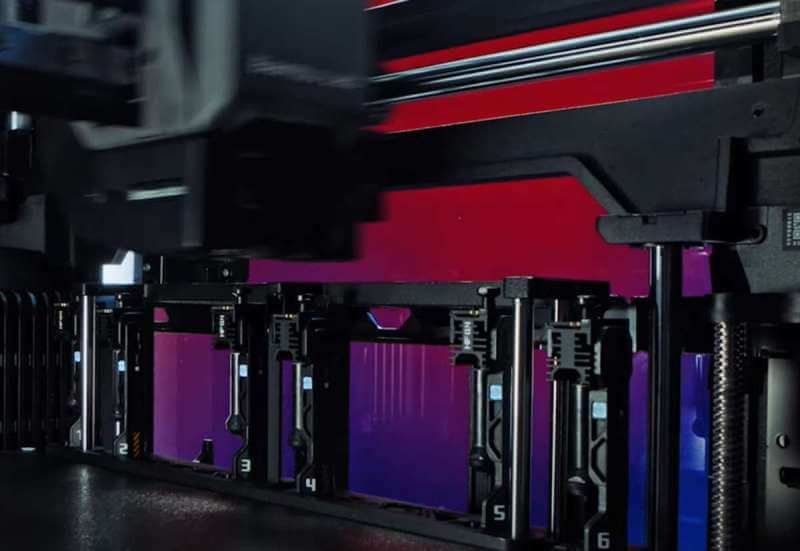
It does this by using Bambu’s Vortek hotend-change system, where the printer can swap between multiple ready hotends instead of constantly flushing one nozzle.
What it’s not is the cheapest way to print PLA, and not a magic button that makes waste disappear in every case.
You can still create purge waste, just typically less, and in some workflows it can even avoid a purge cleaning cycle when switching between dedicated hotends (depending on how many materials you use and how you set things up).
Buy H2C if you are this kind of user:
- You want multi-material or serious multi-color printing, and you care about a smoother workflow more than “fastest demo speed.”
- You plan to print tougher filaments and want a machine built for higher temps (Bambu lists hotends up to 350°C and an actively heated chamber up to 65°C).
- You’re okay doing basic ownership habits (drying tricky filament, occasional cleaning, keeping a spare hotend/nozzle).
Skip H2C if:
- You mostly print single-color PLA and just want the simplest, cheapest printer for toys and décor.
- You hate maintenance or you don’t want to learn material basics (wet filament causes many “mystery failures”).
- Your #1 goal is “fastest multi-color no matter what,” even if it wastes more.
What Bambu Lab H2C Is
Most multi-color systems work like this: one nozzle, many colors.
Every time the color changes, the printer has to push old plastic out and clean the nozzle. That’s why you get purge towers and those little piles of waste.
H2C takes a different approach.
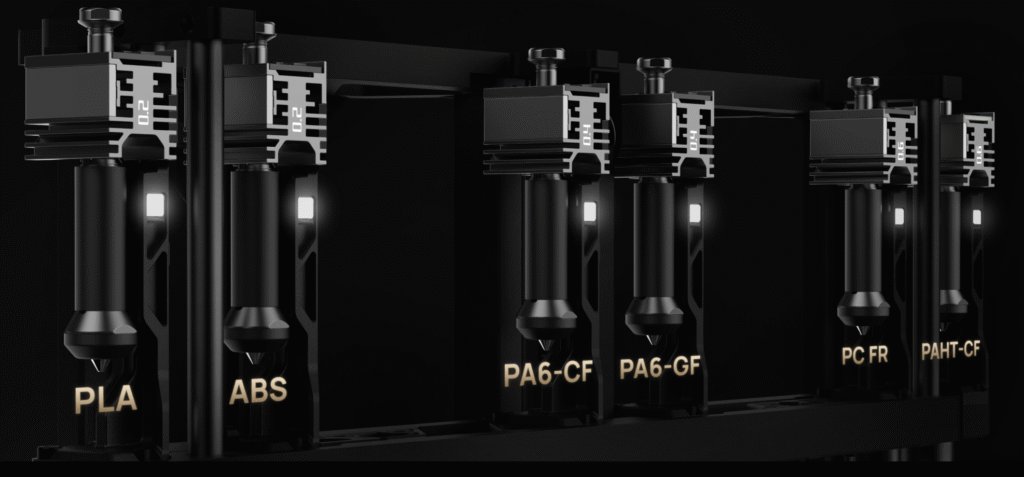
It uses Bambu’s Vortek hotend-change system, which lets the printer switch between multiple hotends that are already set up for different materials. Instead of forcing one nozzle to “become” a new color/material through heavy purging, it can swap to another hotend and keep going.
Here are the three ideas to remember:
Waste becomes more manageable
H2C is designed to reduce purge waste by changing how switching happens. In some cases (especially with fewer than seven materials), industry coverage says the system can even eliminate the purge cleaning cycle when moving between dedicated hotends.
Switching can be quicker and more predictable
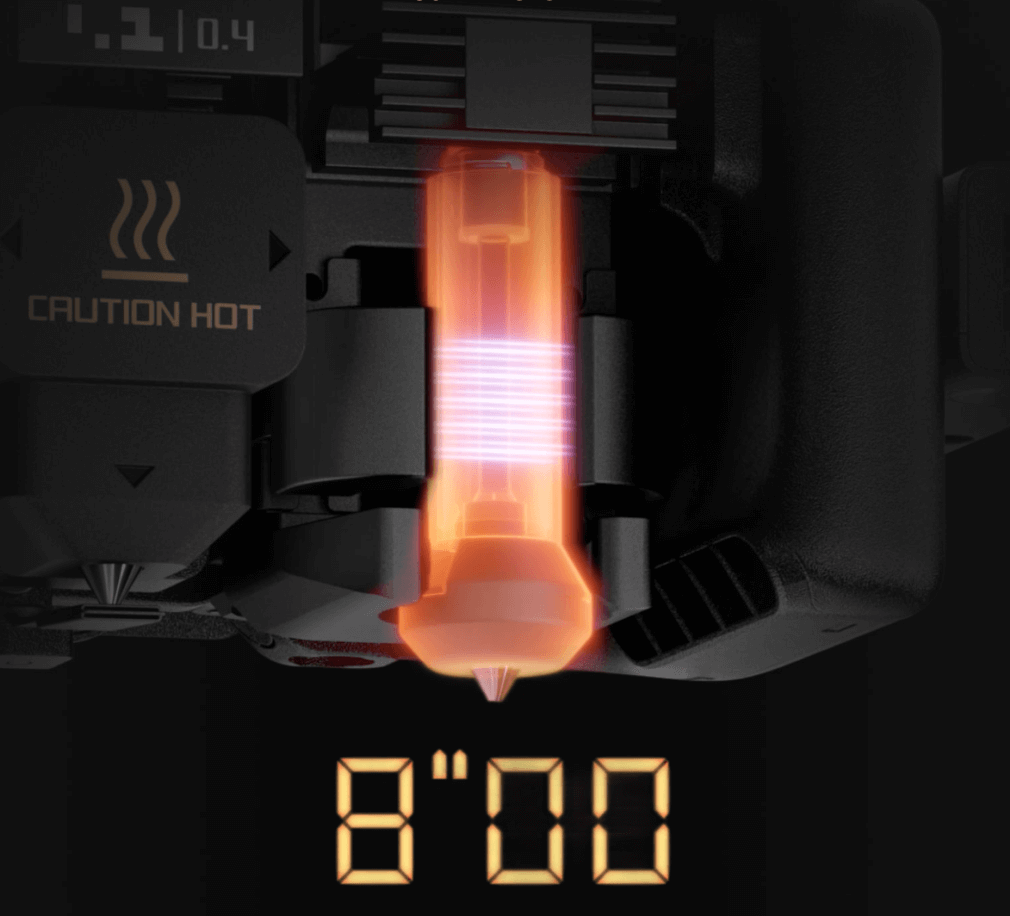
Bambu’s store describes an induction hotend that can heat up very fast (they claim about 8 seconds for PLA), which helps shorten the “waiting” part of a swap.
It’s built for higher-temperature printing
Bambu’s buying guide/specs list hotends up to 350°C and an actively heated chamber up to 65°C, which is the kind of setup people look for when printing higher-performance filaments.
One more practical detail: H2C is designed to scale material choices using Bambu’s AMS ecosystem—Bambu’s H2C FAQ notes it can connect multiple AMS units for up to 24 slots.
If your main problem is “multi-material feels messy and wasteful,” H2C is aimed right at that.
Key Features That Actually Matter
Specs are easy to list. What matters is what changes your day-to-day printing: less waste, fewer failures, and less babysitting. These are the H2C features that truly affect that.
Vortek Hotend Change System
Why it can cut waste and chaos?
Most multi-color systems push different filaments through one nozzle, so every switch needs a lot of purging.
H2C’s Vortek approach is different: it’s built around multiple interchangeable hotends. Bambu says the system supports six interchangeable hotends, and in a single job it can print with up to seven colors or materials, “without purge-cleaning of the nozzles.”
When you’re using fewer than seven filaments, the purge cleaning cycle can be completely eliminated during filament changes.

Important reality check: Bambu’s own wording around “no purging” still includes caveats (like initial purging before the job). So think of this as “less waste and smarter switching,” not “zero waste forever.”
8-Second Induction Heating
Why switches can feel faster?
Waiting on heat-up is a hidden time killer in multi-material printing.
Bambu’s induction hotend product page claims the nozzle can reach printing temperature in about 8 seconds for PLA. That quick heat response helps reduce the “dead time” around material changes.
The Hotend Remembers(Fewer setup mistakes)
This is one of those features that sounds small—until it saves a print.
Each hotend has onboard memory that records what filament it last used. Before a print, the system can suggest reusing the right hotend and settings.
That’s meant to reduce wrong settings, wrong assignments, and the kind of mistakes that cause failed prints.
24-Filament Scale
In real life, most people don’t print with 24 materials in one model. But having a bigger “ready to go” library can still be useful.
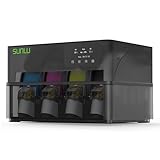
The H2C can expand to 24 filaments when combined with the AMS ecosystem, and their buying guide and blog both frame first-gen AMS as plug-and-use compatible with H2C.
Heated Chamber + High Temps
If you mainly print PLA, this won’t feel like a big deal. If you want ABS/ASA/nylon/PC, it matters.
Bambu lists these headline limits in their own H2C blog spec block:
- Max nozzle temp: 350°C
- Bed: 120°C
- Active chamber heating: 65°C
- Plus an air purification system
That combo is aimed at keeping prints more stable when materials get picky.
Automation + Cameras + Sensors (Less babysitting)
H2C is designed to catch common issues earlier and reduce manual steps.
Bambu highlights things like touchless calibration, intelligent nozzle cleaning, build-plate checking, and multiple cameras (including a macro lens used to monitor extrusion).


The Real Costs
H2C can make multi-material feel cleaner and more controlled. But you still “pay” in three places: time, waste, and upkeep. If you understand these upfront, you’ll enjoy the printer a lot more.
1) Time: swaps still add time
Every time a print changes color or material, something has to happen—swap, heat, move, check. H2C is designed to make switching faster and more predictable, like with the induction hotend heating quickly
But the basic rule still holds:
- More switches = more time.
- A model with 2 colors will usually feel “normal.”
- A model with 6–7 materials/colors can still be a long job.
So don’t judge it by a “maximum colors” headline. Judge it by what you print most often.
2) Waste: less waste is real, but “no purging” has a footnote
With Vortek, H2C can print up to seven colors/materials in one job without purge-cleaning of the nozzles, using six hotends assigned to filaments.
But Bambu also adds an important detail on its official pages: the “no purging” claim does not include the initial purge.
What that means:
- You can often cut a big part of the swap waste.
- You may still see some waste at the start (and sometimes in other situations).
- Your model choices still matter a lot. (If you force constant switching, you’ll still pay for it.)
3) Maintenance: fewer “mystery problems” if you plan for hotends
H2C’s big advantage (multiple hotends) also changes how you maintain it.
Instead of treating the nozzle as “one part you never touch,” you’ll do better if you treat hotends as tools:
- Keep at least one spare hotend/nozzle ready, so a clog doesn’t stop you for days.
- Assign hotends to certain filaments. That reduces mix-ups and saves time later. (This idea is part of how Bambu describes the Vortek workflow.)
- Do simple routine cleaning. Small buildup becomes big problems only when you ignore it.
A quick “buyer sanity check”
H2C is a great fit if:
- You print multi-material often enough to benefit from a better switching workflow, and You’re okay with basic habits: drying picky filaments, occasional cleaning, and keeping a spare part or two.
If your goal is “never touch anything, never learn anything,” you’ll be happier with a simpler machine.
Print Quality & Speed
If you buy H2C for the right reason, you’ll probably be happy. If you buy it expecting “instant multi-color with zero waste,” you’ll get disappointed.
Print quality: usually strong, but your filament habits still matter
H2C is built to be consistent—especially when you’re switching materials—because the whole Vortek idea is about making swaps cleaner and more controlled.
But the biggest quality killer is still the boring stuff:
- Wet filament (stringing, blobs, weak layers)
- Wrong temperature / cooling
- Warping from unstable chamber conditions
So the realistic expectation is: H2C can make the workflow easier, but you still need decent material handling to get “clean, repeatable” results.


Speed: single-color feels normal; multi-color depends on how often you switch
The simple rule hasn’t changed:
More switches = more time.
H2C can reduce the “wasted time” around changes because Bambu’s induction hotend is designed to heat fast (Bambu claims about 8 seconds to reach PLA printing temperature). That helps swaps feel less sluggish.
Still, don’t judge H2C by a “max colors” headline. Judge it by your typical model:
- 2–3 colors/materials: often feels reasonable
- 6–7 colors/materials: still a long job, just more controlled
About waste and speed together: the honest version
Bambu’s official pages push “no purging,” but they also clearly say that claim does not include the initial purge when you load a brand-new filament into a hotend.
So in real life:
- You can often cut a big chunk of swap waste and swap overhead.
- You may still see some waste at the start (and other cases depending on setup).
- Smart model planning still matters a lot.
Materials (What Works Great vs What’s Tricky)
H2C is built for more than PLA.
Bambu Lab lists a wide material range (PLA, PETG, TPU, PVA/BVOH, ABS/ASA, PC, PA/nylon, and several higher-end plastics), plus carbon/glass-fiber reinforced versions of common materials.
But “supported” doesn’t always mean “easy.” Here’s the most useful way to think about it:
Green Light (usually easy and forgiving)
These are the materials most people can run without drama once the first setup is done.
- PLA — simplest, cleanest learning material.
- PETG — strong and practical, but can string if your filament is damp.
- Support filaments (PVA / BVOH) — for complex parts; keep them dry or they’ll print poorly. Bambu documents H2C support strategies in its guides.
Best use case: prototypes, brackets, household parts, and most “everyday” prints.
Yellow Light (works well, but needs good habits)
These are great on H2C—if you treat them correctly.
- ABS / ASA — H2C has an actively heated chamber (up to 65°C) and a hot bed up to 120°C, which helps with warping and layer bonding. What you need: stable temps + basic ventilation planning (smell can be strong).
- TPU — listed as supported, but soft filament can be picky. Dry TPU and print slower when needed.
- PC (polycarbonate) — strong and heat resistant, but it’s less forgiving than PLA/PETG. The H2C’s high nozzle temp (350°C max) is designed for this class of material.
Best use case: functional parts that need toughness or heat resistance.
Red Light (advanced: expect trial-and-error)
These are materials you can run, but they’re easy to mess up if you don’t control moisture and settings.
- PA / Nylon — supported, but very sensitive to moisture. If it’s not dry, you’ll see weak layers and messy surfaces.
- Carbon / glass fiber reinforced filaments — supported, but they are abrasive. The good news: H2C uses a hardened steel nozzle and supports reinforced materials in its specs. Practical tip: treat this as “serious mode”—keep spare nozzles/hotends ready.
- Higher-end plastics (like PPS and similar) — listed in the supported filament types, but these are not beginner materials. They usually require very controlled conditions.
Best use case: small-shop parts, engineering projects, production-style workflows.
A simple rule that saves a lot of failed prints
If the filament is moisture-sensitive (nylon, TPU, many supports, often PC), treat drying and storage as part of the printer. H2C can be very capable, but wet filament will still ruin your day.
Which Bundle Should You Buy?
H2C isn’t the kind of printer where “just buy the base unit” is always the best move. The smart choice depends on one thing:
Do you want multi-material on day one, or are you building up over time?
Here’s the simplest way to pick.
Option A: H2C AMS Combo (best for most people)
Choose this if you want the “full H2C experience” right away.
The AMS Combo / Laser Full Combo includes 8 hotends and 1 AMS 2 Pro (with multiple induction hotends in different nozzle sizes).
Why it’s the best default:
- You can start multi-material faster, with fewer missing pieces.
- You get more hotends up front, which matters for the Vortek workflow.
Who this is for:
Most makers upgrading to serious multi-material, small-shop users, and anyone who hates “buying the missing part later.”
Option B: H2C Laser Full Combo (only if you truly want the laser add-on)
Pick this only if you already know you’ll use the laser module.
It’s usually the most expensive package, and it makes sense when your projects actually include cutting/engraving—otherwise you’re paying for a tool you won’t touch.
Also, the Laser Full Combo is listed as including the same core multi-material pieces (AMS 2 Pro + hotends) alongside the laser bundle.
Who this is for:
Creators doing product customization, small-batch business work, or shops that already have laser workflows.
Option C: Printer + add-ons later (only if you already own AMS / you’re pacing your budget
This path makes sense if you already have compatible AMS gear or you’re okay ramping up slowly.
Just be honest about the trade-off: H2C’s big value is the hotend-swap workflow, and that usually means you’ll end up buying more hotends anyway.
A lot of confusion comes from people expecting “full hotend swapping” but only buying one or two hotends. That’s when H2C feels underused.
Who this is for:
Existing Bambu owners with AMS hardware, or buyers who want the machine now and will build the ecosystem later.
The “don’t waste money” checklist
Don’t overbuy AMS units on day one
H2C can scale to up to 24 materials using multiple AMS units connected in parallel, but most people won’t need anything close to that at the start.
Start with one AMS (or whatever the combo includes), then expand only if your projects truly demand it.
Don’t ignore the “boring” essentials
If you’re buying H2C for engineering materials, your first add-ons should be practical:
- a way to keep filament dry (especially nylon / TPU / support filaments)
- a spare hotend/nozzle so one clog doesn’t pause your life for a week
Setup Checklist (First 24 Hours)
The first day with a new printer decides a lot. If you do a few simple things upfront, you avoid most “week one regret.”
Here’s a clean, practical checklist.
1) Do a quick hardware sanity check (5 minutes)
- Make sure everything is seated and not loose from shipping.
- Check that the build plate is the one you think it is (wrong plate = bad adhesion).
- Confirm the tool/hotend area is clean and unobstructed.
2) Start with an “easy win” filament
For your first print, use a stable material like PLA (or a very familiar PETG).
Don’t start with nylon, PC, or soft TPU. Those are great later—bad for day one confidence.
3) Run the built-in calibration and let it finish
Bambu’s H2C features automated routines like touchless calibration, build plate checking, and intelligent nozzle cleaning. Let the machine do its setup steps before you start tuning anything.
4) Do one single-color test print before anything fancy
This is your baseline. If single-color prints look clean, then you know any future problems are likely about:
- material moisture
- switching strategy
- or settings for a specific material
5) If you plan to print engineering materials, plan airflow now
H2C includes air purification in its design notes, but you should still think about placement and ventilation—especially for ABS/ASA.
Simple rule: don’t put it in a tiny, sealed room you sit in all day.
6) Set yourself up to avoid the #1 “mystery failure”
If you’re going to use nylon/TPU/supports later, get into the habit early:
- store filament sealed
- dry it when needed Wet filament causes a lot of “why is this printer suddenly bad?” moments.
7) Make one smart spare-parts decision
H2C’s workflow revolves around hotends. Keeping one spare hotend/nozzle ready is the easiest way to prevent downtime when a clog or wear issue happens.
Troubleshooting
When a print fails, most people do the same thing: change 10 settings at once. Don’t.
Use this simple flow instead:
- Identify the symptom (what you see)
- Pick the likely cause (usually 1–2 things)
- Try one fix and re-test with a small print
Below are the most common H2C-style issues, written as quick cards.
Symptom 1: The corners lift (Warping)
What it looks like: edges curl, parts crack on big prints.
Likely causes: cold drafts, bed not clean, wrong first-layer settings, material needs more stability (ABS/ASA/PC/nylon).
Quick fixes:
- Clean the build plate with dish soap + water, then dry fully (hands leave oils).
- Add a brim for large parts.
- Slow down the first layer and increase first-layer squish slightly.
- Keep the printer away from open windows / fans.
- For harder materials, preheat longer and keep the environment steady.
Prevention: print big parts with fewer sudden temperature changes; store filament dry.
Symptom 2: The part won’t stick (Bad first layer / poor adhesion)
What it looks like: spaghetti, corners detach early, first layer looks patchy.
Likely causes: dirty plate, wrong plate type for the material, Z-offset/first-layer not dialed, too much cooling too early.
Quick fixes:
- Clean the plate (soap + water is often better than alcohol for oils).
- Re-run the first-layer / calibration routine.
- Increase first-layer temperature a bit and slow first-layer speed.
- Turn off strong cooling for the first few layers.
Prevention: don’t touch the print surface with bare fingers; store plates properly.
Symptom 3: Strings between parts (Stringing)
What it looks like: thin hair-like threads between surfaces.
Likely causes: filament moisture, temperature too high, retraction/travel not optimized.
Quick fixes:
- Dry the filament (especially TPU, nylon, some PETG).
- Drop nozzle temperature slightly (small steps).
- Increase travel speed and enable “avoid crossing perimeters” if available.
Prevention: keep filament sealed with desiccant; don’t leave spools out for days.
Symptom 4: Blobs / zits / messy seams
What it looks like: random bumps, ugly seam line, small blobs on corners.
Likely causes: wet filament, pressure changes from switching, speed too high, seam settings.
Quick fixes:
- Dry filament first (this solves a surprising amount).
- Reduce outer wall speed slightly.
- Use a “aligned seam” or “hide seam” setting if your slicer supports it.
- If this happens mainly during switches, reduce how often you switch (combine colors, split the model smarter).
Prevention: fewer switches = fewer opportunities for blobs.
Symptom 5: Clogged nozzle / under-extrusion
What it looks like: gaps in walls, weak layers, “clicking” or grinding, print becomes thin.
Likely causes: partial clog, wet filament popping, wrong nozzle/material combo, debris.
Quick fixes (safe-first):
- Pause and unload/reload filament.
- Try a different filament that you know is dry.
- Run the printer’s built-in cleaning/purge routine if available.
- If you use separate hotends/nozzles, swap to a clean one (fastest way to confirm it’s a clog).
Avoid: forcing tools into a hot nozzle or taking apart electrical parts while powered. If the clog keeps coming back, follow the official maintenance steps for your model.
Symptom 6: Layers shift (the whole print “steps” sideways)
What it looks like: the print suddenly shifts in X/Y; corners don’t line up.
Likely causes: part got knocked loose, belt/pulley issue, hitting curled edges, too fast acceleration for a tall print.
Quick fixes:
- Check the part is still stuck well (warping can cause collisions).
- Reduce speed/acceleration for tall, thin models.
- Make sure the printer sits on a stable surface and nothing is snagging the toolhead path.
Prevention: brim on tall parts + stable adhesion reduces collisions.
Symptom 7: Colors look “dirty” after a swap (Color contamination)
What it looks like: previous color shows up in the next color, especially light colors.
Likely causes: not enough transition between colors/materials, too many tiny swaps, poor color layout.
Quick fixes:
- Reduce how often the print swaps colors (merge small color islands).
- Adjust transition settings (more transition when going dark → light).
- Place color boundaries where they’re less visible (inside, underside, or along edges).
Prevention: design for fewer swaps; keep light colors on dedicated hotends/nozzles when possible.
Symptom 8: Supports are hard to remove / surface looks rough
hat it looks like: ugly underside, torn surfaces, supports welded to the part.
Likely causes: support density too high, wrong interface settings, wrong support material, cooling/temp mismatch.
Quick fixes:
- Lower support interface density or increase interface distance slightly.
- Use a dedicated support interface material when you truly need clean undersides.
- Re-orient the model to reduce supports in visible areas.
Prevention: rotation often fixes more than settings do.
FAQ
1) Is the H2C beginner-friendly?
It can be—if you start simple. Do your first week with PLA or PETG, then move into multi-material later. Most “new printer problems” come from wet filament and rushed setup, not from the machine itself.
2) Does H2C really reduce purge waste?
It can reduce it a lot in the right workflow. Bambu’s H2C page also makes a key note: the “no purging” claim does not include the initial purge when loading a brand-new filament into a hotend.
So the honest version is: less purge waste during swaps, but not “zero waste forever.”
3) How many colors/materials can I print in one job?
Bambu markets it as a multi-material / multi-color system, and the core idea is switching hotends instead of flushing one nozzle over and over. For practical planning, assume: more materials = more complexity. If you keep your projects to a few materials, it’s easier and more predictable.
4) Do I need an AMS?
If you want easy multi-color and a smoother feeding workflow, AMS helps a lot. But you don’t need it for every print—single-spool printing is still a normal use case.
5) Can it print nylon, PC, and other “engineering” filaments?
Bambu’s official specs list a 350°C max nozzle temperature and a 120°C bed, which is the kind of hardware people look for when they want higher-temp materials.
Still: nylon and PC demand good drying and good settings. The printer helps, but your material habits matter.
6) Does the heated chamber matter?
If you print ABS/ASA/nylon/PC, yes. Bambu calls out an actively heated chamber up to 65°C, aimed at reducing warping and improving layer adhesion.
If you only print PLA, it’s less critical.
7) How fast is switching?
Bambu says the induction hotend can heat to printing temp in about 8 seconds (PLA), which helps reduce waiting time around changes.
But total print time still depends heavily on how often you switch.
8) What should I buy first with the printer?
If you’re doing multi-material seriously:
- A filament drying solution (especially for nylon, TPU, support filaments)
- A spare hotend/nozzle so one clog doesn’t pause your projects for a week
- A few “known good” filaments you trust for testing
9) Is H2C worth it if I only print PLA?
Usually not. If you mostly print single-color PLA, you’re paying for multi-material workflow benefits you won’t use. A simpler printer will feel like better value.
10) What’s the biggest mistake new owners make?
Trying seven colors on day one.
Start with single-color → then 2 colors/materials → then scale up. You’ll waste less and learn faster.
Final Recommendation
H2C isn’t for everyone—and that’s a good thing.
I’d recommend H2C if you want multi-material (or serious multi-color) to feel calmer: fewer messy swaps, less waste, and more prints you can trust to finish.
I’d skip it if your printing is mostly single-color PLA and your goal is “simple, cheap, done.” You’ll get better value elsewhere.
The best way to buy without regret:
Pick the bundle that matches how you print today, then grow into more materials step-by-step. The printer’s strengths show up when your workflow does.