Table of Contents
Verdict on Bambu Lab H2C Bundle
If you’re staring at the Bambu Lab H2C bundle names and thinking, “Okay… but what’s the real difference?”you’re not alone. The names sound big and fancy, but they don’t clearly tell you what changes in real life.
So let’s make this simple.
Your goal isn’t to buy the biggest bundle.
Your goal is to buy the bundle that matches how you’ll print, so you don’t:
- overpay for stuff you won’t use, or
- miss one key piece and end up buying it later anyway.
Here’s the fastest way to decide:
Here’s the fastest way to decide:
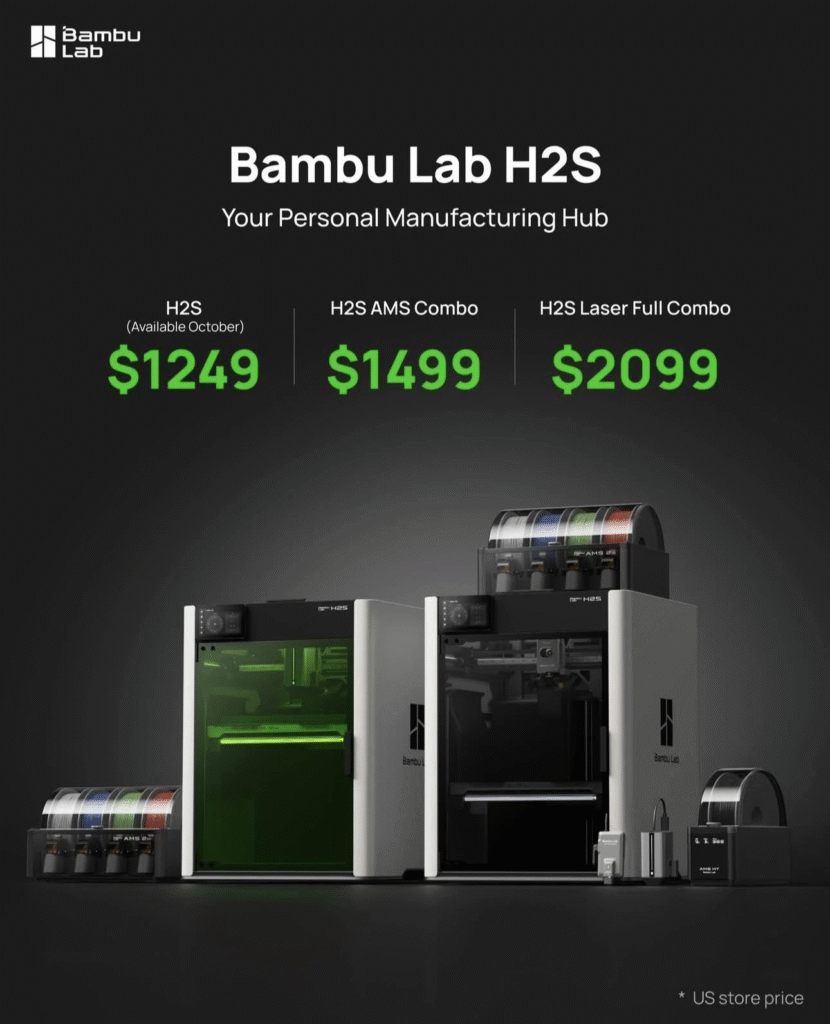
Best for most people: H2C AMS Combo
Pick this if you want multi-color or multi-material soon. It usually gets you “ready to go” faster with fewer extra purchases in the first month.
Buy this if: you plan to switch filaments often and want the easiest start.
Only worth it if you’ll truly use laser: H2C Laser Combo
This is for a specific buyer. If you already know you’ll engrave or cut for your projects, it can make sense. If it’s just a “maybe,” it’s easy to pay extra for a tool you barely touch.
Buy this if: you have real laser use cases (custom tags, product labels, small shop work).
Best for heavy users / small shops: H2C Ultimate Set
This is about uptime. If you print a lot, the “best deal” is often the one that prevents downtime and keeps your workflow smooth.
Buy this if: you print often, sell items, or run multi-material jobs where one failure wastes hours.
What Each Bundle Adds?
Now that you have the quick verdict, let’s answer the real question:
What does each bundle actually change for you after the first week?
1) H2C AMS Combo
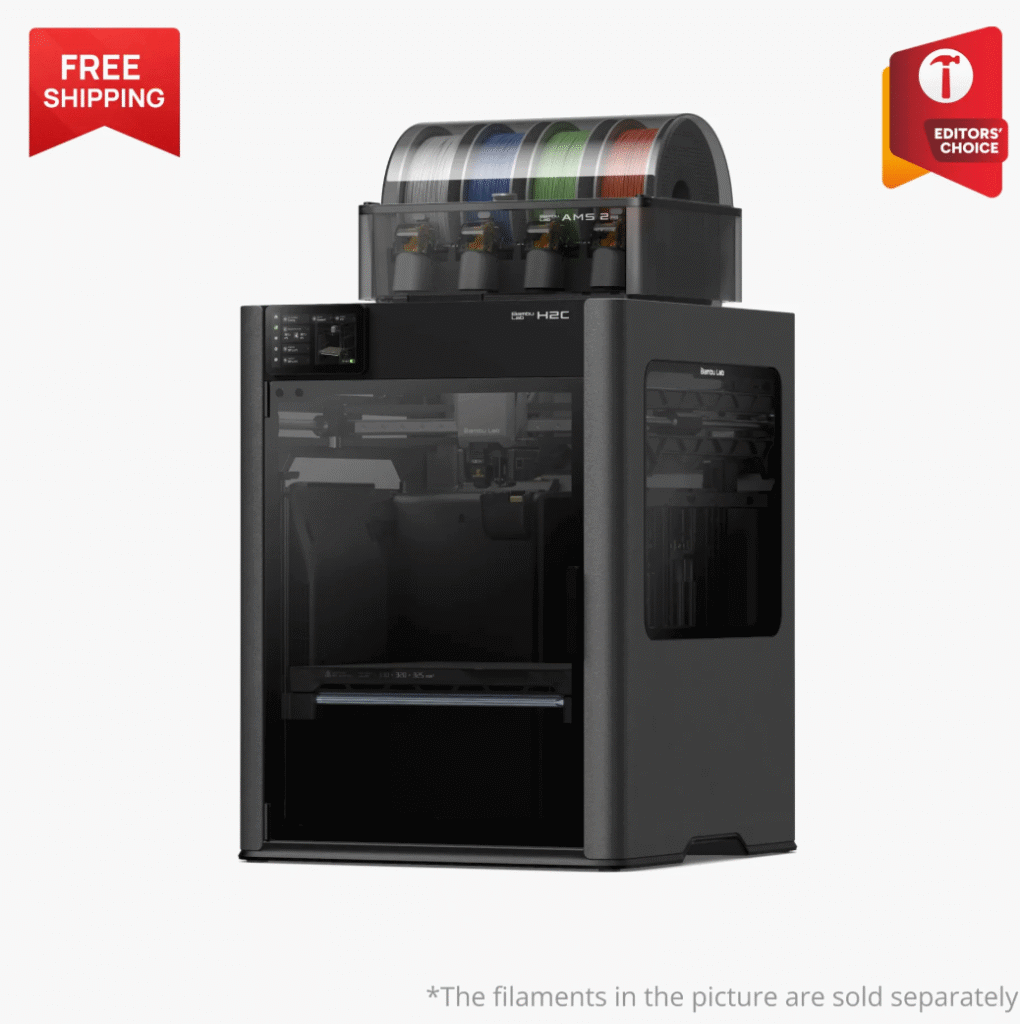
What it adds :
- A smoother path into multi-color / multi-material printing
- Less friction getting started (fewer “oh… I also need that” moments)
What problem it solves:
If you plan to switch filaments often, the AMS Combo usually helps you get to a stable workflow faster. That means fewer manual steps and fewer interruptions during normal use.
Who should skip it:
If you’re truly going to print mostly single-color PLA for the next few months, you may not feel the value right away.
Quick check before you buy:
- Confirm what the bundle includes right now (bundles can change).
- Make sure it matches how many materials/colors you realistically plan to run.
2) H2C Laser Combo
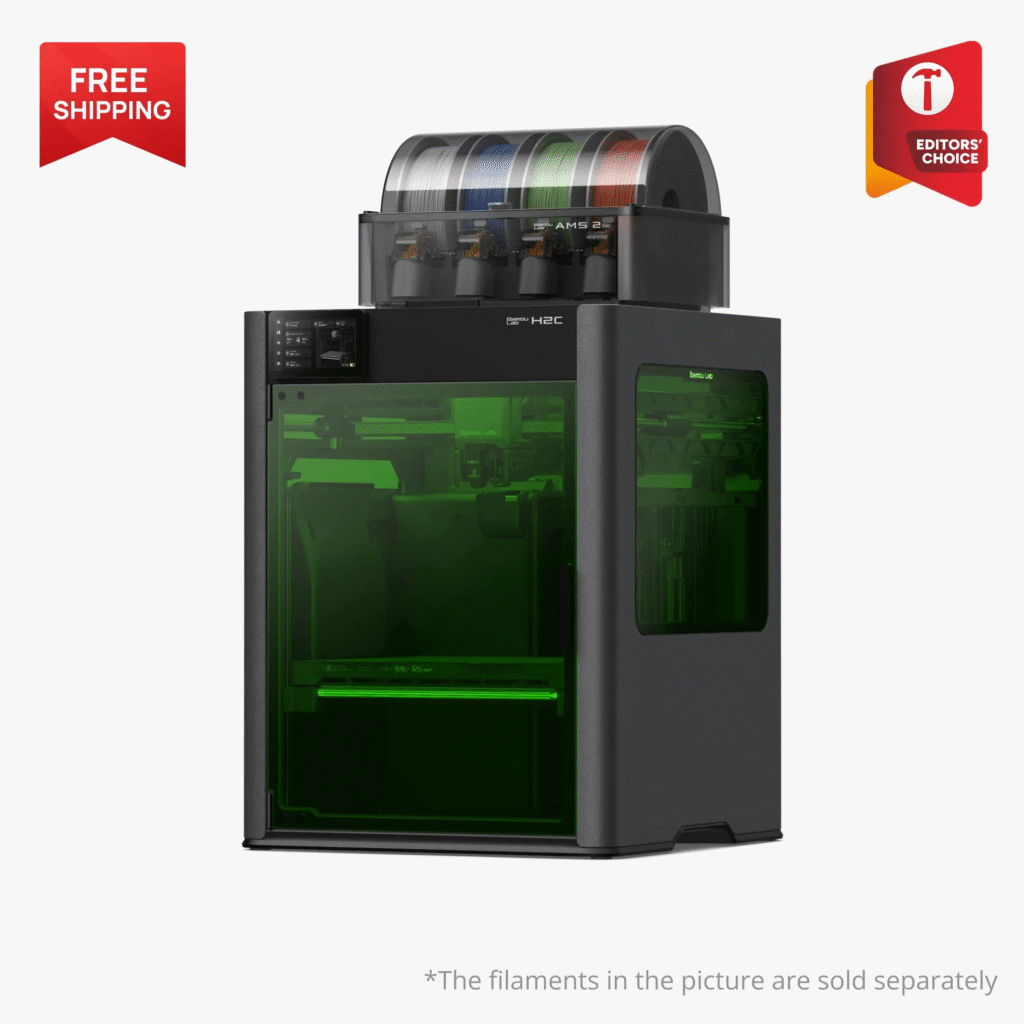
What it adds :
- Laser capability bundled in, so you can do print + engrave/cut style projects in one setup
What problem it solves:
It saves you from building a second workflow later if you already know laser work is part of your projects (labels, personalization, small shop products).
Who should skip it:
If laser is just a “maybe,” skip it. A “maybe” laser is one of the easiest ways to overpay.
Quick check before you buy:
- Do you have a real laser project list? (Even 3 examples is enough.)
- Do you have space and a safe place to use it?
3) H2C Ultimate Set
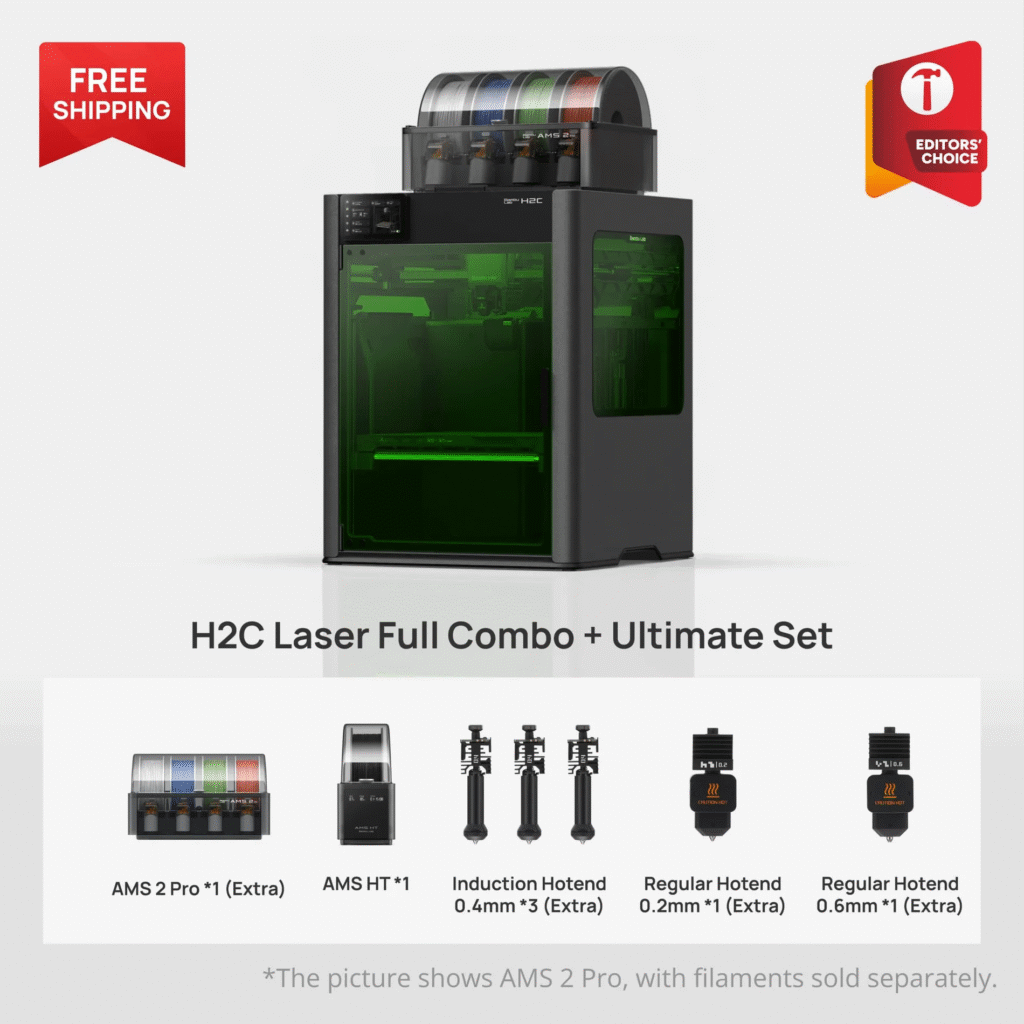
What it adds :
- More coverage for serious usage (think: fewer “one small issue stops everything” situations)
- Better support for a high-frequency workflow
What problem it solves:
Downtime. If you print often, a clog or a worn part isn’t just annoying—it wastes hours and breaks your schedule. The Ultimate-style bundle makes sense when reliability and speed-to-recover matter.
Who should skip it:
If you print casually (weekends only, small projects), it can be overkill. You can buy the essentials later and still be happy.
Quick check before you buy:
- Are you printing often enough that downtime actually costs you money or deadlines?
- Are you ready to store filament properly and keep a simple maintenance rhythm?
The simple takeaway
- AMS Combo = best start for most multi-material buyers
- Laser Combo = only worth it with real laser plans
- Ultimate Set = best when you print a lot and hate downtime
Best Bundle by Persona
If you don’t want to overthink it, pick the bundle the same way you’d pick shoes: what you do every day matters more than what looks “premium.”
Here are the three most common buyer types—and the bundle that usually fits best.
Newbie upgrader
You probably sound like this:
“I want better prints and fewer headaches. I’m interested in multi-color, but I don’t want to fight the printer.”
Best pick: H2C AMS Combo
Why it’s worth it: it’s usually the fastest way to get a stable multi-color / multi-material routine without buying a bunch of extra pieces later.
What to avoid:
Don’t jump straight into “Ultimate” just because it sounds safer. Most new users get more benefit from good basics first: clean first layers, dry filament, and a simple workflow.
Smart starter plan (first 2 weeks):
Single-color → 2 colors/materials → then scale up.
Multi-material builder
You probably sound like this:
“I care about strength, heat resistance, and parts that actually work. I’m switching materials for a reason.”
Best pick: H2C AMS Combo (in most cases)
Why it’s worth it: multi-material becomes easier when you can manage filament switching without constant manual effort.
What matters more than the bundle name:
Your “success rate” will come from materials + habits:
- drying moisture-sensitive filament
- storing spools properly
- using the right plate and temperatures
When to consider the bigger bundle:
If you print multi-material constantly and hate downtime, then the Ultimate set can make sense. But only if you truly print enough to feel it.
Small shop / Etsy / heavy user
You probably sound like this:
“I need repeatable results. If the printer is down, I lose time or money.”
Best pick: H2C Ultimate Set
Why it’s worth it: this is the “keep printing” choice. When you print often, the best value is usually the bundle that reduces downtime and lets you recover fast when something wears out.
What NOT to do:
Don’t rely on “I’ll fix it later.” In a small-shop workflow, you want:
- at least one backup for the most common wear parts
- a simple maintenance rhythm
- reliable filament handling
The 1-minute chooser
- I mostly print single-color PLA → you probably don’t need the biggest bundle. Start simpler.
- I plan to do multi-color/multi-material weekly → H2C AMS Combo is usually the best value.
- I print daily or sell prints → Ultimate Set is worth considering for uptime.
- I have real laser projects (labels, engraving, product work) → only then consider the Laser Combo.
What NOT to Buy
Most bundle regret comes from one of two mistakes:
- buying “max everything” out of fear, or
- skipping one boring item that later causes constant failures.
Here’s what to avoid—so you spend money where it actually helps.
Mistake #1: Buying the biggest bundle “just in case”
It feels safe, but it’s often wasted money.
If you’re not printing daily (or running a small shop), you may not use the extra coverage enough to justify the jump. For many people, the smarter move is:
- buy the bundle that matches your current workflow
- add upgrades only after you know what you print most
If you can’t name 3 projects that need the bigger bundle, don’t buy it yet.
Mistake #2: Paying for laser when you don’t have laser projects
Laser sounds cool. But “cool” doesn’t equal “useful.”
Skip laser unless you can list real use cases, like:
- engraving names/logos on products
- making labels/tags
- small shop customization work
If it’s a “maybe,” it’s almost always a “no” for now.
Mistake #3: Buying too many add-ons before your first week is stable
People buy a pile of extras to feel prepared, then realize they didn’t need half of it.
Your first week should be about one goal:
make the printer reliable with one easy material.
Once you have clean first layers and predictable prints, then you upgrade.
Not before.
Mistake #4: Ignoring filament drying and storage (then blaming the printer)
This one is huge.
Moisture-sensitive filament can cause:
- stringing
- blobs
- weak layers
- random failures that feel “mysterious”
So if you’re spending money anywhere, spend it on the basics:
- a simple drying plan
- sealed storage + desiccant
That often improves results more than buying an “Ultimate” bundle.
Mistake #5: Buying every nozzle / plate option on day one
You don’t need a “collection.” You need what matches your prints.
Buy later (safe to delay 30 days):
- extra build plates (after you know which materials you use most)
- specialty nozzles/sizes (after you know your detail vs speed needs)
- fancy tools (basic tools are enough to start)
Buy now (prevents downtime):
- one spare nozzle or hotend (so a clog doesn’t stop you for a week)
- simple cleaning tools
Quick “buy later” list
If you want a clean “don’t overpay” list, here it is:
- Second/third build plate
- Extra specialty nozzles (unless you already know you need them)
- Large accessory bundles
- Laser (unless you have real laser projects)


Must-Buy Accessories List
This is the part that actually prevents regret.
Most people don’t fail because they chose the “wrong printer.”
They fail because they skipped the boring basics—then every print becomes a fight.
So here’s a starter cart that makes H2C ownership smoother. It’s split into three tiers so you don’t overbuy.
Tier A — Day-1 Essentials (buy these first)
These are the items that prevent the most common early problems: bad first layers, stringing, clogs, and downtime.
1) A simple filament drying plan
You don’t need a fancy setup. You just need a way to keep moisture-sensitive filament dry (especially if you plan nylon, TPU, or support material later).


2) One spare nozzle or hotend
This is the cheapest “downtime insurance.” If you ever get a clog or wear issue, a spare lets you get back to printing fast instead of losing a week.
3) Basic maintenance tools
Keep it simple:
- tweezers (for strings and scraps)
- a small brush (for cleanup)
- flush cutters (for trimming)
- a basic hex set
Why Tier A matters: it keeps your success rate high while you’re still learning the machine.


Tier B — Quality & Convenience Upgrades
These improve consistency and make printing feel easier long-term, but you don’t need them on day one.
4) An extra build plate (only the type you’ll actually use)
Don’t buy every plate option. Start with the one that matches your most-used material, then add another later.


5) Sealed storage + desiccant
If you’re going to keep multiple spools around, sealed storage is a cheap upgrade that saves a lot of headaches.
Why Tier B matters: it reduces “random” issues and keeps your setup tidy and predictable.


Tier C — Project-Specific Add-Ons (only if your projects need them)
Buy these when you can clearly explain why you need them.
6) Engineering filament extras
If you plan to print ABS/ASA/nylon/PC, you may eventually want:
- better drying/storage
- extra spools of known-good filament for testing
- a plate/adhesion approach that matches your material


7) Abrasive filament support (only if you print carbon/glass fiber regularly)
Abrasive filaments can wear parts faster. If you run them often, plan spares and treat it like “shop mode.”
Why Tier C matters: it avoids buying “cool” stuff that doesn’t match your work.
Deal Timing Tips
You don’t need to “hunt the lowest price.” You just need to buy at a time when:
- bundles are more likely to be discounted, and
- the included items are clear (so you don’t get surprised later).
Here’s the safe way to do it.
1) Watch the big promo windows
Most brands run their strongest deals around predictable moments:
- major holiday sales (Black Friday / Cyber Monday style promos)
- seasonal events (back-to-school, year-end)
- product launch periods (when bundles get pushed)
Tip: if you’re not in a rush, waiting for a known promo window is often smarter than buying randomly.
2) Always confirm what’s included right now
This matters more than the discount.
Bundle contents can change quietly over time—extra hotends, plates, accessories, or “bonus items” come and go. Two people can buy the “same bundle” months apart and receive different value.
Before you check out, do a quick 30-second check:
- “What’s included” list
- what’s excluded (especially accessories)
- any region-specific differences (shipping, power, availability)
3) The safest buying approach
If you want a clean rule that avoids regret:
- If you’re ready now: buy the bundle that matches your workflow and stop overthinking.
- If you can wait: aim for a big promo window, but don’t delay forever chasing a perfect deal.
- Either way: confirm included items first—discount second.
FAQs
1) Do I need AMS to buy the H2C?
No. You can print normally with a single spool.
AMS mainly helps if you want easier multi-color or multi-material workflows, with less manual swapping.
2) Which bundle is best for most people?
For most ready-to-buy users, the H2C AMS Combo is usually the safest pick because it gets you into multi-material sooner with fewer extra purchases in the first month.
3) Is the Ultimate set overkill?
It can be. If you print occasionally, it’s often more than you need.
It makes the most sense when you print a lot, sell prints, or care about uptime—because downtime costs you real time (or money).
4) When is the Laser Combo actually worth it?
Only when you have real laser projects. A quick test:
Can you list 3 laser use cases you’ll do in the next month? If not, skip it for now.
5) What accessories are truly must-have?
The boring three:
- a simple drying plan (especially for nylon/TPU/support filaments)
- one spare nozzle or hotend (downtime insurance)
- basic maintenance tools
6) Which bundle is best for ABS/ASA/nylon?
Bundle choice matters less than your material setup.
For those materials, success usually depends on: stable temps, correct plate/adhesion approach, and dry filament. Start with the bundle that matches your switching needs, then invest in drying/storage.
7) Should I buy extra build plates and nozzles on day one?
Most people should wait. Start printing first, then buy based on what you actually use.
The one exception: having one spare nozzle/hotend is a smart day-one move.
8) What’s the biggest bundle mistake?
Buying “max everything” out of fear.
A better approach is: buy the right bundle for your workflow, then upgrade after 2–4 weeks when you know what you print most.
9) How do I compare bundles without focusing only on price?
Use “value per workflow”:
- Does it save setup time?
- Does it reduce common failures and downtime?
- Does it match the projects you actually print?
10) What should I check before I click buy?
- The current included items list (bundles can change)
- What’s excluded
- Region-specific notes (shipping, availability)
- Whether you have the Tier A starter items (drying + spare + tools)