
Table of Contents
P2S First Layer Not Sticking
When your Bambu Lab P2S first layer won’t stick, it’s tempting to start tweaking settings. That’s usually the mistake. Most adhesion failures come from a small set of root causes: the plate surface is contaminated, the system is starting too cold, or calibration wasn’t completed cleanly.
This guide is designed for one thing: get you back to a clean, repeatable first layer as quickly as possible.
We’ll start with a short “Quick Fix” that solves the majority of cases, then route you into the right path based on what you actually see on the bed.
Quick Fix (Do These 4 Steps First)
These steps are in the correct order. Don’t skip around.
1) Wash the build plate (not just an IPA wipe)
Remove the plate and wash it with dish soap + warm water. Rinse well and dry fully. After that, touch only the edges.


2) Preheat longer than you think
Set your normal PLA bed temperature, then wait another 5 minutes after it reaches target. In a cold room, wait longer.
3) Run one full calibration
Run the full calibration once and let it finish. Don’t interrupt it, and don’t start tuning settings afterward.
4) Test on a small first-layer square (PLA + default profile)
Don’t retry a large model yet. Use a simple first-layer test square so you can see adhesion clearly.
What “success” looks like:
The first layer lines are continuous, they touch each other, and they don’t slide when the nozzle moves.
What NOT to do yet:
Don’t change Z-offset. Don’t change flow. Don’t change three settings at once. If the Quick Fix doesn’t solve it, that’s useful information. Now we diagnose by symptom.
The 3 Fixes That Solve Most First-Layer Failures
In most cases, you don’t need advanced tuning. You need to restore the basics that adhesion depends on: a clean surface, stable heat, and a correct baseline calibration.
Work through the three fixes below in order. Each one has a clear success signal. If you get a good first layer, stop there—don’t keep adjusting.
Fix #1 — Clean the plate the way it actually needs to be cleaned
A quick alcohol wipe can remove dust, but it often doesn’t remove skin oils well enough. That’s why “I wiped it, and it still won’t stick” is so common.
Do this:
- Remove the build plate.
- Wash with dish soap + warm water.
- Rinse thoroughly.
- Dry fully with a clean towel, then let it air-dry briefly.
- Handle only by the edges afterward.
Success signal: the first layer lines stay in place instead of sliding or curling immediately.
Fix #2 — Preheat longer (especially if your room is cold)
A bed can reach the target temperature quickly on the display, but the entire system (plate + bed + surrounding air) may still be cold.
Cold starts are a common cause of early curl-up and weak bonding—especially in winter or near windows.
Do this:
- Heat the bed to your normal PLA temperature.
- Wait an extra 5 minutes after it reaches target.
- If your room is very cold, wait 5–10 minutes.
Success signal: corners stop lifting early and the first layer looks more “settled” and consistent.


Fix #3 — Run one full calibration, then stop touching settings
Calibration is not optional tuning. It’s the baseline that makes default profiles behave as expected. If you interrupt calibration, skip it, or start changing settings immediately afterward, you can end up chasing symptoms instead of fixing causes.
Do this:
- Run one full calibration.
- Use PLA + the default profile for your test print.
- Don’t adjust Z-offset or flow yet.
Success signal: first-layer lines become even and repeatable across the whole square.
A quick, honest checkpoint
If you’ve done all three fixes and the first layer still fails, that’s not bad news. It just means your issue is likely in the “harder 20%” category: a local surface problem, temperature distribution, inconsistent feeding, or a height/offset baseline issue.
30-Second Symptom Check (Pick the Closest Match)
First-layer failures look similar, but they have different causes. Choose the one that matches your print most closely:
A) Nothing sticks at all
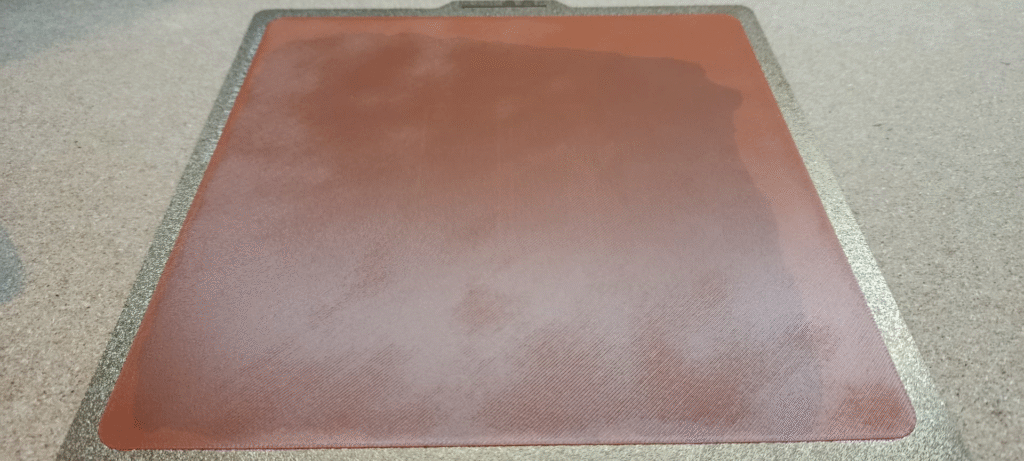
The first line slides, curls, or gets dragged immediately. The nozzle “plows” through filament.
B) Only one area won’t stick

The same corner or zone fails every time, while other areas look acceptable.
C) It sticks, but has gaps
The first layer looks striped. Lines don’t merge into a sheet. You can see spaces.
D) Corners lift / warping
The first layer starts fine, but corners lift after a few minutes or after the next layer.
E) Messy blob / nozzle dragging
Plastic bunches up, the nozzle hits it, and the start turns into a clump.

Safe Parameter Boundaries
Before we go into the decision tree, you need guardrails.
The most common mistake at this stage is changing too many variables at once—temperature, speed, flow, Z-offset—and turning one clear problem into three confusing ones.
For first-layer troubleshooting, keep adjustments small, stay inside safe ranges, and test on a small first-layer square each time.
| Item | PLA Start | Adjust Range | Notes |
|---|---|---|---|
| Bed Temp (°C) | 55–65 | +5 to +10 | One change only |
| Nozzle Temp (°C) | 200–220 | ±5 | Keep default first |
| First Layer Speed (mm/s) | 20–35 | lower if needed | Slow = safer |
| Brim Width (mm) | 5–8 | 8–12 (big parts) | Warping fix |
| Extra Preheat (min) | 5 | 5–10 | Cold room help |
Rule: change one item, then retest. If it works, stop. If it doesn’t, revert and move to the next step in the decision tree.
The Decision Tree
“First layer not sticking” sounds like one problem, but it isn’t. The fix depends on what the failure looks like. Use the path that matches your symptom. Each path starts with the highest-probability, lowest-effort steps first.
Path A — Nothing sticks at all (lines slide or get dragged)
When adhesion is near zero, treat it like a surface + heat issue until proven otherwise.
Start with a freshly washed plate, then make one small bed temperature increase (+5°C). Keep PLA and the default profile, and test with a first-layer square.
If it still slides, inspect the nozzle area. A tiny blob of leftover plastic can make the nozzle drag and destroy the first layer every time.
What to do (in order):
- Wash plate (dish soap + warm water), dry fully
- Increase bed temp +5°C (one time)
- Print a small first-layer square (PLA default)
- Check nozzle/wipe area for stuck plastic
Success signal: the first layer stays down from the first line, and the nozzle stops dragging material.
If it still fails: jump to Path E dragging/blobsor advanced checks.
Why this works:
If nothing sticks, the limiting factor is usually the plate surface condition or early heat transfer—not slicer tuning.
Path B — Only one area won’t stick (same corner/zone fails)
A repeatable “same spot” failure is a clue. It usually means local contamination, a worn/over-smooth surface zone, or a temperature gradient.
The fastest diagnosis is a controlled test: print the same first-layer square in two different bed locations. If the failure stays in the same physical zone, you’ve confirmed it’s local—not the model.
What to do (in order):
- Clean plate and do a no-touch test (edges only)
- Print the same test square in a different bed location
- Flip the plate / use the other side if available
- Add 5–10 min extra preheat to reduce gradients


Success signal: the “bad zone” improves when you move the model, flip the plate, or extend preheat.
If it still fails: Check bed temperature uniformity and plate condition.
Why this works:
If one zone fails consistently, it’s usually a local surface or heat distribution issue—not a global profile problem.
Path C — Sticks, but has gaps (striped first layer, spaces between lines)
A striped first layer means the printer is laying lines down, but they aren’t merging into a continuous sheet. That often points to unstable extrusion, feeding issues, or the nozzle being slightly too high for the first layer to bond properly.
Start with feeding and cleanliness—then make only one small adjustment if needed.
What to do (in order):
- Listen for clicking/slipping during the first minute
- Unload and reload PLA once (clean feed path)
- Clean the nozzle tip area (remove residue)
- If needed, change one of these:
- Lower first layer speed (stay in range), or
- Increase nozzle temp by +5°C
Success signal: lines touch with no visible spaces; the square looks uniformly filled.
If it still fails: go to advanced height/offset/hardware.
Why this works :
First-layer gaps are usually caused by inconsistent flow or a first-layer height that’s just a bit too high for lines to fuse.
Path D — Corners lift / warping (starts okay, then lifts)
Warping is adhesion plus cooling. Your first layer can look fine, then the part cools, shrinks, and pulls upward at the corners.
The highest-success, lowest-effort fix is a brim, paired with better thermal stability (extra preheat + no drafts).
What to do (in order):
- Clean plate + longer preheat
- Add a brim (start 5–8 mm)
- Remove drafts (no open window, no AC vent)
- If needed, slow first layer (stay in range)
Success signal: corners stay flat through the first few layers, not just the first minute.
If it still fails: go to environment + plate wear checks.
Why this works :
Warping is driven by shrinkage and uneven cooling, so you win by increasing hold-down force and reducing early temperature shock.
Path E — Messy blob / nozzle dragging
Dragging is often a second-order failure: the first layer doesn’t bond, a loose strand builds up, and the nozzle hits that bump repeatedly.
Stop early, clean, then validate with a simple test square. If dragging repeats on a clean plate, check for a dirty wipe area or looseness in the nozzle/hotend assembly.
What to do (in order):
- Cancel early and clean safely (remove the blob)
- Clean the plate again
- Retest with a first-layer square (PLA default)
- If repeating: check nozzle/hotend seating and wipe area
Success signal: clean first lines, no buildup, no nozzle plowing.
If it still fails: go to advanced checks.
Why this works:
Dragging happens when early lines aren’t anchored, so plastic accumulates into a bump the nozzle collides with.
What NOT to Do (This Is How People Make It Worse)
Here are the most common moves that waste time and add confusion—avoid them until your first layer is stable again:
1) Don’t change Z-offset as your first move
Z-offset changes can help in advanced cases, but if your plate is dirty or your system is starting cold, Z-offset tuning just hides the real problem. You’ll end up with inconsistent results across different models and materials.
2) Don’t change temperature, speed, and flow at the same time
If you adjust three variables and the print improves, you won’t know why. If it gets worse, you also won’t know why. Make one change, retest on a small square, and stop when it works.
3) Don’t use PETG or TPU to “test adhesion”
For troubleshooting, PLA is the simplest baseline. PETG and TPU introduce extra variables (surface interaction, sensitivity, feeding behavior) that can distract you from the real cause.
4) Don’t assume an IPA wipe is always enough
IPA is useful, but many adhesion failures are caused by oils that don’t fully come off with a quick wipe. If you’re stuck, reset with dish soap + warm water. It’s boring—but it works.
5) Don’t use a big model as your test
A large print hides the signal. You waste filament and time before you can tell whether the fix helped. Use a small first-layer square until adhesion is clearly stable.
6) Don’t keep retrying the exact same failed print without changing the test
If a model fails at minute one, rerunning it ten times doesn’t give you new information. Switch to a controlled test (square or small block) so you can isolate the cause.
Bottom line: regain a stable, repeatable first layer first. Then you can start optimizing.
Three Tiny Tests That Diagnose Faster Than Guessing
When you troubleshoot with a full model, you’re mixing too many factors: geometry, cooling, supports, time, and surface area. These three small tests give you clean signals in minutes.
Test 1 — First-Layer Square (Adhesion + Gaps + “Bad Zones”)
This is your primary diagnostic tool. It shows whether lines bond into a sheet and whether one area of the plate is worse than another.
What to look for:
- Lines should touch and merge into a solid surface
- No “striping” gaps
- No sliding or curling
Pass standard: the square is smooth, continuous, and stays flat.
If it fails:
- Slides/curls → Path A
- One corner/zone fails → Path B
- Striped gaps → Path C
Test 2 — Small Block (Early Warping)
A small block is better than a large model because it shows corner lift quickly without wasting time.
What to look for:
- Corners staying flat through the first few layers
- No early edge peeling
Pass standard: the base stays fully flat.
If it fails: go to Path D (warping).
Test 3 — Short Line Test (Feeding Consistency)
If you suspect inconsistent extrusion, you want a test that reveals clicking, slipping, or unstable flow immediately.
What to look for:
- Smooth feeding sound (no repeating clicks)
- Consistent line width from the start
Pass standard: steady lines, steady sound.
If it fails: go to Path C (gaps/flow) and check feeding + nozzle cleanliness.
Advanced Checks (The “Harder 20%” Problems)
If you’ve already done the basics—soap-wash the plate, longer preheat, full calibration, PLA defaults, and small test squares—and the first layer still won’t behave, you’re likely dealing with a less common root cause.
At this stage, the goal is not “tune harder.” The goal is to confirm whether you have a height baseline issue, a temperature distribution issue, a hardware stability issue, or a surface wear issue.
Advanced Check #1 — First-layer height baseline
If your first layer sticks but looks consistently under-pressed (thin lines that don’t merge, visible gaps) even after clean plate + good heat + stable feeding, you may be dealing with a height baseline that’s slightly too high.
The right way to validate this is not to start randomly changing values. It’s to run your first-layer square and look for a stable pattern:
- If lines are consistently “round” and separated everywhere, that points to height/pressure.
- If the pattern changes by location (one area good, one area bad), that’s more likely plate/heat distribution (see next check).
What to do (safe approach):
- Re-run full calibration once (if you haven’t since troubleshooting).
- Retest the first-layer square with defaults.
- Only if the “too high” pattern is consistent and repeatable, move to a controlled height/offset adjustment.
Success signal: lines merge into a continuous sheet without you needing extreme temperature changes.
Advanced Check #2 — Bed temperature uniformity (the “same spot always fails” clue)
If one zone keeps failing no matter what you do, it’s time to treat this like a distribution problem, not a settings problem.
The clean test is simple: print the same first-layer square in three positions:
- center
- front-left (or your usual failure zone)
- back-right (opposite corner)
If one corner repeatedly fails while another prints fine, that’s strong evidence of a local issue: surface condition, plate wear, or temperature gradient.
What to do next:
- Increase preheat time and retest (helps reduce gradients).
- Flip the plate or try another plate/side if available.
- If the pattern remains unchanged across plates and locations, log it as a bed distribution issue.
Success signal: adhesion becomes consistent across positions, not just in the center.
Advanced Check #3 — Nozzle/hotend stability (loose parts can mimic “bad adhesion”)
A slightly loose nozzle/hotend assembly can cause inconsistent first-layer behavior that looks like adhesion failure. The printer may lay a good line, then the next line shifts, drags, or becomes uneven.
This is especially likely if you see:
- repeating “dragging” even on a clean plate
- blobs forming at the start repeatedly
- inconsistent line width even at the same location
What to check (carefully):
- Inspect for obvious looseness in the hotend/nozzle area (follow official safety guidance; don’t touch hot parts).
- Check the wipe/brush area for buildup that can create a “bump” at the start.
Success signal: the nozzle lays down the first line cleanly without collecting or plowing plastic.
Advanced Check #4 — Plate surface wear or mismatch (sometimes the plate is the bottleneck)
Build plates are not “forever.” Over time—or depending on the plate type—adhesion can change. A plate that is too smooth, contaminated, or worn can produce exactly the same symptoms you’re seeing.
Clues:
- you need higher and higher bed temps to get the same adhesion
- cleaning helps briefly, then failures come back fast
- one zone is worse even after thorough washing
What to do:
- Try the other side of the plate (if applicable).
- Try a different plate type you trust (if you have one).
- Treat this as a surface problem if the rest of the system is stable.
Success signal: adhesion returns without needing extreme tuning.
When it’s reasonable to suspect a hardware/quality issue
This is rare, but it happens.
If you can reproduce the failure under controlled conditions—clean plate, PLA defaults, multiple bed positions, long preheat, full calibration—and it still fails in the same pattern, you now have something worth escalating.
What to record (so support takes you seriously):
- a photo of the failed first-layer square
- which bed location it was printed in
- bed/nozzle temps used
- confirmation that plate was soap-washed and calibration completed
FAQ
Why does my first layer stick sometimes, but fail other times?
Because adhesion is sensitive to small changes you don’t notice—most commonly:
- how clean the plate really is (skin oils build up quietly)
- how cold the system starts (especially in winter)
- whether the previous print left residue on the nozzle or wipe area If the result feels random, reset to a soap-washed plate + longer preheat + small test square.
Is an IPA wipe enough, or do I really need soap and water?
IPA is useful for quick maintenance, but it doesn’t always remove oils well enough for reliable adhesion. If you’re troubleshooting a failure, soap + warm water is the fastest “true reset.” Once adhesion is stable again, IPA wipes can work as routine upkeep.
Should I use glue stick for PLA adhesion?
Glue stick can work as an emergency helper, but it’s not the best first step. If PLA isn’t sticking, it’s usually a cleanliness or heat baseline issue. Fix the cause first. Use glue only if you need a quick, temporary safety net.
I only have problems in one corner. What does that usually mean?
A repeated one-corner failure is usually local, not global:
- contamination in that zone
- surface wear or texture differences
- temperature gradient across the bed Confirm it by printing the same first-layer square in different bed locations. If the failure follows the location, it’s a local issue.
My first layer has gaps / looks striped. Is that under-extrusion?
Sometimes, but don’t assume it’s a slicer setting first. Gaps can also come from:
- unstable filament feeding (clicking/slipping)
- a dirty nozzle tip
- a first-layer height that’s slightly too high Start with feeding + nozzle cleanliness, then consider one small change (slower first layer or +5°C nozzle).
Should I adjust Z-offset to fix first-layer gaps?
Only after you’ve done the basics: soap-wash the plate, longer preheat, full calibration, PLA defaults, and a controlled first-layer square. If gaps are consistent everywhere and repeatable, then a small height/offset adjustment may be reasonable. If gaps are location-dependent, it’s more likely plate/heat distribution.
How long should I preheat the bed before printing?
For most setups, waiting 5 extra minutes after reaching target is enough. In a cold room, 5–10 minutes is safer. The goal is to warm the plate and the surrounding metal—not just hit a number on the screen.
What’s the best “test print” for diagnosing adhesion
A first-layer square. It’s fast, cheap, and gives clean signals:
- sliding/curling → adhesion/heat problem
- one zone failing → local plate/temperature issue
- stripes/gaps → flow/height baseline issue
Why does the nozzle drag and create a blob at the start?
Dragging is often a second-order failure: a loose first line doesn’t bond, then plastic builds into a bump, and the nozzle hits it repeatedly. Stop early, clean, and retest with a small square. If it keeps happening on a clean plate, inspect the nozzle/hotend seating and the wipe/brush area.
If I raise bed temperature, how much should I change it?
Small steps. Start with +5°C once. Only go further (up to +10°C) if you see clear improvement but still not enough. Big jumps create new variables and can mask the real cause.
Do I need to slow down the first layer?
Not always. But if you’re borderline—slight curling, occasional lift—lowering first-layer speed within a safe range can help the filament bond before the nozzle pulls on it. It’s a good “single-variable” tweak after cleaning and preheating.
Could wet filament cause first-layer problems?
Yes, especially if you see inconsistent extrusion, popping sounds, or a rough, foamy line. Wet filament can make flow unstable, which can look like poor adhesion. For the fastest troubleshooting, switch to a known-dry PLA spool if possible.
When should I suspect a real hardware problem?
Only after controlled testing:
- soap-washed plate
- long preheat
- full calibration
- PLA defaults
- first-layer squares in multiple bed locations If the failure pattern is repeatable and survives all that, it’s reasonable to investigate bed temperature uniformity, hotend stability, or plate condition—and then escalate with photos and settings.
You may also like
Anker vs. Bambu Lab: Why the King of E-Commerce Lost the 3D Printing War
Creality Falcon T1 Review: The Ultimate 5-in-1 Galvo Laser Guide (2026)
Blue Laser vs NIR Scanning on the Creality Sermoon P1: Which Mode Should You Use?
22 vs 7 vs 1 Laser Line Modes on the Creality Sermoon P1: What They Mean (and Which to Use)
Creality Sermoon P1 3D Scanner: Specs, Price, Release Date, and Who It’s For (Updated 2026)




Leave a Reply