Table of Contents
Sometimes you have to admit that most Bambu Lab H2C print failures don’t come from the printer itself but from buying accessories in the wrong order. If an accessory doesn’t reduce failed prints, wasted filament, or downtime, it shouldn’t be your first purchase, no matter how popular it looks.
That’s the principle behind this guide.
1. Where early Bambu Lab H2C problems usually start
Looking at real usage and community feedback, early issues tend to cluster around a few areas: filament moisture, nozzle or hotend trouble, and basic maintenance being overlooked.
When these problems show up, no amount of fancy upgrades will help. Prints fail halfway through, layers weaken, or jobs stop because a small part needs attention.
Accessories that address these points prevent problems before they happen.
Everything else is secondary.
A priority framework that actually works
Instead of listing every accessory you could buy, it’s more useful to sort them by impact.
Some accessories directly prevent common failures and keep the printer running. Others improve convenience once your setup is stable. And some simply don’t matter early on.
This guide follows that logic, grouping accessories into three clear priorities:
- items that protect print quality and uptime
- items that make printing easier after the basics are solid
- items that can safely wait
This keeps your spending focused on results, not features.
2. Drying & Filament Storage
If you only buy one accessory for the H2C, make it filament drying and proper storage.
This isn’t about chasing perfect surface finish. It’s about eliminating the most common cause of unstable prints.
Why moisture matters more on the H2C than you expect
The H2C is designed for multi-material work. That also means it’s less forgiving when filament quality changes mid-print.
Moist filament doesn’t always fail loudly. More often, it shows up as:
- inconsistent extrusion
- stringing that won’t tune out
- weak layer bonding
- random nozzle clogs that seem to “come out of nowhere”
When users say, “This print worked yesterday but fails today,” moisture is very often the reason.


The common mistake: trusting the spool too much
A lot of people assume a brand-new filament is dry or PLA doesn’t need drying and AMS alone solves moisture problems.
In practice, none of these are reliable assumptions.
PLA absorbs moisture more slowly than nylon or TPU, but it still absorbs moisture. Once you start longer prints or multi-material jobs, small moisture changes become visible problems.
Drying isn’t about extreme precision. It’s about reducing variables so the printer behaves the same from one job to the next.
What “good enough” drying actually looks like
You don’t need a complex setup to get most of the benefit. A practical drying approach has two goals:
- dry filament before longer or critical prints
- keep it dry between uses
That can be as simple as a basic dryer for active spools and sealed storage with desiccant for everything else.
The key point isn’t the device—it’s consistency. Once filament stays dry, many “mystery issues” simply disappear.
Storage matters just as much as drying
Drying filament once doesn’t help if it sits exposed afterward.
Good storage keeps filament:
- sealed
- paired with desiccant
- away from temperature swings
This is especially important if you rotate between materials or don’t print every day. Stable storage means you can come back to a spool weeks later and get the same results.


When drying becomes non-negotiable
If you print any of the following, drying is no longer optional:
- TPU
- nylon (PA)
- support materials
- ABS / ASA for larger or longer prints
For these materials, skipping drying almost guarantees wasted prints. This is where a small accessory saves far more money than it costs.
The takeaway
Drying and storage don’t feel exciting, but they do something upgrades can’t: they make your printer predictable.
Once filament moisture is under control, tuning becomes easier, failures drop, and other accessories finally start to matter.
3. Nozzles & Hotends
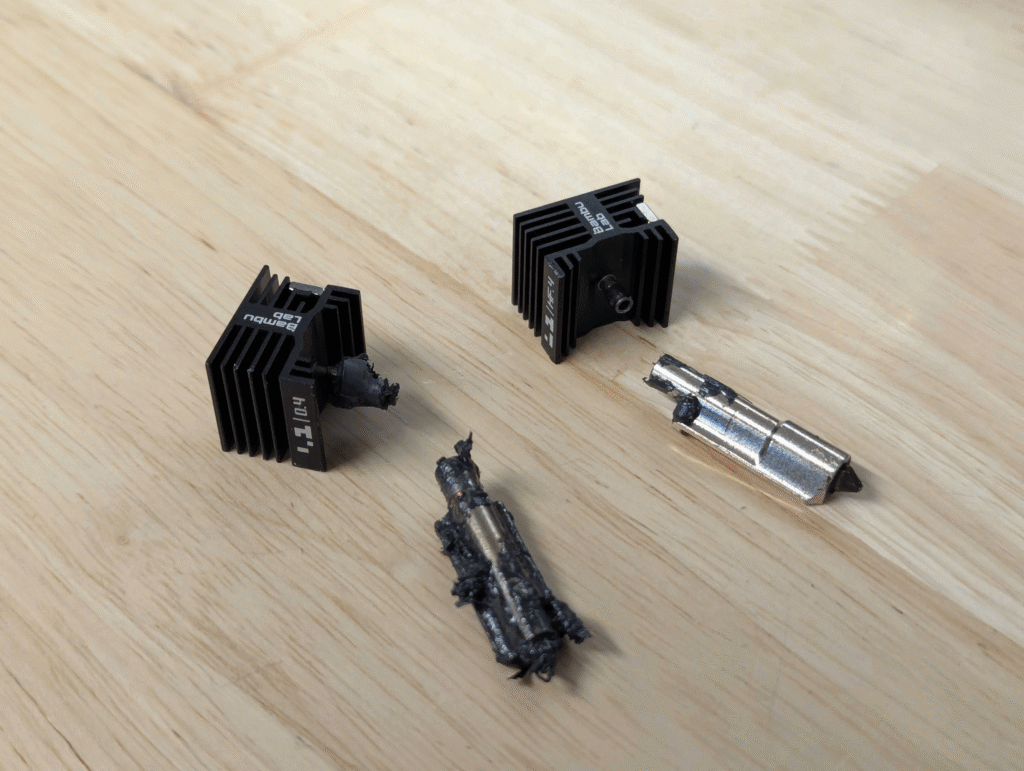
After filament moisture, the next most common reason H2C owners lose time is nozzle or hotend trouble. It’s about what happens when something eventually goes wrong—because at some point, it will.
Why nozzle issues show up sooner than expected
On the H2C, nozzles and hotends work harder than many users expect, especially if you:
- switch materials often
- print longer jobs
- use filled or abrasive filaments
- run back-to-back prints
Even with good filament, residue builds up over time. A partial clog or worn nozzle doesn’t always cause an obvious failure—it often shows up as:
- under-extrusion that slowly gets worse
- inconsistent walls
- layers that look fine early, then fail hours in
At that point, troubleshooting costs far more time than prevention.

- 【Designed for Bambu Lab P2S & H2 Series】 Specifically engineered as a direct replacement for Bambu Lab P2S, H2S, and H2D 3D printers. Also compatible with the H2C hotend (Left/Lifting side only). This official upgrade ensures perfect fitment and thermal performance
- 【Quick Swap Nozzle Design】The special design of H2/P2S hotend heating assembly enables easy separation of the thermal and electronic components of the hotend. Simply unlock the latch for quick and easy hotend removal and installation
- 【4 Versatile Nozzle Sizes- Fit Every Printing Need】0.2mm nozzle enables optimal printing precision.0.4mm nozzle is the perfect all-rounder, balancing speed and quality for daily prints like toys and mechanical parts. 0.6mm nozzle and 0.8mm nozzles extrude more filaments per second, enabling faster printing for large structural parts, household functional components, and industrial engineering models
- 【Wide Filament Compatibility】Engineered to work seamlessly with a vast range of filaments, including PLA , PETG, ABS, ASA, PC, TPU, and high-performance carbon fiber/glass fiber-infused materials. The hardened steel construction prevents clogging and abrasion, even when printing abrasive filaments that damage ordinary nozzles
- 【Note】For filaments containing carbon fiber or glass fiber, it is highly recommended to use a hardened steel 0.6 mm nozzle to minimize the risk of clogging and abrasion.Bamboo PLA-CF and Bamboo PETG-CF have been extensively tested and proven to have a low risk of clogging when printed with a hardened steel 0.4 mm nozzle, while also achieving higher print quality
The real value of a spare nozzle or hotend
Many people think of spares as backups “just in case.” In reality, they’re recovery tools. If you have a spare ready:
- a clog becomes a quick swap, not a multi-hour teardown
- you can confirm whether a problem is nozzle-related in minutes
- printing doesn’t stop while you clean or troubleshoot
This is especially important on a printer meant for multi-material work. When the workflow is complex, fast recovery matters more than perfect tuning.
Standard vs hardened
For basic PLA and PETG, a standard nozzle works fine.
Hardened nozzles become worth considering if you regularly print:
- carbon- or glass-fiber filled materials
- glow-in-the-dark filaments
- other abrasive blends
These materials slowly wear standard nozzles, which leads to dimension drift and poor surface quality long before the nozzle looks “damaged.”
If you don’t print abrasives, hardened nozzles can wait. If you do, skipping them is usually false economy.
Hotends: think in terms of workflow, not parts
Owning an extra hotend isn’t about collecting hardware. It’s about keeping momentum.
A spare hotend lets you:
- isolate problems quickly
- avoid rushing maintenance
- keep printing while one unit is cleaned or serviced
For anyone printing frequently—or selling prints—this changes how disruptive small issues feel.
The takeaway
Nozzles and hotends aren’t glamorous accessories, but they control how fast you recover from problems. A spare doesn’t make prints better. It makes failures shorter and that’s often more valuable.
4. Build Plates & Adhesion
Build plates are one of the easiest places to overspend—and still struggle with adhesion. Most H2C owners don’t need more plates. They need the right surface for the materials they actually print.
Why adhesion problems are often misunderstood
When a print lifts, curls, or detaches mid-job, it’s tempting to blame speed, temperature, or slicer settings. Sometimes that’s true. But very often, the real issue is simpler:
the surface doesn’t match the material.
A build plate that works perfectly for PLA can be frustrating for ABS or ASA. Switching materials without switching surfaces is a common source of “random” failures.
What a good build plate actually does
A good plate does two things:
- it holds the part securely during the print
- it releases the part cleanly once the print finishes
If you need excessive adhesives or force to remove prints, the surface isn’t doing its job.
For most users, a reliable general-purpose plate covers the majority of prints. Specialty plates are useful, but only when you know why you need them.


Matching plates to materials
Rather than collecting plates, focus on coverage:
- PLA / PETG A standard textured or smooth plate usually works well. Cleanliness matters more than variety.
- ABS / ASA These materials benefit from surfaces that provide stronger, more consistent grip. A plate designed for higher-temperature materials reduces warping more effectively than slicer tweaks alone.
- TPU Adhesion is usually less of a problem, but release can be. The right surface prevents parts from sticking too well.
Adhesives: tool, not crutch
Glue sticks, sprays, and similar products aren’t failures. They’re tools.
That said, if you rely on adhesives for every print, it usually means the surface or setup isn’t ideal. Use adhesives when:
- printing large ABS/ASA parts
- working with materials known to warp
- protecting the surface from damage
Don’t use them to compensate for a dirty plate or mismatched surface.

- 【THE ULTRA 52-PIECE KIT WITH 18 NEW TOOLS, 1-Year Warranty】Your Complete 3D Printing Workshop,…
- 【NEW TOOLS IN POST-PROCESSING STATION】Transform rough 3D prints into polished masterpieces. This…
- 【FILAMENT PTFE TUBE CUTTER ADD-IN】Our Customized Precision Filament Tube Cutter guarantees a…
- 【3D PRINTER NOZZLE & PRINTER BED CARE】Ensure flawless extrusion and easy 3D print removal. Our…
- 【CUSTOM, DURABLE STORAGE BAG FOR 52 3D PRINTER ACCESSORY TOOLS】Keep your 3D printer tools…
The takeaway
One good plate that matches your main materials is worth more than three that don’t. Start with a dependable general-purpose surface. Add a specialty plate only when a specific material consistently demands it.
5. Tools & Small Spares
Tools and small spares rarely get attention, but they quietly determine how stressful a failure feels.
When something goes wrong, the difference between a 10-minute fix and a ruined evening is often having the right tool within reach.
Why small tools matter more than upgrades
Most print issues don’t require advanced tuning or replacement parts. They require:
- removing a string or blob before it causes a collision
- cleaning residue from a nozzle
- trimming filament cleanly
- inspecting a problem area up close
Without basic tools, these tasks turn into awkward workarounds that make problems worse instead of better.
The core tools every H2C owner should have
You don’t need a full workshop. A small, focused set covers almost everything:
- Tweezers for removing strings, scraps, and purge remnants
- Flush cutters for clean filament cuts and trimming supports
- A small brush to clear debris from nozzles and build plates
- Hex keys or drivers that match the printer hardware
These tools don’t improve print quality directly. They improve response time—which is just as important.
Cleaning tools: preventative, not reactive
Waiting until a nozzle is fully clogged is a mistake.
Light, regular cleaning:
- keeps extrusion consistent
- reduces partial clogs that cause under-extrusion
- extends nozzle life
Simple habits—like brushing off residue after long prints—prevent many issues from ever appearing.
Small spares that reduce downtime
Not every spare needs to be expensive to be useful.
Keeping a few inexpensive items on hand can turn a failure into a short pause:
- spare PTFE tubing (if applicable)
- replacement fasteners that are easy to lose
- extra desiccant for storage containers
These aren’t exciting purchases, but they keep your workflow moving when something minor goes missing or wears out.

The takeaway
Tools and small spares don’t make prints better. They make problems shorter.
If you print often, this category is one of the highest returns on investment—because it saves time every time something goes slightly wrong.
6. Safety & Ventilation Basics
Safety accessories are another area where people either overbuy—or ignore them completely. The right approach sits in the middle:
match safety and ventilation to the materials you actually print.
When ventilation truly matters
If you mostly print PLA, ventilation is rarely a limiting factor. Basic room airflow is usually enough.
That changes when you move into:
- ABS / ASA
- nylon (PA)
- long, high-temperature prints
These materials can release odors and airborne particles that make enclosed spaces uncomfortable over time. This isn’t about panic—it’s about practicality.
If you finish a print and don’t want to stay in the room, that’s a signal something should change.
What “basic ventilation” really means
You don’t need an industrial setup to be responsible.
At a minimum, good ventilation should:
- move air away from where you sit or work
- prevent fumes from building up during long prints
- keep the printing space comfortable over time
For many home setups, this can be as simple as:
- placing the printer near a window or exhaust path
- using a dedicated enclosure with filtration if available
- avoiding printing high-emission materials in small, sealed rooms
The goal is risk reduction, not perfection.
Filtration vs airflow: don’t confuse the two
Filtration helps capture particles and odors. Airflow prevents buildup in the first place.
Relying on filtration alone, without moving air, often leads to lingering smells and heat buildup. On the other hand, airflow without filtration may not be ideal in shared living spaces.
The best setups balance both—but only when your materials justify it.
Safety accessories that actually make sense
Rather than buying everything labeled “safety,” focus on what improves day-to-day use:
- basic airflow planning
- heat-resistant placement around the printer
- simple awareness of material behavior
Most H2C users don’t need heavy upgrades here unless they print engineering materials regularly.
The takeaway
Safety accessories should scale with your materials, not your fear. If you print PLA or PETG, keep things simple.
If you print ABS, ASA, or nylon often, basic ventilation becomes part of responsible ownership—not an optional upgrade.
7. FAQ
FAQ 1: Do I really need a filament dryer for the H2C?
Yes, if you print more than short PLA jobs. Filament moisture is one of the most common causes of unstable prints, especially for TPU, ABS, ASA, nylon, and support materials. A basic dryer and sealed storage prevent many failures before they happen.
FAQ 2: Is PLA okay without drying?
PLA is more forgiving, but it still absorbs moisture over time. Fresh PLA may print fine at first, but drying helps keep results consistent—especially for longer prints or repeated use over weeks.
FAQ 3: When can I skip a filament dryer for the H2C?
You can usually skip a dryer if you only print short PLA jobs, live in a low-humidity environment, and use filament quickly. Once you print longer jobs, switch materials, or store filament for weeks, drying becomes important.
FAQ 4: How many spare nozzles or hotends should I keep?
At least one spare nozzle or hotend is recommended. This allows quick recovery from clogs or wear and reduces downtime while troubleshooting or cleaning the original part.
FAQ 5: Do I need a hardened nozzle for the H2C?
Only if you regularly print abrasive materials such as carbon-fiber, glass-fiber, or glow-in-the-dark filaments. For standard PLA and PETG, a regular nozzle works well.
FAQ 6: Which build plate works best for ABS or ASA?
Build plates designed for higher-temperature materials provide stronger and more consistent adhesion for ABS and ASA, helping reduce warping and mid-print failures.
FAQ 7: Do accessories matter more for multi-material printing on the H2C?
Yes. Multi-material printing increases print time and complexity, which makes filament moisture, nozzle condition, and recovery speed more critical. The right accessories reduce failure risk as jobs get longer.
FAQ 8: Which accessories help most with long prints?
Drying and storage reduce moisture-related failures, while spare nozzles or hotends help you recover quickly if extrusion problems appear during long jobs.
FAQ 9: Is it better to buy H2C accessories with the printer or later?
Start with essentials like drying, one spare nozzle or hotend, and basic tools. After a few weeks of real printing, it becomes much easier to know which additional accessories are actually worth buying.
Final takeaway
Most accessory decisions get easier when you ask one question:
Does this reduce failures or downtime on the H2C?
If the answer is yes, it’s worth considering early.