
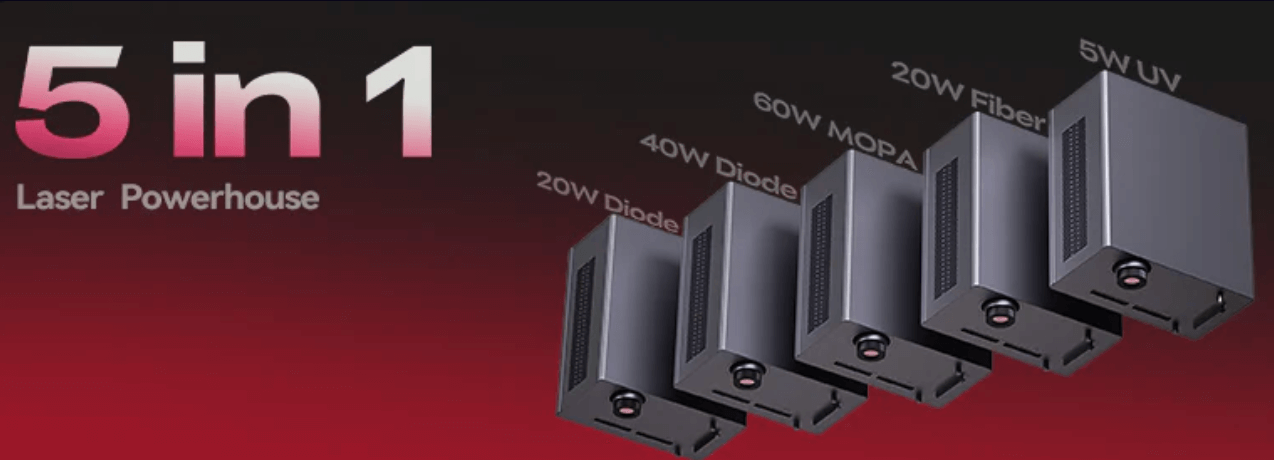
Most desktop lasers make you pick a lane: wood or metal or glass. The Falcon T1 is trying to break that rule by letting you swap laser “heads” instead of buying another machine. The real story isn’t “5-in-1” marketing, it’s whether the modular system actually saves you time, money, and bench space.
What WaveSync is, and why it matters in real use
WaveSync is the system that auto-detects the installed module and then adjusts key parameters (like working distance and settings) when you boot up or swap modules. The promise is simple: switch jobs without re-learning the machine every time.
Creality position the T1 as a high-speed galvo desktop platform (with marketing claims up to 10,000 mm/s line speed) inside a fully enclosed, Class 1 design, meaning the safety concept is “closed and interlocked,” not “open-frame hobby laser.”
WaveSync is the “time saver” feature. If it works as advertised, the T1’s value is less about raw wattage and more about fast switching + fewer setup mistakes.


The 5 modules: what each one is actually for
Creality’s official messaging around the T1 highlights five laser types: 20W diode, 40W diode, 20W fiber, 60W MOPA, and 5W UV.
Here’s the beginner-friendly version, what you should expect each module to be good at:
| Module | Typical wavelength | Best at | What it’s not for |
|---|---|---|---|
| Diode 20W (Blue) | ~445nm | Wood, leather, coated surfaces, dark acrylic, “gift shop” work | Fine metal marking, clear glass, clean acrylic edges like CO₂ |
| Diode 40W (Blue) | ~445nm | Faster engraving + deeper cuts on wood and many organics | Metal color, precise metal marking, glass “inside engraving” |
| Fiber 20W | ~1064nm | Sharp metal marking (aluminum, stainless, etc.), many hard plastics | Thick cutting, big deep relief on wood |
| MOPA 60W | ~1064nm | Metal color effects and higher-end metal results (parameter control) | A “must-have” if you only need simple metal logos/text |
| UV 5W | ~355nm | Glass, clear/transparent materials, high-detail marking, “cool” processing | Cutting thick stock; it’s a precision tool, not a saw |
Two important notes for accuracy:
Many exact spot-size numbers floating around online are marketing-dependent and can vary by lens/settings—so treat any single micrometer spec as directional, not absolute.
Material results depend heavily on material type, coating, lens choice, and settings. Even the “right” module can disappoint with the wrong setup.
Think of the T1 modules as five different jobs. Don’t buy based on wattage—buy based on the material you touch every day.
Precision vs speed: what changes when you move from diode → fiber/MOPA → UV
UV is the “detail specialist”
UV is typically chosen when you need very fine marks on tricky materials (glass, clear acrylic, certain plastics) and want less heat impact.
Press coverage also calls out engraving inside glass blocks as a use case for the UV workflow.
Diode is the “throughput workhorse” for organic materials
If you’re doing wood signs, leather patches, bamboo items, slate coasters—diode is usually the fastest path from idea → sellable product.
UV is about clean detail and tricky materials. Diode is about volume on common materials. If your shop is mostly wood/leather, start diode and upgrade later.
Fiber vs MOPA: which metal module makes sense?
Fiber 20W is the straightforward pick for:
- serial numbers
- QR codes
- logos and text on metal parts
- consistent, sharp black/white marking on many metals
MOPA 60W is the upgrade path when:
- you want color effects on stainless/titanium
- you care about parameter control (pulse tuning) for surface effects
- you sell higher-margin “premium metal customization”
Coverage around the T1 explicitly highlights “over 100 MOPA colors” as part of the pitch.
If you just need clean metal marking, fiber is enough. If your product is the color finish, MOPA is the reason to pay more.


How the Falcon T1 compares to xTool’s “fixed dual-laser” approach
A simple way to think about it:
- The T1 is trying to be a platform (swap modules, grow into it).
- xTool’s xTool F1 Ultra is a fixed dual-laser design: it combines a 20W fiber + 20W diode in one enclosure, aimed at covering “most materials” without changing hardware.
- The xTool F2 Ultra concept is also “two lasers in one,” depending on configuration (commonly MOPA + diode).
Safety class: why you’ll see “Class 1” and “Class 4” at the same time
This confuses a lot of buyers.
xTool support explains it clearly: the machine can be treated as Class 1 when the enclosure is closed and interlocks are active, even though the working lasers inside are effectively Class 4 sources.
Press coverage describes the T1 as fully enclosed and Class 1-certified as well.
Work area + conveyor angle
xTool’s own materials call out 220 × 220 mm for F1 Ultra (expandable with conveyor).
For the T1, multiple early references mention a 175 × 175 mm style field size (still plenty for tags, coasters, small signs), and the “batch + feeder” idea is part of how both brands pitch production.
Key Takeaway: If you want a ready-made combo, fixed dual-laser machines are simple. If you want a grow-with-you platform, the T1’s modular strategy is the differentiator.
A practical “which module should I buy?” decision guide
If you sell wood/leather gifts (Etsy, craft fairs)
Start: Diode 20W
Upgrade: Diode 40W when you feel limited by speed or depth
If you sell metal tags, QR plates, tool labels
Start: Fiber 20W
Upgrade: MOPA 60W only if color finishes drive your pricing
If you sell premium glass, clear acrylic, or detail-heavy parts
Start: UV 5W (but be honest: UV is niche—amazing when it fits, wasteful when it doesn’t)
If you don’t know yet (but want the “safe” first buy)
Start with diode, because it covers the biggest range of beginner projects and materials people actually cut/engrave every day.
Key Takeaway: Buy for your best-selling material, not for your future dream project. The modular promise only pays off if you upgrade because demand forces it, not because the spec sheet looks cool.
Common mistakes that waste money
- Buying UV first “for precision,” then mostly engraving wood. UV shines on glass/clear/detail—not everyday wood signage.
- Expecting diode to behave like a CO₂ laser on acrylic. Diode results on acrylic depend on the acrylic type and color; clear acrylic is usually not the diode’s happy place.
- Thinking “Class 1” means “no ventilation needed.” Enclosure helps with safety, not air quality. You still need smart fume handling.
Key Takeaway: Match module to material, and plan your airflow. Most bad results come from mismatch and setup—not from “bad hardware.”
Practical summary: who this is for, and what to do next
This setup makes the most sense for:
- small businesses that need to jump between wood → metal → glass without buying three machines
- shops that want to start “basic” and upgrade into premium work over time
What to do next:
- Write down your top 3 selling materials (not your “maybe someday” materials).
- Pick the first module that makes those products easy.
- Only plan your second module after you’ve validated demand.
Key Takeaway: The T1’s strongest angle is modular growth. Start with the module that prints money now, then expand.
FAQ
Is the Falcon T1 really “5-in-1”?
It’s marketed as a 5-laser-type platform (two diodes + fiber + MOPA + UV).
Is T1 actually “faster than diode lasers”?
It’s positioned as a high-speed galvo system with marketing claims up to 10,000 mm/s. Real results depend on settings and material, but galvo platforms are generally built for speed.
Why do some pages say Class 1 and others mention Class 4?
Because “Class 1” usually describes the system under normal enclosed operation, while the internal working lasers can still be Class 4 sources. xTool explains this clearly for their enclosure-based machines.
Should I buy Fiber or MOPA for metal?
Fiber for clean, consistent marking. MOPA when color and finish effects are part of your product’s value.
What’s the typical work area size?
Early references commonly mention around 175 × 175 mm for the T1 field size (and xTool F1 Ultra lists 220 × 220 mm with conveyor expansion). Always confirm the exact spec on the current product page before buying.






Leave a Reply