
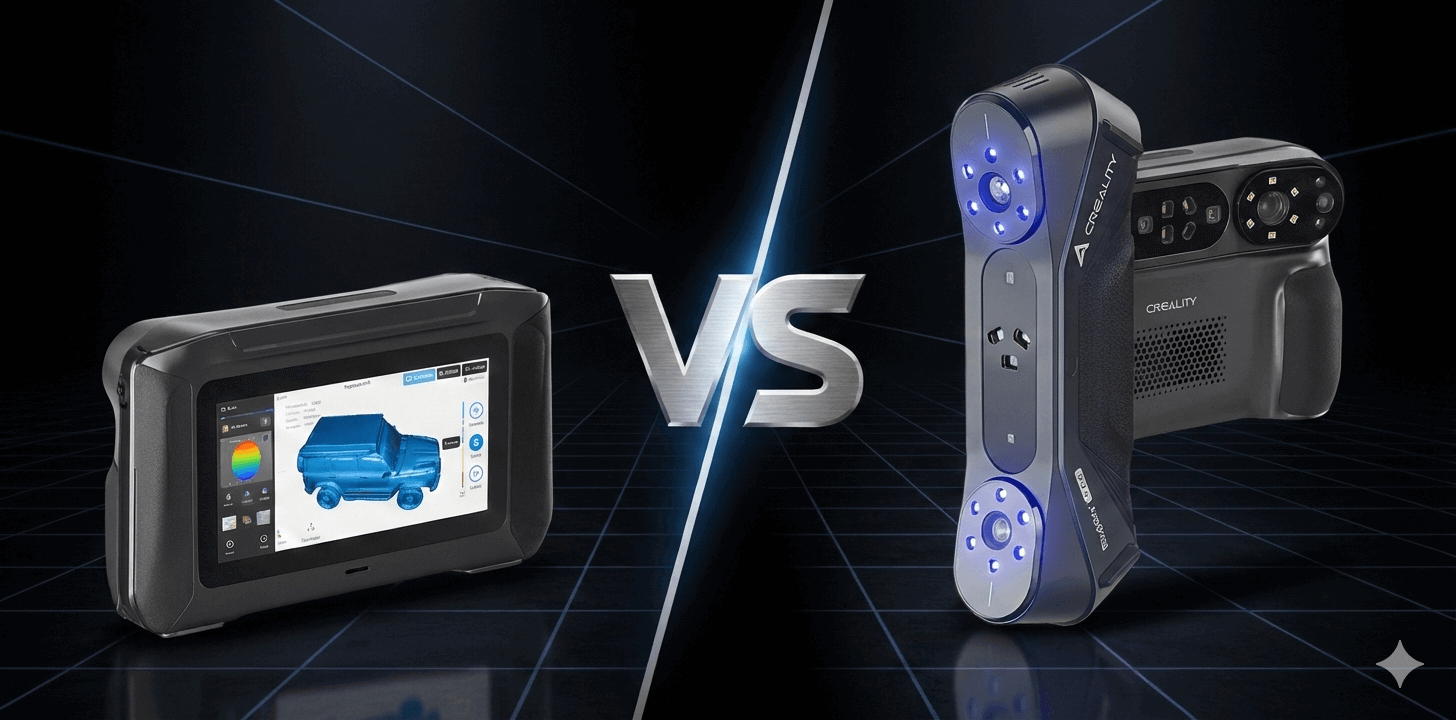
Most “high-precision” 3D scanners look identical on paper:0.02mm headlines, laser lines, IR modes,all the usual flex. But in real life, the purchase rarely fails because of accuracy. It fails because of friction: cables, laptops, power, switching modes, re-scanning the same feature twice, and realizing you didn’t capture what mattered until you’re already done.
So here’s the only question worth answering first:
When you scan, do you want to bring a computer… or leave the computer out of the scan?
That’s the entire split between these two 3d scanners:
- Sermoon P1 is built as a system: standalone / wireless / wired, onboard performance, hot-swappable batteries.
- CR-Scan Raptor Pro is built as a tool: a lighter, PC-centered workflow that makes sense when scanning happens at a bench and processing happens on a workstation.
Read this comparison like a workflow guide, not a spec fight. If you match the scanner to your actual scanning environment, the “better choice” becomes obvious fast.
Makers101 Quick Take
- Choose Sermoon P1 if your scanning isn’t tied to a desk: you want standalone / wireless / wired flexibility, you care about staying productive mid-session (no “everything stops because power/connection changed”), and you’re paying for a smoother field workflow.
- Choose CR-Scan Raptor Pro if your scanning happens mainly at a workstation: you’re comfortable with a PC-led pipeline, you want a lighter handheld tool, and you’d rather put budget into a proven “scan → process → export” routine than into standalone convenience.
- If you’re unsure, use one tie-breaker: How often do you scan away from your desk?
- Often → lean P1
- Rarely → lean Raptor Pro
Table of Contents
The Only Difference That Matters
System vs Peripheral
Forget the “0.02mm-class” headline for a second. Both products play in that lane.
What separates them is where the work happens.
Sermoon P1 = a system (scanner + compute + power + flexible connection)

- All in One-Scannning :No cables, no computer needed. Powered by a Qualcomm 8-core 3.36 GHz CPU, Adreno 740 GPU,24GB LPDDR5X RAM, and 256GB ROM, the Sermoon P1…
- 3 Blue Laser Mode: (1) with a precise single-line blue laser and an optimized optical path, the Sermoon P1 excels at scanning deep holes, narrow gaps, and…
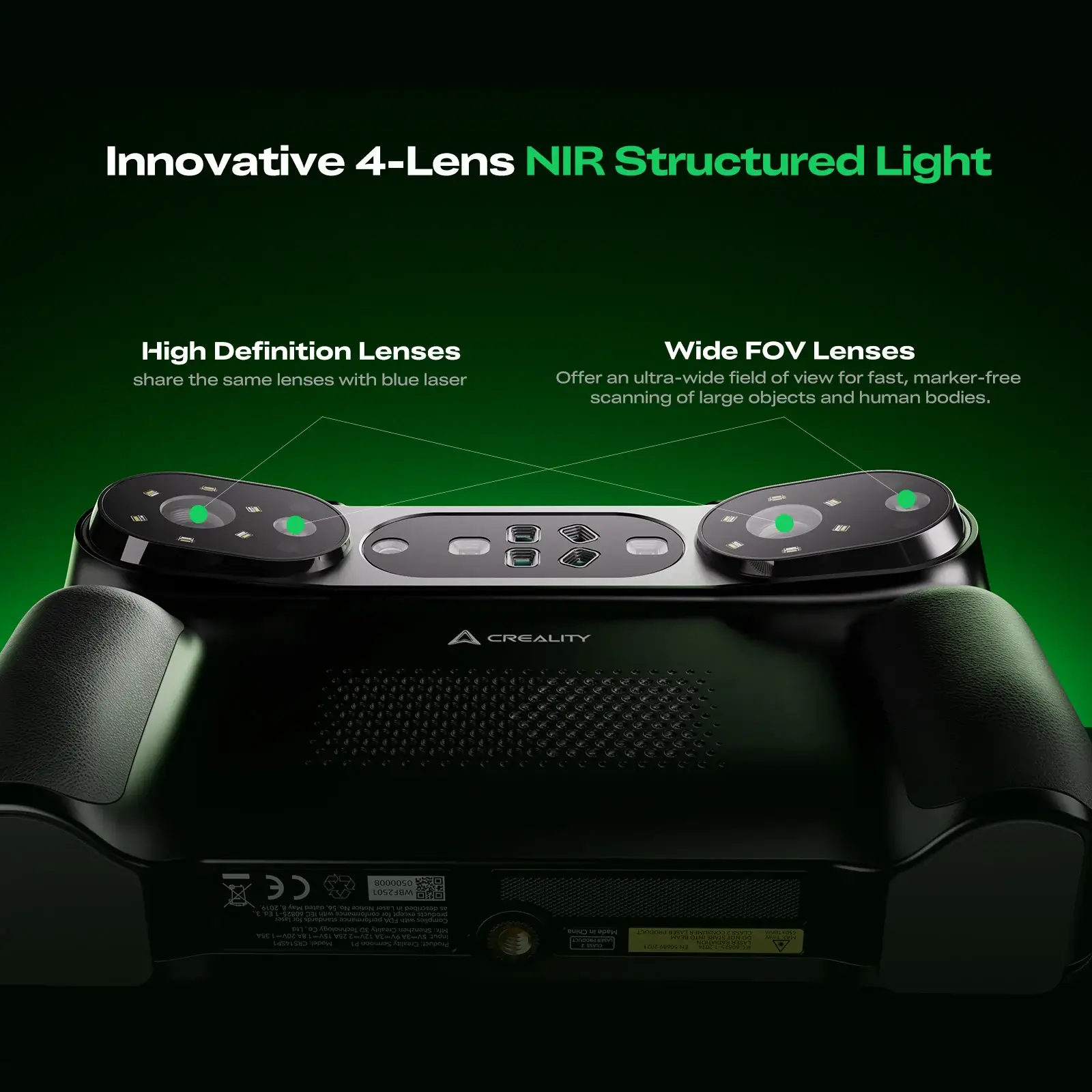
- Wide Scanning Range: By combining blue laser lines and NIR structured light, the Sermoon P1 supports a wide scanning range-from 5*5*5 mm³ up to 4000*4000*4000…
- Innovative Software:Creality has taken care to provide a robust solution with the CrealityScan app. Designed with both ease of use and professional features…
- Seamless Integration:The Creality Scan software also supports seamless integration with popular 3D inspection and design tools like Geomagic Control X,…
P1 is designed to stand on its own when it needs to. The product positioning is basically: stop treating scanning like a laptop project.
What that means in practice :
- Multiple ways to work: standalone / wireless / wired You can choose the workflow that matches the job instead of forcing every job into “plug into PC and hope.”
- Onboard capability: Qualcomm platform + 24GB RAM This is there to keep the experience responsive and reduce dependence on an external machine for basic workflow.
- Uninterrupted operation: dual hot-swappable 3500mAh batteries You don’t have to pause the job because power becomes the bottleneck.
- Capture flexibility: 22+7+1 laser lines + dual NIR It’s explicitly framed around speed + detail + tricky features (the “+1” is the tell: it’s meant to help where multi-line capture tends to miss).
Net: P1 is built to reduce the two most expensive things in scanning—setup time and rescans.
Raptor Pro = a peripheral (scanner optimized for a PC pipeline)

- Ultra-Fast & High-Precision Laser Scanning: Achieve metrology-grade accuracy with blazing speed. This scanner captures a remarkable 660,000 points per second…
- No-Spray Scanning for Challenging Materials: Eliminate the messy powder step and scan directly. Engineered with advanced blue laser technology, the Raptor Pro…
- Unmatched Versatility: From Miniature to Massive: Handle virtually any project size with ease. Offering an exceptional scanning range from 5x5x5mm³ to…
- Handheld Scanning with Anti-Shake Technology: Enjoy smooth, uninterrupted scans anywhere. Equipped with One-Shot 3D imaging and a sophisticated anti-shock…
- True-Color Capture & Powerful Processing: Create vibrant, lifelike 3D models. The built-in 24-bit RGB camera ensures full-color texture capture for stunningly…
Raptor Pro is the opposite philosophy: keep the handheld light and let the workstation do the heavy lifting.
The practical effect:
- Your scanning routine is typically PC-centered: capture → process → export.
- You’re buying consistency and value in a fixed setup rather than independence in the field.
- The specs and accessories (like optional wireless bridging) support that “bench workflow” identity, not a fully standalone one.
The quick reality check
If your scans happen where the laptop already is, a system-level standalone experience may be overkill.
If your scans happen where the laptop is a pain, a peripheral-level scanner becomes the pain.
Creality Sermoon P1 Breakdown
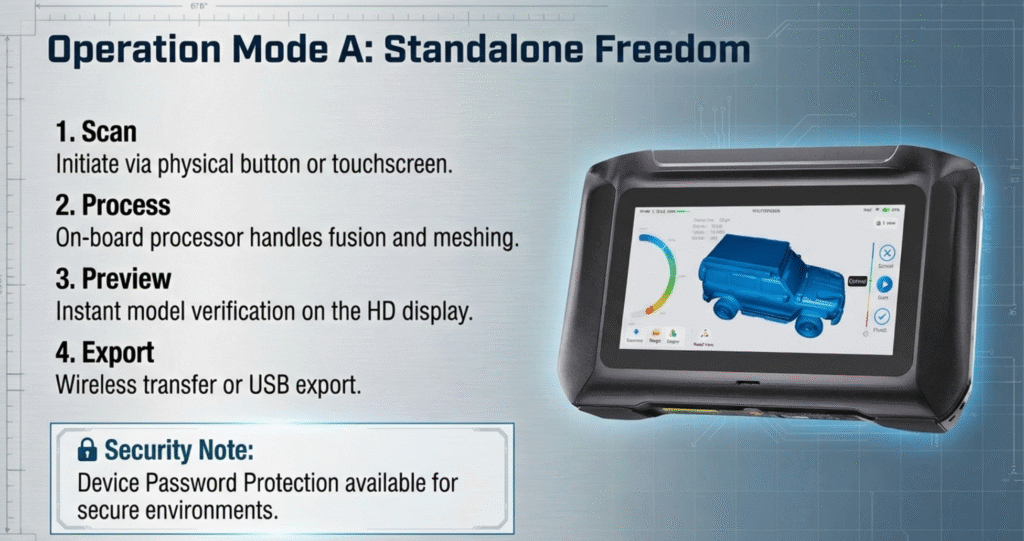
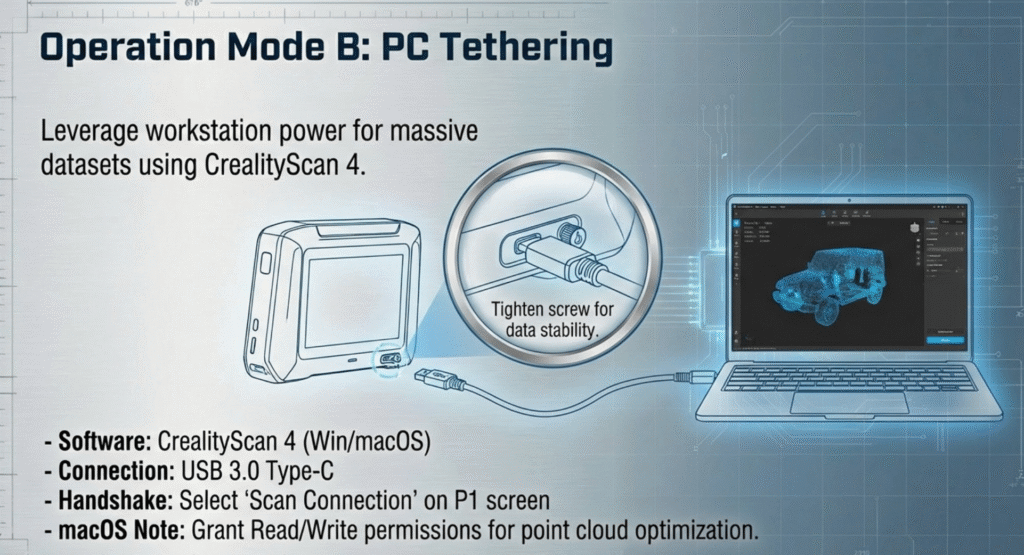
3 Modes: Standalone / Wireless / Wired
This isn’t a “nice to have.” It’s the core reason P1 exists.
- Standalone is for the moment you don’t want scanning to turn into a laptop project. Fast setup, quick sanity-check, get the job moving.
- Wireless is for “I still want PC-side work, but I’m done fighting cables.”
- Wired is your stability mode: predictable transfer, least risk of interruptions, best for longer sessions.
The point is choice: your workflow adapts to the job, not the other way around.
Multi-line scanning: 22+7+1 + dual NIR (Speed & Detail)
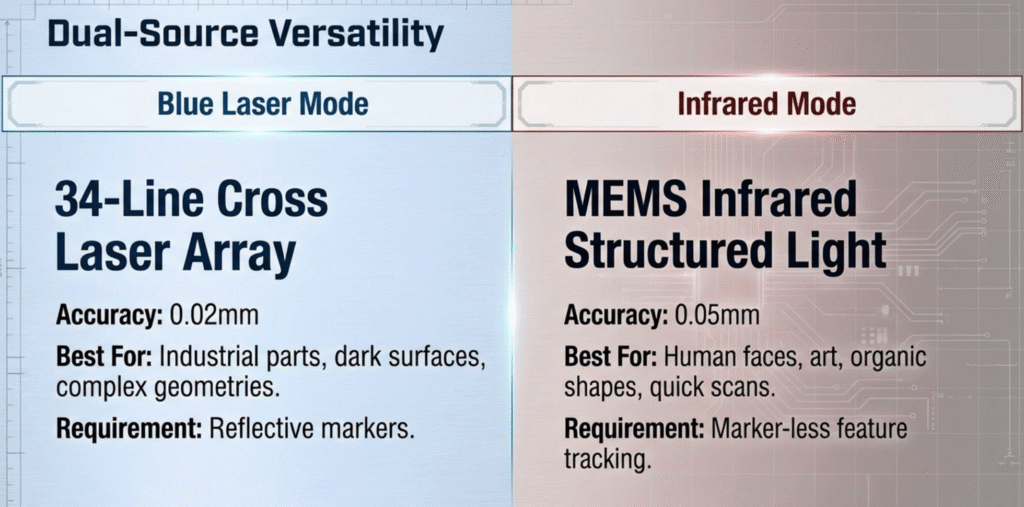
Speed and detail, while reducing rescans.
- 22-line capture is your coverage pass: move fast, map the surface quickly.
- 7-line capture is your detail pass: tighten smaller features.
- +1 single line is the “problem solver” pass: it exists because holes, grooves, and deep features are where scanners love to fail and force rework.
- Dual NIR sits alongside that laser stack to broaden capture flexibility when laser isn’t the easiest route.
This design tells you what P1 is optimizing for: completeness on the first attempt
Performance + continuity
- Qualcomm processor + 24GB RAM → keep the experience responsive while scanning and handling data.
- Two hot-swappable 3500mAh batteries → the key word on your screenshot is “Uninterrupted.” In scanning, interruptions are costly because they often turn into alignment headaches or “redo that section.”
If you scan outside a stable bench setup, this is the difference between “smooth session” and “session you regret.”
Precision & size range
- Volumetric accuracy: 0.02mm + 0.06mm/m This format matters because it scales with size — larger objects make the “per meter” term more important than a simple “0.02mm” headline.
- Versatile size range: 5 mm³ to 4000 mm³ The unit formatting is unusual, so in the article we keep it verbatim instead of reinterpreting it into a different measurement system.
Raptor Pro Breakdown
Why Raptor Pro is the smarter buy in a lot of real workflows
If Sermoon P1 is built to remove the laptop from scanning, Raptor Pro is built to assume the laptop (or desktop) is already there — and then do one job extremely well: capture clean data fast and consistently.
Hybrid capture stack: blue laser + NIR
Raptor Pro’s identity is its hybrid approach:
- Blue laser for crisp geometry, edges, and industrial-style parts
- NIR structured light for broader flexibility when laser isn’t the best tool
The practical takeaway: it’s meant to cover a wide range of “shop reality” without turning every scan into a special-case setup.
Speed & throughput: what actually matters in daily scanning
Raptor Pro is optimized for repeatable sessions:
- Laser mode up to 60fps (fast enough to feel productive, not “demo-only”)
- NIR mode often listed up to 30fps
- High point throughput (the kind of spec that matters when you’re scanning more than a few minutes at a time)
This is the difference between “cool tech” and “tool you can run all afternoon.”
Volumetric accuracy: the spec that decides larger parts
For anything beyond small objects, volumetric accuracy is the spec you feel.
Raptor Pro is widely listed at:
- 0.02mm + 0.08mm/m volumetric accuracy
You don’t need to overthink the math. Just remember the rule:
- Small parts: base accuracy dominates
- Larger parts: the “+ mm/m” term becomes the limiter
So if your work includes medium-to-large objects where consistency matters more than convenience, this spec is one reason Raptor Pro stays competitive.
Wireless is optional — and that’s the point
Unlike P1 (where multi-mode workflow is the product), Raptor Pro treats wireless as an add-on workflow rather than the default identity.
In real terms:
- If you’re fine being wired at a bench → you lose nothing
- If you sometimes want less cable management → you can enable that route
- But the core expectation remains: PC-led processing
That makes Raptor Pro easier to justify for teams who already have a stable workstation pipeline.
Weight matters more than people admit
This is the quiet advantage.
A lighter scanner:
- reduces hand fatigue
- makes it easier to hold steady
- makes long sessions more realistic
- keeps “scan quality” from being limited by how tired your wrist gets
So even if P1 wins on “system convenience,” Raptor Pro can win hard on “tool practicality” for repetitive bench work.
So who is Raptor Pro for?
If scanning is part of a repeatable workstation routine—capture, process, export—Raptor Pro is the cleaner, more rational tool. It’s not trying to be everything everywhere. It’s trying to be reliable where most scanning actually happens.
Side-by-Side Comparison Table
Spec table that actually helps you choose
Rule for this table: only include fields that change the buying decision. If a spec doesn’t move the workflow needle, it doesn’t belong here.
| What matters | Sermoon P1 | CR-Scan Raptor Pro |
|---|---|---|
| Best fit | Fieldwork + mobile scanning | Workstation + repeatable bench workflow |
| Workflow | Standalone / Wireless / Wired | PC-first (wireless as an optional path) |
| “System vs tool” | Scanner + onboard performance + batteries | Scanner optimized for PC capture/processing |
| Laser / light stack | 22+7+1 laser lines + dual NIR | Hybrid: blue laser + NIR |
| Why the laser lines matter | Built to reduce rescans on tricky geometry (holes/grooves/deep features) | Built for consistent daily capture on parts and assemblies |
| Volumetric accuracy | 0.02mm + 0.06mm/m | 0.02mm + 0.08mm/m |
| Power / uptime | Dual hot-swappable 3500mAh batteries | Typically workstation-powered workflow |
| Size range (as listed) | 5 mm³ → 4000 mm³ (kept verbatim) | Broad range; typically used across small–large parts |
| Price positioning | Higher; early-bird shown at $3,129 | Lower entry cost; varies by seller/region |
| The simplest tie-breaker | If you scan away from your desk often | If you scan at the bench most days |
- If your pain is setup + downtime, P1 is designed to solve it.
- If your pain is repeatable throughput at a workstation, Raptor Pro is designed to live there.
Which one fits your work?
Fieldwork / on-site capture → Sermoon P1
Pick P1 if your scanning looks like this:
- You’re moving between locations (shop floor, client site, different rooms)
- You don’t always have a clean “desk + PC + cable management” setup
- You need to confirm coverage right now, not later
Why it maps to P1: its product story is built around mode flexibility (standalone/wireless/wired) and continuity (hot-swappable batteries). You’re paying for fewer interruptions and fewer “redo the job” moments.
If your scanning environment changes, P1 is designed to change with it.
Workshop bench / production routine → Raptor Pro
Pick Raptor Pro if your scanning looks like this:
- You scan near a workstation almost every time
- You expect to process and clean up scans on a PC anyway
- You care more about repeatable daily workflow than “scan anywhere freedom”
Why it maps to Raptor Pro: the PC-first pipeline is the default assumption, and the lightweight “tool” identity tends to win when scanning is frequent and routine.
If your scanning environment is stable, a stable tool is usually the smarter spend.
Small business doing both → decide by the dominant workflow
Most small teams aren’t purely field or purely bench — they bounce.
Use this rule:
- If more than half your scans happen away from the workstation → lean P1
- If most scans happen at the bench and fieldwork is rare → lean Raptor Pro
This prevents the classic mistake: buying for the “coolest scenario” instead of the one you live in.
Beginners / occasional use → be honest about frequency
If scanning is not a weekly routine:
- Avoid paying a premium for features you won’t use consistently
- Start with the workflow you already have (usually a PC setup)
Occasional scanning tends to favor the simpler, more cost-efficient route — unless you know your few scans are always off-desk and time-critical.
Overbuying convenience feels great once. Then it sits on the shelf.
Pricing, Launch Window, Gifts
Sermoon P1 Early-Bird Details
- Early Bird price: $3,129 (was $3,299, Save $170)
- Sale period: Feb 5, 00:00 – Feb 11, 23:59 (PST)
- Estimated dispatch: within 15 days
- Early-bird gifts (one set per order):
- QUICKSURFACE Pro — 2-month free trial license
- 3mm high-precision reflective markers — 1680 dots
- Availability status shown: Sold Out / Notify Me
This deal doesn’t change which scanner is better for you — it only changes timing and value if you already decided on P1.
If you’re choosing between P1 and Raptor Pro, decide by workflow first. Then come back here to decide whether the timing/bonus bundle makes sense for your purchase window.
More scanner wiki detais, check here.


FAQ
1) Is Sermoon P1 truly standalone, or just “portable marketing”?
P1 has three modes: standalone / wireless / wired, plus onboard hardware and batteries.
2) What changes between standalone / wireless / wired in real life?
- Standalone: fastest setup, best when you need mobility and quick validation
- Wireless: fewer cables, still compatible with PC-side handling
- Wired: most stable for longer sessions and consistent transfer The point is choosing the mode that fits the job, instead of forcing every job into one setup.
3) What does P1’s “22+7+1 laser lines + dual NIR” actually fix?
It’s built to reduce rescans:
- 22 lines cover fast
- 7 lines tighten detail
- +1 single line targets difficult geometry (holes/grooves/deep features) The store page language is essentially “speed + completeness without having to redo passes.”
4) Does dual NIR matter?
Treat it as “capture flexibility.” It’s part of the hybrid system designed to broaden what you can scan without turning every object into a special case.
5) Does hot-swappable battery actually matter?
Yes — because it protects continuity. The store page frames it as Uninterrupted Operation with dual hot-swappable batteries. In scanning, interruptions often turn into alignment headaches or partial rescans.
6) What does “0.02mm + 0.06mm/m volumetric accuracy” mean on P1?
It’s a size-dependent accuracy model:
- a base component (0.02mm) plus
- an error term that scales with object size (+0.06mm per meter) So for larger objects, the “per meter” part becomes more meaningful than a simple “0.02mm” headline.
7) Raptor Pro is listed at “0.02mm + 0.08mm/m” — should I care about the difference?
If you scan larger parts regularly, yes: the “+ mm/m” term becomes the limiter as objects scale up.
If you mostly scan small parts, the difference is less likely to be the deciding factor than workflow.
8) Is Raptor Pro always PC-tethered?
In most real setups, yes — it’s a PC-first workflow.
Wireless can exist as an optional route, but the product identity is still “scanner as a workstation tool.”
9) Which one is better for fieldwork?
P1, by intent: three modes + onboard performance + hot-swappable batteries are all field-oriented design choices.
Raptor Pro can work outside the desk, but it’s fundamentally optimized for a stable pipeline.
10) Which one is better for repeatable production-style scanning?
Raptor Pro tends to be the cleaner fit: lighter tool, repeatable workstation routine, and fewer moving parts in the workflow if you already have a PC processing pipeline.
11) That “5 mm³ to 4000 mm³” range on P1 looks odd — what should I do with it?
Don’t reinterpret it. Quote it exactly as the store page lists it unless you have a second confirmed reference that clarifies the unit formatting. The safest approach is accuracy over guesswork.
12) What’s the pricing reality right now?
From your P1 store page screenshot:
- $3,129 early-bird (was $3,299, save $170)
- Feb 5 – Feb 11 (PST)
- Dispatch within 15 days
- Gifts: QUICKSURFACE Pro trial + 3mm reflective markers (1680 dots)
- Status shows Sold Out / Notify Me
Verdict
If your scanning happens away from a desk often—and downtime or setup friction is your enemy—Sermoon P1 is built around that reality.
If your scanning is a workstation routine and you want a lighter tool with a straightforward PC pipeline, Raptor Pro is the more rational buy.


Leave a Reply