

Quick Answer
If you’re deciding between buying a Sermoon P1, renting a 3D scanner, or outsourcing 3D scans, here’s the simplest (and most realistic) way to choose:
- Outsource if you scan occasionally, you want a clean deliverable with minimal hassle, or you’re still figuring out what quality you actually need.
- Rent if you have a short, concentrated project (a lot of parts in 2–4 weeks) and you don’t want long-term ownership costs.
- Buy (Sermoon P1) if scanning is ongoing and you need fast iteration—scan, adjust, re-scan—without waiting on anyone else.
Who this page is for
- E-commerce sellers building 3D assets from physical products
- Product design / reverse engineering workflows
- Small studios doing client work
- Education labs that scan regularly
- Anyone who cares about turnaround time as much as cost
In this page, a “usable scan” means a file you can actually use in your workflow (clean enough to export and work with)—not just a raw capture.
Pick in 60 Seconds
No calculator. Just three questions.
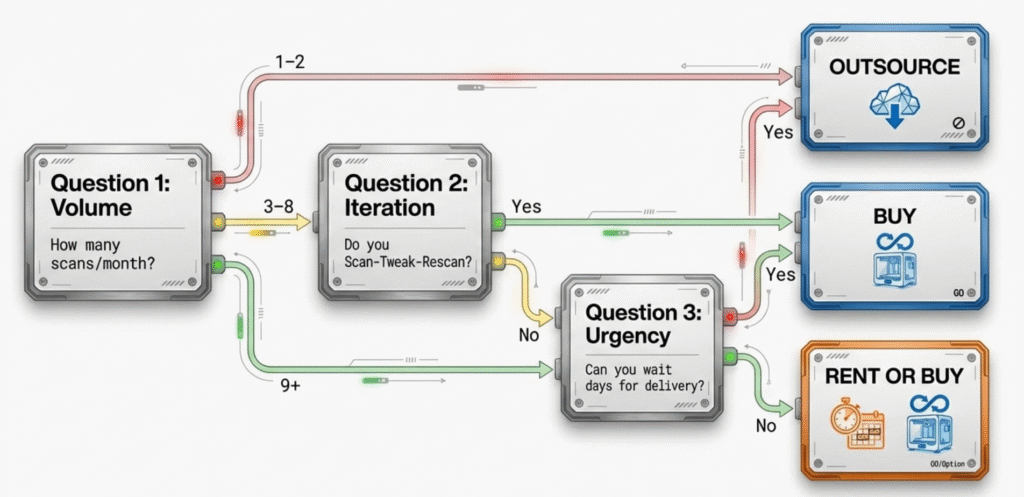
1) How many usable scans do you need in a typical month?
- 1–2 / month
- 3–8 / month
- 9+ / month
2) Do you need iteration (scan → tweak → re-scan) on the same item?
- Yes (often)
- No (mostly one-and-done)
3) Can you wait a few days for delivery?
- Yes, waiting is fine
- No, I need results fast (same day / next day)
Fast recommendation
- 1–2/month → Outsource You’ll avoid setup time, post-processing headaches, and ownership costs for low volume.
- 3–8/month → Depends on timing
- Scans are clustered into a short project window → Rent (short-term control, limited commitment)
- Scans happen every month and you iterate often → Compare Buy vs Outsource (this page makes that easy)
- 9+/month → Buying is usually worth considering Volume + iteration is where ownership becomes both cheaper and easier.
Friendly edge case:
If you’re not sure what scan quality you truly need, outsource 1–2 jobs first to set a baseline—then decide rent vs buy with confidence.
The 3 Options at a Glance
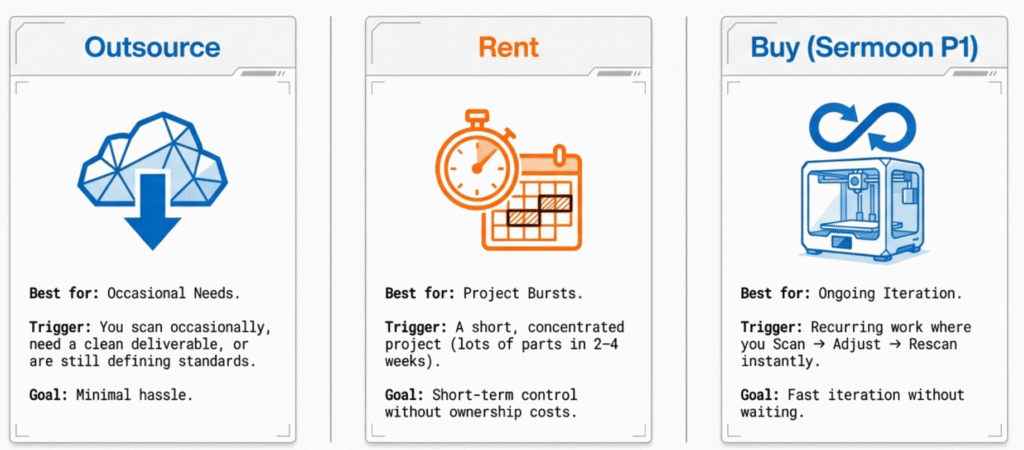
You’re not only choosing a price—you’re choosing a workflow.
Option A: Buy (Sermoon P1)

Best when: scanning is recurring and you value speed + control.
You gain the ability to iterate instantly, and your per-scan cost tends to drop as volume rises.
Trade-off: you invest time upfront learning and doing post-processing.
Option B: Rent a 3D Scanner
Best when: your need is intense but temporary (a project burst).
You get short-term control without long-term depreciation.
Trade-off: your timeline matters; renting is most efficient when your schedule is tight and realistic.
Option C: Outsource 3D Scans
Best when: you want clean deliverables with minimal workflow overhead, especially at low volume.
You’re paying for equipment + experience + finished output.
Trade-off: lead time and revisions can add time/cost if specs aren’t clear.

Pricing Benchmarks
Most “price confusion” comes from how vendors charge.
Outsourcing: how scan services typically price work
- Per part / per object Simple to quote when the number of items is fixed.
- Per hour Common when complexity is unknown or the job is messy.
- Per project / package Good for fixed deliverables and a fixed scope.
Common add-ons to watch
- Minimum charge (starting fee)
- Rush fees
- Pickup/on-site fees
- Revision limits (how many “do it again” rounds)
- Extra fees for “clean mesh,” watertight models, textures, or CAD conversion
- Shipping both ways and packaging requirements
One question that prevents most misunderstandings:
“Does the quote include post-processing and how many revision rounds?”
Renting: how rental costs really work
- Rates are usually daily / weekly / monthly, but the real cost is “all-in”:
- shipping both ways
- insurance
- deposit (and what you might lose if something goes wrong)
- late/extension fees
- whether software access is included
- whether training/support is included
Rental quote question that matters most:
“What’s the all-in cost for my dates (rental + shipping + insurance), and is the software included?”
Cost Breakdown
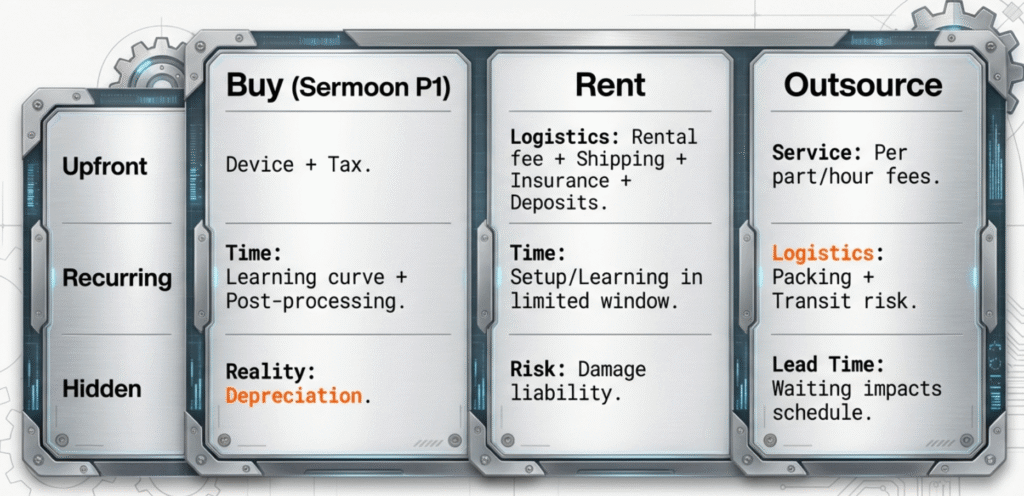
Here’s where the money really goes—split into one-time, recurring, and hidden costs.
Buy: Sermoon P1 total cost
Upfront
- device price + tax (if applicable) + shipping (if applicable)
Ongoing
- maintenance/wear items (if any)
- accessories that improve your workflow (varies)
- optional software upgrades (workflow-dependent)
Time
- scanning time
- post-processing time
- learning curve (early scans take longer)
Ownership reality
- depreciation (you won’t recover 100% on resale)
- downtime risk (rare, but real)
Rent: total cost to rent
Rental + logistics
- rental fee
- shipping both ways
- insurance + deposit
- extension fees if your project runs late
Time
- setup + learning inside a limited window
- “rush pressure” when the rental clock is ticking
Risk
- damage liability (read the policy, not the banner)
Outsource: total cost to outsource
Service fee
- per part / per hour / per project
Logistics
- packing + shipping + transit risk
Revisions + communication
- time spent clarifying needs
- rework rounds if something is missing or unusable
Lead time
- waiting impacts your schedule (sometimes the biggest hidden cost)
IP/privacy (when relevant)
- NDA or trusted vendors for sensitive parts
The Two Costs People Forget
These two items can completely flip your “buy vs outsource” decision.
1) Post-processing time
A scan isn’t automatically usable. Typical post steps include cleanup, alignment, hole filling, smoothing/decimation, and exporting the right format.
Why it matters:
If post-processing takes longer than you expect, your “cheap per scan” estimate collapses—especially when you’re new.
2) Revisions / rescans
Real projects require rework: missed areas, surface challenges, client feedback, or “we need more detail here.”
Why it matters:
Outsourcing becomes slower or more expensive with revisions. Renting becomes risky if you need more days. Buying becomes attractive because iterations are effectively “free” once you own the workflow.
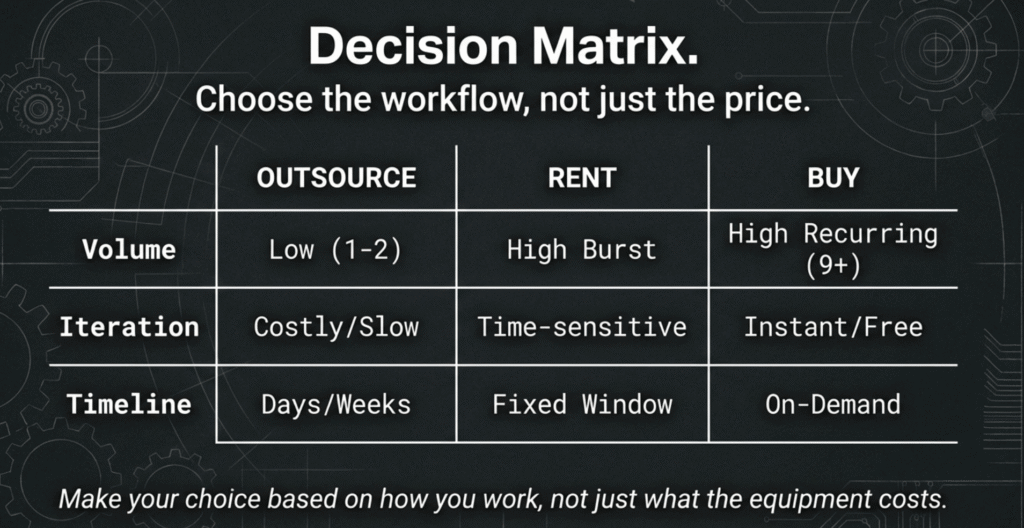
Three Real-World Scenarios
These are the most common usage patterns.
Scenario 1: Occasional (1–2 usable scans/month)
Typical outcome: outsource usually feels best.
Why: low volume can’t spread fixed costs, and your time-per-scan is typically highest early on.
Common pitfall: underestimating post-processing → buying looks cheaper than it feels.
Scenario 2: Project burst (10–30 deliverables in 2–4 weeks)
Typical outcome: renting often fits cleanly.
Why: short-term control without long-term depreciation.
Common pitfall: timeline drift. If you extend the rental window, rental efficiency drops fast.
Scenario 3: Ongoing production (8–20+ per month + iteration)
Typical outcome: buying becomes the practical choice.
Why: iteration is fast, cost per scan drops with stable volume, and you control delivery.
Common pitfall: ignoring time-per-scan at the start. Plan for a ramp-up period.


FAQ
How should I compare outsource quotes?
Force clarity on deliverables: file formats, mesh cleanup level, and revision rounds included.
What changes outsource pricing the most?
Surface difficulty, geometry complexity, deliverable expectations (clean mesh vs raw), and revisions.
When does renting stop being a good idea?
When your work stretches across months or you underestimate post-processing and need extensions.
What two costs should I never ignore?
Post-processing time and revisions/rescans.
Tip: Some images in this article may be AI-generated and are used for demonstration purposes only. They’re for reference, not an exact representation of real products or scenes.

Leave a Reply