
Table of Contents
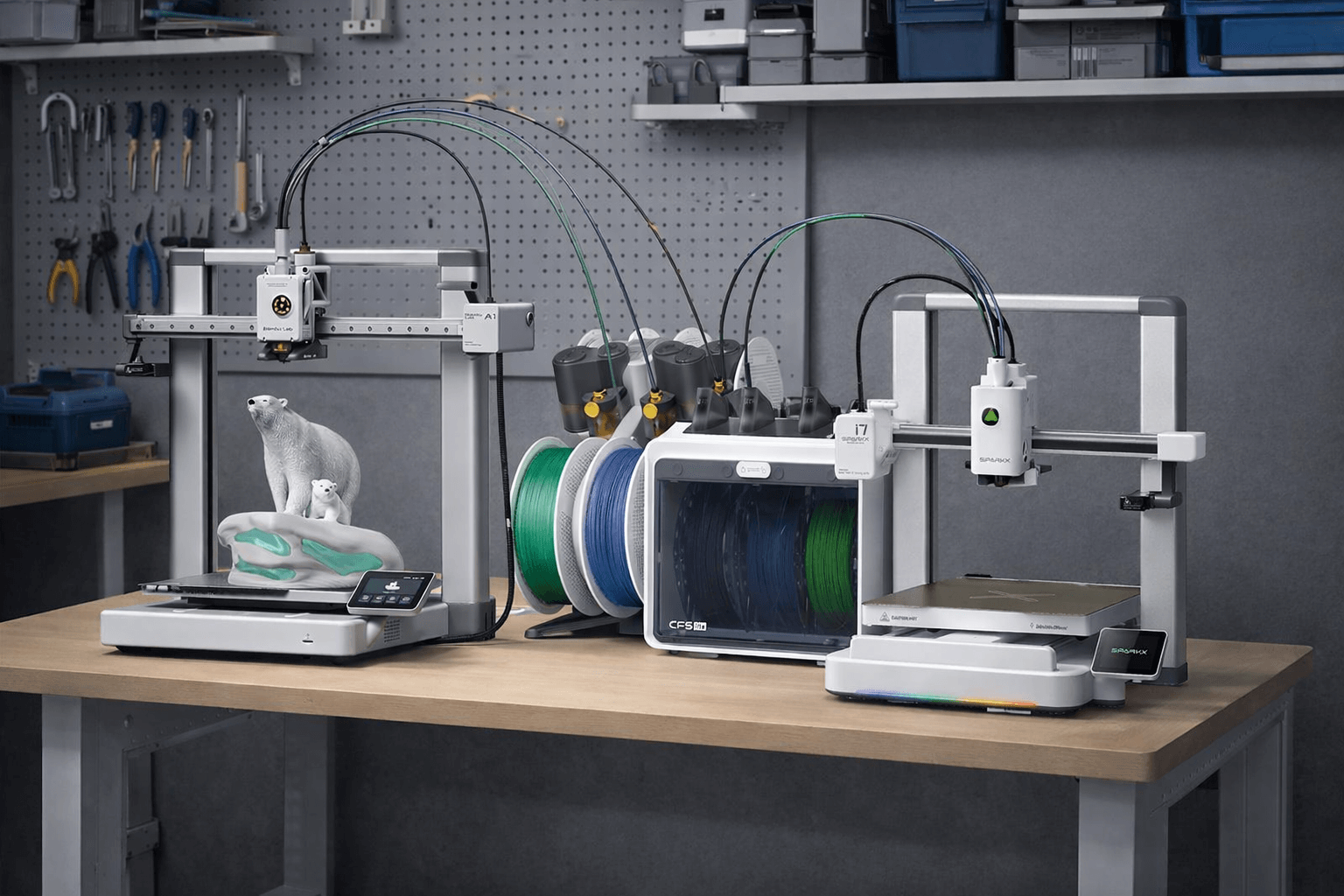
SparkX i7 vs Bambu Lab A1 2026
Creality’s new SparkX i7 is landing right in the same “beginner-friendly, fast bed-slinger” lane as the Bambu Lab A1,so the real question isn’t “which spec is bigger,” it’s which ecosystem and multicolor path makes more sense for your budget and risk tolerance.
If you want the safest default for a first printer, A1 is still the lower-risk pick because it’s established and has a massive user base.
No products found.
If you want the strongest launch value and 4-color printing is all you need, the SparkX i7 Color Combo price is the reason people are paying attention.
What This Guide Will Do (and Not Do)
- It won’t argue about “clone vs not.” That’s not a buying decision.
- It will help you choose based on what actually affects beginners: multicolor success rate, spool/humidity headaches, ecosystem maturity, and price-to-value.
Quick Price Check
- SparkX i7 Color Combo — check current launch pricing ($339 Early Bird / $399 MSRP)
- Bambu Lab A1 / A1 Combo — check today’s price (A1 pricing varies by retailer and promos)
1. Specs: SparkX i7 vs Bambu Lab A1
Here’s the fastest way to compare SparkX i7 and Bambu A1 without getting lost in marketing numbers.
I’m listing confirmed specs from official pages, and I’ll label performance figures as claimed where real-world results vary by profile, material, and model geometry.
| Category | SparkX i7 (official / listed) | Bambu Lab A1 (official / listed) | What it means for beginners |
|---|---|---|---|
| Build volume | 260 × 260 × 255 mm | 256 × 256 × 256 mm | Same class. Build size won’t decide this purchase. |
| Max speed (claimed) | Up to 500 mm/s (class) | 500 mm/s | Headline speed is similar. Your “real speed” depends on quality targets. |
| Max acceleration (claimed) | Up to 10,000 mm/s² (class) | 10,000 mm/s² | Similar motion class; quality + profiles matter more than the number. |
| Multicolor system | CFS Lite (4 slots) (Color Combo) | AMS lite (4 spools) (A1 Combo) | Both are “4-color systems,” but daily reliability differs by ecosystem + setup. |
| Max colors / expansion | 4 colors max; multiple CFS Lite not supported | One AMS lite only → 4 colors max | If you dream of 6–8 colors later, neither of these is that path. |
| Official i7 pricing | $339 Early Bird / $399 listed | Varies by retailer/promos | i7’s launch price is a big part of the “value” argument. |
| Best fit | Early adopters / value hunters / “launch bundle” buyers | Risk-averse beginners / “most proven” path | Your tolerance for unknowns often decides the winner. |
The printers are close on paper. Your decision is mostly about multicolor experience + ecosystem maturity + price, not raw specs.
2. What You’re Really Buying: Ecosystem vs Launch Value
At a glance, SparkX i7 and Bambu Lab A1 sit in the same “fast, beginner-friendly bed-slinger” class. Build volume and headline motion specs are close enough that they rarely decide the purchase.
What actually decides it is simpler:
- A1 is the ecosystem bet (more proven profiles, more troubleshooting history, more “someone already solved this” answers).
- i7 is the launch value bet (aggressive bundle pricing and a clear 4-color target).
If you want the lowest-risk beginner path (and fewer surprises)
With A1, you’re buying into a mature system.
Bambu publishes detailed specs and documentation, and AMS lite behavior is widely discussed because so many people already run it daily.
That matters for beginners because most early failures aren’t “hardware problems”—they’re workflow problems (first layer, wet filament, spool friction, swap recovery).
A larger installed base usually means faster fixes and fewer dead ends.
If you want the strongest launch value right now
SparkX i7’s biggest advantage is confirmed pricing: Creality’s store lists the Early Bird Drop at $339 with $399 shown as the regular price, and Creality’s own blog post frames the early-bird window (Jan 6–Jan 20).
That price is why people immediately compare i7 to the A1 “value lane”—especially if you want multicolor from day one.
But here’s the trade-off you should understand upfront:
- i7’s multicolor system is designed as 4 colors max, with multiple CFS Lite units not supported (so it’s a fixed 4-color platform).
- A1 + AMS lite is also capped at 4 colors (A1 series connects to a single AMS lite).
So this isn’t “4 colors vs 8 colors.” It’s “which 4-color experience will be easier for you”—and whether i7’s launch pricing is worth choosing a newer platform.
3. The Multicolor Section That Actually Decides the Winner
If you’re comparing SparkX i7 and Bambu A1, this is where the purchase gets real.
Specs are close. Multicolor workflow is not.
It’s the difference between “fun and easy” vs “why is this jammed at 2am?”
Before we compare systems, one clarification that prevents expensive mistakes:
Auto-refill vs Multicolor (not the same thing)
- Auto-refill means the printer can switch to another spool when one runs out, so a long print can finish.
- Multicolor means the system swaps filaments during the print to produce 2–4 colors.
SparkX i7’s CFS ecosystem can support both ideas depending on the bundle, but the multicolor conversation here is about CFS Lite (4-slot) vs AMS lite (4-slot).
CFS Lite vs AMS lite
| Topic | SparkX i7 + CFS Lite | Bambu A1 + AMS lite | What it means in real life |
|---|---|---|---|
| “Out of the box” colors | 4 | 4 | Both are true 4-color systems (not manual swaps). |
| Max colors / expansion | 4 max (Multiple CFS Lite units not supported) | 4 max (A1 series can only connect to one AMS lite) | If you want 6–8+ colors later, neither A1 nor i7 is the right path. |
| Filament “ID” / automation | Supports RFID with Creality RFID filaments | More manual/normal spool management | RFID can reduce setup friction—if you use matching filaments. |
| Moisture management style | Listed “Drying method: Desiccant” | Open-frame style; humidity is a common user concern | In humid rooms, AMS lite owners often add enclosures/dry-box mods. |
| The “new vs proven” factor | New platform, fewer long-term swap reports (for now) | Larger installed base, more “known fixes” | Beginners usually benefit from a bigger troubleshooting library. |
Where multicolor usually breaks for beginners
Multicolor fails for boring reasons:
- the filament is wet,
- the spool drags,
- a swap fails and you don’t know the fastest recovery path.
4. Real-World Multicolor Problems (Humidity, Cardboard Spools, and Jams)
Multicolor printing usually doesn’t fail because your printer is “bad.” It fails because the system is doing many small moves—load, unload, pull back, feed again—over and over.
Three things cause most of the pain: moisture, spool friction, and loading/unloading errors.
Humidity: the #1 multicolor troublemaker
When you run multicolor, you often leave multiple spools out for longer.
In humid rooms, filament can absorb moisture and start acting “weird.” Bambu’s own guidance is clear: after drying, store filament with desiccants in a sealed container (or similar dry storage) and use it soon to prevent re-absorbing moisture.
What moisture looks like: more stringing, rough surfaces, random under-extrusion, and prints that feel “inconsistent.”
What to do :
- Dry the filament when prints start getting stringy or rough.
- Store spools in a sealed bin/bag with desiccant when you’re not printing.
- If your setup is open (like AMS lite), consider an enclosure or dry-box approach—this is a common direction discussed by A1/AMS lite owners in humid climates.
How this differs between i7 and A1 :
- Creality lists CFS Lite’s “drying method” as desiccant (helpful, but not active heated drying).
- AMS lite is widely used in the open, so humidity management becomes more “on you,” and many users add enclosure ideas.


Cardboard spools and spool friction: small issue, huge impact
Even with perfect filament, multicolor can fail because a spool doesn’t roll smoothly. This gets worse when a spool is low or slightly deformed.
What the community reports :
- Some users say cardboard spools can create dust and friction that may affect the AMS mechanism.
- Others report they run cardboard spools with no issues at all, especially on AMS lite-style setups where the mounting is different.
So the right takeaway isn’t “cardboard = always bad.” It’s this:
Beginner rule: if you’re doing your first multicolor tests, use the most stable spools you have. Save sketchy spools for later.
Quick fixes that actually work
- If a spool drags, re-spool it or use a spool adapter/ring (low-cost fix).
- Keep the filament path smooth and clean.
- If errors show up when the spool is almost empty, it may be a “low spool friction” issue—many AMS lite users specifically mention problems near the last 10% of a spool.


Jams and swap failures: how to recover without ruining your day
This is where beginner frustration spikes: a multicolor print stops mid-way, and you don’t know what to do next.
Good news: most of the time, it’s a loading/unloading failure you can fix quickly. Bambu has an official AMS lite troubleshooting page for common loading/unloading failures, including causes and step-by-step checks.
Fast recovery playbook (safe and simple):
- Pause the print as soon as you notice an error.
- Unload the problem filament through the system’s normal unload process.
- Check the filament tip. If it’s bent, swollen, or rough, cut it clean.
- Reload and watch for smooth feeding.
- Resume only after the filament is moving freely.
If you’re using CFS Lite with non-RFID filaments, Creality’s user guide notes you may need to set filament parameters manually, so don’t assume the system “knows” your material.
The simple takeaway
If you want multicolor to feel easy, treat it like a system, not a feature:
- dry filament + dry storage,
- smooth spools,
- and a simple recovery routine when swaps fail.
5. Speed & Print Quality: Why “500 mm/s” Isn’t Your First Goal
Both SparkX i7 and Bambu Lab A1 are marketed in the same “fast bed-slinger” tier, with ≤500 mm/s top speed and ≤10,000 mm/s² acceleration listed in their specs.
That sounds like a tie—until you look at what actually limits real prints.
Headline speed vs real speed
“500 mm/s” is a motion capability, not a guarantee that your prints will run at 500 mm/s the whole time. Real prints slow down constantly because of:
- Hotend melt capacity (flow limit): A printer can only melt and push so much plastic per second. Bambu even publishes this as Max Hot End Flow: 28 mm³/s for A1 (measured under a specific single-wall test setup).
- Volumetric flow physics: Speed isn’t just speed. It’s speed × line width × layer height. Bambu’s own documentation explains volumetric speed as the physical limit that caps how fast you can print before the hotend can’t keep up.
- Small details + cooling: Corners, holes, text, and curves force the printer to slow down for accuracy and cooling.
- Bed-slinger reality: Moving the bed fast can amplify vibration on tall parts. Acceleration matters more than “top speed” for most prints.
A good real-world reference: Tom’s Hardware notes that while the A1’s top speed is 500 mm/s, default slicer speeds are typically in the 200–300 mm/s range, which is closer to what most people will actually see day-to-day.
The beginner-friendly mindset: print “fast enough,” not “as fast as possible”
If you’re new, the goal is repeatable success:
- clean first layers,
- stable extrusion,
- and parts that look good.
Chasing max speed too early usually creates “random” problems (stringing, rough walls, weak corners) that are actually just pushing flow/cooling too hard.
A simple 3-step speed plan that works on both i7 and A1
Step 1 — Baseline (first 3–5 prints):
Use the default profile and print PLA. Don’t touch speed yet. Your job is to build confidence.
Step 2 — One knob at a time:
Increase only one thing per test (slightly faster speed or slightly higher acceleration). Reprint the same small model and compare.
Step 3 — Fast mode (only after you’re stable):
Once you know your filament is dry and your first layer is reliable, then you can try more aggressive speed modes. If quality drops, you’ve found your real limit—not the marketing limit.
Signs you’re going too fast
If you see any of these, back off:
- messy corners or rounded details
- inconsistent lines (thin spots / gaps)
- rough top surfaces
- ringing/ghosting on walls
- tall prints wobbling or shifting
6. Software & Ecosystem: Where Beginners Either Love the Hobby
When two printers look similar on paper, software is what makes one feel “easy” and the other feel “fussy.” The slicer you use, the mobile app, and how fast you can find proven fixes often matter more than an extra 5 mm of build volume.
Bambu A1: a tighter, more mature “full stack”
With A1, most buyers use Bambu Studio on desktop and Bambu Handy on mobile.
- Bambu Studio (desktop slicer) is positioned as an open-source, feature-rich slicer with a project-based workflow.
- Bambu Handy (mobile app) is marketed as an all-in-one app to control your printer remotely and connect with the model ecosystem (MakerWorld) for easy printing.
- A1 also leans hard into “less tuning.” For example, Bambu’s own docs note the A1 series supports auto calibration features like auto flow dynamics calibration (with firmware requirements).
Beginner reality check: this mature stack usually means you can Google a problem and find answers fast—profiles, common settings, and fixes are already everywhere.
SparkX i7: Creality Print + Creality Cloud (newer platform, growing ecosystem)
SparkX i7 sits inside Creality’s software ecosystem:
- Creality Print is Creality’s official FDM slicer, and the download page explicitly says it can help you remote control and monitor your 3D printer and print from your computer.
- Creality Cloud is positioned as an all-in-one platform with a model library, cloud slicing, remote control printing, and remote video monitoring (plus AI tools in the app listing).
Because i7 is new, the key question is not “does it have an app?” It’s: How smooth is the workflow when something goes wrong?
New platforms can be great, but early buyers sometimes end up being the first wave to report bugs, edge cases, and “weird” behaviors.
What to do as a beginner (works for both i7 and A1)
If you want fewer headaches, follow these rules:
- Start with the default profile (PLA first).
- Change one setting at a time.
- Don’t chase speed until your first layer is consistent.
- If multicolor is involved, treat “dry filament + smooth spools” as part of the software workflow, not an optional hobby upgrade.
7. Price & Value: The Only Rule You Need
If you’re buying in the US, price is not a side note in this comparison—it’s one of the main reasons SparkX i7 is suddenly in the same conversation as Bambu’s A1.
Price snapshot (official listings)
SparkX i7 Color Combo (i7 + CFS Lite, 4-color)
- Creality’s official store lists $339 Early Bird and $399 as the regular price.
- Creality’s blog also frames the early-bird window as Jan 6–Jan 20 at $339 ($399).
Bambu Lab A1 (official US store pricing at time of writing)
- A1: $299
- A1 Combo (A1 + AMS lite): $399
Prices can change with promos/stock, so treat these as “current official” reference points, not permanent MSRP.
The value table
| Buyer situation | Best value move | Why |
|---|---|---|
| First-ever 3D printer, you want the least risk | A1 (single) | Lowest complexity and the most proven ecosystem for fixes. |
| Multicolor is the whole reason you’re buying | Compare combos: i7 Color Combo vs A1 Combo | Both are 4-color systems—your real decision becomes ecosystem maturity vs launch value. |
| You’re price-sensitive but want multicolor now | i7 Color Combo at $339 (while live) | At this price, it’s a strong “4-color entry” if you accept a newer platform. |
| You’re unsure you’ll even use multicolor | Start single | Many beginners print single-color most of the time; spend the saved money on filament + basics. |
| You want more than 4 colors later | Neither i7 nor A1 | Both are capped at 4 colors in their lite multicolor setups. |
My simple rule
Don’t ask “which printer is better.” Ask: “Is multicolor the reason I’m buying?”
- If no → buy single (A1 or i7 single) and spend the difference on filament, a basic tool kit, and dry storage.
- If yes → buy combo, but choose based on your tolerance for unknowns:
- i7 Color Combo at $339 = the launch-value play, with a fixed 4-color ceiling.
No products found.
8. “Marketing Claim Watch”: The “50% Less Waste” Promise
SparkX i7 is heavily marketed around one big multicolor line: “50% Less Waste” / “up to 50% less waste compared to traditional systems.” You’ll see it on Creality’s official product pages and intro content.
That claim might be true in a certain test setup—but as a buyer, you should treat it like this:
What the claim could realistically mean
Multicolor “waste” mainly comes from flushing/purging old color out of the nozzle before the new color prints cleanly.
If i7’s cutter/retract workflow reduces how much mixed color stays in the hotend, it could reduce purge needs in some scenarios (especially frequent swaps).
Creality describes it as an efficiency/waste improvement versus “traditional systems.”
What’s missing
Creality’s public claim doesn’t always specify the exact test conditions (model, swap count, purge settings, materials, color order). Without that, “50%” can be true in one benchmark and not reflect your prints.
So instead of asking “is it true,” ask: “Under what conditions would I personally see less waste?”
A fair way to judge “less waste”
To validate the claim in a way that matters, you need comparisons like:
- Same model + same number of color swaps
- Same materials
- Same target quality
- Same slicer strategy (prime tower on/off, flush-into infill/object, etc.)
Otherwise you’re comparing apples to oranges.
Reality check: A1 already lets you reduce waste in software
Bambu Studio has dedicated controls for reducing waste during filament change, including Flushing Volume logic (darker-to-lighter typically needs more), plus settings around purge behavior.
And Bambu’s documentation explains the prime tower (generated for multi-color tasks) as part of maintaining consistent extrusion after swaps.
So the practical comparison isn’t:
- “i7 has less waste, A1 has more waste”
It’s:
- “Does i7 reduce waste enough that it beats what A1 users can already optimize in Bambu Studio—and does it do it without creating new reliability headaches?”
9. Reliability & Safety Notes
No 3D printer is “zero risk.” The goal is to stack the odds in your favor: buy the right revision, set it up correctly, and avoid the common conditions that trigger failures.
What “reliable” means for beginners
For a first printer, reliability isn’t about lab benchmarks. It’s:
- Can you get repeatable first layers without constant tweaking?
- Can you finish 3–6 hour prints without babysitting?
- When something goes wrong, can you find a proven fix quickly?
That’s why ecosystem maturity matters: A1 has more long-running owners and more “already solved” troubleshooting history, while i7 is newer and still building that body of knowledge.
A1: known safety history
1) The A1 had an official recall (heatbed cable)
Bambu Lab initiated a recall for early A1 units due to a heatbed cable issue that could become damaged if bent during shipping/installation.
2) A newer discussion surfaced about a power board component
Recently, some community reports and a third-party investigation raised concerns about overheating on an A1 power distribution board component in rare cases.
Bambu told Tom’s Hardware the issue had already been addressed via a redesign and that affected customers were offered repairs or replacements, while emphasizing compliance with safety standards.
What you should do as a buyer:
- Prefer buying from channels with clear revision/after-sales handling.
- Use a quality surge protector (good practice for any printer—Bambu referenced surges in its response).
SparkX i7: what we can say honestly right now
SparkX i7 is new, so long-term reliability patterns (months of multicolor swaps, firmware cadence, “what fails first”) are still emerging.
Creality’s own i7 wiki shows several guides still marked as “Updating,” which is normal early in a launch cycle.
For the multicolor unit (CFS/CFS Lite), the available manuals emphasize basic safety setup: indoor use, dry/ventilated environment, keep away from heat/flammables, stable surface, and avoid overloaded extension setups.
Safety setup checklist (good for either i7 or A1)
Keep this short and boring—because boring is safe:
- Put the printer on a stable, non-wobbly surface with airflow (not inside a cramped cabinet).
- Avoid cheap extension cords and multi-plug adapters; don’t overload power strips.
- Keep the area free of clutter and flammable items near the printer (especially for long prints).
- Don’t run overnight until you’ve had several successful prints and you trust your setup.
The honest takeaway
- A1: more proven ecosystem, but it has a documented recall history and recent community scrutiny—so buy smart, update firmware, and set up power safely.
- i7: attractive launch value, but it’s early—expect fewer “known fixes” at first, and follow the safety/setup guidance closely.
10. Pick SparkX i7 or Bambu A1 in 30 Seconds
If you’ve read this far, you already know the truth: specs won’t decide this. Your choice is mostly ecosystem maturity vs launch value, plus one hard constraint: both sit in a 4-color max lane for their “Lite” multicolor setups.
The 6-line decision tree
- I want the least risk for my first printer → Bambu A1
- I want multicolor mainly for fun models and want the proven path → Bambu A1 Combo (A1 + AMS lite)
- I want 4-color printing and the best launch deal while it’s live → SparkX i7 Color Combo at $339
- I’m not sure I’ll even use multicolor → Start single-color (save money for filament + dry storage)
- I plan to grow beyond 4 colors later → Neither i7 nor A1 (both are capped at 4 in these setups; i7 also explicitly doesn’t support multiple CFS Lite units)
- I already own an A1 → Don’t switch just for hype; wait for more real i7 owner data unless the $339 price makes it a clear value win for you
No products found.
Price-based shortcut
If you’re deciding purely on dollars and you want 4-color printing:
- SparkX i7: Creality lists $339 Early Bird / $399 for the i7 launch window (Jan 6–20).
- Bambu A1: US store listing shows A1 $299, A1 Combo $399.
So the “value moment” is simple: $339 for a 4-color combo is unusually aggressive—but it’s also a newer platform, so you’re trading some certainty for that deal.
11. FAQ
1) What is the official SparkX i7 price in the US?
SparkX i7 is listed at $339 (Early Bird) and $399 (regular price) on Creality’s official store and launch blog.
2) Can SparkX i7 expand beyond 4 colors?
No—SparkX i7 multicolor is capped at 4 colors because “Multiple CFS Lite Units” are “Not supported.”
3) Can Bambu A1 expand beyond 4 colors with AMS lite?
No—Bambu states the A1 series can only connect to one AMS lite, so it supports 4-color printing at most.
4) What’s the official Bambu A1 vs A1 Combo price (US store)?
Bambu’s US store lists A1 at $299 and A1 Combo at $399.
5) SparkX i7 has three versions—what’s the difference?
Creality lists three i7 package options: the base i7, an “Autofill Combo,” and a “Color Combo” (with CFS Lite for multicolor).
6) Does CFS Lite do both multicolor and auto-refill?
Yes—CFS Lite supports multicolor printing and also supports auto filament refill.
7) How many filament slots does CFS Lite have, and what spools fit?
CFS Lite has 4 filament slots and is specified for 1 kg spools (diameter 195–202 mm, width 42–68 mm).
8) Does CFS Lite actively dry filament (heated dryer)?
No—Creality lists the CFS Lite “Drying Method” as desiccant, not heated drying.
9) When will SparkX i7 orders ship (per the product page)?
Creality’s i7 product page says orders are expected to ship in about one month.
10) How do I claim the free filament shown on the SparkX i7 page?
Creality’s page says the free 2KG Hyper RFID filament should auto-add at $0.00 after you log in and add i7 to cart; if it doesn’t appear, you can order first and contact support to add it manually.
12. Update Log
I’ll keep this page updated as new hands-on tests and community reports come in. Here’s what’s been confirmed and added so far.
Jan.8 2026
- Confirmed SparkX i7 Color Combo pricing: $339 Early Bird / $399 (Creality listing), including the Jan 6–20 early-bird window.
- Confirmed multicolor hard limit on i7: CFS Lite is 4 slots and “Multiple CFS Lite Units: Not supported” → i7 is fixed at 4 colors max.
- Confirmed current official A1 pricing (US store): A1 $299 / A1 Combo $399.
- Confirmed A1 multicolor limit: A1 series can only connect to one AMS lite → 4-color printing max.
What’s next to update
- Swap reliability: 20–50 swap “stress test” results (success rate + recovery friction)
- Waste reality: purge/prime waste estimates under the same model + same settings
- Spool compatibility: which spool types consistently behave (and which are risky)
- Firmware cadence: stability notes by version (especially for multicolor)
13. Final Verdict: which one should you buy
- Choose SparkX i7 Color Combo if: You want 4-color printing now, the $339 early-bird price is still live, and you’re okay being early on a newer platform (fewer long-term “known fixes” today).
- Choose Bambu A1 (or A1 + AMS lite) if: You want the most proven workflow and the deepest pool of profiles, tutorials, and community troubleshooting—especially helpful when you’re new. (Also: A1’s multicolor positioning with AMS lite is explicitly “up to 4 colors.”)







Leave a Reply