
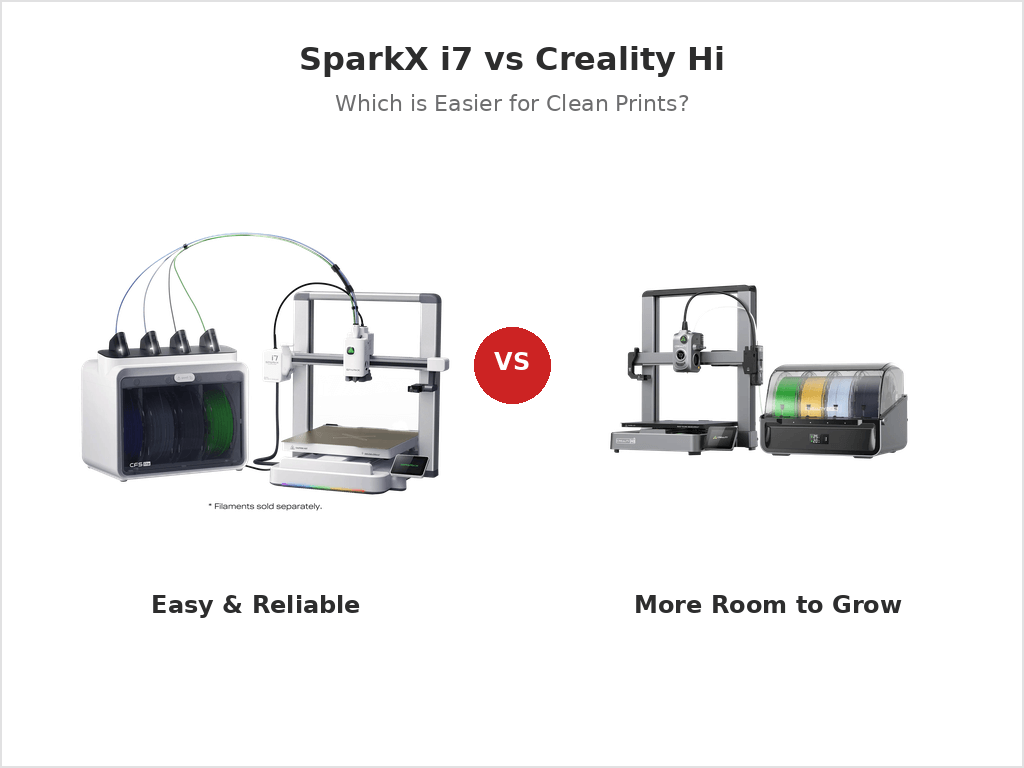
Buying a 3D printer sounds fun, until you actually try to choose one.
If you’re looking at SparkX i7 and Creality Hi, chances are you’re already feeling that tension. They’re both made by Creality. They both promise fast, clean prints. And on paper, they look close enough to make the decision feel harder than it should be.
The real problem isn’t specs.
It’s figuring out which printer fits the way you actually print.
This article is written for people, not spec sheets. We’ll start simple, clear up why these two printers exist at the same time, and then narrow the choice down in a way that actually feels confident.

Quick Pick

If your main goal is easy, clean prints with less thinking, here’s the short answer:
- Choose SparkX i7 if you want a smoother, lower-stress experience and don’t plan to build a complex multi-color setup.
- Choose Creality Hi if you want more room to grow—especially if bigger prints or future expansion matter to you.
Another way to think about it:
SparkX i7 is about reducing friction today. Creality Hi is about keeping options open tomorrow.
If that already makes the choice clear, you’re done.
If not, the next step is understanding why these two printers feel so close—but aren’t meant for the same type of buyer.


Before We Compare Specs, Let’s Talk About You
Most people compare printers by looking at numbers first.
That’s usually a mistake.
Before specs matter, your printing habits matter more. Take a moment and answer these honestly:
- Is this your first 3D printer, or an upgrade? First-time users usually value fewer problems more than extra features.
- What do you actually print most of the time? Small desk items and toys feel very different from large functional parts.
- Do you really plan to use multi-color often—or does it just sound cool? Many buyers love the idea but rarely use it after the first few weeks.
- What annoys you more: learning settings, or feeling limited later? This one question alone decides the right printer for many people.
Keep your answers in mind.
They explain why Creality didn’t just make “one perfect printer” and call it a day.
You may also like
2025: The Year Consumer FDM Entered the Multi-Material Era
3D Printing Filament Guide 2025: PLA, TPU, PETG, ABS, ASA Compared
8 Best Creality K2 Pro Accessories(2025 Guide)
Anker vs. Bambu Lab: Why the King of E-Commerce Lost the 3D Printing War
Bambu Lab H2C Review: How the Vortek Hotend Switching System Changes Multi-Color FDM Forever
Why Creality Sells Both SparkX i7 and Creality Hi
When two printers from the same brand seem this close, it’s fair to wonder: “Why not just combine them into one model?”
The answer is simple: Creality is serving two different types of users, not trying to confuse you.
SparkX i7: Made to Feel Easy from Day One
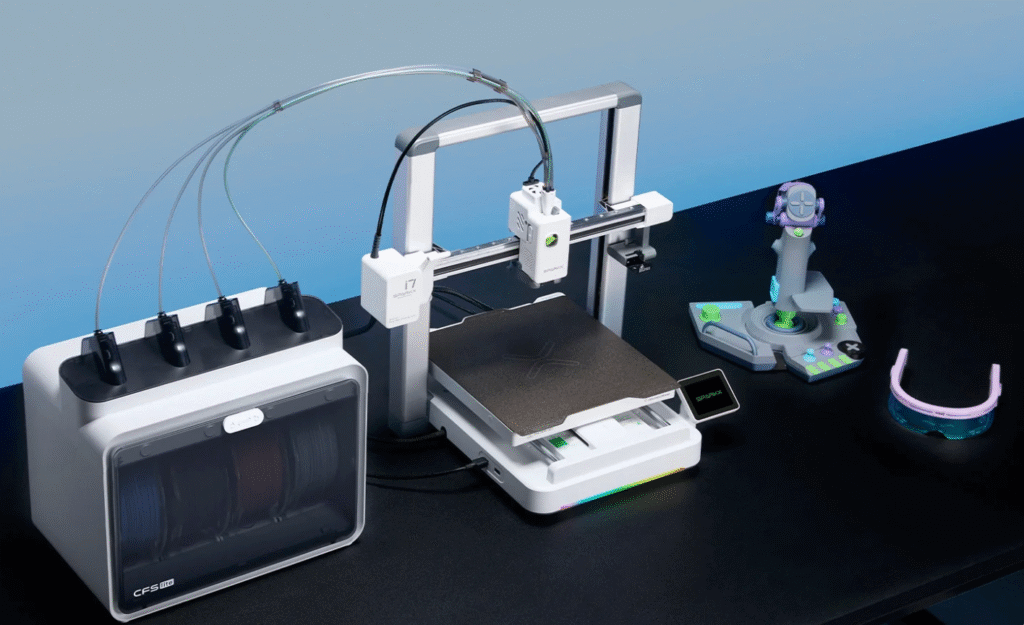
The SparkX i7 is designed for people who want to:
- start printing quickly,
- get clean results without digging into settings,
- and avoid the feeling that they’ve signed up for a second job.
It’s the kind of printer that lowers decision stress.
You don’t need a long-term plan—you just want it to work.
Creality Hi: Built for the Longer Game

The Creality Hi, on the other hand, is for users who:
- print larger or more functional parts,
- expect their needs to grow,
- and care about having more headroom over time.
It’s less about the fastest win, and more about not feeling boxed in later.
The Real Trade-Off
Here’s the honest part many comparisons skip:
- Buy too simple, and you might outgrow it.
- Buy too advanced, and you might not enjoy using it.
Neither choice is wrong.
But choosing the wrong fit is how people end up frustrated.
Now that the roles are clear, the real question becomes simple:
Which differences actually change your day-to-day experience?
That’s where we go next.
You may also like
The 3 Differences That Actually Matter

Most “vs” articles dump a big spec table and call it a day. But when people regret a printer, it’s rarely because of one number.
It’s usually because of one of these three things:
- They thought they’d use multi-color more than they really do.
- They didn’t realize size limits would annoy them later.
- The day-to-day workflow felt harder than they expected.
Let’s keep it simple and talk about the real-life difference.
1) Color Plan: Do You Truly Need Multi-Color?
Multi-color printing is fun. It’s also the easiest feature to overbuy.
So start with this question:
What do you want multi-color for?
Here are the most common “real” reasons:
- Logos and labels (two or three colors)
- Toys and gifts (a few bright accents)
- Small signs (letters in a different color)
And here’s what surprises many beginners:
- A lot of prints look amazing with one color + good design.
- Multi-color can add extra time, more waste, and more things to manage.
How this affects your choice:
- If you want multi-color sometimes, but you want the process to stay simple, SparkX i7 usually matches that mindset better.
- If multi-color is a big part of why you’re buying a new printer—and you might want to go further with it later—Creality Hi is the safer long-term bet.
A quick “honesty check” that helps:
- If you can already name 5 things you’ll print in multi-color next month, you’ll probably use it.
- If you can’t, you might be buying the idea of it, not the habit.


2) Size Regret: Will You Wish You Had More Room?
This is the regret that shows up later, not on day one.
At first, almost everyone prints small stuff:
- a phone stand
- a mini figure
- a cable clip
- a desk hook
Those fit on almost any printer.
Then one day you want to print something bigger:
- a tool holder that actually holds tools
- a storage bin that fits a drawer
- a bigger cosplay piece
- a strong bracket for something at home
That’s when size starts to matter—especially height.
How this affects your choice:
- If you already know you like larger functional prints, or you hate splitting models into parts, Creality Hi is often the safer choice.
- If your prints are mostly small-to-medium, and you care more about an easy experience than extra headroom, SparkX i7 can make more sense.
Simple rule:
If you regularly print objects taller than a soda can, don’t ignore height.


3) Daily Use: Which One Feels Easier to Live With?
This is the part most comparisons skip, but it matters the most.
When you own a 3D printer, you don’t interact with “max speed.”
You interact with small daily moments like:
- loading filament
- starting a print
- checking the first layer
- swapping spools
- cleaning up after a long job
- dealing with a failed print
A printer can be “powerful” and still feel annoying if the workflow is fussy.
How this affects your choice:
- If you want the printer to feel like an appliance—something you can use on a busy day—SparkX i7 tends to fit that expectation.
- If you enjoy learning, tweaking, and building a setup that can do more over time, Creality Hi can feel more worth it.
A quick test:
- If you hate troubleshooting and just want reliable output, lean i7.
- If you don’t mind a learning curve in exchange for flexibility, lean Hi.
You may also like
Blue Laser vs NIR Scanning on the Creality Sermoon P1: Which Mode Should You Use?
22 vs 7 vs 1 Laser Line Modes on the Creality Sermoon P1: What They Mean (and Which to Use)
Creality Sermoon P1 3D Scanner: Specs, Price, Release Date, and Who It’s For (Updated 2026)
SparkX i7 vs Creality Hi: Which One Should You Buy If You Want Easy, Clean Prints?
Creality SparkX i7 vs Bambu Lab A1 (2026): Multicolor, Price & Buy Guide
Side-by-Side Specs
Now that we’ve talked about fit, we can look at specs—but only the ones that actually change your day-to-day printing.
Here’s the clean, decision-grade comparison:
| What matters | SparkX i7 | Creality Hi / Hi Combo |
|---|---|---|
| Build volume (XYZ) | 260 × 260 × 255 mm | 260 × 260 × 300 mm |
| Max speed (marketing max) | ≤ 500 mm/s | ≤ 500 mm/s |
| Max acceleration | ≤ 10,000 mm/s² | ≤ 12,000 mm/s² |
| Nozzle temp (max) | (not always shown on every i7 page; check official spec block) | ≤ 300°C |
| Bed temp (max) | (not always shown on every i7 page; check official spec block) | ≤ 100°C |
| Supported filaments (official list) | PLA / PLA-Silk / PETG / TPU / PLA-CF | Hyper-PLA / PLA / PETG / ABS / PLA-CF |
What those numbers mean in real life
1) The biggest spec difference is height (Z).

Both printers give you the same 260 × 260 “floor.” The Hi gives you 45 mm more height (300 vs 255).
That doesn’t sound huge… until you print something tall like a tool holder, a desk organizer, or a cosplay piece.
If you hate cutting models into parts and gluing them later, that extra height matters.
2) Don’t buy based on “max speed.”
Both list up to 500 mm/s. But your real print speed depends on the model shape, filament, and settings. Think of “max speed” like a car’s top speed—it’s not how you drive every day.
3) Acceleration affects how fast prints feel, especially on small parts.
Hi lists a higher max acceleration (12,000 vs 10,000).
In practice: it can help with snappy moves on small prints, but it won’t magically fix bad settings or poor filament.
4) Filament support tells you the “official comfort zone.”
Both cover the basics (PLA, PETG) and even list CF blends. Hi’s support list explicitly includes ABS on the support/spec page.
If you care about ABS a lot, that’s a small “confidence” point for Hi.
You may also like
Best Budget 3D Printers Under $300 & $500 in 2025-2026
Best 3D Printers for Kids, Students & STEM Projects (2025 Guide)
Real-Life Scenarios: Which One Fits Your Life?
This is the part that saves you from buyer’s remorse. Read the scenario that feels most like you.
Scenario A: “This is my first 3D printer. I just want it to work.”
My pick: SparkX i7
Why:
- You’re not trying to “build a whole system.” You’re trying to get clean prints fast.
- New users usually quit when the printer feels like a project.
What to do so it stays easy:
- Start with PLA for your first week.
- Print a simple test model first (small and quick).
- Don’t chase max speed. Focus on a clean first layer.
If you’re a student, a parent, or just busy, this is usually the safest choice.
Scenario B: “I already have a printer. I want a real upgrade.”
My pick: Creality Hi (most of the time)
Why:
- Upgraders usually care about more capability, not just “it prints.”
- You’re more likely to notice limits like build height, workflow, and future expansion.
When i7 still makes sense:
- If your upgrade goal is mainly simpler daily printing, not bigger parts or expansion.
A good way to decide:
- If your old printer already prints small things fine, and you want “more room,” lean Hi.
- If you want “less fuss,” lean i7.
Scenario C: “I want multi-color, but I hate trouble.”
My pick: SparkX i7 (for most people who say this)
Honest truth:
Multi-color is never “zero effort.” It adds:
- more spool management,
- more time,
- more waste.
So if you already know you hate troubleshooting, you don’t want the biggest multi-color dream. You want the simplest multi-color you’ll actually use.
When Hi is better:
- If you’re serious about multi-color as a main hobby goal, and you want a bigger ecosystem to grow into.
Scenario D: “I print bigger functional parts.”
My pick: Creality Hi
Why:
- Bigger prints are where build height starts to matter.
- You’ll also care more about stability over long prints, and having “headroom” for future needs.
Quick gut check:
If your prints are often “useful home parts,” not “small desk stuff,” Hi usually feels better long-term.
Scenario E: “I’m price-sensitive, and I want the best value.”
My pick: depends on the gap (but here’s the rule)
Think about value like this:
- If the price difference is small, choose based on your future:
- Want to grow? Hi
- Want easy now? i7
- If the price difference is big, don’t force the “better model.”
- A cheaper printer that you actually use is better than an expensive one you avoid.
Pricing Truth: When Each One Is “Worth It”
Let’s talk money the honest way.
A 3D printer price tag is not just “the printer.” It’s also the system you’re buying into—especially if you care about multi-color.
1) Start with the real price question: “What do I need on day one?”
With SparkX i7, Creality sells a clear bundle idea: the i7 Color Combo includes the printer + CFS Lite, and Creality’s own store has shown an early price of $339 (with a higher crossed-out price shown on-page).
If you want multi-color right away, bundles like that can be a better deal than “buy printer now, add color later.”
2) Understand the hidden cost: multi-color is a “whole setup,” not one button
If your plan is “I want more and more colors later,” you should look at the ecosystem:
- Creality CFS is marketed as supporting up to 16 colors when you connect multiple CFS units (up to four).
- CFS Lite (for i7) has 4 slots, and Creality’s own spec block says multiple CFS Lite units are not supported.

So the pricing logic becomes simple:
- If you only want 4 colors and want it to stay simple → i7’s Color Combo often makes sense.
- If you want a path where “4 colors today could become more later” → Hi + CFS is the cleaner long-term story.

3) Don’t overpay for “maybe”
Here’s the mistake I see all the time:
People pay extra for the “future plan,” then never use it.
A quick rule that keeps you safe:
- If you can name five multi-color prints you will actually make next month, pay for color now.
- If you can’t, buy the printer for easy printing first, then upgrade only when the habit is real.
4) Price moves. Your decision shouldn’t.
Retail prices change by region and promos. Reviews have even described the Hi as a very budget-friendly option at the time of review.
So don’t get trapped by a single number. Use this instead:
Pay for i7 when you want “easy wins.” Pay for Hi when you want “room to grow.”
What People Get Wrong (So You Don’t Waste Money)
Most bad purchases happen for simple reasons—not because the printer is “bad.”
Here are the biggest mistakes I see, and how to avoid them.
Mistake 1: “I’m definitely going to use multi-color all the time.”
What usually happens:
- You print a few cool multi-color things…
- then you go back to simple, single-color prints because they’re faster and easier.
A better way to decide:
- If you already have real projects that need color (logos, signs, gifts), go for it.
- If you just think it sounds fun, start simple. You can still have a great time printing.
Mistake 2: “The faster printer is always better.”
Speed numbers look exciting, but speed is only helpful when:
- your first layer is solid,
- your filament is dry,
- your settings are stable.
What to do instead:
- Aim for clean prints, not “fast prints.”
- Once prints look good, then you can speed up.
Mistake 3: “I’ll just upgrade later. Easy.”
Sometimes upgrades are easy. Sometimes they’re not.
What people forget:
- Upgrades can mean extra cost, extra setup, extra learning.
- If you already know you’ll want more room or more expansion, buying the right base printer now can save money later.
Simple rule:
- If you hate re-buying things, choose the one with more headroom.
- If you hate complicated setups, choose the one that keeps life simple.
Mistake 4: “Bigger is always better.”
A bigger printer can be great—but it also means:
- bigger prints take longer,
- failures waste more time and material,
- you’ll need more space in your room.
If you mostly print small stuff, you don’t need a “bigger” mindset.
You need a “prints succeed” mindset.
Mistake 5: “If it’s from the same brand, it’s basically the same printer.”
This is the sneaky one.
Creality isn’t making two versions to confuse you.
They’re offering two different paths:
- i7 = easier daily life
- Hi = more growth room
Once you pick the right path, the choice becomes simple.
FAQ
Can SparkX i7 add more colors later?
It depends on what kind of “later” you mean. If you want basic color, you’re fine. If you want a big “expand forever” color setup, that’s usually the reason people choose Hi instead.
Is Creality Hi better for beginners?
It can be—but only if you’re the kind of beginner who likes learning and wants room to grow. If you want the lowest-stress start, i7 usually fits better.
Which one is better for PLA?
Both are great for PLA. Your success will mostly depend on setup, first layer, and using decent filament.
Which one is better for PETG?
Both can print PETG well if you do the basics:
- slow down a little
- use a clean build plate
- keep cooling moderate (not max)
- dry your PETG if it’s stringy
Pick i7 if you want the simplest “PETG that just works” routine.
Pick Hi if you often print bigger PETG parts and want more headroom.
What about TPU (flexible filament)?
TPU is less about “which printer is stronger” and more about how patient you are.
TPU usually needs:
- slower speeds
- careful loading
- a calm first layer
If you’re new and TPU is only “sometimes,” either can work—but don’t make TPU your first-week goal. Start with PLA, get confident, then try TPU.
What about ABS (or other hotter, smellier plastics)?
ABS is doable, but it’s pickier:
- it likes stable heat
- it warps more easily
- it usually needs an enclosure or a very calm room
If ABS is a main goal, don’t guess—check the official spec page for nozzle/bed temps and consider an enclosure plan. The “best ABS printer” is often “the one you can keep warm and stable.”
Which one needs less maintenance?
In real life, “maintenance” usually means:
- keeping the nozzle clean
- keeping the bed clean
- loading filament smoothly
- not letting filament get wet
So the bigger question is: Which workflow will you stick with?
If you want fewer moving parts in your routine, i7 tends to feel simpler.
If you’re okay learning a bit more because you want more room to grow, Hi can be worth it.
Which one is quieter?
Noise depends a lot on:
- where you place it (desk vs solid table)
- speed settings
- whether the printer vibrates
Instead of chasing “the quietest,” do this:
- place it on a sturdy surface
- use a vibration pad if needed
- don’t run max speed at night
That makes a bigger difference than most people expect.
Which one is better for school / home use?
For most families and students: SparkX i7
Because the best school printer is the one that:
- starts easily
- finishes prints reliably
- doesn’t turn into a weekend troubleshooting project
Choose Hi if the student is the “builder type” and wants to grow into bigger projects or a more expandable setup.
If I could only buy one today, what’s the safest pick?
If you want the safest pick for easy, clean printing with less stress: SparkX i7.
If you already know you’ll print bigger parts, or you care about long-term expansion and headroom: Creality Hi.
Bottom Line: My Honest Recommendation
Here’s the clean takeaway:
- Buy SparkX i7 if you want an easier daily life and you mainly want reliable, good-looking prints without overthinking it.
- Buy Creality Hi if you want more room to grow—especially for bigger parts or a more expandable path over time.
And if you’re still stuck, use this final rule:
If you hate troubleshooting, pick i7. If you hate feeling limited later, pick Hi.


Leave a Reply