

Last updated: March 2026 | Applies to: Bambu X1C, P1S, A1, A1 Mini with AMS
Table of Contents
What Should You Do With Bambu AMS Filament Poo?
| Your Monthly Poo Volume | Best Option |
|---|---|
| Any volume | Cut your waste first. Free Bambu Studio settings can reduce poo by up to 45% before you print a single layer. |
| Less than 500g/month | Throw it away. No recycling option is worth the effort at this volume. |
| 500g – 2kg/month | Mail it to Printerior or donate to a local makerspace. Free, zero equipment needed. |
| 2kg+/month | Start saving it now. The Creality M1 & R1 is built exactly for this volume. Run your numbers first. |
If you run a Bambu printer with AMS, you know the drill.
Every color change produces a purge block. Every multi-color print leaves a pile of mixed-color waste sitting on your build plate. You peel it off, look at it for a second, and throw it in the trash.
That pile adds up faster than most people realize.
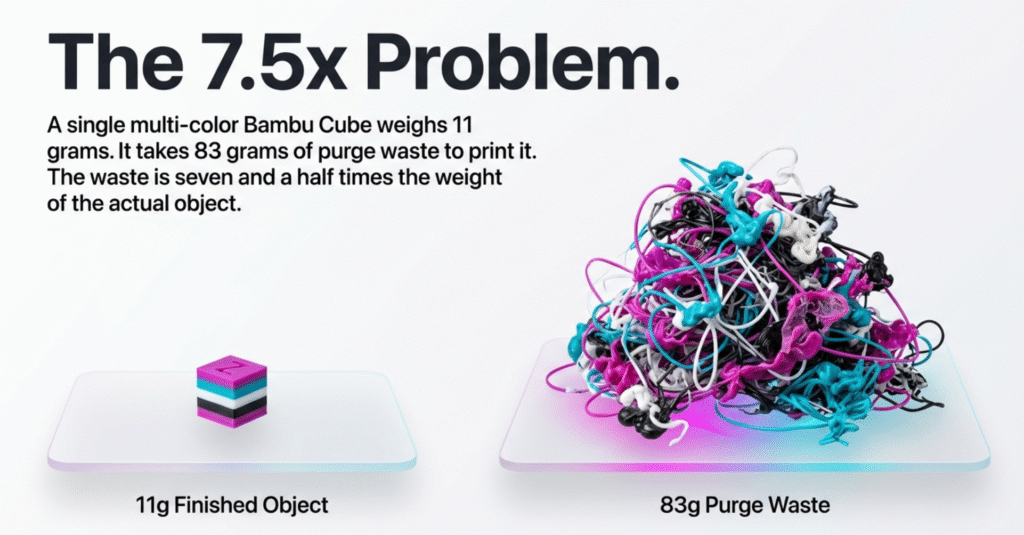
Bambu’s own documentation gives a stark example: a single Bambu Cube, printed in multiple colors, generates 83 grams of purge waste to produce an 11-gram finished object. The waste is seven and a half times the weight of the thing you actually wanted.
So this article today will cover everything — how to cut that number down before it happens, and what to do with whatever’s left.
How Much Filament Poo Does a Bambu AMS Actually Produce?
Most Bambu users underestimate this number.
| Print Type | Estimated Poo Per Job | Jobs Per Week | Monthly Waste |
|---|---|---|---|
| 2-color print (simple) | ~20–40g | 3x | ~240–480g |
| 4-color print (moderate) | ~60–100g | 3x | ~720g–1.2kg |
| Multi-color (complex, many changes) | ~150g+ | 3x | ~1.8kg+ |
| Mixed usage (average AMS user) | ~50–80g | 4x | ~800g–1.3kg |
These are estimates based on typical purge volumes. Your actual number depends on how many colors you use, how aggressively you’ve tuned your purge settings in Bambu Studio, and which printer model you’re running.
The point isn’t precision. Most active AMS users are sitting somewhere between 500g and 2kg of waste per month without realizing it. At the low end, that’s 6kg of plastic per year going in the trash. At the high end, it’s over 20kg.
Here’s what you can actually do about it.
Option 1: Cut Bambu Filament Poo at the Source (Free Bambu Studio Settings)
Do this first, before anything else. It costs nothing, takes about ten minutes, and permanently reduces how much poo you generate on every future print.
Here’s what actually moves the needle.
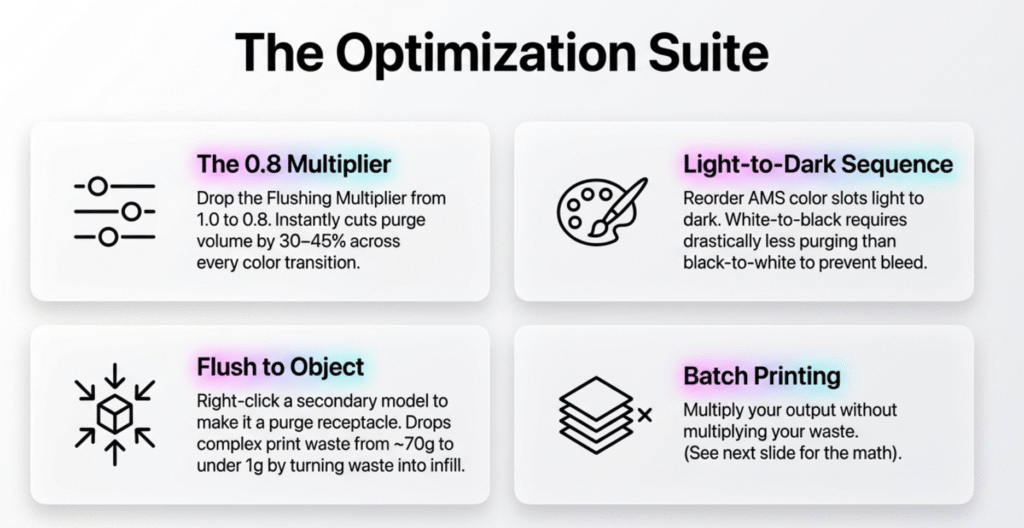
1. Lower the Flushing Multiplier
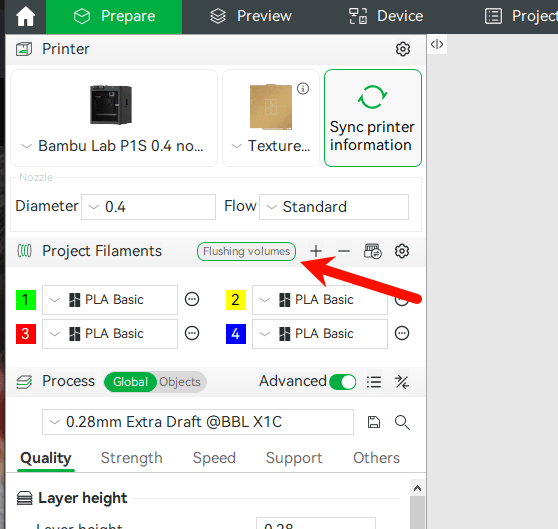
In Bambu Studio, look for the Flushing Volumes button in the Project Filaments panel on the left sidebar. Click it. You’ll see a matrix showing purge volumes for every color-to-color transition, plus a Multiplier field at the top.
The default multiplier is 1.0. Bambu sets it high to guarantee clean color changes on every printer, every time. Your specific setup probably needs less.
Start at 0.8 — that’s 20% less purge across every transition. Run a short test print. If you see color bleed, go back to 0.9. Most users land at 0.7–0.8 without visible quality loss on standard PLA.
That’s a 30–45% reduction in purge volume per color change, backed by Bambu’s own documentation and community testing.
2. Color Ordering: Light to Dark
Sequence your AMS colors light to dark within the print. A white-to-black transition needs far less purge than black-to-white, because a tiny trace of white in black is invisible while even a small trace of black in white ruins the layer.
Reordering your color slots costs nothing and consistently reduces purge on color-heavy jobs.
3. Flush Into Infill vs. Flush Into Object
These are two separate features. They work differently. Both help.
Flush Into Infill: Found under Process → Others tab.
Directs some purge material into your print’s infill instead of a separate waste block. Reduces poo modestly on everyday prints — good to enable as a baseline.
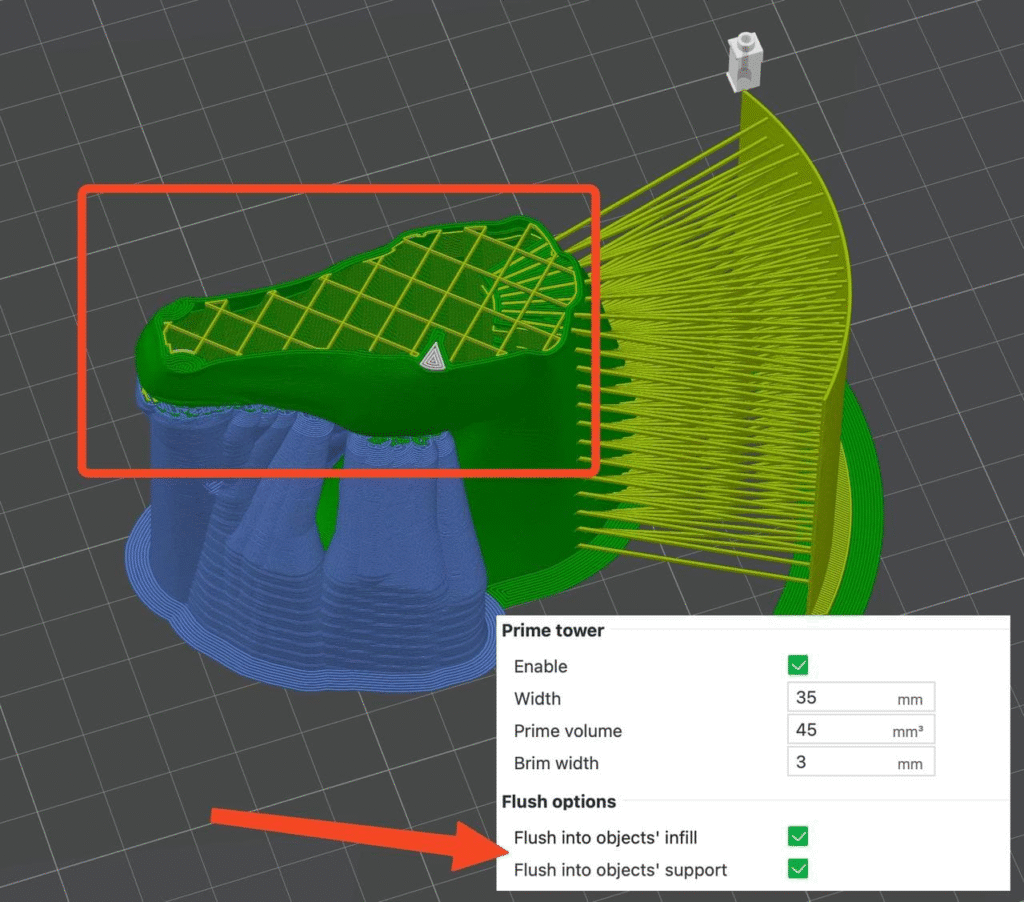
Flush Into Object (the bigger win): Right-click any model on your build plate → select “Flush into this object.”
The selected model becomes a purge receptacle. According to Bambu’s own data, this drops purge waste from ~70g down to under a gram on complex prints — because the “waste” becomes infill inside a secondary part instead of a block you throw away. Works best when printing multiple identical objects, or when you have a spare simple part on the same plate.
Use both if you can. They stack.
4. Batch Printing: The Most Overlooked Trick
This is the one most people miss entirely.
Purge waste per color change is fixed — it doesn’t matter if you’re printing one object or ten on the same plate. Bambu’s example says it all: one Bambu Cube = 83g of waste + 11g of cube. Nine Bambu Cubes on the same plate = the same 83g of waste + 99g of cubes.
That means nine times the output for the same poo.
If you regularly print the same multicolor model — keychains, figurines, gifts, batch orders — load the plate with as many copies as it fits. The waste percentage per unit drops dramatically. It doesn’t eliminate poo, but it makes every gram of waste you generate count for a lot more.
Option 2: Mail Your Bambu Filament Poo to Printerior (Free Program)
After you’ve cut your poo volume with Option 1, here’s where to send what’s left.
Printerior is a US-based filament manufacturer in St. Louis that accepts 3D printing waste — including Bambu AMS purge blocks — and turns it into new filament. The program is free.
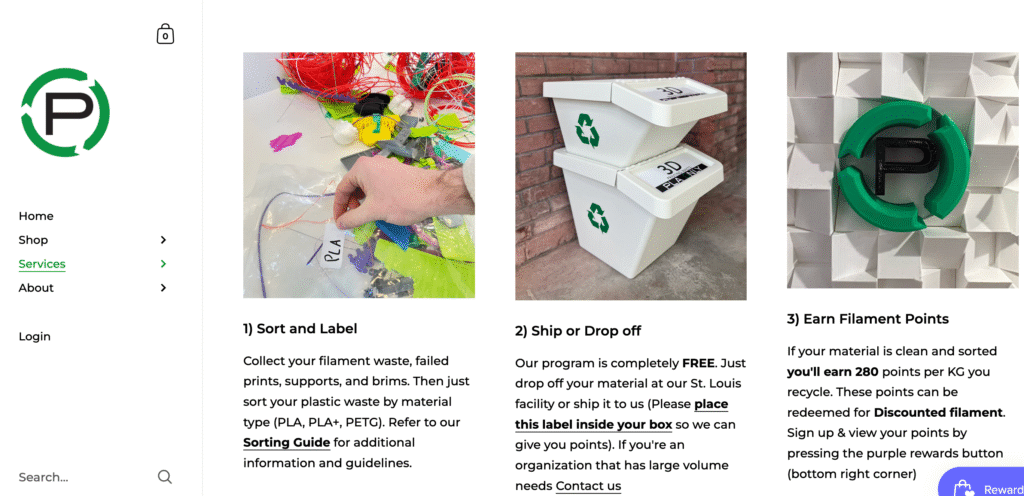
Two ways to participate:
Ship it yourself: Sort your waste, box it up, and ship to their St. Louis facility. You pay shipping. A USPS flat-rate box runs about $10–15. You earn 280 points per kg of accepted waste, redeemable for discounts on new filament.
Pre-paid recycling bin: Printerior sells dedicated recycling bins with a prepaid return shipping label included. Order the bin, fill it up, slap their label on it, drop it at USPS. No guessing on postage or packaging.
What Printerior accepts:
- PLA and PETG — sorted separately, never mixed
- Clean material only. No adhesives, tape, or bed residue.
- ABS and TPU are not accepted.
The honest reality check: Batch your waste. Sending 500g at a time isn’t worth it financially. Save up 2–3kg before you ship and the per-kg cost drops to something reasonable.
Printerior is US-only. No international shipping currently.
Option 3: Donate Bambu Filament Poo to a Local Makerspace or School
This works better than most people expect — if you approach it right.
Makerspaces and school fab labs go through a lot of filament. Many run tight budgets. Clean, sorted PLA waste is genuinely useful to them for student projects where surface quality doesn’t matter.
How to find a makerspace near you:
- Search “makerspace near me” or “fab lab near me” on Google Maps
- Check hackerspaces.org — community-maintained directory of spaces worldwide
- Local libraries — many now have 3D printing setups
- Community colleges and high schools with engineering programs
What to say:
Don’t just show up with a bag of plastic. Send a quick message first:
“Hi, I run a Bambu AMS printer and generate clean, sorted PLA purge waste every month. I’m looking for somewhere to donate it rather than throw it away. Do you accept filament waste donations?”
Short and specific. Most spaces will say yes or point you somewhere that will.
What they’ll accept:
- Clean PLA and PETG sorted by material: almost always yes
- Mixed colors of the same material: usually fine
- Mixed materials (PLA + PETG together): almost always no
- ABS, TPU, or specialty filaments: ask first
The honest limitation: Geography determines everything here. City dwellers will find somewhere in minutes. Rural users might not have a reasonable option nearby.
Option 4: Start Saving Bambu Filament Poo Now for the Creality M1 & R1
This option makes sense if you’re generating serious volume and want a permanent in-house solution.
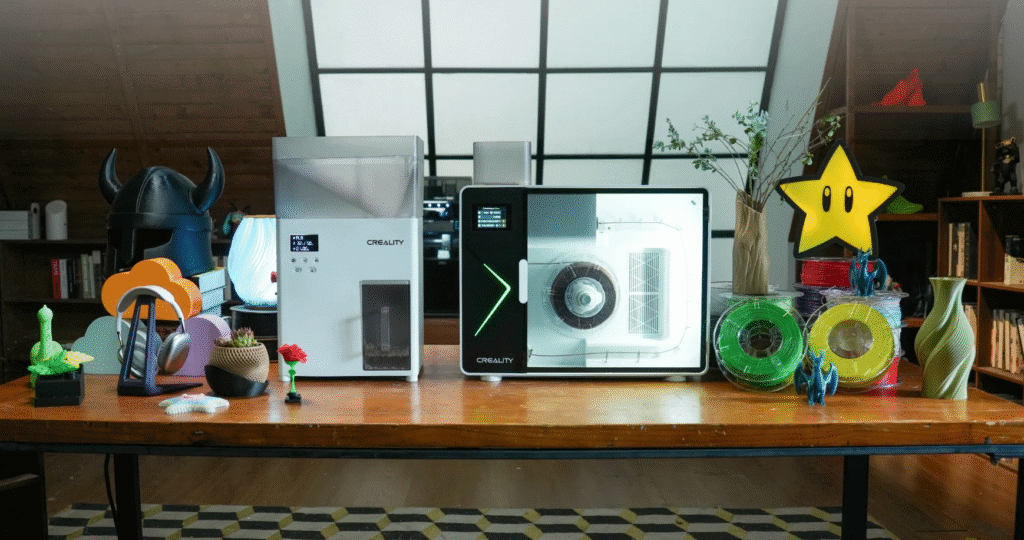
The Creality M1 & R1 is a desktop system designed specifically to close this loop. The R1 shreds purge blocks and failed prints into uniform pellets. The M1 extrudes those pellets back into usable filament. It’s the first product from a major manufacturer built exactly for the waste pile sitting next to your Bambu printer.
The Indiegogo campaign is live now. VIP bundle price is $899.
Should you save your poo for it?
Two things determine whether this makes sense for you.
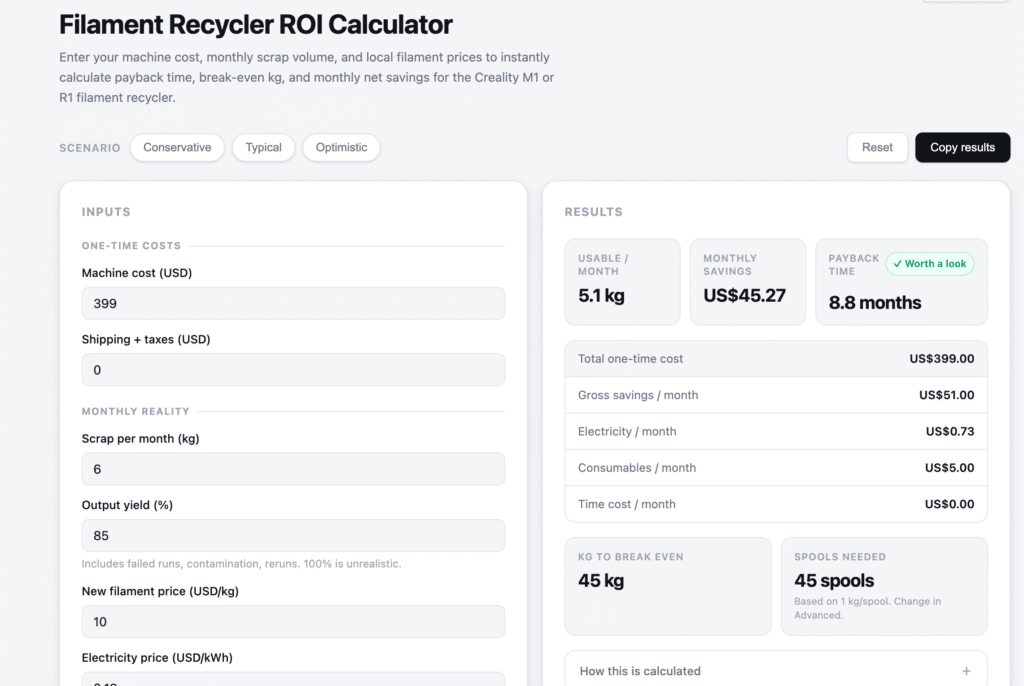
Your volume. The M1 & R1 makes financial sense at 2kg+ of waste per month. Below that, the ROI math gets difficult. [Check: Is a Filament Recycler Worth It? (M1/R1 ROI Calculator) or Filament Recycler ROI Calculator]
Your material mix. AMS purge blocks are almost always mixed colors of the same material — usually PLA. That’s ideal feedstock. Single-material mixed-color waste is far easier to process than contaminated scraps.
What to save and how:
Store purge blocks in a sealed, labeled container sorted by material. PLA in one container, PETG in another. Keep them dry — moisture-contaminated waste produces worse recycled filament. Don’t bother saving TPU purge waste; flexible materials degrade faster and recycle poorly through this system.
Creality M1 & R1 specs, confirmed pricing, and Q2 2026 shipping updates — live tracker
Option 5: Just Throw It Away — And Why That’s Sometimes the Right Call
Nobody wants to say this. I will.
If you’re generating less than 500g of filament poo per month, no recycling option on this list is worth your time. The math doesn’t work. The environmental benefit of recycling a few hundred grams of PLA per month is real but marginal — a rounding error compared to reducing your waste at the source.
Disposal by material:
PLA: Technically biodegradable but only under industrial composting conditions, not in a home bin or landfill. Small quantities are fine to throw in general waste. It won’t leach toxic chemicals.
PETG: Not accepted by standard curbside recycling. Trash is fine for small volumes.
ABS: Contains styrene. Don’t burn it or melt it in unventilated spaces. Small quantities in general waste are acceptable.
TPU: Trash only. No consumer recycling programs accept it.
Optimize your purge settings first. Print smarter with batch printing. What’s left after that is usually small enough that disposal guilt isn’t warranted.


FAQ: Bambu AMS Filament Poo
Q: What exactly is Bambu AMS filament poo?
Bambu AMS filament poo is the purged plastic waste created during color changes on Bambu Lab printers using an AMS (Automatic Material System). Each filament switch causes the printer to flush residual material from the previous color through the nozzle. That flushed plastic — ejected into a waste container at the back of the printer — is what the community calls “poo.” On a complex multi-color print, the poo can outweigh the finished part.
Q: Can you recycle Bambu AMS filament poo at home?
Not with a single machine. AMS poo is mixed-color plastic, so melting it produces a brownish output. To recycle it into usable filament you need both a shredder (to grind purge blocks into pellets) and a filament extruder (to re-form those pellets into 1.75mm filament). The Creality M1 & R1 (shipping Q2 2026) is the first consumer product designed specifically for this two-step process. Before it ships, Printerior in St. Louis is the most accessible US mail-in option.
Q: Does Bambu filament poo go in regular recycling?
No. PLA and PETG purge waste is not accepted by standard curbside recycling programs. PLA is technically compostable but only under industrial conditions — a home bin won’t break it down. For small volumes, general waste is acceptable. For larger volumes, Printerior’s mail-in program is the most practical US option.
Q: How do you reduce Bambu AMS filament poo?
Four settings in Bambu Studio make a real difference: (1) Lower the Flushing Multiplier to 0.8 in the Flushing Volumes panel — cuts purge 30–45% immediately. (2) Sequence colors light-to-dark to minimize transition purge volume. (3) Enable “Flush Into Object” by right-clicking a model — this turns waste into infill inside a secondary part, dropping poo near zero on multi-object prints. (4) Batch identical multicolor models on the same plate — same waste, multiple outputs.
Q: Is Printerior’s 3D print recycling program actually free?
The program itself is free — Printerior accepts clean, sorted PLA and PETG at no charge. Your cost is either self-paid shipping to their St. Louis facility, or the purchase price of their pre-paid recycling bin (which includes a return label). You earn 280 points per kg of accepted material, redeemable for filament discounts.
Q: How much filament poo does a Bambu AMS produce per month?
It varies significantly by how you print. A light AMS user doing a few 2-color prints per week generates roughly 240–500g per month. A heavy user running complex multi-color jobs can easily exceed 1.5–2kg per month. Bambu’s own documentation shows that a single multi-color Bambu Cube generates 83g of purge waste to produce an 11-gram object — more waste than finished part.
→ [Is the Creality M1 & R1 worth $899? Full Indiegogo cost breakdown for Bambu AMS users]






Leave a Reply