Table of Contents
Overview – Two Flagships, Two Eras
When Bambu Lab launched the X1 Carbon, it instantly set a new benchmark for speed, intelligence, and industrial-grade precision in consumer 3D printing. It was sleek, quiet, and fast—an “Apple moment” for the hobbyist market.
But in 2025, the game has changed. The new P2S isn’t just another compact model; it’s a sign that Bambu is shifting from premium exclusivity toward broader accessibility.
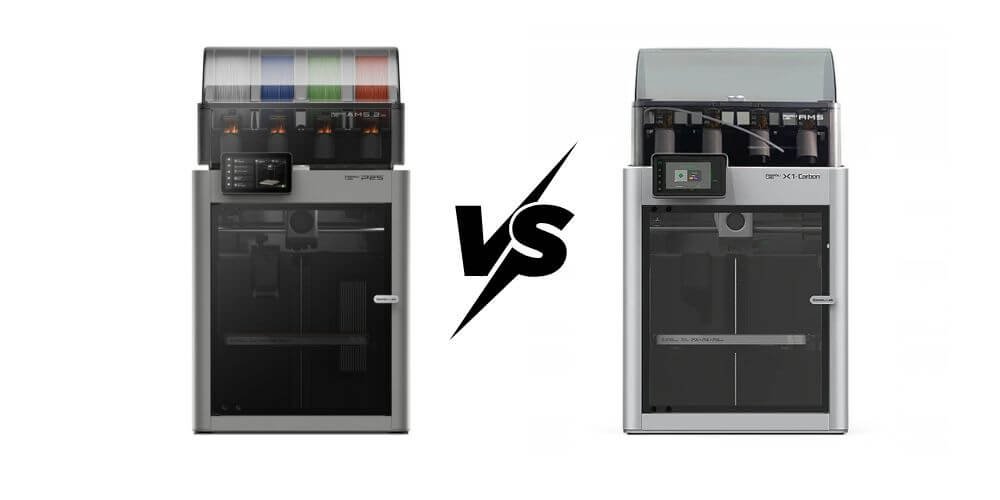
At first glance, both machines share a lot:
Enclosed frames, AI-assisted monitoring, multi-material capability through the AMS, and an almost identical printing engine.
The key difference lies in who they’re built for.
The X1C remains a flagship for professionals—offering dual cameras, hardened nozzles, and a more robust internal frame for demanding materials.
Meanwhile, the P2S refines the experience for everyday creators: quieter operation, simplified maintenance, and a price tag that’s nearly 40% lower.
In short, the X1C represents the “first era” of Bambu’s dominance—where innovation justified the premium. The P2S signals the next one, where that same performance becomes accessible to more users.
Bambu Lab P2S vs X1 Carbon — Specs (2025)
| Category | Bambu Lab P2S | Bambu Lab X1 Carbon |
|---|---|---|
| Build volume | 256 × 256 × 256 mm. | 256 × 256 × 256 mm. |
| Machine footprint | 392 × 406 × 478 mm. | 389 × 389 × 457 mm. |
| Weight | 14.9 kg. | 14.13 kg. |
| Motion system | CoreXY, enclosed chassis. | CoreXY, fully enclosed; prosumer-grade frame. |
| Nozzle (default) | 0.4 mm hardened steel; quick-swap. | 0.4 mm hardened steel (0.2–0.8 mm supported). |
| Max nozzle temp | 300 °C. | 300 °C. |
| Max bed temp | 110 °C. | 110 °C @220V, 120 °C @110V. |
| Materials (official/typical) | PLA/TPU/ABS/PC (up to 300 °C). | PLA, PETG, TPU, ABS, ASA, PVA, PET; ideal for PA/PC and CF/GF-reinforced. |
| Sensing / cameras | AI failure detection with upgraded 1080p camera; no LiDAR. | Chamber camera + LiDAR-assisted features on X1C platform. |
| Bed leveling & calibration | Auto bed leveling; vibration compensation; auto flow dynamics. | Dual auto bed leveling; vibration compensation. |
| Connectivity & UI | Wi-Fi / Bluetooth / USB; 5-inch touch screen. | Touch screen; standard X1C connectivity (Wi-Fi etc.). |
| AMS / multi-material | Compatible with AMS 2 / AMS 2 Pro; P2S Combo bundles AMS 2 Pro. | Compatible with AMS (including AMS 2 Pro). |
| Indicative pricing (launch/review time) | $549 (standalone) / $799 (Combo with AMS 2 Pro). | Commonly ~$1,199 MSRP; frequent promos vary (e.g., combo deals). |
Design and Build Quality – Compact vs Premium
Both the Bambu Lab P2S and X1 Carbon look unmistakably “Bambulab” — clean lines, enclosed structure, and that minimalist industrial flair.
Yet once you start printing, the differences in their build quality and engineering philosophy become clear.
The X1C was built like a tank.
Its CNC-machined aluminum frame, reinforced motion rails, and dual-camera monitoring system give it the feel of a professional studio tool.
Every part feels over-engineered for longevity. It’s the printer you’d want if you’re pushing engineering-grade filaments like PA-CF or ASA on long print cycles.
But with that strength comes weight, fan noise, and a higher price tag.
The P2S, on the other hand, carries over the same precision but in a more practical, home-friendly form.
Its new airflow redesign keeps temperature stable while reducing acoustic output by nearly 10 dB in most real-world tests. The enclosure is slightly slimmer, and maintenance points—like the nozzle swap and side-panel access—are simpler and faster.
You still get the sense of a premium build, just more approachable.
Some reviewers describe it as “the X1C, re-imagined for daily use,” and that’s not far off. The P2S trades a bit of the X1C’s brute strength for agility and convenience—a choice that makes sense for most creators.
💡 Pro Tip:
Many users mention that placing the P2S on a solid desk or vibration-dampened mat drastically improves noise and print surface finish.
Next, let’s dive deeper into performance and print quality—because design alone doesn’t tell the full story of how these two machines perform side by side.
Performance and Print Quality
When it comes to raw performance, both the Bambu Lab P2S and X1 Carbon are incredibly fast—capable of hitting speeds up to 500 mm/s with precise acceleration control.
Yet, speed alone doesn’t define how these two perform day after day. What’s impressive is how the P2S manages to deliver almost identical results with far fewer moving parts and a lower price tag.
In a 300-hour endurance test by TechRadar, the P2S maintained consistent dimensional accuracy with no layer shifts or thermal drift. Surface finish remained clean even during long PLA and PETG runs.
Meanwhile, the X1C still leads when working with abrasive or high-temp filaments like carbon-fiber nylon, thanks to its hardened hotend and slightly superior chamber temperature stability.
In side-by-side prints, differences are surprisingly subtle. Benchy test models show nearly the same detail fidelity, though the X1C edges ahead on overhangs and bridging.
The P2S, however, often produces quieter and cleaner first layers—a nod to its improved cooling path and auto-bed calibration.
On Reddit, real users echo similar sentiments:
“P2S prints every bit as good as the X1C—for less money and less noise.” – u/printinpeace
Another noted:
“After switching to the P2S, I haven’t touched my X1C except for nylon jobs.”
In practical terms, unless you regularly print engineering composites, the P2S will give you 95% of the X1C’s print quality at about 60% of the cost.
💡 Pro Tip:
Always run the P2S with Bambulab’s default “Silent Mode” when printing PLA or PETG—it keeps speed high but noticeably reduces vibration artifacts.
Smart Features and Ecosystem
If the hardware is the muscle, then Bambu’s software and AI systems are the brain—and both the P2S and X1 Carbon share the same DNA here.
They run on Bambu Studio and Bambu Handy, fully integrated with Bambu Cloud, allowing users to monitor, slice, and queue prints remotely.
But as similar as they seem on paper, subtle differences define how “smart” each machine feels in daily use.
The X1C remains the more feature-packed of the two. It comes with dual cameras—one for time-lapse capture and another for AI print failure detection.
Its active cooling algorithms and vibration compensation are slightly more advanced, helping it maintain precision even under aggressive acceleration. It also has broader material profiles built-in, especially for engineering-grade filaments.
The P2S, however, doesn’t lag behind—it simply rebalances what matters most.
It integrates the latest AI camera system, upgraded to detect spaghetti failures and surface anomalies faster than before.
Paired with the AMS 2 Pro, it handles multi-material printing with impressive reliability. It even auto-syncs filament colors in Bambu Studio, saving manual setup time that once annoyed X1C users.
Perhaps the biggest improvement lies in usability.
The P2S boots faster, connects more reliably to Wi-Fi, and has a cleaner touchscreen interface. Bambu has clearly learned from the community’s feedback: fewer steps, fewer pop-ups, and smoother handoff between software and printer.
Still, both machines are bound by the same closed ecosystem—you rely on Bambu’s firmware and cloud services. While this ensures seamless operation, it also means limited room for customization or third-party mods.
So while the X1C remains the smarter multitasker for pros, the P2S delivers 95% of that intelligence with cleaner execution and fewer frustrations. For most makers, that’s a trade worth taking.
Maintenance and Usability
When you own a 3D printer, the real test isn’t just how well it prints—it’s how easy it is to keep it printing. That’s where the P2S starts to shine over the X1 Carbon.
The X1C was built for pros who don’t mind the occasional teardown. Its reinforced gantry, hardened nozzles, and dense internal frame make it solid but slightly intimidating for casual users.
Replacing a nozzle or cleaning the extruder takes time and care, and the dual-camera layout adds a few extra calibration steps that new users sometimes find tedious.
The P2S, by contrast, feels refreshingly approachable.
Its tool-less nozzle swap system and quick-release panels mean most maintenance tasks can be done in under five minutes.
Accessing the extruder or cooling fans no longer requires removing the entire front enclosure—a quiet but important change that frequent tinkerers immediately appreciate.
On Reddit, this difference shows up repeatedly:
“With the P2S, I actually enjoy maintaining my printer. It’s quick, simple, and predictable.” – u/LayerLoft
Another long-time user added:
“The X1C always felt like a professional tool. The P2S feels like a friendly assistant.”
Usability also improves in smaller but meaningful ways. The new UI is snappier, the touchscreen gestures are smoother, and the AI camera now provides real-time progress previews.
Even the chamber door magnets have been adjusted for better ergonomics—no more loud clicks when closing the lid.
💡 Pro Tip:
Keep a soft brush and compressed air near your P2S. Cleaning the cooling ducts and AMS sensors every few weeks can extend print consistency dramatically.
In short, while the X1C remains the “engineer’s choice,” the P2S wins the everyday battle—it’s simply easier to live with.
Next, let’s talk about the one thing every buyer weighs most carefully: price and long-term value in 2025.
Price and Value in 2025
Price has always been the most decisive factor in the Bambu lineup—and in 2025, the gap between the P2S and the X1 Carbon speaks volumes about where Bambu sees its future audience.
The Bambu Lab P2S starts at $549 for the base unit, or $799 with the AMS 2 Pro Combo, making it one of the most feature-complete printers in this price class.
In comparison, the X1 Carbon still retails around $1,199–$1,249, depending on region and bundle. That’s a difference of roughly $400–$600, yet their real-world performance is closer than ever.
According to Tom’s Hardware, the P2S “delivers nearly X1C-level print quality with only minor trade-offs in material compatibility.” The site highlighted how the new chamber insulation and airflow design keep print temperatures consistent—something that used to be the X1C’s signature advantage.
Meanwhile, TechRadar’s long-term review concluded that the P2S “feels like a matured X1 platform—more approachable, more stable, and just as capable for most materials.” Their 300-hour print test recorded zero layer shifts and minimal variance in dimensional accuracy, further proving that lower cost doesn’t necessarily mean compromise.
Creative Bloq, reviewing the P2S launch, called it “a democratized flagship,” emphasizing its balance between affordability and advanced features like the AI failure detection camera and full enclosure. The publication also noted that the P2S is “clearly targeted at X1-level performance without the X1-level price.”
On YouTube, reviews from creators such as Maker’s Muse and 3DPrintSOS echoed similar takeaways:
“You’d struggle to justify the X1C now unless you’re deep into composite materials,” said Maker’s Muse.
“The P2S is Bambu’s most user-centered printer yet—95% of the performance, half the anxiety,” summarized 3DPrintSOS.
Objectively, the X1 Carbon still offers better durability and material compatibility—its hardened hotend and refined motion system remain superior for engineering applications.
But for the vast majority of hobbyists and designers, the P2S provides a better return on every dollar. It’s quieter, easier to maintain, and delivers results that are practically indistinguishable in most use cases.
In short, the X1C is still a professional’s workhorse, but the P2S has become the smarter buy for 2025—where “flagship performance” finally meets everyday reality.
Verdict – The 2025 Buying Recommendation
After testing, reading, and listening across hundreds of hours of reviews, one thing is clear: both the Bambu Lab P2S and X1 Carbon remain among the best printers money can buy in 2025—but they now serve very different audiences.
The X1 Carbon is still the “engineer’s choice.” Its hardened tool head, carbon filter, and dual-camera setup make it the right call for professionals working with abrasive filaments or long prototype runs. If you need industrial reliability or plan to experiment with carbon-fiber, nylon, or PC blends, it remains worth every extra dollar.
The P2S, however, is where Bambu’s vision for mass accessibility becomes real. It keeps 95% of the performance while shedding much of the complexity and noise. Reviewers from Creative Bloq and 3DPrintSOS agree that it’s the new “default recommendation” for most creators entering or upgrading in the Bambu ecosystem.
Even within Bambu’s own community, sentiment is shifting.
“The P2S made the X1C redundant for me,” wrote one Reddit user. “Unless you’re pushing exotic materials, it’s the same joy for less pain.”
In 2025, your choice really depends on intent:
- If you’re an engineer, prototyping business owner, or print farms operator → X1 Carbon still reigns.
- If you’re a designer, educator, or serious hobbyist → P2S is the better value and the smarter long-term buy.
💡 Final Thought:
The X1C once defined the top tier of desktop printing. The P2S quietly redefines what “top tier” means.
In the end, both printers carry the same Bambu DNA—speed, precision, and polish—but only one feels perfectly timed for 2025. The P2S is not just the affordable alternative; it’s the printer that brings flagship performance down to earth.
FAQ – Top Questions on Bambu P2S vs X1C
1. Is the P2S just a cheaper version of the X1C?
Not exactly. The P2S borrows much of the X1C’s core technology—like the motion system, AI camera, and high-speed architecture—but it’s been optimized for accessibility and lower noise. Think of it as a “streamlined X1C,” not a downgrade.
2. Does the P2S support the AMS 2 or AMS 2 Pro system?
Yes. The P2S is fully compatible with AMS 2 and AMS 2 Pro, giving it the same multi-material printing capability as the X1C. In fact, most P2S Combo packages already include AMS 2 Pro out of the box.
3. Can I use X1C accessories or parts on the P2S?
In most cases, yes. Accessories like the AMS unit, build plates, and spool holders are cross-compatible. However, some X1C-specific mods (such as hardened nozzle kits) may not fit the P2S without adjustment.
4. Which printer is quieter, P2S or X1C?
Multiple reviews—including TechRadar and Tom’s Hardware—confirm that the P2S runs quieter thanks to its redesigned airflow and damping system. Users on Reddit report an average reduction of 8–10 dB during PLA prints.
5. Does the P2S handle high-temperature or carbon-fiber materials?
It can print some high-temp filaments, but not as comfortably as the X1C. The X1C’s hardened steel nozzle and higher chamber temps make it more suitable for abrasive materials like PA-CF, ABS, or ASA.
6. How accurate is the P2S’s AI camera compared to the X1C?
The new AI failure detection on the P2S is faster at recognizing spaghetti errors and print shifts. However, the X1C’s dual-camera system still provides slightly better monitoring angles and layer visibility.
7. Is the X1C still worth buying in 2025?
Yes—if you need industrial reliability or frequently print with advanced composites. But for most users, the P2S offers 90–95 % of the performance at nearly half the price. For general hobby or design use, the P2S makes more sense
8. Can I use third-party slicers or open firmware on these printers?
Not really. Both models depend on Bambu Studio and Bambu Cloud, which are closed systems. You can export G-code, but features like AI monitoring and AMS control only work through official software.
9. Which one prints faster in real-world conditions?
They’re virtually tied. Both can reach up to 500 mm/s, though the X1C holds slightly better consistency during extreme acceleration. In practice, print time differences are usually under 5 %.
10. Which one has stronger community and aftermarket support?
The X1C community is larger—since it’s been around longer—but the P2S forums are growing fast. Most guides, mods, and print profiles for the X1C already apply to the P2S, making it easier for new users to learn.
✅ Pro Tip:
If you’re new to the Bambu ecosystem, start with the P2S Combo (with AMS 2 Pro). It delivers the complete experience—multi-color printing, AI safety, and plug-and-play reliability—without the flagship price shock.