Table of Contents
Introduction
3D printing is rapidly becoming one of the most engaging and educational tools for students of all ages.
Whether your child wants to print toys, your teen is building STEM competition projects, or you’re equipping a classroom or college lab, the right 3D printer can spark creativity, teach problem-solving, and support hands-on learning.
But choosing the best 3D printer for kids or students isn’t just about specs.
You need to balance ease of use, safety, print quality, and budget — while also making sure the printer matches the learner’s age, environment, and goals.
In this guide, we break down the top 3D printers for every stage of learning, from elementary kids to college-level makers, and help you decide which one is right for your home, school, or STEM lab.
How to Choose the Right 3D Printer for Education or Home Use
Not all 3D printers are made equal, especially when it comes to use by kids, teens, or students in an academic environment.
The right choice depends on who will be using the printer, where it will be used, and what kind of learning or making you want to support.
Age Group Breakdown: What Different Ages Really Need
Ages 6–10: Early Learners
- Needs: Safety, simplicity, fun
- Look for: Fully enclosed design, touchscreen interface, preloaded model libraries, no heated bed
- Good for: Toys, letters, simple shapes, creative play
- Avoid: Open-frame printers or anything requiring manual calibration
Ages 11–17: Teens and Middle/High School Students
- Needs: Speed, capability, creative flexibility
- Look for: Auto bed leveling, decent build volume, compatibility with PLA/PETG/TPU, slicer software with beginner-friendly presets
- Good for: School projects, cosplay parts, engineering models, robotics accessories
- Avoid: Overly basic “kids printers” that they’ll outgrow fast
Ages 18+: College Students and Advanced Makers
- Needs: Precision, versatility, print volume
- Look for: Multi-material options, high-speed CoreXY or Prusa-style machines, support for technical materials like ABS, ASA, or Nylon
- Good for: Prototypes, coursework, research, design portfolios
- Avoid: Printers with weak community support or proprietary limitations (unless plug-and-play simplicity is preferred)
Classroom vs. Home Use: Safety, Scale, and Supervision
For Classrooms
- Prioritize enclosed printers with HEPA/carbon filters (especially if printing ABS)
- Choose printers with low maintenance and auto features — teachers shouldn’t spend hours fixing beds or reloading firmware
- Bonus: Some printers offer cloud management or multiple-user support, which is great for managing a fleet in a school environment
For Home Use
- For younger kids: You’ll want a printer that’s safe to use even when adults aren’t constantly watching
- For teens: Look for machines with just enough complexity to teach skills, but not so much that frustration sets in
- Consider noise levels and safety for indoor use (enclosed printers are often quieter and contain messes)
Materials, Print Volume & Software: What to Expect
- PLA is best for young users — low-odor, easy to print, and biodegradable
- PETG and TPU are common upgrades for teens who want more strength or flexibility
- ABS, ASA, and Nylon are advanced materials used in college/professional settings, but require enclosures and ventilation
- Print volume matters: a 100mm³ build space is fine for toys; teens and adults often want 200–300mm³ or more
- Good slicer software should offer beginner modes (one-click presets) and advanced options (layer control, speed tuning) as the user grows


Best 3D Printers for Kids (Ages 6–10)
For early learners, the best 3D printers are more like smart toys than technical tools — simple, safe, and engaging right out of the box.
The goal at this stage is fun and exploration, not engineering.
You’ll want a printer that requires no manual setup, uses safe materials, and ideally comes with preloaded models so kids can start printing cool things immediately — even without using a computer.
What to Prioritize for Younger Kids:
- Fully or semi-enclosed body (to protect little fingers)
- Non-heated print bed or built-in safety lock
- PLA-only filament (non-toxic and safe for indoor use)
- One-click print apps or touchscreens
- Minimal/no calibration required
- Bright, intuitive interface that feels kid-friendly
1. Toybox 3D Printer

- 3D Printing Kit for Kids and Families: Includes the Toybox 3D Printer and 1 PLA filament spool for creative toy-making projects at home.
- Fast, Easy Printing: Prints up to 2× faster with 50% more detail than Toybox Alpha Two. Features one-touch printing and tool-free calibration for quick, hassle-free setup.
- Kid-Safe Design: Lightweight, durable frame and non-toxic PLA filament ensure safe, worry-free printing for children and families.
- Licensed Toys: Print officially licensed favorites from SpongeBob, Batman, How to Train Your Dragon, and more using the included filament spool.
- Access 7,000+ Ready-to-Print Designs: Choose from thousands of toys, including licensed characters, or draw and upload your own STL, OBJ, and gCode files through the Toybox app (iOS, Android, Web).
Best for: Kids who want instant fun with no setup hassle
Price Range: ~$299-$319
Build Volume: ~70 × 80 × 90 mm
Why It Stands Out:
- Mobile app with 2000+ printable toys (cars, fidget spinners, keychains, animals)
- Touch-free filament loading system
- No heated bed (safer)
- Completely plug-and-play What to Watch Out For:
- Very small print volume
- Occasional app connectivity bugs reported by users
- Only works with PLA, and some argue it’s pricey for its limits
✅ Best for parents who want their kids to start printing immediately — no slicing, no setup, just creativity.
2. Kidoodle MiniBox A1
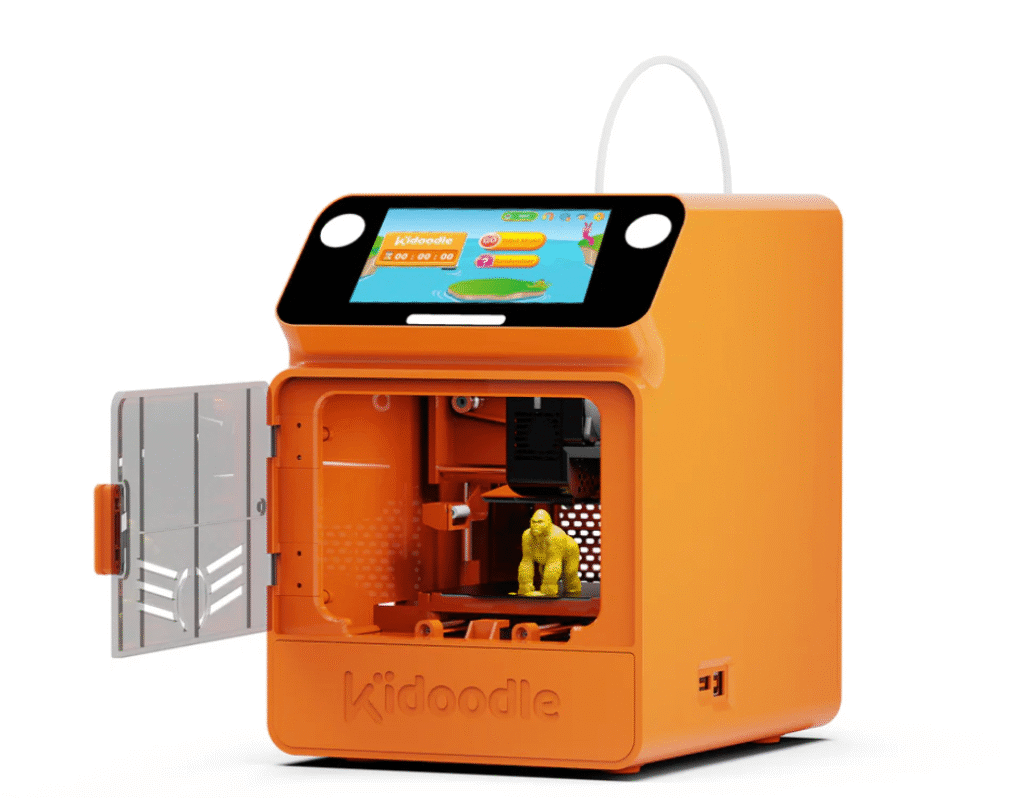
Best for: Young kids with supervision who want a more advanced, fast printer
Price Range: ~$250-$299
Build Volume: ~100 × 100 × 100 mm
Why It Stands Out:
- Fully enclosed design with locking door and open-door safety alarm
- Fast printing (up to 600 mm/s) — no long waiting times
- 3.5″ touchscreen with friendly UI
- Comes with preloaded models and a kid-focused app What to Watch Out For:
- Slightly more technical setup (you may need to help with first print bed adhesion)
- Uses glue stick for bed adhesion instead of heated plate
✅ Great option for kids who want speed and a bit more capability, while still prioritizing safety and simplicity.
3. AOSEED X-Maker Joy
No products found.
Best for: App-savvy kids who want a colorful, connected experience
Price Range: ~$219–259
Build Volume: ~120 × 120 × 120 mm
Why It Stands Out:
- Enclosed build space with LED lighting (feels like a science toy!)
- Controlled entirely through the AOSEED app
- Auto-leveling and filament runout sensors built-in
- Supports PLA and PETG What to Watch Out For:
- No heated bed, so model adhesion can sometimes be tricky
- App library is smaller than Toybox, but growing
✅ Perfect for families who want a mobile-first, Wi-Fi connected experience that’s more flexible than toy-only printers.
🧮 Quick Comparison Table
| Printer | Age Range | Enclosed | Print Speed | Interface | Safety Rating | Filament | Easy for Kids? |
|---|---|---|---|---|---|---|---|
| Toybox | 5–9 | ❌ | Slow | Mobile App | ✅✅✅ | PLA only | ✅✅✅ |
| Kidoodle MiniBox A1 | 6–10 | ✅✅ | Very Fast | Touchscreen + App | ✅✅✅ | PLA only | ✅✅ |
| AOSEED X-Maker Joy | 6–10 | ✅ | Fast | AOSEED App | ✅✅ | PLA, PETG | ✅✅ |
If you’re looking for the most beginner-friendly experience, go with Toybox. If your child is a bit more curious and you’re okay with helping during setup, Kidoodle MiniBox A1 offers faster prints and more future-proofing.
For families that love apps and Wi-Fi control, the X-Maker Joy strikes a nice middle ground with a playful design.
Best 3D Printers for Teens and Middle/High School Students (Ages 11–17)
Teenagers are at the perfect age to level up from plug-and-play printers to machines that offer real creative control, material flexibility, and design learning.
At this stage, students may be working on school projects, robotics club builds, or just developing their own DIY or cosplay ideas.
What Teens Need in a 3D Printer:
- Decent build volume (at least 180mm³)
- Auto bed leveling and easy setup
- Compatibility with common filaments like PLA, PETG, and even TPU
- Beginner-friendly slicing software with room to grow into advanced settings
- Good print quality and reliability
- Optional: enclosure or silent mode for bedroom use
1. Bambu Lab A1 Mini
No products found.
Best for: Teens who want speed, quality, and ease with minimal hassle
Price Range: ~$299
Build Volume: 180 × 180 × 180 mm
Why It Stands Out:
- Super-fast printing (CoreXY motion, up to 500 mm/s)
- Full auto-calibration, first-layer inspection, and error detection
- Quiet “silent mode” (<48 dB), perfect for bedroom use
- Supports PLA, PETG, TPU, and ABS
- Works out-of-box — no mods or tinkering required What to Watch Out For:
- Best used with Bambu’s ecosystem (not open-source focused)
- AMS (multi-color add-on) costs extra
✅ For teens who want speed and ease without sacrificing print quality — it’s the closest thing to “press print and walk away.”
2. AOSEED X-Maker (Standard Model)
No products found.
Best for: Entry-level to intermediate students who want touchscreen + PC slicing
Price Range: ~$349
Build Volume: 150 × 150 × 150 mm
Why It Stands Out:
- Color touchscreen with built-in model previews
- Auto-leveling and filament runout detection
- Ships fully pre-leveled — prints right away
- Supports PLA, PETG, and TPU
- Includes kid-friendly app + downloadable slicing software What to Watch Out For:
- Smaller build volume than other teen-focused printers
- Not as fast as CoreXY models like Bambu
- Less well-known brand, smaller community than Prusa or Creality
✅ A nice upgrade from the X-Maker Joy — more capable, still beginner-friendly. Good for students ready to slice their own models but not ready for a full DIY printer.
3. Prusa Mini+
No products found.
Best for: Hands-on learners who want to build and understand their machine
Price Range: ~$429 (kit), ~$489 (semi-assembled)
Build Volume: 180 × 180 × 180 mm
Why It Stands Out:
- Incredible print quality and open-source control
- Auto mesh bed leveling
- Supports most standard materials: PLA, PETG, ABS, TPU
- Active community, thousands of upgrades/mods What to Watch Out For:
- Requires some setup — great learning experience, but not plug-and-play
- No enclosure (though can be added later)
✅ Perfect for teens interested in engineering, design, or 3D modeling who want a serious, open printer they can grow with.
4. Creality Ender 3 V3 SE

- 250MM/S HIGH-SPEED PRINTING: Ender 3 V3 SE 3d printer can print at up to 250mm/s speed with 2500mm/s²acceleration, faster than ender 3, ender 3 v2, ender 3 pro, ender 3 neo, ender 3 v2 neo, ender 3 s1, ender 3 s1 pro etc. You can complete models efficiently, saving time to wait for print jobs. Moreover, it can keep good printing quality at the same time. The Optimized UI uses motion graphics to display the leveling process and other parameters, so you will know how the printer is doing at a glance, providing you a perfect printing experience
- START PRINTING WITHIN 20Mins: Creality Ender 3 V3 SE 3D printer is easy to put together in 3 steps within about 20 minutes only. It equips CR Touch for auto leveling and strain sensor for auto Z offset. It is easy to get a perfect first layer. Leveling is the important process before printing, it usually make customers in trouble. This 3d printer saves 73% of the time compared with other printers and easily start to print. Which is friendly to all of customers including the beginners
- CAPABLE “SPRITE” DIRECT EXTRUDER: The “Sprite” Direct Extruder of Ender 3 V3 SE enables smooth feeding of various filaments, including PLA, PETG, and TPU. And the extruder is market-proven for its reliability, as over 500,000 units have been shipped worldwide
- “DUAL” STABLE STRUCTURE: Creality Ender 3 V3 SE, Dual Z-axis synced by a quality timing belt, ensuring high print quality. The rigid dual Z-axis lead screws reduce Z wobbling effectively. The Y-axis features two 8mm linear shafts made of strong and wear-proof steel, which underpins a steady and accurate motion of the build platform for a lasting time
- 32-BIT SILENT MAINBOARD&MORE: This 3d printer equips a 32-bit silent mainboard with an advanced stepper motor drive to control all axes more precisely for less operation noise. The PC spring steel build plate is sticky and flexible, making it easy to remove the printed models by bending it slightly. Moreover, Ender 3 V3 SE equips the auto filament loading and uploading, one tap to load the filament, and one tap to unload it. Warning: Please make sure the side of the power supply is chosen at 115V before power on
Best for: Budget-conscious teens who want full control and modding freedom
Price Range: ~$219–$299
Build Volume: ~220 × 220 × 270 mm
Why It Stands Out:
- Large print volume for price
- Auto bed leveling and silent steppers (in newer versions)
- Direct drive (S1 model) allows for TPU
- Huge modding and support community What to Watch Out For:
- More tinkering and maintenance required
- Print quality depends on setup and calibration
- Not enclosed — care needed for safety
✅ The go-to budget pick for tech-savvy teens or classrooms with tight budgets — as long as you’re okay adjusting settings and learning as you go.
🧮 Quick Comparison Table
| Printer | Best For | Auto Leveling | Silent Mode | Materials | Open-Source? | Enclosed? | Skill Level |
|---|---|---|---|---|---|---|---|
| Bambu A1 Mini | Fast + Easy | ✅ | ✅ | PLA, PETG, TPU | ❌ | ❌ | Beginner → Intermediate |
| AOSEED X-Maker | Controlled upgrade | ✅ | ⚠️ Quiet-ish | PLA, PETG, TPU | ⚠️ Limited | ✅ | Beginner |
| Prusa Mini+ | Learning & Tinkering | ✅ | ✅ | All common types | ✅ | ❌ | Intermediate → Advanced |
| Ender 3 V3 SE | Modding on a budget | ✅ | ⚠️ Varies | PLA, PETG, TPU | ✅ | ❌ | Intermediate |
For students who want ease of use, excellent quality, and no hassle, the Bambu A1 Mini is the best out-of-box choice. If your teen wants to learn how a 3D printer works — and doesn’t mind assembling or tweaking — the Prusa Mini+ or Ender 3 S1 gives them full control and long-term flexibility. The AOSEED X-Maker is a nice in-between: touchscreen, app-connected, but still offers room to grow.
Best 3D Printers for College Students and STEM Majors (Ages 18+)
College-level users often need more than just plug-and-play.
Whether for engineering, architecture, industrial design, or hobby-making, the best 3D printers for college students are those that combine reliability, speed, material versatility, and pro-level print quality — without requiring a PhD in printer maintenance.
These printers should be capable of printing functional parts, larger prototypes, or multi-material designs, and should handle complex slicing software without overwhelming the user.
What College-Level Users Need:
- High print speed (especially helpful under time pressure)
- Compatibility with engineering-grade materials (ABS, ASA, Nylon, CF blends)
- Reliable first-layer performance and failure detection
- Large build volume for architecture, product design, or cosplay
- Enclosed or ventilated if used in dorms or shared spaces
- Strong support & user community in case of troubleshooting
1. Bambu Lab X1-Carbon Combo
Best for: Serious makers and engineering/design students
Price Range: ~$1,200–1,500 (with AMS unit for multi-color)
Build Volume: 256 × 256 × 256 mm
Why It Stands Out:
- Ultra-fast CoreXY design (up to 500 mm/s+)
- AI camera for failure detection + LIDAR first-layer inspection
- HEPA and carbon filters (great for enclosed dorm spaces)
- Prints everything: PLA, PETG, ABS, TPU, Nylon, Carbon Fiber
- One of the most advanced and polished printers on the market What to Watch Out For:
- Expensive (but worth it for serious users)
- Less modding freedom; mostly works within Bambu’s ecosystem
✅ A future-proof investment for any college student in STEM, design, or manufacturing who wants enterprise-grade performance.
2. Prusa MK4

- Starting with 3D printing has never been easier Take the printer out of the box, plug it in, let it run a quick Selftest, and start printing No assembly required. With automatic calibration, always-perfect first layer, one-click printing and many other useful features, the MK4S is the best choice for your home, workshop, or company. All print profiles and configurations are in-house tested ensuring that the MK4S effortlessly delivers top-quality 3D prints at a press of a single button from the very start.
- With automatic calibration, one-click printing and an always-perfect first layer, the MK4S is the best entry into the world of 3D printing. Its open design, the result of more than 10 years of evolution, ensures easy maintenance, upgradability and great accessibility. Plus, a detailed handbook guides you through every aspect of the MK4S. When you get the assembled printer, simply take it out of the box, plug it in and once it finishes the automatic calibration, you can start printing right away
- The printer includes a free 1 kg spool of Prusament PLA Prusa Galaxy Black; Prusa Research offers lifetime technical assistance and 24 hours professional customer service.

Best for: Engineering students who want open-source freedom and long-term value
Price Range: ~$799 (kit) / ~$1,099 (assembled)
Build Volume: 250 × 210 × 220 mm
Why It Stands Out:
- Extremely reliable with ultra-quiet operation
- Supports all standard materials + optional multi-material add-on
- Fully open-source and mod-friendly
- Best-in-class documentation and support What to Watch Out For:
- Not enclosed by default (Prusa enclosure sold separately)
- Slower than CoreXY printers, but prints are extremely consistent
✅ A fantastic all-rounder for students who want to learn the mechanics, own the printer long-term, and print high-quality models reliably.
3. Creality K1 / K1 Max
No products found.
Best for: Students who want a fast CoreXY printer on a tighter budget
Price Range: ~$599–999
Build Volume: 220 × 220 × 250 mm (K1) / 300 × 300 × 300 mm (K1 Max)
Why It Stands Out:
- CoreXY speed rivaling Bambu, at a lower price
- Fully enclosed design, great for ABS
- Large build area (especially on K1 Max) for oversized prints
- Color touchscreen, Wi-Fi, and AI camera on some models What to Watch Out For:
- Firmware less polished than Bambu/Prusa
- May require more community troubleshooting or mods
✅ Best value if you need large volume + high speed without jumping to Bambu’s price tag. A favorite among budget-conscious makers.
4. Flashforge Adventurer 5M Pro

- Efficiency Driving Creativity: The high-performance of the Adventurer 5M Pro 3D printer offers you greater creative potential. With a maximum travel speed of 600mm/s and with an acceleration of up to 20,000mm/s², your designs can be swiftly realized. No waiting required, the nozzle heats up to 200°C within 35 seconds, saving you valuable time.
- Quality Assurance for Intricate Details: Fast printing doesn’t compromise on quality. The Core XY structure and all-metal frame ensure stability during high-speed movements. Offering multiple nozzle sizes (0.25mm, 0.4mm, 0.6mm, 0.8mm), you could strike a balance between speed and intricate details, achieving impeccable print quality.
- Smart Convenience and Innovative Experience: Adventurer 5M Pro employs pressure sensing for automatic bed leveling. It detects platform height with multi-point precision, ensuring flawless initial layers. No manual adjustments, no Z-axis calibration, and no print raft needed. Plus, the dual-sided PEI platform enables easy tool-less model removal.
- User-Friendly Operation: Unbox to print in 10 mins. Integrated smart management via mobile app-Flash Maker includes remote video monitoring, real-time progress tracking, parameter adjustments, and alerts. Features like auto shutdown, resume printing, and filament detection optimize workflow. Dual circulation system reduces dust, ensuring a safer, more convenient experience, giving you full control with ease.
- Extensive Material Compatibility: Supports PLA, ABS, PETG, ASA, TPU, PC, PLA-CF, and PETG-CF materials. Its robust full-metal direct extruder, reaching 280°C, accommodates versatile printing needs, ensuring precise and reliable results across diverse projects. From functional prototypes to durable components, its adaptability empowers creative exploration.
Best for: School labs or students who want silent, enclosed, ready-to-use printing
Price Range: ~$899
Build Volume: 220 × 220 × 200 mm
Why It Stands Out:
- Fully enclosed with HEPA filtration
- Ultra-quiet, plug-and-play simplicity
- Cloud-based management for multiple users
- Great for school makerspaces or shared apartments What to Watch Out For:
- Closed ecosystem (works best with Flashforge filaments)
- Fewer slicing controls for advanced users
✅ Excellent classroom printer or dorm-safe option. Quiet, clean, and beginner-friendly — ideal if you value convenience and safety.
🧮 Quick Comparison Table
| Printer | Type | Speed | Enclosed | Materials | Beginner Friendly | Price Tier |
|---|---|---|---|---|---|---|
| Bambu X1-Carbon Combo | CoreXY + AI | 🔥 Ultra Fast | ✅ | All major filaments | ✅✅✅ | $$$$ |
| Prusa MK4 | Cartesian | Moderate | ❌ (optional) | PLA, PETG, ABS, TPU | ✅✅ | $$$ |
| Creality K1 / K1 Max | CoreXY | 🔥 Fast | ✅ | PLA, ABS, PETG | ✅✅ | $$–$$$ |
| Flashforge 5M Pro | Enclosed Cartesian | Moderate | ✅ | PLA, ABS | ✅✅✅ | $$$ |
If you want speed and cutting-edge automation, go with the Bambu X1-Carbon — it’s a game-changer.
Prefer open-source, tinkerable flexibility? The Prusa MK4 is a rock-solid, community-loved choice.
Want large prints fast on a budget? The Creality K1 Max wins on value.
And for classroom labs or shared dorm use, Flashforge 5M Pro delivers safe, quiet reliability.
Final Thoughts
3D printing in education isn’t just a trend — it’s a gateway to creative confidence, design thinking, and hands-on STEM learning.
Whether you’re helping a child discover the magic of making or choosing the right printer for a robotics class or college project, the right machine can unlock massive potential.
Let your decision be guided by safety, ease of use, and how far the student wants to grow. Every model featured here in the 2025 lineup offers a great balance between features, reliability, and age-appropriate usability.
FAQs
What is the safest 3D printer for kids?
Kidoodle MiniBox A1 and Toybox are two of the safest 3D printers for kids under 10. Both feature enclosed designs, no heated beds, and simple interfaces. They also use non-toxic PLA filament and include safety locks or door alarms to protect little fingers.
Can a 7-year-old use a 3D printer?
Yes, with supervision. A 7-year-old can safely use kid-friendly 3D printers like the Toybox or AOSEED X-Maker Joy, which are designed for one-tap printing and use safe, low-heat materials. However, an adult should always help with filament loading and removing finished prints.
What is the best 3D printer for a middle or high school STEM student?
The Bambu Lab A1 Mini is widely recommended for middle and high schoolers due to its high speed, smart features, and ease of use. For students who want to tinker and learn more about hardware, the Prusa Mini+ is an ideal hands-on learning machine.
What 3D printer is best for a college student?
College students working on serious STEM projects benefit from printers like the Bambu X1-Carbon (for speed and materials), Prusa MK4 (for open-source flexibility), or Creality K1 Max (for large-scale builds on a budget).
Do schools need special 3D printers for classrooms?
Not necessarily — but schools should prioritize printers that are:
- Enclosed for safety
- Easy to maintain
- Quiet in operation
- Compatible with standard filaments like PLA or PETG Good examples include the Flashforge Adventurer 5M Pro and the Prusa MK4 (especially in enclosed setups).
Is PLA filament safe for kids?
Yes. PLA (Polylactic Acid) is considered one of the safest filaments for kids. It’s made from renewable resources like cornstarch, emits minimal odor, and doesn’t require high heat or special ventilation. It’s the default material for most beginner-friendly 3D printers.
What’s the difference between kid-friendly and beginner-friendly 3D printers?
Kid-friendly printers are designed for safety, simplicity, and immediate use — like Toybox or Kidoodle.
Beginner-friendly printers (like Bambu A1 Mini or Prusa Mini+) may require more setup or slicing knowledge but offer far more capability and growth potential.