

TL;DR
The Creality SparkX i7 offers excellent upgrade potential for beginners looking to enhance their 3D printing experience. Essential accessories include the PrintEase Kit with maintenance tools and spare parts, plus multicolor printing capabilities through the CFS Lite system. We also find that the i7’s swappable hotend design makes upgrades straightforward.
Key beginner-friendly upgrades focus on print quality improvements like bed leveling tools, enclosure options for temperature control, and storage solutions for filament management. The printer’s lightweight design under 20 lbs makes portability upgrades like carrying cases particularly valuable.
Most accessories are priced around $50-200, making them accessible for new users. I would suggest starting with basic maintenance accessories before moving to advanced upgrades like multicolor systems provides the best learning experience.
This guide covers essential accessories, advanced upgrade options, maintenance tools, and budget considerations to help beginners make informed purchasing decisions for their SparkX i7 setup.

- AI Creation & Smart AI Detection System: Creality’s CubeMe to turn portraits into 3D models in…
- DIY RGB Lighting Design: The aluminum alloy silver body is beautifully lit up by the dynamic RGB…
- Multicolor Printing—50% Less Waste: Upgrade SPARKX i7 3d printer, faster printing. Achieve refined…
- Easy Start Less than 5 Minutes: From unboxing to printing in just five minutes. 95% Pre-Assemble, No…
- Smarter Printing. Zero Setup: The i7 Combo with CFS-Lite takes the guesswork out of creation. It…
Essential SparkX i7 Accessories Every Beginner Needs
PrintEase Kit Components Breakdown
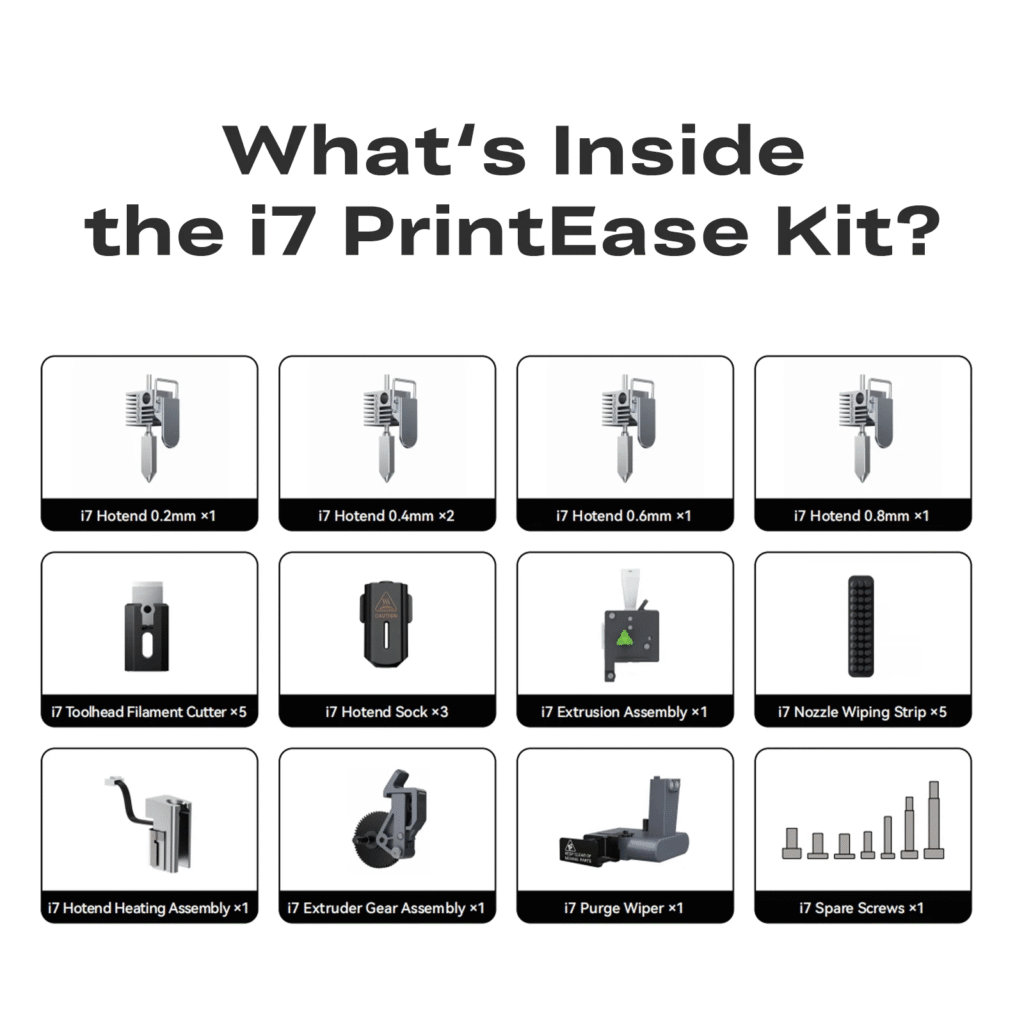
The SPARKX i7 PrintEase Kit serves as the foundation for successful printing, containing carefully selected components that address common beginner challenges. It includes essential items designed specifically for the i7’s unique requirements.
The kit typically features specialized tools for hotend maintenance, filament management accessories, and calibration aids. These components work together to streamline the printing process, reducing trial-and-error learning curves that often frustrate newcomers to 3D printing.
Filament Storage Solutions
Proper filament storage directly impacts print quality and reduces waste. The i7’s large spool holder accommodates various filament sizes but doesn’t include moisture protection features standard on higher-end machines.
Vacuum storage solutions and airtight containers prevent filament degradation, especially important for hygroscopic materials like PLA and PETG. Users report significant quality improvements when switching from open storage to sealed systems, making this upgrade essential for consistent results.


Basic Maintenance Tools
Essential maintenance accessories include nozzle cleaning kits, bed leveling tools, and spare hotend components. The i7’s easily swappable hotend design means replacement parts should be readily available for quick repairs.
Basic tool kits should include hex keys in multiple sizes, needle files for nozzle clearing, and isopropyl alcohol for bed preparation. These items cost relatively little but prevent extended downtime when maintenance issues arise.
Quality assurance becomes achievable when proper tools are available. Regular maintenance using appropriate accessories extends printer lifespan while maintaining consistent print quality throughout the machine’s operational life.


SparkX i7 Hotend Upgrades and Replacements
When to Upgrade Your Hotend
The stock hotend handles most beginner materials effectively, but upgrading becomes necessary when printing advanced materials or seeking improved performance. Temperature limitations of standard hotends restrict material choices to PLA, PETG, and basic ABS variants.
Upgrade considerations include maximum temperature requirements, material compatibility, and printing speed improvements. Advanced hotends typically reach 300°C or higher, enabling materials like PEEK, PEI, and filled composites that stock components cannot handle safely.
Compatible Hotend Options
Third-party hotend manufacturers offer solutions designed specifically for the i7’s mounting system. Community feedback suggests several options provide reliable performance improvements while maintaining easy installation procedures.
All-metal hotends eliminate PTFE tube limitations, allowing higher temperature printing without thermal degradation concerns. These upgrades typically cost between $50-150 depending on features and manufacturer reputation.
Compatibility verification remains crucial before purchasing replacement hotends. The i7’s proprietary mounting system may require specific adapter plates or modified components for proper fitment with aftermarket options.
Installation Guide for Beginners
Hotend replacement on the i7 follows straightforward procedures thanks to the printer’s modular design philosophy. Users report installation times under 30 minutes for basic swaps when following proper procedures.
Safety precautions include powering down the printer completely and allowing cooling time before beginning work. Proper wire management prevents damage to heating elements and thermistor connections during installation.
Step-by-step procedures typically involve removing the old hotend assembly, disconnecting electrical connections, installing the new component, and performing calibration checks. Documentation from hotend manufacturers provides detailed instructions for specific models.
Multi-Color Printing Accessories and Add-ons
CFS Lite System Components
The CFS Lite system represents a significant upgrade from standard multi-material setups, offering faster color changes and reduced maintenance requirements. User reviews consistently praise its speed and reliability compared to traditional CFS systems.
System components include specialized filament management hardware, automated cutting mechanisms, and waste reduction features. The CFS Lite processes color changes approximately 50% faster than standard multi-material systems while generating less waste material.
Integration with the i7’s existing hardware requires minimal modification, making installation accessible for beginners. The system’s modular design allows partial upgrades when budget constraints limit full system purchases initially.
RFID Filament Management
RFID-enabled filament spools provide automatic material recognition and parameter optimization. These smart spools communicate directly with the printer, adjusting temperature, speed, and retraction settings based on material specifications.
The system reduces setup time by eliminating manual parameter entry for each material change. Users report improved consistency when switching between different filament brands and types throughout single print jobs.


RFID compatibility extends beyond Creality’s official filaments, with many third-party manufacturers now offering compatible spools. This ecosystem approach prevents vendor lock-in while maintaining automated convenience features.
Color Switching Optimization
Optimizing color transitions requires specific accessories designed to minimize waste and improve transition quality. Specialized purge towers and transition management tools help achieve cleaner color changes with reduced material consumption.
Software tools complement hardware accessories by calculating optimal transition sequences and minimizing support material requirements. These digital solutions often provide more value than physical accessories for multi-color printing improvement.
Advanced users implement custom purge routines using accessories like waste collection systems and automated cleaning mechanisms. These upgrades particularly benefit high-volume multi-color printing operations where material costs become significant factors.
Print Quality Enhancement Upgrades
Enclosure Kits and Benefits
Third-party enclosure kits priced around $349 transform the i7 into a professional-grade printing system capable of handling advanced materials. These enclosures provide temperature stability crucial for materials like ABS, ASA, and engineering plastics.

- 【Enhanced Illumination For Your Printing Area】Improve your workspace visibility with our…
- 【Temperature and Humidity Monitoring,Isolate Noise】Our enclosure is equipped with an advanced…
- 【Improve Print Quality with Constant Temperature】Provides a stable and controlled environment…
- 【Dustproof and Fireproof, Safe to Use】Protect your 3D printer and reduce the risk of accidents…
- 【Fast Installation and Long-term Use】5 minutes easy installation, quick start and easily…
Clearview Plastics offers an exclusive design specifically engineered for the SparkX i7, maintaining compatibility with the CFS Multi Material unit while providing enhanced functionality. The enclosure includes features designed for both safety and performance optimization.
Benefits extend beyond temperature control to include noise reduction, fume containment, and improved workplace safety. Users report significant quality improvements when printing materials sensitive to ambient temperature variations and air currents.
Bed Adhesion Solutions
Proper bed adhesion prevents print failures while ensuring easy part removal after completion. The i7’s standard bed surface works well for basic materials but may require enhancement for challenging filaments or large prints.
Upgrade options include PEI sheets, glass beds, and specialized adhesive systems. Each solution offers specific advantages depending on material requirements and user preferences for maintenance and durability.

- Compatible Printer: This double-side smooth cool plate is compatible with Creality SPARKX i7 3D Printer.
- Upgraded Cool Plate: Zero heating time, saves time during mold removal, and conserves energy. It is an ideal choice for your application.
- Low-Temperature Printing: The cold plate can be used at room temperature without heating, which only suits PLA (30-50℃) and PEGT (50-70℃) filaments.
- 0-Second Mold Taking: No need to wait, save time! Bend the platform slightly without scraping or prying tools, reducing the risk of model damage.
- Strong adhesion: The PLU platform has better adhesion than a normal build plate, ensuring no warping, long-lasting durability.
Glass beds provide excellent flatness and easy cleaning but require careful handling to prevent breakage. PEI surfaces offer superior adhesion for most materials while maintaining reasonable removal force for completed prints.
Vibration Dampening Accessories
Reducing mechanical vibrations improves print quality by eliminating artifacts like layer inconsistencies and surface imperfections. The i7’s lightweight construction makes it particularly susceptible to vibration-related quality issues during high-speed printing.
Dampening feet, isolation pads, and weighted bases provide different approaches to vibration control. Simple foam pads offer basic improvement while dedicated isolation systems provide professional-grade vibration elimination for demanding applications.
Implementation costs remain minimal compared to potential quality improvements. Most vibration control accessories cost under $50 while delivering noticeable improvements in surface finish and dimensional accuracy for detailed prints.

- Applicable Model: This anti vibration feet pad set is designed to fit for Creality Hi Combo 3D printer, ensuring a stable printing experience.
- Improved Anti Slip Performance: These anti slip pads have been upgraded from EVA to rubber material, improving their anti slip performance by 20%.
- Spring Shock Absorption: The foot pads adopt premium bearings and spring solution, accurately calibrating key spring parameter to enhance shock absorption function.
- Premium Materials: The 3D printer shock pads are made from premium rubber, ABS, and alloy materials, sturdy and robust, ensuring long lasting performance.
- Strong Stability: The 3D printer anti vibration feet provide multi angle buffering, significantly enhancing stability during printing.
Maintenance and Longevity Accessories
Cleaning and Maintenance Kits
Regular maintenance using proper tools extends printer lifespan while maintaining consistent print quality. Specialized cleaning kits include tools designed specifically for 3D printer maintenance requirements rather than general-purpose cleaning supplies.
Essential items include nozzle cleaning needles in multiple sizes, bed cleaning solutions compatible with various surface types, and lubrication products for moving components. These specialized tools prevent damage that generic alternatives might cause.
Professional maintenance kits typically cost between $30-60 but provide tools that last throughout the printer’s operational lifetime. The investment prevents costly repairs and ensures consistent performance over thousands of printing hours.
Replacement Parts Inventory
Maintaining spare parts inventory prevents extended downtime when components fail. The i7’s modular design simplifies parts replacement, making basic inventory management practical for home users.
Critical spare parts include hotend assemblies, extruder components, and belts. These items experience wear during normal operation and benefit from proactive replacement before complete failure occurs.
Parts availability through official channels ensures compatibility and quality, though costs may exceed third-party alternatives. Balancing official parts with compatible alternatives helps manage inventory costs while maintaining reliability.
Preventive Care Tools
Preventive maintenance tools help identify potential issues before they cause print failures or component damage. Digital calipers, temperature measurement devices, and alignment tools enable precise maintenance procedures.
Calibration accessories ensure consistent performance over time as mechanical components experience wear. Regular calibration using proper tools maintains print quality standards and prevents gradual performance degradation.
Investment in quality measurement tools pays dividends through improved print success rates and reduced material waste. Professional-grade tools cost more initially but provide accuracy and durability that justify higher prices for serious users.
Who Is This For
• Complete beginners seeking guidance on essential accessories before first prints
• Budget-conscious makers wanting maximum value from accessory investments
• Multi-color printing enthusiasts exploring advanced material handling systems
• Home workshop users needing reliable maintenance and upgrade solutions
• Students and educators setting up classroom or educational environments
• Small business owners requiring consistent, professional-quality results
Pros & Cons
Pros
• Modular design makes upgrades accessible for beginners
• Wide accessory ecosystem from multiple manufacturers
• PrintEase Kit provides essential components in single purchase
• Easy hotend swapping reduces maintenance complexity
• CFS Lite system offers professional multi-color capabilities
• Third-party options keep upgrade costs reasonable
Cons
• Essential accessories not included with base printer purchase
• Official Creality accessories often cost more than alternatives
• Some upgrades require technical knowledge despite beginner focus
• RFID filament system limits material choices without workarounds
• Enclosure solutions add significant cost to total system price
• Limited documentation for third-party accessory installation
Final Verdict
The SparkX i7’s accessory ecosystem strikes an excellent balance between accessibility and capability expansion. Beginners should prioritize the PrintEase Kit and basic maintenance tools initially, budgeting around $100-150 for essential accessories that prevent common printing failures.
The printer’s modular design philosophy delivers on its promise of easy upgrades. Community feedback consistently highlights how quickly hotends swap and how accessible most modifications remain for users without extensive technical backgrounds. This approach reduces the intimidation factor that often discourages beginners from attempting necessary upgrades.
Multi-color printing capabilities truly shine with proper accessories. The CFS Lite system addresses many traditional multi-material printing challenges while maintaining user-friendly operation. RFID filament management adds convenience without creating excessive vendor lock-in, though third-party compatibility requires verification.
Budget allocation should follow a tiered approach: essential accessories first, quality-improvement upgrades second, and advanced features third. This strategy ensures reliable basic operation before expanding capabilities. Most users find the sweet spot around $200-300 total accessory investment for well-rounded system functionality.
For beginners specifically, the i7’s accessory ecosystem removes many traditional barriers to 3D printing success. The combination of thoughtful design, reasonable pricing, and expanding third-party support creates an environment where gradual capability expansion feels natural rather than overwhelming.
FAQ
What accessories come with the SparkX i7 PrintEase Kit?
The PrintEase Kit includes essential maintenance tools, filament management accessories, and calibration aids designed specifically for the i7. Exact contents vary by kit version, but typically include hotend maintenance tools and basic setup accessories for optimal printing results.
Can I use third-party hotends with the SparkX i7?
Yes, several manufacturers offer compatible hotends for the i7’s mounting system. However, verify compatibility before purchasing, as some may require adapter plates or modified components. All-metal hotends enable higher temperature materials beyond stock capabilities.
Which accessories should I buy first as a complete beginner?
Start with the PrintEase Kit, basic maintenance tools, and proper filament storage solutions. These essential accessories cost around $100-150 total and address the most common beginner printing challenges while building confidence with the system.
How much should I budget for essential SparkX i7 accessories?
Budget $150-200 initially for essential accessories including the PrintEase Kit and basic maintenance items. Quality improvement upgrades like enclosures add $300-400 more, while advanced multi-color systems require additional investment based on specific needs.
Are Creality’s official accessories worth the extra cost?
Official accessories guarantee compatibility and quality but often cost more than alternatives. For critical components like hotends, official parts provide reliability. For basic tools and consumables, third-party options typically offer better value without compromising performance.
What maintenance accessories do I need to keep my printer running?
Essential maintenance accessories include cleaning kits, spare hotend components, bed leveling tools, and basic replacement parts inventory. These items prevent extended downtime and maintain consistent print quality throughout the printer’s operational lifetime.





Leave a Reply