📅 Updated March 2026 — The P2S has been in real users’ hands for over five months. I’ve gone through hundreds of Reddit posts, community reports, and owner feedback to update this comparison with what’s actually happening in the wild — not just what the spec sheet promised at launch.
When Bambu Lab dropped the P2S, I knew the real test wasn’t going to happen at launch.
It was going to happen six months later.
After the hype died down. After people printed 500+ hours on it. After the AMS 2 Pro started doing weird things at 2am and someone rage-posted about it on Reddit.
That’s where we are now.
I’ve spent the last few months tracking real owner feedback across r/BambuLab and r/3Dprinting. And the most important thing I found isn’t in a spec sheet — it’s the price.
The P2S Standard is $549 — that’s $150 more than the P1S Standard at $399. If you’re comparing Combo to Combo, it’s $799 vs $549 — a $250 gap. Which number matters depends on what you’re buying. Most people comparing these two are looking at Standard vs Standard. So let’s work with $150.
That’s still less than half what most people assumed at launch. And it changes how you should think about this upgrade.
Tom’s Hardware awarded the P2S its Editor’s Choice — the first Bambu Lab P-series printer to earn it.

- Up to 16 Colors: Bring your designs to life with vibrant multi-color/multi-material printing capabilities, perfect for showcasing your creativity. Note: Connecting Bambu Lab AMS is required.
- 500mm/s and 20000 mm/s² Acceleration True High Speed: Don’t wait around for your masterpieces. Lightning-fast printing speed lets you focus on creating, not waiting.
- Enclosed Design: Fully enclosed body improves print performance for advanced filaments. Automatic Bed Leveling: Say hello to high-quality, successful prints. Auto bed leveling makes 3D printing such an easy thing.
- Set Up in 15 Minutes: Spend more time printing and less time setting up. User-friendly design ensures a hassle-free assembly experience for all skill levels.
- Supported Filament: Ideal: PLA, PETG, TPU, PVA, PET ABS, ASA; Capable : PA, PC; Not Recommended: Carbon/Glass Fiber Reinforced Polymer.
Table of Contents
Quick Comparison: Bambu Lab P2S vs P1S at a Glance
Before diving into the details, here’s the side-by-side spec breakdown.
(Specs based on official Bambu Lab listings and verified reviewer data. Prices confirmed as of March 2026.)
| Feature | Bambu Lab P1S | Bambu Lab P2S | What It Means for You |
|---|---|---|---|
| Price (2026) | ~$399 Standard/$549 Combo | ~$549 Standard / $799 Combo | $150 more Standard vs Standard. At that gap, the upgrade makes sense for anyone printing regularly. |
| Build Volume | 256 × 256 × 256 mm | 256 × 256 × 256 mm | Same footprint — no increase in printable size. |
| Motion System | Core-XY | Core-XY (identical kinematics) | Still fast and precise; no mechanical overhaul. |
| Extruder | Standard stepper-driven | DynaSense PMSM servo motor, ~70% more extrusion force | Stronger, more accurate feeding — especially for CF and TPU. |
| Nozzle / Hotend | Screw-in type; manual change | 1-clip quick-swap hotend (P2S/H2-series only — NOT A1 compatible) | Tool-less swap in seconds. Note: P2S uses a different nozzle system than the A1. |
| Touchscreen & UI | D-pad LCD (non-touch) | 5″ color touchscreen, 2nd-gen UI | Faster setup, modern interface — the old screen was genuinely bad. |
| AI Detection | Basic spaghetti detection | Enhanced AI + vibration calibration, NPU onboard | Smarter self-checks, fewer wasted prints. |
| AMS Support | AMS / AMS Lite | AMS 2 Pro with active drying and venting | Better multi-color workflow. Note: drying only works in standby mode, not during printing. |
| Cooling | Standard active cooling | Adaptive Airflow — draws in external cool air while door stays closed | Better PLA-in-enclosure results without opening the door. |
| Camera | 1080p static | 1080p high-frame-rate + NPU for AI monitoring | Better timelapses, smarter remote failure detection. |
| LAN Printing | Yes | Yes, full LAN-only mode supported | Print without cloud connectivity — good for IP-sensitive files. |
| Maintenance | Requires tools and patience | Modular, faster access | Easier hotend swaps, cleaner day-to-day use. |
| Ecosystem | Bambu Studio / Handy App | Same, optimized for P2S hardware | Familiar workflow, better diagnostics. |
What’s Actually New on the P2S
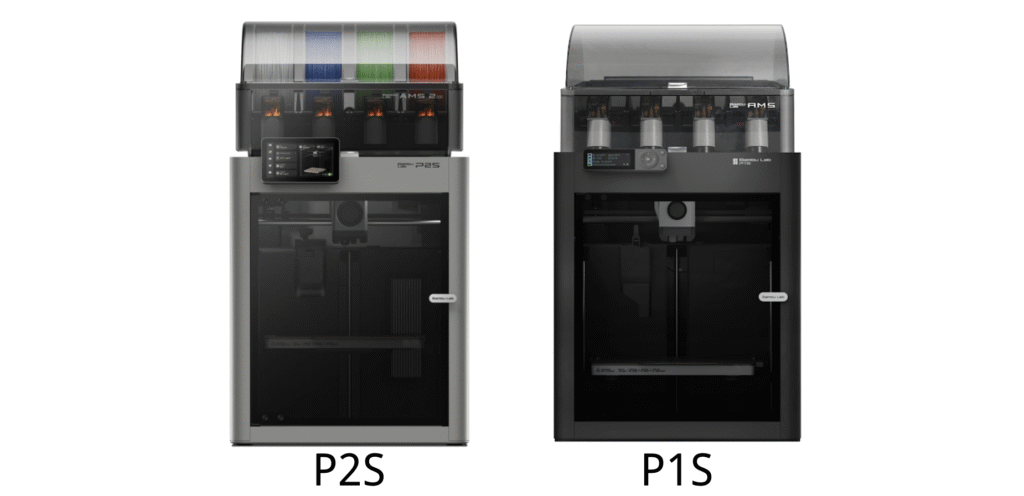
The Bambu Lab P2S builds on the same mechanical foundation as the P1S but refines almost every interaction point.
Instead of chasing bigger numbers or louder specs, it focuses on solving annoying friction points that users of the P1S have been complaining about for over a year.
Here’s what actually changed — and why it matters.
1. A Stronger, Smarter Extrusion System

The biggest hardware leap is inside the toolhead.
The P2S uses the DynaSense extruder — a PMSM (Permanent Magnet Synchronous Motor) servo system that delivers roughly 70% more extrusion force than the P1S’s standard stepper.

In practical terms: it grips filament more precisely, feeds it more consistently, and drastically reduces under-extrusion and grinding — even at higher speeds.
This isn’t brute force for the sake of it. It’s control. Flexible and abrasive filaments that previously needed slower speeds now run reliably without skipping.
Who benefits most: Anyone printing CF-PLA, TPU, or carbon-fiber-reinforced filaments. If you’ve fought grinding or clicking sounds on your P1S under load, this directly fixes that.


2. Quick-Swap Hotend — Maintenance, Reimagined
Changing a nozzle on the P1S required screws, heat, and patience.
The P2S uses a 1-clip quick-swap system. You can swap nozzle sizes or replace a clogged hotend in under a minute. No wiring. No calibration loss.

One important note: the P2S uses a new-generation nozzle system shared with the H2 series — it is NOT interchangeable with A1 nozzles. The external design looks similar, but the flow rates and internal geometry are different. Don’t mix them.
For print farms and high-volume users, fast nozzle swaps alone can save hours of downtime per month. Even as a hobbyist, eliminating one of the most tedious maintenance tasks makes a real difference.
⚙️ Pro Tip: If you regularly switch between 0.4mm (detail work) and 0.6mm (carbon fiber), you can do the swap in about 30 seconds with zero recalibration.

- COMPATIBLE MODELS: The complete hotend assembly only for Bambu Lab P1P,P1S 3D printer (The print…
- RAPID HEATING: High quality 24V 48W ceramic heating element, heats up quickly, and max reaches…
- DURABILITY: Built with heavy-duty materials, the hardened steel hotend have better capability of…
- RAPID COOLING FAN: Hotend cooling fan is used to cool and reduce the temperature of hot end ceramic…
- EASY INSTALLATION: The kit is assembled with the fan, ceramic heater and thermistor together,…
No products found.
3. A Modern 5-Inch Touchscreen and Refined UI
The old P1S screen was genuinely bad. D-pad navigation, monochrome LCD, and it felt like a printer from 2018.
The P2S touchscreen is borrowed from the H2 series — a 5-inch 720×1280 color display with the 2nd-gen UI. Menus are logical. Icons are large. You can change nozzle sizes, manage filaments, and run calibration directly from the printer without opening a laptop.
For new users, setup feels guided. For experienced ones, it’s just faster.

4. Upgraded AI Error Detection and Smart Monitoring
The AI-assisted failure detection that debuted on the X1C has been improved and brought down to the P2S.
The onboard NPU (Neural Processing Unit — 2 TOPS) handles AI spaghetti detection, bed adhesion monitoring, and real-time extrusion anomaly checks. Combined with the upgraded 1080p high-frame-rate camera and dual-LED lighting, you can remotely catch problems before they waste a full spool.
It’s not perfect. It won’t save you from a bad first layer on an improperly leveled bed. But it’s good enough to catch catastrophic failures mid-print — the kind that waste 6+ hours of material and machine time.
5. AMS 2 Pro and Filament Drying Integration
If you print multi-color or multi-material jobs, the AMS 2 Pro is the quiet star of this release.
It’s not just about storing four spools. The AMS 2 Pro includes active filament drying and venting — a direct response to years of P1S users complaining about moisture-related clogs, especially with Nylon, PETG, and TPU.
One thing to know: The drying function works during standby mode only. It does not actively dry filaments while printing is in progress. You need to pre-dry filaments before a long print session, not simultaneously.
That said, for multi-color users in humid climates, the reduction in AMS-related errors and clog incidents is real and noticeable.
📦 Note: The AMS 2 Pro can be paired with older Bambu printers with an adapter, but pairing it with the P2S unlocks the fastest auto-switching logic and full UI integration.

- 【Say Goodbye to Poor 3D Printing by Wet Filament】Wet 3d printing filament will caused to…
- 【Personalized Temperature Setting】The user can adjust the temperature of the drying box…
- 【Personalized Drying Time Setting】 The default continuous drying time of the drying box is 6…
- 【Compatible with 99% of 3D Filament Spools】A: Maximum capacity of SUNLU dry box is…
- 【User-friendly Design&1 Year Guaranteed After-Sales Service】 A: The design of two rollers inside…


6. Adaptive Airflow — PLA in an Enclosure, Finally Fixed
One of the P1S’s most frustrating quirks: printing PLA in an enclosed chamber caused heat creep and clogs, forcing users to print with the door open (defeating the purpose of an enclosure).
The P2S fixes this with Adaptive Airflow — an automated system that draws in cool external air while keeping the door closed. PLA and PETG can now print enclosed at speed without overheating issues.
This sounds small. For anyone who’s had a PLA print clog at hour three because of heat creep buildup, it’s not small.
7. Subtle But Meaningful Design Tweaks
Bambu quietly reworked several quality-of-life details on the P2S:
- Side-mounted spool holder for easier access
- Upgraded camera positioning for better timelapses
- Dual-tone LED system for clearer print monitoring
- Smoother rod surfaces (easier to clean than the P1S’s carbon rods)
- Built-in 8GB eMMC storage and USB port
- Transport handles designed for safe two-hand carrying
Small changes individually. Together, they make the printer feel more finished — like someone actually thought through daily use.
In Summary
The P2S focuses on refinement, not reinvention.
Every improvement targets a real friction point: extrusion reliability, nozzle maintenance, AMS stability, screen usability, airflow management.
If you print often enough to feel those friction points, the upgrade isn’t about specs — it’s about fewer headaches and more uptime.
Where the Upgrade Feels Minor or Unnecessary
Not every change on the P2S will transform your workflow. Some improvements look good on paper but make little measurable difference in daily printing.
Here’s a sober look at where the P2S doesn’t move the needle much beyond the P1S.
1. Print Quality: Barely Noticeable Gains
Despite the stronger DynaSense extruder and smarter calibration, surface finish and dimensional accuracy remain nearly identical between the two printers.
Both share the same Core-XY motion system, frame stiffness, and kinematic tolerances. Unless you’re printing edge-critical mechanical parts, you’ll rarely see a visible difference between two well-tuned profiles side by side.
The improvement is in consistency — fewer clogs, more reliable extrusion — not in raw visual quality.
2. Same Build Volume, Same Limits
The 256 × 256 × 256 mm build area is unchanged.
If you were hoping for larger single-piece cosplay helmets or bigger functional enclosures, you’ll still need to split models. Bambu chose reliability over scale here.
Verdict: Great for efficiency improvements. Irrelevant for size expansion.
3. No True Actively Heated Chamber
Despite the “Adaptive Airflow” marketing language, the P2S still does not have an actively heated chamber.
The enclosure temperature is more stable than the P1S thanks to improved circulation and insulation, but it cannot reach the controlled heat levels that large ABS, ASA, or high-temp Nylon prints require.
For that, you’re looking at the H2S ($1,249+), which has genuine 65°C active chamber heating.
⚙️ Reality check: Chamber temperature stability improved by roughly 5–8°C over the P1S in real-world tests — helpful, but not enough to eliminate warping on large ABS parts without additional enclosure management.
4. Ecosystem Lock-In Still Exists
Bambu Lab’s closed-ecosystem strategy is unchanged: proprietary slicer integration, firmware restrictions, and part-specific compatibility.
The P2S continues this philosophy. Community mods, third-party firmware, and open-source integration remain locked out. Reddit frustration about this hasn’t gone away.
If you value plug-and-play simplicity, this is a feature. If you’re a tinkerer or open-source advocate, nothing has changed. The P2S is still Apple-style in a maker world.
5. The AMS 2 Pro Drying Is Standby-Only
I mentioned this in the “What’s New” section, but it deserves its own call-out because the marketing implied otherwise.
The AMS 2 Pro’s active drying does not run during printing. You need to pre-dry filaments before a print session begins. If you were expecting to print and dry simultaneously, that’s not how it works.
Still a useful feature — just not the “set-and-forget during printing” experience some people anticipated.
Reddit Users’ Reactions — Praise and Pushback
If you want an honest pulse on community sentiment, Reddit is where the real talk happens.
Between r/BambuLab, r/3Dprinting, and dozens of side threads, the community has split into two clear camps.


Praise — What Users Love
“Plug-and-print” reliability still wins hearts. Users who’ve run hundreds of prints report that the P2S produces repeatable results at higher speeds than the P1S without the occasional artifacts that crept in at P1S limits.
The DynaSense extruder is consistently praised. It’s the most mentioned real-world improvement — specifically for TPU and CF materials. The clicking and grinding sounds under load that plagued aggressive P1S setups are gone for most users.
Anticipation that met reality. The quick-swap hotend, better AMS integration, and touchscreen all delivered on their pre-launch promises — which doesn’t always happen with Bambu releases.
Pushback — Concerns and Criticism
Repairability still frustrates users. Multiple community members describe Bambu printers as “unrepairable” or overly closed. Nothing on the P2S changed that fundamental posture.
AMS 2 Pro early firmware issues. Early adopters flagged communication errors between the AMS 2 Pro and the printer during long multi-color runs. Bambu pushed a firmware fix in January 2026, and most users report it as resolved.
Long-term belt and rod wear. Users running print farms express concern about belt tension loss and rod wear after 100+ hours of heavy use. Not a widespread reported failure yet — but worth monitoring.
“Should I wait for the P3?” A recurring Reddit theme. The answer from most experienced users: if you need a printer now, don’t wait. Bambu’s next major release is likely late 2026 at earliest.
Read Details: Reddit Users on BambuLab P2S: What’s Great and What’s Missing
6 Months In: What P2S Owners Are Actually Reporting
(New section — March 2026 update)
Launch reviews are always glowing. That’s expected.
Here’s what the community is actually saying now that the honeymoon is over.
The DynaSense extruder upgrade is real. This isn’t marketing noise. Users printing carbon fiber PLA and flexible TPU consistently report fewer jams and better consistency compared to their old P1S setups. Bambu delivered on this one.
The AMS 2 Pro is good — but had a rocky start. Humidity control works well in practice. Filament drying integration is genuinely useful for Nylon and PETG users. But early adopters flagged occasional communication errors during long multi-color runs. Bambu addressed this in a January 2026 firmware update — most affected users report it resolved. Update your firmware immediately after unboxing.
The AI detection is smarter, not magic. It reliably catches spaghetti failures and obvious bed adhesion loss. It won’t save you from a bad first layer or cheap filament. Manage expectations accordingly.
The quick-swap hotend is the real sleeper hit. I underestimated this in my original review. Owners switching between 0.4mm and 0.6mm nozzles regularly say it’s cut their maintenance time dramatically. For anyone running multiple materials across a week, this alone justifies a meaningful portion of the price difference.
Issues still worth watching:
- A subset of users report belt tension loss after heavy use (100+ hours). Not widespread, but documented.
- The 5-inch touchscreen occasionally freezes on older firmware. Again: update firmware before you do anything else after unboxing.
- Ecosystem lock-in frustrations haven’t gone away. If you were hoping Bambu would open things up — they haven’t.
Bottom line from six months of community data: The P2S is a better printer than the P1S in every measurable way. But for a casual user who prints a few projects a month on a well-tuned P1S, the upgrade won’t feel dramatic. For power users and multi-material operators — it’s the right machine.
Who Should Upgrade — and Who Should Wait
At $549 for the P2S Standard vs $399 for the P1S Standard, the price gap is $150. That’s real money — but it’s also less than most people assumed before checking the actual store page.
For new buyers, the P2S is still the right call — $150 more gets you the DynaSense extruder, the new touchscreen, Adaptive Airflow, and the quick-swap hotend. Unless you find a heavily discounted P1S secondhand, the P2S is the better long-term investment.
For new buyers, the answer is almost always: get the P2S.
$50 more buys you the DynaSense extruder, the new touchscreen, Adaptive Airflow, and the quick-swap hotend. There’s very little argument for choosing the P1S as a new purchase in 2026 unless it’s heavily discounted secondhand.
The more interesting question is: existing P1S owners — do you upgrade?


You Should Upgrade If…
1. You print professionally or run a small print farm.
The quick-swap hotend alone can save hours of downtime over a month. The DynaSense extruder and smarter AI detection reduce print failures — which directly translates to saved labor and filament.
🧮 ROI snapshot: If one failed print wastes 6 hours and $5 in materials, preventing 10 failures a month saves 60 hours and $50. The $150 price difference between P1S and P2S Standard pays for itself within the first few prevented failures.
2. You print with advanced or abrasive materials.
Carbon fiber, glass-filled PETG, TPU — these are where the DynaSense extruder makes the biggest real-world difference. If you’ve fought under-extrusion or grinding sounds on the P1S, this directly addresses the root cause.
3. You use multi-color or multi-material printing regularly.
The AMS 2 Pro’s improved drying integration and jam reduction are a genuine blessing for high-volume multi-color users. If the AMS is central to your workflow, this upgrade matters.
4. The P1S screen has frustrated you since day one.
The old D-pad LCD was legitimately bad. If you’ve been annoyed by it for a year, the 5-inch color touchscreen alone makes the upgrade feel worthwhile.
You Should Stay With Your P1S If…
1. You print casually — mostly PLA or PETG, occasional projects.
A well-tuned P1S is still an excellent printer. The extra torque, smarter AI, and faster nozzle swaps won’t meaningfully change your weekly output. Save the $150 for filament and materials instead.
2. You’ve already dialed in your P1S perfectly.
A dialed-in P1S is a beast. If you’ve solved your AMS quirks, have good bed adhesion, and trust your profiles — switching to P2S just restarts your calibration journey for incremental gains.
3. You want open, modifiable hardware.
The P2S continues Bambu’s closed-ecosystem philosophy. Firmware, parts, and slicer integration are proprietary. If you love modding and open-source tools, your P1S (or a Voron) gives more freedom.
4. You’re looking at a secondhand P1S at a steep discount.
If you can find a well-maintained P1S for $300–$350 used, that’s a different calculation. At $150 more new? The P2S wins for regular users. Find a used P1S under $250? Then the math changes.
Makers101 Verdict (Updated March 2026)
New buyers: At $150 more than the P1S Standard, the value case is strong for anyone who prints more than casually.ng.
Existing P1S owners: Only upgrade if you regularly use abrasive materials, swap nozzles frequently, or rely on multi-color printing as part of your workflow. If your P1S is running well for casual use, hold off.
The P2S’s biggest advantage isn’t raw speed. It’s smoother days, fewer headaches, and more uptime — and at the current price, that’s hard to argue against for anyone buying new.ys and fewer headaches.
Upgrade Kit to Turn P1S into a P2S?
While many users have hoped for an official upgrade kit, Bambu Lab has confirmed there won’t be one.
The two printers differ significantly under the hood — not just in the nozzle or screen, but in the mainboard, cooling system, wiring layout, power supply, intake structure, and camera housing. Converting a P1S to P2S would essentially mean rebuilding the printer from scratch.
From my perspective, that’s not necessarily a bad thing.
For most everyday use cases, the P1S is still a capable, well-balanced machine. Its print quality, chamber control, and reliability remain strong. The P2S is more about convenience and workflow refinement than a dramatic performance leap.
That said, nozzle compatibility anxiety is real. Some P1S owners worry about long-term availability of P1/X1 nozzles and hotends. Realistically, this shouldn’t be a major concern anytime soon.
Beyond Bambu’s own parts supply, several third-party manufacturers — including E3D, Revo, and Diamondback — already offer compatible replacements that perform on par with or better than OEM, with minor calibration adjustments.
The P2S is a refinement rather than a revolution — an upgrade that polishes workflow and quality-of-life details without redefining the printing experience. The P1S remains a reliable workhorse. The P2S is built for those who want fewer friction points in their daily workflow.
Long-Term Outlook — What the P2S Tells Us About Bambu’s Direction
The P2S isn’t just another incremental printer.
It’s a clear signal of where Bambu Lab wants to take desktop 3D printing over the next few years — toward a more integrated, closed, and intelligent ecosystem.
1. The “Apple of 3D Printing” Vision Is No Longer a Joke
What started as a Reddit meme has become a near-accurate analogy.
Bambu Lab is following Apple’s playbook: control the hardware, software, and user experience end-to-end. From Bambu Studio to Bambu Handy to the AMS ecosystem — everything is designed to work together, but only together.
The upside: seamless reliability and automation that few competitors match. The downside: less freedom for tinkerers and third-party accessory makers.
2. AI and Smart Automation Are the Next Frontier
The P2S’s expanded AI failure detection, vibration analysis, and camera-assisted quality monitoring aren’t gimmicks. They’re groundwork.
Bambu’s data-driven firmware updates hint at a future where the printer learns from usage, predicts failure modes, and adjusts calibration autonomously. The NPU hardware is already in the machine — the software capabilities will grow over time through firmware.
Expect smarter slicer profiles, filament recognition, and automated maintenance reminders in future models.
3. The Road to the “P3” (or Beyond)
Based on the current trajectory:
- P1 Series — the breakthrough (speed + accessible price)
- P2 Series — refinement and intelligence
- P3 — likely focuses on true automation: active chamber heating at the P-series price point, more advanced AI calibration, networked multi-printer management
Bambu’s release cadence (roughly 18 months between major P-series updates) suggests the next flagship lands around late 2026 to early 2027.
4. What It Means for Makers
Bambu’s success is already pushing Creality, Anycubic, and Prusa toward closing their ecosystems and building in more AI-assisted features.
The direction is clear: 3D printing is moving toward appliance-like simplicity. For professionals, that’s good news. For open-source advocates, it’s a signal to hold onto your Voron.
FAQ — What the Community Asks Most
Below are the ten questions that keep showing up across Reddit, Discord, and YouTube comments — answered with honest, data-backed insights from real users and my own analysis.
1. Is it really worth upgrading from the P1S to the P2S?
For new buyers: yes, without much hesitation. At $150 more than the P1S Standard, the P2S delivers a meaningfully better experience — better screen, better extruder, better airflow — for anyone printing more than a few projects a month.nting more than a few projects a month.
For existing P1S owners happy with their setup: probably not urgent. The gains are real but not dramatic for casual use.
2. What is the Bambu Lab P1S price in 2026?
The P1S Standard retails for ~$399 USD, and the P1S Combo for $549 USD.
Prices confirmed as of March 2026 from the official Bambu Lab US store.
3. Can I upgrade my existing P1S to P2S specs?
No. The P2S uses a redesigned extruder (DynaSense), new mainboard, different cooling system, and an entirely new nozzle type. There’s no official upgrade kit, and DIY conversion would cost more in time and parts than it’s worth.
4. Does the P2S produce better print quality?
Marginally, and mostly in terms of consistency rather than visual quality.
Surface finish and dimensional accuracy are nearly identical on both printers. The improvement is in fewer clogs, smoother extrusion under load, and more reliable filament handling — not a visible jump in print aesthetics.
5. Is there a heated chamber on the P2S?
No. The P2S has Adaptive Airflow that improves chamber temperature stability, but there is no actively heated chamber. For large ABS, Nylon, or engineering-grade prints requiring consistent high chamber temperatures, you’re looking at the H2S ($1,249+), which heats to 65°C actively.
6. Is the P2S compatible with my existing AMS?
AMS 1.0 works with the P2S using a buffer adapter. The P2S Combo includes the new AMS 2 Pro natively. Everything else — cables, software, workflow — remains similar.
7. What are the most common P2S problems in 2026?
The two most cited issues from early 2026 community reports:
AMS 2 Pro communication errors during long multi-color prints — addressed in a January 2026 firmware update.
Touchscreen freezes on older firmware versions — fixed by updating immediately after unboxing.
Neither is a deal-breaker, but both are real. Update your firmware as the first thing you do.
8. Are P2S nozzles compatible with the A1?
Not fully. The P2S uses the same quick-swap nozzle system as the H2 series. While Bambu says you can put the new nozzle in an A1, A1 nozzles are not recommended for the P2S or H2 series due to different flow rates and internal geometry. Don’t mix them for serious printing.
9. Does the P2S support LAN-only printing without cloud?
Yes. The P2S supports full LAN-only operation, allowing print management over a local network without cloud connectivity. This is particularly valuable for businesses or designers handling proprietary files they don’t want uploaded to external servers. Combined with Bambu’s Farm Manager for multi-printer setups, this is a legitimate pro feature.
10. Should new buyers skip the P1S and buy the P2S?
At $150 more for the Standard version, the P2S is still the better new purchase for most buyers. If you find a used P1S under $250, that changes the math — but at MSRP, the P2S wins.
11. Is the P2S still worth buying in 2026?
Yes — especially for power users and new buyers.
Six months of real-world data confirms the upgrade delivers on its main promises: better extrusion, faster maintenance, and smarter filament handling. At $549, it represents genuinely strong value for an enclosed prosumer printer.
For casual users already happy with a P1S: hold off. You won’t feel a dramatic difference.
12. P2S vs X1C — which should I buy in 2026?
The X1C remains the stronger all-around printer for demanding materials and precision output, thanks to its Bambu Micro LiDAR system and more mature AI calibration stack.
The P2S closes the gap significantly — especially on maintenance and extrusion. But the X1C’s LiDAR-based first-layer calibration and overall refinement still put it a step ahead for serious engineering work.
Choose P2S if: Budget is a primary factor and you don’t need LiDAR-level precision. Choose X1C if: You want Bambu’s most polished enclosed printing experience and will use it for functional mechanical parts regularly.
I’ll have a dedicated P2S vs X1C comparison article up soon.
13. What does the P2S tell us about Bambu Lab’s future direction?
It signals a clear push toward a smart, closed ecosystem — AI monitoring, automated calibration, and tighter hardware-software integration.
Bambu isn’t chasing raw speed specs anymore. They’re chasing frictionless experience. The P2S is the next step in that direction, and it sets up the P3 to be a genuinely automated machine.
Last updated: March 2026. Prices and specifications verified against official Bambu Lab US store and community reports.