
Heads up — some of the links below are affiliate links. If you buy through them, I earn a small commission (at no extra cost to you), which helps cover the gear I test. Thanks!
Here’s something that should bother you.
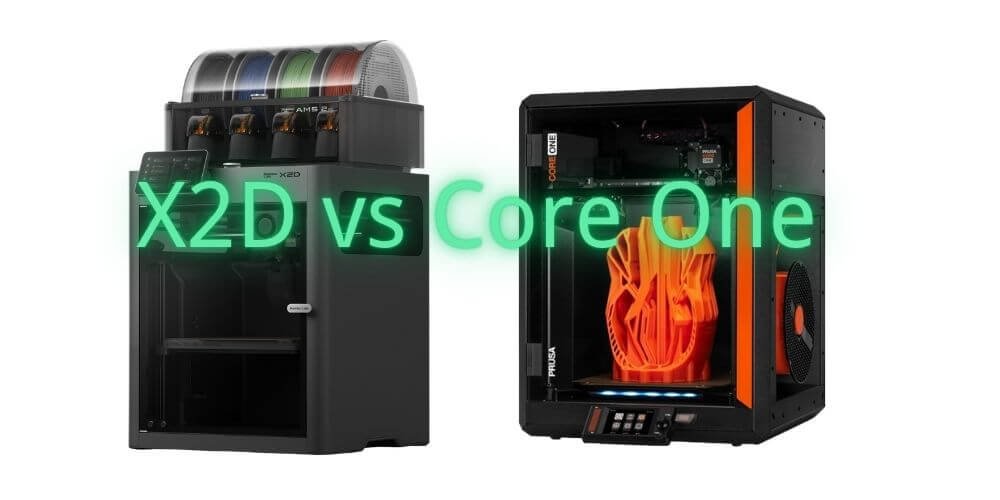
The Bambu Lab X2D launched in April 2026 at $649. For that price, you get dual extrusion, an actively heated chamber, a 65°C enclosure, 600mm/s print speed, and an AI camera. The Prusa Core One starts at $999 for a kit you assemble yourself, has no second nozzle, and tops out at a passive 55°C chamber temperature. Budget tight? It’s worth scanning the best current 3D printer deals before you commit.
By every spec on the comparison sheet, the X2D wins. It’s not close.
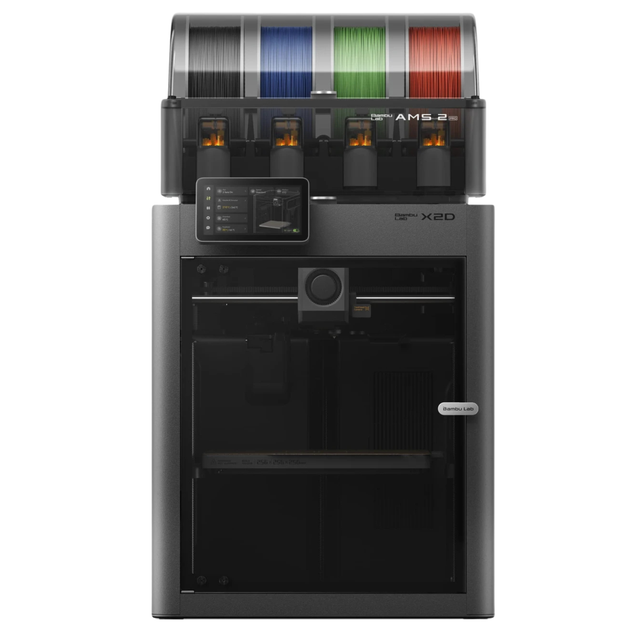
- Bambu Lab’s X2D is poised to redefine premium multi-material 3D printing with a true dual-nozzle architecture built for speed, precision, and reduced waste
- Rather than relying on tool swapping, the X2D is expected to use two fully integrated nozzles to deliver cleaner prints across the full 256 × 256 x 260 mm build area
- Combined with expanded AMS readiness, camera-driven plate and filament verification, simplified sensor hardware, and a striking glass-and-light premium enclosure, the X2D is a perfect fit for hobbyists and professionals alike! Dual-nozzle system with dedicated support material nozzle for clean, peelable supports
- Multi-material and multi-color printing capabilities for enhanced creativity
- 300°C nozzle temperature with 65°C active chamber heating for advanced materials
- Full filament path AI detection with built-in monitoring and backup systems
And yet, scroll through any serious 3D printing forum right now and you’ll find experienced makers — people with thousands of print hours, people who’ve owned multiple Bambu machines — quietly choosing the Pursa Core One. Not because they can’t afford the X2D. Not because they don’t understand the specs. Because they’ve learned something that spec sheets don’t tell you.
This article is about that thing.
We’re not going to tell you the X2D is bad — it isn’t. At $899 for the Combo with AMS 2 Pro, it’s arguably the most aggressive value proposition in consumer 3D printing right now. What we are going to tell you is that one reviewer who spent 250 hours on the X2D put it better than anyone else: “It has too many ifs, buts, and howevers to be the must-buy machine the X1 was.”
Those ifs and buts matter enormously depending on who you are. They’re completely irrelevant depending on who you are.
By the end of this article, you’ll know exactly which one you are.

- The CORE One is a 3D printing workhorse engineered in the proven Prusa tradition. Designed with a…
- Whether you’re new to 3D printing or a seasoned expert, Prusa CORE One ticks all the boxes for a…
- The printer includes a free 1 kg spool of Prusament PLA Prusa Galaxy Black; Prusa Research offers…

Quick Verdict
Buy the Bambu Lab X2D if you print support-heavy parts, want cleaner multi-material separation, and can clearly name the workflow problem that a second nozzle solves. The $899 Combo has no real competition at this price.
Buy the Prusa Core One if you want one enclosed machine that’s still fully serviceable, repairable, and supported in 2031 — and the work you actually do doesn’t require two nozzles to do it well. Looking at Bambu’s bigger H2D instead? Here’s how the Core One holds up against the H2D.
Still not sure? The use case breakdown below will settle it.
Full Spec Comparison: Bambu Lab X2D vs Prusa Core One
Before we get into what actually matters, here’s where the two machines stand on paper.
| Bambu Lab X2D | Prusa Core One | |
|---|---|---|
| Price | $649 solo / $899 Combo | $999 kit / $1,199 assembled |
| Print volume (single nozzle) | 256 × 256 × 260mm | 250 × 220 × 270mm |
| Print volume (dual nozzle) | 235.5 × 256 × 256mm | N/A — single nozzle |
| Dual extrusion | Left: direct drive / Right: Bowden | Single hotend (INDX add-on: not yet shipping) |
| Active chamber heating | Up to 65°C | Passive only — ~55°C via bed heat |
| Max nozzle temp | 300°C | 290°C |
| Max print speed | 600mm/s / 20,000mm/s² accel | ~300mm/s comparable real-world settings |
| Belts | 1.5GT precision belts | Standard belts |
| Firmware | Closed source | Open source (Marlin + Input Shaper) |
| Camera | 1080p, included | Optional add-on ($40) |
| Air filtration | HEPA + activated carbon, included | Optional add-on |
| Repairability | Limited — proprietary parts | Excellent — parts available 8+ years |
| Support quality | Forum-dependent, inconsistent | Direct human support, industry-best |
| Multi-color | Up to 25 colors with AMS 2 Pro | Up to 5 colors with MMU3 (INDX: 8 colors, TBA) |
| Warranty | 1 year | 2 years |
What this table doesn’t tell you
Three things jump out when you look past the numbers.
First, the price gap is wider than it looks. The X2D Combo at $899 includes a camera, air filtration, and AMS 2 Pro multi-material system out of the box. To get a comparably equipped Core One — assembled, with camera, filtration, and MMU3 for multi-material — you’re looking at roughly $1,600. That’s not a $300 gap. It’s nearly double. We break down the full cost picture in the Price Reality Check.
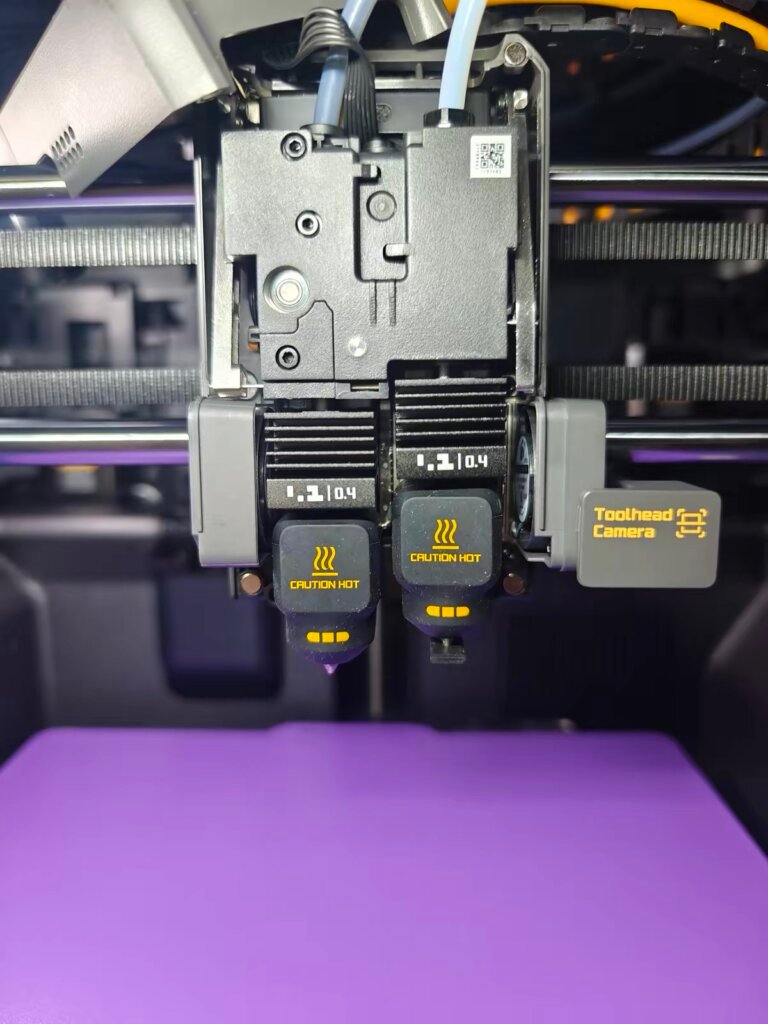
Second, the dual extrusion systems are not equivalent. The X2D’s left hotend is a proper direct drive. The right hotend is a Bowden-fed auxiliary extruder — with the motor mounted on the back panel, pushing filament through a long PTFE tube to reach the nozzle. This is the single most important thing to understand about the X2D, and we cover it in full in the next section.
Third, the speed numbers require context. The Core One’s 300mm/s figure comes from real-world comparable settings. Bambu’s 600mm/s is a ceiling, not a cruising speed. Tested head-to-head at comparable quality settings, the Core One matches print times within 1–4% for most jobs. The gap narrows significantly once you’re past the marketing numbers.
The Bowden Compromise: What Bambu Didn’t Put in the Press Release
Let’s talk about the thing Bambu’s marketing page glosses over.
The X2D’s product listing describes an “Independent Dual-Toolhead (IDEX) system.” That sounds like two equal, fully capable hotends working in parallel. It isn’t. What the X2D actually has is one proper direct-drive hotend on the left, and a Bowden-fed auxiliary extruder on the right — with the motor mounted on the back panel of the machine, pushing filament through a long PTFE tube to reach the nozzle.
One reviewer called it “1.5 hotends.” That’s not an insult. It’s an accurate description of what Bambu actually built — and understanding why they built it this way is the key to knowing whether it matters for you.
Why Bambu used a Bowden extruder for the aux hotend
This wasn’t a cost-cutting mistake. It was a deliberate geometry decision.
The X2D shares its footprint with the P2S. To fit a second hotend into that existing frame without shrinking the build volume, Bambu had to keep the toolhead light and compact. Moving the right extruder motor to the back panel was the only way to do that without either enlarging the printer or sacrificing build area. As one technical reviewer put it: “It’s not about weight — the Bowden may even cost more to produce than the H2D’s mechanism. This is only about size.”
The H2D solves this differently — two full direct-drive hotends, full capability on both sides — but that solution requires a larger machine and a $1,749 price tag to match. The X2D’s Bowden compromise is what gets you dual-extrusion capability at $649.
What the X2D Bowden limitation actually means in numbers
This is where the spec sheet stops and the real-world data starts.
The aux hotend is capped at 200mm/s print speed and 1,000mm/s² acceleration — compared to 600mm/s and 20,000mm/s² on the primary hotend. In practice, after 250 hours of real-world testing, the aux hotend consistently prints around 7% slower than Bambu Studio estimates, because the slicer doesn’t fully account for the Bowden’s slower acceleration profile in its time calculations.
In dual-nozzle mode, you also lose 20mm of build width on the left side of the bed — effective print area drops from 256 × 256mm to 235.5 × 256mm. Most slicer auto-arrange functions treat this as unusable space even for single-material prints, which means the printer often feels smaller than it is unless you manually position models.
Two more practical limitations: the aux extruder runs on a basic stepper motor with no clog or runout detection — if it jams mid-print, the machine won’t catch it. And automatic flow calibration only works on the left hotend. The right side runs on default pressure advance values, requiring manual tuning for anything outside standard PLA.
What the X2D aux hotend cannot print
The right Bowden hotend is not recommended for: PETG (as a model material), ABS, ASA, PC, PPA, PPS, or TPU fed directly. Flexible filaments are unreliable through a long Bowden path.
What it is designed for: PLA, PVA, BVOH, and dedicated support materials. Within that use case, it performs exactly as designed.


The part that surprises most people
For support material printing — the primary reason most buyers want a second nozzle — the Bowden limitation is almost completely irrelevant.
Support interfaces don’t need to print at 600mm/s. They don’t need millimeter-perfect extrusion control. They need to deposit cleanly, adhere lightly, and release without tearing the part. The aux hotend does all of this well.
After extensive dual-material testing — PLA bodies with PETG support interfaces, ABS parts with HIPS supports, TPU overmolds on PLA cores — support separation results were consistently clean. One test involving a carbon fiber nylon part with PolySupport interfaces produced supports that came away with minimal surface marking and zero post-processing required.
The limitation bites when you try to use the aux hotend for something it wasn’t designed for: model geometry at speed, PETG or ABS as a secondary model material, or H2D-level dual-extrusion performance from a $649 machine.
→ Full technical deep-dive: [X2D Bowden extruder — limitations, workarounds, and when it doesn’t matter]
The honest summary
The X2D has 1.5 hotends, not 2. The left one is excellent. The right one is purpose-built for support and secondary material work, and it does that job well within its defined boundaries. If your second-nozzle use case is support material separation or basic two-color functional prints — the Bowden compromise costs you almost nothing in practice. If you want two fully capable equal hotends at full speed — you need the H2D at $1,749, or a toolchanger.
Who Should Buy Which: 6 Buyer Profiles
Stop comparing specs. Start comparing problems.
Profile 1: You print support-heavy parts and support removal is your main frustration
→ Buy the Bambu Lab X2D. This is exactly what it was built for.
If support removal is eating your time and patience, the X2D solves that problem directly. As covered in the Bowden section above, the aux hotend is purpose-built for this: dedicated support materials — PVA, BVOH, PolySupport, HIPS — deposit cleanly and release without tearing your part.
Real-world results back this up. A carbon fiber nylon part with PolySupport interfaces came away cleanly with no post-processing. A PETG body with PLA support interfaces required zero finishing work. One maker printed a structurally complex wall organizer — parts that would have required hours of support cleanup on a single-nozzle machine — and assembled directly off the bed. Printing a lot of that material? We ranked the best printers for nylon and carbon fiber separately.
The Core One running MMU3 cannot match this. MMU3 routes all material through a single nozzle, which means real contamination risk between incompatible support and model filaments.
Profile 2: You print engineering materials — ASA, ABS, PA-CF — mostly single material
→ Your material list decides this one.
Split the decision by what you actually run most often.
If your work is primarily ABS, ASA, or PA-CF: buy the X2D. Its 65°C active chamber heating is a meaningful step up from the Core One’s passive ~55°C ceiling. That 10°C difference is real in interlayer adhesion and warp resistance — one tester found the X2D was the only machine in their lineup to complete a PC print without warping.
If your work is primarily PETG or TPU: buy the Core One. Its 360° cooling system handles these materials better, and its direct-drive Nextruder manages flexible filaments more consistently than the X2D’s Bowden aux hotend — which cannot run TPU on the right side at all.
Hard constraint for both: neither machine can run PPS-CF, PEEK, or ultra-high-temperature materials. Both cap at 300°C and 290°C respectively. For that tier, you need the H2D or a dedicated high-temp machine.
Profile 3: You print miniatures, tabletop figures, or high-detail model
→ Core One edges ahead — but the gap is smaller than you’d expect.
The Core One achieves 0.05mm gap clearance on square tolerance test pieces — a top-tier result — with perfect cylindrical tolerances. Its 0.9° stepper motors reduce VFA (vertical fine artifacts), the faint horizontal banding visible on large smooth walls that plagues many CoreXY machines. Reddit’s r/fdmminiatures community has documented extensive results with 0.2mm nozzle setups producing detail that surprises people expecting resin-quality output from FDM.
The X2D’s 1.5GT precision belts do reduce VFA compared to the P2S — a measurable improvement. And for miniature work, you’d use the left direct-drive hotend anyway, which performs excellently. But if miniatures are your primary use case, the Core One is the more tuned tool.
Profile 4: You run a small print shop or use your printer as a production tool
→ Core One. Repairability is non-negotiable when a printer is how you make money.
When a production printer breaks at midnight before a client deadline, what matters is whether you can fix it with parts you can actually get.
The Core One’s repairability story is exceptional. Prusa has continuously supplied MK3 parts — a 2018 printer — to this day. The Core One shares components with the MK4S, meaning a large compatible parts base exists right now. Many wear items can be reproduced on the machine itself.
The X2D’s maintenance picture is harder than it looks. Accessing the cutter requires removing side panels with tight plastic clips that become brittle over time. The hotend area has a proximity sensor wire that breaks easily if disturbed. A strong internal magnet near one screw position will swallow a dropped screw into the chassis — requiring full disassembly to retrieve. One experienced user described X2D maintenance as “ten times harder than the P1S.”
Bambu’s parts supply is currently adequate, with availability committed through March 2031. But their product lifecycle pattern — detailed in the Ecosystem section — is a real risk for production operators who can’t afford to be stranded on a discontinued platform.
If the printer is income-generating infrastructure, the Core One’s longer support horizon and genuine repairability are worth the premium.
Profile 5: Budget is your primary constraint and you want maximum capability per dollar
→ X2D Combo at $899. It’s not a close call.
At $899 with AMS 2 Pro, the X2D Combo includes: dual extrusion, active chamber heating, 1080p camera, HEPA + activated carbon filtration, and 25-color multi-material capability. A comparably equipped Core One costs approximately $1,600 — see the full breakdown in the Price Reality Check.
No printer under $1,000 comes close on features-per-dollar in 2026.
→ See also: [Best 3D printers under $1,000 in 2026]
Profile 6: You care about open source, repairability, and who you’re buying from
→ Core One. And you probably already know that.
This is the profile where specs stop mattering. The decision is about company philosophy and what kind of relationship you want with your hardware.
Bambu has been tightening its ecosystem. A third-party developer who built workflow tools for X-series printers was pressured by Bambu and shut down that portion of his project. Bambu Studio is increasingly the assumed environment. Cloud connectivity that makes Bambu machines convenient also gives Bambu visibility into your print activity. Several professionals in ITAR-adjacent work have noted they cannot use Bambu hardware for compliance reasons.
Prusa’s position is the opposite. Josef Prusa responds personally to Reddit threads. Firmware is open source. The API is being opened further. Every component has published repair documentation. The machine is designed to be owned, not subscribed to.
If those things matter to you, no price comparison changes the answer.
Quick reference: Bambu X2D vs Prusa Core One by use case
| Your situation | Buy this |
|---|---|
| Support removal is your main pain point | Bambu Lab X2D |
| Engineering materials — ABS / ASA / PA-CF | X2D (chamber heat advantage) |
| Engineering materials — TPU / PETG | Prusa Core One |
| Miniatures and high-detail work | Prusa Core One |
| Production tool, shop environment | Prusa Core One |
| Maximum features per dollar | X2D Combo at $899 |
| Open source and long-term ownership | Prusa Core One |
Ecosystem & Long-Term Ownership
Here’s a question most comparison articles skip entirely: what does it feel like to own this printer in year three?
Not the honeymoon period. Not the unboxing video. Year three, when the nozzle needs replacing for the fourth time, when a firmware update changes something you relied on, when the company releases a new model that makes yours feel obsolete. That’s when the purchase decision either holds up or doesn’t.
The Bambu experience: you’re buying into a system
Bambu Lab’s strength is integration. Bambu Studio, Bambu Handy, MakerWorld, and the hardware form a closed loop that works better than any comparable ecosystem in consumer 3D printing right now.
The workflow numbers are real. Head-to-head testing on a two-color print requiring color changes at every layer: X2D finished in 1 hour 37 minutes. P2S took 4 hours and 5 seconds. Filament waste: 8 grams on the X2D, 62 grams on the P2S. The average dual-nozzle color switch takes 14 seconds including prime tower time, versus 81–133 seconds for a single-nozzle AMS purge cycle. Camera integration is the best in the consumer class — 1080p, 30fps streaming, with spaghetti detection that has saved users from hours of wasted material. These aren’t paper features.
But the system comes with terms.
Bambu has been systematically tightening its ecosystem. A third-party developer who built workflow tools for X-series printers was pressured by Bambu and shut down that portion of his project.
More telling is the product lifecycle pattern: the X1 Carbon was discontinued the same day the X2D launched — no prior public indication it was coming. P2S users found their machines effectively demoted within weeks of purchase, still within the return window for some, already past it for others. The timing of these announcements is not coincidental.
Your X2D works optimally connected to Bambu’s cloud. Several cloud-dependent features degrade in offline mode. Bambu has committed to firmware support through May 2027, security patches through May 2029, parts through March 2031. What happens after is unknown.
None of this makes the X2D a bad machine. It makes it a machine you’re renting on a long-term agreement where the landlord controls the lease terms.
The Prusa experience: you’re buying a tool
The Core One’s ownership story starts from a different premise. Prusa’s business model depends on you wanting to keep your machine and buy more from them — not on you replacing it with the next model.
Prusa still actively supports the MK3S, a printer from 2019. The Core One shares toolhead, bed surface, and core electronics with the MK4S — a deliberate design choice that means the existing parts ecosystem applies to your machine from day one. Multiple documented cases exist of Prusa sending replacement parts to out-of-warranty users, no questions asked.
One user who accidentally destroyed their MK4S hot end received a replacement from Prague within days — with international shipping that cost Prusa far more than the component itself. Josef Prusa responds personally to Reddit threads. Firmware is open source. The API is being opened further, not locked down.
The honest downside: Prusa moves slowly. INDX — the Core One’s most capable multi-material answer — has been anticipated for a long time with no confirmed retail ship date. Prusa’s manufacturing capacity has historically struggled to match demand. If you need something shipping this week, Prusa’s pace is genuinely frustrating. But for buyers who view a printer as long-term bench equipment, that track record is the most credible long-term ownership story in the industry.
The INDX question
MMU3 is functional but finicky — a filament multiplexer running through a single nozzle, with purge waste and contamination limitations the X2D’s dual-nozzle setup avoids entirely.
INDX changes this. Eight hotends, tool-changer architecture, near-zero purge waste, and the ability to run TPU alongside rigid materials in ways no AMS or MMU system can match. When INDX ships and integrates cleanly, Prusa’s multi-material story becomes genuinely competitive — and for some use cases, superior.
The critical word is “when.” INDX is not shipping in volume today. Don’t pay today’s price for a feature that doesn’t exist yet. If INDX ships and prices reasonably, this comparison looks different in twelve months — we’ll update this article when that happens.
The Price Reality Check
The sticker price comparison is the least useful number in this article. Here’s the one that matters.
What you actually spend for equivalent capability
| Configuration | X2D | Core One |
|---|---|---|
| Base machine (assembled) | $649 | $1,199 |
| Multi-material system | Included in $899 Combo | MMU3: ~$380 |
| Camera | Included | $40 add-on |
| Air filtration | Included | ~$100 add-on |
| Total for full setup | $899 | ~$1,720 |
That’s an $820 gap for comparably equipped machines — and the Core One’s MMU3 still doesn’t match the X2D’s dual-nozzle support-material workflow. Add INDX to close that gap and you’re looking at a Core One total north of $2,000.
Where the math flips
Two scenarios change the calculation.
If you don’t need multi-material at all: a bare Core One at $1,199 against a bare X2D at $649 is a $550 gap. Now you’re comparing two single-material enclosed printers where the Core One’s repairability, support quality, and long-term ownership confidence carry real weight. Whether that weight is worth $550 depends on your profile above.
If you’re running a production shop where downtime has a cost: one hour of lost production time can exceed the price difference between these machines. The Core One’s lower risk of extended downtime — more repairable, better support, longer confirmed parts supply — changes the value calculation entirely when the printer is income-generating infrastructure.
The warranty gap nobody talks about
X2D: 1-year warranty. Core One: 2-year warranty. On hardware in this price range, that’s not a minor footnote — it’s an extra year of covered repairs on a machine that costs four figures.
The honest bottom line
Feature-for-feature, the X2D at $899 Combo is an extraordinary value proposition. Nothing in this price class matches it. That’s arithmetic, not marketing.
Ownership-for-ownership over a 4–5 year horizon, the gap narrows considerably. The Core One’s parts availability, warranty length, and support quality reduce lifetime cost in ways that don’t appear in a purchase-day comparison.
Buy for the sticker price if you’re optimizing for today. Buy for the total cost if you’re optimizing for the next five years.
→ See also: [Bambu X2D vs P2S — is the $100 upgrade worth it?]
Frequently Asked Questions
Is the Bambu Lab X2D worth the upgrade from a P2S?
Almost certainly yes. For $100 more than the P2S solo price, the X2D adds a second hotend for support material and dual-material printing, active chamber heating up to 65°C, 1.5GT precision belts that measurably reduce VFA, and standard exhaust filtration Bambu previously sold separately.
The X2D Combo at $899 versus the P2S Combo at $799 is $100 for dual extrusion, chamber heating, and better belts. For any buyer printing beyond single-color PLA and PETG, that’s not a close call.
Can the Prusa Core One compete with the X2D once INDX launches?
On multi-material workflow: yes — and potentially surpass it. INDX’s tool-changer architecture means near-zero purge waste, true independent hotends with no Bowden limitations, and TPU alongside rigid materials in combinations no AMS-based system can match cleanly. Eight hotend positions versus the X2D’s two is a different category of multi-material capability.
On price: no. A full Core One plus INDX setup will likely cost more than twice the X2D Combo. And as noted in the Ecosystem section, INDX doesn’t exist in volume today — evaluate the Core One on what it can do right now, not a future product’s promise.
Is the Bambu X2D good for beginners?
Better than the X1 Carbon was, but not designed for true first-timers. Bambu Studio and MakerWorld lower the barrier significantly — for someone moving up from an entry-level open-frame printer, the automated workflows feel like a revelation.
The complication is the dual-nozzle system. Understanding which hotend to use and how to configure support material profiles requires more knowledge than a typical first printer demands. If 3D printing is completely new to you, the P2S or A1 Mini gets you printing faster. If you’re a fast learner already frustrated with entry-level limitations, the X2D is a substantial and worthwhile step up. For pure beginner support quality, the Core One’s customer service is the safety net no Bambu machine can match. If it comes down to the P2S or a Prusa, we priced that matchup out separately.
Does the X2D Bowden aux extruder affect real-world print quality?
For its intended job: minimally. For jobs it wasn’t designed for: noticeably. The full breakdown is in the Bowden Compromise section — but the short version is: use the left hotend for your model, the right for support material, and the Bowden limitation is a technical footnote. Try to use the aux hotend for model geometry at speed, and you’ll see stringing, surface voids, and inconsistency.
Why are experienced makers choosing the Core One when the X2D is clearly better value on specs?
Because specs measure the machine. Experienced makers are also measuring the company.
People who’ve been in this hobby long enough have watched manufacturers launch, dominate, and quietly exit — leaving users with hardware that still works but receives no firmware updates, no parts, and no support. Bambu’s product lifecycle pattern, detailed in the Ecosystem section, is a real concern for buyers thinking past year one.
Prusa has an eight-year track record of doing the opposite. That track record has a dollar value — and for buyers who’ve learned the hard way what it costs to be stranded on a discontinued platform, that value justifies the premium. It’s a different calculation than specs-per-dollar, and it’s a legitimate one.
Final Verdict
Come back to the question from the opening.
Experienced makers are choosing the Core One — not because the Bambu Lab X2D is bad, but because they’ve learned to evaluate things the spec sheet doesn’t capture. Company trajectory. Ecosystem risk. What year three looks like. The difference between a machine you own and a machine you’re subscribed to.
The X2D is the better machine for most people right now. At $899 Combo, it offers dual-extrusion capability, active chamber heating, and a multi-color workflow that nothing in its price bracket can match. If you need two nozzles and you’re confident you know why, buy it.
→ [Full Bambu Lab X2D review ]
The Core One is the better machine for the right people over the right time horizon. If you’re running a shop, printing demanding materials solo, or you’ve been burned by a manufacturer that moved on faster than you did, the Core One’s ownership story is worth real money — money that shows up in repair costs you won’t have, downtime you won’t experience, and firmware support you’ll still be receiving when the X2D’s clock runs out in 2027.
One question, honestly answered, decides this for most readers: when you imagine the second nozzle on the X2D, can you name a specific print it would have improved in the last six months? If yes — buy the X2D. If the answer is vague — buy the Core One, and spend the difference on filament and time actually printing.
The best printer is the one you’re still using in three years. Choose accordingly.