
I earn a commission if you buy through links on this page, at no extra cost to you. As an Amazon Associate, I earn from qualifying purchases.
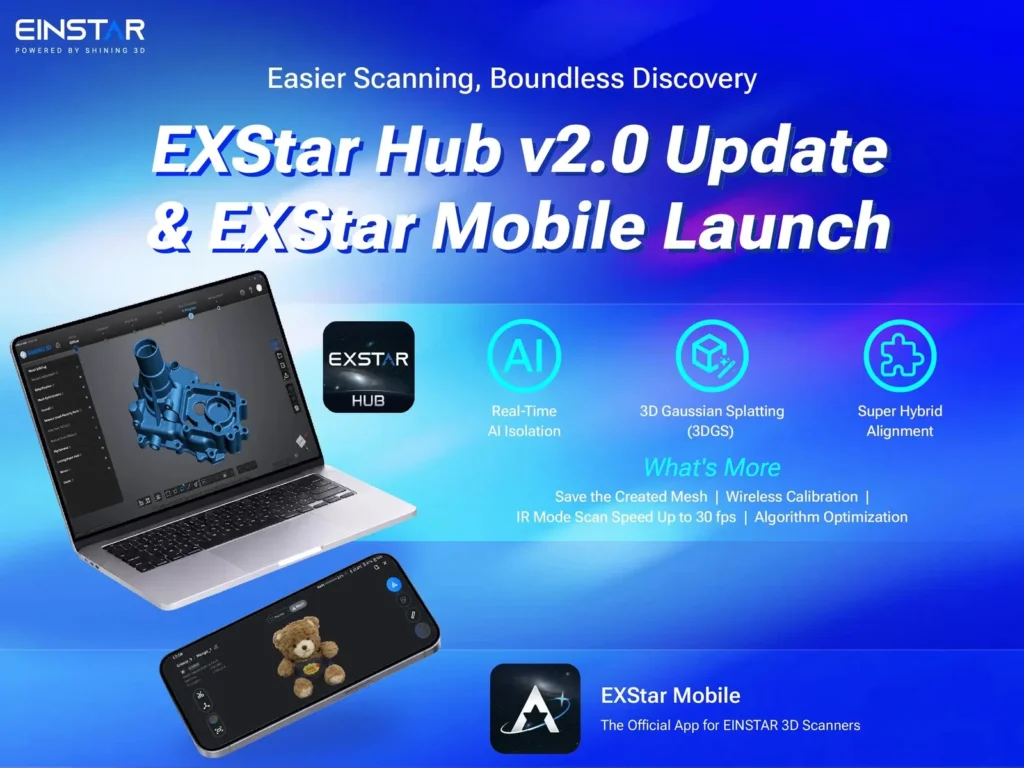
Einstar released EXStar Hub 2.0 on Oct. 29, and with it EXStar Mobile, a phone app that runs the Einstar Rockit and Einstar 2 scanners without a PC. Two wireless scan modes jump from 20 FPS to 30 FPS, and calibration no longer needs a cable.
The catch is in the fine print. The mobile app works on Android 15 phones and tablets today, but the iPhone and iPad version is listed as “Will be available on the App Store soon!” on the EXStar Mobile download page, and the headline AI feature needs a Windows PC with an RTX 3060 or better.
Table of Contents
What EXStar Hub 2.0 Changes for Einstar Rockit and Einstar 2
| EXStar Hub 2.0 and EXStar Mobile (as of Oct. 31, 2026) | Details |
|---|---|
| Compatible scanners | Einstar Rockit, Einstar 2 |
| Desktop version | 2.0.0-44 (Windows 10/11), 2.0.0-16 (macOS Tahoe 26.2+) |
| Mobile version | 1.0.0-55, Android 15+; iOS listed as coming to the App Store |
| Phone hardware | Snapdragon 8 Gen 2 and 8GB RAM minimum |
| Faster capture | Wireless IR without texture and Laser Feature: 20 to 30 FPS |
| Real-Time AI Isolation | Windows with an RTX 3060 or higher; macOS still in development |
| New tools | 3D Gaussian Splatting (3DGS), Super Hybrid Alignment, Saved Mesh, wireless calibration |
Real-Time AI Isolation works in supported IR scanning workflows. Turn it on before a scan, or while a scan is paused, and it uses the texture camera to pick out the object near the center of the frame, then filters turntables, backgrounds and fingers out of the data while you scan.
Super Hybrid Alignment mixes feature and marker tracking, which means fewer markers in more laser-scanning setups. Saved Mesh keeps one mesh per project, so jumping between Scan and Post-Processing no longer rebuilds it from scratch. Batched mesh calculations reduce peak memory use and make complex or long-running datasets more stable.
3DGS, also called 3D Gaussian Splatting, builds a visually richer model from images, guided by the scan geometry. It’s for product shots and visual archives, and it doesn’t replace a mesh for editing, measuring or printing.
Does EXStar Mobile Work on iPhone? Not Yet, Android 15 Only
Einstar’s announcement contradicts itself here. Its opening says iOS support is “coming soon,” then a later section lists iPhones and iPads as supported. The download page settles it: the iOS build isn’t on the App Store yet, and Android is the only platform you can install today.
Android also comes with a hardware bar. The minimum is a Snapdragon 8 Gen 2 phone with 8GB of RAM, and the recommended spec is a Snapdragon 8 Elite with 12GB. The download page links to Google Drive and ShiningSpace files rather than a store listing.
On a phone, you connect through the scanner’s own Wi-Fi hotspot, pair with a QR code, scan in laser or IR modes, clean up the data, generate a mesh or 3DGS on the device, and export OBJ, PLY or STL. Bigger jobs can move to EXStar Hub on a PC. A beta tester on r/3DScanning, using a pre-release build on a recommended-spec Galaxy S25 Ultra in September, said scanning felt close to their workstation. They added that very large scans could hit the phone’s RAM limit, though they hadn’t run into it themselves.
What EXStar Hub 2.0 Doesn’t Fix
IR Texture scanning is largely unchanged. The 30 FPS bump covers wireless IR without texture and Laser Feature only.
Wireless still crops the view. At the same working distance, wireless scanning can show a slightly smaller field of view than wired because of image cropping.
AI Isolation skips every Mac and lower-end PCs, for now. Hub itself runs on an RTX 2060 at minimum, but AI Isolation needs the RTX 3060 that Einstar lists as the recommended card. My read: if your PC only meets Hub’s minimum RTX 2060 spec, plan on a GPU upgrade before you count on AI Isolation.
What the Update Means for Einstar Rockit and Einstar 2 Owners
If you scan in IR mode on Windows with an RTX 3060 or higher: update now. AI Isolation and Saved Mesh cut two repetitive steps: deleting background data and rebuilding meshes.
If you’re on a Mac: you get 3DGS, Saved Mesh and the frame-rate bump, but no AI Isolation yet.
If your Android 15 device runs a Snapdragon 8 Gen 2 or newer with 8GB of RAM: this is the first time a Rockit or Einstar 2 can scan with no computer in the room. New to scanning? Our guide on how to 3D scan a product covers the basics.
If you’re on an iPhone: wait for the App Store listing.
If you own an EZ GO or are still shopping: this release covers Rockit and Einstar 2 only, so the Einstar EZ GO isn’t on the list. Our best 3D scanners for makers guide compares the alternatives.

EXStar Mobile and EXStar Hub 2.0 FAQ
Can I 3D scan with my phone using an Einstar scanner?
Yes, if you own an Einstar Rockit or Einstar 2 and an Android 15 phone or tablet with at least a Snapdragon 8 Gen 2 and 8GB of RAM. The iOS and iPadOS versions are still listed as coming soon.
What are the PC requirements for EXStar Hub 2.0?
On Windows, the minimum is a 13th-gen Core i7 or Ryzen 7 5800, 32GB of RAM and an RTX 2060. Real-Time AI Isolation needs an RTX 3060 or higher, and Macs need macOS Tahoe 26.2 or later.
Which scanners work with EXStar Mobile?
Only two models: Einstar’s Rockit and the Einstar 2. Other Einstar scanners aren’t listed for this release.
What We Still Don’t Know About EXStar Mobile
- iOS timing: no date for the App Store release.
- Mac AI Isolation: “in development,” with no timeline.
- Cloud 3DGS: the Hub release note says 3DGS models can now be generated in the cloud, and Einstar hasn’t said whether that needs an account or a paid plan.
- Store distribution: whether the Android app moves to Google Play.
If you scan wirelessly with a Rockit or Einstar 2, the Hub update is worth installing today, and the phone app is worth a try if your Android handset clears the spec bar.