
Heads up — some of the links below are affiliate links. If you buy through them, I earn a small commission (at no extra cost to you), which helps cover the gear I test. Thanks!
Nothing stings quite like a six-hour print that fails on the last layer. You check the model, the bed, the nozzle. Then you hear it: a faint popping from the hot end. That sound is moisture, and it means your filament drank water out of the air while you weren’t looking.
Here is the part most buying guides skip. You may not even need a dryer, and the wrong one will happily cook a spool without pulling much water out. So this guide does two jobs. It helps you decide whether a 3D printer filament dryer is worth it for how you actually print, and if it is, it ranks six units using real test numbers instead of spec sheets.
I have not put all six on my own bench. What I can do is pair the hard test data from teardowns and moisture tests with what years of drying my own filament have taught me about what matters. Where a number comes from someone else’s test, I say so.
- Do you need one? It depends on three things: what you print, how you store it, and how often you print. Dry-stored PLA and ABS often skip the dryer entirely. PETG, TPU, and nylon are a different story.
- Best overall value: Sovol SH02, a no-frills two-spool unit that dries and stores.
- Best budget entry: SUNLU FilaDryer S2, the cheapest sane way to start.
- Best for multi-color and multiple printers: SUNLU FilaDryer S4, four spools at once.
- Best for nylon and engineering filament: Creality Space Pi X4, the sole 85°C unit here with an active fan.
- Best for Bambu Lab AMS owners: EIBOS Tetras, active drying that reuses the AMS you own.
- Honest note: Before you blame moisture, check your slicer settings and nozzle. Not every ugly print is a wet spool.
Table of Contents
- What a Filament Dryer Actually Does
- Do You Actually Need One?
- How to Tell If Your Filament Is Wet
- How I Picked These Dryers (What “Best” Really Means)
- At-a-Glance: Filament Dryers Compared
- 1. Sovol SH02: Best Overall Value
- 2. SUNLU FilaDryer S2: Best Budget Entry
- 3. SUNLU FilaDryer S4: Best for Multi-Color and Multiple Printers
- 4. Creality Space Pi X4: Best for Nylon and Engineering Filament
- 5. Creality Space Pi Plus: Best Simple Two-Spool
- 6. EIBOS Tetras: Best for Bambu Lab AMS Owners
- Filament Drying Temperature and Time Chart
- No Dryer Yet? Cheaper Ways to Dry Filament
- Don’t Buy a Dryer If…
- FAQ
What a Filament Dryer Actually Does
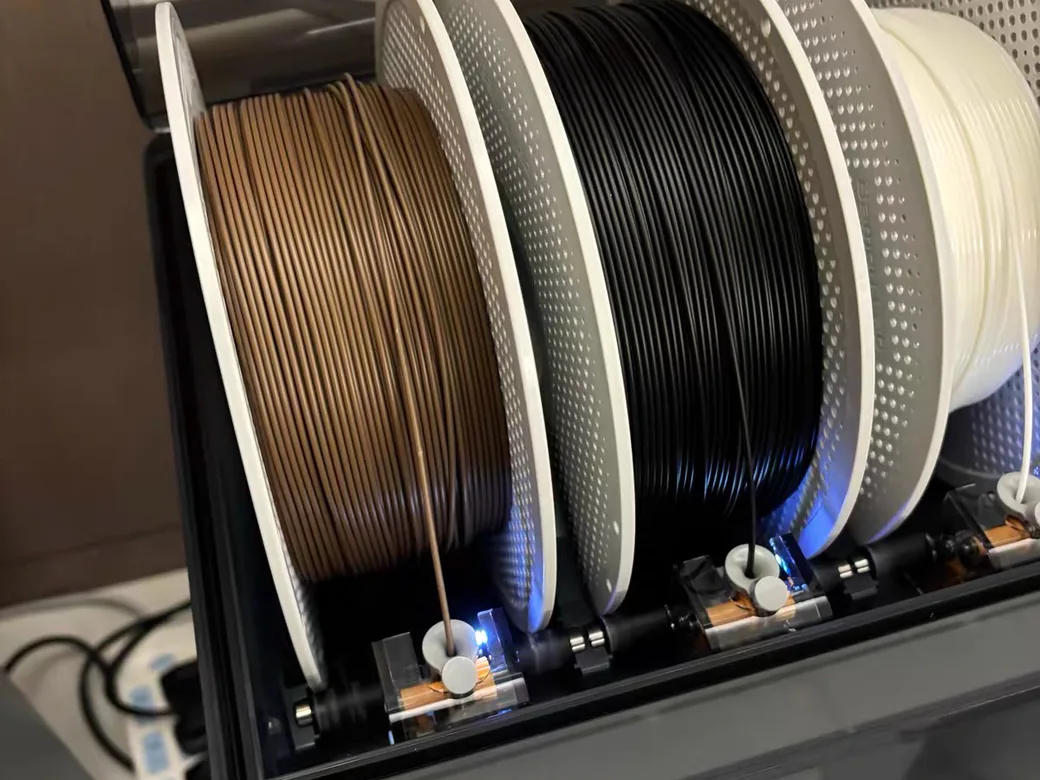
A filament dryer is a heated box that gently warms a spool to drive out absorbed water. That’s the whole job. It runs far cooler than an oven, circulates warm air, and vents the humidity it pulls out.
Why does this matter? Most filaments are hygroscopic. They soak up water from the air like a sponge. When that wet plastic hits the hot end, the trapped moisture flashes to steam. You get bubbles, popping sounds, stringing, rough surfaces, and weak layer bonding. A dryer removes the water before it can sabotage the print.
The good ones share three traits: real temperature control, air circulation, and a vent so humid air can escape. Early sealed boxes with no vent trapped the moisture inside and barely worked. Some printers hand you this problem by design. The K2 SE 4C parks four spools in open air while they wait their turn.
Do You Actually Need One?
Let me save you some money. A filament dryer isn’t mandatory for everyone.
Three things decide it: the material you run, your storage habits, and your print frequency. If you mostly print PLA or ABS in a dry climate, you may never see a difference. PLA is fairly forgiving. But for PETG, TPU, and especially nylon, drying can be night-and-day.
Storage and pace matter just as much. Vacuum bags and sealed bins with desiccant slow moisture down. If you print daily, filament often doesn’t sit long enough to get wet. The people who benefit most are casual printers whose spools sit exposed for weeks or months. If that’s you, the fix is usually a storage setup that actually scales, not a bigger dryer.
Here is the honest version most sponsored reviews won’t give you. Plenty of “wet filament” prints are actually slicer problems: too little infill, too few top layers, retraction set wrong, or a worn nozzle. One popular teardown showed a Benchy printed with filament left for months next to a fish tank, and apart from some stringing it came out fine. Moisture is real, but it’s not the cause of every flaw. Check the cheap stuff first.
How to Tell If Your Filament Is Wet
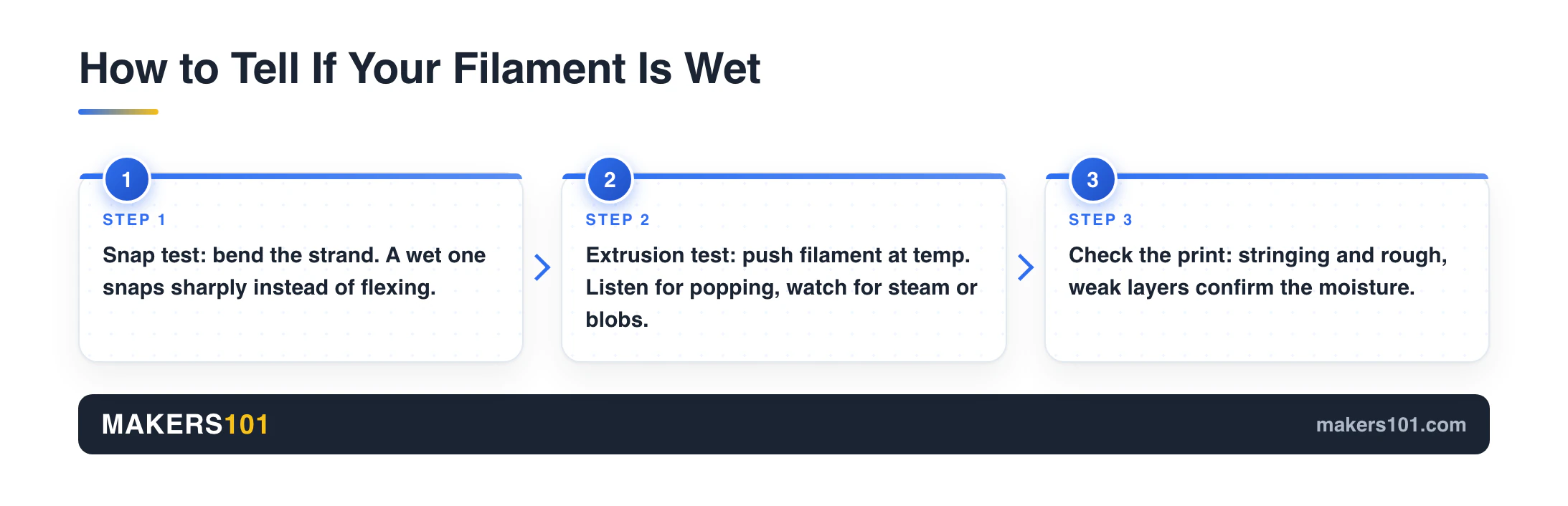
Before you buy anything, find out if you even have a moisture problem. Two quick tests do the job.
The snap test. Bend a length of filament. If it snaps sharply instead of flexing, it has likely drunk too much water. This one isn’t foolproof, so treat it as a first hint.
The extrusion test. Load the spool and push out a small amount at printing temperature. Listen and look. Popping, sizzling, faint steam, or tiny surface blobs all point to moisture. A clean, smooth extrusion means you’re probably fine.
On the printed part itself, watch for stringing between towers, a rough or hazy surface, and layers that peel apart too easily. Any of those, combined with the sounds above, is your answer.
How I Picked These Dryers (What “Best” Really Means)
A dryer is only “best” if it actually removes water and does not fight you. Here are the six things I weighed, each tied to a real observation rather than a marketing bullet. If you want the exact target temperature for your specific material, our filament drying temperature guide breaks it down by plastic.
- Max temperature. This sets which materials you can dry. 70°C covers PLA, PETG, and TPU. Nylon and polycarbonate want 80°C or more, which most units can’t reach.
- Active fan vs passive vents. Moving air out beats letting it seep out. In one head-to-head, an active-fan unit dried a test sponge in 30 minutes while passive-vent siblings needed a full hour.
- Capacity. One spool is fine for a single printer. Multi-color and print farms want two or four.
- Print-while-drying. A PTFE feed port lets the filament stay in the dryer during long prints. For hygroscopic materials, that’s the whole game.
- Temperature accuracy. The number on the screen isn’t always the number at the spool. One tested unit overshot its 60°C setpoint by 5°C at the filament, another by only 2°C.
- Sensor honesty and noise. A built-in humidity readout that lies is worse than none. Cheaper units like the SUNLU S2 are notorious for it, while pricier boxes such as the Polymaker Polymus read more consistently. Some dryers also hum loudly enough to notice in a home office.
At-a-Glance: Filament Dryers Compared
Prices are current as of July 7, 2026 and move around, so treat them as ballpark. Full specs and today’s price sit in each card below.
| Dryer | Spools | Max temp | Best for | Price (as of Jul 2026) |
|---|---|---|---|---|
| Sovol SH02 | 2 | 70°C | Best overall value | $61.74 |
| SUNLU FilaDryer S2 | 1 | 70°C | Budget entry | $38.24 |
| SUNLU FilaDryer S4 | 4 | 70°C | Multi-color / farms | $99.44 |
| Creality Space Pi X4 | 4 | 85°C | Nylon / engineering | $159.00 |
| Creality Space Pi Plus | 2 | 70°C | Simple two-spool | $89.00 |
| EIBOS Tetras | 4 (AMS) | 65°C | Bambu Lab AMS owners | $199.99 |
1. Sovol SH02: Best Overall Value
If you want one dryer that just works, start here. The SH02 holds two spools, heats with a 150W PTC element from 40°C to 70°C, and runs nine material presets from a touchscreen. No app, no RGB, no gimmicks.
What sells it is honest performance for the money. In one detailed review, new PLA spools lost 2g and 5g of water over an 8-hour cycle, and the unit evaporated 10mL of standing water in just over two hours at its top setting. Independent steel rollers let the spools turn, which helps even out heat and means you can feed a printer while drying. Desiccant slots and a rubber-sealed lid let it double as a storage box between prints.
- Two-spool capacity at a mid-range price
- Doubles as a sealed storage box
- Rollers allow print-while-drying and more even heating
- No always-on mode (98-hour timer max)
- Base can reach 62°C, so keep it off heat-sensitive surfaces
Best for: The everyday printer who wants effective drying plus storage without paying for features they’ll never touch.
Nik’s Take: This is the unit I point most people to. The test numbers are solid rather than flashy, and that matches how I think about drying gear. You want boring reliability, not a light show. Just respect that hot base and give very wet spools extra time, since the heat evens out after the first hour.

- [Dual Spool Filament Dryer Box] – Each Sovol SH02 filament dryer is equipped with 2 filament holes which allow PTFE pipes through. The newly designed…
- [150W PTC Fast Heater]- Different from Sovol SH01, SH02 comes with 150W PTC heater which can heat up faster and are more energy-efficient. SH02 dryer…
- [Better Sealing than SH01] – We changed the sealing design of SH02 filament storage box and used thicker sealing materials with stronger sealing…
- [One Key Set for Each Type of Filaments] – Sovol SH02 has one-key temperature setting for 9 different types of 3D Printing filaments, including PLA…
- [Smart Safety Protection] – When PTC temperature exceeds 130°C, it will automatically cut off the heating, and when the PTC temperature drops below…
2. SUNLU FilaDryer S2: Best Budget Entry
The S2 is the cheapest way to start drying without regret. It takes one spool, tops out at 70°C, and uses top-and-bottom heating for 360° coverage. A 4.3-inch touchscreen handles presets, and it sips under 50W. That ceiling is enough to dry nylon, which the older S1 couldn’t manage.
It’s not perfect, and the flaws are worth knowing. In a moisture test it pulled 31.7% of the water out of a sponge in an hour at 60°C, respectable for the price but behind fan-forced units. The bigger catch is the humidity sensor. Reviewers found it still reading 30% to 60% after a full day of drying, while other meters showed 11% to 13%. Trust a cheap standalone hygrometer over the S2’s display.
- Lowest price of any pick here
- 70°C ceiling handles nylon, TPU, and PETG
- Compact and quiet under 50W
- Humidity sensor reads inaccurately, so use your own meter
- Single spool only
Best for: First-time buyers who want to solve a PETG or TPU moisture problem cheaply before committing to anything bigger.
Nik’s Take: As one reviewer put it, without a fan it is not as efficient as the pricier boxes, but it’s still far better than no dryer at all. That’s exactly the right way to see the S2. It is a starter unit. Buy it on sale, ignore the built-in humidity number, and you’ll be happy.

- SUNLU Filament Dryer S2: As a leading 3D printing manufacturer, we’ve invested years of research to develop a product that significantly enhances 3D…
- Importance of 3D Filament Dryer: Filaments will absorb moisture from the air, especially if they’re old or stored in a humid place. Damp filament will…
- Keep Filament Dry During Printing: SUNLU Filament Dryer can be used as a filament spool holder (storage dehydrator), and can dry filament during…
- Revive Damp 3D Printer Filament: Moisture can be a real problem for 3D printer filament, especially if it has been stored for a while. SUNLU Filament…
- Fast Heating and Even Drying: SUNLU filament dryer heats up quickly to the preset temperature, while the built-in spindle ensures that the filament…

3. SUNLU FilaDryer S4: Best for Multi-Color and Multiple Printers
When one spool at a time stops cutting it, the S4 steps up to four. A 350W PTC heater brings it up to temperature fast, and a smart humidity mode keeps things dry on its own: it stops heating below 20% and kicks back on above 50%. For multi-color rigs and small farms, drying a full set of colors together is the point.
The tradeoffs come with the size. That 350W draw is a big jump from the S2’s sub-50W appetite, so it costs more to run. Reviewers also found the bundled PTFE tube a touch narrow at 1.9mm inner diameter, which adds drag on multi-color feeds. Swapping in a 2.5mm tube fixes it for a few dollars.
- Four spools dried at once
- Smart humidity maintenance cycles heat automatically
- Fast 350W heat-up
- Higher running cost than single-spool units
- Stock PTFE tube is tight for direct feeding
Best for: Multi-color printers and anyone running more than one machine who needs a whole palette dry at the same time.
Nik’s Take: The math is simple. If you dry spools one at a time and you own more than one printer, you’ll resent a single-spool box within a week. The S4 buys back your patience. Plan for the power bill and keep a wider tube on hand if you feed multi-color directly. One warning before you buy it. The presets can run hot enough to fuse spools together, and the S4 review covers what to set instead.

- ①【Large Space for Endless Printing】Experience uninterrupted 3D printing with SUNLU New S4 Filadryer– the first filament dryer box that…
- ②【Updraded Lightning-Fast Heating】Get to heating quicker with the S4 filament dry box’s impressive 350W PTC heater. In just 30 minutes, it heats…
- ③【Triple Security for Worry-free Printing】Rest easy knowing the S4 filament storage box prioritizes your safety. Its triple-layer security…
- ④【Triple Fans for Uniform Drying】SUNLU New generation S4 filament dehydratorr equipped with three build-in fans – two circulating fans on the…
- ⑤【Smart Auto Humidity Control】3D printing users can adjust the internal humidity by mode 2(humidity range 30%~50%). The S4 dryer will auto start…
4. Creality Space Pi X4: Best for Nylon and Engineering Filament
This is the specialist. The X4 is the only pick here that reaches 85°C, and that ceiling is the difference between drying nylon and pretending to. It also uses a real fan on the back to actively expel moisture, plus dual heating chambers and a flame-retardant certificate.
The test data backs the price. In a three-way comparison it dried a saturated sponge completely in half an hour, while its passive-vent siblings took a full hour. Its temperature accuracy was the best of the group too, overshooting a 60°C setpoint by only 2°C at the spool versus 5°C on the Plus. If you print carbon-fiber blends, nylon, or PPS, that combination of heat and airflow is what you’re paying for. It pairs naturally with a machine built for high-temp materials like nylon and ABS.
- 85°C ceiling dries nylon and engineering filament
- Active fan dries dramatically faster than passive units
- Best temperature accuracy in its family
- Premium price
- No spool rotation, and the top exit port is awkward
Best for: Anyone serious about nylon, carbon-fiber composites, or other high-temp engineering materials that ordinary 70°C boxes cannot dry.
Nik’s Take: Don’t buy this for PLA. You’d be paying for headroom you never use. But the moment you commit to nylon or CF, a 70°C box will quietly waste your time, and you’ll wonder why the prints still string. The X4 is the honest entry point for engineering materials.

- Spacious & Organized Storage: Holds 4 standard 1kg spools or 2 large 2kg spools – the ultimate Creality SpacePi X4 filament dryer for high-volume…
- Fast & Efficient Drying: Dual independent 200W heating chambers (85°C max) remove moisture 30% faster than single-chamber dryers. Eliminates…
- Dual Functionality: Dryer + Storage: Beyond a standard filament dryer box: Actively maintains humidity during printing pauses. Silicone-sealed…
- Precise Temperature Control: Industry-first drying scene touch UI on this Creality dryer. Customize temps 50-60°C for PLA/PETG/TPU ect. via real-time…
- Protect Your Filament Investment: Extends filament shelf life, reduces waste%, and ensures consistent high-quality prints
5. Creality Space Pi Plus: Best Simple Two-Spool
The Plus is the X4’s calmer sibling. It holds two spools, heats with dual 360° PTC elements, and drives everything from a 4-inch touchscreen. Its larger 4-5mm vent holes, up from a single 1mm hole on the original, keep humidity lower during a run through passive airflow.
Know its limits going in. The 70°C ceiling rules out nylon and polycarbonate. And its temperature accuracy trails the X4, reading about 65°C at the spool on a 60°C setpoint. There’s no active fan, so it dries at the slower passive pace. For common materials, none of that is a dealbreaker.
- Clean two-spool design with a simple interface
- Improved passive venting over the original
- Reasonable mid-range price
- 70°C only, so no nylon or PC
- Slower passive drying and looser temperature accuracy
Best for: PLA, PETG, and ABS printers who want a tidy two-spool Creality box and never plan to touch engineering filament.
Nik’s Take: Think of the Plus as the X4 minus the parts nylon needs. If your filament shelf is all PLA and PETG, you’ll never miss the extra heat or the fan, and you keep some cash. If there is any chance nylon enters your life, spend up for the X4 instead.
6. EIBOS Tetras: Best for Bambu Lab AMS Owners
If you own an original Bambu Lab AMS, this is the clever upgrade. The Tetras turns your existing AMS into an active drying system rather than a desiccant box. It gives each of the four lanes independent temperature control, dries while you print, and needs no firmware update.
The performance surprised even the reviewer. Temperature stayed within 2°C across a single lane, the most even result they had measured on any dryer. Lane isolation worked too: one lane at 45°C and another at 65°C held their own settings, so you can dry different materials side by side. It runs quietly at 42dB. The catch is a 65°C ceiling that stops short of polycarbonate, and early units had some cracked mounting parts that EIBOS covered with replacement print files. It is a smart way to keep filament in my Bambu AMS dry without swapping hardware.
- Adds active, print-while-drying to an existing AMS
- Excellent temperature uniformity and per-lane control
- Very quiet, and far cheaper than buying a new AMS 2 Pro
- 65°C ceiling cannot handle polycarbonate
- 20-30 minute install, with some early build-quality complaints
Best for: Original Bambu Lab AMS owners who want real drying without spending on a whole new AMS 2 Pro.
Nik’s Take: The value case is what makes this one land. A new AMS 2 Pro costs far more and still won’t dry while it prints. If you already live in the Bambu ecosystem and fight humidity, upgrading the box you own is the smarter money. Just budget half an hour for the install and check your mounts.
- 【4 Independent Filament Drying Chambers】Tetras upgrades your Bambu Lab AMS into a professional 4-spool smart drying system. Each spool slot…
- 【Drying Filament While Printing】keep filaments in peak, moisture-free condition throughout the entire print process. Each chamber supports…
- 【Active Drying with Intelligent Moisture Exhaust】 every chamber of Tetras features forced-air circulation, blowing across the heating element and…
- 【Automatic Sealing & Humidity Control】once the drying cycle is complete, each chamber automatically seals to block moisture and dust. Humidity…
- 【Second-Stage Drying & Easy Independent Installation】Tetras employs a second-stage thermal process: high-efficiency moisture removal followed by…
Filament Drying Temperature and Time Chart
Temperature is where good drying is won or lost. Too low and you barely move the water. Too high and you soften or warp the spool. These are safe starting points for common materials. When in doubt, start lower and add time. If you are still choosing what to print, our guide to the best filaments for your printer covers the material side.
| Material | Drying temp | Time | Moisture sensitivity |
|---|---|---|---|
| PLA | 45-55°C | 4-6 h | Low |
| PETG | 55-65°C | 4-6 h | Medium |
| TPU | 50-55°C | 4-6 h | High |
| ABS / ASA | 60-70°C | 4-6 h | Medium |
| Nylon (PA) | 70-80°C | 8-12 h | Very high |
| PC | 80-90°C | 6-8 h | Very high |
Notice the pattern. Everything below nylon lives happily inside a 70°C dryer. Nylon and PC are exactly why the 85°C Space Pi X4 exists.
No Dryer Yet? Cheaper Ways to Dry Filament
You don’t strictly need a purpose-built box. Several low-cost methods work, with real tradeoffs.
Food dehydrator. Pull out the tray dividers and you can stack a few spools. It is cheap and effective, but there is no fine temperature control, no timer, and it is loud. As one reviewer bluntly summed it up, it’s cheap, dumb, and it works.
Your oven. This is the most effective method and the most dangerous. In testing, an oven pulled 80% of the moisture from a sponge in one hour. It can also ruin a spool or the oven itself if the temperature swings. Gas ovens are riskier because combustion adds moisture. If you try it, stay near it.
Heated-bed box. Set your printer bed to about 65°C, put the spool on it, and cover it with an old filament box that has a few vent holes poked in the top. Convection does the rest over four to six hours. In one test this removed 20% of a sponge’s water for zero dollars. The downside is obvious: your printer is busy the whole time.
Sealed bin with desiccant. This one prevents the problem instead of fixing it. Store spools in an airtight container with rehydratable desiccant and a cheap hygrometer, and aim to keep it under 10% humidity. It dries slowly but keeps dry filament dry, which is half the battle.
Don’t Buy a Dryer If…
A guide that only says “buy” isn’t being straight with you. Skip the purchase, at least for now, if any of these fit.
Your shelf is nothing but PLA and ABS, kept somewhere dry. Store those spools with desiccant and you’ll rarely notice moisture at all. Spend the money on better filament or a spare nozzle instead.
You are troubleshooting a bad print. Resist the reflex to blame moisture first. Check infill, top layers, retraction, and Z-lift. Swap the nozzle, since it is cheap and rules out a big variable. Only after those come up clean should you suspect a wet spool.
You need to dry nylon or polycarbonate on a budget. Here is the trap: most sub-$100 dryers top out at 70°C and simply can’t dry those materials properly. Buying a cheap box for nylon just wastes money. Either save for the 85°C X4 or accept that PLA and PETG are your lane.
FAQ
Do I really need a filament dryer? Not always. It comes down to your material, your storage habits, and how much you actually print. PLA and ABS in a dry room usually do fine with desiccant storage alone. PETG, TPU, and nylon absorb water fast and benefit a lot from active drying, especially if spools sit unused for weeks.
What temperature should I dry filament at? It depends on the material. PLA sits around 45-55°C, PETG around 55-65°C, ABS and ASA around 60-70°C, and nylon needs 70-80°C. When unsure, start lower and dry longer rather than risking a softened spool.
How long does it take to dry filament? Most materials want four to six hours. Very hygroscopic filament like nylon can need eight to twelve hours. A truly soaked spool takes longer than a slightly damp one, so weigh it before and after if you want proof it worked.
Can I dry filament in an oven or food dehydrator? Yes, with caveats. A dehydrator works and is cheap but has no fine control. An oven pulls water out fastest but carries the most risk, since unstable heat can wreck a spool or the appliance. Never leave either unattended, and avoid gas ovens where possible.
Can you print while drying filament? Only on dryers with a PTFE feed port or, for Bambu users, a system like the EIBOS Tetras. Those let the spool stay warm and sealed while feeding the printer. For nylon and other thirsty materials, drying while printing is the ideal setup.
What’s the best filament dryer for Bambu Lab? For an original AMS, the EIBOS Tetras upgrade adds real active drying and per-lane control without replacing the hardware. For a standalone box next to a Bambu machine, the Sovol SH02 or Creality Space Pi X4 both work well.
How do I know if my filament is wet? Two quick checks. Bend it: if it snaps sharply, it may be wet. Then extrude a little at temperature and listen for popping or watch for tiny bubbles and steam. Stringing and rough surfaces on the printed part back it up.
Last updated July 7, 2026. Prices and availability change often, so check the current listing before buying.