
Heads up — some of the links below are affiliate links. If you buy through them, I earn a small commission (at no extra cost to you), which helps cover the gear I test. Thanks!
- The Creality Pika 3D Scanner is a 260g pocket scanner co-developed by Creality and Orbbec. It uses a 7-line blue laser plus infrared structured light and runs straight off your phone.
- On paper it claims fine-detail accuracy and a built-in touchscreen. No PC needed to scan. It’s aimed at collectibles and small reverse-engineering jobs.
- A scanner isn’t a magic CAD button. Plan for a learning curve. Software has long been Creality’s weak spot on scanners.
- The official price is $699, but Creality is running an early-bird presale from July 22 to August 12, 2026 at $629 (10% off). That still lands it just below the Otter in Creality’s own scanner lineup.
- Buy it if you want a phone-first pocket scanner and can live with rough edges. Wait if you need pro accuracy, polished software, or a confirmed price.
A few months ago, a 3D scanner that fits in your jacket pocket sounded like a gimmick. The Pika teasers changed that conversation fast, mostly because of one line: scan like you shoot.
That promise is seductive. It’s also where a lot of first-time scanner buyers get burned. The marketing reel and your actual first scan are rarely the same thing.
So here’s the plan. We’ll walk through what the Pika actually is, what early users are reporting, and the realistic expectations you should set before you spend a cent.
Table of Contents
- What Is the Creality Pika 3D Scanner?
- The Dual-Light System: Blue Laser vs Infrared
- Pocket Build, Built-In Screen, and a Phone-First Workflow
- What the AI Features Actually Do (and What They Don’t)
- What Early Users Are Saying
- Setting Realistic Expectations Before You Buy
- How the Pika Compares to Creality’s Other Scanners
- Price and Availability: What We Know So Far
- Who Should Buy the Pika, and Who Should Wait
- FAQ
What Is the Creality Pika 3D Scanner?
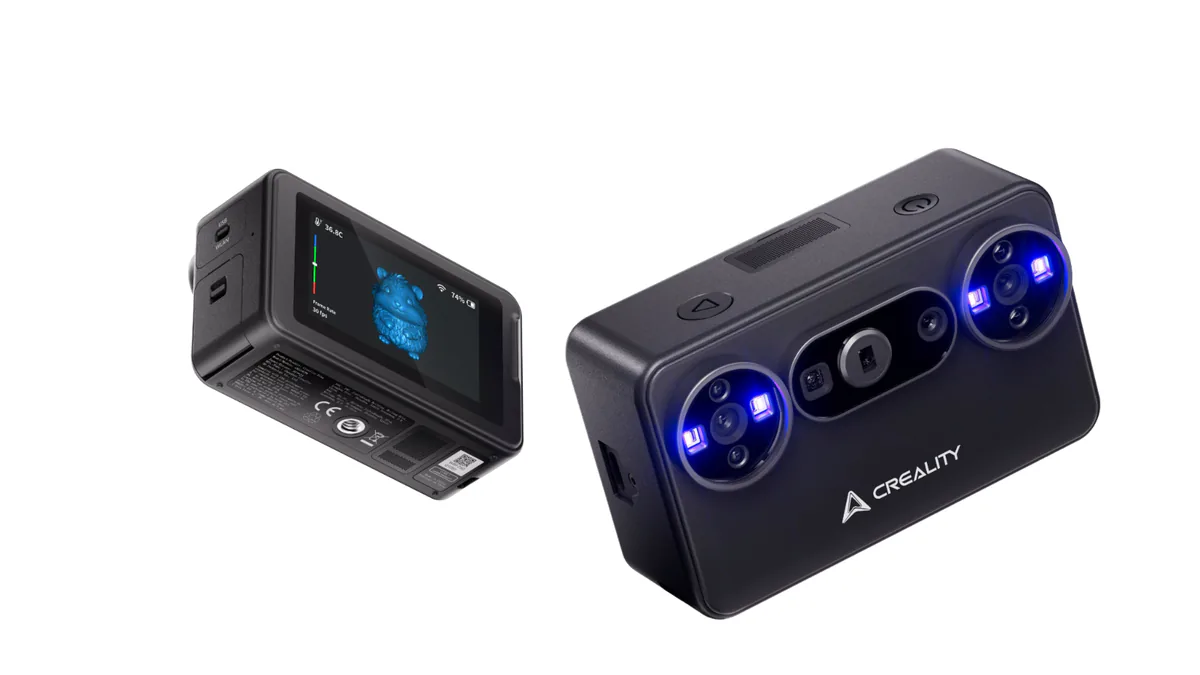
Creality’s Pika is a portable, AI-assisted handheld scanner, built jointly with sensor specialist Orbbec and announced on May 29, 2026. In plain terms: a pocket-sized device that captures real objects as 3D models, designed to work straight off your phone.
The Orbbec partnership matters more than it looks. Orbbec is a spatial-computing company that builds the depth cameras and global-shutter sensors inside many consumer scanners. A global shutter captures the whole frame at once. That cuts the motion blur you get when your hand drifts mid-scan. The sensor is doing a lot of the quiet heavy lifting here.
Here’s the part most buyers care about: a quick spec snapshot.
At a Glance
| Spec | Creality Pika |
|---|---|
| Scan tech | 7-line blue laser + infrared structured light |
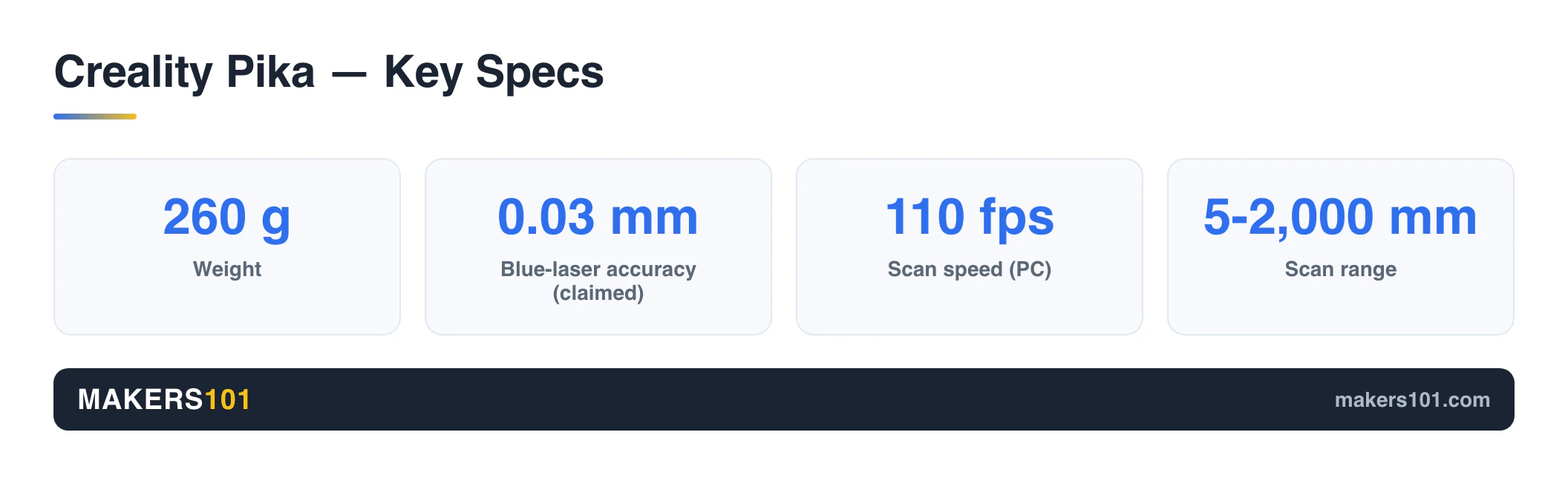
| Claimed accuracy | Up to 0.03mm (blue laser); ~0.08mm phone mode |
| Frame rate | 110 fps PC (USB 3.0); 40 fps phone |
| Weight / size | 260g / 100 × 60 × 35mm |
| Display | 3-inch touchscreen, 854 × 480, 500 nits |
| Battery | Dual swappable 3,350mAh, USB-C |
| Connectivity | Wi-Fi 6 to phone; USB-C to PC |
| Software | Creality Scan (Win/Mac/Android/iOS) |
| Scan range | 5mm to 2,000mm (official) |
| Price | $699 official; $629 early-bird presale (July 22–Aug 12, 2026) |

- Dual-light: 7-line blue laser + infrared structured light
- Up to 0.03mm accuracy (claimed), scans 5-2000mm objects
- 260g pocket body with built-in 3-inch touchscreen
- Phone-first over Wi-Fi 6, no PC required
Every number above comes from Creality and Orbbec’s own materials plus early coverage. Treat them as manufacturer claims until independent testers verify them in the wild.
The Dual-Light System: Blue Laser vs Infrared
The Pika’s most practical feature is that it carries two light sources. Each one does a different job. That’s the real reason to pay attention.
The 7-line blue laser is the precision tool. Creality rates it at up to 0.03mm and, notably, says it scans without sticking markers on your object. That’s a genuine convenience if it holds up, because marker dots are the tedious part of laser scanning on competing units. Blue laser is your pick for hard surfaces and reverse-engineering a part you want to reproduce.
The infrared structured light is the gentle, fast mode. It’s eye-safe and captures 24-bit full color, with a removable IR filter in the box. Creality says that filter lets it hold up outdoors in bright light, rated to around 80,000 lux. This is the mode for scanning people, figures, and color-rich objects in one quick pass.
Creality also claims the Pika handles black and metal objects without scanning spray. If true, that’s a real time-saver, because traditional structured-light scanners choke on dark and shiny surfaces. Hold that claim loosely until reviewers stress-test it.
Not sure which mode fits your work? We break down the trade-offs in our guide to blue laser versus NIR scanning.
Pocket Build, Built-In Screen, and a Phone-First Workflow
The Pika’s pitch is that the whole scanning rig fits in your pocket, with no laptop tethered to your wrist.
At 260g and 100 × 60 × 35mm, it’s genuinely pocketable. Creality packs an 8-core processor, the light sources, and the battery into the body itself, so the device leans less on your phone’s horsepower. Even an entry-level phone should keep up.
The built-in screen is the standout. It’s a 3-inch, 854 × 480 touchscreen at 500 nits, and it lets you watch your scan progress on the device. You can spot a missed patch and fill it in on the spot. No squinting at a separate phone or monitor. That’s rare at this size.
Connectivity is wireless-first. Wi-Fi 6 links the Pika straight to your phone across all four major platforms. Plug it into a PC over USB-C and the frame rate jumps to 110 fps. The cable’s there when you want speed, not as a requirement.
One detail early users keep praising: the dual 3,350mAh batteries are hot-swappable. You can pop in a fresh one mid-scan and keep going. Each charges over USB-C, with no proprietary brick.
What the AI Features Actually Do (and What They Don’t)
AI is front and center in the Pika’s marketing, so it’s worth separating what saves you time from what just sounds like magic.
The Pika offers AI body completion, AI hole-filling, and AI re-texturing. Body completion fills in the parts of a person or organic shape your scan inevitably misses. Hole-filling patches gaps in the mesh. Re-texturing pulls in higher-res photos to sharpen the color on a finished model.
Here’s the honest read: these features shave post-processing time, not the learning curve. AI cleanup works on the data you capture. A sloppy scan still gives you a sloppy starting point. The algorithms tidy the result. They don’t rescue a bad capture.
And about that headline accuracy spec. The blue laser’s best-case figure assumes good conditions, not a promise you’ll hit it on every job. Resolution isn’t the same as accuracy, and marketing specs tend to quote the rosiest number. Judge real-world results when independent scans land.
What Early Users Are Saying
The Pika has been in a handful of hands before wide release. The early signal is encouraging, with one big caveat.
On r/3DScanning, an early tester scanned an Iron Man figure and was surprised by the result. The armor detail came out cleaner than expected. That tracks with the Pika’s pitch for collectibles and small figures. For that use case, the first scans look promising.
Another early user compared it directly to their own Ferret Pro and put the Pika a clear step above on tracking and overall smoothness. They also loved the practical stuff: swapping batteries mid-scan, popping off the IR lens for backlit captures, and connecting over the Pika’s own Wi-Fi straight to a phone.
Now the caveat. A widely upvoted reverse-engineering thread points out that Creality’s scanners are essentially rebranded Orbbec hardware, and that the software has historically lagged behind. That fits the broader pattern with Creality scanners. The sensor is solid. The app is where complaints pile up. Keep your software expectations measured.
One more thing to keep in mind: most early reviewers got pre-release units from Creality. Useful signal, but it isn’t a substitute for independent, paid-unit testing.
Setting Realistic Expectations Before You Buy
Here’s the uncomfortable truth that scanner marketing skips. Your first scan will probably fail. That’s normal.
A 3D scanner is closer to a really fancy tape measure than a CAD program. It outputs a point cloud and a mesh, not an editable model. To turn that mesh into a part you can modify, you reverse-engineer it in CAD software. If you’re not already comfortable in CAD, a scanner will slow you down before it speeds you up.
That lesson is cheaper to learn for free. Do one phone photogrammetry scan of a product first and you will meet tracking drift, holes, and mesh cleanup before any money has changed hands.
Tracking is where most beginners stumble. The scanner has to know where it is relative to the object, using geometry, texture, or stick-on markers. Symmetrical, featureless objects (think a smooth cup with no pattern) confuse geometry and texture tracking. That’s exactly when you reach for markers. The Pika’s markerless blue laser is a real perk here, but no scanner makes tracking foolproof.
Budget for a learning curve, too. Even on a beginner-friendly unit, plan to read the manual and spend an hour just getting comfortable with the software before you expect clean results. That’s the normal on-ramp, not a sign you bought wrong.
If you’re still weighing whether a scanner belongs in your workflow at all, our roundup of the best 3D scanners for makers lays out what actually works for 3D printing.
How the Pika Compares to Creality’s Other Scanners
Inside Creality’s lineup, the Pika stakes out one clear spot. It’s the most portable, phone-first entry option with the screen built in.
| Scanner | Best for | Rough tier |
|---|---|---|
| Pika | Pocket, phone-first, collectibles/figures | Entry portable |
| CR-Scan Ferret Pro | Value structured-light first scanner | Budget |
| Otter / Otter Lite | Color-rich mid-range scanning | Mid (~$719 / ~$459) |
| Raptor / Raptor Pro | Higher-precision, prosumer work | Premium |
Want the cheapest sensible way in? The Ferret Pro is still the value pick and a popular first scanner.

- EASY TO USE FOR BEGINNERS – Perfect for entry-level users, DIY creators, and 3D printing enthusiasts. Quick start, with simple practice giving…
- SMOOTH WIRELESS SCANNING – WiFi6-powered Ferret Pro ensures fast, stable scanning. Works with Windows, macOS, Android, and iOS for flexible…
- HIGH-PRECISION 3D MODELS – Capture detailed 3D models with full-color 24-bit scanning and anti-shake technology. Offers up to 0.1mm accuracy with…
- VERSATILE OUTPUT & ENVIRONMENT – Export in OBJ, STL, or PLY. Works reliably in most settings, including outdoor light (<30,000 lux). Avoid...
- LIGHTWEIGHT & PORTABLE – Weighing just 105g, carry and scan anywhere—home, studio, or on the go. Compact, convenient, and ready for travel.
Need more precision or color fidelity than a pocket scanner can offer? Step up. See how Creality’s Sermoon P1 vs Raptor Pro compare for heavier work. The short version: choose the Pika for portability, Raptor or Sermoon for precision, Ferret or Otter Lite if budget rules. Bambu has a scanner in the works too, though for now it’s just an FCC filing.
Price and Availability: What We Know So Far
Let’s be straight about the money. Creality has set the Pika’s official price at $699 — but right now there’s a cheaper way in. Creality is running an early-bird presale from July 22 to August 12, 2026, and during that window the Pika drops to $629 (10% off).
That settles months of conflicting pre-launch chatter, where figures ranged from the high-$300s up to $699. For context, the Pika lands just below Creality’s own Otter at around $719 and well above the Otter Lite near $459. At $699, it isn’t an impulse buy. It’s priced like a serious entry portable scanner, so the real question shifts from how much to whether it earns the premium over the cheaper Ferret Pro.
My advice: the $629 early-bird price is the real reason to act during the presale window, but it doesn’t change the smart-buyer math. If you can wait, let the first independent, paid-unit reviews settle whether the Pika beats its cheaper rivals before you commit — the discount will tempt you, the reviews should decide it. On availability: the presale is how you order it right now, with units shipping after the window closes on August 12. Creality’s broader push into scanners and other hardware beyond printers is worth understanding too, and we cover Creality’s move beyond 3D printers in depth.
Who Should Buy the Pika, and Who Should Wait
The Pika is a strong fit if you want a truly portable, phone-first scanner for collectibles and small parts, you already have some CAD comfort, and you can accept that the software may need patience. For that buyer, the pocket form and built-in screen are genuinely useful.
Wait if you need guaranteed professional accuracy, zero tolerance for a learning curve, or polished software out of the box. In that case, sit tight for independent, paid-unit reviews before you commit.
If I were spending my own money today, I’d weigh one thing against the clock: the early-bird presale saves you $70 ($629 vs $699) but closes August 12, while the first round of independent scan comparisons may not land until after that. The hardware looks promising. If the discount matters more to you than a review-backed guarantee, the presale is your window; if not, let the reviews land before you buy.
FAQ
How much does the Creality Pika 3D scanner cost?
The Creality Pika is officially priced at $699, though an early-bird presale runs July 22 to August 12, 2026 at $629 (10% off). That places it just below Creality’s Otter (around $719) and well above the Otter Lite (around $459). At that price it competes with capable mid-range scanners, so weigh it against the cheaper Ferret Pro and the pricier Raptor before buying.
What software does the Creality Pika use?
The Pika runs on Creality Scan, available across Windows, Mac, Android, and iOS, with Creality Cloud for slicing. You can export finished models as STL, OBJ, PLY, or ASC files. Heads up: Creality’s scanner software has drawn more complaints than its hardware over the years, so expect some rough edges.
How accurate is the Creality Pika, and what can it scan?
Creality claims up to 0.03mm accuracy with the blue laser and a scan range of 5mm to 2,000mm. That spans small figures all the way up to large objects. Just remember that the headline number is a best case, not what you’ll get on a shaky handheld pass.
Do you need a computer to use the Creality Pika?
No. The Pika works directly with your phone over Wi-Fi 6, and it has a built-in screen and processor, so no laptop is required. Wiring it to a PC over USB-C is optional. It mainly bumps the frame rate to 110 fps for faster captures.
Is the Creality Pika good for beginners, and do you need markers?
It’s beginner-friendly in form, with a built-in screen and phone-first setup, but 3D scanning still has a learning curve. Plan to spend an hour learning the software. Creality says the blue laser scans without markers, which removes one of the most tedious beginner steps. Tracking tricky symmetrical objects can still trip you up.
Once your scan is cleaned up and ready to print, dial in your settings with the 3DPKit Print Settings Finder.