
Heads up — some of the links below are affiliate links. If you buy through them, I earn a small commission (at no extra cost to you), which helps cover the gear I test. Thanks!
Prices as of September 2026, checked against Amazon listings and each manufacturer’s own store.
- Bambu Lab X2D: $649 solo / $899 Combo — dual-nozzle enclosed machine with full ecosystem, 65°C heated chamber, proven reliability.
- Flashforge Creator 5: $699 standard — 4-toolhead tool changer, near-zero purge waste, roughly 3× faster on dense multi-color prints.
- Speed gap is real: Aurora Tech’s lab clocked Creator 5 at 20 minutes on a 4-color test block vs ~60 minutes for the X2D dual-nozzle setup.
- X2D secondary nozzle: Bowden-fed, 200 mm/s max, no TPU, no clog detection — treat it as a support-material tool, not an equal partner.
- Creator 5 firmware: Hardware is excellent (3,358 tool swaps, zero mechanical failures in one 36-hour test), but firmware arrived rough. Active fixes in progress.
- Creator 5 Standard vs Pro: Standard = open frame, no ABS/ASA. Pro (~$850) adds enclosure and heated chamber.
Multi-material printing used to mean one thing: a Bambu Lab machine with an AMS. That worked — until you ran a 4-color print and watched the machine waste more filament on purge towers than the actual model.
The Flashforge Creator 5 landed in early 2026 and quietly broke that assumption. It’s a tool changer — four independent heads, near-zero purge waste, color-swap times that make AMS purging look slow. But the Bambu Lab X2D vs Flashforge Creator 5 comparison isn’t a simple win for either machine. The X2D has a full ecosystem, a polished workflow, and a heated enclosure. The Creator 5 has a speed advantage that’s hard to ignore if multi-color prints are your main output.
This guide cuts through the spec sheets. I’ll show you where each machine genuinely wins, where each one falls short, and which one makes sense for your actual workflow — based on real test data, not marketing copy.
TL;DR — Key Differences at a Glance
| Bambu Lab X2D | Flashforge Creator 5 | |
|---|---|---|
| Price | $649 solo / $899 Combo | $698.99 on Amazon (Pro: $848.99); $799 / $949 direct from Flashforge |
| Multi-material system | Dual-nozzle (direct drive + Bowden) | 4 tool heads, all equal |
| Max simultaneous materials | 2 efficient; 25 colors w/ AMS | 4 colors/materials at once |
| Purge waste per swap | ~14g poop + prime tower | Near-zero (no purge needed) |
| 4-color print speed | ~60 min (4-color block) | ~20 min (3× faster) |
| Enclosure / chamber heat | Yes — up to 65°C | No (Standard) / Yes (Pro) |
| Ecosystem | Full (Bambu Studio, AMS, community) | Minimal (OrcaSlicer fork) |
| Firmware maturity | Proven, stable | Early-stage, actively improving |
The Core Difference Nobody Explains Clearly
The X2D uses two nozzles in a single print head. The Creator 5 uses four physically separate tool heads that dock, swap, and undock in about 7 seconds each. That distinction sounds mechanical, but it changes almost everything about how you print — including what materials you can run, how fast color changes happen, and how much filament you throw away.
What “dual nozzle” actually means on the X2D
The primary (left) nozzle on the X2D is a full-speed direct-drive head: 1,000 mm/s capable, PMSM servo motor, 8.5 kg max extrusion force. It handles everything — PLA, PETG, ABS, TPU, carbon-fiber reinforced filaments. This is the head you build your models with.
The secondary (right) nozzle is different in almost every way. It’s Bowden-fed from a motor mounted at the back of the machine. Top speed is 200 mm/s. It produces more stringing. Acceleration is lower. It cannot run TPU or other flexible materials. When it’s active, you lose roughly 20 mm of X-axis build width. There’s no clog detection on this nozzle — just a basic stepper motor.
After 250+ hours of testing, Stefan from CNC Kitchen put it plainly: the right nozzle works well for support materials, interface layers, and secondary colors. Treat it as an auxiliary tool, not an equal partner. If you need two independent, equal-capability nozzles, the X2D isn’t that machine.
For a deeper look at what the X2D does well, see our full Bambu Lab X2D breakdown.
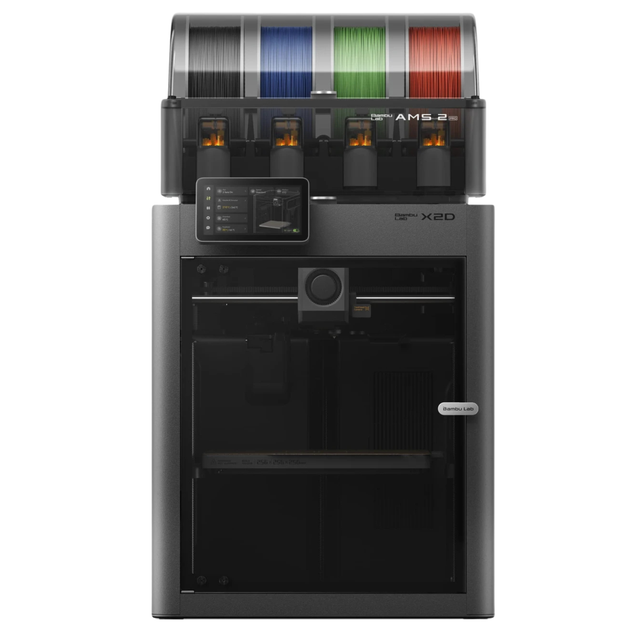
- Bambu Lab’s X2D is poised to redefine premium multi-material 3D printing with a true dual-nozzle architecture built for speed, precision, and reduced waste
- Rather than relying on tool swapping, the X2D is expected to use two fully integrated nozzles to deliver cleaner prints across the full 256 × 256 x 260 mm build area
- Combined with expanded AMS readiness, camera-driven plate and filament verification, simplified sensor hardware, and a striking glass-and-light premium enclosure, the X2D is a perfect fit for hobbyists and professionals alike! Dual-nozzle system with dedicated support material nozzle for clean, peelable supports
- Multi-material and multi-color printing capabilities for enhanced creativity
- 300°C nozzle temperature with 65°C active chamber heating for advanced materials
- Full filament path AI detection with built-in monitoring and backup systems
What “tool changer” actually means on the Creator 5
All four heads on the Creator 5 are mechanically identical: same direct-drive mechanism, same 320°C ceiling, same speed rating. The active carriage picks up whichever head it needs via neodymium magnets and a shared drive shaft. The three idle heads wait on a rack at the side of the frame.
Color switching means picking up the next head. No retraction sequence. No purge routine by default. From one head stopping to the next resuming print: about 15 seconds total.
There’s an elegant engineering trick underneath this — Flashforge calls it FlashSwap. The Creator 5 has only one extruder motor, mounted on the carriage. The tool heads themselves have no motors; they’re driven through a mechanical coupling that engages when the head docks. That’s a big part of how a four-head machine lands under $700.
Print Speed and Filament Waste — The Gap That Shocked Me
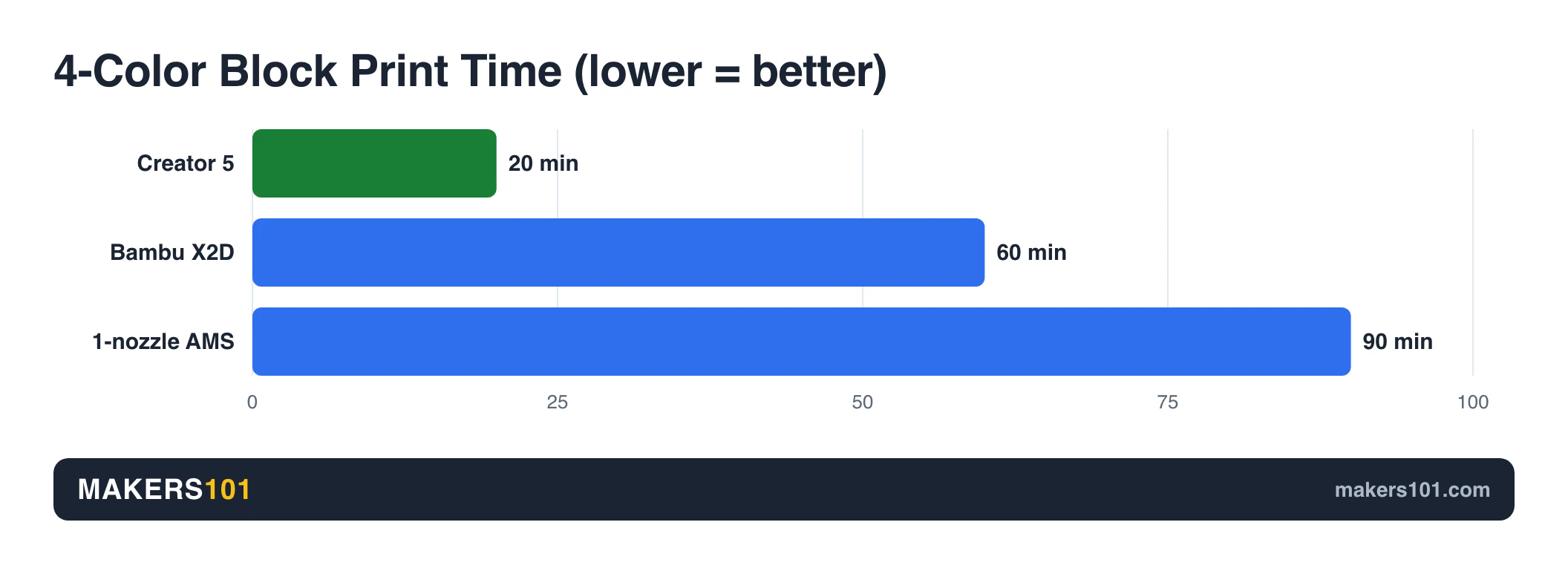
Speed comparisons between modern 3D printers are usually noise — both sit in the same high-speed class and the real-world difference on single-color prints is marginal. Here, there’s a genuine gap, and it comes entirely from how each machine handles color changes.
The numbers
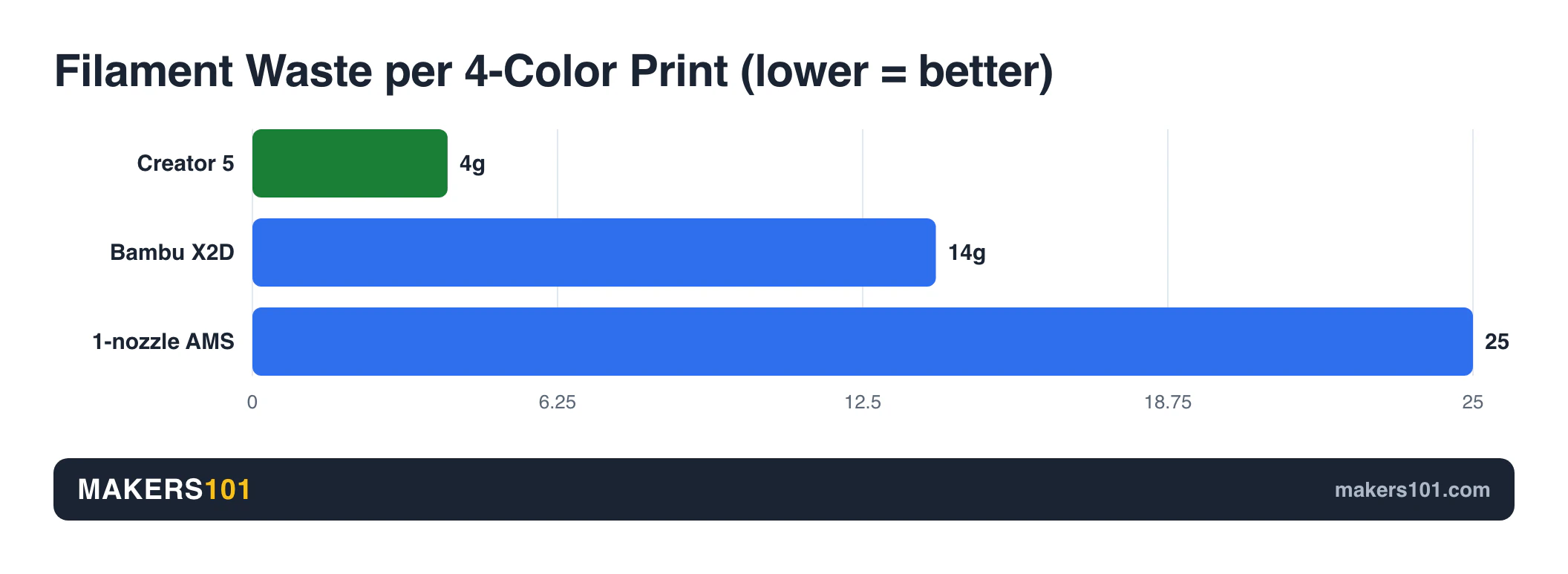
Aurora Tech ran both machines on identical multi-color test models. The results on a 4-color block (with per-layer color swaps) were stark:
| Test | Creator 5 | Bambu X2D | Single-nozzle AMS |
|---|---|---|---|
| 4-color block | 20 min | ~60 min | ~80–100 min |
| Model filament | 5g | 5g | 5g |
| Waste filament | 4g (prime tower only) | 14g (poop + tower) | 25g+ |
| Hello Kitty ×4 (220g model) | 9h 7m | — | 17–20 hours |
The Creator 5 is roughly 3× faster than X2D dual-nozzle on dense multi-color work, and 4–5× faster than a single-nozzle AMS setup. On a batch job with hundreds of color swaps, that difference is measured in hours per day.
When the X2D closes the gap
For prints that use only the main nozzle — single color, or two materials where the second just handles soluble supports — the X2D is fast and extremely reliable. The waste comparison disappears entirely when you’re not doing frequent color swaps.
If your typical multi-material job is “model body plus PVA supports, no mid-print color changes,” the X2D’s Bowden setup handles that well. The speed penalty only kicks in on prints with heavy multi-color switching. Know your print profile before you assume the Creator 5’s advantage applies to your workflow.
Print Quality
Print quality is where the X2D pulls ahead — though the gap is narrower than you might expect.
The X2D uses 1.5GT precision belts rather than the standard 2 mm belts found on most competitors. Stefan’s CNC Kitchen testing confirmed measurably fewer VFA (vertical fine texture artifacts) compared to older Bambu machines. Surface quality on the primary nozzle is excellent, even at high speeds.
Creator 5 hardware reliability vs firmware reality
Here’s the tension with the Creator 5: the hardware is almost absurdly reliable. TNL ran a 36-hour continuous print of a Spider-Man bust at 0.12 mm layer height — 3,358 tool-head swaps, zero mechanical failures. Even when the prime tower collapsed mid-print and waste filament scattered across the build plate, the magnetic docking mechanism kept making clean swaps.
The firmware, however, arrived rough. Three issues showed up consistently across multiple independent reviewers at launch:
- Z-offset too high — first-layer lines don’t fully fuse. Parts fall apart when peeled off the build plate.
- Prime tower base bug in the OrcaSlicer fork — the tower’s first-layer foundation sometimes has gaps, causing collapse on tall models. Fix: switch to “Rib” prime tower geometry plus a wider brim.
- Input Shaper miscalibrated — single-color surface quality shows visible vibration artifacts, noticeably worse than Flashforge’s own simpler machines.
Flashforge has pushed four firmware builds since launch, and the changelog is public. Version 1.7.3 shipped on April 11, 2026, then 1.7.8 on April 27, 1.9.2 on June 3, and 1.9.3 on June 15. The April build cleared the screen freezes during filament loading, the Flash Studio disconnects, and several startup-wizard and power-loss-recovery faults. Version 1.9.2 added a Z-axis compensation control to the maintenance menu, which is the direct lever for the first-layer problem above. Version 1.9.3 went after noise at high speed.
Nothing has shipped since June 15, though, so the current build has had a couple of months to surface its own issues. And AI failure detection never appears in any release note, so the camera stays a monitoring tool with no power to halt a print that has already gone wrong. Surface quality is improving but not yet at X2D level for mono-color prints. Update the machine before your first serious print.
Materials — What Each Machine Can Actually Run
Materials is where the two machines diverge most sharply — and where the Creator 5 Standard vs Pro split changes the comparison entirely.
Bambu Lab X2D — the engineering machine
The X2D’s 65°C active chamber makes it the stronger choice for engineering filaments. ABS, ASA, polycarbonate, nylon, and carbon-fiber variants all benefit from the enclosed heated environment. The primary nozzle handles all of them at up to 300°C with full extrusion control and clog detection.
The Bowden right nozzle cannot run TPU. If you need a PLA + TPU combination print — say, a rigid body with flexible grip inserts — you’d need to load TPU into the left nozzle instead. Workable, but it’s not the clean two-material setup the marketing implies.
With the AMS 2 Pro in the Combo configuration, you get up to 25 colors fed through a single-outlet system. One nozzle draws from the AMS at a time. The second nozzle still needs external manual loading, which limits how you can structure complex multi-material workflows.
Creator 5 — TPU combos yes; ABS only on Pro
The Creator 5 Standard has no enclosure. PLA, PETG, and TPU are its native territory. ABS and ASA on an open frame mean warping — Aurora Tech confirmed front-corner lifting in ABS test prints, and weak layer adhesion on parts printed at speed.
The Pro version adds a full enclosure and heated chamber, unlocking ABS and ASA. If engineering materials are part of your workflow, the relevant comparison shifts: Creator 5 Pro ($848.99 on Amazon, $949 direct from Flashforge) versus X2D Solo ($649) — and the X2D wins that math while also bringing a more mature ecosystem. The other machine buyers price against the Pro is the Snapmaker U1, so it’s worth seeing how the U1 handles the same job.
Where Creator 5 does something the X2D genuinely cannot: multi-color TPU. All four heads support flexible filaments. PLA + TPU combinations, dual-hardness prints, multi-color flex projects — these work cleanly on any of the four heads. The direct-drive path on each tool head handles TPU reliably. That’s one area where the tool-changer architecture has a real, practical edge.
For a direct look at how the X2D compares to another tool-changer competitor, see our X2D vs Snapmaker U1 breakdown.
Filament & accessories worth buying
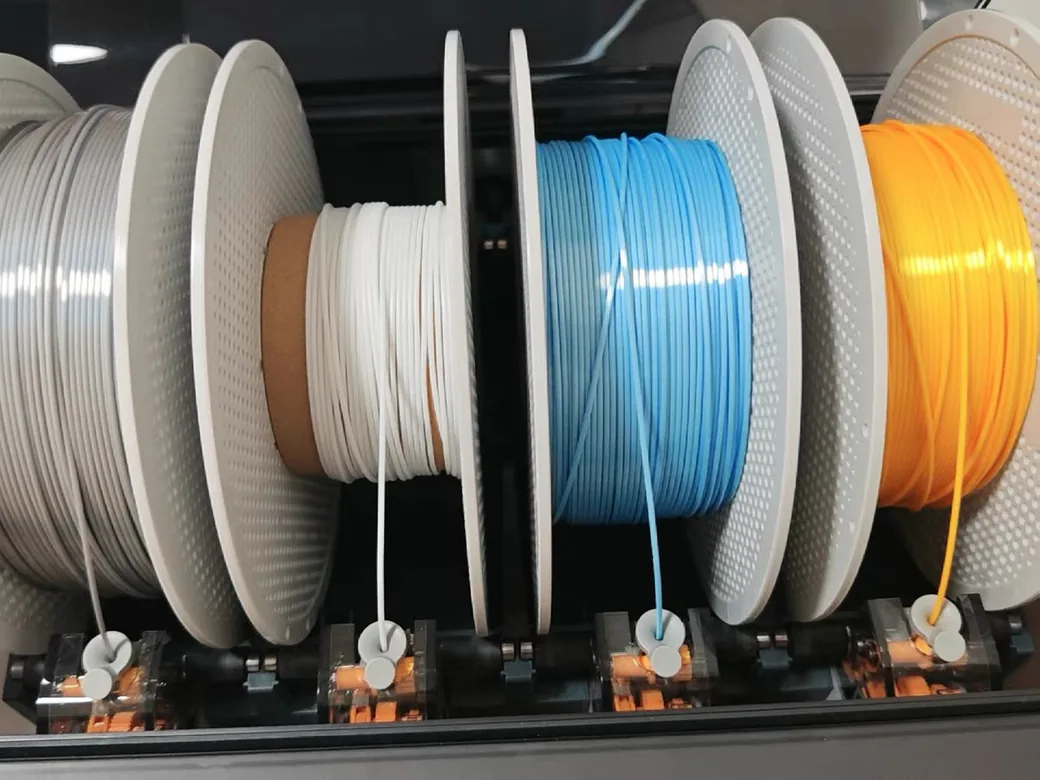
Whichever machine you pick, these are the consumables and add-ons that get the most out of multi-material printing — multi-color PLA for everyday prints, flexible TPU for the Creator 5’s standout combos, ABS for enclosed engineering work, and the AMS 2 Pro if you want the X2D’s full 25-color capability.


Software, Ecosystem, and Daily Workflow
This is the dimension that decides the comparison for most people — and it’s the one that spec sheets skip entirely.
Bambu Studio is polished, deeply integrated, and backed by a community that has built out profiles, mods, and troubleshooting guides for years. You open the slicer, drag in a model, and the machine does the rest. The Creator 5 uses a re-skinned OrcaSlicer fork called FlashStudio. OrcaSlicer is a capable slicer — but the surrounding ecosystem is thin.
What you lose with Creator 5
- No RFID filament recognition — you manually tell the machine what’s loaded in each slot
- No automatic filament loading — push each strand in by hand, click Load on the screen
- No material sync — colors assigned in the slicer don’t auto-map to machine slots; you assign them manually every print
- No AI failure detection — there’s a camera, but it has no spaghetti detection or first-layer analysis at launch
- No 3D model marketplace or generative AI tools — the Bambu Makerworld ecosystem doesn’t exist here
What you lose with the X2D
- AMS single outlet — even in the Combo, only one nozzle feeds from AMS at a time; the second nozzle needs external loading
- No clog detection on the right nozzle — basic stepper, no real-time extrusion feedback
- Locked ecosystem pressure — Bambu wants you on their slicer, their filament, their workflow; third-party profiles work but get less official support over time
The honest framing: if you’re already invested in Bambu’s ecosystem — AMS dialed in, Bambu Studio profiles built out — switching to Creator 5 has real daily friction costs that go beyond the machine itself. If you’re starting fresh and value long-term openness, the OrcaSlicer foundation on the Creator 5 has more flexibility.
If multi-material printing isn’t actually your priority and you’re debating whether you even need the X2D over a P2S, our P2S vs X2D guide covers that question directly.
Price Breakdown — How Each Machine Gets to Its Number
Both machines open in the same $649–$699 range, but they get there through very different design decisions — and understanding those decisions helps you judge long-term value.
How Flashforge Got a Four-Head Machine Under $700
The Creator 5 is an engineering exercise in deliberate cost reduction. Six specific trade-offs made the price possible:
- One shared extruder motor on the carriage — tool heads have none, coupling mechanically at dock
- Neodymium magnet docking instead of CNC precision mechanical locks
- One USB signal cable per head instead of expensive pogo-pin PCB stacks
- No auto-loading motors, no RFID chips
- Built-in filament cutter on each head — hardware prep for a future AMS-style add-on
- Sheet metal and injection-molded housing, no dedicated waste chute
None of these are cheap shortcuts. They’re specific architectural bets about where complexity should live in the machine. The result: four equal-capability direct-drive toolheads at a price that would have required a $3,000+ machine two years ago.
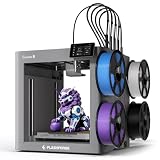
- A Smarter Approach to Multi-Material Printing: Every color change shouldn’t come with a pile of wasted filament. Creator 5 takes a smarter route…
- 7 Seconds Tool Changer System: Traditional filament changers can spend more time purging than printing. The FlashSwap system keeps four toolheads…
- Support Mixed-Material Printing: The Creator 5 allows you to combine model materials with PETG, PVA, and BVOH supports for improved print stability…
- High-Speed Printing Without the Artifacts: Combines high-speed motion with intelligent vibration cancellation to preserve print quality at every…
- Calibrated for Flawless Multi-Toolhead Printing: Advanced compensation algorithms keep every toolhead perfectly synchronized, suppress vibrations…
Price comparison
| Configuration | Price | What you get |
|---|---|---|
| X2D Solo | $649 | Dual nozzle, enclosed, 65°C chamber |
| Creator 5 Standard | $698.99 | 4 tool heads, open frame, PLA/PETG/TPU |
| Creator 5 Pro | $848.99 | 4 tool heads, enclosed, 65°C chamber, HEPA + carbon filtration |
| X2D Combo (with AMS 2 Pro) | $899 | Dual nozzle + AMS, up to 25-color |
If you need enclosed printing with engineering materials and want a proven ecosystem: the X2D Solo at $649 is a better value than the Creator 5 Pro at $848.99. If you print multi-color PLA, PETG, or TPU and speed matters: the Creator 5 Standard at $698.99 wins the math. Use our print cost calculator to run the filament waste numbers against your actual print volume.
Creator 5 Pro vs Bambu P2S: The Comparison That Trips People Up
Plenty of buyers reach the Creator 5 Pro while cross-shopping a Bambu P2S. The two machines don’t line up, and that mismatch is why the answer feels slippery when you try to settle it on speed alone.
The P2S pushes four filaments through one nozzle using an AMS. The Creator 5 Pro carries four independent tool heads. On the Flashforge subreddit, an owner answering this exact question put the tiers more cleanly than any spec sheet: a P2S with an AMS lines up against Flashforge’s own AD5X, and the Creator 5 belongs next to Bambu’s H2C. Same job, different class of machine.
Street prices make the tiers obvious. Everything below is a real selling price today, taken from Amazon or the manufacturer’s own store.
| Machine | Street price | How it does multi-material |
|---|---|---|
| Flashforge AD5X | $349 | Single nozzle, direct four-filament feed |
| Bambu P2S | $569 | Single nozzle + AMS |
| Bambu X2D Solo | $649 | Dual nozzle |
| Flashforge Creator 5 | $698.99 | 4 tool heads, open frame |
| Bambu P2S Combo | $769 | Single nozzle + AMS 2 Pro |
| Flashforge Creator 5 Pro | $848.99 | 4 tool heads, enclosed |
| Bambu X2D Combo | $899 | Dual nozzle + AMS 2 Pro |
The Creator 5 Pro and a bare P2S sit $280 apart, which is most of an entire AD5X. You aren’t picking between two versions of one idea. You’re deciding whether purge waste or ecosystem maturity is the problem worth paying to solve.
What actually separates the Pro from a P2S
Speed and waste get the attention, but they aren’t the dividing line. The Pro’s real case is the box around it. Flashforge lists a sealed chamber with active heating to 65°C, H13 HEPA and activated-carbon filtration, auxiliary cooling, and a door sensor, and none of that appears on the standard Creator 5. If ABS, ASA, or fume control is why you’re shopping, that is the entire argument, and a P2S doesn’t answer it.

- More Savings: Featuring 4 independent toolheads and a 7-second FlashSwap changer, the Creator 5 Pro switches nozzles without flushing filament. This…
- More Possibilities: Designed for industrial engineering, the fully enclosed frame features an active heated chamber up to 65°C to prevent warping in…
- More Stability: Built on a ultra-rigid integrated architecture combining a CoreXY motion structure, precision linear rails, and 1.5GT high-torque…
- More Safety: Prioritizing workspace safety, the dual HEPA 13 and activated carbon system effectively traps ultrafine particles and fumes from…
- More Control: Get a flawless first layer with automated toolhead offset calibration, vibration compensation, and dynamic flow calibration. Monitor…

Power-loss recovery is the counterweight. In a third-party head-to-head against a Snapmaker U1, testers cut power to both machines ten times mid-print. The Creator 5 Pro came out with deep lines on five of those interruptions, and one left the model separating as supports came off. The U1 finished nearly unmarked. If your long prints run overnight on unreliable power, weigh that against the chamber spec.

- High-Speed Precision: The Bambu Lab P2S 3D printer prints up to 600 mm/s while maintaining exceptional accuracy. With the PMSM Servo Extruder and…
- Ready to Print in 15 Minutes: Set up your P2S FDM 3D printer and start printing in just 15 minutes. With AI failure detection, quick-swap nozzles, and…
- Effortless Multi-Color Printing: The AMS 2 Pro enables seamless multi-color/multi-material 3D printing. It features built-in filament drying at up to…
- Smart Airflow for Any Filament: The Adaptive Airflow System automatically balances cooling and heat retention—keeping overhangs crisp with cool air…
- Limitless Creativity, Seamless Workflow: Explore over one million 3D models on MakerWorld and bring them to life with a smooth, unified workflow using…
Where the H2C fits
If the Creator 5 Pro’s true peer is Bambu’s H2C, they still aren’t priced as peers. Bambu doesn’t sell the H2C through Amazon, and its combo hardware puts it in a tier well above the Pro. That distance is the Pro’s strongest argument, and it’s a different argument than the one it makes against a P2S. Against the H2C you’re buying most of the tool-changer benefit for meaningfully less. Against the P2S you’re buying a category the P2S was never in.
Who Should Buy Which
One reviewer framed this comparison in a way I keep coming back to: if you genuinely believe ecosystem doesn’t matter — that a 3D printer is just a machine — then the Creator 5 wins on features at this price. If you ultimately pick the X2D anyway, you’ve proven to yourself that ecosystem does matter. Your choice here reveals what you actually value.
Buy the Bambu Lab X2D if…
- You print engineering materials (ABS, ASA, PA, PC) and need a reliable heated chamber
- You already own AMS or want 25-color capability in the future
- Software polish and ecosystem integration matter to your workflow
- Your multi-material use case is primarily support materials, not visual multi-color
- You want a machine that works well out of the box, with minimal firmware management
Buy the Flashforge Creator 5 if…
- Multi-color decorative prints are your main output — figures, toys, Etsy products, cosplay props
- You’re frustrated by the filament waste and time cost of AMS purging on your current machine
- You want to print PLA + TPU combinations or multi-color flexible parts
- You’re comfortable with a firmware that’s still maturing and can tolerate occasional quirks
- You’re starting fresh and want an open slicer ecosystem long-term
Wait if…
- You need ABS or ASA multi-material on the Creator 5 — get the Pro, and give independent reviewers 60–90 days to confirm the enclosure holds temperature consistently under sustained print loads
- Firmware stability is a hard requirement — the Creator 5 is improving fast, but it’s not at X2D maturity yet
- You’re cross-shopping with the Snapmaker U1 — it has RFID, fully automatic filament loading, and a more mature firmware at $899; the gap between U1 and Creator 5 is narrowing but still real
FAQ
Is the Bambu Lab X2D a true IDEX printer?
No. IDEX (Independent Dual Extrusion) means two carriages that move independently along the X axis. The X2D has two nozzles in a single shared carriage. Only one nozzle prints at a time. The right (secondary) nozzle is Bowden-fed and has a lower speed ceiling and fewer material capabilities than the left direct-drive primary.
Does the Flashforge Creator 5 support TPU?
Yes — all four tool heads support TPU. This is a genuine advantage over the X2D’s Bowden secondary nozzle, which cannot run flexible filaments reliably. If PLA + TPU combinations or multi-color flex prints are part of your plan, the Creator 5 handles them cleanly on any head.
Can the Flashforge Creator 5 Standard print ABS?
Not reliably. The standard version is open-frame with no enclosure. ABS requires a heated enclosure to prevent warping and ensure proper layer adhesion. Multiple reviewers confirmed front-corner warping on ABS test prints. If you need ABS or ASA, you need the Creator 5 Pro ($848.99 on Amazon), which adds a full enclosure, active chamber heating to 65°C, and H13 HEPA plus activated-carbon filtration.
How fast is the Flashforge Creator 5 tool swap?
The physical mechanical swap takes approximately 7 seconds. From previous head stopping print to new head resuming: about 15 seconds total. On a 4-color print with per-layer swaps, this adds up to roughly 20 minutes on a standard test block — compared to about 60 minutes for the X2D dual-nozzle setup running the same model.
X2D Solo vs Combo — is the AMS worth the extra $250?
If you need more than two colors, yes. The X2D handles two materials natively; the AMS 2 Pro extends that to 25 colors. One thing to know: even in the Combo, only one nozzle draws from the AMS at a time. The second nozzle still loads manually unless you add a Filament Track Switch. If your workflow is mostly “model plus support material,” the Solo at $649 is enough.
Which is better for beginners?
The X2D, without much debate. Bambu’s onboarding sequence, software polish, community documentation, and ecosystem support are meaningfully ahead of where Creator 5 is today. The Creator 5 will get there — Flashforge is updating aggressively — but right now, a beginner who hits a problem with the X2D has vastly more resources to draw on.
Should I upgrade from an X1C to the X2D?
It depends on whether dual-material printing is actually in your workflow. If you’re still printing single-color PLA with your X1C and happy with it, the upgrade is hard to justify on specs alone. If you want soluble supports, dual-material engineering parts, or the improved 1.5GT belt quality, the X2D is a meaningful step up. See our X1C to X2D upgrade guide for the full breakdown.
Specs at a Glance
| Spec | Bambu Lab X2D | Creator 5 Standard | Creator 5 Pro |
|---|---|---|---|
| Price | $649 / $899 (Solo/Combo) | $698.99 | $848.99 |
| Build volume | 256×256×260mm | 256×256×256mm | 256×256×256mm |
| Extrusion system | Dual nozzle (direct + Bowden) | 4 tool heads (all direct) | 4 tool heads (all direct) |
| Max hotend temp | 300°C | 320°C | 320°C |
| Max bed temp | 120°C | 120°C | 120°C |
| Active chamber | Yes (65°C) | No | Yes (65°C) + H13 HEPA & carbon filtration, door sensor |
| Top speed | 1,000mm/s (primary) / 200mm/s (secondary) | 600mm/s (all heads) | 600mm/s (all heads) |
| Max colors (AMS) | 25 (w/ AMS 2 Pro) | 4 (no AMS system) | 4 (no AMS system) |
| RFID detection | Yes | No | No |
| Slicer | Bambu Studio | FlashStudio (OrcaSlicer fork) | FlashStudio |
| AI camera / failure detection | Yes (1080p + spaghetti detection) | No AI (camera present) | No AI (camera present) |
| Enclosure | Yes | No | Yes |
| Ecosystem | High (Bambu Studio, Makerworld) | Low | Low |
| Firmware maturity | Proven, stable | Early-stage, improving | Early-stage, improving |
| Launch | April 2026 | May 2026 | May 2026 |
| Source | bambulab.com | flashforge.com | flashforge.com |