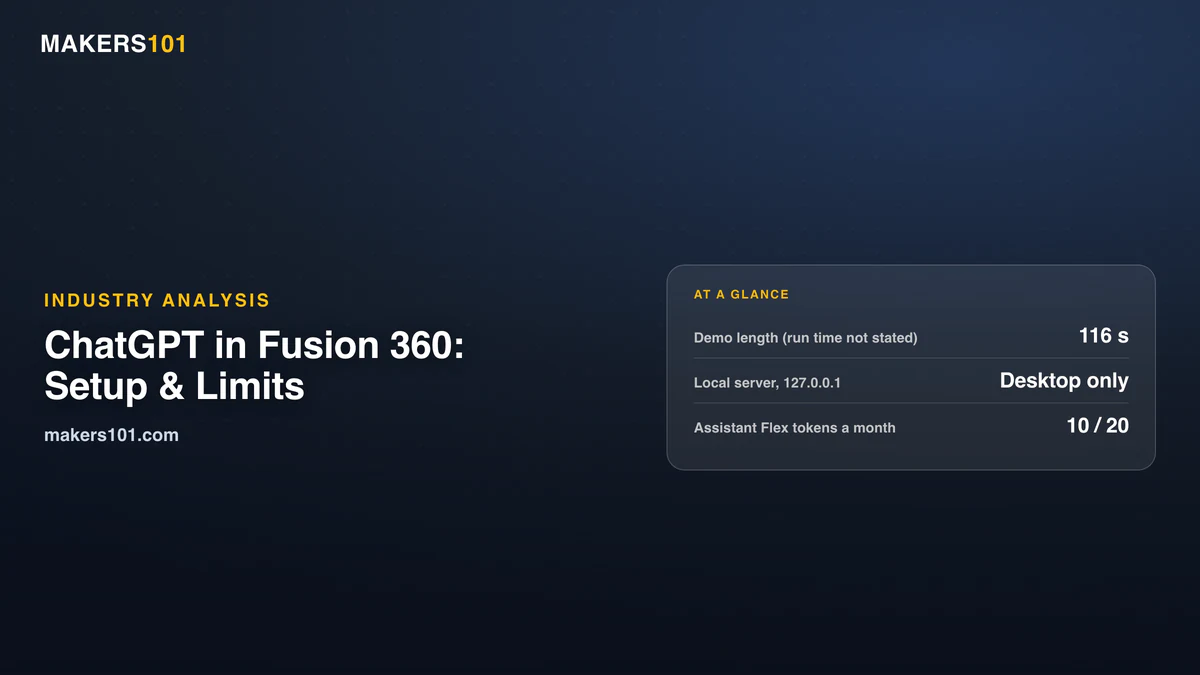

Autodesk’s ChatGPT demo lasts 116 seconds. The run behind it took long enough that the presenter says “It’s been running now for a while,” and the video never says how long. In that time, ChatGPT builds a two-piece 6061-T6 aluminum Raspberry Pi 4 case inside Fusion 360, with a parametric timeline you can still edit. The video passed 244,000 views in ten days.
So yes, ChatGPT can model in Fusion 360, and the connection is official. It just isn’t hands-off. In a June post about running the same Fusion MCP server with Claude, Autodesk calls AI modeling “not yet reliable for generating complex CAD models or full assemblies.”
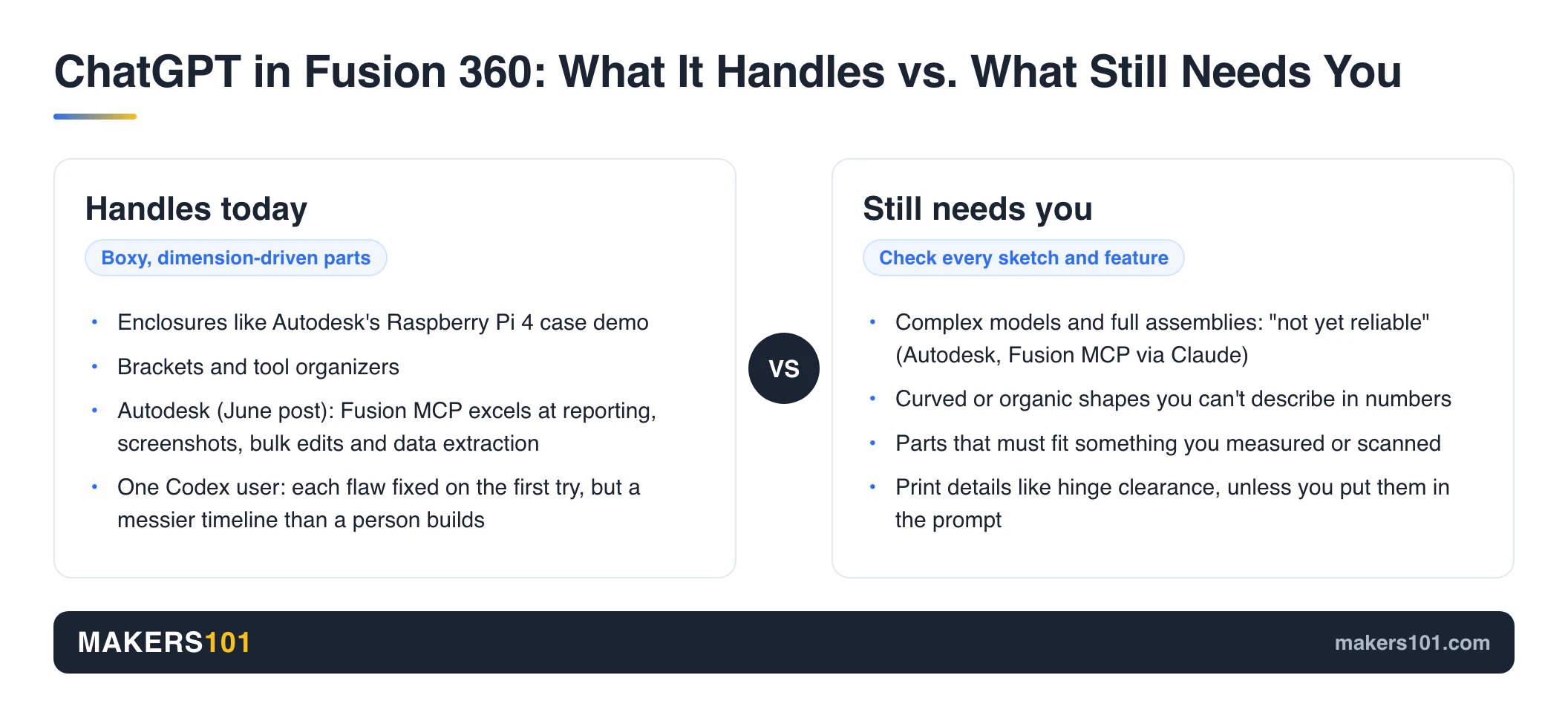
Quick verdict: Try it if you run desktop Fusion and already use the ChatGPT desktop app. It suits boxy, dimension-driven parts like enclosures and brackets. Skip it for organic shapes. And keep learning Fusion, because you still have to check every sketch and feature it builds.
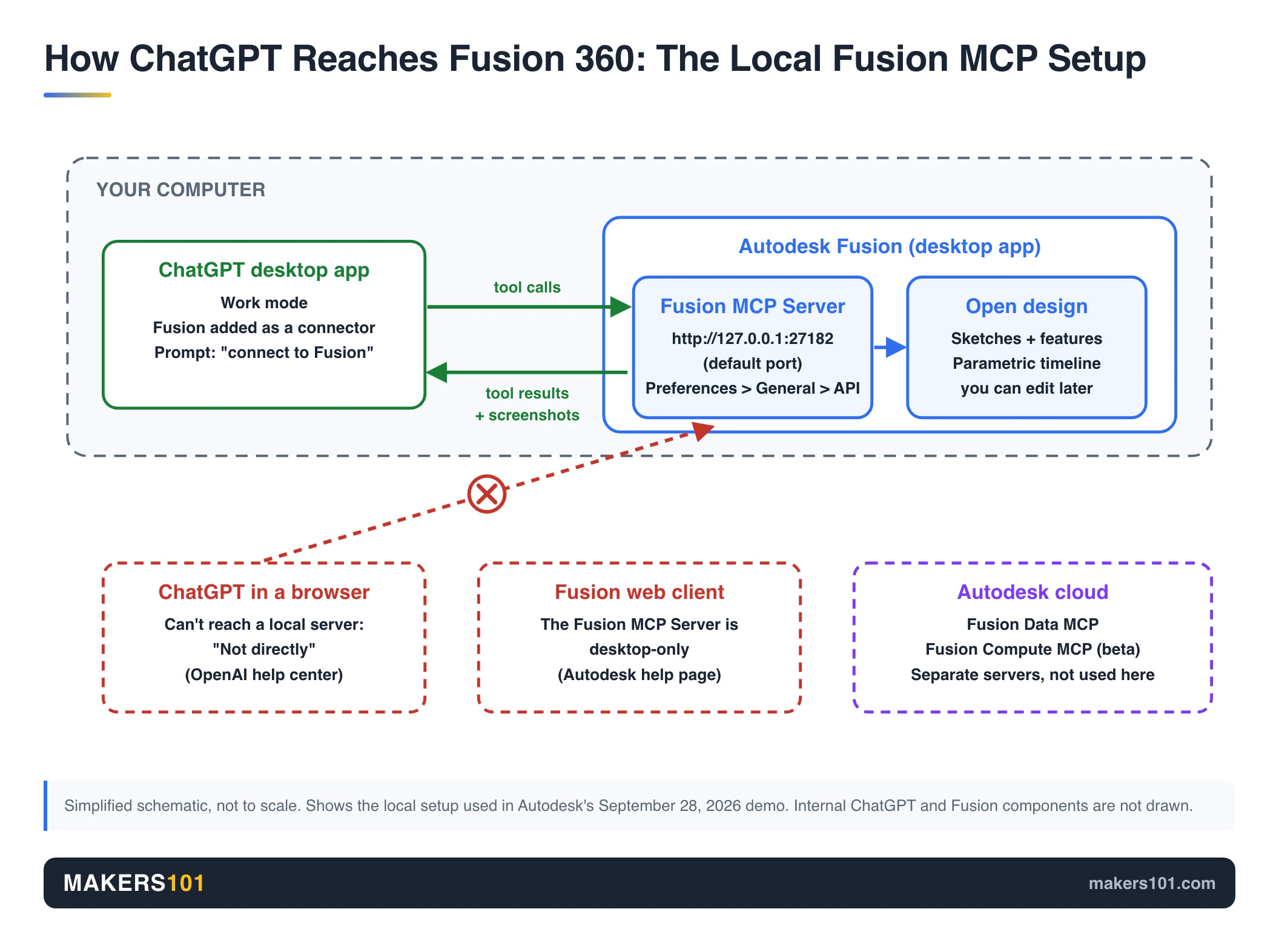
- The connection is local. Fusion opens a server at http://127.0.0.1:27182 by default, so only apps on the same computer can reach it, and browser ChatGPT can’t.
- The demo doesn’t state run time, token use, or which ChatGPT plan it ran on.
- Token-burn complaints so far come from Claude and custom-MCP users. Nobody has published ChatGPT usage numbers for Fusion.
- Fusion’s built-in Autodesk Assistant needs no OpenAI account. From October 6, personal and education plans get 10 Flex tokens a month for design actions, commercial plans 20.
Table of Contents
- What Autodesk Showed: ChatGPT Modeling a Raspberry Pi 4 Case in Fusion 360
- How to Connect ChatGPT to Fusion 360 Through the Fusion MCP Server
- Fusion MCP vs Fusion Data MCP vs Compute MCP vs Autodesk Assistant
- What ChatGPT Can and Can’t Model in Fusion 360 Today
- The Real Costs of ChatGPT in Fusion 360: Long Silences, Token Burn, and Plan Limits
- Do You Still Need to Learn Fusion 360 If ChatGPT Can Model?
- How to Get a Printable Part Out of ChatGPT and Fusion 360
- What Comes Next for AI Modeling in Fusion 360
- FAQ: ChatGPT Fusion 360 Setup and Limits
- Sources for This ChatGPT and Fusion 360 Report
What Autodesk Showed: ChatGPT Modeling a Raspberry Pi 4 Case in Fusion 360
The demo shows ChatGPT building a fully parametric Raspberry Pi 4 enclosure from one prompt, with Fusion doing the geometry. The presenter enables the Fusion MCP Server and pastes its address into the ChatGPT app. Then comes the request for “a fully parametric model for a Raspberry Pi 4 case.” It should be aluminum, with every part machinable on a 3-axis mill.
What came back, per the video description: “a base and a lid in 6061-T6, threaded holes, a full parametric timeline you can go back and edit, and exported files.” ChatGPT also took screenshots of its own work. At the end, the presenter hits play on the timeline to replay each feature.
What the Fusion 360 Demo Video Leaves Out
The clip never says how long the run took. “It’s been running now for a while” is the only clue. It also skips token use and the ChatGPT plan. Nobody checks the part against a real CAM toolpath either.
Two minutes isn’t enough for any of that. But it means the video proves the connection works. It doesn’t prove the case is shop-ready.
Fusion MCP Server Existed Before ChatGPT Showed Up
The Fusion MCP Server isn’t new. Autodesk first connected it to Claude in late April 2026 and published its introduction on May 7. The official help page lists Claude Desktop, Cursor, and VS Code as example clients.
ChatGPT isn’t named on that page. The September video is the first official Autodesk demo of ChatGPT on the local server I could find.
How to Connect ChatGPT to Fusion 360 Through the Fusion MCP Server
Connecting ChatGPT to Fusion 360 takes two switches and one address: turn on the Fusion MCP Server inside Fusion, then add that address as a connector in the ChatGPT desktop app’s Work mode.
| What you need | Why it matters |
|---|---|
| Autodesk Fusion desktop app | The server is “Desktop-only” and doesn’t work with the Fusion web client |
| Fusion open on the same computer | The server is “Local-only” and listens at http://127.0.0.1:27182 by default |
| ChatGPT desktop app | ChatGPT in a browser can’t reach a local server directly |
| Possibly a paid ChatGPT plan | OpenAI limits Work to paid plans on web and mobile and hasn’t said whether desktop Work with local connectors needs one |
| A saved copy of your design | Autodesk recommends saving before any AI-driven change |
Six Steps to Link ChatGPT and the Fusion MCP Server
- In Fusion, open Preferences > General > API.
- Under Preferences for Scripting and Programming, tick Fusion MCP Server. Note the port (27182 by default) and copy the address.
- Open the ChatGPT desktop app and switch to Work mode.
- Add Fusion as a connector and paste the address.
- Type “connect to Fusion.” ChatGPT checks that it can reach the server before it models anything.
- If it can’t connect, restart Fusion or go back and confirm the checkbox is still on.
Don’t try this from a browser tab. OpenAI’s help center answers “Can I connect to a local MCP server?” with “Not directly,” because ChatGPT on the web only talks to remote servers.
Owners on r/Fusion360 and r/ChatGPT describe the same checkbox. One connected Codex, which lives in the same desktop app, the same way. One user only saw Autodesk Assistant in their build, so update Fusion before you go hunting for the setting.
Fusion MCP vs Fusion Data MCP vs Compute MCP vs Autodesk Assistant
Autodesk now runs three MCP servers plus a built-in assistant. The ChatGPT demo uses only one of them: the local Fusion MCP.
| Tool | Runs where | What it’s for | Status in 2026 |
|---|---|---|---|
| Fusion MCP | Your computer, next to Fusion | Live modeling and commands in the open design | Launched April to May |
| Fusion Data MCP | Autodesk cloud | Query and manage Fusion data without Fusion open | Announced July 2 |
| Fusion Compute MCP | Autodesk cloud | Runs whole Fusion sessions in the cloud, CAM included | Public beta since September 15 |
| Autodesk Assistant | Inside Fusion | Answers questions and runs tasks on your design | Generally available since AU 2026 |
Compute MCP’s launch post is the only written Autodesk page I found that names ChatGPT, alongside Claude, Antigravity, and VS Code. It needs an Autodesk account, an active Fusion license, and a Fusion Team hub.
Autodesk Assistant Flex Tokens in Fusion 360
From October 6, 2026, eligible Fusion plans get a monthly allowance of Flex tokens (beta) for Assistant actions that work on your design. Commercial users get 20 a month. Personal and education users get 10, and a trial gets 10 for its 30 days. Plain help questions don’t use the allowance.
If you’re on Fusion for Personal Use and buy extra Flex tokens, Autodesk moves you to the commercial version. So the built-in Assistant is the default “AI in Fusion” with no OpenAI bill. ChatGPT through MCP makes sense when you already pay OpenAI and want your own model doing the driving.
What ChatGPT Can and Can’t Model in Fusion 360 Today
ChatGPT in Fusion 360 is realistic today for simple, dimension-driven parts. Autodesk hasn’t rated ChatGPT on its own. About the same Fusion MCP used through Claude, its June post calls AI modeling “not yet reliable for generating complex CAD models or full assemblies.” Autodesk doesn’t mention curved surfaces, but I’d put them on the unreliable side too, for reasons below.
The same post says it “excels at tasks like reporting, screenshots, bulk edits, and data extraction.”
Boxy Parts Like Enclosures and Brackets Work in Fusion
The Pi case sits in the sweet spot: rectangles, pockets, holes, a lid. Brackets and tool organizers live there too.
One r/ChatGPT user hooked Codex up to Fusion and got a 3D-printable box for CNC drill bits with a sliding lid that clicks shut. It took a few iterations. Each time they pointed out a flaw, it fixed it on the first try.
A commenter still spotted waste. It extruded every tool slot separately instead of grouping slots of the same depth. The part was usable. The timeline was messier than a person would build.
Curved and Measured Parts Still Need You
Anything you can’t describe in numbers is hard. Think of an ergonomic mouse shell or a bracket that has to hug an existing curve.
Those shapes start with measurement. One maker designing a car cup holder that fits a curved console traced the console onto paper, then imported a scaled photo into Fusion as a canvas. Another reverse-engineered car parts in three stages: calipers for a simple relay cover, a grid-paper photo for curves, and a blue-light scanner for a complex insert.
If you can’t type the dimension, ChatGPT can’t either. For those parts, a 3D scan of the product is a better starting point than a long prompt.
One r/Fusion360 commenter goes further. They argue the model mostly sees screenshots of the viewport and has no real feel for model coordinates. That’s one user’s read, and Autodesk hasn’t documented it either way.
Fusion Geometry Isn’t the Same as a Printable Part
A clean Fusion model can still print badly. One Fusion tutorial builds a hinged snap-fit box that uses short hinge bumps tapered at 45° in place of a full-length pin, so nothing overhangs. It runs 0.2 mm of hinge clearance and 0.1 mm on the snap catch.
That design is driven by a parameter table, so it still works when scaled down to 20 x 15 x 20 mm. Drop the hinge clearance to 0.1 mm and the lid holds at any angle. None of that reaches ChatGPT unless you put it in the prompt, and the same goes for deciding how to split a 3D model into parts for printing.
The Real Costs of ChatGPT in Fusion 360: Long Silences, Token Burn, and Plan Limits
Running ChatGPT in Fusion 360 costs waiting time and tokens, on top of the subscriptions behind them.
Waiting. The demo’s description warns: “it thinks for a long time before it does anything, so don’t assume it’s broken when nothing seems to be happening.” If you want progress updates more often, ask for the work in smaller chunks.
Tokens. We couldn’t find anyone publishing ChatGPT usage numbers for Fusion, so the warnings come from neighbors. A r/Fusion360 owner who runs Claude through the same Fusion MCP says it is “burning tokens at a ridiculous level.” Another, who had tried a custom MCP a month earlier, said it “burned all of my tokens to generate a 50 mm cube.”
ChatGPT is unlikely to be much cheaper, because the cost is structural. Every step sends the whole conversation back to the model, plus tool results and often a screenshot. A long session gets more expensive with each step, which is another argument for short, focused requests.
Plans. On the web and mobile, OpenAI rolled out Work mode to paid plans and left out Free and Go. Autodesk pitched the Fusion MCP “for Fusion subscribers” and doesn’t say whether Fusion for Personal Use qualifies. Reddit users have asked and haven’t had a firm answer. If you’re on the free personal license, check whether the box appears under Preferences > General > API.
Do You Still Need to Learn Fusion 360 If ChatGPT Can Model?
Yes. Learning Fusion 360 still pays off, but what you practice shifts toward describing parts precisely and checking what the AI built.
The AI builds the timeline. You have to read it. If a sketch isn’t fully constrained or a feature hangs off the wrong face, the “fully parametric” model breaks the first time you change a dimension. Spotting that is a CAD skill.
For small edits, a trained user is faster. When a Reddit post listed “offset the walls by 3mm” as a showcase prompt, the top reply was simply: press Q, type -3, hit enter.
Tolerances come from your printer. The hinge clearance call above came from test prints, and ChatGPT never sees your printer.
My take: learn sketches and constraints well enough to audit the timeline it builds. Then hand ChatGPT the repetitive work, like a dozen size variants of one enclosure or batch exports. Autodesk’s list of what the MCP does well (bulk edits, reporting, screenshots) points the same way. Beginners have the most to lose, because they can’t yet tell a broken model from a good one.
How to Get a Printable Part Out of ChatGPT and Fusion 360
A printable result depends on how much you specify up front. Use this checklist before you hit send.
- Give every number. Outer size, wall thickness, hole diameters, and clearances.
- Name the process. “FDM, 0.4 mm nozzle, PETG” or “3-axis mill” changes how it should handle overhangs and holes.
- Ask for a user parameter table. You can resize the part later without another prompt.
- Ask for one feature per message. You get feedback sooner and spend fewer tokens on rework.
- Save and version before each run. The MCP supports undo, but a saved version is cheaper insurance.
- Audit the timeline. Fully constrained sketch lines turn black in Fusion. Blue lines mean something can still move.
- Print a test coupon first. Print just the hinge or snap area, and dial in your print settings before you commit to the full part.
What Comes Next for AI Modeling in Fusion 360
Autodesk’s newest Fusion server, the cloud Compute MCP, already lists ChatGPT, while the local server’s docs still don’t. Our forecast: ChatGPT joins the local client list, and heavier jobs move to the cloud servers.
- Compute MCP entered public beta on September 15, 2026. Its launch post already lists ChatGPT.
- Fusion Data MCP arrived July 2 for working with Fusion data without opening the app.
- Autodesk Assistant went generally available at AU 2026, with Flex token allowances from October 6.
As of October 10, 2026, the local server’s help page still leaves ChatGPT off its client list. The next things to watch are ChatGPT joining that list and a clear answer on Personal Use. Flex token pricing after the beta matters too.
FAQ: ChatGPT Fusion 360 Setup and Limits
Can ChatGPT make Fusion 360 models?
Yes, through Autodesk’s Fusion MCP Server. With it, the ChatGPT desktop app in Work mode can build sketches and features into a full parametric timeline inside desktop Fusion. Autodesk’s demo built a two-piece Raspberry Pi 4 case.
Expect the best results on simple, dimension-driven parts. Autodesk calls AI modeling through the same server not yet reliable for complex models.
How do I enable the Fusion MCP server in Autodesk Fusion?
Go to Preferences > General > API and tick the Fusion MCP Server checkbox. The default port is 27182, so the address is usually http://127.0.0.1:27182. The server only runs in desktop Fusion on the same computer as your AI client.
How do I connect MCP to ChatGPT?
Open Work mode in the ChatGPT desktop app. Paste the Fusion server address as a new connector, then ask it to connect to Fusion. The desktop app’s settings also have an MCP servers section where you can add a Streamable HTTP server by URL. ChatGPT on the web can’t reach a local server directly.
Is there an AI for Fusion 360?
Yes. Autodesk Assistant is built into Fusion and became generally available to all Fusion users at AU 2026. Design actions draw on monthly Flex tokens (10 on Personal and education plans, 20 on Commercial). External tools like ChatGPT and Claude connect through the Fusion MCP Server instead.
Does the Fusion MCP Server work with Fusion for Personal Use?
Autodesk doesn’t say. Its launch material describes the Fusion MCP as being “for Fusion subscribers” and lists no plan tiers. The quickest test on a free personal license is to look for the checkbox yourself.
Can ChatGPT create CAD drawings in Fusion?
The official demo covers 3D models with exported files and screenshots. Autodesk hasn’t shown ChatGPT producing 2D manufacturing drawings through the MCP, so plan to make drawings yourself for now.
Sources for This ChatGPT and Fusion 360 Report
I haven’t run ChatGPT on Fusion myself yet. This report is built from Autodesk’s video and documentation, OpenAI’s help pages, maker tutorials, and owner threads on Reddit, all checked on October 8, 2026.
Show all 19 sources
- Autodesk Fusion (YouTube), “ChatGPT Can Now Model in Fusion. Here’s How,” September 28, 2026
- Autodesk Help, Autodesk Fusion MCP Server
- Autodesk Fusion Blog, “Introducing the Fusion MCP: Opening Fusion to AI-Powered Workflows,” May 7, 2026
- Autodesk Platform Services Blog, “Bringing Fusion to Claude for Creative Work,” April 28, 2026
- Autodesk Fusion Blog, “How to Improve Your Fusion Workflow with the Claude Desktop Connector,” June 2026
- Autodesk Fusion Blog, “Build Your Own Fusion Add-ins with the Fusion MCP,” June 30, 2026
- Fusion Data MCP launch post (Autodesk Fusion Blog), July 2, 2026
- Autodesk Fusion Blog, “Autodesk Fusion Compute MCP: Public Beta,” September 15, 2026
- Autodesk Fusion Blog, “Changes to Autodesk Assistant in Autodesk Fusion Beginning October 6th,” October 1, 2026
- OpenAI Help Center, “Developer mode and MCP apps in ChatGPT”
- OpenAI Help Center, ChatGPT Business release notes (ChatGPT Work, July 2026)
- OpenAI Developers, Codex MCP configuration
- r/ChatGPT, “Connected Codex to Fusion 360 and it worked surprisingly well,” August 2026
- r/Fusion360, “Claude vs. ChatGPT integration,” September 2026
- r/Fusion360, “I Used Claude + MCP to Generate Fusion 360 Parts From Prompts,” May 2026
- r/Fusion360, “Fusion MCP / Assistant,” July 2026
- Send to Print (YouTube), “3D Printed Hinged Box with Snap Fit Lid – Quick Fusion 360 Tutorial”
- Morley Kert (YouTube), “3D Printing a Custom Cup Holder for a Small Car”
- All about the build (YouTube), “3 Ways to Reverse Engineer 3D Printed Car Parts with Shapr3D”