
I earn a commission if you buy through links on this page, at no extra cost to you. As an Amazon Associate, I earn from qualifying purchases.
Print a model with 553 color changes, and the gap between these two printers adds up to roughly six hours. That’s our back-of-envelope math from two reviewers’ timings: about 6 to 8 seconds per swap on the Creality SparkX i8, about 45 on the Anycubic Kobra X.
SparkX i8 pledge tiers and Kobra X prices change often, so check the live listings before you buy. For the Kobra X, Anycubic’s coupon codes are worth a look too.
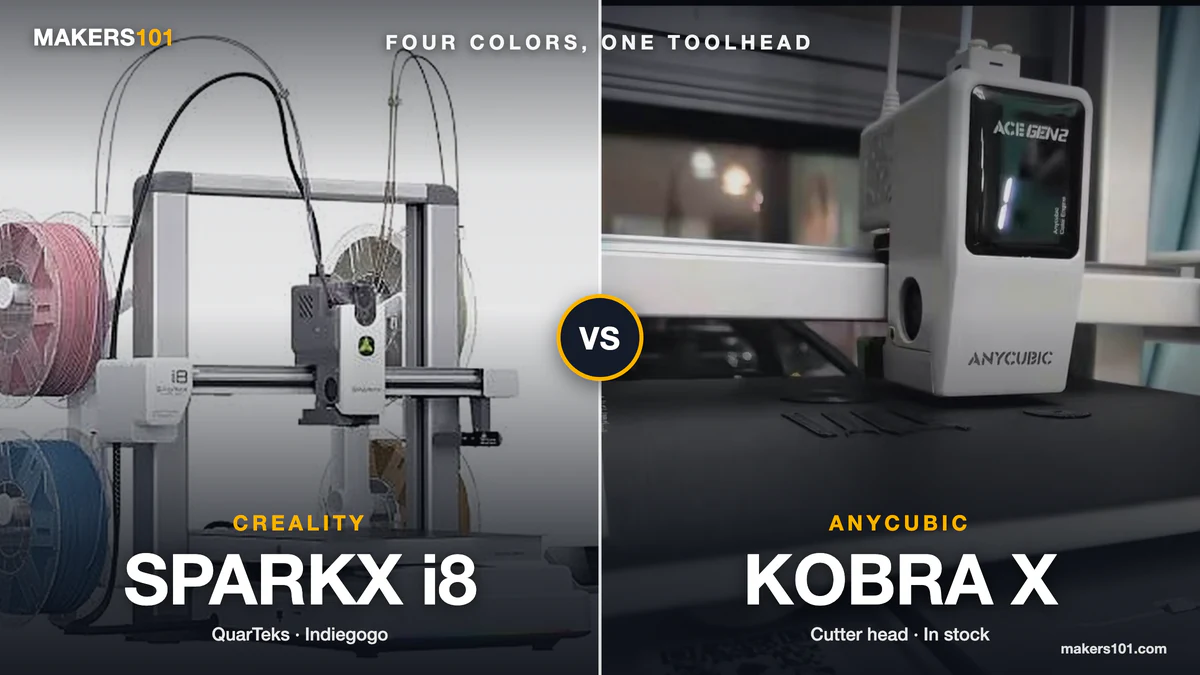
From across the room, you’d never guess these two are that far apart. Both are white four-color bedslingers with 260 mm beds, and one top Reddit reply called the i8 “essentially the Anycubic Kobra X.” The real differences sit inside the toolhead.
They cut both ways. The Kobra X prints TPU and ships today. The i8 is still an Indiegogo pledge, and every published review ran on a pre-production unit. The color-change figures floating around (“under one second,” “2.5 seconds,” “6 seconds”) also measure different things, which makes the gap easy to overstate.


Table of Contents
- SparkX i8 vs Kobra X Specs at a Glance
- How the SparkX i8 and Kobra X Put Four Colors in One Toolhead
- Filament Change Speed on the SparkX i8 and Kobra X
- Purge Waste on the SparkX i8 vs Kobra X
- SparkX i8 vs Kobra X Materials: PLA, PETG, and TPU
- Going Past Four Colors: CFS Lite on the SparkX i8 vs ACE 2 Pro on the Kobra X
- SparkX i8 vs Kobra X Print Quality and Everyday Use
- SparkX i8 vs Kobra X Price, Availability, and Risk
- Which Should You Buy: SparkX i8 or Kobra X?
- FAQ: SparkX i8 vs Kobra X
- Sources for This SparkX i8 vs Kobra X Comparison
SparkX i8 vs Kobra X Specs at a Glance
Near-identical 260 mm build volumes, very different toolheads, and one printer you can’t buy at retail yet.
| Spec | Creality SparkX i8 | Anycubic Kobra X |
|---|---|---|
| Status | Indiegogo, Sept 21 to Oct 31, 2026; November delivery | Retail, on Amazon since Feb 27, 2026 |
| Price (Sept 26, 2026) | $309 Early Bird (MSRP $399) | $299 at Anycubic store; $459.99 on Amazon |
| Amazon ASIN | None (crowdfunding only) | B0GQGSQNF8 |
| Build volume | 260 × 260 × 255 mm | 260 × 260 × 260 mm |
| Max speed (maker claim) | 500 mm/s | 600 mm/s |
| Four-color method | QuarTeks: four heated lanes into one nozzle | Four lanes into the head, cutter above the heat break |
| Filament left to purge per change | Under 1 mm to 1.7 mm shared path (two Creality figures) | About 33 mm (per Aurora Tech) |
| Color-to-color change, measured | 8 s with prime tower, 6 s without (JJ Shankles) | 45 s average (Ricky Impey) |
| Nozzle | 0.4 mm, 5-second quick-swap hotend; 0.2, 0.6, 0.8 mm planned | 0.4 mm hardened steel; 0.25, 0.6, 0.8 mm optional |
| TPU | Not supported | 95A, 64D, 68D officially; PLA + 68D TPU in one print |
| Beyond four colors | CFS Lite, up to 8 colors | ACE 2 Pro, up to 19 colors with four units |
| Noise (maker claim) | 45 dB or less | 48 dB or less |
Nobody has tested these two side by side, so the comparisons below go through shared reference printers. We haven’t had hands-on time with either machine, so the measurements come from the reviewers linked at the end, and the i8 numbers come from pre-production units.
How the SparkX i8 and Kobra X Put Four Colors in One Toolhead
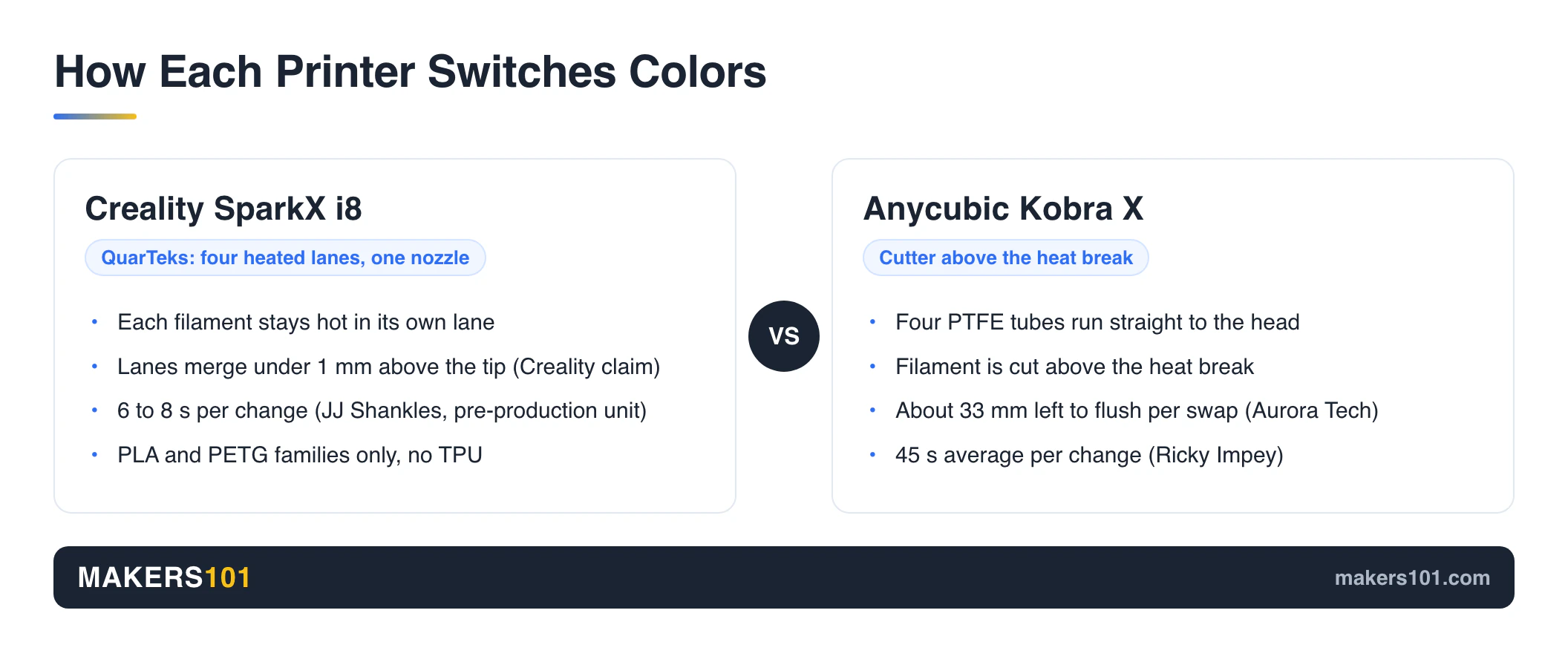
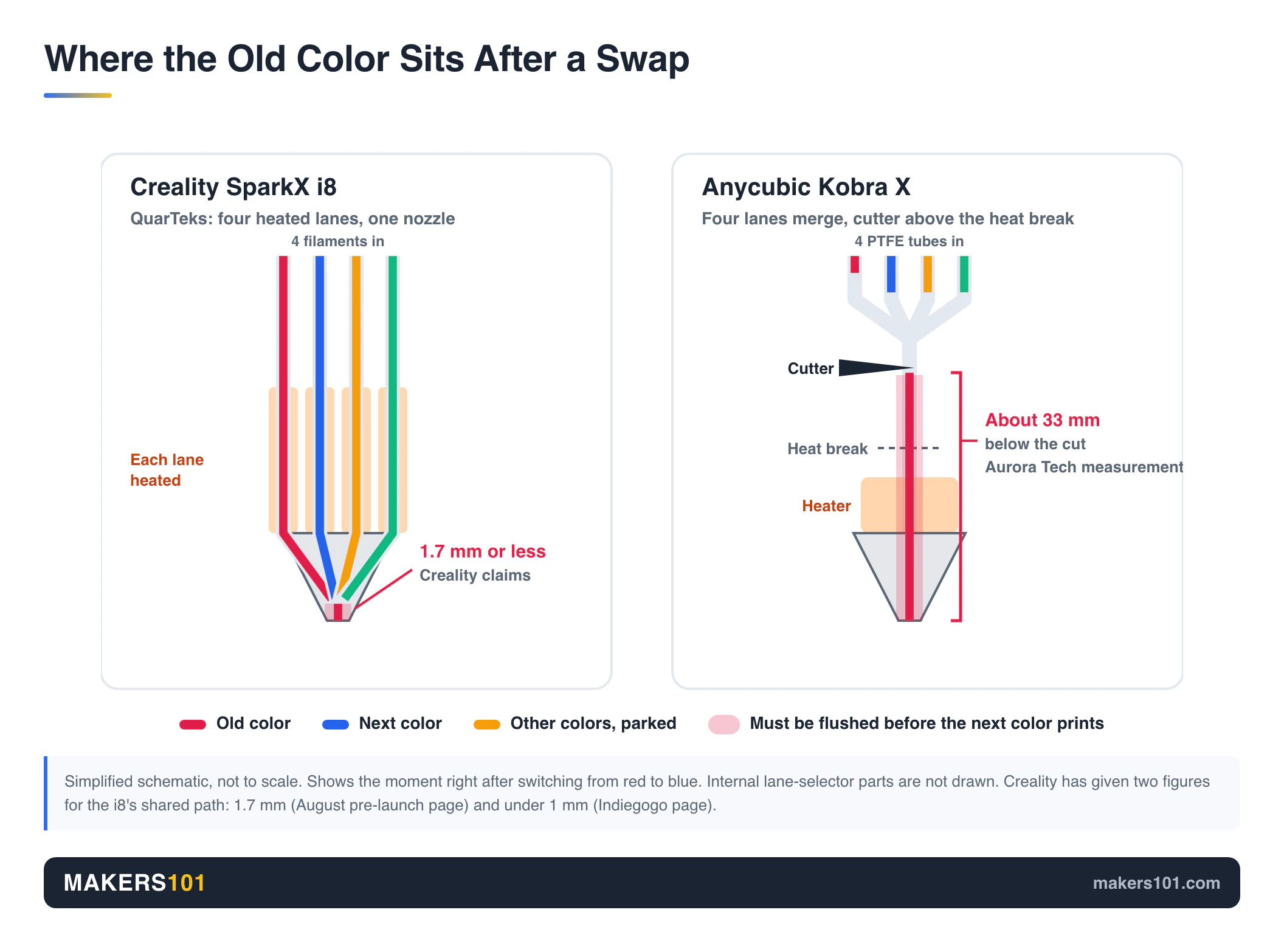
Both printers skip the external color box and feed four filaments directly into the toolhead. The SparkX i8 keeps each filament in its own heated lane until less than a millimeter above the nozzle tip. The Kobra X cuts the outgoing filament above the heat break. A few centimeters of old color still has to flush out before the new one prints clean.
Creality SparkX i8 QuarTeks: Four Heated Lanes, One Nozzle
Creality calls its system QuarTeks. Each of the four filament channels has its own heating zone, and they merge into one 0.4 mm nozzle right at the bottom. JJ Shankles took one apart and found a camshaft-and-spring mechanism that picks which lane feeds. Every screw on it is the same size, which helps with repairs.
Because all four colors sit ready and hot, a switch only has to purge the last millimeter or so at the tip. Creality’s campaign page claims “a <1 mm path, vs. 35+ mm in conventional systems.” Its August pre-launch page gave 1.7 mm for the same shared path. Either figure is tiny next to what a cutter-based head has to clear.
One Reddit commenter put it well: “It’s not a mixer, it’s a switcher.” The i8 prints one filament at a time. It just swaps between them very quickly.
Anycubic Kobra X: A Cutter Above the Heat Break
The Kobra X hangs two dual spool holders on top of the frame and runs four PTFE tubes straight to the head. FauxHammer called the layout “the perfect embodiment of less is more.” There’s no separate AMS-style box to find desk space for.
On a color change, a cutter sits above the heat break. Aurora Tech measured about 33 mm of leftover filament per swap.
That’s 46% shorter than the SparkX i7 and 32% shorter than Bambu Lab’s A-series, though still far more than the i8 has to flush.
Filament Change Speed on the SparkX i8 and Kobra X
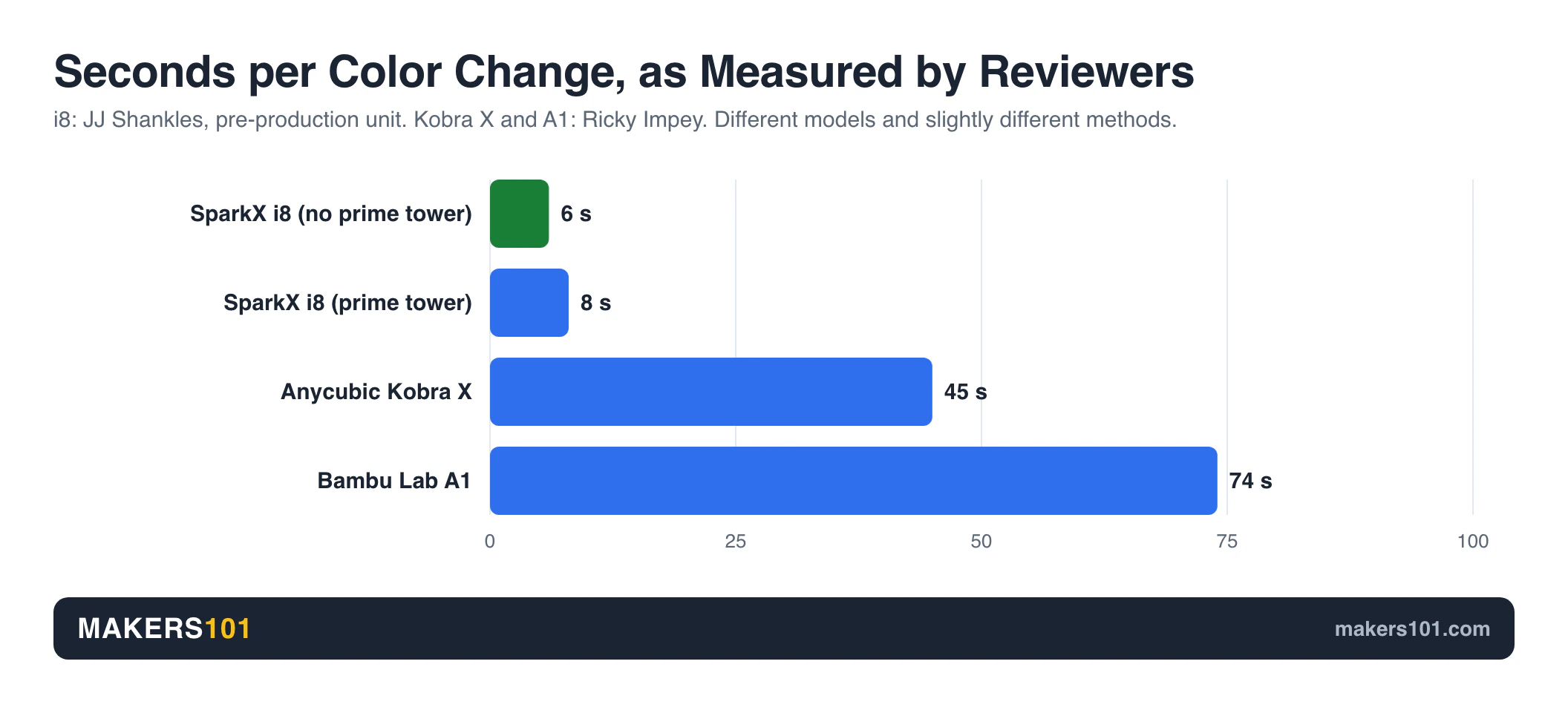
In separate reviewers’ tests on different models, SparkX i8 color changes took single-digit seconds (6 to 8) while the Kobra X averaged 45. On a model with hundreds of color changes, that gap turns into hours.
Why the SparkX i8’s “Under One Second” and the Kobra X’s “45 Seconds” Measure Different Things
Four numbers float around for the i8, and they’re easy to mix up:
- Under 1 second: the lane switch inside the head, as Creality’s campaign page advertises.
- About 2.5 seconds: Creality’s total transition time without a prime tower, as relayed by Silver Cos Lab (against about 15 seconds on conventional systems).
- 8 seconds: JJ Shankles’ measured color-to-color time with the default prime tower, including toolhead travel.
- 6 seconds: the same test with the prime tower turned off.
The Kobra X figure comes from Ricky Impey timing the full cut, retract, load, and flush cycle. Bambu Lab’s A1 took 74 seconds in the same test. The closest like-for-like pairing is 6 to 8 against 45, timed by two reviewers with slightly different methods. Setting “under one second” against 45 overstates the i8’s lead.
SparkX i8 and Kobra X Speed on Real Test Prints
Nobody has timed both printers on one model, so here is how each did against shared reference machines:
- SparkX i8 vs a toolchanger: TheLayeredWorkshop sliced a Spider-Man bust at Creality’s suggested 0.15 flushing multiplier at 5 h 10 min, then printed it. His slicer estimated 6 h 21 min for the FlashForge Creator 5 toolchanger on the same model.
- SparkX i8 vs Snapmaker U1: BuildDanielBuild ran the U1’s own G-code on the i8. A spider finished in about 8 h 40 min, roughly 30 minutes ahead of the U1, and a chameleon came in 3 hours faster.
- Kobra X vs Bambu Lab A1: Ricky Impey’s boat needed 553 filament changes. The Kobra X finished more than 5.5 hours sooner. The German channel mak3r printed a multicolor dragon in 8 h 57 min on the Kobra X against 16 h 28 min on the A1.
On these numbers, the i8 keeps pace with dedicated toolchangers, though both Spider-Man times are slicer figures. The Kobra X is clearly beating the A1 but plays one tier below the i8 on raw change speed.
How Many Color Changes Before the SparkX i8’s Speed Edge Matters
Subtract the two measured averages and you get roughly 37 to 39 seconds saved per change. Multiply it out using change counts from real test prints:
| Color changes | Example from reviewers | Time the i8 would save (estimate) |
|---|---|---|
| 75 | Aurora Tech’s four-color cube | About 45 to 50 minutes |
| 273 | JJ Shankles’ Mini Cooper | About 2.8 to 3 hours |
| 553 | Ricky Impey’s boat | About 5.7 to 6 hours |
| 800 | JJ Shankles’ “stained glass” model | About 8 to 8.7 hours |
This is a back-of-envelope estimate built on two reviewers’ averages from different models. Under about 100 changes per print, you save an hour or less. Past a few hundred, the i8 starts reclaiming whole evenings.
Single-color printers can skip this math. Even the teardown reviewer said the i8 isn’t the best value for single-color work.
Purge Waste on the SparkX i8 vs Kobra X
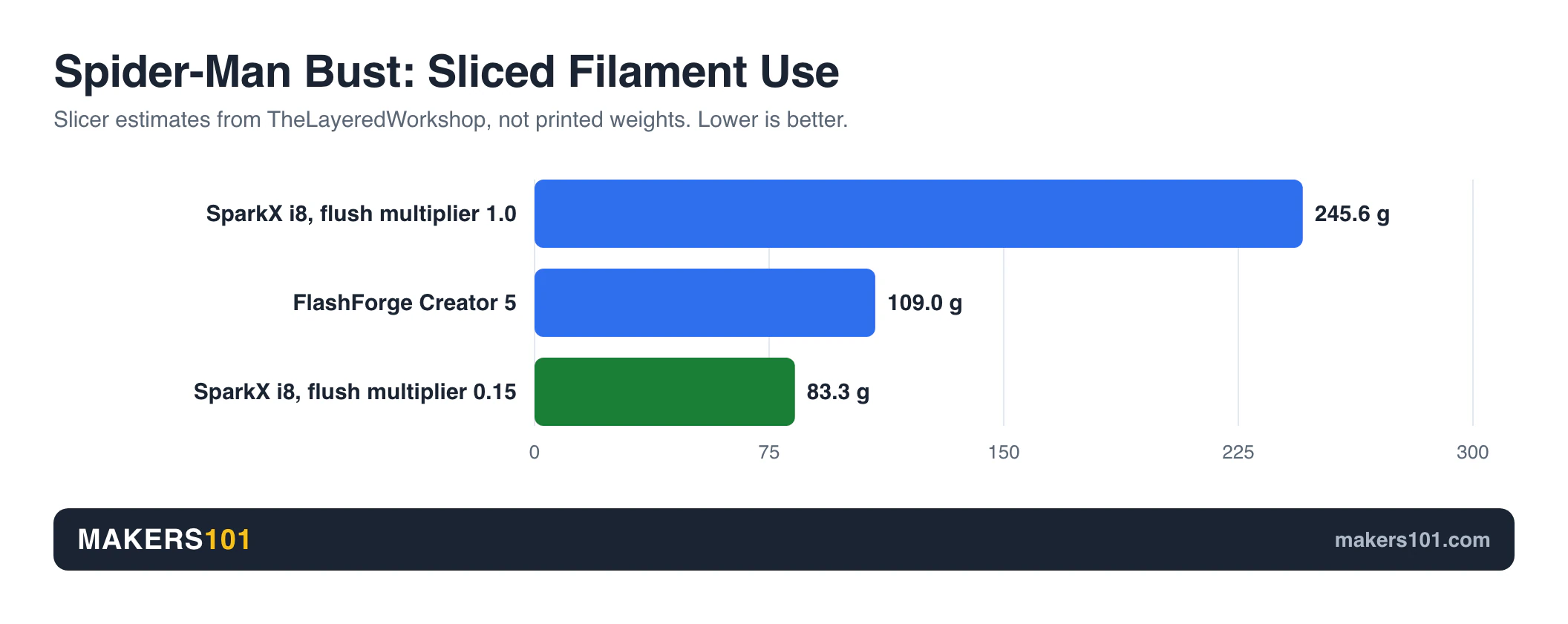
The SparkX i8 wastes less per color change because it only flushes the tip, and most of its waste goes into an optional prime tower. The Kobra X beats Bambu’s A1 by about a third on purge, but it can’t match the i8’s tip-only flush.
The i8 numbers from that reviewer’s Mini Cooper print: a 63.66 g model, a 16.46 g prime tower, and 273 color changes. That’s roughly 0.06 g of tower per change, with the tower weighing about a quarter as much as the model.
The bigger lever is the flushing multiplier. On TheLayeredWorkshop’s Spider-Man bust, the default 1.0 setting sliced at 245.59 g of filament and 9 h 44 min. Dropping to Creality’s suggested 0.15 cut that to 83.26 g and 5 h 10 min, with no visible drop in quality. His slicer put the Creator 5 at 108.96 g.
For the Kobra X, that multicolor dragon produced 123.4 g of purge waste against 188.2 g on the A1, about 34% less. On the 553-change boat, the Kobra X threw away over 100 g less than the A1, on a model that weighed 13 g.
The Kobra X slicer has one quirk. When the purge algorithm judged two colors as close (gold set as light yellow), it calculated only 125 mm³ of purge and the colors bled. Setting it to dark yellow raised purge to 550 mm³, and waste went from 17 g to 27 g.
On both machines, you’ll still end up with a pile of poop. Our guide covers what to do with filament poop once the bin fills up.
Creality’s SparkX i8 “438 kg Saved per Year” Math Doesn’t Hold Up
Creality’s campaign page claims the i8 saves about 438 kg of filament a year and, as of September 24, values that at “$15,000.” At the page’s own $30 per kilogram, it’s $13,140. Getting there assumes roughly 1.68 years of non-stop printing, and a Reddit thread mocking the math collected 86 upvotes.
The “0 g waste” claim has a footnote too: a small flush at the start, and no-prime-tower printing is “not applicable to all 3D models.” The i8 is genuinely frugal. The marketing just rounds too hard.
SparkX i8 vs Kobra X Materials: PLA, PETG, and TPU
The SparkX i8 is a four-color PLA and PETG machine. It can’t print TPU, and it can’t combine materials that need very different temperatures. The Kobra X officially prints 95A, 64D, and 68D TPU and can combine PLA with 68D TPU or PVA in one job.
The i8’s supported list: PLA, Silk PLA, PLA-CF, PETG, PETG-CF, and support PLA. Creality says TPU isn’t supported because of the print head’s complexity.
Since all four lanes share one hotend, you can’t pair PLA with PETG as a support interface, though PLA plus support PLA works. QuarTeks is a multicolor system, and it was never designed as a multi-material system.
The Kobra X’s official single-material list covers PLA, PETG, TPU (95A, 64D, 68D), PVA, and ABS. It can also switch to flexible filament mid-print, something even Bambu Lab’s far pricier H2D can’t do in four colors.


ABS is another split. Creality doesn’t recommend engineering materials on the open-frame i8. On either open frame, ABS is a fair-weather material at best.
A 90A TPU was too soft to feed and clogged in testing, which fits Anycubic’s list starting at 95A. If you want the softest TPU filament, neither printer is the right tool.
Going Past Four Colors: CFS Lite on the SparkX i8 vs ACE 2 Pro on the Kobra X
The SparkX i8 tops out at eight colors with one Creality CFS Lite, while the Kobra X reaches 19 colors with four Anycubic ACE 2 Pro units. Getting to color five is cheaper on the i8 if you pledge now, but the Kobra X has the longer runway.
On Indiegogo, the CFS Lite is a $119 add-on (listed at $199). It’s aimed at October and adds automatic loading, RFID, and enclosed storage. Creality has told reviewers it has no 16-color plans.
The Kobra X expands through the ACE 2 Pro. Anycubic’s FAQ says 19 colors takes four units plus three 8-color hubs and one 2-color hub (one reviewer said 16). The ACE 2 Pro also dries filament, which the Kobra X can’t do on its own.
| Goal | SparkX i8 | Kobra X |
|---|---|---|
| Colors 5 to 8 | $119 CFS Lite (pledge add-on) | $289.99 for one ACE 2 Pro |
| More than 8 colors | Not offered | Up to 19 with four ACE 2 Pro units (about $1,160 before hubs) |
| Filament drying | Not included | Built into ACE 2 Pro |
If four to eight colors covers your plans, the i8 path costs less. If you want a drying box anyway, or you dream in 12 colors, only the Kobra X goes there.

SparkX i8 vs Kobra X Print Quality and Everyday Use
Both produce clean multicolor prints in reviewers’ hands, and both print every color through a single nozzle, so neither needs a toolchanger’s offset calibration. The Kobra X has a longer track record, a slightly louder hum, and clunkier network printing.
SparkX i8 print quality. The Mini Cooper print showed crisp color separation.
The same reviewer’s layer-by-layer color mixing looked smooth at 50/50 and striped at 75/25. BuildDanielBuild’s CMYK frog mixed four base colors into eight, with visible banding up close, and his white filament strung slightly.
Kobra X print quality. One reviewer called its first-layer test one of the absolute best he’d seen, and a tolerance test cleared every 0.05 mm gap.
A calibration cube came out 0.1 mm off in total, against 0.2 mm on the A1, though that tester had fitted aftermarket parts. On single-color prints in one test, it ran a bit slower than the A1 with slightly rougher surfaces, partly due to a conservative 2,000 mm/s² outer-wall default.
Setup and noise. The i8 was running in about 30 minutes without the manual in one review, and Kobra X assembly falls between the SparkX i7 and the A1. The Kobra X measured a 47 dB average with 52 dB peaks. No reviewer has published an i8 noise measurement yet.
Software and camera. The i8 uses Creality Print on Windows, macOS, and Linux.
The i8’s beta slicer was locked to 0.20 mm layers in one review, and the pre-production camera looked worse than on an i7. On the Kobra X, Orca Slicer can’t send jobs over the network, even in LAN mode, and the camera sits low and sees more bed than model.
For the full list of Creality’s claims and which ones hold up, see our SparkX i8 full specs breakdown.
Day-One Settings for the SparkX i8 and Kobra X
- SparkX i8: drop the flushing multiplier to 0.15. Creality suggests it, and it roughly halved sliced print time in one test, though a Gundam showed a faint red tint on its head.
- SparkX i8: keep each print to one material family. One hotend temperature means PLA types (support PLA included) or PETG types.
- Kobra X: pick clearly different colors in the slicer. Similar shades shrink the purge and bleed.
- Kobra X: start flexible prints with 95A TPU.
- Kobra X: send jobs by USB stick or Anycubic Slicer Next.
SparkX i8 vs Kobra X Price, Availability, and Risk
Bought direct from Anycubic, the Kobra X costs $10 less than an i8 Early Bird pledge and ships now. On Amazon it costs $150 more. The SparkX i8 arrives in November at the earliest. And it carries crowdfunding risk that a retail printer doesn’t.
SparkX i8 pricing (Indiegogo, as of September 24, 2026):
- Super Early Bird $289: sold out
- Early Bird $309 (MSRP $399), November 2026 delivery
- Color Combo with CFS Lite: $428 (MSRP $598)
- The campaign runs through October 31
Kobra X pricing: Amazon went back to its $459.99 list price on September 26. Our deal tracker had logged it between $299.99 and $329.99 from September 10 to September 24. Anycubic’s own US store sells the base printer for $299 (compare-at $399), so check both before you buy.
The crowdfunding fine print. The i8’s Indiegogo page shows no Shipping Guarantee badge and is labeled Express Crowdfunding. Refund requests go to Creality’s customer support, and Indiegogo can’t process them. Once an order ships with tracking, it’s no longer refundable.
Some backers on Reddit reported being charged more than once at launch, and Creality said it was working with Indiegogo on it. Another commenter said Creality’s M1 and R1 Indiegogo campaign promised July shipping and still hadn’t reached manufacturing.
Brand track records cut both ways. The SparkX i7 launched in January 2026, and the i8 arrived eight months later on the same frame with a new head, which annoyed i7 owners on Reddit. Anycubic also releases new models at a fast clip. FauxHammer’s verdict: Anycubic “has surpassed Bambu in raw product value, but now they must not touch this printer for three years.”
Early reliability signals. One pre-production i8 ran thousands of color changes without a clog. One Reddit Kobra X owner reported a single clog in about 200 hours, and Anycubic pushed a firmware patch the next day. A Kobra X nozzle plus heat-zone tube costs $15, against $11 for a complete A1 hotend.
If you want to see how filament savings stack up against the price gap, plug your numbers into the 3DPKit print cost calculator.
Which Should You Buy: SparkX i8 or Kobra X?
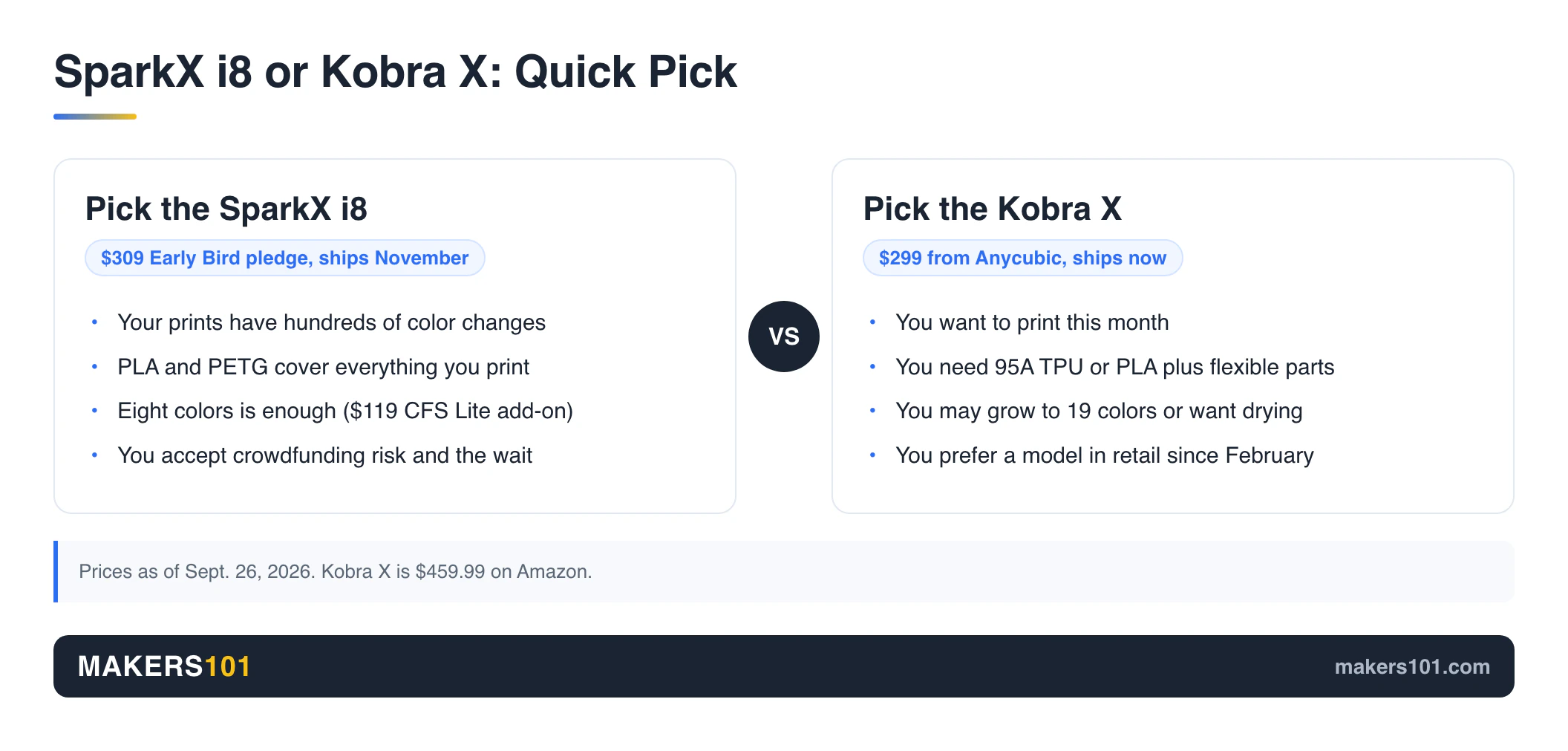
The SparkX i8 is the better fit for patient buyers who print lots of four-color PLA and hate waste. The Kobra X suits anyone who wants to print now, needs TPU, or wants a path past eight colors. Neither is the right buy for mostly single-color printing.
Choose the Creality SparkX i8 if:
- Your prints routinely have hundreds of color changes, where the 37-second-per-change edge adds up to hours
- You print PLA and PETG and don’t need TPU
- Eight colors is your ceiling, and a $119 CFS Lite pledge appeals to you
- You’re comfortable backing a crowdfunded, pre-production design and waiting until November

Choose the Anycubic Kobra X if:
- You want a printer on your desk this month
- You need 95A TPU, or PLA with flexible parts in one print
- You might grow to 12 or 19 colors, or you’d like built-in filament drying
- You’d rather buy a model that has been in retail hands since February
Skip both if:
- You mostly print in one color. A cheaper single-color machine does that job better. Our guide to the best budget 3D printers under $300 and $500 is a good starting point.
- You need PLA and PETG in the same print. That’s toolchanger or nozzle-changer territory, like the Creality K3 and its KliTek nozzle changer.
If I were buying today with no deadline, I’d let the first retail i8 reviews land before pledging. The Kobra X is the known quantity. The i8 is the faster bet.
FAQ: SparkX i8 vs Kobra X
Which 3D printer is better, the Anycubic Kobra X or the Creality SparkX i8?
The SparkX i8 is better at fast, low-waste four-color PLA and PETG printing. The Kobra X is better at flexible filament, expansion to 19 colors, and immediate availability. In the SparkX i8 vs Kobra X choice, your filament list and your patience decide it.
Which 3D printer is better, the Anycubic Kobra X or the Creality SparkX i7?
In Aurora Tech’s tests, the Kobra X beat the SparkX i7 on multicolor prints, running 22 to 30% faster and wasting 22 to 32% less filament across several models. The SparkX i8 is Creality’s answer to that gap, reusing the i7’s frame with a new four-lane toolhead.
Is Kobra X good?
Yes, for the price. Two independent tests measured it faster and less wasteful than a Bambu Lab A1 on multicolor prints. The weak spots are Anycubic’s software ecosystem and long-term support. Its main Amazon listing averages 4.2 stars from 263 ratings. Anycubic is working on that gap: its Thingiverse partnership brings selected models to Makeronline as multicolor 3MF files starting Nov. 17, 2026.
Is Creality or Anycubic better?
Neither wins across the board. Creality’s SparkX i8 has the more advanced color-change hardware, and Anycubic’s Kobra X is the more mature product today. Both release new models quickly, so judge the specific printer.
What is the highest rated 3D printer?
There’s no single highest-rated 3D printer, because ratings depend on the category. Among four-color bedslingers, all three Kobra X reviewers we tracked favored its multicolor hardware over the Bambu Lab A1’s, though one still rated Bambu’s ecosystem ahead. The SparkX i8 has no retail reviews yet.
Can the SparkX i8 print TPU?
No. The i8 is limited to PLA and PETG families, including their carbon-fiber and silk versions, and Creality has ruled out TPU for now. If you need flexible filament, Anycubic lists 95A, 64D, and 68D TPU for the Kobra X.
How much does the SparkX i8 cost compared with the Kobra X?
As of September 26, 2026, an Early Bird i8 pledge ($309, MSRP $399) costs $10 more than a Kobra X from Anycubic’s store ($299), and $150 less than the Kobra X on Amazon ($459.99). The i8 won’t arrive until November. For eight colors, the i8 plus CFS Lite bundle is $428 as a pledge, while a $299 Kobra X plus one $289.99 ACE 2 Pro comes to about $590.
Is it safe to back the SparkX i8 on Indiegogo?
It carries normal crowdfunding risk: no Shipping Guarantee, refunds only through Creality support, and none after shipping. Creality is a large, publicly listed company, but a backer of its M1 and R1 campaign reported a missed ship date. Back it only with money you can leave tied up until November or later.
Sources for This SparkX i8 vs Kobra X Comparison
Every measurement in this comparison comes from these reviews and threads. SparkX i8 figures are from pre-production units.
Show all 13 sources
- JJ Shankles: Creality SparkX i8 review and teardown (YouTube)
- TheLayeredWorkshop: Creality SparkX i8 review: single nozzle multi-color (YouTube)
- BuildDanielBuild: SparkX i8 vs toolchanger G-code tests (YouTube)
- Silver Cos Lab: Creality SparkX i8 before you buy (YouTube)
- FauxHammer: Anycubic Kobra X review (YouTube)
- Aurora Tech: Anycubic Kobra X vs Bambu Lab A1, A2L and SparkX i7 (YouTube)
- Ricky Impey: Anycubic Kobra X vs Bambu Lab A1 (YouTube)
- mak3r (German): Bambu Lab A1 vs Anycubic Kobra X (YouTube)
- r/3Dprinting: The Kobra X and the i8 look similar
- r/3Dprinting: Interesting math used by Creality on their SparkX i8 page
- r/Creality: SparkX i8 is here
- Specs and prices: SparkX i8 Indiegogo campaign and Anycubic Kobra X store page
CERTAIN CONTENT THAT APPEARS ON THIS SITE COMES FROM AMAZON. THIS CONTENT IS PROVIDED ‘AS IS’ AND IS SUBJECT TO CHANGE OR REMOVAL AT ANY TIME.
Price details
Product prices and availability are accurate as of the date/time indicated and are subject to change. Any price and availability information displayed on Amazon.com at the time of purchase will apply to the purchase of this product.