
I earn a commission if you buy through links on this page, at no extra cost to you. As an Amazon Associate, I earn from qualifying purchases.
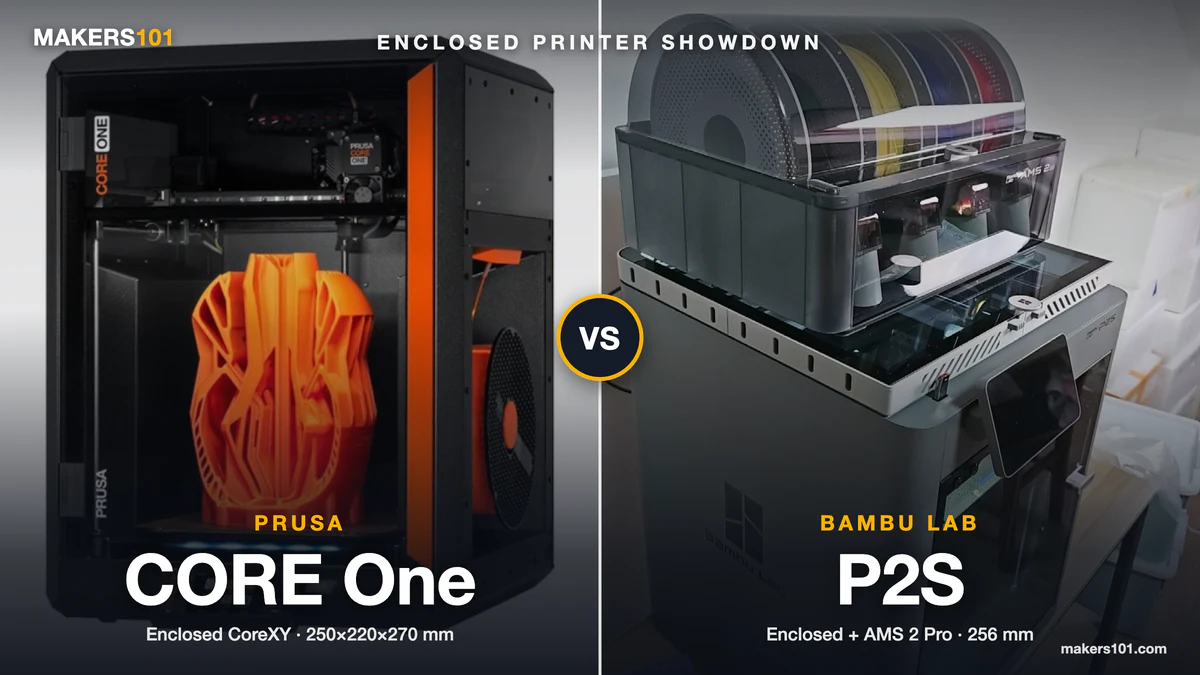
Most Prusa Core One vs P2S threads turn into an ethics fight. The number that should settle it is about 45°C.
That’s roughly where both chambers topped out when Thomas Sanladerer printed the same ABS and polycarbonate parts on each machine. The Prusa’s heated-chamber edge mostly vanishes on the bench, and what’s left is a $730 price gap. I’ve run a P2S for a year. For most people, that $730 buys nothing they’ll notice. For a few, it buys exactly the right things.
Quick verdict: Buy the P2S ($569) unless you want a printer that never needs the cloud and that you’ll repair and upgrade for five-plus years. Then the CORE One+ ($999 kit / $1,299 built) earns its price.
Table of Contents
- Bambu Lab P2S vs Prusa CORE One+ Specs at a Glance
- Prusa Core One vs P2S Price: What You Actually Pay for Each Setup
- Which Core One Are You Comparing? Original Core One vs Core One+ (Gen 2)
- Build Volume and Footprint: P2S 256 mm Cube vs Core One+ 250×220×270 mm
- Chamber Heat and Engineering Materials: Prusa Core One vs P2S for ABS, ASA, PC and Nylon
- Print Quality: Prusa Core One vs Bambu Lab P2S Surface Finish, Overhangs and VFA
- Reliability and Firmware: How the Core One and P2S Hold Up Over Hundreds of Hours
- Multicolor and Multi-Material: AMS 2 Pro vs MMU3 and Prusa INDX
- Core One+ vs P2S Setup and Daily Use: Kit Assembly, Calibration and Maintenance
- Software, Cameras and Cloud: Bambu Studio and Handy vs PrusaSlicer and Prusa Connect
- Repairs, Upgrades and Long-Term Ownership: Prusa vs Bambu Lab
- Prusa Core One vs Bambu Lab P2S: Which Should You Buy?
- FAQ: Prusa Core One vs Bambu Lab P2S
- Sources for This Prusa Core One vs P2S Comparison
Bambu Lab P2S vs Prusa CORE One+ Specs at a Glance
| Spec | Prusa CORE One+ (Gen 2) | Bambu Lab P2S |
|---|---|---|
| Price (Oct 7, 2026) | $999 kit / $1,299 assembled (prusa3d.com) | $569 / $769 Combo with AMS 2 Pro (Amazon) |
| Build volume | 250 × 220 × 270 mm | 256 × 256 × 256 mm |
| Chamber heat | Heatbed-driven chamber control, rated to 55°C | Enclosed, no active chamber heating (Bambu FAQ) |
| Stock nozzle | 290°C, not hardened (HT Hotend upgrade to 400°C) | Hardened steel nozzle and extruder gear |
| ABS / ASA / PA | Requires Advanced Filtration System add-on | Carbon filter included |
| Multicolor today | MMU3 (up to 5 colors); INDX 8-tool ships Oct 15 | AMS 2 Pro (4 slots, expandable to 20 colors) |
| Camera | Optional add-on | Built in, with AI failure detection |
| Offline use | Full LAN, USB, no cloud required | Cloud-first app, with a LAN mode |
| Assembly | Kit or factory-assembled | Ready to print |


Prusa Core One vs P2S Price: What You Actually Pay for Each Setup
The P2S costs $569, while the CORE One+ runs $999 in kit form and $1,299 built (prices checked October 7, 2026). That’s a $430 to $730 gap before accessories. Price the setup you’ll actually use and it grows: an ABS-ready assembled Prusa costs $813 more than a P2S, and an assembled multicolor one costs $929 more than the P2S Combo. Add-on prices come from Prusa’s US store on the same day.
| Setup you want | CORE One+ | P2S |
|---|---|---|
| PLA and PETG, single color | $999 kit / $1,299 assembled | $569 |
| ABS, ASA, nylon | $1,082 kit / $1,382 assembled (+ $82.99 Advanced Filtration) | No extra cost (filter included) |
| Abrasive CF/GF filaments | Base price + a hardened nozzle | No extra cost (hardened nozzle stock) |
| Multicolor today | $1,398 kit / $1,698 assembled (+ $399 MMU3 full kit) | $769 (P2S Combo) |
| 8-material printing | $2,249 for the assembled INDX 8-Tool version | Up to 20 colors with extra AMS units |
Two line items quietly change the math. Prusa’s spec sheet ties ABS, ASA, HIPS, and PA to its filtration add-on. The stock CHT nozzle isn’t hardened, so carbon-fiber filament means another purchase too. A camera is extra as well ($43.99 for the Buddy3D).
One owner on r/3dprinter put it bluntly. An X2D Combo costs less than a CORE One+ kit by itself, and you still have to buy filtration and a camera for the Prusa. That comparison stings even more against a $569 P2S.
Running costs barely differ, since both machines burn similar filament and power. If you want to sanity-check what a print job really costs you, plug your numbers into the 3DPKit print cost calculator.
Which Core One Are You Comparing? Original Core One vs Core One+ (Gen 2)
Prusa now sells only the CORE One+ (Gen 2). Most of the harsh 2025 reviews you’ll find were filmed on the original Core One, and three of their biggest complaints map directly onto hardware Prusa changed.
The top cover had to be unscrewed to clear a jam or swap filament. There was no wiper, so the nozzle cleaned itself by scraping a line on the print sheet.
And vertical fine artifacts (VFA) showed up on smooth walls. One early review measured them worse than an X1C, an MK4, and a Qidi Plus4, and traced the pattern to the 2 mm belt pitch. Prusa support’s fix was raising belt tension from 85 Hz to 105 Hz.
Gen 2 addresses each of those on paper:
| Original Core One complaint | CORE One+ (Gen 2) change |
|---|---|
| Top cover screwed on, slow to open for jams | Snap-on top panel, removable without tools |
| No wiper; nozzle cleaning left marks on the sheet | Silicone nozzle wiper before every print |
| VFA on smooth walls | GT1.5 belts to “reduce fine patterns on smooth surfaces” |
| Heatbed warm-up time | Redesigned heatbed mount Prusa says shortens warm-up |
These are Prusa’s claims, and we haven’t seen an independent VFA re-test on Gen 2 yet. If you’re reading a 2025 review, check which machine is on the bench. Original owners can buy a Gen 1 to Gen 2 upgrade kit, which is very on-brand for Prusa. If you’re weighing the Prusa against Bambu’s dual-nozzle flagship instead, our Bambu Lab X2D vs Prusa Core One comparison covers that matchup.
Build Volume and Footprint: P2S 256 mm Cube vs Core One+ 250×220×270 mm
The P2S gives you a 256 mm cube. The CORE One+ is 6 mm narrower, 36 mm shallower, and 14 mm taller. That’s about 19% more bed area on the Bambu.
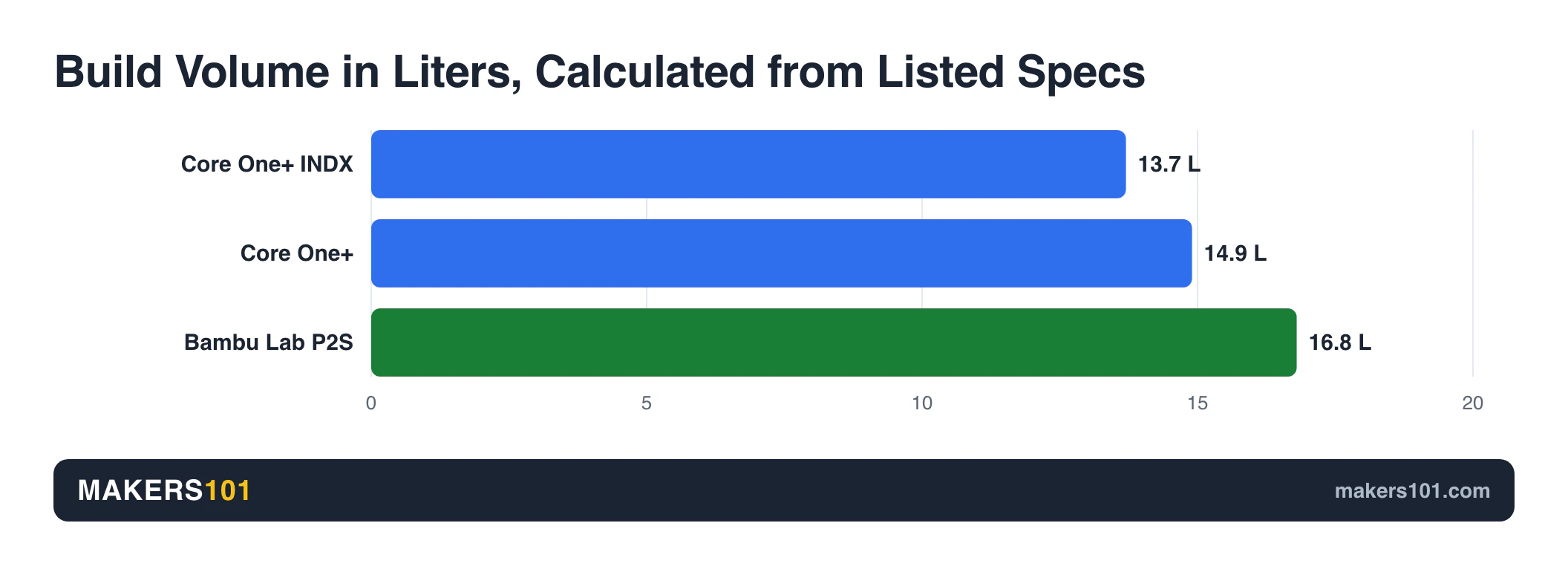
The missing 36 mm of Y-depth on the Prusa matters more than it sounds. Even the P2S cube isn’t huge. I still had to split a castle-shaped storage box into parts to fit mine. On a 220 mm-deep bed, more of your big prints get split.
Tall, narrow parts are the one place the Prusa wins. Vases, lamp shades, and long brackets printed upright get those extra 14 mm.
Plan the desk space too. The CORE One+ measures 415 × 444 × 555 mm and weighs 22.5 kg. Leave roughly 56 cm of height for it.
Chamber Heat and Engineering Materials: Prusa Core One vs P2S for ABS, ASA, PC and Nylon
Neither printer heats its chamber with a dedicated heater. The CORE One+ is rated to 55°C, but it gets there by using the heatbed and managing airflow. Bambu’s own FAQ says plainly: “The P2S does not have an active chamber heating function.”
The most useful single test for this comparison comes from Thomas Sanladerer (Made with Layers), who printed the same ABS and polycarbonate parts on a Core One, a Core One L, a P2S, and an H2S, using matched settings. The Core One and the P2S both reached only about 40 to 45°C inside.
The actively heated H2S and Core One L hit about 60°C and printed visibly better ABS. Polycarbonate was harder. The Core One L couldn’t finish its PC print at all, traced to grease dripping onto the bed and cold spots in the heatbed. With Prusament PC Blend, only the H2S stayed mostly flat, and the Core One and P2S both warped badly.
So the “Prusa has a heated chamber, Bambu doesn’t” line you’ll see in some comparisons overstates the gap. For hard engineering plastics, they sit in the same tier.
ABS and ASA are a different story, and here the P2S has the practical edge:
- Filtration: The P2S ships with a carbon filter. Prusa requires its Advanced Filtration System for those materials.
- Nozzle: The P2S has a hardened steel nozzle and extruder gear from the factory. The Prusa’s stock nozzle isn’t hardened.
- Track record: Two long-term P2S reviews report good ABS results. The second also rated ASA excellent, saw PC warp, and found nylon failed without a brim but printed fine with one.
Our own P2S material tests lined up on nylon: PC and nylon both needed a brim to stay down, and every material we ran printed cleanly at 0.2 mm layers.
The Prusa holds its own once it’s configured. In one Core One test, the reviewer preheated with the bed at 115°C and reached 51°C in the chamber after 70 minutes of ABS. PC-CF and PA-CF printed on the first try. On the CORE One+, Prusa lists that filtration add-on as a requirement for ABS and PA, and carbon-fiber filament wants a hardened nozzle.
In its cooling mode for PLA and PETG, the P2S’s auxiliary fan exhausts air straight out of the machine, unfiltered. Bambu has since added a post-print air purge and announced an external exhaust kit. For a ranked list of machines built for this work, see our guide to enclosed high-temperature 3D printers for ABS and nylon.
Print Quality: Prusa Core One vs Bambu Lab P2S Surface Finish, Overhangs and VFA
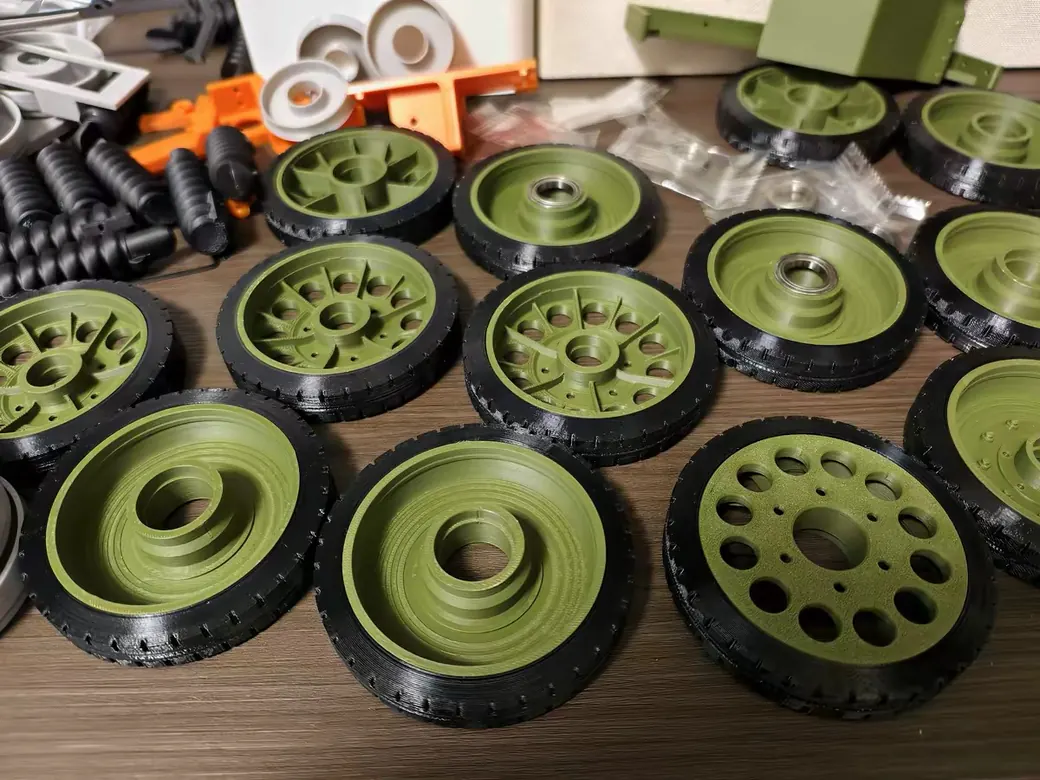
Both printers make excellent parts. The Prusa tends to win on surface finish, and the P2S tends to win on overhangs with default profiles.
Prusa’s surface finish gets the most praise. One long-time Bambu user with 40,000-plus hours across Bambu machines said Prusa prints have “a real fine-tuned finish to it that Bambu lacks.” A two-host podcast that had just received Core Ones put the print quality in the “top 1%.” One test passed a 0.05 mm clearance on the tolerance gauge, and mask prints came off with layer lines that were hard to see.
The Prusa misses happen when you leave its sweet spot. Prusament PETG on the official profile still produced rough support interfaces and weak overhangs in one review. The first-gen VFA issue covered above sits on this side of the ledger too.
The P2S is consistent more than spectacular. In a four-printer showdown, only the P2S and P1S printed a Prusa-designed extreme overhang plate cleanly. The others curled from fan placement.
A 500-hour owner found print quality matched the P1S on every model, and ASA came out better thanks to automatic flow calibration before each print. The P2S isn’t immune to VFA either; that same showdown flagged it.
If you print display models and care about how a wall looks under raking light, the Prusa has the edge. If you print functional parts with lots of overhangs, the P2S is the safer default.
Speed: Core One vs P2S Benchy Times
Speed won’t decide this one. A first-gen Core One printed a standard Benchy in 42 minutes on the default 0.2 mm profile.
A print-farm run clocked the CORE One+ at 38 minutes for a single-color Benchy. On the Bambu side, one reviewer timed a two-color bookmark at 1.5 hours on the single-nozzle P2S against 1.7 hours on a dual-nozzle X2D. Nobody has published a same-model timing between a P2S and a Core One yet, so treat speed as a tie.
Reliability and Firmware: How the Core One and P2S Hold Up Over Hundreds of Hours
The P2S has the thicker long-term record right now. The Core One’s documented problems cluster around first-generation firmware, and Prusa has a history of fixing things quickly.
Public P2S logs run past 500 hours, and a separate 50-hour PLA run had zero issues. Mine has handled a year of PLA and PETG home prints without problems. The failures that do show up are ordinary: an old silk PLA jammed one reviewer’s hotend, which took a quick teardown to clear.
The Core One list is longer, and mostly early:
- Losing Z height after a pause to clean the nozzle, which knocked over supports
- Random “nozzle cleaning failed” errors after a bad blob
- Prints sent over Wi-Fi occasionally stuck at heating with a temperature error
- A filament sensor that detects whether filament is present but can’t tell if it’s moving
In a 40-print farm torture run, the CORE One+ stopped after 33 prints with a leveling-sensor fault. That was a single unit, so it may be a one-off. Bambu’s X2D stopped earlier in that same run with an AMS jam, so neither brand was spotless.
Community opinion splits along familiar lines. One owner who works with a Core One L daily said that “for ease of use and reliability the H2C is miles ahead.” Another, with an H2D at work and a Core One at home, summed up Bambu as “great, until it’s not,” and said the fix is to replace parts and skip repairing them.
Multicolor and Multi-Material: AMS 2 Pro vs MMU3 and Prusa INDX
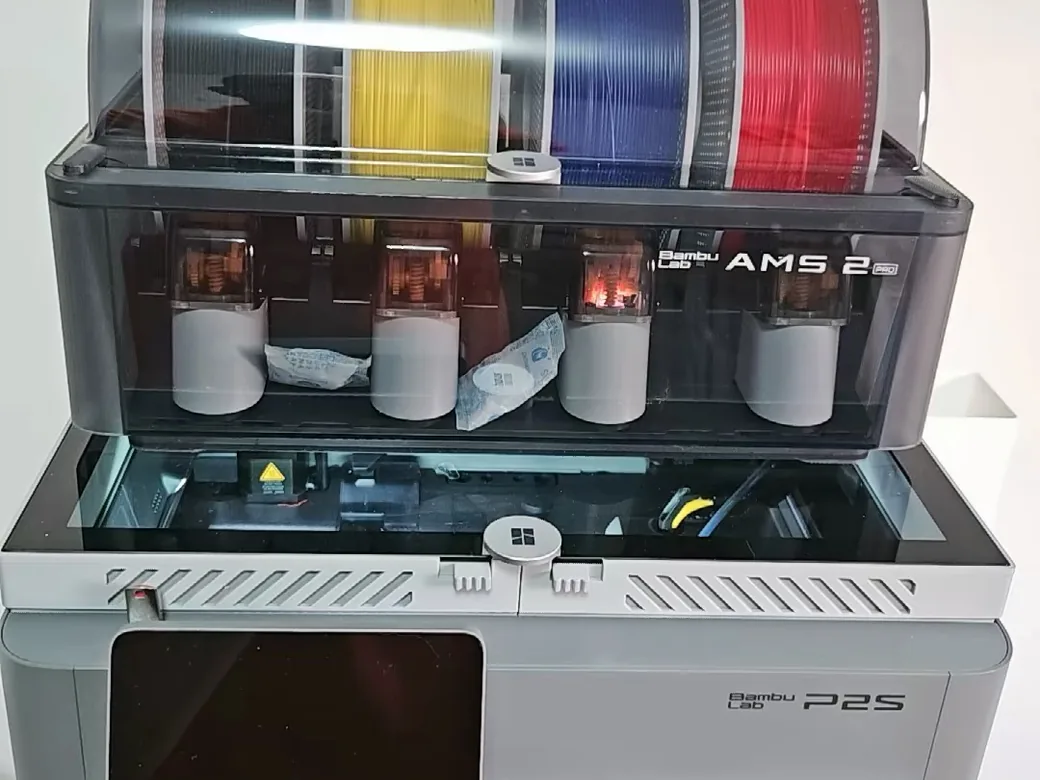
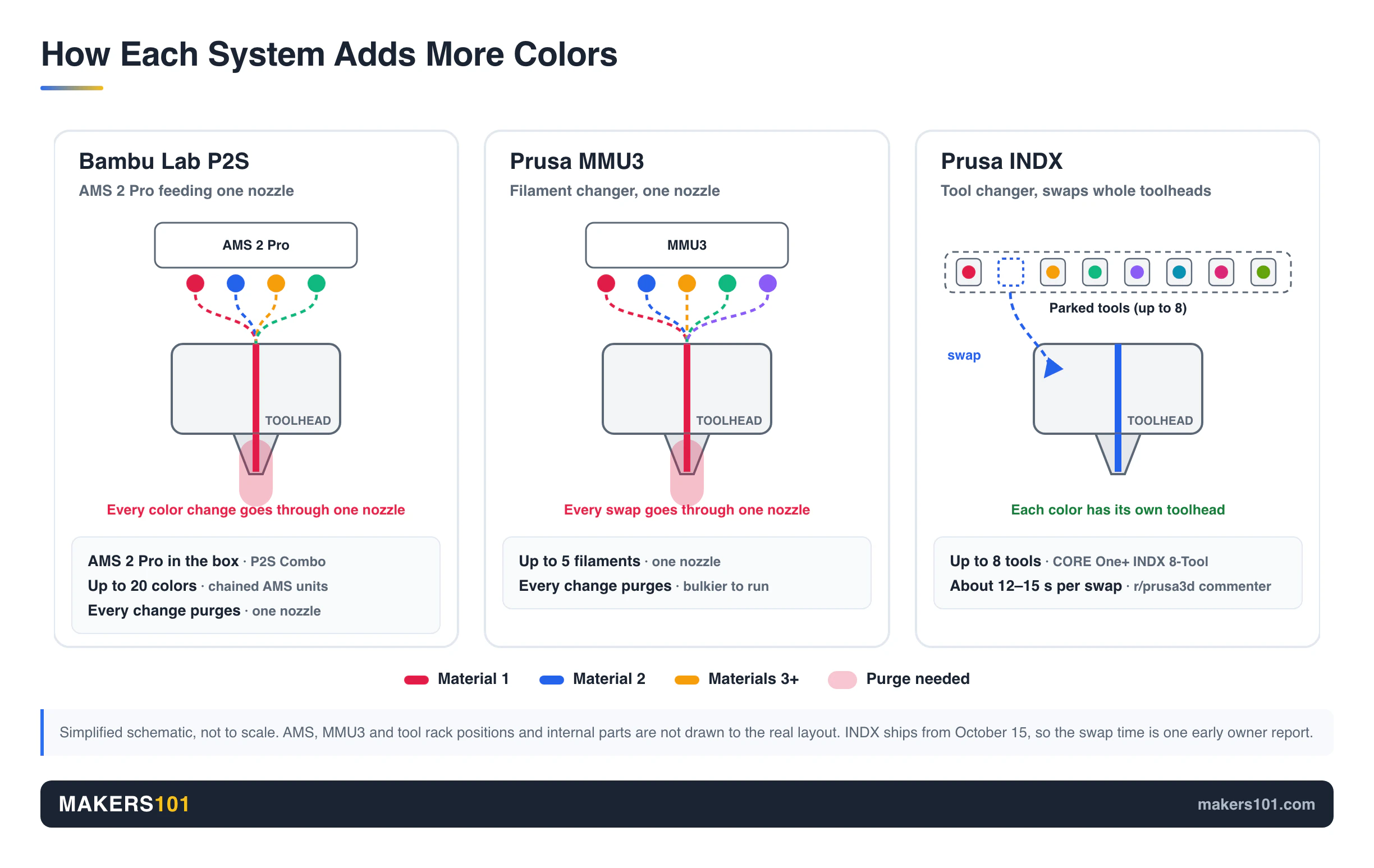
If you want multicolor today, the P2S Combo is ready out of the box. It bundles an AMS 2 Pro, and you can chain AMS units up to 20 colors. The CORE One+ works with Prusa’s MMU3 (up to five colors) now, and the INDX 8-tool system starts shipping October 15.
The two approaches waste filament differently. The AMS feeds one nozzle and purges on every color change. One P2S reviewer’s multicolor dragon took 19 hours and left a noticeable pile of purge waste. The AMS 2 Pro also dries filament, which helps if you live somewhere humid.
The MMU3 also purges on every swap, and it’s bulkier and fussier to run. In a four-color Benchy farm test, the CORE One+ with MMU3 took about five hours, close to the X2D. A Snapmaker U1 toolchanger did it in 2 hours 13 minutes.
INDX is what Prusa fans are waiting for. It swaps whole toolheads in roughly 12 to 15 seconds, according to one commenter on r/prusa3d.
Others note a trick that cuts swaps sharply: print only the support interface layers in a second material. The assembled CORE One+ INDX 8-Tool costs $2,249, its build volume shrinks slightly to 248 × 205 × 270 mm, and it’s brand new. For a toolchanger you can buy right now, our Snapmaker U1 vs Bambu Lab P2S comparison runs those numbers.
Core One+ vs P2S Setup and Daily Use: Kit Assembly, Calibration and Maintenance
The P2S is the easier printer to live with. Setup takes about 20 minutes with no manual calibration. One reviewer’s first Benchy after setup came out clean. Another long-time reviewer called it a printer they can “easily recommend” to a total beginner.
The assembled version isn’t hard either. Two reviewers of the original assembled Core One went from box to first print in 10 to 15 and 20 to 30 minutes. Wi-Fi credentials load from your phone over NFC, and a load cell in the nozzle handles first-layer calibration.
The kit is a project. Build-time reports run from 5 to 10 hours up to a roughly 12-hour livestreamed build.
Most of that time, one German owner on r/3DDruck joked, goes into finding the right screw. The payoff is that you know every part. Build one, and fixing it later feels much less scary.
Build feel differs too. The same podcast found the P2S looks more finished, with magnets and clips and almost no visible screws. The Core One uses printed parts and thin acrylic panels that don’t feel like a $1,300 product.
Nozzle swaps favor Bambu. The P2S quick-swap hotend uses a single clip, and Bambu rates a swap at 30 seconds. The farm test didn’t include a P2S, but its X2D swap took 40 seconds against 1 minute 25 seconds on the CORE One+.
Noise is a wash. My P2S is fine in a shared room. Reviews of the Core One range from “one of the quietest machines tested” (40s dB with the door closed) to “too loud for a bedroom.”
If you’re leaning P2S and want the full picture, our Bambu Lab P2S review goes deeper on daily use.
Software, Cameras and Cloud: Bambu Studio and Handy vs PrusaSlicer and Prusa Connect
Bambu gives you the smoother software. Prusa gives you more control over where your data goes.
The P2S has a 1080p camera with AI failure detection, a 5-inch touchscreen, and the Bambu Handy app. Pick a file, assign colors, tap print. One reviewer called it “the Apple of 3D printers: you can’t tinker as much, but it just works.”
The AI detection isn’t perfect. A 500-hour owner saw it miss a first layer that hadn’t stuck and a large nozzle blob, and also saw false alarms. Firmware updates have broken third-party add-ons like the Panda Touch.
The CORE One+ runs fully offline over LAN or USB, or through Prusa Connect if you want remote access. That matters for print farms and schools. It also matters if you distrust cloud lock-in. The camera is an optional add-on. On the first-gen machine it uploaded a snapshot every 10 seconds to the cloud only, with no live video and no local view.
The ethics debate is real, and it drives a lot of buying decisions. Bambu’s cease-and-desist against an OrcaSlicer developer pushed some buyers away in 2026.
One owner with several machines from both brands summed it up: Prusa’s price-to-value is off, Bambu is “an ownership and privacy nightmare,” so “pick your problems.” Keep the open-source claim in proportion, too. Prusa no longer publishes STEP files for the Core One, and its electronics are closed.
Repairs, Upgrades and Long-Term Ownership: Prusa vs Bambu Lab
Prusa sells an upgrade path. Bambu sells cheap replacement parts. Which one matters depends on how long you keep a printer.
Prusa’s record here is unusual. It has offered upgrade kits from the MK3S to the MK4 and on to the Core One, and still updates machines that are eight years old.
Many structural parts are printed in-house on Prusa printers, so you can print a replacement yourself. One owner reported that Prusa diagnosed a destroyed MK4S hotend and shipped a new one within days. Another said a kit-built MK3S has needed maintenance once or twice in six years.
Bambu’s answer is price. Small spares like fans and cables sell for close to cost. A toolhead FPC cable runs $1.69. You won’t upgrade a P2S into next year’s model, but keeping one running is cheap.
Prusa Core One vs Bambu Lab P2S: Which Should You Buy?
For most buyers, the Bambu Lab P2S is the better buy. It costs several hundred dollars less and comes ready for ABS and abrasives out of the box. Multicolor is a $200 step up, and it’s simpler to own. The CORE One+ is the right call when you’re paying for ownership. Offline control. Parts you can fix. A long upgrade road.
After a year with mine, I’d buy the P2S again.
Buy the Bambu Lab P2S if:
- This is your first enclosed printer and you want it printing tonight
- You want ABS, ASA, or carbon-fiber filament without buying add-ons
- You want multicolor now, with AMS drying, in one bundle
- You prefer a polished app and built-in camera over local control
Buy the Prusa CORE One+ if:
- You want a printer that never needs the cloud
- You’ll actually repair, tune, and upgrade it over five-plus years
- Single-color surface finish matters more to you than overhang performance
- You plan to add INDX and accept that it’s brand new
Consider neither if:
- You need a truly heated chamber for PC or nylon, which points to an H2S
- You need true dual-material parts today, which points to the X2D or Snapmaker U1


FAQ: Prusa Core One vs Bambu Lab P2S
Is Prusa Core One better than P2S?
For most people, no. The P2S matches it on engineering materials, costs hundreds less, and needs no add-ons for ABS or carbon-fiber filament. The CORE One+ is better if you value offline operation, repairability, and Prusa’s upgrade path. If you’re also considering Bambu’s dual-nozzle model, see Bambu Lab P2S vs X2D.
How does the Prusa Core One compare with other Bambu printers?
It depends on which Bambu. Against the P2S, the Core One wins on openness and repair support and loses on price, convenience, and out-of-box materials. Against Bambu’s H2-series, the Core One also gives up chamber heat and build volume.
Are Prusa printers better than Bambu Lab?
Neither brand is better across the board. Prusa leads on long-term support, offline control, and upgrade kits. Bambu leads on ease of use, multicolor convenience, and value per dollar.
Is the Prusa Core One worth the money?
In a Prusa Core One vs Bambu Lab P2S decision, it’s worth it if you’ll use what you’re paying for: a printer you can maintain yourself for years, with no cloud dependency. If you mainly want reliable prints with minimal effort, the extra money buys little you’ll notice.
Does the Core One+ have a heated chamber?
It has heatbed-driven chamber control rated to 55°C, with no separate heater. When an original Core One and a P2S printed ABS on the same bench, they reached about the same chamber temperature. The Core One L ran hotter in that test, but it failed its polycarbonate print.
Is INDX available for the Core One+ now?
Prusa lists the CORE One+ (Gen 2) INDX 8-Tool at $2,249 assembled, with shipping starting October 15, 2026. Independent long-term reviews of INDX on the CORE One+ don’t exist yet.
Sources for This Prusa Core One vs P2S Comparison
I’ve run a Bambu Lab P2S for about a year, mostly PLA and PETG household prints. I haven’t owned a Prusa Core One, so the Prusa-side test data come from the reviews and owner reports below. Prices were checked October 7, 2026.
Show all 21 sources
- Made with Layers (Thomas Sanladerer): Core One L engineering materials test with Core One, P2S, and H2S
- CoExtrusionPodcast: Prusa Core One vs Bambu P2S, Episode 16
- YGK3D: Trouble in Prusa-dise, Core One honest review
- Frankly Built: Prusa Core One review
- Joshua Schiergens 3D: Prusa Core One+ in-depth review
- BuildDanielBuild: Prusa Core One unboxing and review
- Aurora Tech: Prusa Core One review (YouTube)
- 3D Farmers: Bambu vs Prusa vs Snapmaker vs Elegoo farm test
- Rad Dad’s Print Lab: P2S vs P1S after hundreds of hours
- Tom Buck: Bambu Lab X2D vs P2S
- FauxHammer: Bambu P2S review
- Tech Fowler: Bambu Lab P2S review
- 247printing: Mid-range printer showdown
- Reddit threads: r/3dprinter Core ONE+ vs X2D, r/prusa3d CORE One Plus or X2D, r/BambuLab Prusa or Bambu, r/3dprinter Core vs H2 owners, r/3DDruck CoreONE oder P2S, r/prusa3d INDX vs X2D
- Store pages: Prusa CORE One+ (Gen 2), Bambu Lab P2S, Amazon listings for P2S and P2S Combo
CERTAIN CONTENT THAT APPEARS ON THIS SITE COMES FROM AMAZON. THIS CONTENT IS PROVIDED ‘AS IS’ AND IS SUBJECT TO CHANGE OR REMOVAL AT ANY TIME.
Price details
Product prices and availability are accurate as of the date/time indicated and are subject to change. Any price and availability information displayed on Amazon.com at the time of purchase will apply to the purchase of this product.