
I earn a commission if you buy through links on this page, at no extra cost to you. As an Amazon Associate, I earn from qualifying purchases.
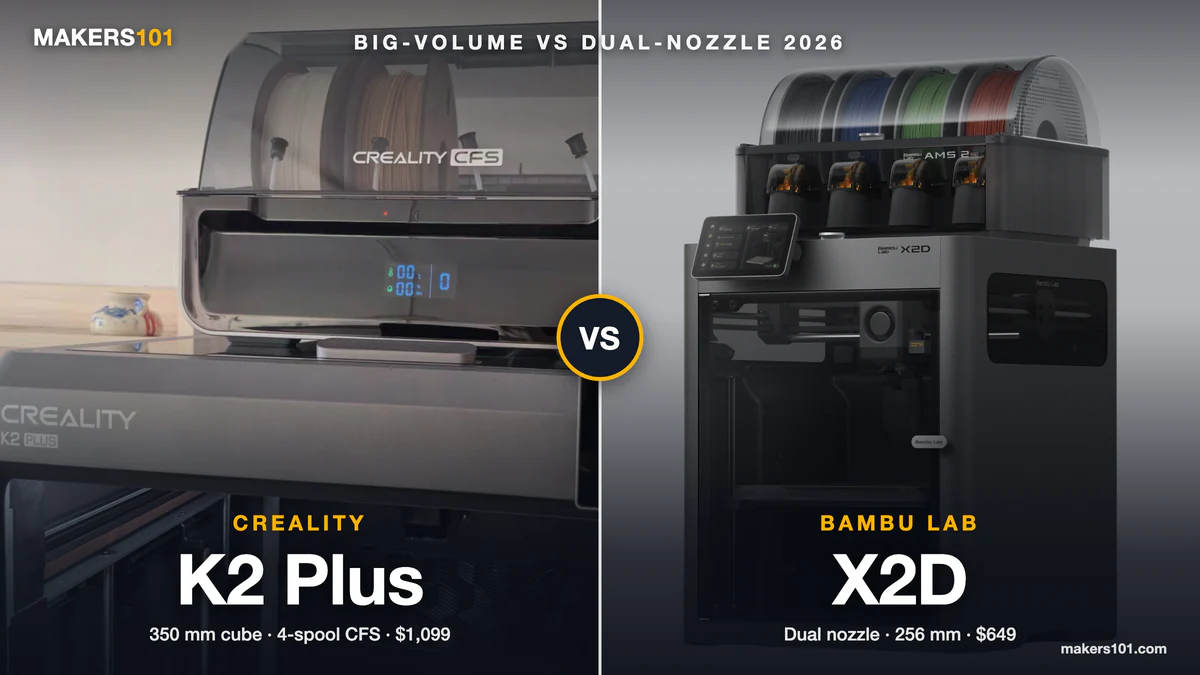
On paper these two look like the same purchase. Both are enclosed, both heat their chambers, and both do multicolor for roughly a thousand dollars.
Then you check today’s prices. The X2D Combo, AMS 2 Pro included, now costs $200 less than the K2 Plus Combo. The popular Reddit math (“the K2 Combo includes the CFS, so it’s cheaper”) only works for the base K2, and that leaves size as the main reason to pay more for the Creality.
I’ve run a K2 Plus for two years and printed full helmets on it in one piece. I haven’t owned an X2D, so every X2D number below comes from twelve independent reviewers listed in the Sources section at the end.
Table of Contents
- Creality K2 Plus vs Bambu Lab X2D at a Glance
- Creality K2 Plus vs Bambu Lab X2D Price: What Multicolor Really Costs
- K2 Plus vs X2D Build Volume: 350 mm Cube vs 256 mm
- Dual Nozzle vs CFS: How the X2D and K2 Plus Handle Multicolor
- K2 Plus vs X2D Speed: Spec Sheet vs Real Print Times
- K2 Plus vs X2D Print Quality: Ringing, Stringing, and Accuracy
- K2 Plus vs X2D for ABS, ASA, Nylon and TPU: Heated Chamber and Materials
- K2 Plus vs X2D Reliability: Tinkering Required vs Appliance Polish
- Creality Print, Orca and Klipper vs Bambu Studio: Software on the K2 Plus and X2D
- Creality K2 Plus vs K2 Pro vs K2: Which K2 Is the X2D Really Up Against?
- Which Should You Buy: Creality K2 Plus or Bambu Lab X2D?
- Creality K2 Plus vs Bambu Lab X2D FAQ
- Sources for This Creality K2 Plus vs Bambu Lab X2D Comparison
Creality K2 Plus vs Bambu Lab X2D at a Glance
On paper, the K2 Plus wins on size, nozzle temperature, and acceleration, while the X2D wins on top speed, chamber temperature, price, and a true second nozzle.
| Spec | Creality K2 Plus (Combo) | Bambu Lab X2D | Edge |
|---|---|---|---|
| Price (Oct 7, 2026) | $1,099 Amazon (list $1,199) | $649 / $899 Combo | X2D |
| Launched | Late 2024 | April 2026 | n/a |
| Build volume | 350 × 350 × 350 mm (42.9 L) | 256 × 256 × 260 mm (17.0 L) | K2 Plus |
| Width with second nozzle | n/a (single nozzle) | 235.5 mm | n/a |
| Max nozzle temp | 350 °C | 300 °C | K2 Plus |
| Heated bed / chamber | 120 °C / 60 °C active | 120 °C / 65 °C active | X2D (chamber) |
| Max speed / acceleration | 600 mm/s / 30,000 mm/s² | 1,000 mm/s / 20,000 mm/s² | Split |
| Rated max flow | 40 mm³/s | 40 mm³/s (standard hotend) | Tie |
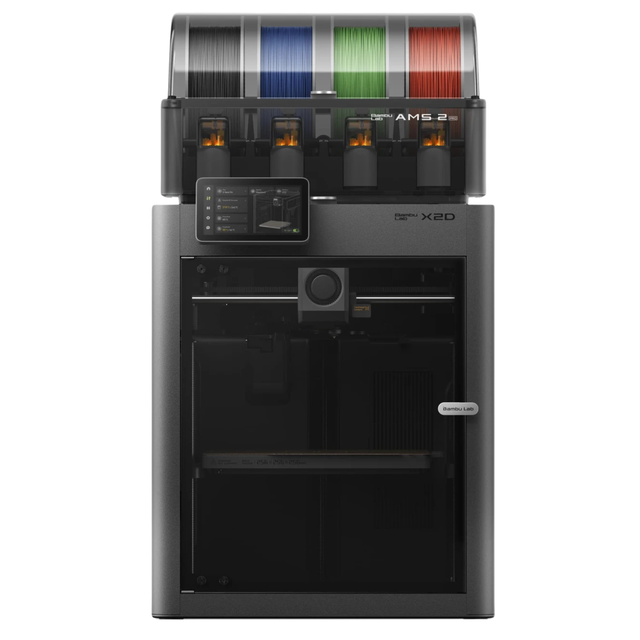
| Multicolor system | CFS, 4 slots included, up to 16 colors | AMS 2 Pro (Combo) + second nozzle | Depends on job |
| Firmware / slicer | Klipper-based, Creality Print or Orca | Bambu firmware, Bambu Studio | Depends on you |


Creality K2 Plus vs Bambu Lab X2D Price: What Multicolor Really Costs
For multicolor printing, the X2D is now the cheaper machine. The X2D Combo costs $899, and the K2 Plus Combo’s current sale price sits $200 higher. If you only print one color, the plain X2D at $649 undercuts the K2 Plus Combo by $450.
That reverses the argument you’ll see in most forum threads. In the r/3dprinter thread that tops Google for this comparison, the original poster found a base K2 Combo and a bare X2D about $100 apart, then counted roughly $300 more to give the Bambu an AMS. That math holds for the base K2. It doesn’t hold for the K2 Plus.
The K2 Plus has also come down a long way. It sold for $1,499 as a Combo in early 2025, then $1,299, then $1,199 before today’s $1,099 Amazon price.
What the extra $200 buys is space. Divide price by build volume and the K2 Plus costs about $25.6 per liter of print space, against about $52.8 per liter for the X2D Combo.
Two hidden costs are worth budgeting before you decide:
- Purge filament on the K2 Plus. One multicolor dragon cost about $2.62 in waste filament on the K2 Plus against $1.28 on a Bambu P1P, at $20 a spool.
- A second feed path on the X2D. The AMS 2 Pro supplies only one of the two nozzles at once. If your second nozzle runs a different material, it needs its own spool holder, and its own dryer if that filament is moisture-sensitive.
If you’re also weighing Bambu’s cheaper enclosed machine, see how the K2 Plus stacks up against the Bambu Lab P2S.
K2 Plus vs X2D Build Volume: 350 mm Cube vs 256 mm
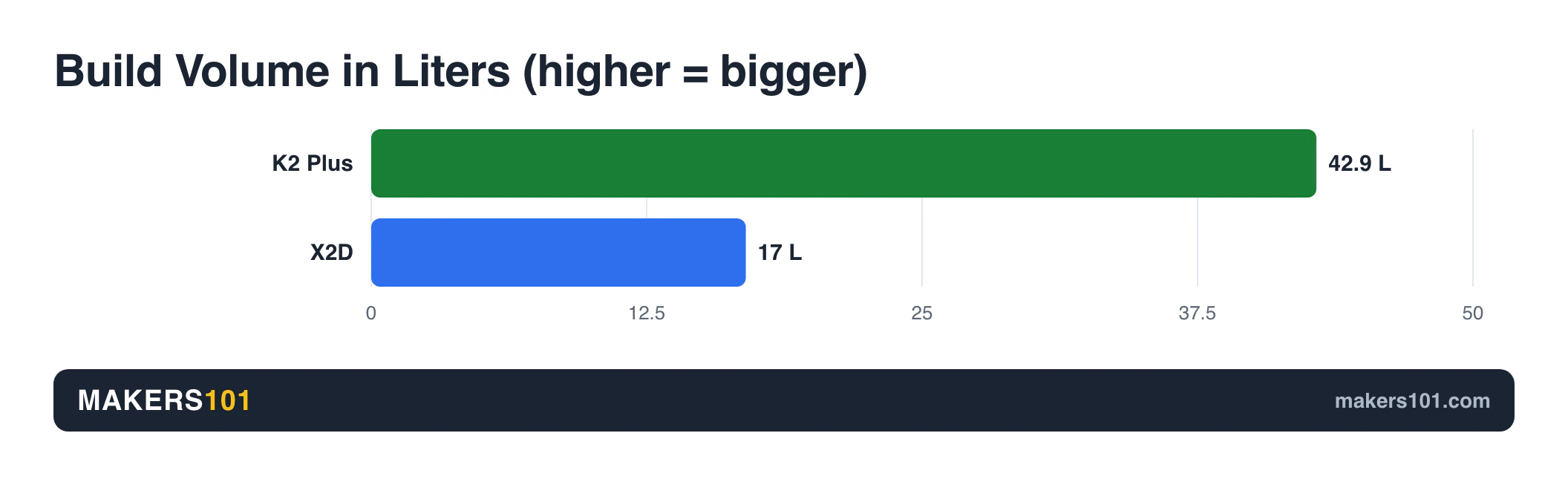
The K2 Plus prints in a 350 × 350 × 350 mm cube, which works out to about 42.9 liters. The X2D gives you 256 × 256 × 260 mm, or about 17.0 liters. That’s roughly 2.5 times the volume on the Creality, and it’s the single biggest reason to buy it.
The X2D’s usable space also shrinks when the second nozzle joins in. Bambu lists 235.5 mm of width for auxiliary-nozzle and dual-nozzle prints, and there’s a narrow strip on the left side of the bed the auxiliary nozzle can’t reach.
Size is where my own K2 Plus earns its keep. I’ve printed a full helmet on it in one piece, no splitting, no glue seams. On the X2D that same helmet becomes a split-and-assemble job.
Be honest about how often you’ll need it, though. Look at your last ten prints. If none of them would have outgrown a 256 mm bed, you’d be paying for space you won’t use. If two or three of them were split to fit, the K2 Plus starts paying for itself.
If you want a middle size, the X2D against the 300 mm K2 Pro is the closer match on build volume.
Dual Nozzle vs CFS: How the X2D and K2 Plus Handle Multicolor
The two printers swap filament in opposite ways. The K2 Plus has one nozzle and pushes out the old color every time it switches. The X2D has two nozzles, so a second material can sit in its own hotend and skip the purge. The catch is that the second nozzle is a weaker one.
How the X2D’s Second Nozzle Works (and Where It Falls Short)
The X2D’s main nozzle is a direct-drive extruder with a servo motor. The auxiliary nozzle on the right is fed by a Bowden tube and a stepper motor. It drops down when it prints and lifts out of the way when it doesn’t.
That Bowden setup costs speed and detail. In ModBot’s test, the same part took 4 hours 30 minutes on the main hotend and 8 hours 20 minutes on the auxiliary one, with more stringing and uneven layers. Another week-long review measured only about 20% extra time with similar quality. The gap depends on how much retraction the model needs.
A few more limits matter in daily use:
- The auxiliary nozzle can’t run abrasives like carbon-fiber PETG or glass-filled nylon, and it can’t run TPU.
- It loses about 20 mm of print width and has no clog detection.
- The AMS 2 Pro feeds only one nozzle at a time, so a second material usually comes from an external spool. Bambu sells an optional Filament Track Switch that routes AMS filament to either hotend, though it adds parts and its own error messages.
Used for the right job, it’s excellent. PETG supports under a PLA plane printed cleanly in one review, and dual nozzles removed the color banding on a two-color Pikachu in another. Owners call it a “1.5 nozzle system”: one great nozzle plus a helper for supports and small second-color areas.
How the K2 Plus CFS Handles Color Changes
Every color change on the K2 Plus purges filament through the single nozzle. A dark-to-light swap flushes about 0.75 g (250 mm) of filament, against under 0.5 g on a Bambu P1P. The K2 Plus uses a Volcano-style high-flow nozzle about 5 mm longer than standard, and its cutter sits farther from the nozzle, so more old filament has to clear out.
The totals add up. Eight multicolor horses produced 218 g of waste on the K2 Plus, while an X1C produced 79 g for four, or about 158 g scaled to eight. That’s roughly 38% more purge on the Creality. Cutting the flush multiplier to 0.6 to save filament caused color contamination in one test, so you can’t just dial it away.
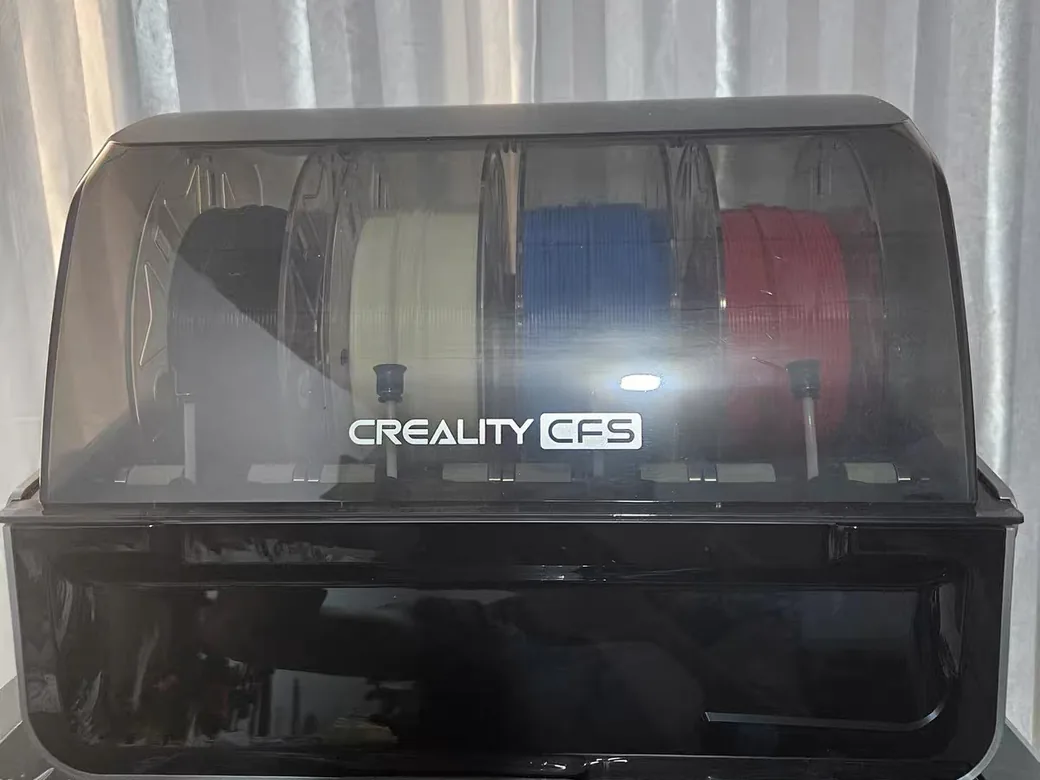
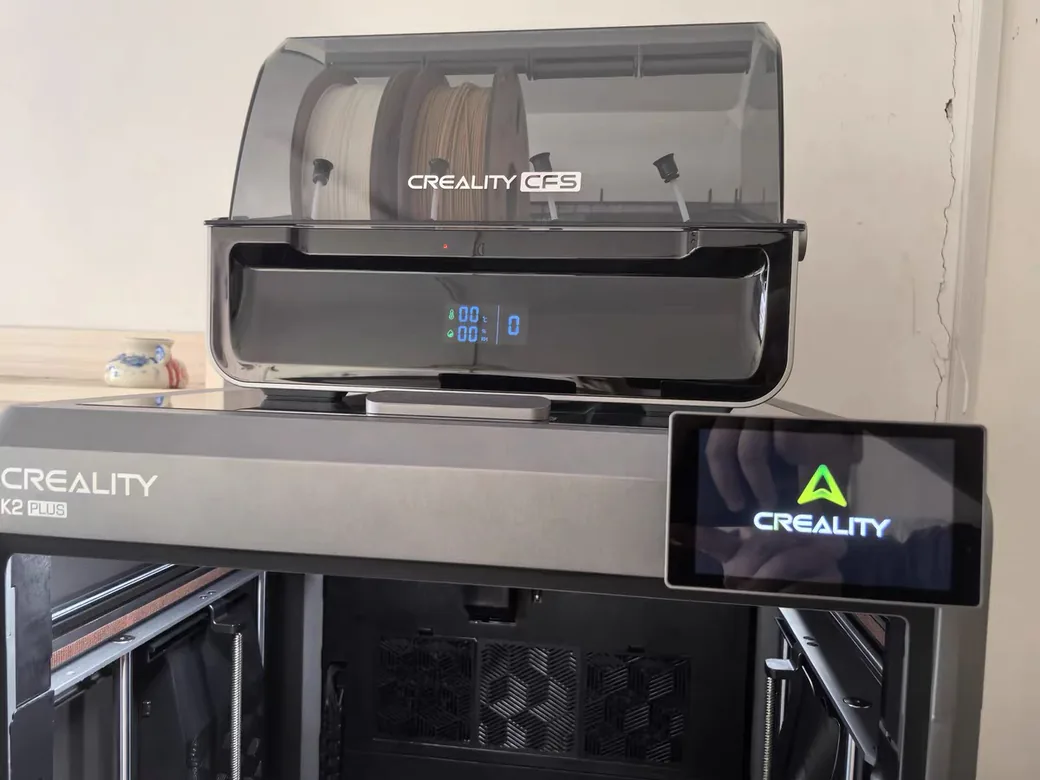
The CFS does some things better than an AMS. You push a filament tube in and it loads itself, and jams can be cleared from the bottom without taking the unit apart. A small screen shows temperature and humidity, though one month-long test found it read consistently high on temperature and low on humidity.
My own experience is milder than the lab numbers. Printing everyday PLA and PETG household items, I didn’t notice much difference in waste between my K2 Plus and a Bambu machine. The gap shows up on prints with hundreds of color changes.
Which Multicolor System Wastes Less for Your Prints
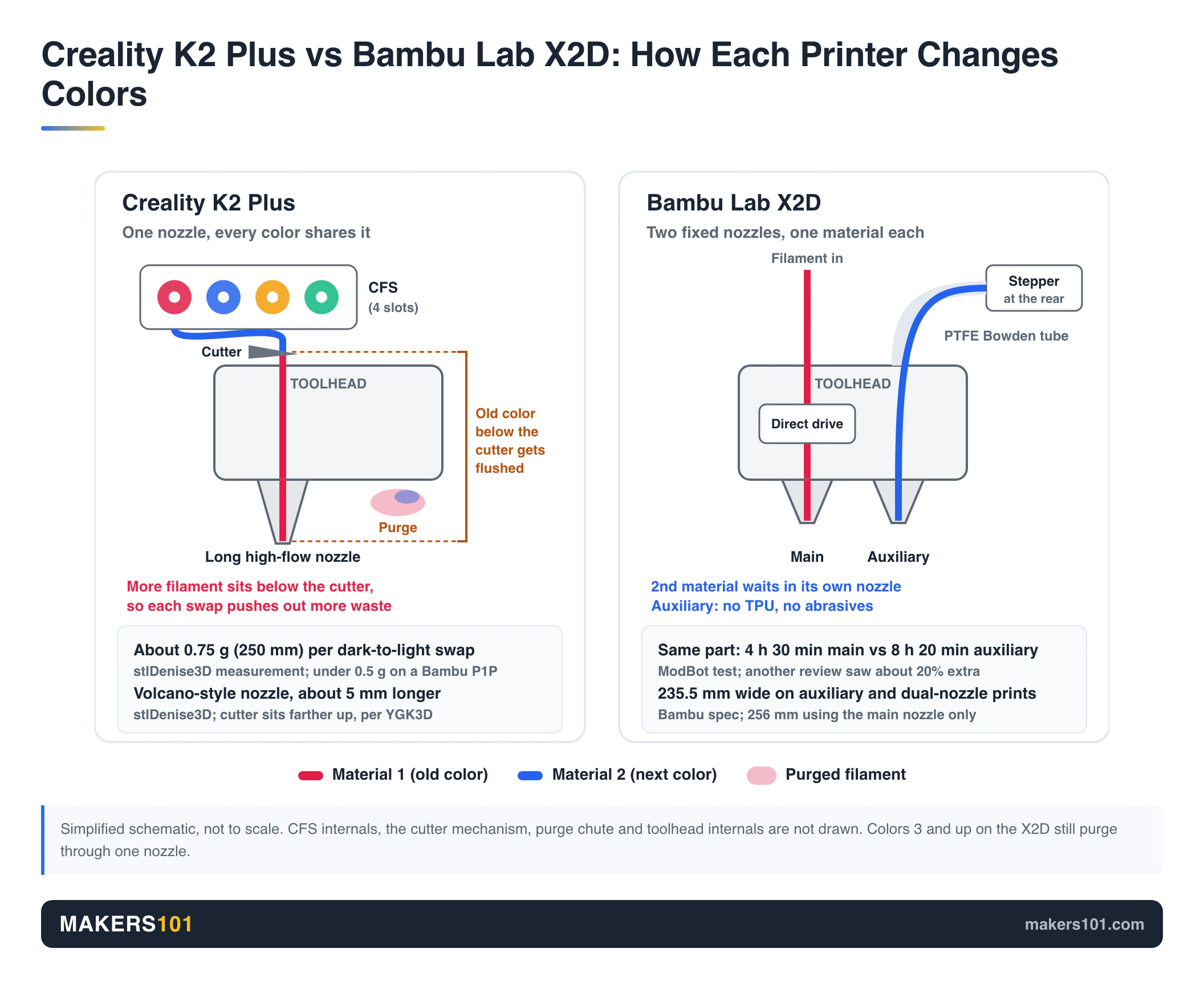
For two materials, the X2D wins clearly. Put PETG supports or a TPU joint on the second nozzle and you skip most of the purging. For four or more colors, both printers purge through a single nozzle for colors three and up, so the X2D’s advantage shrinks to its shorter flush.
Heavy color work is where the K2 Plus suffers most. In a four-color Deadpool bust test, the K2 Plus produced the most waste and finished last, about 15 hours behind a Bambu H2D. Either way, you’ll want a plan for what to do with all that purge waste.
K2 Plus vs X2D Speed: Spec Sheet vs Real Print Times
In real single-color prints the K2 Plus is fast, and in heavy multicolor jobs it slows down badly. On paper the two split the speed contest. The X2D has the higher rated top speed (1,000 mm/s vs 600 mm/s), while the K2 Plus has the higher acceleration (30k vs 20k mm/s²), and both list 40 mm³/s of max flow.
No reviewer has timed these two side by side, so the numbers below compare each printer with a different Bambu machine.
- K2 Plus vs Bambu’s older CoreXY machines (P1 and X1 class): the K2 Plus usually finished first, about 10% faster, with both running 200 to 300 mm/s in normal slicer profiles.
- K2 Plus vs Bambu H2S: a large PLA tiger finished in 15 hours 39 minutes on the K2 Plus against 17 hours 33 minutes on the H2S. An ABS print took 7 hours 8 minutes against 10 hours 38 minutes.
- K2 Plus vs Bambu H2D: measured max flow was 23 mm³/s on the K2 Plus and 28 mm³/s on the H2D, and the K2 Plus finished the four-color Deadpool last.
- X2D on its own: a standard 0.2 mm Benchy took 37 minutes on the main nozzle in CNC Kitchen’s 250-hour review. Actual print times ran 1% to 4% over the slicer estimate on the main extruder and 7% over on the auxiliary one.
Watch out for slicer estimates on the K2 Plus. One model showed about 18 hours in Creality Print and 7 hours in Orca Slicer, because Orca only adds flush time for Bambu printers. Trust the print clock.
K2 Plus vs X2D Print Quality: Ringing, Stringing, and Accuracy
No one has printed the same model on both machines yet, so this comparison runs through Bambu’s other printers. Against the H2S and H2D, the K2 Plus showed more ringing and stringing, and one reviewer rated it at “85 to 90%” of the H2D’s quality. Tested on its own, the X2D produces clean surfaces from its main nozzle out of the box.
The K2 Plus has real strengths. Its stronger part cooling and lighter toolhead handled extreme overhangs better than the H2D, though it struggled with bridging and stringing on steep curves. Dimensional accuracy was solid in a month-long test: a 16 mm feature measured 15.97 mm on average. An ABS foil holder came off the K2 Plus with no defects, while the X1C version had two tiny spots.
Its weak points repeat across reviews. Against the H2S, the K2 Plus left ripples near the bottom of a PLA tiger and visibly more ringing on an ABS mask. In the three-printer test with the H2D, its Benchy came out faster but lower in quality.
The X2D’s main nozzle printed a Benchy with almost no vertical fine artifacts. Its Vision Encoder plate calibration cut skew from 0.17 degrees to 0.03 degrees. Prints from the auxiliary nozzle look close to the main one on simple shapes but pick up stringing on retraction-heavy details, so assign fine parts to the left nozzle.
K2 Plus vs X2D for ABS, ASA, Nylon and TPU: Heated Chamber and Materials
Both printers actively heat their chambers, so both handle ABS and ASA well. The X2D’s chamber goes slightly hotter (65 °C vs 60 °C). The K2 Plus nozzle goes much hotter (350 °C vs 300 °C), which gives it more room for high-temperature filaments.
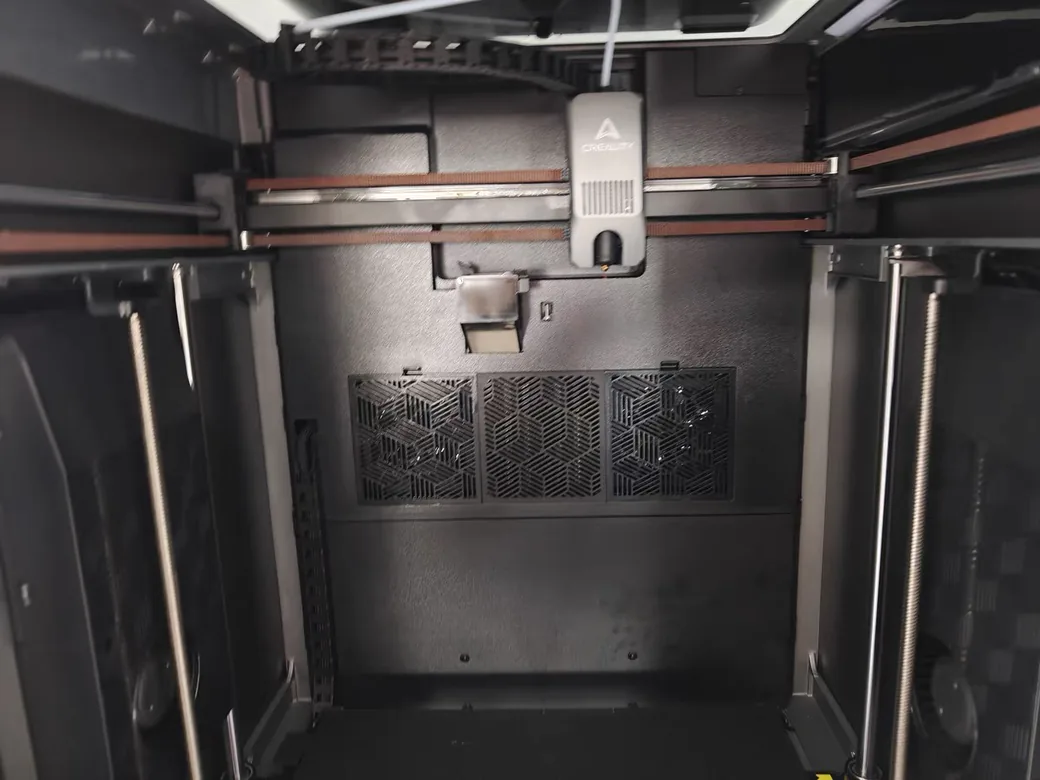
Chamber behavior differs in practice. The K2 Plus took 14 minutes to reach 50 °C in one test, and it has no automatic heat-soak routine.
Without a manual 15 to 20 minute preheat, first layers on ABS came out squished. Once the preheat fixed that, the heated chamber kept ABS parts flat without glue. The X2D took about 20 minutes to reach 65 °C on the chamber heater alone, roughly half that with the bed helping.
Each has material traps:
- K2 Plus and PETG: filament softened in the hot chamber and jammed under the extruder gear in one production test, and the exhaust fan was off by default.
- K2 Plus and engineering blends: its extruder motor died while printing glass-filled PC in a three-printer test.
- K2 Plus and TPU: TPU can’t run through the CFS, and two reviewers had clogging or surface dots even after drying.
- X2D and abrasives or TPU: only the main nozzle handles them. An optional TPU feed-assist module supports 85A and harder, and a foaming-TPU part came out clean in another test.
- X2D and fumes: the three-stage G3, H12 HEPA, and coconut-shell carbon filter helps, but it doesn’t remove every smell.
The X2D’s 300 °C ceiling may be deliberate, keeping the hottest materials for Bambu’s H-series. If you print PPS-CF or PPA-CF, neither of these is your printer.
K2 Plus vs X2D Reliability: Tinkering Required vs Appliance Polish
The K2 Plus works, but it expects you to fix things. The X2D behaves more like an appliance, though as a 2026 launch it has its own early bugs. If you don’t want to learn your printer’s insides, that difference matters more than any spec.
After two years with my K2 Plus, my verdict is simple. The printer itself has been solid. The CFS is where most of my problems came from.
Independent tests found the same pattern, plus a few rough edges:
- The bed shipped tilted, with a 0.84 mm spread across probe points, and front-to-back tilt has to be fixed with manual knobs.
- An extruder coupler broke and stopped holding the PTFE tube in place, and the front cover fell off overnight during a multicolor print.
- Thinner plastics and a looser lid give it what one reviewer called “version 1.1 energy.”
- Fans keep running whenever it’s powered on. One test measured 51 to 52 dBA while printing. Noise has never bothered me, but it isn’t silent.
Owners on r/3Dprinting and r/Creality split the same way. Some single-color owners report almost no issues, while CFS users describe random multicolor errors. One user said a fleet of K2 Plus printers ran fine for about 1,000 hours and then declined.
The X2D’s problems so far are mostly about feeding. In one review the left PTFE tube caught behind the cable chain and caused about 50% of loads to fail until a printed clip fixed it. Another hit a “filament track switching failed” error, and a third lost 30 minutes because the second nozzle’s tube wasn’t fully seated at setup. In a 200-hour owner thread on r/BambuLab, the recurring complaint was spider-webbing from the auxiliary nozzle.
Support was decent on both sides in one long-term comparison: Creality sent a replacement door, and Bambu quickly replaced an AMS motor and board.
Creality Print, Orca and Klipper vs Bambu Studio: Software on the K2 Plus and X2D
The K2 Plus is the open option and the X2D is the polished one. The K2 Plus runs Klipper-based firmware, sends jobs straight from Orca Slicer, and has built-in storage. Bambu’s software is smoother, and one 250-hour reviewer describes its ecosystem as gradually closing.
That openness has a learning curve. In one month-long test, Z-offset had to be adjusted through the Fluidd web interface because the touchscreen didn’t expose it, and AI detection and auto calibration were off by default, tucked inside an advanced menu. Another reviewer questioned whether Creality would release its Klipper source code as promised.
One small cross-brand detail favors Creality: the CFS can read Bambu’s RFID filament tags, while an AMS can’t read Creality’s. If tinkering sounds fun, the K2 Plus rewards you. If it sounds like a chore, Bambu Studio and the X2D will annoy you less.
Creality K2 Plus vs K2 Pro vs K2: Which K2 Is the X2D Really Up Against?
On size and price, the X2D’s closest Creality rival is the smaller K2 Pro. The K2 Plus is Creality’s largest K2 and sits above both the X2D and the K2 Pro in build volume. The base K2 is the cheapest of the three.
This matters because most “K2 vs X2D” debates mix the models. The base K2 Combo is the one priced close to a bare X2D, so the “CFS for free” math belongs to it. For the full split between Creality’s two bigger machines, see how the K2 Plus and K2 Pro differ.
Which Should You Buy: Creality K2 Plus or Bambu Lab X2D?
Buy the K2 Plus if size is the problem you’re trying to solve. Buy the X2D if you want cleaner two-material prints, a lower price, and fewer evenings spent troubleshooting.
- Cosplay helmets, props, and large storage bins: K2 Plus. It prints them in one piece where the X2D can’t.
- Functional parts with PETG-on-PLA supports, or PLA with TPU joints: X2D. This is what its second nozzle does best.
- Your first enclosed printer, and you don’t want to fix it: X2D. One production tester put it plainly: an experienced user can sort out the K2 Plus, and a newer one might simply give up.
- You enjoy tinkering and want Klipper-level access: K2 Plus.
- You print mostly single-color PLA and PETG: maybe neither. The X2D’s heated chamber is an upgrade you may never use, so check whether the X2D is worth $100 over the P2S.
- You need nylon and PC-CF in the same print, or multicolor 85A TPU: neither is a great fit.
Before you choose on multicolor alone, run your typical model through a 3D print cost calculator with the purge weight included. On a busy four-color print, that waste can add up to a noticeable share of the filament bill.
My own pick comes down to what ends up on the shelf. For the big prints I make, I’d keep the K2 Plus. For someone printing mid-size functional parts who just wants it to work, I’d point them to the X2D.
Creality K2 Plus vs Bambu Lab X2D FAQ
Which 3D printer is better, the Bambu Lab X2D or the Creality K2 Plus?
Neither is better across the board. The X2D is cheaper, more polished, and handles two materials better thanks to its second nozzle. The Creality K2 Plus offers roughly 42.9 liters of print space against 17.0 and a hotter 350 °C nozzle, so it’s the better choice for large prints.
Are Bambu Lab printers better than Creality?
Bambu printers are generally more refined and reliable out of the box, which is why newer users tend to prefer them. Creality printers usually offer more size and openness for the money, and they reward owners who don’t mind tuning. Among enclosed CoreXY machines, the gap in print quality is smaller than the gap in polish.
What is the Bambu equivalent to Creality K2?
The X2D is the closest Bambu match for the Creality K2 Pro in size and price. Bambu’s printers that come close to the K2 Plus in build volume are the H2-series machines, which cost several hundred dollars more than the X2D.
Is the K2 Plus or the X2D better for TPU?
The X2D is the safer bet for TPU, as long as you print it on the main direct-drive nozzle. Its auxiliary Bowden nozzle can’t run TPU. On the K2 Plus, TPU can’t go through the CFS, and reviewers reported clogs and surface defects.
Can the X2D print as big as the K2 Plus?
No. The X2D tops out at 256 × 256 × 260 mm, and width drops to 235.5 mm when the second nozzle is used. The K2 Plus build area is a full 350-millimeter cube.
Does the K2 Plus waste more filament than the X2D?
Probably, on most multicolor prints, though no one has measured both on the same model yet. The K2 Plus purged about 0.75 g per dark-to-light swap and more than a Bambu P1P, X1C, and H2D in three separate tests. The X2D largely avoids purging for a second material that runs on its own nozzle.
Sources for This Creality K2 Plus vs Bambu Lab X2D Comparison
Prices checked Oct 7, 2026. Specs come from the Bambu Lab X2D spec page and Creality’s K2 Plus product listing and FAQ.
Show all 20 sources
- Amazon: Creality K2 Plus Combo
- Shop3D Universe: Bambu Lab X2D and X2D AMS Combo
- Bambu Lab: X2D specifications
- CNC Kitchen: Bambu Lab X2D review
- ModBot: Bambu Lab X2D review
- The Scrappy Creative: X2D after one week
- M.M’s Prop Shop: X2D review
- Tech Fowler: X2D in-depth review
- 3D Print Rancher: The X2D problem
- stlDenise3D: K2 Plus vs Bambu
- YGK3D: One month of K2 Plus production printing
- aim6mac: H2D vs K2 Plus
- 247printing: H2D vs Prusa XL vs K2 Plus
- Crafted Catastrophes: X1C vs K2 Plus
- Uncle Jessy: H2S vs K2 Plus
- Reddit: creality k2 or bamboo x2d, X2D after 200+ hours, Creality vs Bambu reliability, 3-month K2 Plus review
CERTAIN CONTENT THAT APPEARS ON THIS SITE COMES FROM AMAZON. THIS CONTENT IS PROVIDED ‘AS IS’ AND IS SUBJECT TO CHANGE OR REMOVAL AT ANY TIME.
Price details
Product prices and availability are accurate as of the date/time indicated and are subject to change. Any price and availability information displayed on Amazon.com at the time of purchase will apply to the purchase of this product.