
I earn a commission if you buy through links on this page, at no extra cost to you. As an Amazon Associate, I earn from qualifying purchases.
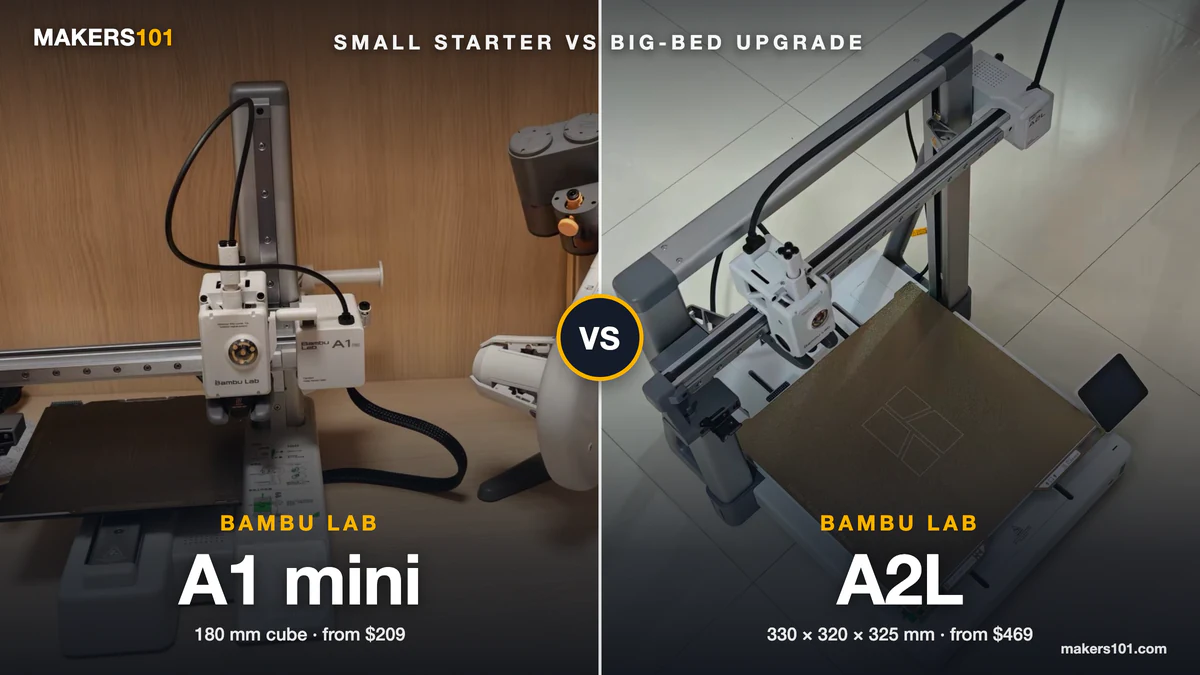
The A2L prints almost six times the volume of the A1 mini and costs $260 more. Whether that’s worth it comes down to what you print, how much desk you have, and how often you print in color.
I’ve owned both. I printed PLA on an A1 mini for three months, then passed it on to a friend’s kid. It was easy to learn, but the plate was too small for me. My A2L now sits on a desk in the corner of a room.
Your answer may differ. One long-time owner of the mini and the full-size A1 estimates that about 90% of his prints fit on the mini’s plate. Color is a clearer split. In one test, a two-color print took 1 h 45 min on the A2L and 3 h 12 min on the A1, and the mini was slower than the A1. And for small parts, the bigger machine won’t finish any faster.
Quick verdict: Buy the A1 mini ($209) if your prints fit in a 180 mm cube. Buy the A2L ($469) for helmets, props, full plates, or regular multicolor.
- The A2L holds about 5.9 times the volume (330 x 320 x 325 mm vs 180 x 180 x 180 mm). It weighs 12.8 kg to the mini’s 5.5 kg and needs far more desk.
- Same 500 mm/s top speed, auto calibration and 80°C bed. Neither is meant for ABS or ASA.
- Multicolor favors the A2L. It swaps colors faster, wastes less, and takes the full-size AMS units. The A1 mini only works with the AMS lite.
- The AMS lite combos cost $315.50 and $569 at Bambu Lab’s US store, against $209 and $469 for the bare printers.

- A1 mini + LED Lamp Kit for Creative Light Projects: Bring your ideas to life with the included LED Lamp Kit. Simply print compatible lamp models and…
- The Perfect 3D Printer for Beginners: A1 mini 3D Printer is designed to make 3D printing easy from day one with automatic calibration, simple setup…
- Experience the Bambu Lab Ecosystem: Access MakerWorld’s huge library of ready-to-print models, manage prints through the Bambu Handy app, and enjoy…
- Fast, Quiet, and Reliable Printing: Compact and beginner-friendly, A1 mini delivers high-speed, high-quality printing with quiet operation that fits…
- Made for Everyday Creativity: From toys and home décor to functional tools and personalized gifts, A1 mini makes it easy to turn ideas into real-life…
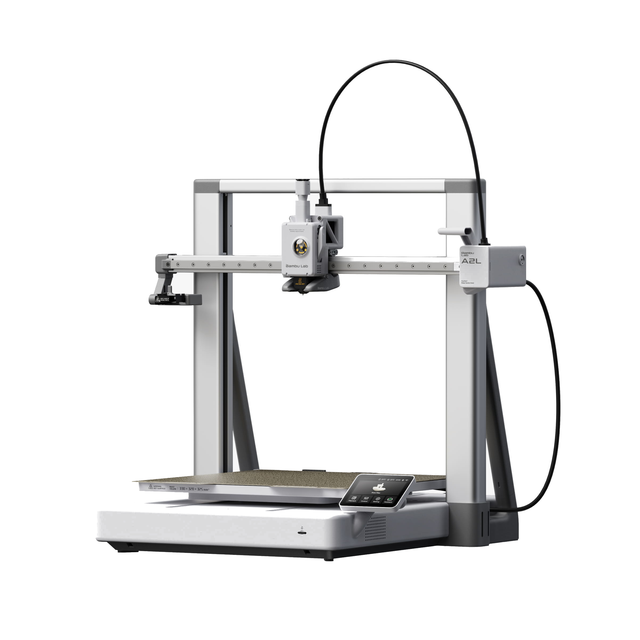
- Large 330 x 320 x 325 mm build volume, about 2x the A1
- PMSM servo extruder with adaptive vibration compensation
- Optional cutting and drawing module for vinyl and papercraft
- Up to 19 colors with AMS, quiet 49 dB operation
Table of Contents
- Bambu Lab A1 mini vs Bambu Lab A2L at a Glance
- A1 mini vs A2L Build Volume: How Much Bigger the A2L Really Prints
- Desk Space and Weight: The A1 mini vs A2L Footprint Difference
- Bambu Lab A1 mini vs A2L Price: What Each Bundle Costs in 2026
- Multicolor Printing on the A1 mini vs A2L: AMS lite Only vs Full AMS Support
- A1 mini vs A2L Print Quality: Small Parts Tie, Tall Parts Favor the A2L
- A1 mini vs A2L Filament Support: Both Beds Stop at 80°C
- Features Only the A2L Has: Servo Extruder, Blob Detection, Cutting Module
- Noise, Power, and Daily Use on the A1 mini vs A2L
- Where the Bambu Lab A1 Fits Between the A1 mini and A2L
- A1 mini or A2L: Which Bambu Lab Printer to Buy for Your Situation
- Frequently Asked Questions About the Bambu Lab A1 mini vs A2L
- Sources for This A1 mini vs A2L Comparison
Bambu Lab A1 mini vs Bambu Lab A2L at a Glance
The A1 mini and A2L share the same open bed-slinger design, the same 500 mm/s top speed and the same bed temperature limit. They differ in size, weight, multicolor system and add-on modules. If those four don’t matter to you, the A1 mini does the same core job for far less money.
| Spec | Bambu Lab A1 mini | Bambu Lab A2L |
|---|---|---|
| Price, US store (Oct 7, 2026) | $209 printer / $315.50 Combo | $469 printer / $569 Combo |
| Build volume | 180 x 180 x 180 mm | 330 x 320 x 325 mm |
| Printer size | 347 x 315 x 365 mm | 544 x 529 x 505 mm |
| Net weight | 5.5 kg | 12.8 kg |
| Max bed / nozzle temp | 80°C / 300°C | 80°C / 300°C |
| Max speed / acceleration | 500 mm/s / 10,000 mm/s² | 500 mm/s / 10,000 mm/s² |
| Multicolor system | AMS lite only (4 colors) | AMS lite, AMS, AMS 2 Pro, AMS HT (up to 19 colors) |
| Cutting and pen modules | Not supported | Supported (sold separately) |
| Screen | 2.4-inch touchscreen | 3.5-inch touchscreen |
| Extruder | Stepper | PMSM servo, closed loop |
| Software updates until | Sep 20, 2028 | Jun 1, 2031 |
A1 mini vs A2L Build Volume: How Much Bigger the A2L Really Prints
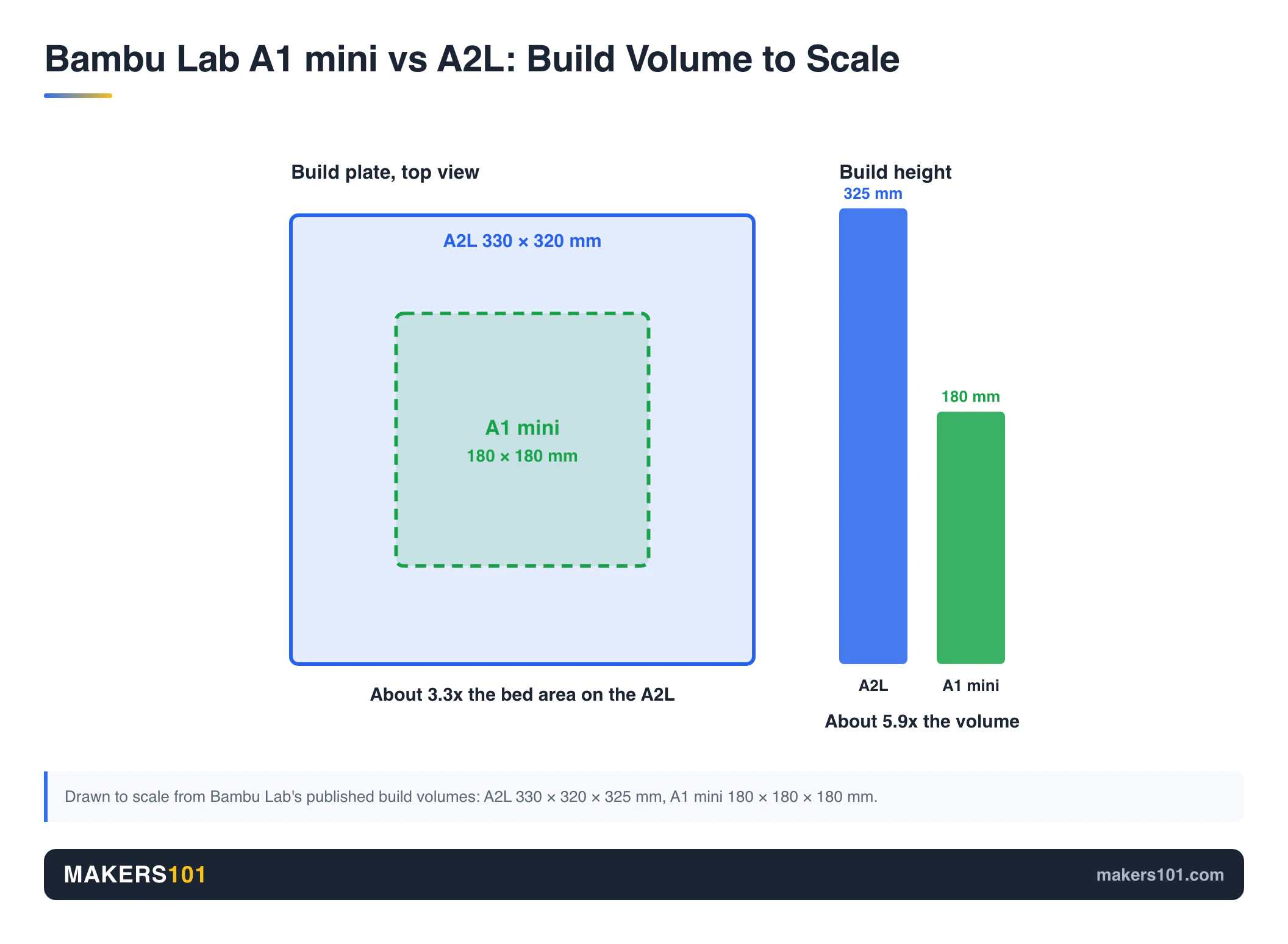
The A2L’s extra volume only pays off if you print helmets, props or full production plates. Its print area holds about 34.3 liters. The A1 mini’s holds 5.8 liters. That makes the A2L roughly 5.9 times bigger by volume and about 3.3 times bigger by bed area.
That gap sounds decisive, but most prints are small. Rad Dad’s Print Lab, who bought both the A1 and the A1 mini, estimates that around 90% of his prints fit on the mini’s plate. The exceptions he lists are the ones you’d expect: helmets and cosplay props. For me, size was the A1 mini’s one real limit.
You can also squeeze more out of the small plate by rotating long parts across the diagonal. One small-plate owner on r/3dprinter says he prints diagonally a lot.
The A2L earns its size on big single-piece jobs. One reviewer printed a LEGO-style Batman helmet in one piece in under 24 hours. A packed plate of small items also changes the math. One Brazilian print-business creator says a packed A2L plate keeps running through a full workday away from home, where a packed A1 plate runs out hours earlier.
Can You Split Big Models to Print on the A1 mini?
Sometimes, and less often than new buyers hope. Splitting adds seams and glue time. Every joint is also a weak point.
On r/BambuLab, a first-time buyer asked exactly this question. The most direct reply came from an owner who had run an A1 mini, an A1 and an A2L: thinking you can simply print large objects in pieces on the mini is “utopic,” and most things won’t work. Another owner noticed within a week that many downloaded models were too large, because so many are designed around 256 mm beds.
Desk Space and Weight: The A1 mini vs A2L Footprint Difference
The A1 mini (347 x 315 mm, 5.5 kg) fits a normal desk. The A2L (544 x 529 mm, 12.8 kg) needs its own table, plus clearance front and back for the moving bed.
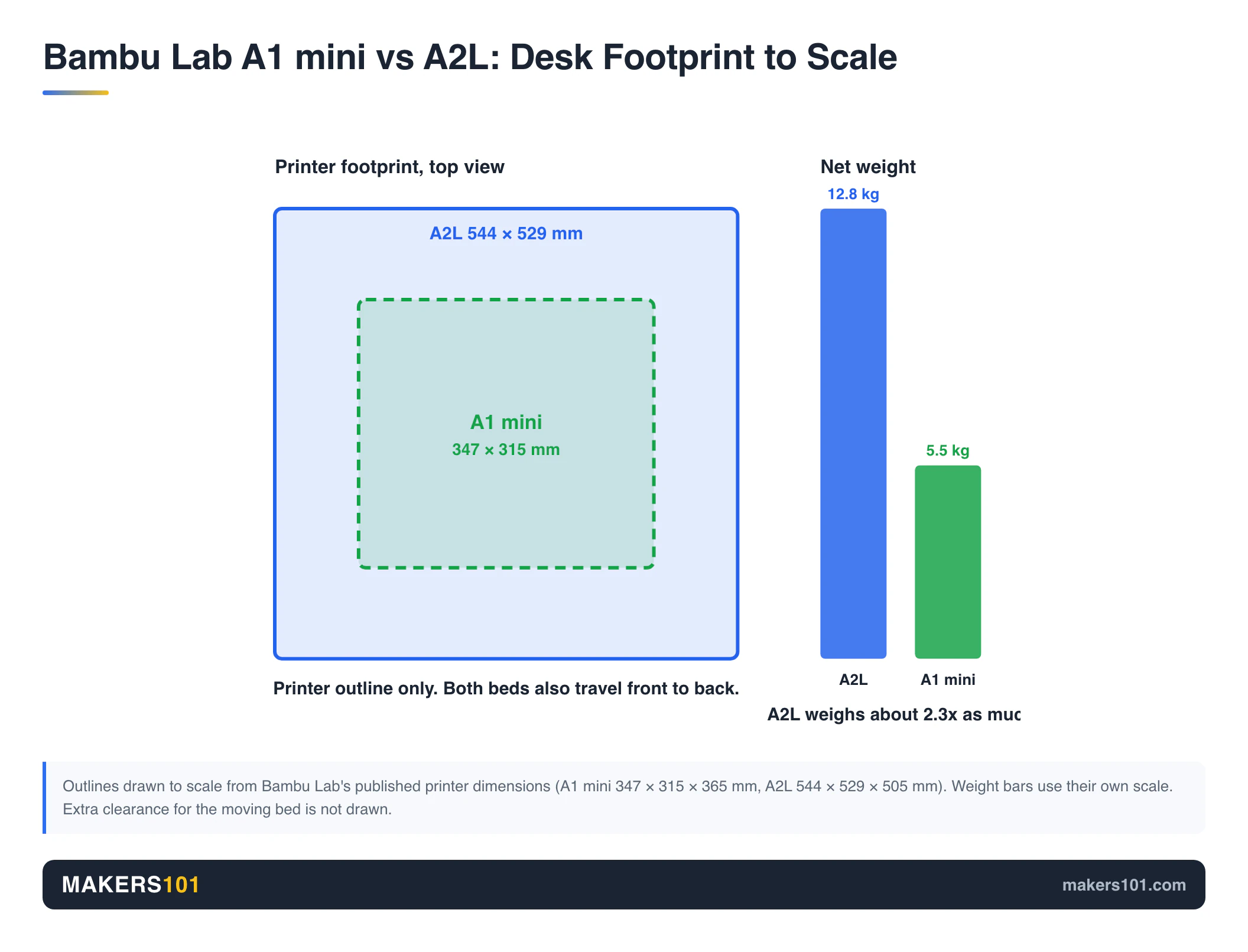
Even those numbers undersell the gap, because both are bed slingers: the plate moves forward and back, so each machine needs clearance in front and behind. One owner who moved from two A1s to an A2L says it needs about 6 more inches of front-to-back room than the A1.
When I unboxed the A2L, its size was the first thing that hit me. Mine lives on a desk in the corner of a room, and it fits there just right. It still shakes the desk a little when the bed swings.
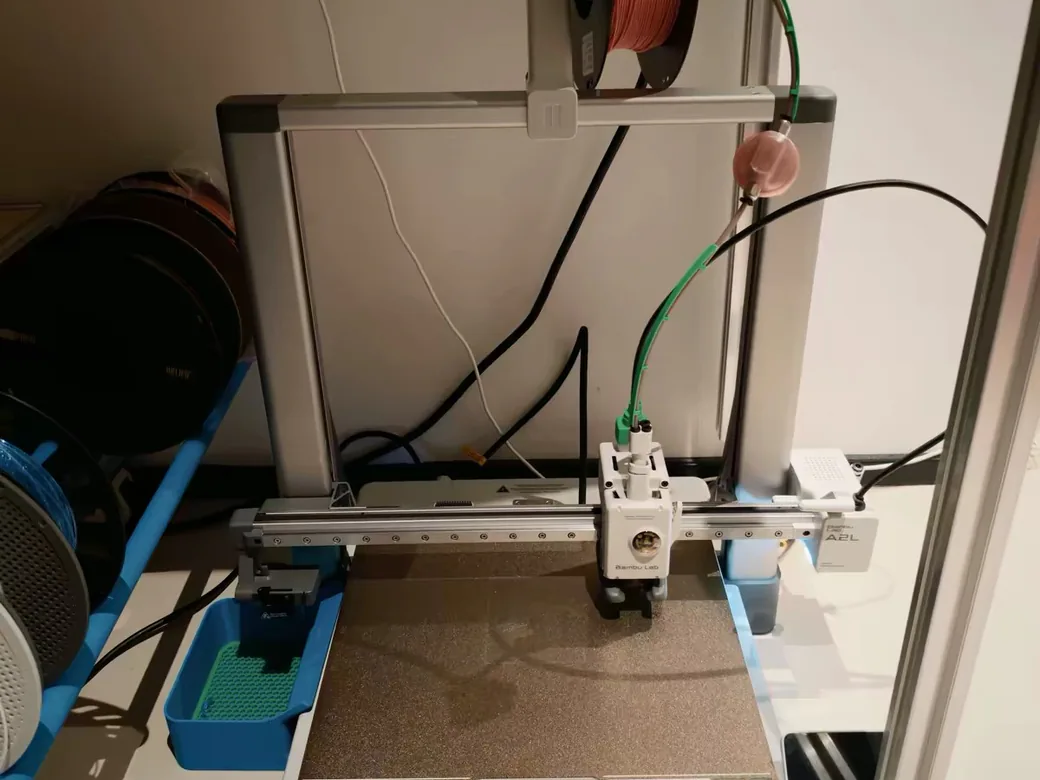
On a lighter table it gets worse. In Uncle Jessy’s review the vibration was strong enough that the AMS lite walked across the desk, and he fixed it with a silicone mat. Tools and a camera on the same bench can shift too. The power cord is only about 3.5 feet long, so check where your outlet is.
The A1 mini goes the other way. One makerspace owner uses it as the group’s travel printer and reports over 1,700 print hours on the original nozzle.
Bambu Lab A1 mini vs A2L Price: What Each Bundle Costs in 2026
The A2L costs $260 more as a bare printer and $253.50 more as an AMS lite combo. The A1 mini is currently $10 under its $219 list price.
| Bundle (US store, Oct 7, 2026) | A1 mini | A2L |
|---|---|---|
| Printer only | $209 (list $219) | $469 |
| With AMS lite (Combo) | $315.50 (list $329) | $569 |
| With AMS lite + cutting and pen kit | Not offered | $629 |

- High-Speed Precision: Experience unparalleled speed and precision with the Bambu Lab A1 Mini 3D Printer. With an impressive acceleration of…
- Multi-Color Printing with AMS lite: Unlock your creativity with vibrant and multi-colored 3D prints. The Bambu Lab A1 Mini 3D printers make…
- Full-Auto Calibration: Say goodbye to manual calibration hassles. The A1 Mini 3D printer takes care of all the calibration processes automatically…
- Active Flow Rate Compensation: Achieve consistently smooth prints with active flow rate compensation. The algorithm actively compensates the flow rate…
- Easy and Quiet 3D Printing: A1 mini 3D printer offers easy printing with a user-friendly interface and simplified touchscreen. Setup for your first…
Running costs scale with size too. In early 2025, a replacement A1 mini plate cost about $15 and an A1 plate about $30. A bigger plate also takes longer to heat and draws more power.
Before you decide, run a typical print through the Print Cost Calculator. If most of your prints are small, $260 buys a lot of filament.
Resale is the other safety net. 3D Print Dood, who ran an A1 mini for nine months, points out that Bambu printers hold their used value well, so starting on the A1 mini and selling it later is a low-risk way in.
Multicolor Printing on the A1 mini vs A2L: AMS lite Only vs Full AMS Support
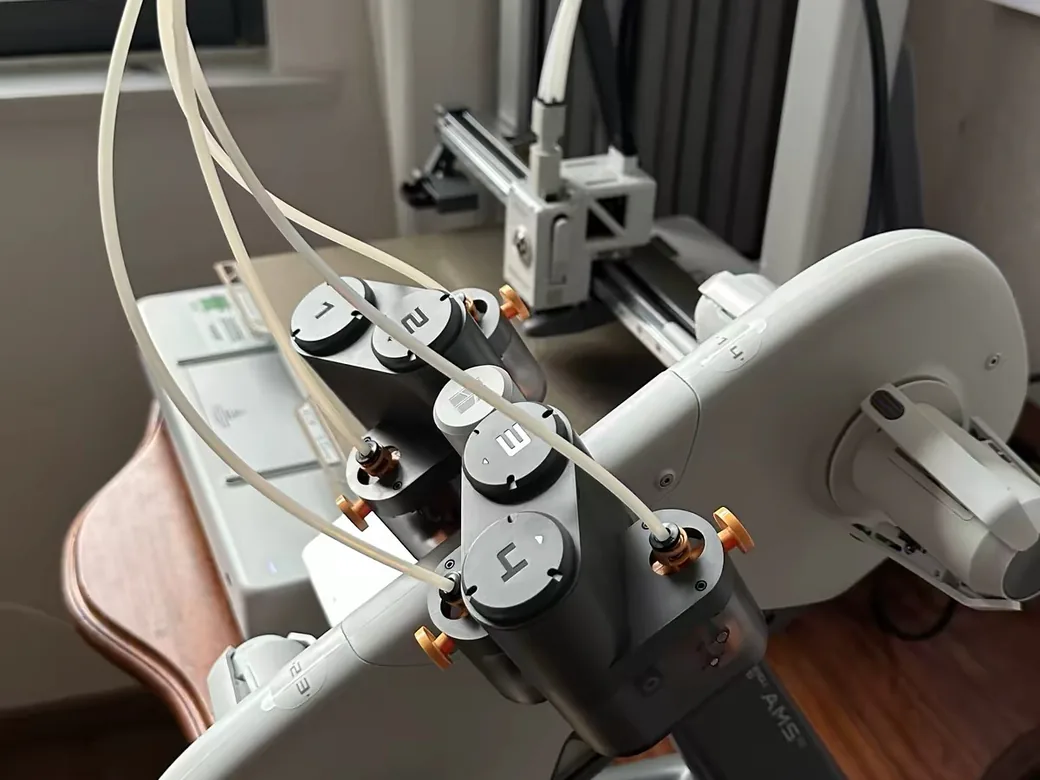
If multicolor is the main reason you’re buying, the A2L is the stronger machine. It works with more AMS units. It also purges faster and wastes less.
Compatibility first. Bambu Lab’s own store FAQ states that the enclosed AMS is incompatible with the A1 mini, so your only multicolor option is the four-spool AMS lite.
The A2L has an AMS port built in. It takes up to four AMS, AMS 2 Pro or AMS HT units plus one AMS lite, for up to 19 colors. The AMS 2 Pro also dries filament, which the open AMS lite can’t (on the A2L, drying needs the AMS 2 Pro’s separate power supply).
Speed is the bigger everyday difference. The A1 series purges old filament in pulses, while the A2L purges in one steady stream. The 3D Printing Zone measured it on the A1. In Almost Engineered’s three-printer test the A1 mini was slower than the A1 at multicolor, so treat these A1 numbers as the smallest gap you’ll see:
| Multicolor test (A1 platform vs A2L) | A1 | A2L |
|---|---|---|
| Color swap, white to green | 1 min 20 s | 44 s |
| Two-color print, total time | 3 h 12 min | 1 h 45 min |
| Purge waste, same print | 39 g | 32 g |
A second A2L review saw the same pattern on a larger multicolor model: 8 hours and 100 g of waste on the A2L against 11 hours 20 minutes and 120 g on the A1. The one side-by-side that included the A1 mini itself, the three-printer test above, also had the A2L finishing a multicolor Benchy well ahead.
Whichever you pick, buy the combo. The most upvoted advice in one r/BambuLab thread was that automatic swap to a fresh spool on runout is worth the AMS lite by itself.
A1 mini vs A2L Print Quality: Small Parts Tie, Tall Parts Favor the A2L
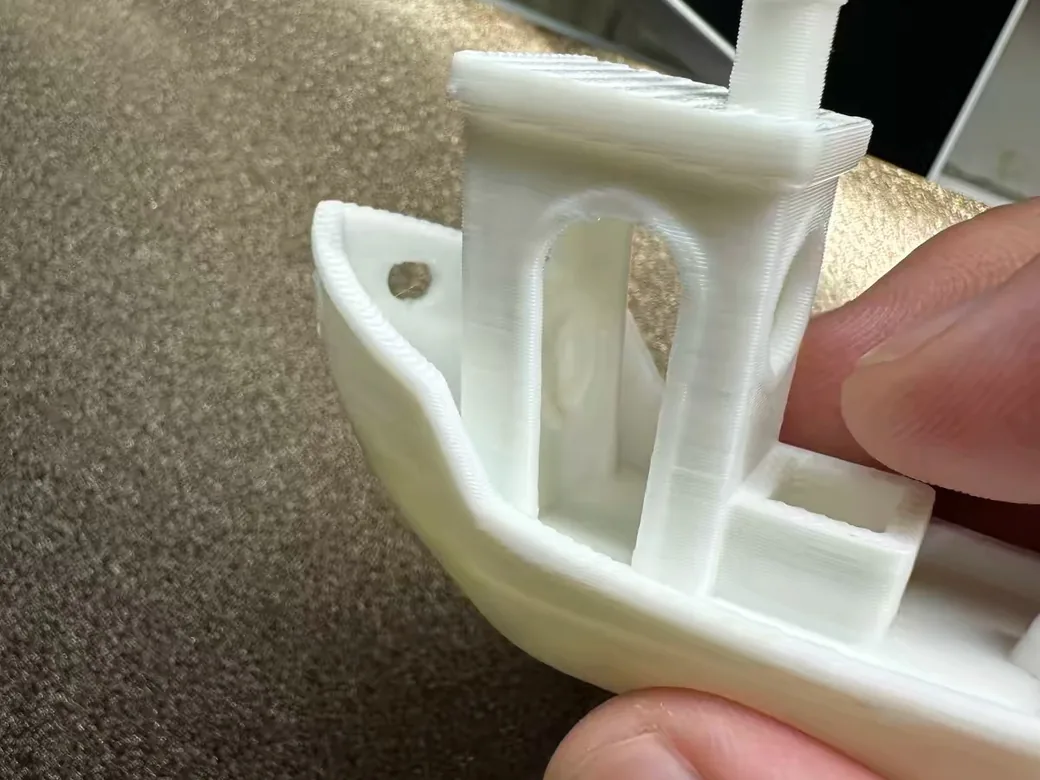
On small and medium prints, you won’t see a quality difference. On tall, narrow prints, the A2L is cleaner.
The A1 mini punches above its price. In that same A1 vs A1 mini comparison, its parts hold up against a P1S and an X1C. In a separate PLA side-by-side with a P1S, the prints were barely distinguishable. The makerspace owner mentioned earlier rates its print quality second only to their X1 Carbon.
The A2L is just as clean on small parts. A 400-hour long-term test produced a 38-minute Benchy with no visible ringing.
Height is where they split. Every bed slinger shakes the print as the bed swings, and the taller the part, the more it shows.
The A2L fights this with adaptive vibration compensation (calibrated at up to eight points) and two granular dampers in the frame. On a tall test model, the A1 showed visible ghosting and the A2L much less. It still isn’t immune. Tall, narrow prints need the “Slow Down at Height” setting and a better part orientation.
Small parts can actually take longer on the A2L. One r/BambuLab owner who uses both says it’s “a much slower machine” for small items. Pre-print calibration is part of the reason: 10 min 51 s on the A2L before a single-color print, against 7 min 17 s on the A1.
A1 mini vs A2L Filament Support: Both Beds Stop at 80°C
Both machines have an 80°C bed and a 300°C stainless steel nozzle, so they print the same materials. Bambu Lab lists PLA, PETG, TPU and PVA as supported on both. ABS, ASA, PC and nylon are not recommended on either.
The A2L’s lower cap is deliberate. Bambu Lab says heating such a large plate any hotter would put too much load on a home circuit, and that open-frame machines are aimed at PLA and PETG anyway. In practice, most PLA and PETG print well under that limit. Owners in an r/BambuLab thread on this exact trade-off mostly said they never use more.
One review called TPU hard on the A2L. Bambu Lab’s spec page and other long-term reviews list it as supported, so treat that as a single report.
Carbon- and glass-filled PLA or PETG work on both, but only after you swap in a hardened steel nozzle. If ABS or ASA is on your list, you need an enclosed machine. Our A2L vs P2S comparison covers that step up.
Features Only the A2L Has: Servo Extruder, Blob Detection, Cutting Module
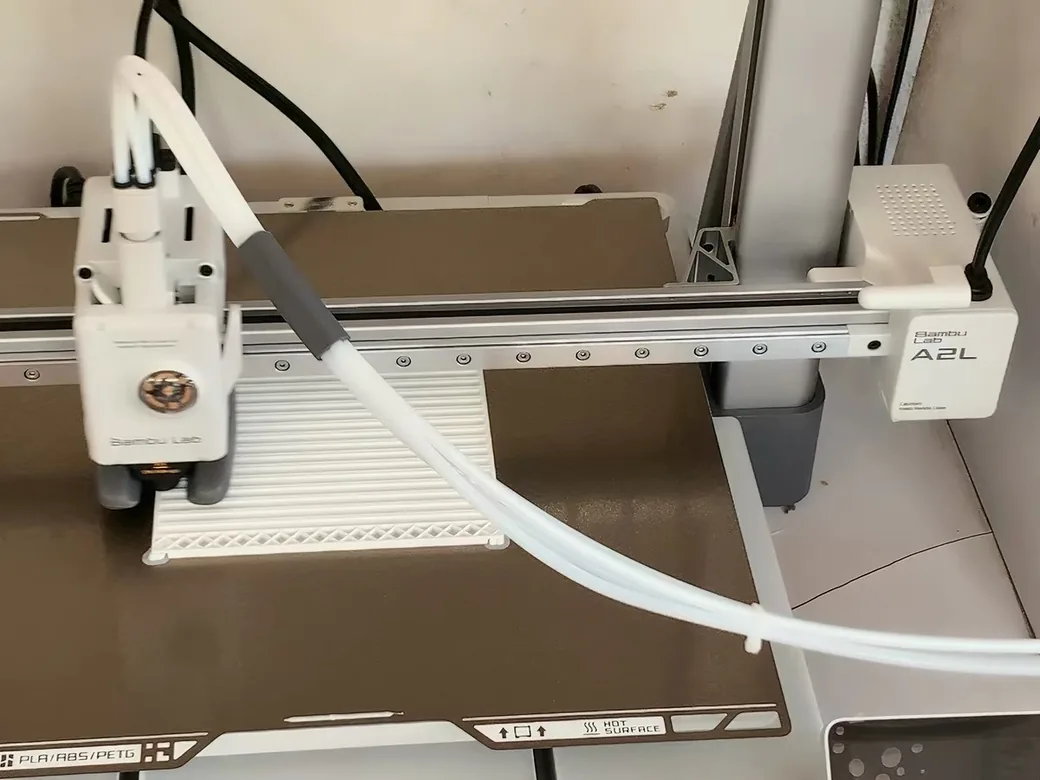
The A2L adds three features the A1 mini lacks: a smarter extruder, a guard against hotend blobs, and a modular cutter.
PMSM servo extruder. The A2L drives filament with a closed-loop servo motor that Bambu Lab says checks itself 20,000 times per second. It watches for nozzle clogs, worn filament and air printing. The A1 mini uses a conventional stepper.
Physical blob detection. A “blob of death” is a lump of plastic that swallows the hotend. The A2L has dedicated hardware that detects it by touch and pauses the job. That Brazilian creator says he has lost several hotends to blobs on the A1.
Cutting and pen modules. The A2L can swap its print head for a blade cutter or a pen plotter. The cutter handles a 300 x 300 mm area, material up to 0.5 mm thick, and blade pressure from 50 to 600 gf. That covers vinyl stickers, heat-transfer film, paper and thin leather. CNC Kitchen’s verdict was that the cutter “finally makes sense on a printer like this,” because you can print a helmet and cut its decals on the same machine.
CNC Kitchen sees little true second-generation hardware beyond the servo extruder and blob detection, plus support for the cutting module. In his view the rest is a scaled-up A1. He suggests it could have been called the A1L. Our Bambu Lab A2L review goes deeper into what changed.
Noise, Power, and Daily Use on the A1 mini vs A2L
Day to day, the A1 mini is quieter, lighter on power and simpler. The A2L has the bigger screen and the longer software runway.
Noise. The A1 mini is the quietest of the three in Almost Engineered’s comparison, and it also runs quieter than a P1S. The A2L sits around 50 dB while printing, with the part cooling fan as the loudest component. Bambu Lab’s 49 dB figure is measured in silent mode.
Power. The A2L’s large bed needs a lot of heat fast. Bambu Lab rates it at 1,000 W and says it holds that peak for about 3 to 5 minutes. Independent tests measured the peak at roughly 900 to 1,022 W and about 120 to 150 W while printing.
Setup. The A1 mini is the faster unbox, and I found it easy to pick up. One long-term owner was printing within 30 minutes, with a smooth first layer and close to plug-and-play setup. The A2L takes about 30 minutes of assembly first, and it only connects over 2.4 GHz Wi-Fi.
Screen and controls. The A1 mini has a 2.4-inch touchscreen. The A2L has a 3.5-inch one, but you can’t cancel a single object from it. That option lives in the Bambu Handy app.
Camera. Both have a low-frame-rate 1080p camera with timelapse. The A2L’s camera got a “poor” verdict in the 400-hour test, and one long-term A1 mini owner calls the mini’s camera barely usable and recommends adding a Wyze Cam.
Reliability. After nine months, 3D Print Dood called his A1 mini more reliable than his P1S and A1. The A2L launched with two firmware bugs (random pauses and a failed AMS lite runout handoff), and both were fixed in an update.
Software support. Bambu Lab publishes end dates on its comparison page. The A1 mini gets bug and feature updates until Sep 20, 2028 and security patches until Sep 20, 2030. The A2L runs to Jun 1, 2031 and Jun 1, 2033.
Where the Bambu Lab A1 Fits Between the A1 mini and A2L
The regular A1 is the “not sure yet” choice. It has a 256 x 256 x 256 mm bed and a 100°C plate, and its price sits between the other two. It makes sense when the mini feels too small but you don’t need the A2L’s size or multicolor speed.

- A1 Combo + LED Lamp Kit for Functional Light Projects: Bambu Lab A1 Combo + LED Lamp Kit lets you create illuminated models. Simply print compatible…
- High-Speed Precision: Experience unparalleled speed and precision with the Bambu Lab A1 3D Printer. With an impressive acceleration of 10,000 mm/s…
- Multi-Color Printing with AMS lite: Unlock your creativity with vibrant and multi-colored 3D prints. The Bambu Lab A1 3D printers make multi-color…
- Full-Auto Calibration: Say goodbye to manual calibration hassles. The A1 3D printer takes care of all the calibration processes automatically…
- Active Flow Rate Compensation: Achieve consistently smooth prints with active flow rate compensation. The algorithm actively compensates the flow rate…
The A1 vs A1 mini choice mostly comes down to price and build size, since auto calibration and speed match. Bed temperature is the part people forget: the A1 reaches 100°C and the mini stops lower. Two owners in a recent r/3dprinter thread told a first-time buyer to skip the mini because they had outgrown its plate quickly.
If the A1 is on your shortlist, our Bambu Lab A2L vs A1 comparison covers that matchup in detail.
A1 mini or A2L: Which Bambu Lab Printer to Buy for Your Situation
Small prints and a small desk point to the A1 mini. If your prints outgrow the mini’s plate and you have room for a larger frame, the A2L is the better buy.
Buy the A1 mini if:
- Your budget tops out around $200 to $300.
- You print figures, gifts, desk accessories, jewelry or small functional parts.
- Your printer has to share a desk or move around.
- This is your first printer and you aren’t sure you’ll stick with the hobby.
- You want the quietest machine of the two.
For a deeper look at the small one, see is the A1 mini worth it for beginners.
- A1 mini + LED Lamp Kit for Creative Light Projects: Bring your ideas to life with the included LED Lamp Kit. Simply print compatible lamp models and…
- The Perfect 3D Printer for Beginners: A1 mini 3D Printer is designed to make 3D printing easy from day one with automatic calibration, simple setup…
- Experience the Bambu Lab Ecosystem: Access MakerWorld’s huge library of ready-to-print models, manage prints through the Bambu Handy app, and enjoy…
- Fast, Quiet, and Reliable Printing: Compact and beginner-friendly, A1 mini delivers high-speed, high-quality printing with quiet operation that fits…
- Made for Everyday Creativity: From toys and home décor to functional tools and personalized gifts, A1 mini makes it easy to turn ideas into real-life…
Buy the A2L if:
- You print helmets, armor, props or anything taller or wider than the mini’s plate.
- You fill plates with small items to sell.
- You plan to print in multiple colors often.
- You want to cut stickers, vinyl or heat-transfer decals.
- You may add an AMS 2 Pro later for dry, enclosed spools.
- Large 330 x 320 x 325 mm build volume, about 2x the A1
- PMSM servo extruder with adaptive vibration compensation
- Optional cutting and drawing module for vinyl and papercraft
- Up to 19 colors with AMS, quiet 49 dB operation
Consider something else if:
- You need ABS, ASA or nylon. Look at an enclosed CoreXY printer like the P1S or P2S.
- You want multicolor with very little waste. Tool changers do that better than any single-nozzle machine.
- You want the full lineup in one place. Our guide to the best Bambu Lab 3D printer ranks every current model.
Frequently Asked Questions About the Bambu Lab A1 mini vs A2L
Is the Bambu Lab A2L worth it over the A1 mini?
Yes, if you regularly print parts larger than 180 mm or print in color often. For small parts in one color, the A1 mini gives you the same quality for less than half the price. The A2L also needs much more desk space.
Is the A2L better than the A1 mini for beginners?
Both are easy for beginners, with full auto calibration and the same Bambu software. The A1 mini is the easier first printer because it’s cheaper, quieter and fits on any desk. The A2L is better for a beginner who already knows they want to print large props.
Can the Bambu Lab A1 mini use the AMS or AMS 2 Pro?
No. Bambu Lab’s store FAQ rules out the enclosed AMS on the mini. The four-color AMS lite is the only multicolor unit it accepts. The A2L works with the AMS lite, AMS, AMS 2 Pro and AMS HT.
Can the A1 mini or A2L print ABS?
Neither is recommended for ABS or ASA. Both have a low-temperature bed and an open frame. For ABS and ASA, choose an enclosed printer such as the P1S or P2S.
Which Bambu Lab printer is the best to buy?
It depends on what you print. The A1 mini is the best value for small parts, the A2L is the best open-frame choice for large parts, and the enclosed P-series is the pick for engineering filaments. Our full Bambu Lab buying guide compares the whole lineup.
What are the best alternatives to the Bambu Lab A2L?
The Bambu Lab A1 is the closest alternative if you want a mid-sized bed for less money. If you need ABS or ASA, look at an enclosed printer like the P2S. For low-waste multicolor printing, a tool-changer printer is the stronger choice.
Sources for This A1 mini vs A2L Comparison
My hands-on time covers A2L setup and printing on a corner desk, plus three months of PLA printing on an A1 mini. The multicolor timings, power and noise readings come from the reviewers below, who measured them on their own machines. Prices and specs were checked on Oct 7, 2026.
Show all 16 sources
- Bambu Lab, printer comparison page (specs, prices, software support dates)
- Bambu Lab US store, A1 mini and A2L product pages (prices, A1 mini dimensions and AMS FAQ)
- Almost Engineered, A1 Mini vs A1 vs A2L
- The 3D Printing Zone, A2L vs A1: We Tested Everything That Matters
- CNC Kitchen, Bambu A2L: My Honest Review After 400 Hours
- Uncle Jessy, Is the Bambu Lab A2L Just a Bigger A1?
- 3D Print Dood, A1 Mini Review: Update After 9 Months and P1S vs A1 Mini
- Rad Dad’s Print Lab, A1 vs A1 Mini
- IMPRESSÃO 3D E RENDA EXTRA (BARBACAST), A1, A1 mini and A2L comparison
- r/BambuLab, A1 mini vs A2L buying help, A2L or A1, A1 or A2L and A2L vs A1 bed temperature
- r/3dprinter, A1 or A1 Mini for my first printer
CERTAIN CONTENT THAT APPEARS ON THIS SITE COMES FROM AMAZON. THIS CONTENT IS PROVIDED ‘AS IS’ AND IS SUBJECT TO CHANGE OR REMOVAL AT ANY TIME.
Price details
Product prices and availability are accurate as of the date/time indicated and are subject to change. Any price and availability information displayed on Amazon.com at the time of purchase will apply to the purchase of this product.