
I earn a commission if you buy through links on this page, at no extra cost to you. As an Amazon Associate, I earn from qualifying purchases.
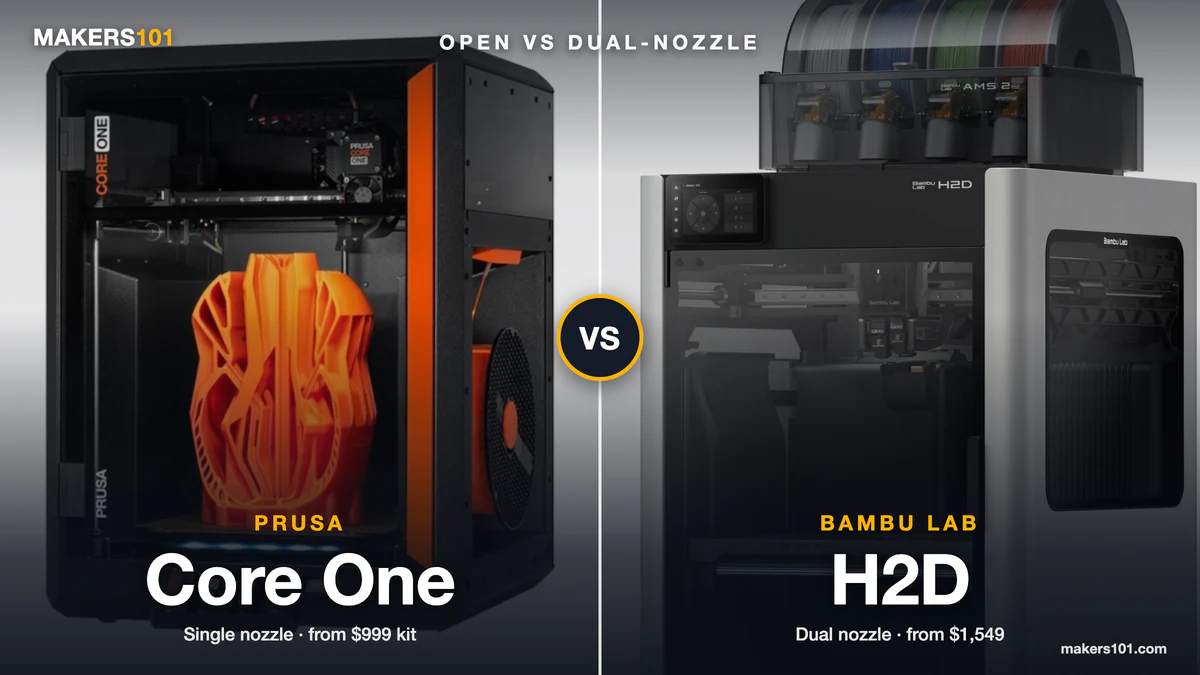
Print quality won’t settle this one. Makezine ran both machines side by side for months, and both finished its tests “almost flawlessly.” So the usual forum fight (Prusa is the only company worth trusting, Bambu just works) misses what actually splits them: price structure, build size, how each handles a second material, and what kind of company you’re buying into.
If you’ve seen $949 and $1,199 in older reviews, those were first-generation Core One prices. Prusa now sells the Core One+ (Gen 2), and the Core One L+ replaces the original L.
Table of Contents
- Prusa Core One vs Bambu Lab H2D Specs at a Glance (Oct 2026)
- Prusa Core One vs Bambu H2D Price: What You Actually Pay for a Comparable Setup
- Build Volume: The Core One Is Smaller, the Core One L+ Is the Real H2D Rival
- Engineering Filaments: Chamber Heat and Nozzle Temperature on the Core One vs H2D
- Multi-Material: Core One MMU3 and INDX vs H2D Dual Nozzle + AMS
- Print Quality: Where the Core One Wins and Where the H2D Wins
- Speed and Flow: Core One vs H2D in Real Prints
- Reliability, Setup and Maintenance on the Core One and H2D
- Open Source, Privacy and Software: Prusa vs Bambu Lab Ecosystems
- Support, Repairability and Long-Term Ownership
- Lasers, Noise and Filtration: The Extras That Separate the H2D and Core One
- Which Should You Buy: Prusa Core One, Core One L+, or Bambu Lab H2D?
- FAQ: Prusa Core One vs Bambu Lab H2D
- Sources for This Prusa Core One vs Bambu H2D Comparison
Prusa Core One vs Bambu Lab H2D Specs at a Glance (Oct 2026)
The H2D is the bigger, hotter, more automated machine. The Core One+ is smaller, cheaper and more open. The Core One L+ matches the H2D on size and costs more. Going the other way on budget? Here’s how the Core One+ does against Bambu’s much cheaper P2S.
| Spec | Core One+ (Gen 2) | Core One L+ | Bambu Lab H2D |
|---|---|---|---|
| Price (Oct 7, 2026) | $999 kit / $1,299 assembled | $1,999 assembled | $1,549 / $1,749 AMS Combo |
| Build volume | 250 × 220 × 270 mm | 300 × 300 × 330 mm | 325 × 320 × 325 mm (300 mm wide with both nozzles) |
| Nozzles | 1 (INDX: up to 8 tools, smaller volume) | 1 (INDX: up to 8 tools) | 2 in one toolhead |
| Max nozzle temp | 290°C (400°C with HT Hotend) | 290°C (400°C with HT Hotend) | 350°C, hardened steel |
| Max chamber temp | 55°C | 60°C | 65°C, active heating |
| Multi-material | MMU3 or INDX | MMU3 or INDX | Dual nozzle + AMS 2 Pro / AMS HT |
| Measured max flow | ~30 mm³/s (CHT nozzle, original Core One) | n/a | ~28 mm³/s (PLA Matte) |
| Laser / cutter | No | No | Optional 10W or 40W |
| Firmware | Open source | Open source | Closed, signed |
Flow figures come from two different creators’ tests under different conditions, so read them as ballpark numbers. Prices are US list prices from prusa3d.com and us.store.bambulab.com.

Prusa Core One vs Bambu H2D Price: What You Actually Pay for a Comparable Setup
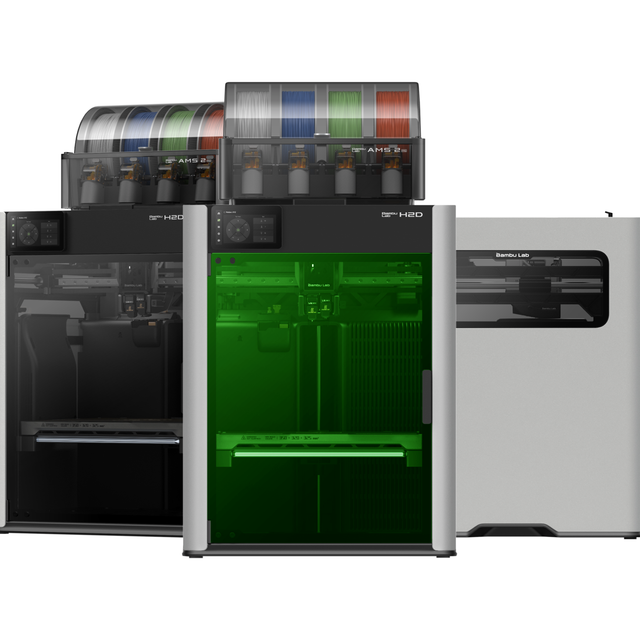
The H2D costs $250 more than an assembled Core One+ and $550 more than the kit. Line up comparable setups and the gap moves a lot, because the two brands bundle different things.
| Setup (Oct 7, 2026) | Prusa | Bambu Lab H2D | Gap |
|---|---|---|---|
| Single material, assembled | Core One+ $1,299 | H2D $1,549 | $250 |
| Single material, cheapest | Core One+ kit $999 | H2D $1,549 | $550 |
| Multi-material starter | Core One+ INDX, 8 tools, $2,249 assembled | AMS Combo $1,749 (4 AMS slots + 2nd nozzle) | Prusa costs $500 more |
| Large format | Core One L+ $1,999 | H2D $1,549 | Prusa costs $450 more |
| With laser | not available | $2,149 (10W) / $2,699 (40W) | H2D only |
Accessories. The Core One’s camera and HEPA filtration are add-ons. The H2D ships with an AI nozzle camera, a hardened steel nozzle and a hardened extruder gear. One r/3dprinter commenter weighing the smaller X2D put it bluntly: that Bambu combo cost less than the Core One+ kit alone, before paying “even more for some good filtration and camera.”
Your time. The kit saves $300, and one r/3DDruck owner budgets 5 to 10 hours to build it. One r/3Dprinting owner took 30 hours to be certain nothing was wrong. An assembled Core One goes from box to first print in about 10 to 15 minutes. The H2D is ready in minutes too.
INDX. The Core One+ (Gen 2) INDX 8-Tool lists at $2,249 assembled, and shipping starts October 15. It comes with trade-offs covered in the multi-material section below. One Reddit buyer put a Core One L+ with 8-tool INDX at about $3,000.
If you’re printing for sales, run both machines through the 3DPKit print cost calculator with your real filament prices. A small price gap disappears fast when one machine wastes less on purge.
Build Volume: The Core One Is Smaller, the Core One L+ Is the Real H2D Rival
The Core One+ prints 250 × 220 × 270 mm. The H2D prints 325 × 320 × 325 mm with one nozzle, which is more than double the volume. If you print helmets, cosplay armor or full-size enclosures, that difference decides the question on its own. If you don’t need that much room, Bambu’s smaller dual-nozzle X2D is worth a look, and our X2D vs H2D comparison shows what you give up.
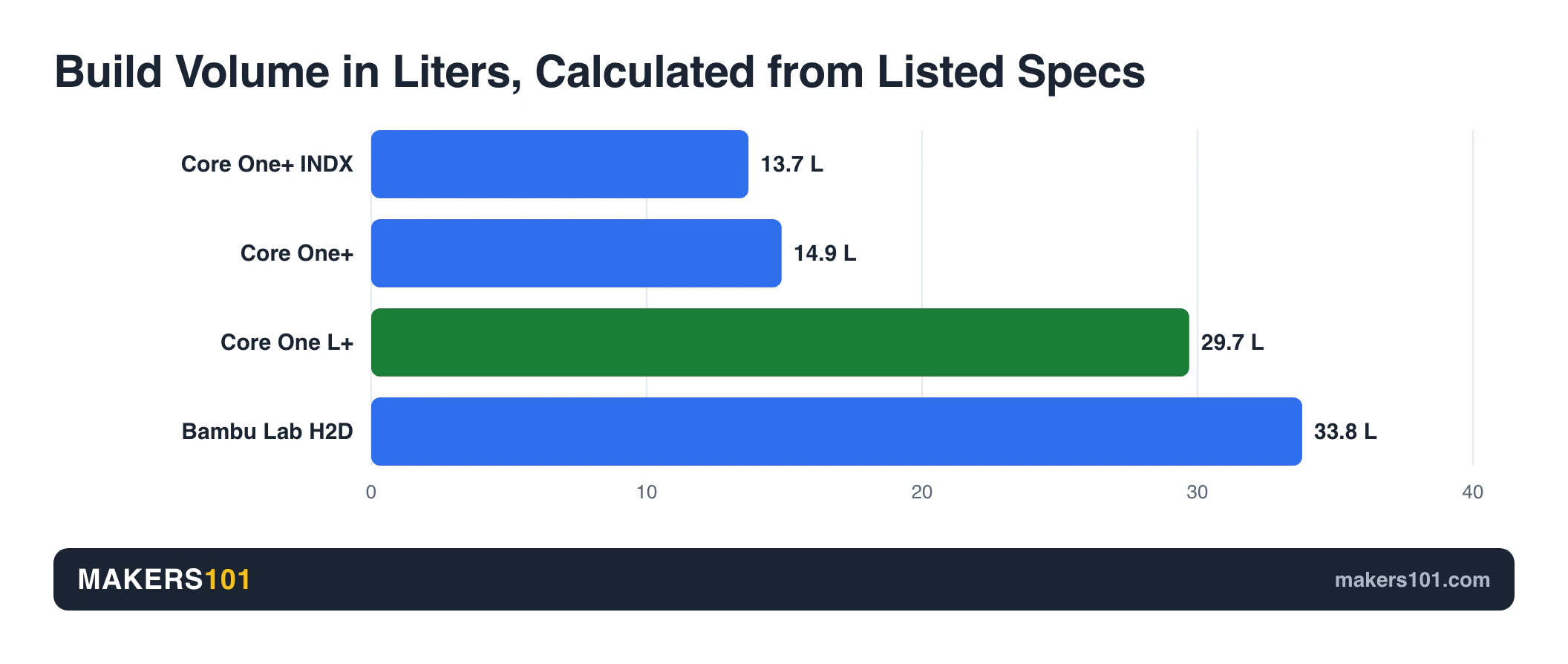
The H2D’s usable width drops to 300 mm when both nozzles work on the same part, because of how the two nozzles sit side by side. The 350 mm figure is the combined reach of both nozzles, and Bambu only allows it when they carry the same filament.
If you want H2D-class size and still want Prusa, look at the Core One L+. It prints 300 × 300 × 330 mm and heats its chamber to 60°C. It gets the same nozzle wiper and GT1.5 belts as the Gen 2 Core One+, and it’s the pricier option.
The Core One takes roughly 50 × 43 cm of desk and needs about 56 cm of height.
The H2D measures 492 × 514 × 626 mm and weighs 31 kg (40.6 kg boxed). Bambu recommends a 700 × 700 × 1100 mm space around it. Measure your shelf before you order.
Engineering Filaments: Chamber Heat and Nozzle Temperature on the Core One vs H2D
Both machines print ABS, ASA, PC-CF and PA-CF. The H2D does it faster and with more margin, because it has a dedicated chamber heater and a 350°C hardened hotend.
H2D. The chamber heats to 65°C. In 247printing’s three-way test, it reached 50°C in 5.5 minutes, and its ABS parts came out flat. A Prusa XL without active heating warped on larger parts in the same test. That test also caught the H2D’s bed surface at 104°C against a 120°C spec.
Core One+. Prusa rates its chamber 10°C below the H2D’s. Aurora Tech’s review of the original Core One showed it gets there through the bed and the compact enclosure, without a separate heater. With the bed at 115°C, the chamber reached 51°C after 70 minutes of printing ABS. PC-CF and PA-CF parts printed cleanly on the first try.
The Core One’s standard nozzle tops out at 290°C and isn’t hardened. Prusa recommends a hardened nozzle for abrasive filaments. For PPS-CF, PPA-CF and similar materials, the optional HT Hotend raises the limit to 400°C. Our Prusa HT Hotend price and compatibility breakdown adds up the full high-temp kit cost.
Core One L+. It adds 5°C of chamber headroom. In one ASA comparison, an original Core One L running a 55°C chamber matched an industrial Stratasys Fortus 450mc on dimensional accuracy, with only slight ghosting.
The verdict: if engineering materials are a weekly job, the H2D removes the waiting and the hardware upgrades. If they’re occasional, the Core One handles them once the chamber warms up. Our guide to enclosed high-temperature 3D printers for ABS and nylon covers the wider field.
Multi-Material: Core One MMU3 and INDX vs H2D Dual Nozzle + AMS
For two materials, the H2D wins today. For many colors, or for multi-material TPU, Prusa’s INDX toolchanger looks stronger on paper. It starts shipping October 15.
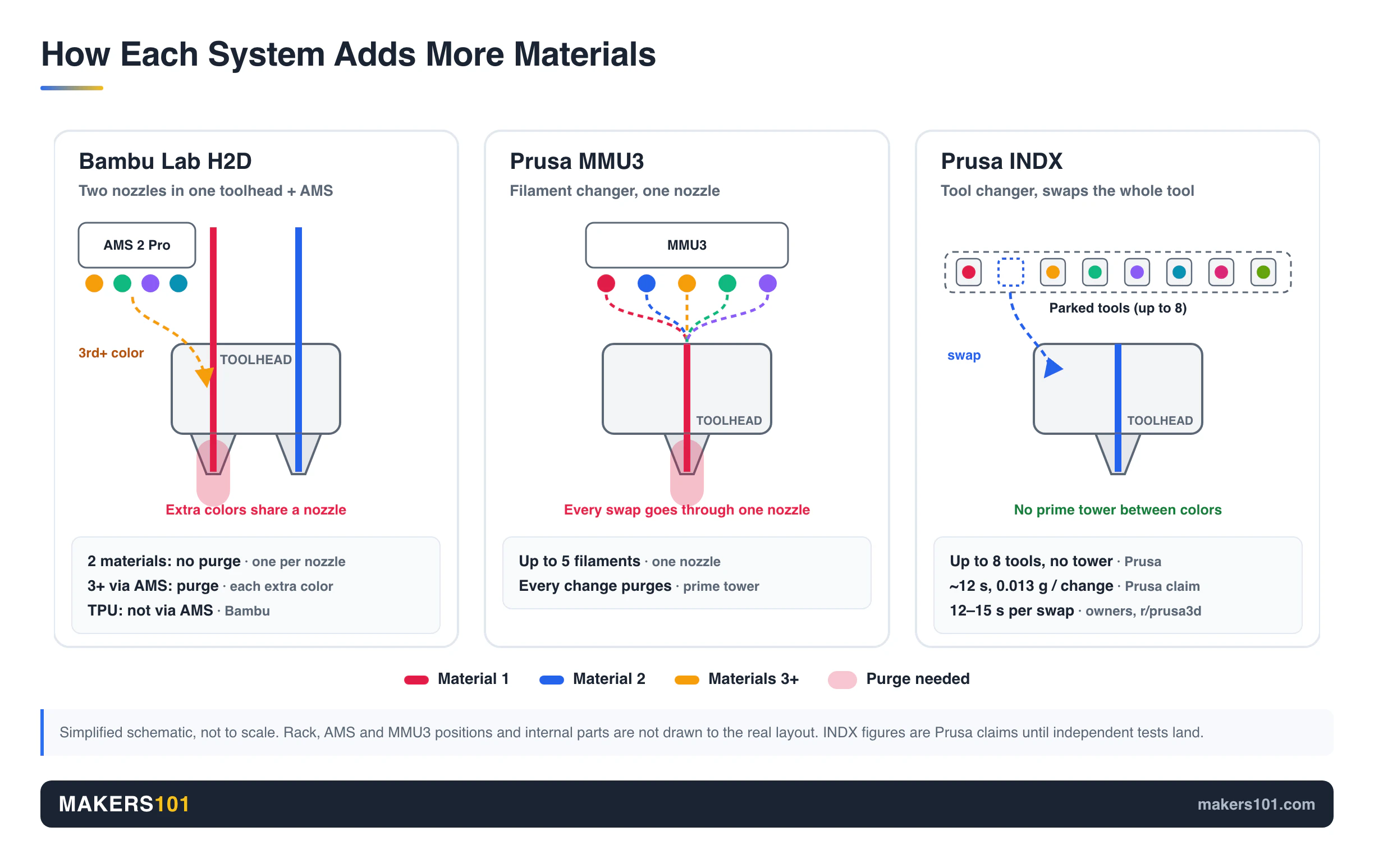
H2D: two nozzles plus AMS. Two nozzles share one toolhead, so a part with a PLA body and a PETG support interface switches nozzles and wastes almost nothing beyond a small prime tower. Past two materials, the AMS 2 Pro (four spools) or AMS HT (one spool, with drying) feeds filament in.
Every extra color then means a purge. You can chain several AMS units, but TPU can’t run through the AMS. Two-color TPU on the H2 line only works on the H2D and H2C, through the two nozzles.
247printing’s verdict: the H2D “is reliable and convenient, but its dual-nozzle toolhead lacks the innovation needed for efficient multi-material printing beyond two filaments.”
Core One: MMU3 or INDX. The MMU3 adds up to five colors through one nozzle, with the same purge cost as any single-nozzle changer.
INDX swaps whole tools instead, so there’s no prime tower. In Prusa’s own demo, a print produced 19 g of waste instead of 130 g and finished in 13 hours instead of 25. Treat that as a vendor benchmark until independent tests land.
One owner who runs both machines is clear about the current gap: “The AMS 2 pro makes the MMU 3 look like a child’s toy.” Owners on r/prusa3d say an INDX tool swap takes 12 to 15 seconds. You can also print only the support interface layers in a second material, which cuts the number of swaps.
- PLA + support interface, or two colors: H2D, today.
- TPU combined with rigid filaments: INDX, once it ships and settles.
- Five or more colors with minimal waste: INDX if you can wait. An H2D + AMS if you can’t.
INDX has costs beyond price. On the Core One+, the INDX version prints 248 × 205 × 270 mm, a little smaller than the standard machine. Its nozzles top out at 300°C.
Prusa says the stock nozzles aren’t designed for long-term printing of abrasive materials. Prusa quotes about 12 seconds and 0.013 g of waste per color change, a vendor figure for now.
If you’re weighing toolchangers more broadly, our H2C vs Prusa XL comparison covers Bambu’s Vortek system against Prusa’s five-tool XL.
Print Quality: Where the Core One Wins and Where the H2D Wins
Both machines print beautifully, and the difference shows up material by material.
Two forum users posted matched test prints in a Bambu Lab forum thread. One owns both machines and printed a Voron cube scaled to 250% on each, from the same roll, with the standard 0.20 mm profile.
The other is a Core One owner who ran the second print on an H2D at work. They printed the same model in dried Polymaker Terra at 0.2 mm layers on a 0.4 mm nozzle, and both printers finished in a little under 6 hours. Both posted photos without picking a winner in words, and the Terra tester simply said they were satisfied.
The most detailed per-material verdict comes from an owner on r/prusa3d who runs a fully offline H2D next to a Core One. In their experience, the Core One gives better results on PETG and TPU. The H2D gives a better finish on PLA, ASA, PC, PC-CF and PCTG. Even after belt tuning, their Core One still showed more vertical fine artifacts (VFA) on PETG walls than the H2D.
Core One strengths. Aurora Tech’s tolerance test passed the 0.05 mm gap, a perfect score. Long-time Prusa owners comparing against older Bambu models credit Prusa’s 360° part cooling for overhangs and a finer surface finish, with fewer blips on inner walls and top layers. The Gen 2 update also switches to GT1.5 belts, which Prusa says reduces fine patterns on smooth surfaces.
Core One weaknesses. It runs Marlin firmware. Even with input shaping, the original Core One’s surface trailed some well-tuned Klipper CoreXY machines (see Klipper vs Marlin for why). Results also vary by profile. One skeptical reviewer got ugly overhangs and stubborn support interfaces with Prusa’s own PETG on the official profile.
H2D strengths and weaknesses. In 247printing’s test it showed excellent retraction, tolerance and overhangs, plus slight under-extrusion. Before calibration it had the largest X/Y deviation of the three printers. The optional Vision Encoder plate (sold separately) brought skew to zero.
The forum user who owns both machines had summed it up before running the cube test: the Core One’s print quality is “outstanding but that’s the only factor that’s close.” That owner rates the H2D better at everything else.
So the H2D isn’t better at everything, and the Core One isn’t the “quality” choice by default. Pick by the materials you actually run.
Speed and Flow: Core One vs H2D in Real Prints
In single-color printing the two are close. The H2D pulls ahead in multi-material jobs and when you need a heated chamber fast.
The Core One’s CHT high-flow nozzle reached a real 30 mm³/s in testing. A standard Benchy took 42 minutes, prep included. On a longer model, the Core One finished about 40 minutes faster than a MK4S. An X1 Carbon still beat it by 34 minutes with a cleaner surface.
The H2D measured about 28 mm³/s with PLA Matte. Bambu rates it for 600 mm/s. FauxHammer suggests the H2D’s heavier dual toolhead makes it a bit slower than the single-nozzle H2S in single-color work, though no timing data was published.
Out of the box, Prusa profiles are also more conservative. One Prusa owner points out that the Nextruder’s short melt zone needs the high-flow nozzle to keep pace with Bambu’s typical 30 mm³/s PLA settings.
For one-color prints, you won’t feel a big difference. For a two-material part, the H2D saves real hours, because neither MMU3 nor a single nozzle can match a toolhead that doesn’t purge.
Reliability, Setup and Maintenance on the Core One and H2D
The H2D asks less of you day to day. You’ll find the Core One easier to fix yourself. If you’d rather never open the machine, that tips you toward the H2D.
H2D. One r/prusa3d owner reports 3,000+ hours on each of their H2Ds with very good reliability. Another reviewer called it “a machine that could run unattended for months at a time.”
The 3,000-hour owner also warns that the H2 machines won’t be print-and-forget and will need more maintenance than most Bambu buyers expect. In a thread for owners of both brands, another user logged 1,700 hours on their H2D before the first issue, while their Prusa had problems from hour zero.
The 3,000-hour owner notes that Bambu keeps parts in stock, but they’re expensive and the system is locked down. An r/3dprinter user who runs an H2D at work and a Core One at home gives a blunt rule for Bambu: if a part fails, order the replacement and swap it in.
Core One. The first-generation machine collected real complaints. The top cover had to be unscrewed to clear a jam.
Nozzle cleaning sometimes left marks on the sheet. One review unit threw random “nozzle cleaning failed” errors, and some of its Wi-Fi jobs hung during preheat. On the Prusa forum, a few buyers returned theirs over quality-control problems.
Gen 2 fixes several of those. The Core One+ (Gen 2) adds a nozzle wiper, a top panel that comes off in seconds without tools, and a redesigned heatbed mount that shortens the wait before printing. First-generation owners can buy an upgrade kit with the wiper and GT1.5 belts.
Routine maintenance favors Prusa. One Core One+ owner describes a nozzle swap as two thumbscrews, one M3 screw and two cable clips. Old MK3 and MK4 print sheets fit the Core One bed. If you like knowing exactly how your machine works, the kit’s assembly manual teaches you that.
Open Source, Privacy and Software: Prusa vs Bambu Lab Ecosystems
Prusa sells an open platform. Bambu sells a polished, closed one.
Prusa. Firmware is open, and you can run the Core One through Prusa Connect, over Ethernet, or fully offline from USB. PrusaSlicer is one of the most-forked slicers around.
Bambu Studio itself started as a fork of it. Makezine’s reviewer said Prusa’s slicer and UI made the Core One feel comfortable, “along with feeling my privacy is more intact.” The first-generation review also flagged the Buddy3D camera, which depended on the cloud and only took a snapshot every 10 seconds.
Bambu. The H2D works through Bambu Studio and Bambu’s cloud by default, and a LAN-only mode lets you skip the cloud. But the company has made choices that worry some buyers. In January 2025 it removed direct cloud printing from Orca Slicer.
Its firmware is signed, which blocks custom modifications. It also sent a cease-and-desist letter to a developer who used open-source code to restore a removed feature. Some Reddit buyers now cite that episode as the reason they’re switching.
One Core One+ and Core One L owner on Reddit can’t use Bambu at all because their employer does ITAR and CMMC work.
Bambu’s convenience is real, and Prusa’s openness costs money. As one commentator put it: “Prusa is not scamming you, but it’s charging you for values that have a specific dollar amount.”
Support, Repairability and Long-Term Ownership
Prusa’s strongest argument is the long term. It still ships updates for 8-year-old printers, and parts and sheets carry across generations. Its upgrade path (Gen 2 kit, HT Hotend, INDX) keeps a Core One relevant without buying a new printer.
The r/prusa3d owner who runs both says it plainly: “Prusa support on their worst day is better than any support you will likely ever receive from Bambu.” They also admit a worry about the H2D: whether Bambu will still stock and fairly price a failed module a year from now. Their answer is to keep at least one Prusa running.
Bambu’s support isn’t absent. One owner reports quick replacement parts for a P1S. The same owner returned an H2C over AMS 2 Pro feeding problems and says other X2D buyers report similar trouble, so check recent owner reports if you plan to buy an AMS 2 Pro.
The difference is control. With Prusa, you can usually print or source a part and fix it yourself. With Bambu, you wait for the part.
Lasers, Noise and Filtration: The Extras That Separate the H2D and Core One
Laser and cutting. Only the H2D offers one. The Laser Full Combo costs $2,149 with a 10W module or $2,699 with a 40W module, and a non-laser H2D can be upgraded later. The BirdsEye camera, which handles laser positioning, comes only with the laser version or the upgrade. The Core One’s extras are more modest: a camera, filtration, a GPIO board and an accelerometer for input-shaper tuning.
Noise. Both are quiet enough for a home office. With the door closed, Aurora Tech measured the Core One in the mid-to-high 40s dB, with peaks in the low 50s. 247printing measured the H2D at about 50 dBA. In the matched Polymaker Terra test described earlier, the poster wrote that the “Bambu was practically silent during printing compared to Prusa.”
Fumes. Plan for filtration if you’ll print ABS, ASA or nylon in a room you work in. On the Core One, HEPA filtration is an add-on, and one H2D owner counts its built-in chamber filtering as a plus.
Which Should You Buy: Prusa Core One, Core One L+, or Bambu Lab H2D?
Most people who regularly print two materials or high-temperature filaments should buy the H2D. Most single-material printers who value repairability should buy a Core One+.
- Buy the Core One+ kit ($999) if you print mostly single-material PLA, PETG and TPU, enjoy building, and want a printer you can repair for a decade.
- Buy the Core One+ assembled ($1,299) if you want the same machine running in 15 minutes.
- Buy the Core One L+ ($1,999) if you need 300 mm parts and want to stay in Prusa’s ecosystem.
- Buy the Core One+ with the 8-tool INDX ($2,249) if you want low-waste multicolor or multi-material TPU, can live with a slightly smaller bed and a 300°C limit, and can wait for the new system to mature.
- Buy the H2D AMS Combo ($1,749) if you print support interfaces, two-material parts or engineering filaments every week and want it to just work.
- Buy the H2D Laser Full Combo ($2,149+) if you also want to engrave and cut in the same machine.
- Stay with Prusa if you need fully offline operation, or if your work rules out Bambu.
Some serious users end up owning both, using the H2D as the daily workhorse and keeping a Prusa for reliability insurance. If your budget only covers one, use GoodPrints3D’s second-nozzle test from the top of this page.


FAQ: Prusa Core One vs Bambu Lab H2D
Is the Prusa Core One better than Bambu?
It’s better at some things. The Core One wins on openness, repairability and long-term support, and an owner of both rates it higher for PETG and TPU work. The H2D wins on build size, chamber heat, two-material printing and ease of use. Print quality is excellent on both.
Why do people choose Prusa over Bambu?
Mostly for ownership. Prusa ships open firmware, keeps updating old printers, sells parts you can fit yourself, and runs fully offline. Bambu’s 2025 changes to third-party slicer access pushed some buyers toward Prusa.
Is the Core One L+ a better match for the H2D?
On size, yes. For a size-matched Prusa Core One vs Bambu Lab H2D comparison, the L+ prints 300 × 300 × 330 mm with a 60°C chamber, close to the H2D’s 325 × 320 × 325 mm. It costs $450 more than a base H2D, and it stays single-nozzle until you add INDX.
Should I wait for INDX or buy the H2D now?
Buy the H2D now if you need two-material printing this month. INDX starts shipping October 15, and early buyers expect a tuning period. For multi-material TPU or many colors with minimal waste, waiting makes sense.
Which is better, the Prusa Core One or the Bambu Lab X2D?
The X2D is Bambu’s smaller dual-nozzle machine and a closer price match for the Core One+. We cover that matchup in our Bambu Lab X2D vs Prusa Core One comparison.
Does the Prusa Core One have an active heated chamber?
Prusa lists active chamber temperature control on the Core One+. Tests on the first-generation Core One show the bed and enclosure do the heating, without a separate heater, so warm-up takes longer than on the H2D’s dedicated heater.
Sources for This Prusa Core One vs Bambu H2D Comparison
I haven’t run either machine in my own workshop, so this comparison is built on the hands-on reviews below, owners who run both printers, and prices and specs checked on both official stores on October 7, 2026.
Show all 13 sources
- Prusa Research: Core One+ product page, Core One L+, Core One model comparison, INDX 8-tool bundle
- Bambu Lab: H2D store page
- GoodPrints3D: X2D vs Core One buyer guide
- Makezine: Bambu H2D vs Prusa Core One: Reviewed
- 247printing: Bambu H2D vs Prusa XL vs Creality K2 Plus
- Aurora Tech: Prusa Core One review (YouTube)
- Frank: Core One review video (YouTube)
- aim6mac: Bambu Lab H2D vs Creality K2 Plus
- FauxHammer: Bambu H2S vs H2D vs H2C
- My Tech Fun: Stratasys vs Prusa ASA
- The Next Layer: Two New Tool Changers Incoming
- 3D Print Exposed: Creality vs Bambu Lab vs Prusa
- Reddit threads in r/prusa3d, r/3dprinter, r/3Dprinting, r/3DDruck and r/3DPrinterComparison (2026); Prusa forum threads; Bambu Lab forum: Need advice before buying
CERTAIN CONTENT THAT APPEARS ON THIS SITE COMES FROM AMAZON. THIS CONTENT IS PROVIDED ‘AS IS’ AND IS SUBJECT TO CHANGE OR REMOVAL AT ANY TIME.
Price details
Product prices and availability are accurate as of the date/time indicated and are subject to change. Any price and availability information displayed on Amazon.com at the time of purchase will apply to the purchase of this product.