
I earn a commission if you buy through links on this page, at no extra cost to you. As an Amazon Associate, I earn from qualifying purchases.
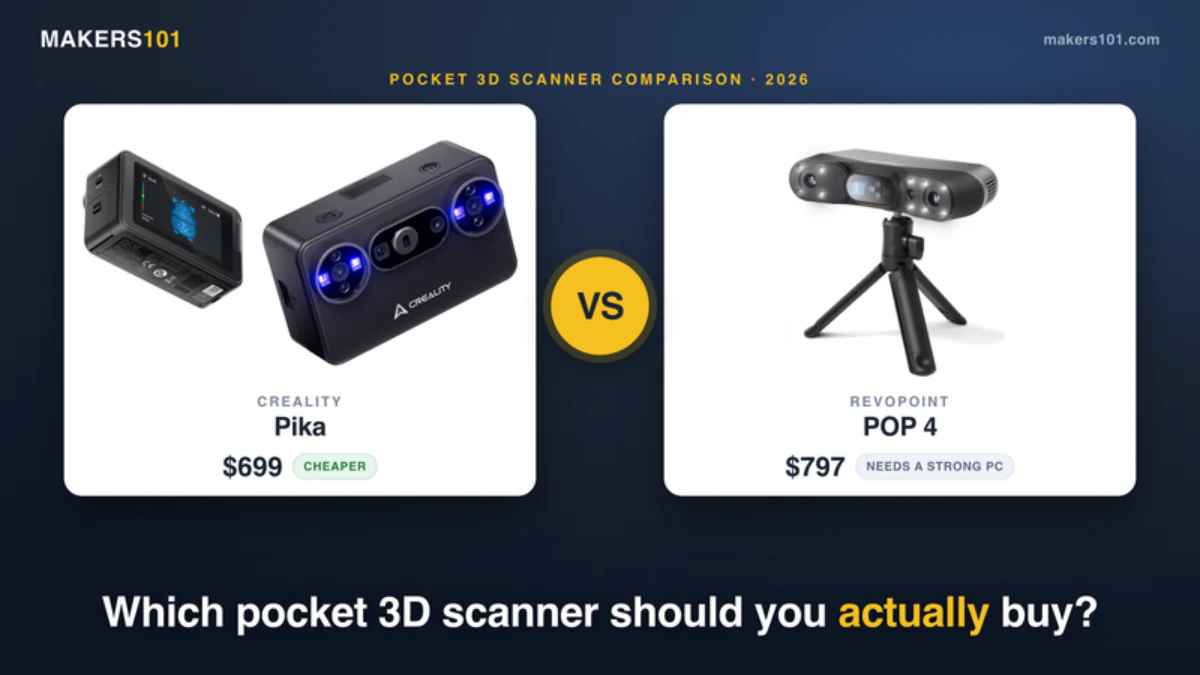
If you only read one line: the choice here comes down to how you work, not raw specs. Pick the Pika for grab-and-go phone scanning of small objects on a modest computer. Pick the POP 4 for precision reverse-engineering work when you have the horsepower to feed it. Both are capable. Neither is magic. If you’d rather wait for a third pocket option, we’re covering the Einstar EZ GO phone 3D scanner as details land.
Table of Contents
- What These Two Scanners Are
- Specs at a Glance
- Accuracy: What the Headline Number Really Means
- Scan Modes and Tracking: Simple vs Versatile
- Speed and Frame Rate
- Portability and Wireless: The Real Difference
- The Hidden Cost Nobody Mentions: Your Computer
- Software and Ecosystem
- The Learning Curve: Managing Expectations
- Which Should You Buy?
- FAQ
What These Two Scanners Are
You have narrowed your choice to two of 2026’s most talked-about pocket 3D scanners, and the spec sheets look almost identical. This is exactly where most buyers get stuck. On paper, the Creality Pika vs Revopoint POP 4 fight looks like a coin flip. Both claim the same flagship laser-accuracy spec. Both do wireless. Both target makers who want to scan real objects and turn them into printable models.
Here’s the truth. The numbers on the box are the least useful part of this decision. What actually changes your day-to-day experience is the stuff the spec sheet doesn’t print: how much computer you need, how steep the learning curve is, and whether you can leave the laptop at home.
Here is what most guides won’t tell you. These two scanners are built around opposite philosophies. The Pika is a Creality and Orbbec collaboration aimed at pocket-sized, phone-driven simplicity. The POP 4 is Revopoint’s Swiss-army knife, packed with modes and precision options for people who want to squeeze out every detail. This guide walks through the differences that matter, and it is honest about where each one will frustrate you. If you want a wider field of options first, our roundup of the best 3D scanners for makers is a good starting point.
Specs at a Glance
Before the deep dive, here is the head-to-head. Read this as your quick-reference card, then use the sections below to understand what each row means in practice.
| Spec | Creality Pika | Revopoint POP 4 (Standard) |
|---|---|---|
| Price (as of July 2026) | $699 (often out of stock) | ~$799 Amazon / $839 official |
| Released | May 2026 | 2026 (via Kickstarter) |
| Blue-laser accuracy (best case) | Up to 0.03 mm | Up to 0.03 mm |
| NIR / full-field accuracy | ~0.08 mm (phone mode) | ~0.08 mm |
| Laser frame rate (wired) | Up to 110 fps | Up to 105 fps |
| Weight | 260 g | ~286 g |
| Scan standalone from phone | Yes (built-in screen + phone) | No (phone app was beta; PC does the work) |
| Onboard screen | 3-inch touchscreen | None |
| Software | Creality Scan + Cloud | Revo Scan 6 |
Revopoint POP 4

Two things jump out. First, the Pika is actually the cheaper scanner here, which flips the usual assumption that Revopoint is the budget brand. Second, only the Pika lets you scan without a computer nearby. Hold onto both of those. They drive most of the recommendations later. If your projects run bigger than a pocket scanner handles, Revopoint’s cheaper RANGE 3 for medium to large objects is the other new option.

Accuracy: What the Headline Number Really Means
Both scanners print the same accuracy headline, so let’s clear this up first: that 0.03 mm figure is a best-case, single-frame laser number, not a promise you’ll hit it every time. Treat it as the ceiling, not the floor.
On the Pika, the blue laser tops out around that same figure in ideal conditions. Switch to the lighter phone-driven mode and real-world accuracy sits closer to 0.08 mm. The POP 4 tells a similar story with more detail published: 0.03 mm single-frame in laser mode, about 0.08 mm in near-infrared full-field mode, and 0.1 to 0.2 mm in its faster Vixel mode depending on distance. Revopoint also publishes a volumetric figure of 0.03 mm + 0.05 mm × L(m) in marker mode, which is the honest way to state that error grows as the scan area gets bigger.
Now the part nobody markets: resolution is not accuracy. Resolution is how much fine detail you capture. Accuracy is whether the dimensions are correct. Car bodywork does not need high resolution. A tiny miniature does. Chasing the smallest micron number on the box is the wrong instinct for most projects, and it just gives you huge files and long processing times.
Does the accuracy hold up in the field? On the Revopoint side, one community tester measured the POP 4 against a calibrated micrometer and logged a 124.993 mm mean against a 124.984 mm reference, an error of roughly 0.009 mm, and summed it up as “crazy accurate.” That is a good sign for a scanner in this class. If you want to understand why the laser mode wins on hard edges and dark surfaces while the infrared mode wins on speed, our breakdown of blue laser vs NIR scanning modes goes deeper than we can here.
Scan Modes and Tracking: Simple vs Versatile
This is where the two scanners split hardest. The Pika keeps it lean. The POP 4 hands you a toolbox.
The Pika uses a dual light source: seven parallel blue laser lines plus infrared structured light, running through Orbbec’s global-shutter camera. Creality leans on AI to fill holes, complete body scans, and, in its marketing, scan shiny or dark surfaces without spray and without markers. Fewer modes means fewer decisions. That’s friendlier when you’re new.
The POP 4 goes the other way with five scanning modes. Its blue laser runs 30 crossing lines for fast, large-surface capture, plus a single-line mode for deep holes and tight corners. On top of that you get near-infrared full-field, a faster Vixel dot mode, and a hybrid HD mode. It also offers four tracking methods: feature, marker, global marker, and texture tracking. Texture tracking is genuinely clever, because it can lock onto a patterned but featureless object like a printed bottle without any stick-on dots.
The trade-off is real. More modes mean more capability, but also more to learn and more ways to pick the wrong setting. The POP 4’s most precise blue-laser mode wants marker dots on the object, while its infrared modes skip the markers but give up a little accuracy. If mode-juggling sounds like a chore, the Pika’s shorter menu will feel like a relief. If it sounds like control, the POP 4 will feel like freedom. For a sense of how laser line count changes the speed-versus-detail balance, our guide to how laser line modes work uses the same principles.
Speed and Frame Rate
Wired to a good PC, both scanners are fast, and the gap is small. The Pika hits up to 110 fps on its line-laser mode over USB 3, dropping to around 40 fps when driven from a phone. Some community users report pushing it to 120 fps wired, with a standard mode around 60 fps. The POP 4 is rated up to 105 fps in laser mode, with its markerless modes running slower: roughly 14 fps in full-field, 32 fps in Vixel, and 20 fps in hybrid HD.
The practical read: raw capture speed is close enough that it shouldn’t be your deciding factor. Where speed actually bites is the workflow around it. That’s the next two sections.
Portability and Wireless: The Real Difference
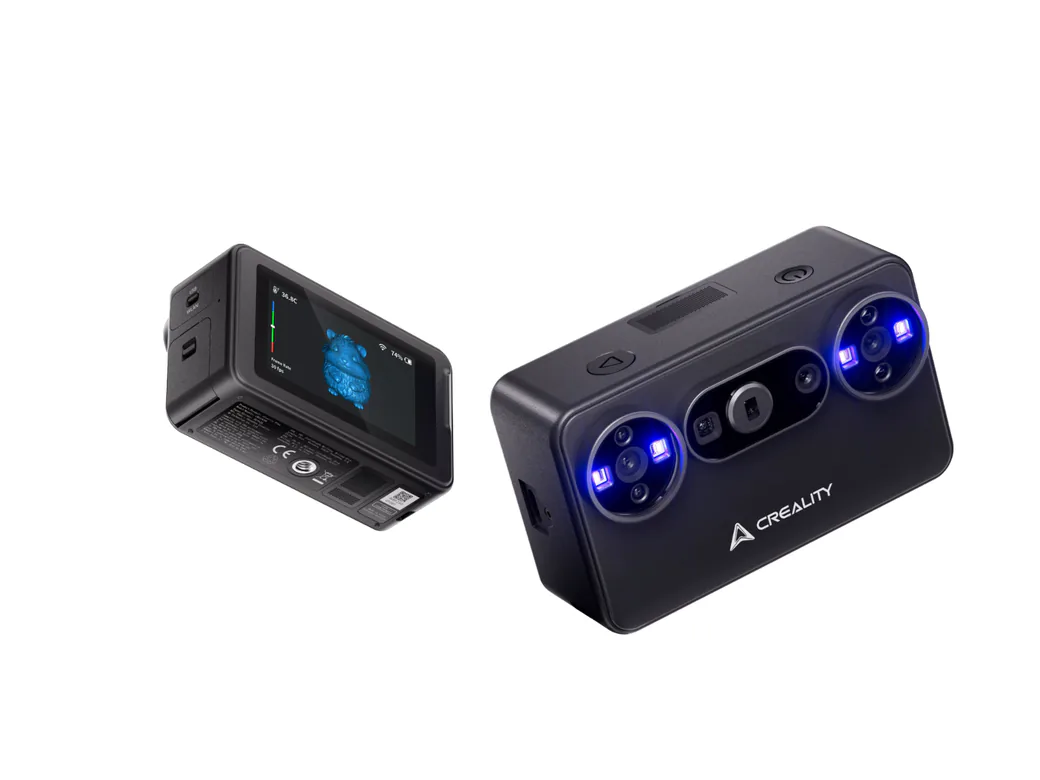
The weights are almost identical, 260 g for the Pika and about 286 g for the POP 4, so “portable” gets thrown around for both. But the word means very different things here.
The Pika is portable in the way a phone is portable. It has a 3-inch touchscreen on the device, connects to your phone over Wi-Fi 6, and can capture standalone. No laptop in the bag. You can walk up to an object, scan it, and check the result on the built-in screen or your phone. Its dual hot-swap batteries keep you going.
The POP 4 is wireless in a narrower sense. It uses Wi-Fi 6, and the battery handle gives you around four hours untethered. But the processing still happens on a PC. On top of that, the phone app was still in beta when the scanner launched, so early users mostly had to scan connected to a computer. If your dream is truly grab-and-go pocket scanning, the Pika delivers it more completely today.
The Hidden Cost Nobody Mentions: Your Computer
Here’s the thing the price tag hides: the POP 4’s real cost can nearly double once you account for the machine that runs it. This is the single most overlooked factor when weighing these two scanners.
If that hardware bill is what is stopping you, run the free route first. Scanning a product with just your phone costs nothing, and it shows you exactly which part of the job you are actually paying a scanner to solve.
Revopoint’s own minimum specs are steep. On Windows, they call for a 12th-gen Intel i9, 32 GB of RAM, and an Nvidia GPU with CUDA support. Mac users need an M3 Pro or Max. And there is a nasty catch for AMD graphics owners: without an Nvidia CUDA card, you are stuck on CPU acceleration, which drops the frame rate from around 100 fps to about 30 fps. One reviewer’s 13th-gen i7 with an RTX 3500 ran it fine, so you do not need the absolute maximum, but you do need real hardware.
The Pika sidesteps most of this. Because it can scan straight from your phone, the computer barrier is far lower. If you do not already own a scanning-grade workstation, that difference is real money you keep in your pocket. It is the same logic we ran when comparing the true cost of owning versus outsourcing 3D scans: the sticker price is only half the bill.
Software and Ecosystem
Software decides most of your time with a scanner, and it is where these two brands have the biggest reputation gap.
The Pika runs Creality Scan plus Creality Cloud, and exports to STL, OBJ, PLY, and ASC in one click. That is the good news. The honest news is that Creality’s scanning software has historically been the weak link in its scanners, and users have flagged it repeatedly over the years. It works, but temper your expectations on polish.
The POP 4 runs Revo Scan 6, which is more mature and has some genuinely modern tricks. Its local AI segmentation automatically strips out the background, and it is smart enough to ignore your hand when you hold an object mid-scan. It also does 3D Gaussian splatting, exporting a .splat file that suits game assets, VR, and animation. If those features excite you, the POP 4 pulls ahead on software. If you just want a clean mesh with minimal fuss, know that both brands still ask for patience.
The Learning Curve: Managing Expectations
Whichever one you buy, brace yourself: your first scan will probably fail, and that is not the machine’s fault. This is the honest talk most product pages avoid.
A 3D scanner is basically a very fancy tape measure. It outputs a point cloud, which software turns into a mesh of triangles. It doesn’t hand you an editable CAD model. To make a usable part, you import that mesh as a reference and reverse-engineer the geometry yourself. If you’re not already comfortable in CAD, a scanner will slow you down before it speeds you up.
The number-one reason beginners fail is tracking. The scanner needs to know where it is relative to the object, using geometry, texture, or markers. Symmetric, featureless objects confuse it, which is why a plain glass or a smooth ball often needs marker dots. Transparent and shiny black surfaces cause their own trouble and usually need a light dulling spray. None of this is unique to one brand. It’s just the reality of the hobby. One new POP 4 owner summed it up on Reddit: the results were “truly bad, not even close” to the polished YouTube showcases, purely because they were still learning.
On friendliness, the Pika’s shorter mode list and phone-first interface put a little less on a beginner’s plate. The POP 4 asks you to learn more upfront, but it rewards that effort with a higher ceiling once you know what you are doing.
Which Should You Buy?
There’s no single winner here. There’s a winner for your situation.
Buy the Creality Pika if…
- You mostly scan collectibles, small parts, faces, or props and want to do it quickly.
- You want to scan without lugging a laptop around.
- You do not own a high-end PC and would rather not buy one.
- You value a simpler menu over maximum control.
Buy the Revopoint POP 4 if…
- You do reverse engineering and design custom parts in CAD.
- You want multiple scanning modes and marker options for tricky objects.
- You need Gaussian splatting for game assets or VR.
- You already own a strong Nvidia-equipped PC (or budgeted for one).
Still on the fence?
Ask yourself one question: do you already have a scanning-grade computer? If yes, the POP 4’s extra modes and mature software give you more room to grow. If no, the Pika saves you both the workstation cost and the setup headache, and it gets you scanning from your phone today. For outdoor scanning of larger objects in bright light, the POP 4’s filters and higher lux rating give it the edge.
On pure value, the Pika is the easier win. It costs less up front and asks far less of your computer. The POP 4 justifies its higher all-in price only if you will genuinely use the extra modes, the precision, and the game-asset tools. Buy the capability you will actually use, not the spec sheet.
FAQ
Is Revopoint a good 3D scanner?
Yes, within its class. The POP 4 is a capable consumer scanner with strong accuracy that has held up in community micrometer testing. The main caveats are its high PC requirements and a learning curve that trips up newcomers. It rewards users who invest time and have the right hardware.
Which Creality scanner is best, and is the Pika it?
The Pika is Creality’s newest pocket scanner and a strong pick for phone-driven, grab-and-go scanning of small objects. Whether it is “best” depends on your needs. Creality also makes higher-end laser scanners in the Raptor and Sermoon lines for heavier reverse-engineering work. The Pika wins on portability and price, not on raw professional capability.
Can the Creality Pika scan without a computer?
Yes, and it’s one of its biggest advantages over the POP 4. The Pika pairs a built-in 3-inch touchscreen with a direct wireless link to your phone, so you can capture scans on their own. The POP 4 leans on a PC to do the processing, and its companion mobile app shipped in beta.
How powerful a PC do I need for the Revopoint POP 4?
Plan for a serious rig. On the Windows side that means a top-tier recent Intel processor, a CUDA-capable Nvidia graphics card, and 32 GB of memory, while Apple users want high-end M3 silicon. Skip the CUDA card and your capture speed collapses to a fraction of its potential. Budget for the computer before the scanner, not after.
Which is better for a complete beginner?
The Pika is slightly gentler to start with, thanks to fewer modes and a phone-first interface. But both scanners require you to learn tracking, object prep, and basic mesh cleanup. Expect a real learning curve either way, and plan for your first few scans to be practice.
CERTAIN CONTENT THAT APPEARS ON THIS SITE COMES FROM AMAZON. THIS CONTENT IS PROVIDED ‘AS IS’ AND IS SUBJECT TO CHANGE OR REMOVAL AT ANY TIME.
Price details
Product prices and availability are accurate as of the date/time indicated and are subject to change. Any price and availability information displayed on Amazon.com at the time of purchase will apply to the purchase of this product.