
Heads up — some of the links below are affiliate links. If you buy through them, I earn a small commission (at no extra cost to you), which helps cover the gear I test. Thanks!
- The Creality Sermoon P1S 3D scanner is a new all-in-one blue-laser and NIR handheld unit that Creality announced on September 22, 2026. Scanning and onboard processing both happen on the device, so you do not need a laptop or desktop nearby to finish a capture.
- Creality lists it for preorder at $2,099 through October 12, with the regular price shown as $2,299. The offer may change with stock.
- Compared with the Sermoon P1, the P1S adds 34 cross laser lines, MASK technology, a larger NIR field of view, and an NIR optical filter. It is also 23 g lighter, although RAM drops from 24 GB to 16 GB.
- Creality publishes a headline accuracy claim and blue-laser scanning up to 100 fps when PC-connected. No independent P1S testing was available when this article was written.
- The P1S looks most relevant for mobile reverse engineering and automotive work. Buyers who need proven dimensional accuracy or dependable onboard fusion should wait for test data.
If you scan parts around a vehicle or workshop, carrying a laptop can be more annoying than holding the scanner. An all-in-one unit solves that problem only when its onboard results are good enough to use.
That is the real question behind the Creality Sermoon P1S 3D scanner. Its specification sheet looks strong, but nearly every performance number currently comes from Creality. This first-look analysis separates verified product details from claims that still need testing.
One naming note will save you a bad search. The Creality Sermoon P1S scanner is a different product from the Bambu Lab P1S 3D printer.
Table of Contents
- Creality Sermoon P1S Price, Release Date, and Preorder Status
- Creality Sermoon P1S Specifications at a Glance
- Creality Sermoon P1S vs Sermoon P1: The Verified Differences
- How the Creality Sermoon P1S 34+7+1 Laser System Is Meant to Work
- Can the Creality Sermoon P1S Scan Without a PC?
- Creality Sermoon P1S Accuracy and Speed Claims Need Independent Testing
- Who the Creality Sermoon P1S Is Designed For
- Should You Buy the Creality Sermoon P1S Now or Wait for Reviews?
- What Makers101 Will Watch Next for the Creality Sermoon P1S
- Creality Sermoon P1S 3D Scanner FAQ
Creality Sermoon P1S Price, Release Date, and Preorder Status
Creality announced worldwide availability for the Sermoon P1S on September 22, 2026. As of September 23, the official US product page labels it as a preorder at $2,099, with $2,299 shown as the regular price.
Creality says the launch price runs through October 12, 2026. Launch-period orders also include one can of AESUB blue scanning spray, which disappears after application and avoids a separate cleanup step. Treat both the discount and gift as temporary.
The product page does not turn a preorder label into a confirmed delivery date. Regional inventory and taxes can differ. Shipping terms and the exact dispatch schedule can change too. Check them before paying, especially if you need the scanner for a scheduled job.

- 34 cross + 7 parallel + 1 single blue laser lines, plus NIR with MASK
- Scans and processes onboard with a 6-inch touchscreen, no PC required
- Claimed accuracy up to 0.02 mm (volumetric 0.02 mm + 0.08 mm/m)
- 807 g with two swappable 3,300 mAh batteries, Wi-Fi 7 and USB 3.0
Creality Sermoon P1S Specifications at a Glance
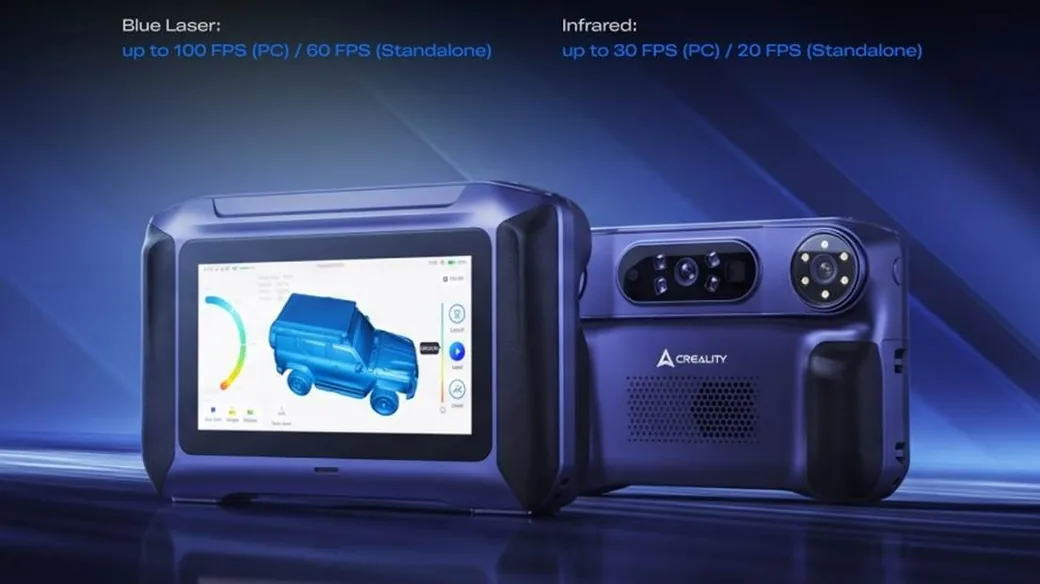
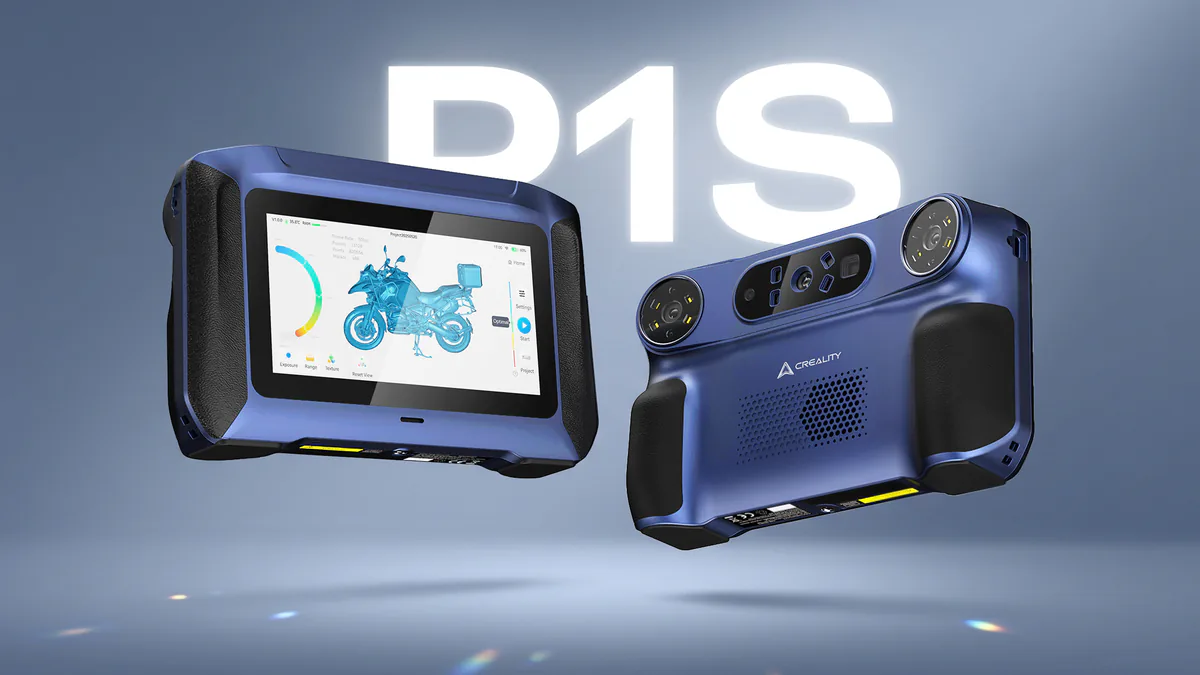
The Sermoon P1S combines four capture approaches with onboard processing. Its headline package includes 34 cross laser lines, seven parallel lines, one blue laser line, NIR structured light, and a 6-inch touchscreen.
| Area | Sermoon P1S specification | Evidence status | Why it matters |
|---|---|---|---|
| Capture modes | 34 cross lines, 7 parallel lines, 1 single blue line, NIR with MASK | Creality specification | Lets you switch between coverage, detail, recessed geometry, and broader marker-free capture |
| Accuracy | Up to 0.02 mm | Laboratory claim | Promising for reverse-engineering references, but object-level accuracy needs testing |
| Volumetric accuracy | 0.02 mm + 0.08 mm/m | Laboratory claim | Error allowance grows with measurement length |
| Blue-laser speed | Up to 60 fps standalone or 100 fps with PC | Creality specification | PC mode carries the highest advertised speed |
| NIR speed | Up to 20 fps standalone or 30 fps with PC | Creality specification | NIR runs slower than blue-laser capture |
| Onboard hardware | 8-core Qualcomm CPU up to 3.36 GHz, Adreno 740 GPU, FPGA | Creality specification | Handles capture and common processing away from a workstation |
| Memory and storage | 16 GB LPDDR5X, 256 GB UFS 4.0 | Creality specification | Provides local processing memory and project storage |
| Display and weight | 6-inch touchscreen, 807 g with battery | Creality specification | Supports live coverage checks while scanning in the field |
| Power | Two replaceable 3,300 mAh batteries, PD 3.0 charging | Creality specification | Battery swapping could reduce downtime, but runtime is untested |
| Connections | Standalone / Wi-Fi 7 PC / USB 3.0 PC | Creality specification | Offers portable use plus wireless or stable wired workflows |
Those numbers describe available capability. Finished scan quality also depends on calibration and object size. Surface finish, movement, ambient light, and processing settings affect what reaches your CAD software.
The four modes also have different jobs. Cross lines prioritize coverage. Parallel lines slow the process down for more controlled detail.
The single line handles recessed geometry. NIR with MASK suits compact and mid-sized objects when faster, broader capture matters more than blue-laser precision. Our guide to blue laser vs NIR scanning explains why one mode rarely wins every job.
Creality Sermoon P1S vs Sermoon P1: The Verified Differences
The P1S changes the P1’s high-speed laser pattern and NIR hardware. Memory, weight, and the bundle change as well, while the basic all-in-one idea remains.
The comparison below rebuilds the specifications from Creality’s current P1 page, its official P1 manual, and the P1S launch material. That matters because the supplied brand comparison sheet appears to reverse several model columns. It also assigns the wrong laser count and volumetric-accuracy figures after that swap.
| Feature | Sermoon P1S | Sermoon P1 | Practical effect |
|---|---|---|---|
| High-speed blue laser | 34 cross lines | 22 laser lines | P1S projects a denser wide pattern for coverage |
| Detail and deep features | 7 parallel + 1 single line | 7 parallel + 1 single line | Core precision-mode layout remains familiar |
| NIR | MASK, larger field of view, optical filter | Close- and long-range NIR, no listed optical filter | P1S targets broader capture and stronger ambient light |
| Accuracy claim | Up to 0.02 mm | Up to 0.02 mm | Same headline point-accuracy figure |
| Volumetric accuracy | 0.02 mm + 0.08 mm/m | 0.02 mm + 0.06 mm/m | P1S has a larger per-meter error term on paper |
| Blue-laser speed | 60 fps standalone, 100 fps PC | 60 fps standalone, 100 fps PC | Advertised frame-rate ceiling is unchanged |
| NIR speed | 20 fps standalone, 30 fps PC | 15 fps standalone, 30 fps PC | P1S raises the standalone NIR ceiling |
| RAM | 16 GB LPDDR5X | 24 GB | P1S has 8 GB less memory |
| Storage | 256 GB UFS 4.0 | 256 GB | Same listed local capacity |
| Fill lights | 8 LEDs in supplied comparison sheet; unconfirmed in PR | 12 dual-color (blue/white) LED fill lights per Creality’s official P1 page | P1S lighting count still needs page-level confirmation |
| Weight with battery | 807 g | 830 g | P1S is 23 g lighter |
| Included extras | Not specified in the P1S release | Adapter and turntable in supplied comparison sheet | Confirm the exact regional box contents |
The RAM reduction deserves attention, but it does not prove the P1S processes scans worse. Memory capacity, algorithms, thermals, storage speed, and workload size all influence performance. A useful review must compare the same raw project onboard and on a PC.
You can read our original Sermoon P1 specs and release coverage for the previous model’s full context. Keep the model names attached to every number. Mixing them is surprisingly easy here.
How the Creality Sermoon P1S 34+7+1 Laser System Is Meant to Work
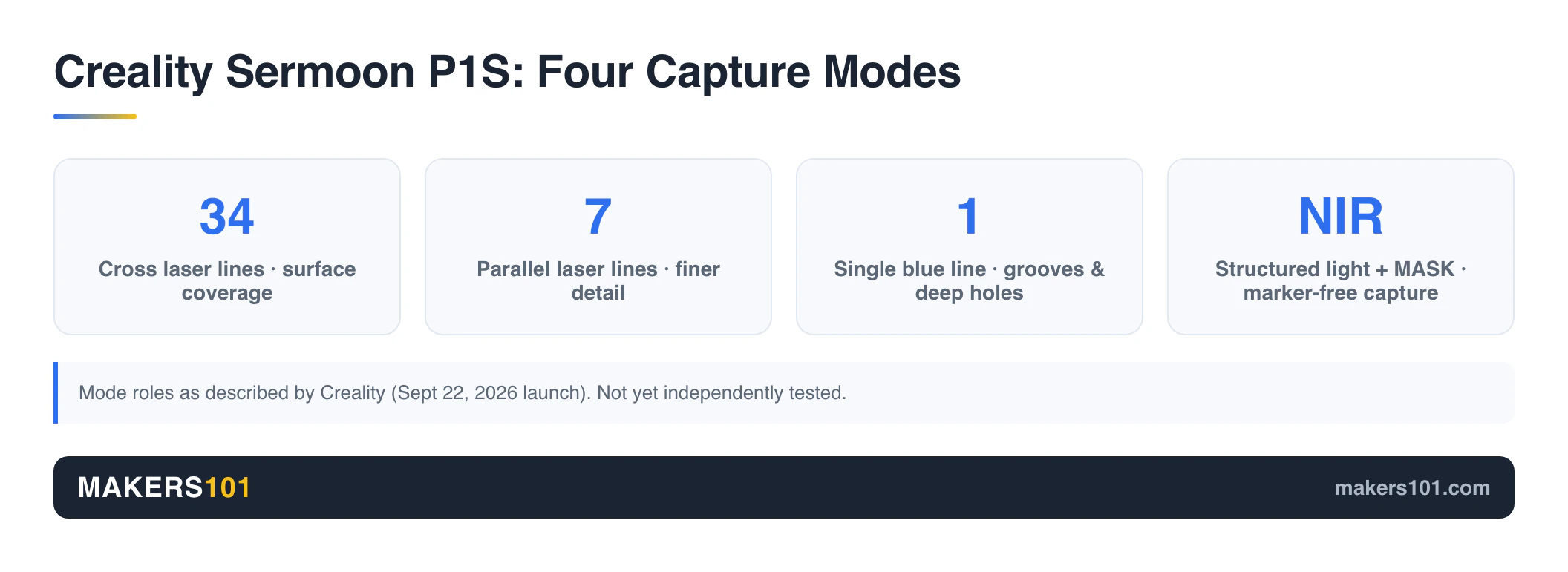
The three blue-laser patterns trade coverage for control, while NIR offers a broader capture route. Having four options is useful only if you choose the mode around the object’s geometry and surface.
34 cross laser lines for faster surface coverage
Creality positions the 34-line cross pattern as the fast mode for larger surfaces. More projected lines can collect wider coverage per pass. That should help with panels or housings, plus other medium-to-large mechanical parts.
Line count alone cannot guarantee a faster usable mesh. Tracking losses, noisy reflections, missed edges, and repeated rescans can erase the theoretical gain. The right test is total time from calibration to an accepted mesh.
Seven parallel laser lines for controlled detail
The seven-line mode is meant for smaller features and more deliberate capture. You may prefer it when edges, holes, or subtle surface transitions matter more than sweeping over a broad panel.
Creality used the same seven-line concept on the P1. That gives the P1S a familiar middle ground between its wide cross pattern and narrow single-line mode, although the new model still needs its own resolution tests.
One blue laser line for grooves and deep holes
A single projected line provides a narrower viewing angle for recessed geometry. Creality specifically calls out narrow grooves and deep holes, two areas where wider patterns can struggle to reach visible surfaces.
Depth and diameter still set hard limits. Surface finish and scanner angle matter too. A claim that the mode is designed for deep holes does not tell you the maximum measurable aspect ratio.
NIR and MASK for broader, lower-preparation capture
The NIR mode adds Creality’s MASK technology and a larger field of view. It is intended for small and medium objects where you want fast contour capture and less marker preparation.
Marker-free does not apply to every P1S mode or object. Creality’s own P1 workflow used reflective markers for blue-laser tracking, and feature-poor surfaces can still need them. Dark or shiny surfaces may require spray. Transparent and repetitive objects can need added tracking features.
Can the Creality Sermoon P1S Scan Without a PC?
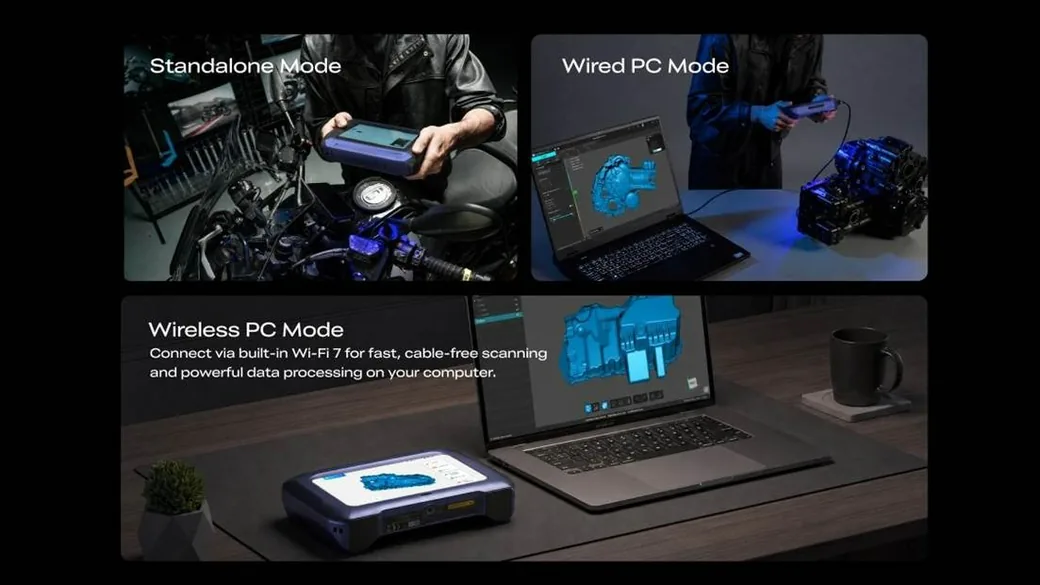
Yes. Creality says the Sermoon P1S can capture and process scan data on the handheld unit. Review and alignment controls also run onboard. You can connect it to a PC through Wi-Fi 7 or USB 3.0.
The 6-inch screen lets you check coverage beside the object. That can prevent the worst scanning surprise: finding a hole in your data after packing up. The 256 GB storage also keeps projects local until you transfer them.
You still have work after capture. A typical project moves from alignment through export, including fusion, meshing, and hole filling. CrealityScan exports STL and OBJ, plus PLY.
Those mesh formats do not become editable parametric CAD automatically. Our guide to the scan-to-model workflow explains where CAD reconstruction enters the process.
The previous P1 also offered onboard processing. Its official tutorial covered activation through meshing, including calibration and marker setup. Optional PC control completed the workflow.
A proper P1S review should measure result quality and processing time. Proving laptop-free operation is only the start.
Creality Sermoon P1S Accuracy and Speed Claims Need Independent Testing
Creality publishes a blue-laser accuracy ceiling and up to 100 fps with a connected PC. Those figures define the best advertised conditions. They do not promise that error ceiling across every finished mesh.
Point accuracy measures a local result. Volumetric accuracy describes how error grows across length, and the P1S figure is 0.02 mm + 0.08 mm/m.
Frame rate measures capture speed. Tracking stability and surface noise matter. So do alignment and fusion.
The standalone limits are lower: 60 fps for blue laser and 20 fps for NIR. PC mode raises them to 100 and 30 fps. Reviewers should publish the selected mode and resolution with every result. Object size, marker layout, calibration state, and processing path belong beside them.
The previous Sermoon P1 raises an onboard-fusion question
An independent P1 video review found that onboard fusion could reduce resolution. Re-fusing the same raw data on a PC at the same resolution setting restored quality to match a direct PC connection. That finding belongs to the P1 and does not establish how the P1S behaves.
It does give reviewers a clean P1S test. Capture one project, fuse it onboard, then reprocess the same data on a PC. Compare dimensions and fine edges, including holes. File size, processing time, and visible smoothing deserve separate results.
The Sermoon P1S strong-light claims need outdoor validation
Creality rates blue-laser operation for up to 110,000 lux. NIR is rated for up to 80,000 lux with its optical filter. Both are brand claims.
A useful outdoor test needs direct sun and open shade. Dark paint, bare metal, and reflective coatings need separate samples. It should also compare untreated surfaces with scanning spray. “Works outdoors” is too broad to guide a professional purchase.
Who the Creality Sermoon P1S Is Designed For

The P1S is aimed at people who need portable capture for reverse engineering or automotive parts. Inspection references and scan-to-print projects are secondary use cases. Its main advantage is carrying less supporting equipment around an object.
Automotive work is a natural fit. A 34-line pattern can cover panels and trim, while the single line targets recessed features. The previous P1 has been shown scanning a car molding, but that example did not publish final fit accuracy, CAD time, or a fitted replacement. Treat a scan as the geometric starting point.
The same boundary applies to mechanical parts. You still need reference dimensions and cleanup before manufacturing a mating component. Tolerances and CAD reconstruction remain part of the job. A smooth-looking mesh can still be wrong where the fit matters.
For field work, the 807 g weight and replaceable batteries are useful design choices. Local storage and live coverage review help too. Buyers comparing other price levels can start with our guide to the best 3D scanners for makers. A phone scan or cheaper structured-light scanner may already cover casual models and occasional reference geometry.
Should You Buy the Creality Sermoon P1S Now or Wait for Reviews?
Preorder the P1S only when its verified feature set solves a current workflow problem and you can accept launch-stage uncertainty. Most buyers should wait for downloadable scan files and repeatable independent tests.
Consider preordering if:
- You need standalone blue-laser capture at vehicles or field sites.
- Carrying a computer materially slows paid work.
- The wide and single-line laser modes match objects you scan regularly, as does filtered NIR.
- You can validate the scanner during the return period.
Wait for reviews if:
- Dimensional accuracy determines whether your parts fit.
- You need proven onboard fusion quality or battery runtime.
- Outdoor scanning and wireless stability are essential.
- You expect a polished CAD model directly from the scanner.
A scanner you rarely use is worse than a scanner that is slightly less capable. If phone photogrammetry or a sub-$1,000 model already delivers usable references, the P1S may add cost without saving enough time.
- 34 cross + 7 parallel + 1 single blue laser lines, plus NIR with MASK
- Scans and processes onboard with a 6-inch touchscreen, no PC required
- Claimed accuracy up to 0.02 mm (volumetric 0.02 mm + 0.08 mm/m)
- 807 g with two swappable 3,300 mAh batteries, Wi-Fi 7 and USB 3.0
What Makers101 Will Watch Next for the Creality Sermoon P1S
The P1S still needs evidence on seven points: independent dimensional accuracy, onboard fusion, battery endurance, thermal behavior, wireless stability, strong-light performance, and long-term software support.
The most useful review would scan the same calibrated part in all four capture modes. It should publish raw data beside onboard and PC meshes. Measured deviations and processing times belong with failed attempts.
Battery tests should cover swaps and charging during sustained scanning. An idle timer proves little.
Account requirements deserve attention too. The P1 setup flow used Wi-Fi, a Creality Cloud login, and device activation. Creality has not yet demonstrated whether P1S users can complete a fully offline first setup and workflow.
This launch also fits Creality’s broader move beyond printers. Scanning and lasers now sit beside its connected fabrication tools. Our analysis of Creality’s wider hardware strategy explains why that expansion matters.
Creality Sermoon P1S 3D Scanner FAQ
Is the Creality 3D scanner any good?
The Sermoon P1S has a promising mix of blue-laser modes and NIR. Onboard processing and portable power suit professional capture. Independent P1S scan files and dimensional tests were unavailable as of September 23, 2026, so it is too early for a performance rating.
Can you provide a review of the Creality Sermoon P1 3D scanner?
The Sermoon P1 is the previous model, and existing P1 reviews should stay separate from P1S coverage. P1 testing provides useful questions about onboard fusion and PC processing. It also informs field-workflow tests, but cannot prove P1S performance.
Is Creality 3D scanner software free?
Creality currently provides CrealityScan installers through its official download center without listing a separate purchase price. The P1S launch material lists STL/OBJ/PLY export and AI-assisted hole filling. Creality makes no clear long-term licensing promise in the material reviewed here, so check the current download terms.
How much does a 3D laser scanner cost?
Prices range from a few hundred dollars for consumer scanners to several thousand for professional laser systems. The Sermoon P1S launched at $2,099 against a higher listed regular price. That puts it above casual maker scanners and below many industrial metrology packages.
Is a 3D scanner worth the money?
A scanner is worth the cost when it repeatedly saves more capture and modeling time than its ownership cost. Paid automotive or inspection work can make that calculation favorable, especially with reverse engineering. Occasional reference meshes rarely justify a $2,000 purchase when a phone or lower-cost scanner works.
What does a 3D laser scanner do?
A 3D laser scanner projects lines onto a surface and uses cameras to calculate its three-dimensional shape. The result becomes a point cloud, followed by a polygon mesh. You normally rebuild critical features in CAD before making dimension-sensitive parts.
What are the key differences between the Creality Sermoon P1 and S1 scanners?
The P1 is Creality’s all-in-one handheld model with onboard processing plus blue-laser and NIR capture. The S1 belongs to another Sermoon branch with its own optical system and target workflow. Compare the complete names carefully because P1/P1S/S1/X1 search results often overlap.