
Heads up — some of the links below are affiliate links. If you buy through them, I earn a small commission (at no extra cost to you), which helps cover the gear I test. Thanks!
Your printer sits idle most of the week. You’ve watched the videos where someone turns a spare bedroom into a business, and you’ve wondered whether the machine on your desk could do the same.
Search “how to make money with a 3d printer” and look at who wrote the guides. Google’s top result is a Reddit thread. Nearly every actual article under it comes from a company that sells 3D printers, filament, or a creator program. They are not lying to you. They are also not going to tell you the part where it stops working.
This guide gives you the numbers instead. What prints actually cost, what people actually earned, and why the math on both sides of this argument is usually wrong.
- Boxes and labels outrun filament as a cost line. Budget $5.76 per order before you spend a cent on plastic.
- Machine depreciation runs about $0.15 per hour. Leave it out and your profit is imaginary.
- The gap between a $5 print and an $88 print is not the printer. It is whether someone else can make the same thing.
- Licensing is stricter than the forums suggest, and an open-looking badge on a file does not make it yours to sell.
- Volume is where the margin hides, because shipping supplies are charged per order, not per part.
Table of Contents
Can You Actually Make Money With a 3D Printer?
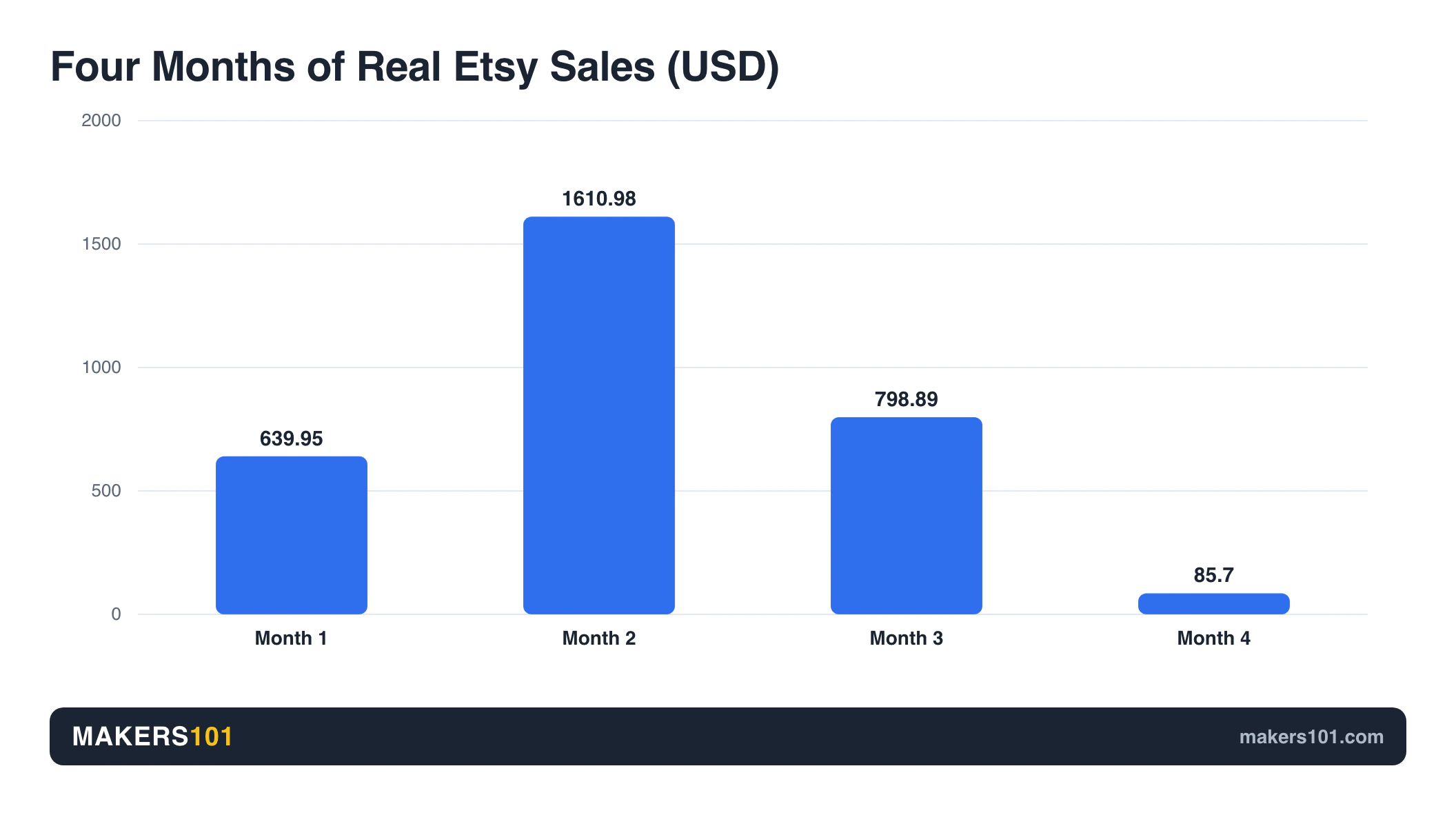
Yes, and less than you hope. One printer running flat out nets roughly $1.54 an hour, which works out to about $258 a week, and only if every part sells. A real four-month Etsy run went $639.95, then $1,610.98, then $798.89, then $85.70. The ceiling is real. So is the floor.
Start with the optimistic version. MysticMesh3D breaks down a print called the Chill Zone station: 13 hours on the machine, about $20 of profit. That’s $1.54 per printing hour, or $36.92 a day with the machine never stopping. Call it $258 a week.
That number assumes everything you print finds a buyer. It won’t. As he puts it: “Sales aren’t just gonna fall out of the sky.”
Now the version nobody puts in a thumbnail. Kevin Heelan published four months of real Etsy figures from a home shop that started with three products, two of his own design and one licensed from someone else.
| Month | Visits | Sales |
|---|---|---|
| 1 | 145 | $639.95 |
| 2 | 2,413 | $1,610.98 |
| 3 | 1,199 | $798.89 |
| 4 | 2,462 | $85.70 |
Look at month four again.
That is the busiest month of the entire run. More visitors than any other month, and sales collapsed to $85.70. Traffic is not revenue. Anyone who tells you to “just get more eyeballs on your listings” has not watched a month like that happen to them.
The ceiling is genuinely high. LayerLab cleared over $10,000 in 90 days running two printers out of a bedroom. Uncle Jessy has brought in almost $90,000 on Etsy across three to four years, with a single listing accounting for more than $30,000 of it. Those are real people with real numbers.
They are also the people who made it. Layered Kingdom said the quiet part out loud while grinding on MakerWorld: “I’m comparing myself to someone making $10,000, which is not realistic for a beginner.” OffDaBench, whose startup guide I keep coming back to below, mentions almost in passing that this is his sixth run at a business.
I’ve done the small version of this myself: local market stalls, and a stretch of standing in a park selling 3D printed toys to kids. Then I did the math. Labor, material, electricity, all the small costs you forget until you add them up. What was left over was thin.
You’re not the only one who suspects this. There’s a thread on r/3Dprinting asking whether making money with a 3D printer is harder than it sounds, and a 282-comment thread on r/BambuLab where sellers compare actual profit margins. Both camps show up. Both are telling the truth about their own situation.
Where the Money Actually Comes From: At a Glance
| Channel | What someone actually made | What it took |
|---|---|---|
| Etsy, first 4 months | $3,855 total from 6,219 visits | 3 products, 2 self-designed |
| Etsy, 3–4 years in | Almost $90,000 total | One listing alone did $30,000+ |
| Etsy, 90 days, 2 printers | Over $10,000 | Own designs plus paid ads |
| Local market stall | $88 per bird house, vs $5 flexis in stores | Picking the right market |
| MakerWorld model files | $480 in gift cards over 20 days | 31 models posted in 14 days |
The Real Math: What Your Prints Actually Cost
Filament is almost never your biggest cost. In three real breakdowns from a working print shop, packaging and shipping supplies outran the plastic in two of the three. Machine depreciation adds another 15 cents an hour on top. Leave those two out and the profit you think you’re making isn’t there.
The machine cost nobody counts
Your printer is a consumable. It just dies slowly enough that you forget to charge for it.
Here’s how Print Farm Academy puts a number on it. Take a $1,000 printer over a three-year life, which is 13,140 hours. Add $250 of maintenance across those years. That’s 9.5 cents an hour. Add electricity at roughly 2 cents an hour and you’re at 11.5. Multiply by 1.3 as a buffer and you land on $0.15 per printing hour.
As they put it: “If you’re not factoring in machine cost, you’re running a charity, not a business.”
Two more adjustments worth stealing. Multiply your material weight by 1.1 to cover failures and waste, because some prints will fail and you paid for that plastic too. And price your own time honestly. Kevin Heelan’s rule is worth repeating: if you had to hire someone to do your post-processing, how long would it take and what would you pay them? That number belongs in your price whether or not you write yourself a check.
Three real cost breakdowns
These are actual parts from an actual shop, priced to a 50% margin.
| Part | Plastic | Pack + ship | Labor | Landed |
|---|---|---|---|---|
| Reveal spacers (16) | $1.39 | $5.76 | $2.50 | $9.95 |
| DeWalt battery hangers (6) | $5.98 | $5.76 | $1.00 | $13.50 |
| Stop block jig | $2.38 | $5.76 | $6.00 | $20.07 |
Two lines are missing from that table, because putting them in pushes it off a phone screen. Machine cost adds $0.30, $0.77, and $0.30 down the column: tiny, and the line everybody drops. The stop block also carries $5.63 of bought-in hardware, which is what closes the gap on that last row. Priced for margin, the three land at roughly $20, $27 to $34, and $40 to $55.
Why shipping supplies cost more than plastic
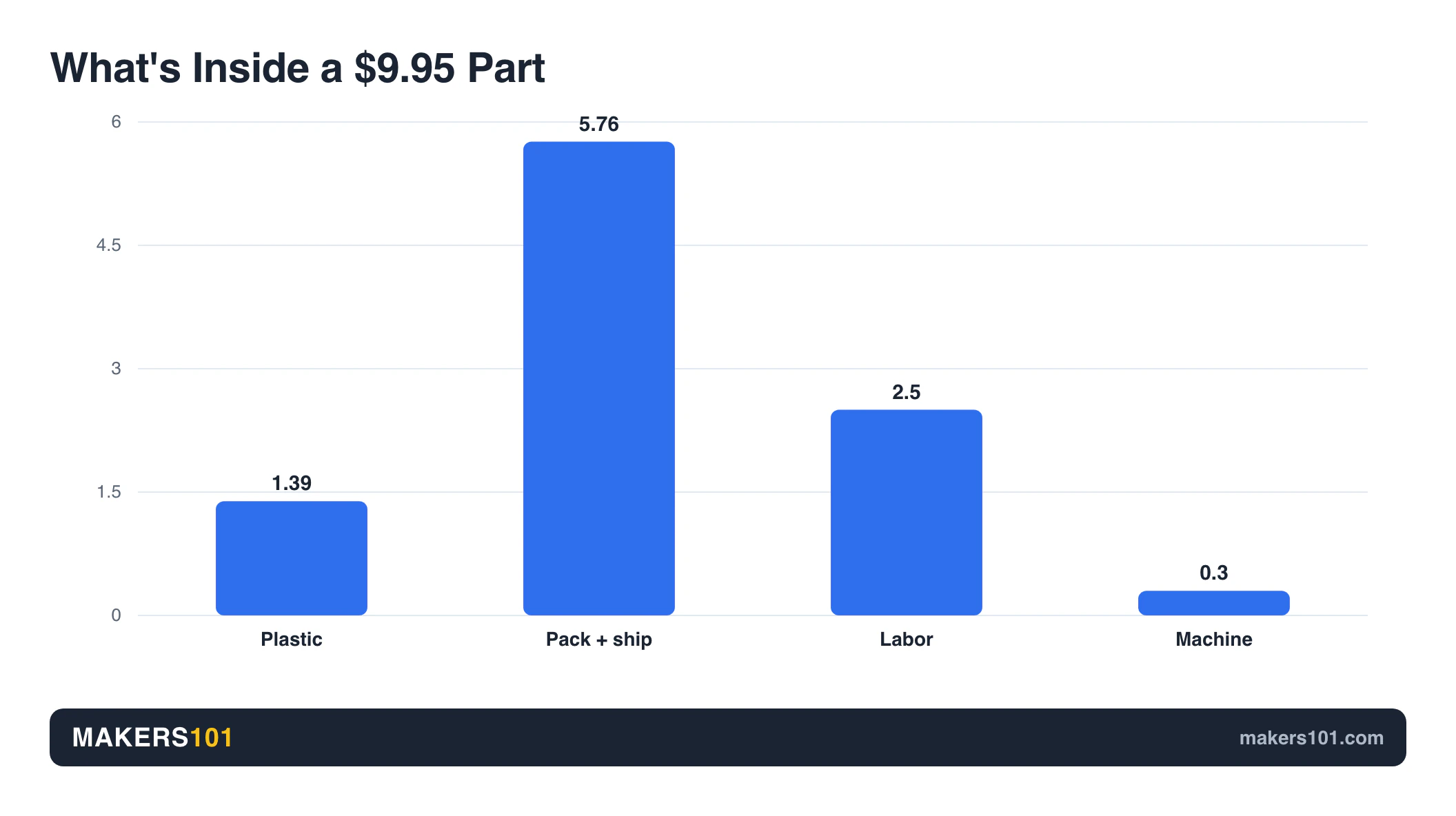
Look down the packaging column. It’s the same number every time, and on the spacers it’s four times the material cost. The plastic in that order runs $1.39. The box and label and padding run four times that. If you built your price around filament, you priced the cheapest part of the job.
This is exactly why the popular shortcut fails. You’ll see a rule of thumb that says charge about $1 per hour of print time plus your costs. It sounds reasonable. It also quietly omits packaging and your labor, which in the spacer example are $8.26 of a $9.95 landed cost. That’s the mechanism behind underpricing, and it’s why Corey J. Williams rebuilt his entire pricing model after realizing he’d been chasing low prices while ignoring what each order actually consumed.
If you want to sanity check your own parts, run them through a print cost calculator before you list anything. Print Farm Academy sums it up in one line: filament cost is not a good indicator of total cost.
Why the “3D Printing Doesn’t Pay” Math Is Usually Wrong
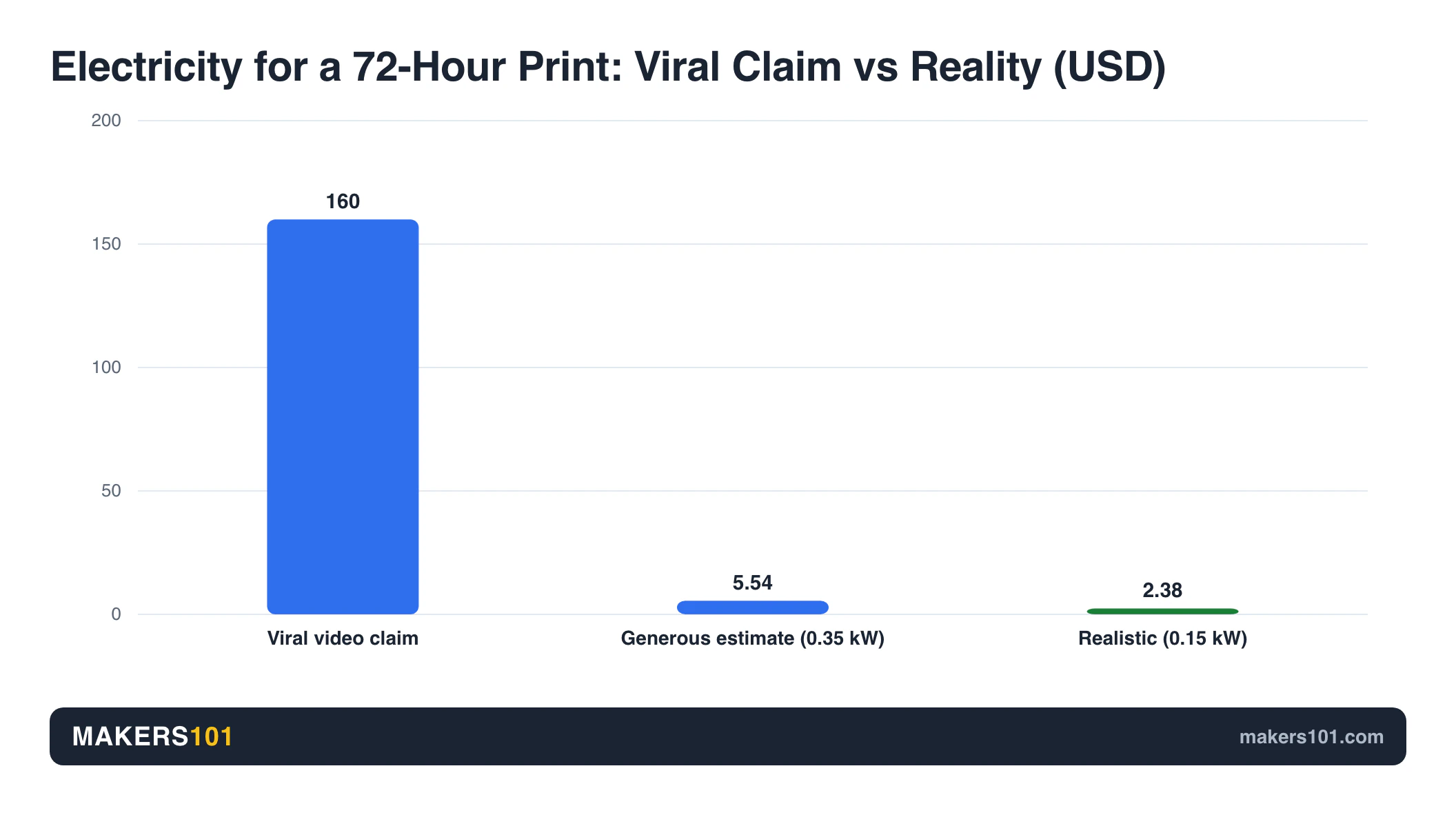
The most-shared version of this argument has an arithmetic problem. It claims three printed dragons cost $180, with $160 of that being electricity for a 72-hour print. At the quoted rate of 22 cents per kWh, that implies a 10-kilowatt draw for three days straight. Desktop printers draw a fraction of that, which puts the real electricity bill somewhere under $6.
Here’s the claim, verbatim from a video with over half a million views: “My cost electricity here in Michigan 22 cents a kilowatt hour. So that comes out to $160 just to run that printer for the 72 hours.”
Walk it through.
$160 divided by $0.22 per kWh is 727 kWh. Spread 727 kWh across 72 hours and you need 10.1 kilowatts running continuously. That is not a 3D printer. That’s roughly a row of electric ovens all going at once.
What does a printer actually pull? A desktop FDM machine spends most of its power on the heated bed, and lands somewhere in the region of 0.1 to 0.2 kW averaged across a print. I’m estimating here, so take 0.15 kW as a working number: over 72 hours that’s 10.8 kWh, or $2.38 at the same 22 cents.
You don’t have to trust that estimate to see the problem. Be generous and assume 0.35 kW, which is more than most desktop machines pull with the bed running: 25.2 kWh, or $5.54. Still nowhere near the claim. It only works if a printer draws as much as a small workshop.
So the real breakdown for those three dragons is closer to $20 of filament, a couple of dollars of electricity, and a dollar of shipping material. Call it $23, or under $8 a dragon. Not $60.
Now the uncomfortable part: that doesn’t rescue the argument, it just fixes the reason.
Put those dragons through the proper method from the last section. Add labor at a real rate, because someone has to pull them off the plate, clean them up, and pack them. Add machine cost across the print. Suddenly the margin is thin again, and it’s thin for reasons that have nothing to do with your power bill. The conclusion was half right. The reasoning was off by more than an order of magnitude, and it’s been watched hundreds of thousands of times.
Electricity is a rounding error. Your time isn’t.
What Actually Sells (and What Doesn’t)
The profitable prints are boring. Desk grommet caps, spacers, battery hangers, jig blocks. Things people need, can’t easily buy, and won’t comparison shop for. The articulated dragons filling your feed are the trap: zero barrier to entry means print farms win on price, every time.
Boring beats cool
The best example comes from Slant 3D: end caps for the cable holes in office desks. They break. The desk manufacturer won’t sell you one. So an office with forty desks has a problem they’ll pay to solve in bulk.
Nobody films a TikTok about grommet caps. That’s the point.
The same pattern shows up in how people find their first product. OffDaBench designed a wall mount for his chargers because his own desk was a mess, used it for three months, and only listed it after his wife suggested it. Three of them went for $15. That’s not a business plan, it’s someone solving their own problem and noticing others had it too.
Even in the passive-income corner, plain wins. Layered Kingdom’s best performer on MakerWorld was a heavy bullet fidget with nearly 2,000 downloads. Not the clever niche piece. The simple one.
And look back at the three cost breakdowns above. Spacers. Battery hangers. A stop block. All of them dull. All of them sold.
Niches that work
The pattern that holds is specific people with specific problems who already spend money on their hobby.
Crystal Creek built a real company around portable hand fishing reels. Campers and hikers are famously particular about how their gear packs, which makes custom containers and fire starter kits a high margin play. Pill bottles and desk organizers trade on the same logic. You’re not selling a novelty, you’re selling a fix.
Cosplay is the exception that proves the rule. Props and armor sell well precisely because they’re custom work at a size that’s a pain to produce. Both of those things keep the farms out. If that’s your lane, the machine matters more than usual, and it’s worth reading up on cosplay armor and props before you commit.
Miniatures, jewelry, home decor, replacement parts, educational models: all of them can work. All of them live or die on the same question as everything else on this list.
What doesn’t sell
Maker’s Muse found articulated prints at two department stores for $5 each.
You cannot win that fight. Print farms buy filament cheaper than you, run more machines than you, and ship for less than you. When the barrier to entry is “download the file and hit slice,” the price falls until only the biggest operation is still standing.
Search “dragon” on Etsy and you’ll see the same fifty dragons over and over. That’s not a saturated market for 3D printed goods. As LayerLab puts it: “The market isn’t saturated with 3D printed products; it’s saturated with copied, unoriginal ones.”
One more thing about the articulated ones, and this matters if your buyers are parents at a market stall. The small segments snap off, and what’s left is a sharp piece small enough for a kid or a pet to swallow. It’s worth thinking about before you set up a table at a family event.
Where to Sell
The same product lives or dies differently on each platform. Tumblers sold on both TikTok Shop and Etsy. Vases sold on Etsy and died on TikTok. Pick the channel that matches the buyer, not the one that matches your feed.
Etsy: rented traffic, real fees
Etsy’s fees buy you the hardest part of the job. Sales are the hard part of any business, and Etsy is already full of people searching for the kind of thing you make. The catch is that the fees land somewhere in the 15 to 20 percent range once you add everything up. Fine on a $40 jig. Brutal on a $9 keychain.
Two things move the needle more than anything else here. First, photos. Kevin Heelan came back to this across two different videos: people skip your listing not because the product is bad, but because the pictures look, in his words, like they were taken with a potato. Second, restraint on ads. LayerLab started at $2 a day, raised the cap to $100, and still never spent more than $13. The cap is not the spend.
If you’re weighing a machine specifically for this, see the FAQ at the end. Short version: it’s almost never the machine holding you back.
In person: why $5 dragons lose and $88 bird houses win
The market stall advice splits in two, and both halves are right.
Maker’s Muse says you won’t make money selling prints at markets. Ashley sells bird houses and feeders at markets for up to $88 each. Neither of them is wrong.
The difference isn’t the venue, it’s what’s on the table. Printed toys for kids are a category anyone can enter, which is another way of saying the farms already won it, and that’s the side of the table I was standing on in the park. A bird house is bulky and material heavy and a nuisance to ship, which is exactly why nobody’s undercutting it from a warehouse. Ashley’s rule is the one to keep: “If you don’t pick the right market for your ideal customer, it won’t go well no matter how many prints you bring.”
Three stall habits pay for themselves immediately. Put your grabbiest item at the edge of the table. Price everything in big readable type, because people won’t approach a table when they don’t know what things cost. Take cards.
TikTok Shop changes the rules again. You don’t need a following, the video does the work. But audience fit is everything: Corey J. Williams sent a pink and purple tumbler to an influencer with a male audience and got nothing back for it.
Volume, not retail: where the margin hides
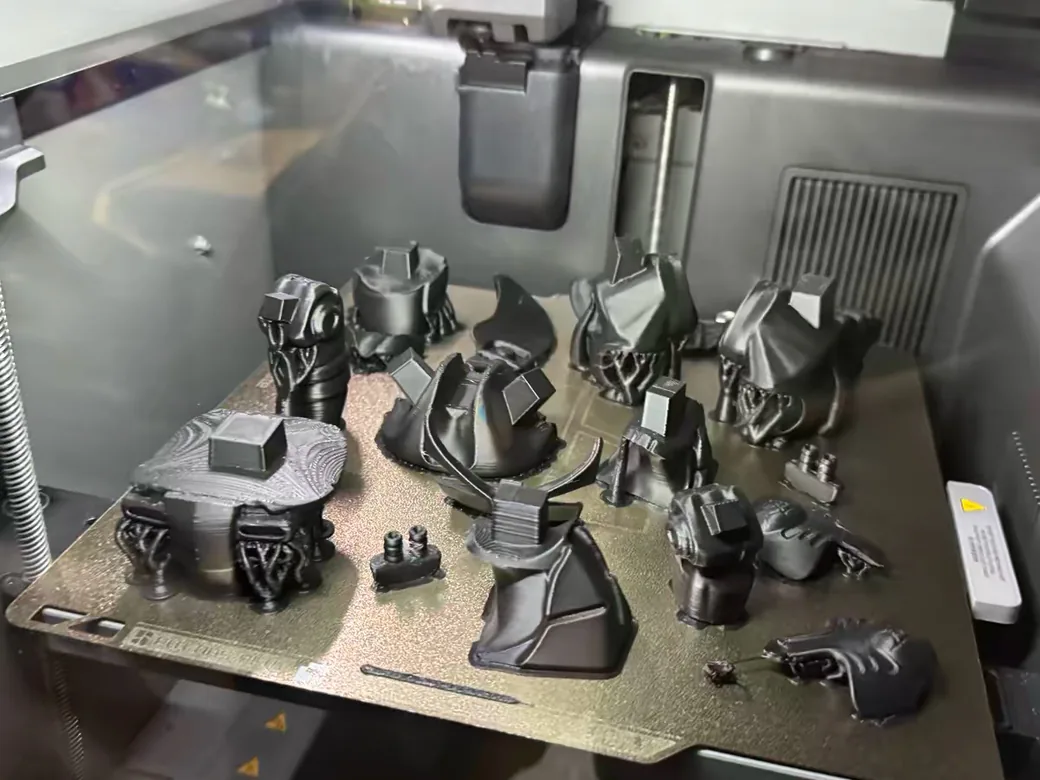
Someone I know skipped retail entirely and takes bulk orders instead. His margins are far better than anything I saw selling one toy at a time, and it took me a while to understand why that gap is structural rather than luck.
Go back to the cost table. Look at what scales with what.
Material scales per part. Machine cost scales per hour. But packaging and shipping is charged per order. It’s $5.76 on the 16-pack of spacers and $5.76 on the single stop block jig, which is the tell: that line barely moves with what’s in the box. Split across 16 spacers it’s 36 cents a part. On a one-item order it’s the whole thing, sitting on top of a single sale.
Labor is the other half, though it doesn’t behave the way you’d guess. It tracks how fiddly the part is, not how many you ship: $2.50 for sixteen spacers, $6.00 for one stop block. So the cheapest thing you can do with an hour of your own time is spend it on an order that ships a lot of parts, and the most expensive is handing one item to one person in a park.
This is why the desk grommet caps are such a good example. The office with forty broken desks isn’t forty transactions. It’s one.
None of this is a shortcut. It’s a grind at the start, and volume is what you’re grinding toward.
Files and services: the closest thing to passive
Selling the file instead of the object removes packaging and labor from the equation entirely. It also removes most of the money.
Here’s a real 20-day run on MakerWorld: 31 models posted in 14 days, 2,600 downloads, 2,000 prints, $480 in Bambu Lab gift cards. Real income for real work, but notice the ratio. The teenager who cleared over $10,000 in under a year on the same platform is the exception people quote, not the baseline. “Success on MakerWorld is not going to fall in your lap.”
Print-on-demand sits in between. Services like Teleport connect your model to an Etsy listing and let a farm print and ship it, so you never touch a box. Running that stack yourself costs about $90 a month once you add up Shopify plus its apps plus Amazon FBA, which is money you shouldn’t spend until a product has proven it sells.
Prototyping for local businesses and teaching classes come up in every guide on this topic. Both are real, and both are a different job than the one you came here for. You’re not selling a product anymore, you’re selling your time: chasing clients, quoting jobs, chasing invoices. If that sounds worse than printing, that’s because for most people it is.
The Legal Part Most Guides Skip
Assume everything is copyrighted until you verify it’s not. A Creative Commons badge is not permission. A Fallout model marked CC BY is still illegal to sell, because the person who uploaded it never owned the character in the first place. Anything marked NC cannot be sold at all.
Creative Commons is on version 4.0, and the letters matter. BY means credit the designer. SA means your version has to carry the same license. ND means you can’t modify it. NC means non-commercial, which rules out selling entirely.
The trap is the one above. A permissive badge on a file can’t hand you rights its uploader never held. Fan models of Disney or Marvel characters are off limits no matter what license sits on the download page. That other sellers are getting away with it is not a legal defense, it’s just a description of enforcement.
Platform policy is tightening on top of copyright law. Etsy now expects original designs for 3D printed items, which means a commercial license from Patreon or Thingiverse may still not be enough to keep your listing up. Sellers who lived through the 2023 policy shift will tell you how fast that can move.
It happens to designers too. Cinder Wings sells commercial licenses for her dragon model, and her work still gets resold across Etsy and TikTok by people who never bought one.
Do this instead, and it takes two minutes. For every model you sell, make a folder named after it. Save the page, the images, the description, plus the files themselves, and label the folder “commercial use.” If a takedown ever lands, you have your paperwork.
One caveat on the common advice to start with free commercial-license models to learn the workflow. As a way to practice packing and listing and shipping, it’s reasonable. It is not a business, and platform rules are moving against it.
The Hidden Costs Nobody Budgets For
The spreadsheet costs are the easy part. Printers are loud and they smell. You can’t take a vacation without hurting your Etsy ranking. Filament shifts color between batches. And every failed print is plastic you paid for and can’t recycle.
Two sellers working out of their own homes flagged the same two things about running machines in a living space: the noise, and the fumes. The fumes are the sneaky one. The worst part, as Kevin Heelan puts it, is that you can’t see them, which is exactly why most people decide they’re not an issue.
Then there’s the part nobody mentions until it happens to them. You can’t leave. Stretching your processing times risks late shipments and bad reviews, and Etsy’s vacation mode can hurt your search ranking. Kevin Heelan’s description is blunt: get enough orders and you start to feel like a slave to these printers.
Packaging advice from LayerLab looks contradictory until you line it up. They spent $1,000 on nice boxes and not a single customer ever mentioned them. They also say the easiest one-star review you can get is a customer opening a box of pieces. The cost tables charge you the same either way. Put together, the answer is clear: protection is mandatory, prettiness is a hobby. Spend on padding, not on printing your logo. Uncle Jessy’s swap is the cheapest win here: drop the $20-a-roll honeycomb paper for painter’s paper at $3.50 to $4.
Inventory has its own trap. Two identical spools of black Sunlu PLA from different batches came out as visibly different blacks when an AMS switched mid-print, and the same brand later changed its white and gray formula, turning a stockpile into scrap. We broke down how profitable that brand has actually gotten despite the mismatched batches. Buying in bulk is right. Buying deep in one color before you’ve sold anything is how you end up with a shelf of mismatched plastic. If you’re deciding what to standardize on, our breakdown of PLA vs PETG vs ABS is the place to start.
Run out at the wrong moment and you learn the other half. Corey J. Williams blew his ship dates twice over black filament. Kevin Heelan drove 45 minutes each way to a MicroCenter for an emergency spool. Corey’s rule after that: one is none, two is one.
Failed prints mostly go to landfill, and almost nobody is recycling them back into filament. And if your answer to all this is “I’ll just scale up,” price it first: a 64-printer farm runs north of $121,000 in machines alone, before shelving or power or space.
What You Actually Need to Start
Probably less than you think, and probably what you already own. The entry machine in most of these stories is a $220 A1 Mini, not a flagship. The two upgrades that actually paid for themselves were a label printer and bulk filament. Nobody’s success came from a bigger machine.
The gear
If you already have a working printer, you have enough. That’s not encouragement, it’s just true.
OffDaBench picks the Bambu A1 Mini, around $220 as of July 2026, specifically because it’s small. The tiny plate forces you to design compact products, which are cheaper to make and cheaper to ship, and it caps how much you can lose. If you’re weighing that one, we’ve looked at whether the A1 Mini is worth it for beginners in more detail.
The upgrades that pay are unglamorous. A thermal label printer is the one upgrade two unrelated sellers both landed on. Uncle Jessy puts it around $100. LayerLab’s version of the win: shipping labels went from a ten minute chore down to seconds. A cheap scale. A free USPS business account, which gets you package pickup at your door for nothing.

- [HIGH TECH LABEL PRINTER] Equipped with a Japanese high tech thermal print head, 203 DPI high printing quality. No ink, No toner, Clean with no mess…
- [PRINT WIRELESSLY]The label printer support printing wirelessly. For windows 8 or later and Mac, you can print via Bluetooth. For Android& iOS, you…
- [PRINT VIA USB] USB connection works with both Windows (7 and newer) and Mac OS (10.9 and newer) devices. Please long and press the feed button to…
- [WIDE USAGE] JADENS thermal label printer is widely used to print labels from various marketplaces and shipping platforms, such as Endicia, Dazzle…
- [EASY TO SET UP & RELIABLE AFTER-SALE SERVICE] Set up in one minute. Printer driver, instruction videos and problem shooting videos are provided in…
Material choice is a business decision, not a preference. LayerLab’s blind stoppers were printed in white ABS, which yellowed in the sun, with locking teeth that weren’t strong enough. He moved to PETG and redesigned the lock. That’s a product that would have generated returns forever, caught only because he tested it on his own windows for weeks first.
Buy one spool to prove the part. Then buy in bulk, because paying full retail per spool is a tax on not planning ahead.
And keep your day job while you figure this out. The worst case then isn’t ruin, it’s a marketplace listing for some used equipment.
Do you need to know 3D modeling?
Short term, no. Long term, yes. This is the question the guides dodge, so here’s a straight answer.
You can start today with free commercial-license models and learn the actual business: photography, listings, packing, shipping, answering angry emails. That’s a real skill set and it’s most of the job.
But look at what every ceiling in this article has in common. The farms win on price because the file is free to everyone. Etsy is pushing toward original designs. Maker’s Muse’s whole argument is that without a unique selling proposition, someone with more resources takes your lunch. Every one of those walls is made of the same brick: if you can make it, so can they.
Design is how you stop competing on price. As OffDaBench puts it, your real competitive edge is your creativity, not the printer. You don’t need to master Fusion 360 this month. You do need a plan for getting there, and tools like Plasticity sell for a one-time price with a 30-day trial if a subscription is what’s been stopping you.
FAQ
What are the most profitable things to 3D print?
Functional parts people can’t easily buy elsewhere. Real examples with real margins include desk cable grommet caps sold to offices in bulk, spacers, tool jigs, and battery hangers. The common thread is that the buyer has a specific problem and no convenient alternative, so they aren’t price shopping against a print farm.
How much does it cost to start a 3D printing business?
Less than the machines suggest. The starter printer in most of these accounts is an A1 Mini at a little over $200. Add roughly $100 for a label printer, plus your first roll of filament, and that’s the setup. The real cost is per order: budget close to six dollars for packaging and shipping supplies, plus roughly 15 cents per printing hour for machine wear.
Can you make money 3D printing miniatures?
Some people do, but it’s one of the hardest categories to start in. Miniatures are exactly the kind of small, common, file-driven product where print farms compete on price, and popular characters carry copyright problems on top. If you go this route, original sculpts or a specific local community are what make it work.
What are the top selling 3D printed items on Etsy?
Etsy’s own search tells you the problem with this question. Search “dragon” and you’ll get the same fifty models repeated across dozens of shops. Whatever is currently top selling is, by definition, what everyone else is already printing. The sellers with real numbers are the ones with their own designs.
Do I need to know 3D modeling to sell prints?
Not to start. Free commercial-license models are enough to learn packing and listings and customer service on. But every ceiling in this business comes from selling a file anyone else can download, and Etsy has moved toward requiring original work, so plan on learning it eventually.
Is it legal to sell 3D prints I didn’t design?
Only if the license allows it, and only if whoever uploaded the file had the right to license it at all. NC files are off limits commercially. A fan model of a franchise character stays unsellable even when it carries a CC BY badge, because the person who posted it never owned that character to begin with.
What’s the best 3D printer to make money?
The one you already have. Nothing in the real numbers here was limited by the machine. What bit people was labor and packaging cost, plus the question of whether anyone else could print the same thing. If you’re buying specifically to sell, reliability and running cost matter more than speed or size, and our guide to the best 3D printers for Etsy sellers covers the trade-offs.

- A1 mini + LED Lamp Kit for Creative Light Projects: Bring your ideas to life with the included LED Lamp Kit. Simply print compatible lamp models and…
- The Perfect 3D Printer for Beginners: A1 mini 3D Printer is designed to make 3D printing easy from day one with automatic calibration, simple setup…
- Experience the Bambu Lab Ecosystem: Access MakerWorld’s huge library of ready-to-print models, manage prints through the Bambu Handy app, and enjoy…
- Fast, Quiet, and Reliable Printing: Compact and beginner-friendly, A1 mini delivers high-speed, high-quality printing with quiet operation that fits…
- Made for Everyday Creativity: From toys and home décor to functional tools and personalized gifts, A1 mini makes it easy to turn ideas into real-life…
Is there a good book on making money with 3D printing?
The bottleneck isn’t knowledge, it’s that this space moves faster than publishing. Etsy’s original-design rules and platform fee structures have shifted repeatedly in the last few years, and any book covering them is dated before it ships. Seller forums and recent breakdowns from people posting their actual numbers will serve you better.