
Your computer won’t let you install anything. Maybe it’s a school Chromebook, maybe it’s a work laptop with locked-down admin rights, maybe it’s an old machine that stopped getting updates two years ago.
Search for the best free browser based 3D printing slicer and you get a wall of cloud platforms. Most of them want an account before they will slice a single layer. Almost none of them tell you whether you can download the finished file.
Here is which ones actually work, which ones only look free, and which one you can open right now without signing up for anything.
Every plan limit and price below was read off the vendor’s own page on August 25, 2026.
Table of Contents
- The Free Browser Slicers Compared at a Glance
- Cloud or Client-Side: The Split That Decides Everything
- What Actually Makes a Browser Slicer Usable
- Kiri:Moto: The Best Free Browser Based 3D Printing Slicer Overall
- SimplyPrint Is Best If You Want Real Desktop Profiles
- MeshSlice Is Best If Your Files Shouldn’t Leave Your Device
- SelfCAD Is Best If You Need to Model and Slice in One Tab
- AstroPrint Is Best for MakerBot-Era Printers
- The Ones That Say Free but Aren’t
- What You Give Up Compared to a Desktop Slicer
- What’s Coming Next in Browser Slicing
- Who Should Actually Use One (and Who Shouldn’t)
- Five Things That Will Bite You in a Browser Slicer
- FAQ
The Free Browser Slicers Compared at a Glance
Five tools cleared the bar of being both genuinely free and genuinely usable from a browser tab. The table splits them on the question that decides most of it: does it make you sign up?
| Tool | Account needed? | What’s free | Best for |
|---|---|---|---|
| Kiri:Moto | No | Everything, no caps stated | Anyone who can’t or won’t sign up |
| SimplyPrint | Yes | 15 cloud slices/month, 2 printers, 1 GB | Reusing your real desktop profiles |
| MeshSlice | No | Everything, still in beta | Files that shouldn’t leave your device |
| SelfCAD | Not stated | Free plan includes the STL slicer | Modelling and slicing in one tab |
| AstroPrint | Yes | 2 printers, 1 user, 1 GB | Older MakerBot-era printers |
The second table covers what almost no other guide bothers with: where the slicing actually happens, and whether you end up holding a file.
| Tool | Slicing runs | Engine | Can you download the file? |
|---|---|---|---|
| Kiri:Moto | On your device | Its own | Yes: gcode, svg, dxf, obj, 3mf |
| SimplyPrint | Vendor’s servers | 7 real slicers incl. PrusaSlicer, OrcaSlicer | “Print, queue or save”, wording unconfirmed |
| MeshSlice | On your device | Its own | Yes, G-code export is the product |
| SelfCAD | Cloud, per its own copy | Not disclosed | Not stated on any page |
| AstroPrint | Vendor’s servers | Slic3r or CuraEngine | Not stated on any page |
Those “not stated” entries are deliberate. I checked every vendor page for each of these tools and several of them never say whether the sliced file is yours to download or only gets pushed to a printer they already know about. That gap matters when your workflow runs through an SD card, so the table keeps it blank.
Cloud or Client-Side: The Split That Decides Everything
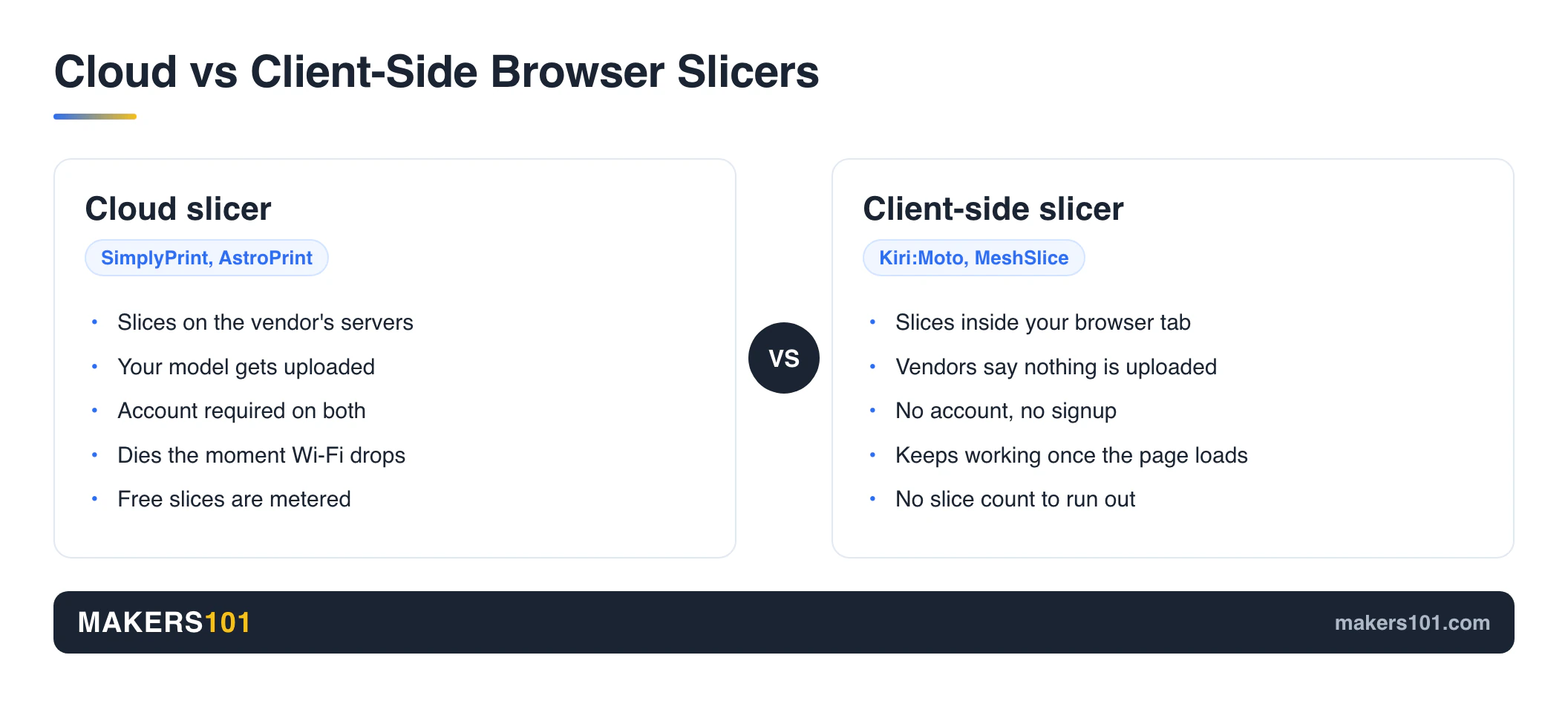
Browser slicers come in two shapes, and picking the wrong shape is how people end up stuck before they slice anything.
A cloud slicer uploads your model to the vendor’s servers, slices it there, and sends the result back. Your Chromebook does almost no work, which is the selling point. SimplyPrint and AstroPrint both work this way, and both want an account first.
A client-side slicer does the maths inside your browser tab. Nothing gets uploaded. Kiri:Moto and MeshSlice sit on this side, and neither one asks who you are.
That difference decides two things that “which has more features” never touches. The first is whether you can use the tool at all on a machine you don’t control, because a school or company login page is often the exact thing standing between you and a print. The second is where your model ends up.
Nobody writes about the second one, though the community keeps voting on it. Pull a sample of recent Reddit threads about browser-based 3D printing tools and the top-scoring three are a G-code editor (153 points), a model splitter (148 points) and an upcoming browser slicer (53 points). All three lead with some version of “runs locally, nothing uploaded, no account”. The search results for this topic go the other way, listing cloud platform after cloud platform.
If installing software is an option for you, none of this applies and you should go read our best slicer for 3D printing guide instead. This article is for when installing isn’t an option.
What Actually Makes a Browser Slicer Usable
Two questions settle it: does it require an account, and can you take the finished file with you? Everything else is a bonus.
1. Does it need an account? On a managed Chromebook this is often the whole ballgame. A teacher on r/3Dprinting asked for exactly this, needing to demo slicing on school laptops with nothing installed, and got very few real answers.
2. Can you get the file out? A slicer that will only send G-code to a printer it has already been paired with is useless when everything you print goes via SD card.
3. Does it know your printer? Pick the one that already has your machine in its list. Starting from a blank profile is where most beginner print failures actually come from, and that advice holds double when the tool only gives you a handful of settings to fix things with.
4. How deep do the settings go? Browser slicers usually expose layer height and infill and stop there. That’s fine for a bracket. It’s a problem the first time you need to fix stringing. Desktop slicers go deeper, but not infinitely. Cura still can’t vary layer height up one model.
5. Is anyone still maintaining it? Simplify3D went years without a meaningful update and many of its users moved on. A slicer that isn’t being maintained will quietly stop matching your printer.
Kiri:Moto: The Best Free Browser Based 3D Printing Slicer Overall
Kiri:Moto asks nothing of you at all. Grid.Space describes it plainly: it runs entirely on your device with no installs, no accounts, and no cloud dependency. You open the page and start.
It exports gcode, svg, dxf, obj and 3mf, and it can push jobs straight to Bambu, Moonraker or OctoPrint hosts if you want that. It also does CNC milling and laser cutting, which nothing else on this list attempts.
The full loop has been proven on genuinely weak hardware. One maker ran the entire workflow on a $70 Chromebook bought from MicroCenter, modelling a pair of eyelets in TinkerCAD, slicing them in Kiri:Moto at 0.2mm layers, 4 shells, 15% infill, 210°C nozzle and 65°C bed, then exporting the G-code to an SD card and printing them successfully. His own verdict on the result was honest: not the best quality he could produce, but good enough for the job.
That’s the right way to think about this tool. It’s the slicer you can always get to. Your best prints will still come off a desktop slicer.
How Slicing in a Browser Actually Works, Step by Step
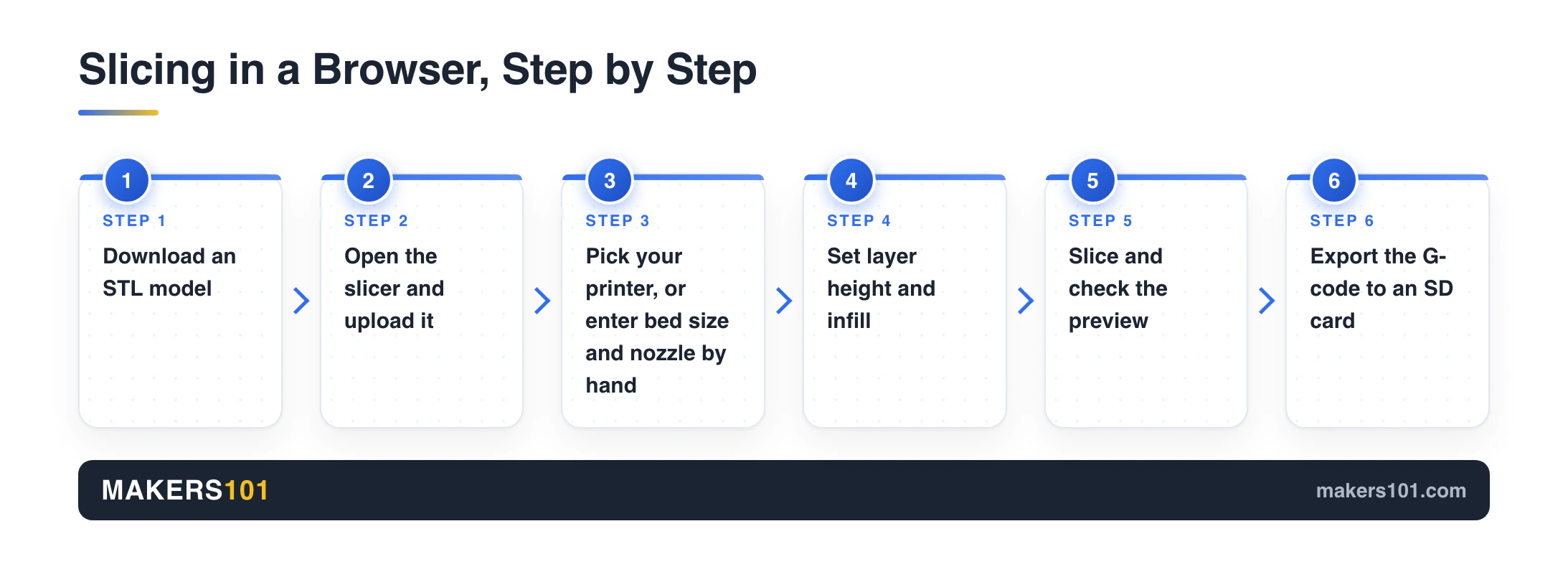
The sequence is the same across every tool here. It has been run end to end on a Chromebook old enough to have lost official support. That run used Cloud 3D Print, which isn’t one of the five above, and the steps transfer:
1. Download a model. Where to download 3D models hasn’t changed just because your slicer moved into a tab. 2. Open the slicer and upload the STL. 3. Pick your printer from the list, or enter its bed size and nozzle diameter by hand. 4. Set layer height and infill. On most browser slicers that is all you get. 5. Slice, then check the preview. 6. Export the G-code. 7. Copy it to an SD card, or send it to your printer if the tool supports your host.
One practical warning from that same run: plug in a mouse. Orbiting a model with a trackpad is miserable, and it’s the thing most likely to make a classroom demo fall apart.
SimplyPrint Is Best If You Want Real Desktop Profiles
SimplyPrint doesn’t write its own slicing engine. It runs seven established ones in the cloud, naming PrusaSlicer, OrcaSlicer, Bambu Studio, ElegooSlicer, CrealityPrint, Cura and Kiri:Moto, and it claims those are unmodified official binaries driven from the command line.
That’s a genuinely different proposition. If you already have a tuned OrcaSlicer profile, this is the only tool here that offers to run the same engine against it from a Chromebook.
The free plan is metered. You get 15 cloud slices per month, 2 printers and 1 GB of storage at $0, with no card required, per SimplyPrint’s pricing page. Fifteen slices is fine for occasional use and runs out fast if you’re iterating on a design.
You will need an account. The free plan’s own signup link makes that clear, so a locked-down school machine that blocks account creation blocks this tool too. On the other hand, the pricing page was last modified on July 11, 2026, which makes it the most visibly maintained option in this group.
MeshSlice Is Best If Your Files Shouldn’t Leave Your Device
MeshSlice does all of its slicing locally in your browser. Its own notice says the tool does not store or access your models or your G-code, uses no cookies, and collects no personal data. There’s no signup, just a box you tick to accept the terms.
That answers a question the rest of this category dodges. If you’re slicing a client’s part, a prototype under NDA, or anything you’d rather not hand to a company you’ve never dealt with, a cloud slicer is a bad fit and almost nobody says so out loud.
It’s also the newest name here and the developer says so directly: MeshSlice is still improving, and some features aren’t final. Treat it as a strong second option and keep something else on hand.
SelfCAD Is Best If You Need to Model and Slice in One Tab
SelfCAD is a browser CAD tool with a slicer bolted into the same interface, which makes it the only entry here where you can design a part and slice it without changing tabs.
The free plan really does include it. SelfCAD’s pricing data lists the STL slicer as an included feature on the free tier, alongside shape generators, transformations, mesh editing and boolean operations. What the free plan removes is the advanced modelling: sculpting, 3D sketching, deformations, image-to-3D, rendering and animation. Paid access runs $14.99 per month or $139.99 per year.
One caution. SelfCAD’s own copy says the slicer runs in the cloud. That line only surfaced through search, because its slicer pages serve an empty shell to anything that isn’t a full browser. Nothing anywhere confirms that the resulting G-code can be saved to your own machine.
For a free browser-based model-and-slice workflow with no account at all, TinkerCAD paired with Kiri:Moto covers the same ground in two tabs.
AstroPrint Is Best for MakerBot-Era Printers
AstroPrint is the only tool in this group still putting X3G output front and centre, which matters if you own a MakerBot or Sailfish-flavour machine that modern slicers have quietly stopped caring about.
The free Basic plan covers 2 printers, 1 user and 1 GB of file storage, at no cost. Slicing runs on AstroPrint’s servers using Slic3r or CuraEngine, and the interface is deliberately cut down to roughly three core settings.
The age shows. The site’s copyright is current and the pages load fine, but the marketing still leads with a file format tied to a printer generation that has largely disappeared, and no page I checked carries a version number or changelog. It’s alive. It isn’t moving fast.
The Ones That Say Free but Aren’t
Four names that show up on “free online slicer” lists don’t belong on this one, and the reasons are worth knowing before you spend an evening on them.
REALvision Online gives you 14 days and 50 prints, then converts to $4.95 per month. Signing up is step two of the vendor’s own published workflow, so there’s no anonymous path. Its printer support figures also contradict each other on its own site, listing 20 printers in one place and 227 in another.
3DPrinterOS has no free tier at all. It’s a 14-day trial, then $19 per month for 2 printers and 1 user. The product is aimed at universities and print farms, and its customer list reflects that.
Creality Cloud couldn’t be verified. Every page returned an empty shell with no readable text, including its own article about online slicers, and its help centre copyright still reads 2025. Its web slicer may well be fine. There’s no way to tell you what the free tier includes when the vendor’s pages won’t say.
3DGo blocked every attempt to reach it, returning a bot-protection challenge four times in a row. That says nothing about the tool’s quality and everything about what can be confirmed. So it stays off the list.
What You Give Up Compared to a Desktop Slicer
Desktop slicers in 2025 were arguing about painting fuzzy skin onto selected regions, setting fan speeds in 25% bands with plain-text explanations, and offering three separate coordinate systems for moving parts around. Browser slicers sit a long way below that. How far below varies more than you’d expect: MeshSlice exposes wall line count, retraction distance, z-hop, flow rate and support overhang angle, while some cloud slicers hand you layer height, infill and nothing else.
Printer coverage is the other gap. Browser slicer databases don’t carry every machine, and the ones they miss have to be configured by hand.
Fewer settings isn’t automatically worse, though, and this is where most comparisons get lazy. Markforged ships a slicer that lets you change almost nothing, and it buys extremely consistent results with that restriction. Cura, the free desktop default, was reported in 2022 to refuse temperatures above 450°C without edits to its core JSON files, so free desktop tools have ceilings of their own. And the payoff from deep settings only lands if you actually work for it: one shop cut a 36-hour carbon-fibre nylon print down to 10 hours, and it took 27 parameter revisions to get there.
Cura itself now ships basic, advanced and expert modes to hide most of its own options from people who don’t want them. The industry keeps arriving at the same conclusion from both directions.
What’s Coming Next in Browser Slicing
The interesting movement right now is engines being compiled to run inside the browser instead of on a server. One developer has published a WebAssembly slicer reverse-engineered from OrcaSlicer. The package description lists Arachne variable-width walls, tree supports, multi-material and even SLA resin slicing with .sl1 export. It went up on npm on August 6, 2026 and was still being updated on August 22.
That’s a signal about direction. It’s a personal project at version 0.2.2, and you shouldn’t trust a long print to it. But it points at where this category is heading: the gap between a browser slicer and a desktop one is a compilation target now, and the account wall that defines today’s cloud tools starts looking optional.
Who Should Actually Use One (and Who Shouldn’t)
Use a browser slicer if you’re in one of these four situations:
- Your machine is managed by someone else. School and workplace Chromebooks routinely block Linux and desktop installs outright, which kills desktop slicers before you start.
- Your laptop is too old to support anything. One maker ran a full slice-and-print workflow on a Chromebook that had already stopped receiving official system updates.
- Your desktop slicer runs badly on your hardware. One long-time user switched away from Cura entirely over its performance on an M1 Mac, reported in 2022 and possibly fixed since. A browser tool sidesteps the question.
- You want a second opinion. Keeping a second slicer around catches things your main one hides. One printer owner had a model that kept failing because PrusaSlicer skipped a layer, and the cause only became visible after loading the same file into IdeaMaker.
Skip it if you can install software. PrusaSlicer 2.9.6 is free, open source, needs no account and runs on your own machine, and the same is true of OrcaSlicer. The best slicing software still lives on Windows, macOS and Linux, and pretending otherwise doesn’t help anyone.
Five Things That Will Bite You in a Browser Slicer
The common failures here aren’t about print quality. They’re about losing your connection, missing your printer, and running out of free slices.
1. No internet, no slicing. Cloud tools stop dead. Client-side tools like Kiri:Moto and MeshSlice keep working once the page has loaded. 2. Your model goes to someone’s server. True for every cloud slicer here. Check the privacy policy before uploading anything you care about. 3. Trackpads make 3D navigation painful. Bring a mouse, especially if you’re demonstrating to a room. 4. Your printer may not be in the list. Have your bed dimensions, nozzle diameter and max temperatures written down before you start. 5. Free slice counts run out. SimplyPrint’s 15 per month disappears quickly during a design iteration, and there’s no warning built into your workflow.
Most of these are the same traps that catch people early on generally, and our guide to beginner 3D printing mistakes covers the ones that survive the move into a browser.
FAQ
Is there a free online slicer for 3D printing?
Yes. If you want the short answer, the best free browser based 3D printing slicer with no strings attached is Kiri:Moto. It and MeshSlice are both free, work entirely in a browser, and require no account. SimplyPrint, SelfCAD and AstroPrint all offer free tiers with limits, though SimplyPrint and AstroPrint need you to sign up first.
What is the best free 3D printing slicing software?
For desktop use it’s OrcaSlicer or PrusaSlicer, with Cura still the one most people land on first. All three cost nothing and need no account. The question only gets interesting when you can’t install software, which is when Kiri:Moto becomes the answer.
Is there a browser-based slicer that doesn’t require a login?
Kiri:Moto and MeshSlice both slice without any account. Kiri:Moto is explicit about running with nothing installed and nobody signed in, and MeshSlice keeps the whole job on your own machine. These are the two to reach for on a machine where you can’t create accounts.
Can I slice on an iPhone or iPad?
Partly. SimplyPrint advertises that its cloud slicer works on tablets and phones, and any client-side slicer will depend on how much your device can handle. A dedicated mobile app is the smoother path: Prusa’s EasyPrint covers roughly 80% of everyday slicing needs on a phone, which is more than most browser tools manage on a small screen.
Is Cura completely free?
Yes. Cura is free and open source, as are PrusaSlicer and OrcaSlicer. All three are desktop applications, so they don’t solve the problem this article is about. Cura was the most-used of the three as of a 2022 community poll, taking 65% of 3,000 votes.
Is Cura or Elegoo slicer better?
Both are desktop applications, so neither one helps on a machine you can’t install to. Between the two, go with whichever already ships a tested profile for your printer, since a ready-made profile prevents more failed prints than any feature comparison will.
Can I use a browser slicer just to estimate filament and cost?
Yes, and it’s one of the better reasons to open one. Slicing a model gives you the filament length or weight and the estimated print time without installing anything. Run those numbers through our print cost calculator to turn them into an actual cost per part.
Will a browser slicer know my printer?
Sometimes. Kiri:Moto and SimplyPrint carry broad machine lists, and SimplyPrint inherits profiles from the desktop slicers it runs. Smaller tools may not have yours, in which case you enter bed size, nozzle diameter and temperatures manually. Have those numbers ready.
Are browser slicers safe for my model files?
It depends on which kind you pick. Both Kiri:Moto and MeshSlice state that they slice on your own device, and MeshSlice adds that it neither stores nor reads your files. Nobody has independently watched the network traffic to confirm it, so read those as vendor statements you can check for yourself. Cloud slicers do upload it, so read the privacy policy first if the model is confidential.
Cover photo: “Working Chromebook” by Brad Stallcup via StockSnap.io, licensed CC0 1.0.