
I earn a commission if you buy through links on this page, at no extra cost to you. As an Amazon Associate, I earn from qualifying purchases.
You’ve probably got a dozen tabs open right now. One says $68. Another says $16,000. Both get called a laser engraver/cutter, and neither listing tells you which one you actually need.
Here’s the uncomfortable part. Make or Break Shop surveyed more than 500 laser owners in 2026, and over 30% said they regretted their purchase. Most didn’t blame the price. They blamed the type: they bought a diode laser expecting to cut acrylic, found out it couldn’t, then bought a CO2 machine to fix the mistake.
This is how to choose the best laser engraver/cutter for any budget, sorted by four real-world price tiers instead of brand hype.
Last updated September 2026. Prices are Amazon prices as of this writing and will drift; use them as a starting range, not a guarantee.
Table of Contents
- Laser Engraver/Cutter Prices at a Glance: What Every Budget Tier Actually Buys
- Diode, CO2, Fiber, and Infrared: The Real Reason Laser Prices Jump So Much
- Under $300: What a Budget Laser Engraver Can (and Can’t) Do
- Best Laser Engraver From $300 to $800: The Sweet Spot for Hobbyists and Side Hustlers
- Best Laser Engraver From $800 to $2,000: Where Small Businesses and Serious Hobbyists Land
- Best Laser Engraver Above $2,000: Fiber, CO2, and Machines Built for Volume Work
- The Hidden Costs Nobody Puts in the Spec Sheet
- Watch Out for Confusingly Similar Laser Engraver Names
- Laser Safety Gear You Actually Need
- Software: Why LightBurn Beats Most Brand-Locked Apps
- Don’t Buy a Laser Engraver If This Sounds Like You
- FAQ: Laser Engraver Budget Questions, Answered
- How to Choose the Best Laser Engraver/Cutter for Any Budget
Laser Engraver/Cutter Prices at a Glance: What Every Budget Tier Actually Buys
Match your project to a tier before you fall in love with a spec sheet. Here’s what each price range actually gets you, machine by machine.
| Budget | Pick | Type | Best For | Price |
|---|---|---|---|---|
| Under $300 | Creality Falcon A1C | Diode | Beginners, gifts | $299 (as of Sept 2026) |
| $300-$800 | AtomStack P1 | Diode + IR | Safe first laser at home | $499 |
| $800-$2,000 | xTool F2 | Diode + IR | Craft fairs, small-batch orders | $1,699 |
| $2,000+ | xTool F2 Ultra | MOPA Fiber + Diode | Metal marking at scale | $5,099 |
Every price above is what you’ll actually pay on Amazon. A manufacturer’s “starting at” number often means something cheaper, and you’ll see why in the next section.
Diode, CO2, Fiber, and Infrared: The Real Reason Laser Prices Jump So Much
Wattage and price tell you almost nothing on their own. The laser type underneath sets a hard ceiling on what you can cut or mark, and no amount of spending moves that ceiling.
There are four laser types you’ll run into, each with its own fixed list of materials it can and can’t touch.
| Type | Mechanism | Can Do | Can’t Do | Typical Price |
|---|---|---|---|---|
| Diode (blue, 450-460nm) | Direct semiconductor laser | Wood, leather, dark acrylic, cardboard | Bare metal, glass, clear acrylic | $199-$1,000+ |
| CO2 | Gas tube, requires enclosure and exhaust | Wood, acrylic (clear included), fabric, deep cuts | Bare or shiny metal | $400-$15,000+ |
| Fiber | Solid-state, wavelength suited to metal | Steel, brass, aluminum, titanium (deep marking) | Wood, most organics | $2,000-$5,000+ |
| Infrared (1064nm) | Lower-power fiber variant | Surface marking on metal, some plastics/leather | Deep engraving, cutting | $1,000-$2,000 |
The other split that matters is how the laser moves. Gantry (open-frame) machines run 800-1,200mm/s on a large bed, which is why they’re the better choice for cutting. Galvo (mirror-steered) machines hit 10,000mm/s or faster but on a work area closer to 8×8 inches, and adding air assist for cutting is difficult on most of them. That’s why galvo machines lean toward engraving and fine detail, and gantry machines lean toward cutting.
None of this changes with budget. A $16,000 diode laser still can’t touch bare metal. Know which type your projects need first, then shop within that type by budget.
For a deeper technical breakdown, see our full comparison of how diode, CO2, and infrared lasers actually differ.
Under $300: What a Budget Laser Engraver Can (and Can’t) Do
$300 is the realistic floor for a laser that actually works. Below it, you’re mostly buying assembly time and frustration.
Creality Falcon A1C ($299): Enclosed, Autofocus, and Beginner-Safe
Creality’s official price for the A1C starts at $199, but that’s the bare 5W unit with no camera, and Amazon doesn’t sell that configuration. The version you can actually buy runs $299 for the 5W model with the AI Camera.
What you get for that: a fully enclosed, Class 1 machine with a 150x150x148mm work area and a lifting platform that autofocuses on its own. That last part matters more than it sounds. Manual focus is where most beginners wreck their first few projects. You slide a focus tool under the head, eyeball the height, and hope you didn’t bump anything on the way out.
The laser modules swap without tools: 5W or 10W diode, plus an optional 1.2W infrared add-on for metal marking. It runs on Creality’s own Falcon Design Space software. Don’t assume LightBurn compatibility here.
One honesty note: every spec above comes from Creality’s own materials. We’ve requested a review unit, and it’s still working through Creality’s approval process. Treat this pick as promising on paper until we can confirm it hands-on.

We covered the full launch details, including the camera-assisted workflow, in our Creality Falcon A1C breakdown.
ORTUR Laser Master 3 ($289.99): The Open-Frame Pick for Fine Detail
If you’d rather have a bigger work area than an enclosure, the Laser Master 3 is an open-frame 10W diode with a genuinely useful trade-off: lower wattage than most competitors, but a tighter 0.05×0.1mm spot size. That means finer detail on photo engravings, at the cost of speed on thicker cuts.
It handles wood, leather, paper, and dark acrylic. Coated metal takes a surface mark; bare metal and clear material are off the table. Being open-frame, you’ll need your own safety glasses and some ventilation. There’s no enclosure doing that job for you.
Why the $68 Longer Ray5 Mini and $100 Two Trees TS1 Failed an Independent Test
Here’s what happens at the very bottom of the market. In one independent hands-on test, the $68.50 Longer Ray5 Mini never completed a single finished piece: the companion app crashed repeatedly and the machine froze mid-job. The $100-150 Two Trees TS1 fared little better. Its all-plastic body used tape to hold internal wiring in place, it shipped with no bottom guard at all, and a simple 70mm hot dog engraving took 24 minutes to finish.
Both machines also came with the wrong color safety glasses: green lenses, when a 445nm blue diode calls for orange or red. That’s not a minor detail. Wrong-colored glasses can let through exactly the wavelength they’re supposed to block.
The same tester’s take on the $300 AlgoLaser Pixie: it was the only budget machine that actually worked, with an adjustable Z-axis, a touchscreen, USB-C, and rotary support, and it successfully cut wood and leather and engraved fine photo detail.
Best Laser Engraver From $300 to $800: The Sweet Spot for Hobbyists and Side Hustlers
This is the first tier where you’re buying a machine you’ll actually keep. Below it, you’re troubleshooting most weekends. One warning even here: the K40, a roughly $400 CO2 machine, has a reputation for controller boards and software so rough that owners spend more time fixing it than using it. Cheap and “cheap in a way that costs you time” aren’t the same thing.
Carverall X1 Pro 20W ($390): Built-In Safety Features for a First Laser
Carverall is a newer name in this space, and the X1 Pro (its internal model number is JL9) is a 20W diode laser built around four laser diodes combined on one module instead of a single larger emitter, on a 300 x 300mm bed with a belt-free modular frame. The air assist pump, height risers, and safety glasses ship in the box instead of being sold as separate add-ons, which is unusual under $400. It also carries more built-in safety hardware than most machines at this price: a physical key lock, an emergency stop button, tilt/motion sensors, and limit switches.
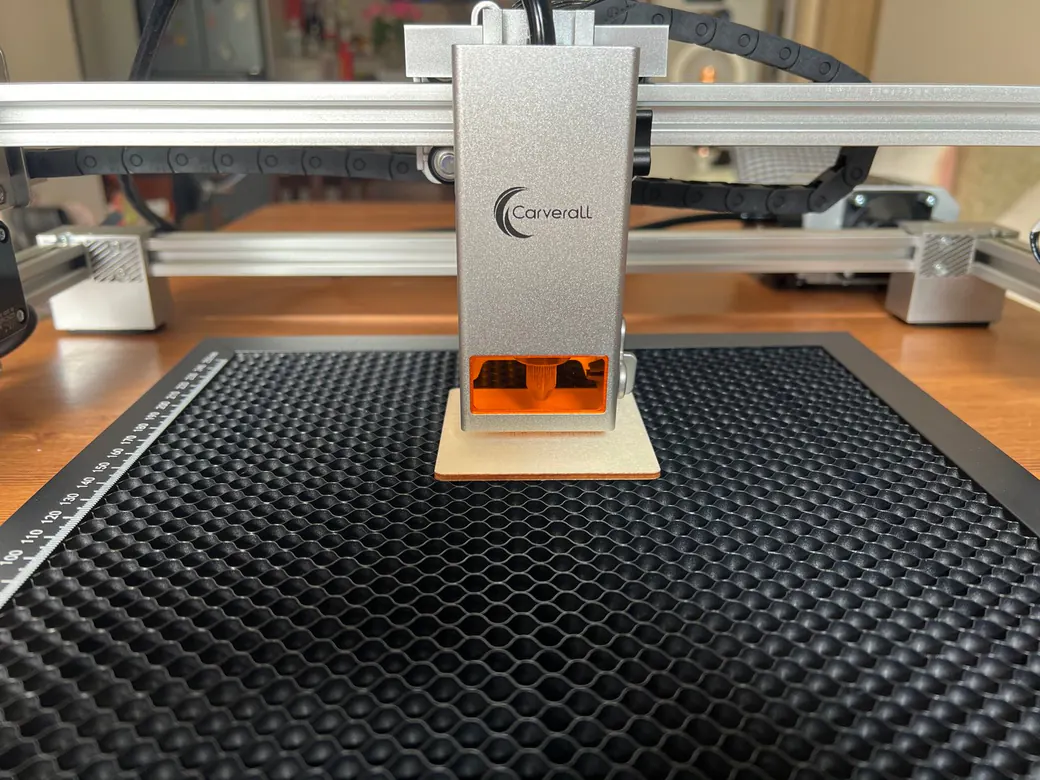
We unboxed and assembled ours in three modular steps in about 15-20 minutes, and it runs LightBurn alongside Carverall’s own CutLabX app, the same setup three independent reviewers we found also settled on. That mix of included safety gear, quick setup, and LightBurn support is why we’d point a first-time buyer here. One thing we won’t do yet is back up Carverall’s cutting-depth claims: the official site lists up to 35mm acrylic, Amazon’s own listing for the same machine says up to 8mm, and no independent tester we found has cut past 10mm hardwood. We’re running our own numbers next as part of a full review; until then, budget this machine for engraving and thinner material cuts, not the deeper marketing figures.

AtomStack P1 ($499): Our Pick for a Safe, Enclosed First Laser
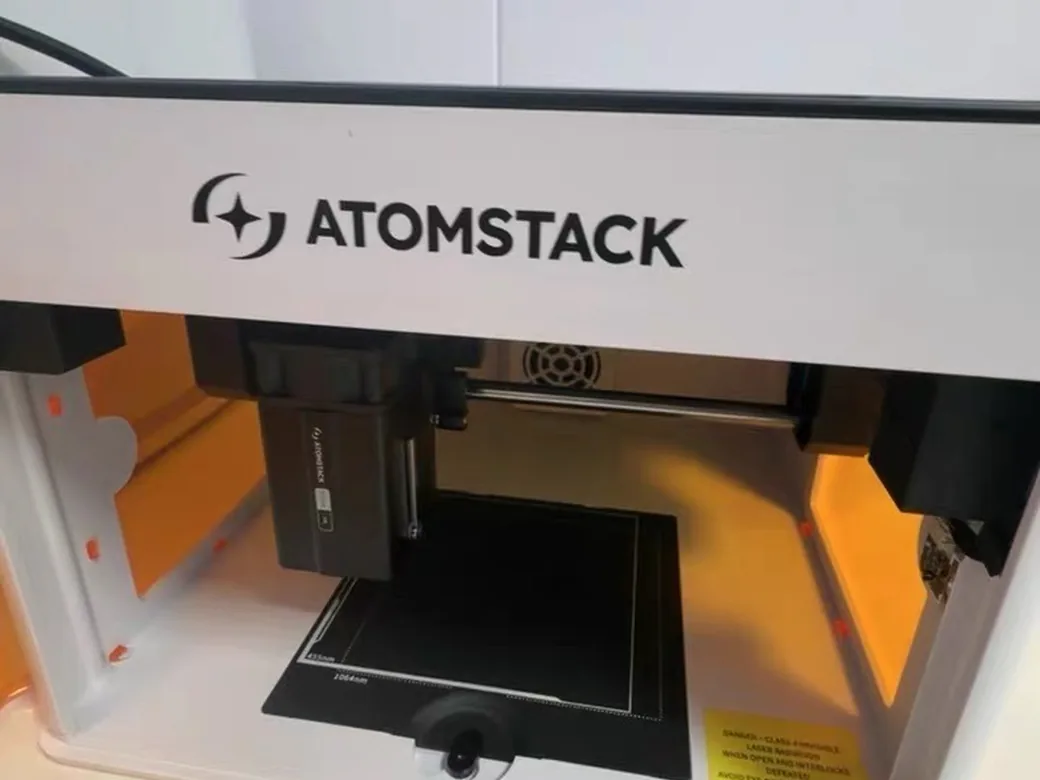
This is one of the machines we’ve actually put time behind. The AtomStack P1 is a fully enclosed dual-laser unit: a 5W blue diode (455nm) plus a 1.2W infrared module. We confirmed both wavelengths directly off the unit’s nameplate. It’s built around a 720-degree enclosure with a clear viewing window, so you don’t need safety glasses to run it, and it auto-pauses if it’s tilted or left unlocked.
The honest limitation is work area: about 110x110mm for the diode side, 105x100mm for infrared. That’s fine for keychains, coasters, and small signage. It’s not the machine for anything bigger than a coaster.
AtomStack X20 Pro ($599.99): For Cutting Thicker Wood on a Budget
If your projects run bigger than a coaster, the X20 Pro is built for cutting, with fine engraving as a secondary skill. Its four coupled 6W diodes add up to 20W of optical power. The listing’s “130W” figure is electrical draw: don’t stack it against single-diode machines quoting optical wattage. It cuts 12-15mm hardwood or 8mm black acrylic in a single pass across a 400x400mm bed, with air assist included.
Being open-frame, it needs ventilation and its own safety glasses. It also won’t match an enclosed machine for fine detail work.

Here’s why this tier matters beyond the hobby: one creator’s documented numbers show 250 acrylic keychains cut in about an hour, at roughly $0.14 in material cost per piece and a $3 sale price. That’s about $750 in gross revenue for one hour of machine time. That’s the kind of math that turns a $500 laser into a side hustle. For more products with real costs and prices, see our list of laser engraving ideas to sell.
Best Laser Engraver From $800 to $2,000: Where Small Businesses and Serious Hobbyists Land
This is the tier where a laser stops being a hobby purchase and starts being something you can build orders around.
xTool F2 ($1,699): Our Anchor Pick for This Tier
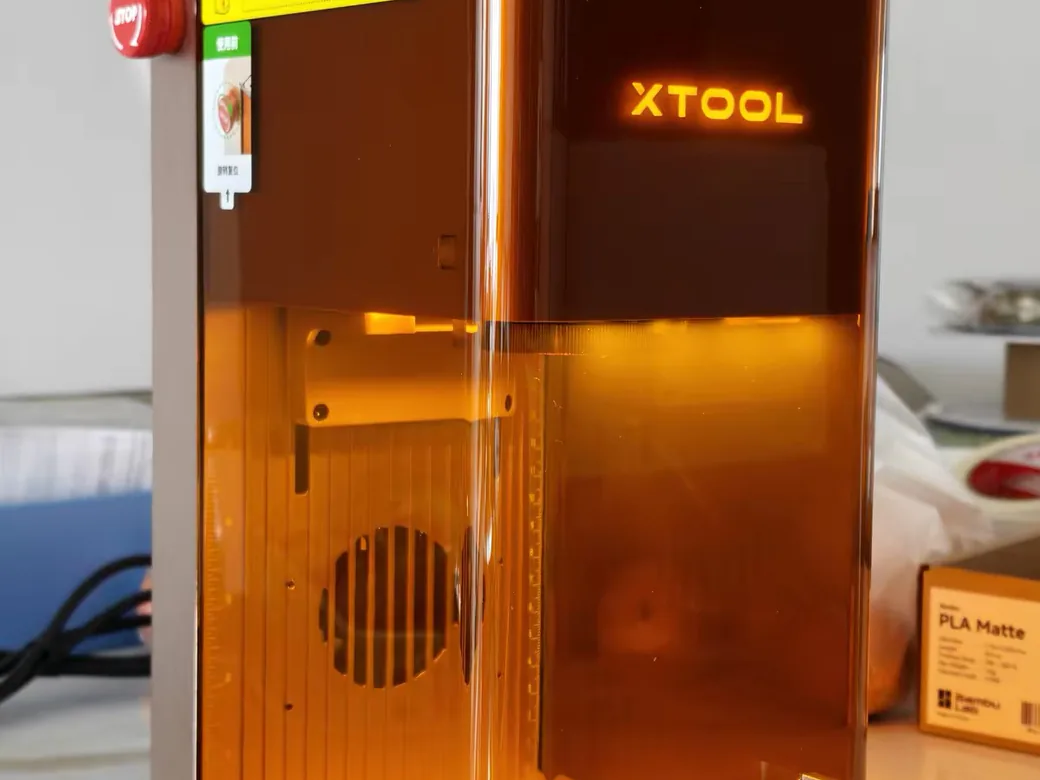
The F2 is a machine we’ve spent real time with, and it’s built to do two jobs one machine used to need two lasers for. It pairs a 15W blue diode with a 5W infrared module in a fully enclosed body, running up to 6,000mm/s. The diode side cuts about 15mm basswood or 12mm acrylic; the infrared side does color marking on metal, something a diode alone can’t touch.
A built-in 50-megapixel camera handles alignment to about 0.1mm, and the machine ships pre-calibrated, so you’re not spending your first weekend dialing in focus and offsets.

Creality Falcon A1 Pro ($1,099): The Cheaper Diode-Only Alternative
If you don’t need the infrared module, the Falcon A1 Pro covers similar ground for less: a 20W diode plus a 2W IR add-on, in an enclosed CoreXY body with built-in air assist, a key lock, and an emergency stop. Its 400x415mm work area is considerably larger than the F2’s.
The honest catch is software. The stock interface is finicky about camera calibration and prone to dropping WiFi. Nearly everyone who owns one ends up switching to LightBurn within the first week, and the complaints mostly stop once they do.

xTool M2 ($999): If You Want Full-Color Print-and-Cut, Not Just Engraving
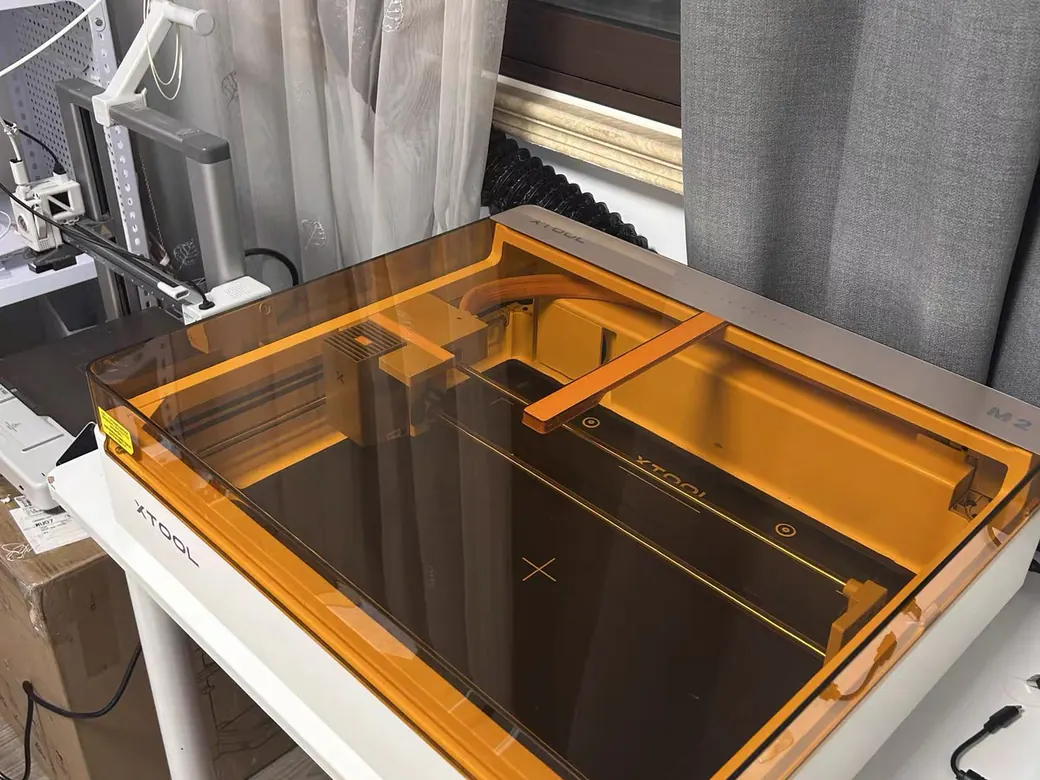
The M2 is a different tool for a different job: a 20W full-color CMYK print-and-cut machine aimed at sticker shops and gift makers, with dual cameras that preview your artwork on the material before you commit. It’s not a heavy-duty cutter, and it costs more than comparable pure engravers. If your business is stickers, cards, and transfers, it’s worth the premium. If it’s wood or metal work, skip it.

For how this tier compares to the modular machines one step up, see how the Falcon T1 stacks up against xTool’s fiber-diode combo machines.
Best Laser Engraver Above $2,000: Fiber, CO2, and Machines Built for Volume Work
Past $2,000, you’re no longer buying “can it do the job.” You’re buying “how fast, and for how many years.”
Creality Falcon T1 ($2,499): The Budget-Conscious Way Into Modular Galvo
The Falcon T1 is a modular galvo laser, and its pitch is flexibility: swap between 20W or 40W diode, 20W fiber, 60W MOPA, and 5W UV modules on the same base. Its native bed is a tight 175x175mm, though a conveyor add-on extends it to 850mm for batch runs. It’s fully enclosed, LightBurn-compatible, and rated Class 1 with flame detection.
One spec-sheet trap: Creality lists the diode wattage as optical output. Don’t stack it against machines quoting the bigger electrical number.

We go deeper on the module system in our Falcon T1 WaveSync modules guide.
xTool F2 Ultra ($5,099): Our Flagship Pick for Metal Color-Marking at Scale
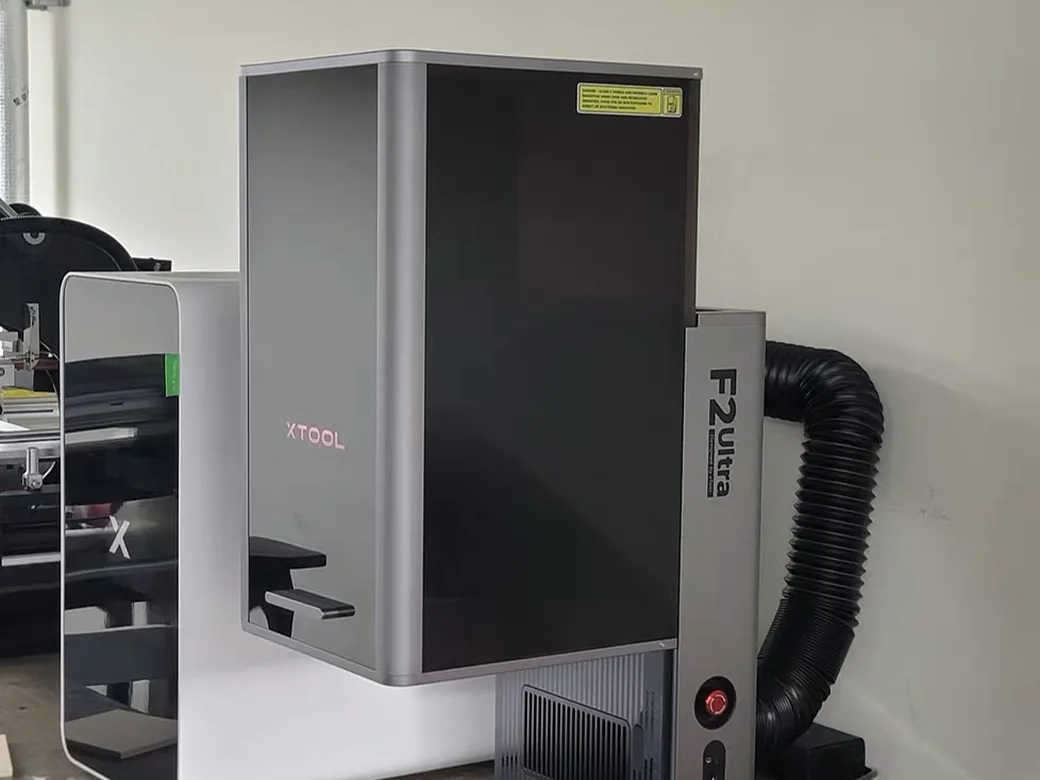
This is the machine in our lineup built for volume. It combines a 60W MOPA fiber laser with a 40W diode in one enclosure, running up to 15,000mm/s, with a work area that extends to 220x500mm using the conveyor accessory, the largest desktop fiber work area we’ve seen. The MOPA source is what unlocks color marking on stainless steel, something a standard fiber laser can’t do.

Specialty Alternatives: ComMarker B6 MOPA, xTool P3 CO2, and Where UV Still Falls Short
Three more machines worth knowing about at this tier, each solving a narrower problem.
The ComMarker B6 (60W JPT MOPA, $3,999) is fiber-only: unmatched for metal marking, but it won’t cut or touch wood at all. The xTool P3 (80W CO2, $6,399) goes the opposite direction: a large-bed CO2 cutter built for volume acrylic and wood work. Want CO2 without P3 money? Bambu’s 55W R1 starts at $2,499, though the accessories add up faster than you’d think.
UV lasers remain the odd one out. Current ComMarker UV listings start around $3,300, roughly in line with the $3,600-$5,500 range one reviewer clocked for 5W UV units. Unless you specifically need cold-ablation marking on glass, ceramics, or heat-sensitive plastics, it’s worth waiting.


Machines in this tier also come with real setup costs the spec sheet skips entirely, on top of the sticker price.
The Hidden Costs Nobody Puts in the Spec Sheet
The sticker price is never the real price. Budget another $50-300 for the stuff that isn’t in the box.
An air assist pump keeps smoke and debris off your cutting path and extends the life of your lens. A honeycomb bed protects your work surface and improves cut quality on anything you’re slicing all the way through. If your machine is open-frame, add a fume extractor or a well-ventilated space; even “smokeless” diode cuts still put fine particulate into the air.
At the higher end, a mid-range CO2 machine adds a water chiller, an air pump, and proper exhaust ducting, plus the reality that tubes, power supplies, and water sensors eventually need replacing yourself.
Watch Out for Confusingly Similar Laser Engraver Names
Creality and xTool both reuse model names in ways that trip up buyers comparing tabs. Read the full model name on the listing before you check out.
On the Creality side: the Falcon A1C ($299, this guide’s under-$300 pick) is a different machine from the plain Falcon A1 (an older, cheaper diode-only model) and from the Falcon A1 Pro ($1,099, this guide’s $800-2,000 pick). The “C” and “Pro” suffixes aren’t cosmetic. They mark real jumps in enclosure, camera, and power.
On the xTool side: the F1 ($999, diode plus a small IR module; we haven’t put hands on this one) sits a full step below the F2 ($1,699, this guide’s $800-2,000 anchor pick). The F2 Ultra ($5,099, this guide’s flagship fiber pick) swaps in an entirely heavier MOPA platform. Budget it as its own machine, separate from the F2 lineup. Buying the wrong one by skimming a listing title is an easy, expensive mistake. We mapped every current xTool model against the others if you want the full picture.
Laser Safety Gear You Actually Need
Two budget laser engravers under $150 shipped with safety glasses in the wrong color entirely. That’s the kind of detail no spec sheet will flag, but it’s the one that actually protects your eyes.
Glasses need to match your laser’s specific wavelength. A 445nm blue diode needs orange or red lenses with a real OD rating printed on the frame. Green lenses, which is what both failed budget machines came with, don’t block blue diode wavelengths properly.
Enclosed, Class 1 machines like the Falcon A1C and AtomStack P1 are designed so you don’t need glasses at all during normal operation. Open-frame machines like the ORTUR Laser Master 3 and AtomStack X20 Pro put that responsibility entirely on you: glasses rated for your specific laser, every time, no exceptions.
Software: Why LightBurn Beats Most Brand-Locked Apps
If a listing doesn’t mention LightBurn compatibility, assume you’ll be doing extra setup work.
LightBurn has become the closest thing this space has to an open standard: one interface that works across most diode, CO2, and fiber machines, with a large community and a real update cadence. Brand-specific software varies wildly. Some, like xTool’s Creative Space, are genuinely easy to start with. Others are rougher: Falcon A1 Pro owners routinely fight camera calibration and WiFi drops on the stock app before switching to LightBurn and finding the machine far easier to live with.
The practical rule: check LightBurn compatibility before you buy. Verifying it after delivery just wastes a return window.
Don’t Buy a Laser Engraver If This Sounds Like You
Three specific mismatches send buyers back to the return window within a month, regardless of budget.
You only want to cut clear acrylic or bare metal, and you’re eyeing a diode laser. A diode can’t do either job at any price point; you need CO2 for the acrylic and fiber for the metal.
You don’t have ventilation or an enclosed machine, and you’re looking at a CO2 unit. CO2 lasers produce real smoke and fumes; running one in a bedroom or unventilated garage isn’t a corner worth cutting.
Your budget is under $150 and you’re expecting a machine that “just works.” Based on the independent testing above, that combination usually ends in a laser that never finishes a project. Save up before you buy.
FAQ: Laser Engraver Budget Questions, Answered
What is the best budget laser engraver/cutter?
For most beginners, the AtomStack P1 ($499) is the safest starting point: fully enclosed, no glasses required, and simple enough to run on day one. If you specifically want a name-brand machine with autofocus, the Creality Falcon A1C ($299) is the newer, cheaper option, though it’s still working through independent testing.
How do I know what laser engraver I need?
If it’s wood, leather, or dark acrylic, a diode or CO2 laser handles it. If it’s bare or shiny metal, you need fiber. If it’s clear acrylic or thick material you need to cut all the way through, CO2 beats diode.
Are there any laser cutters that are affordable like xTool?
Yes. AtomStack, Creality’s Falcon line, and ORTUR all sell diode lasers in the $200-800 range that cover the same wood-leather-acrylic use cases as xTool’s entry machines, though xTool’s cameras and software polish are hard to match below $1,000.
Are cheap laser engravers worth it?
Above $300, generally yes. Below it, the independent testing above found machines that never completed a single project. That price band is the exception in this market, worth extra scrutiny before you buy.
How to Choose the Best Laser Engraver/Cutter for Any Budget
Figure out what you’re cutting before you look at price.
If you’re brand new and want something safe out of the box, the AtomStack P1 at $499 is the pick. If you’re ready to sell what you make, the xTool F2 at $1,699 covers wood, acrylic, and metal marking in one enclosed machine. If metal work is the whole business, skip straight to fiber: the xTool F2 Ultra at $5,099 is the machine to grow into.
If you’d rather shop by laser type instead of budget, our full breakdown by laser type covers the same machines from a different angle.
CERTAIN CONTENT THAT APPEARS ON THIS SITE COMES FROM AMAZON. THIS CONTENT IS PROVIDED ‘AS IS’ AND IS SUBJECT TO CHANGE OR REMOVAL AT ANY TIME.
Price details
Product prices and availability are accurate as of the date/time indicated and are subject to change. Any price and availability information displayed on Amazon.com at the time of purchase will apply to the purchase of this product.