
Heads up — some of the links below are affiliate links. If you buy through them, I earn a small commission (at no extra cost to you), which helps cover the gear I test. Thanks!
Recently, I noticed quite a few folks on Reddit asking about parts and upgrades for the Creality Filament System (CFS), especially those using it with the K2 Plus. Not sure the K2 Plus is your machine? Compare it against the rest of Creality’s range.
| Preview | Product | Rating | Price | |
|---|---|---|---|---|

| Creality K2 Plus Combo 3D Printer, Multi Color Printing with New CFS | $1,199.00 | Buy on Amazon |
Since there’s not a ton of info out there yet, I thought it’d be helpful to put together a straightforward list of official CFS accessories — the ones that are actually useful to have on hand, whether you’re replacing worn parts or just want to be prepared. Check which machine you have first. The K2 SE 4C does not use a CFS at all, it holds four spools on an open rack.
All the items below are original Creality parts.
Some are must-haves for basic operation, while others are good spares or upgrades depending on how heavily you use your printer.
Top 10 Must-Have Creality CFS Accessories
1. CFS 485 Communication Cables – 100cm / 150cm / 45cm
These are the connection cables between the CFS and your printer.
If you’re running into connection drops or need a different length for tidier cable routing, Creality offers these in three sizes.
Good for: Keeping a stable connection between the printer and the CFS.

- Compatible Models: This 150CM Creality 485 Cable is compatible with K2 Plus, Creality Hi.
- Length: The cable legth is 150CM, ideal for connecting CFS and 3D printers.
- Installation tip: Do not hot-swap cables.
- 100% original creality brand.
2. Multi-Color Filament Buffer (a.k.a. Filament Cushioner)
This sits between the CFS and your printer and helps manage filament flow.
It prevents tangles and gives your filament a bit of breathing room when it feeds in and out.
Good for: Smoother filament handling, especially with multiple colors.

- Smart Feed Assistance Mechanism – Equipped with a high-quality slider that moves to the right when feeding resistance is detected and returns to the left as filament is used. This provides real-time tension feedback to assist with smooth feeding and retraction, independent of active print jobs
- Supports Multi-Color – The buffer is engineered to efficiently manage up to 4 CFS (Multi Color Auto Filament System) units, enabling support for as many as 16 different filament colors
- Simple & Reliable Passive Operation – Functions without the need for master control or motor drives. The passive mechanical design promotes smooth filament transitions, helps reduce tangles, and minimizes extrusion issues for more consistent print quality
- Easy Installation & Universal Fit – It can be fixed to the printer with screws or double-sided tape, without complicated installation steps, making it simple, convenient, and efficient
- Creality Official Accessories – Designed as an official Creality accessory, this filament buffer is compatible with the K2 Plus Combo, Creality Hi Combo, and other multi-color modified 3D printers
3. CFS Feed and Withdraw Kit
This is the mechanism that pushes filament in and pulls it back out inside the CFS.
If the system isn’t loading or unloading properly, this is usually the part to check or replace.
Good for: Restoring proper filament loading and unloading.

- This Official CFS Feed and Return Kit is a must-have spare part for CFS 3D printer, helps to feed and return the filaments
- Compatible with Creality 3D Printers with CFS system like Hi Combo and K2 PLUS combo 3D Printer
- The details for brush motor: Voltage: 24V, Current: 0.17A
- Package: 1Set CFS Feed and Return Kit
4. Crealilty CFS Bottom Bracket with Brushless Motor
This is the central piece that switches between different filament paths. If it stops switching cleanly or feels stuck, replacing this module can solve it.
Good for: Reliable switching between filament inputs.
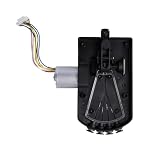
- Creality original CFS bottom bracket with brushless motor _0.35A_24V_L11
- Creality CFS 5 way hut kit Replacement
5. CFS Display Kit
This is the screen on the front of the unit. If yours is dead, flickering, or unresponsive, this kit brings it back to life.
Good for: Replacing a broken or faulty CFS screen.

- Creality CFS Display Kit, Origianl Screen Replacement for Creality CFS Auto Filament System
6. CFS Mainboard Kit
This is the main control board that runs everything in the CFS. If you’re seeing strange behavior or complete failure even with all other parts checked, this might be the one to swap.
Good for: Fixing system-wide problems or electronics failure.
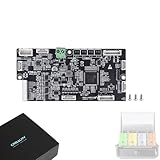
- – Original Creality CFS Motherboard Replacement – Ensure seamless compatibility and optimal performance with this genuine Creality CFS Motherboard Kit (MAIN_32_MS35774_GD32F303VET6), designed specifically for the Creality Filament System (CFS).
- – Enhanced Reliability & Precision – Built with high-quality GD32F303VET6 chips and factory-tested components, this mainboard guarantees stable operation, precise filament control, and extended durability for your 3D printer.
- – Easy Installation & Plug-and-Play Setup – Directly replace your existing CFS motherboard without complex configurations. Perfect for restoring or upgrading Creality CFS systems quickly and effortlessly.
- – Maintain Printer Efficiency – Keep your 3D printer’s filament feeding system running smoothly with this authentic replacement, ensuring consistent print quality and reducing downtime due to faulty components.
- – Trusted Creality Quality – Backed by Creality’s reputation for excellence, this CFS mainboard kit is rigorously tested to meet strict standards, offering a reliable, long-lasting solution for enthusiasts and professionals alike.
7. CFS Hub Idler Pulley Assembly
A small but important part that helps guide the filament through the hub. If filament movement feels rough or makes noise, this could be worn out.
Good for: Smoother filament routing and tension control.

- Original Replacement Part – This Creality CFS hub idler pulley assembly (4.33×21.96×21.99) is an authentic replacement for the Creality Filament System (CFS), ensuring seamless compatibility and reliable performance.
- Precise Fit & Durable Build – Designed specifically for Creality CFS, this idler pulley maintains smooth filament feeding, reducing wear and tear for consistent 3D printing results.
- Easy Installation – The assembly is a direct replacement part, making installation quick and hassle-free without the need for modifications.
- Enhanced Filament Feeding – Ensures stable filament tension and smooth movement, minimizing jams and improving print quality with your Creality 3D printer.
- Trusted Creality Quality – Made from high-quality materials, this genuine Creality part guarantees long-lasting durability and optimal performance for your CFS system.

8. CFS Front Tray Shaft Kit
Supports the front tray where filament enters and exits. If the tray movement feels loose or rough, this shaft kit helps get it back on track.
Good for: Restoring stable movement on the front tray.

- CFS Original: CFS front tray shaft kit is an original accessory, designed to perfectly fit CFS. With dimensions of 3.2 in (8.2 cm) in length and 0.6 in (1.5 cm) in diameter, it guarantees a precise and secure fit
- Troubleshoot Feed and Return: If the shaft assembly is visibly damaged or not securely mounted, it will result in feed failure and prompt replacement is recommended
- Durable and Reliable: Made from high-quality materials, this original CFS part ensures long-lasting performance
- Filament Management: Creality CFS front tray shaft kit works seamlessly with the bottom bracket to feed filament into the extruder and drives the tray back and forth to return filament inside the CFS
- System Integration and Response: Work closely with other components of the CFS system to coordinate refueling
If you’re using the CFS regularly, especially for multi-color or multi-material prints, having a few of these on standby is a smart move.
It’s way less stressful to swap a part quickly than to wait for a replacement in the middle of a project.