
Heads up — some of the links below are affiliate links. If you buy through them, I earn a small commission (at no extra cost to you), which helps cover the gear I test. Thanks!
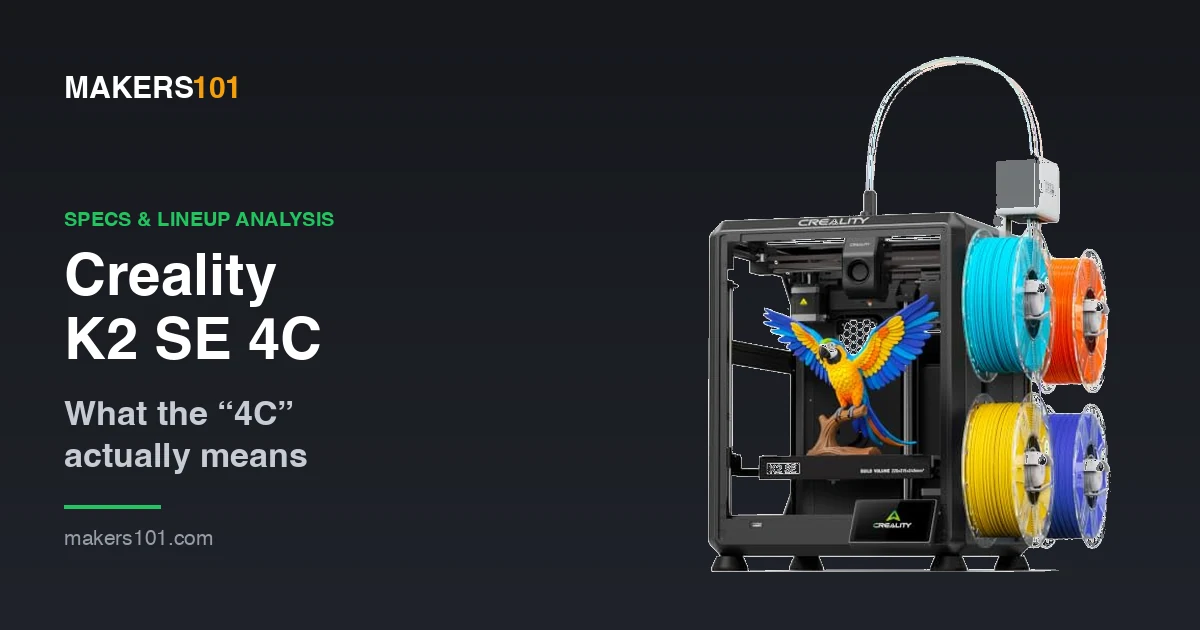
- The “4C” in Creality K2 SE 4C means four colors. Four spools sit on an open rack bolted to the side of the printer, feeding one hotend that swaps between them.
- Build volume is 220 × 215 × 245 mm, the smallest in the K2 family.
- It’s an open-frame machine with no chamber heating, so ABS and ASA will warp. PLA and PETG are what it’s built for.
- Creality’s 500 mm/s headline is a ceiling. Its own footnote puts typical speed across the K2 line at 300 mm/s.
- The SE runs plain step motors. The K2, K2 Pro, and K2 Plus all get FOC step-servos.
- This is not a K2 SE with a CFS attached. The sealed, moisture-proof CFS box is replaced by an open spool rack, which is where the “37% less space” claim comes from.
The Creality K2 SE 4C 3D Printer is the entry model of the K2 line, sold with a four-spool filament rack on its side where the rest of the K2 line uses a sealed CFS box. It prints up to 500 mm/s in a compact open-frame body, using step motors instead of the FOC step-servos found on the K2, K2 Pro, and K2 Plus. It handles PLA and PETG on a tight budget, while high-temp materials need a heated chamber it doesn’t have.
Creality sells it directly for $399, the same as Amazon.
I haven’t had a K2 SE on my bench, so this comes from Creality’s specs, current listings, and owners of the sibling machines.
Table of Contents
- What “4C” Actually Means on the K2 SE
- Creality K2 SE Specs at a Glance
- Open Frame Is the Real Trade-Off
- Where the K2 SE Sits in the K2 Family
- What $399 Buys You Outside the K2 Line
- The Multicolor Reality: Open Spools and Purge Waste
- Living With It: Slicer, Firmware, and Spare Parts
- Who Should Buy the K2 SE 4C (and Who Shouldn’t)
- My Take
- FAQ
What “4C” Actually Means on the K2 SE
Four colors, and four is the ceiling. The spec sheet lists four filament slots, and there is no documented way past that.
If you have seen a sixteen-colour figure attached to this line, that belongs to the K2 Plus running four CFS units.
The machine still has one 0.4 mm nozzle. It swaps between spools and purges the old color before continuing, which gives you four discrete colors on a print. Blended shades, the kind a two-in-one-out mixing hotend produces, are outside what this system does.
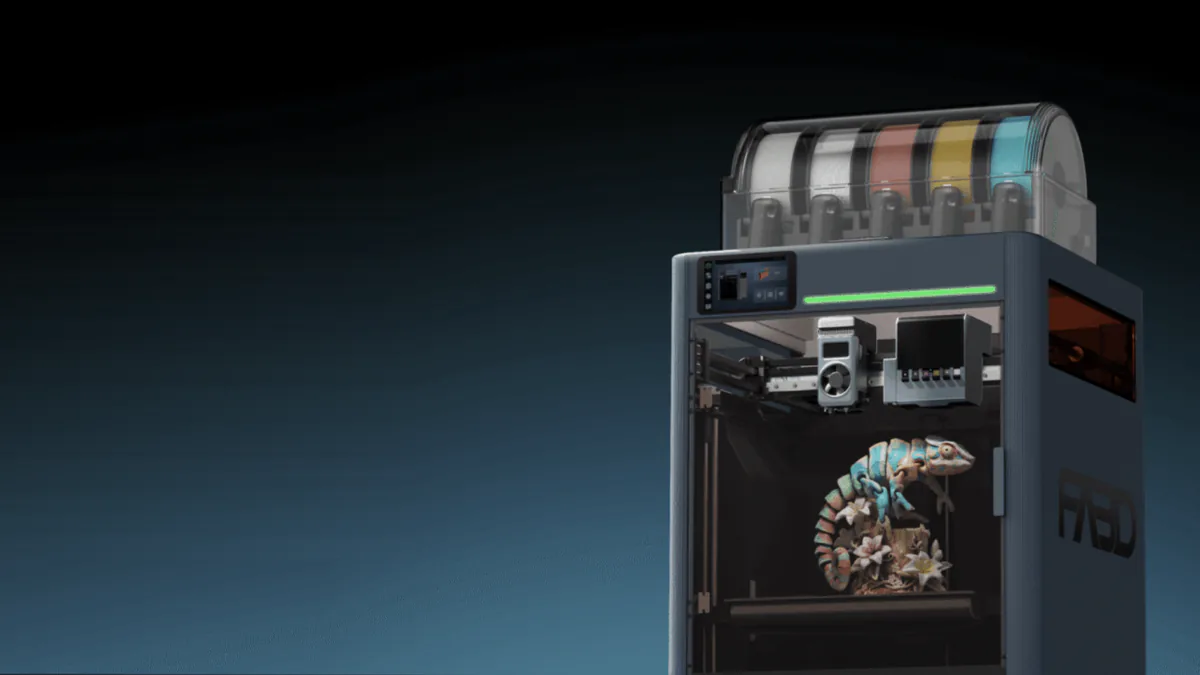
On the K2 Combo the CFS is a closed box that stores the spools and keeps them dry. The 4C has no box. Four spools sit on an open two-by-two rack bolted to the right side of the frame, with a small feeder hub on top and four PTFE tubes running to the toolhead.
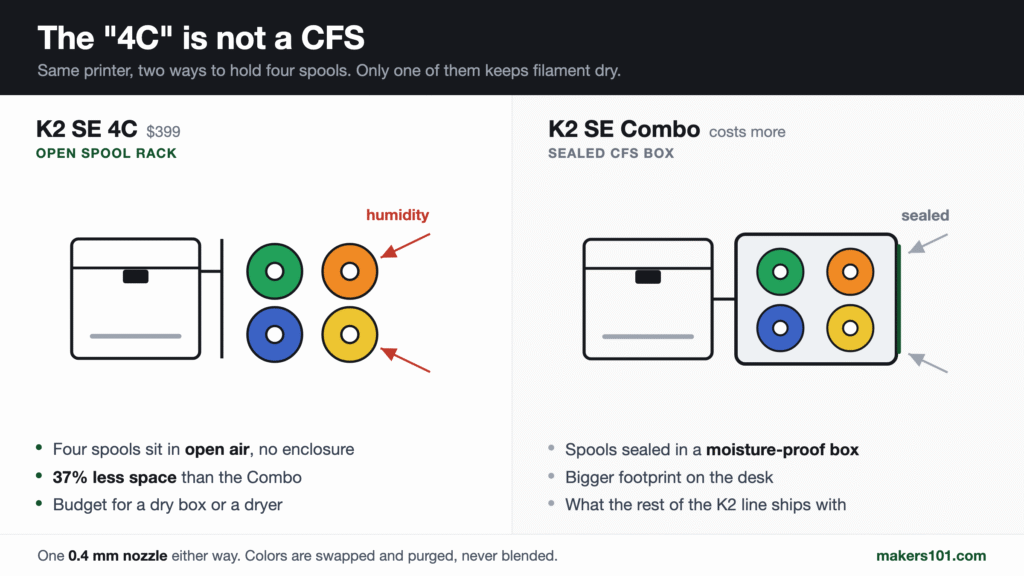
That is where the 37% space saving comes from. You are not getting the CFS at a discount, you are getting a cheaper way to hold four spools, and your filament sits in open air while it waits.
Creality splits the SparkX line the same way, into CFS Lite and CFS Mini bundles.
Sorting the SKUs out, at Amazon pricing checked August 10, 2026:
| What you see | What you get | Amazon price |
|---|---|---|
| K2 SE | Printer only, no CFS | $249 |
| K2 SE 4C | Printer plus an open 4-spool side rack | $399 |
| K2 SE Combo | Printer plus the sealed CFS box, a bigger footprint | Not the same product as the 4C |
So four-colour capability costs about $150 over the bare printer.
Creality K2 SE Specs at a Glance
Everything below is from Creality’s spec sheet, checked August 10, 2026. The speed and temperature figures are ceilings.
| Spec | Creality K2 SE |
|---|---|
| Build volume | 220 × 215 × 245 mm |
| Max speed / acceleration | Up to 500 mm/s / up to 20,000 mm/s² |
| Layer height | 0.1 to 0.35 mm |
| Extruder | Dual-gear direct drive |
| Nozzle | 0.4 mm, up to 300 °C |
| Heatbed | Up to 100 °C |
| Build plate | Epoxy resin |
| XYZE motors | Step motors |
| Connectivity & storage | Wi-Fi 2.4 GHz, USB drive, 8 GB eMMC |
| Frame | Open-frame |
| Filament slots | 4 (open side rack, no sealed box) |
| Official filament support | PLA / PETG / PLA-CF |
The 500 mm/s headline is a ceiling. Creality’s own footnote puts typical speed for the K2 line at 300 mm/s, so plan around 300.
The build plate is epoxy resin. Most competitors ship PEI, so your adhesion habits and replacement part shopping both differ here. And the Wi-Fi is 2.4 GHz only, which means separating your router bands or fighting a connection that keeps hopping to 5 GHz.
Open Frame Is the Real Trade-Off
Open frame means PLA and PETG are straightforward. ABS and ASA will warp, and tall prints will crack partway up.
The K2 Pro and K2 Plus get active chamber heating up to 60 °C, which is what makes ASA and PPA workable on them. Above WongArt credits that chamber for the PPA CF and PET CF prints coming off his K2 Pro. The SE has no such system. That chamber is also why the K2 Pro gives the P2S trouble.
You can add an enclosure later. Creality sells an official one that fits the K2 SE and K1 SE, a transparent dust cover that runs about $70.
A passive tent is not a heated chamber. It holds warmth and cuts drafts, which helps PETG and takes the edge off small ABS parts. Building one yourself is cheap, and ventilation and fire safety matter more in the design than the material you wrap it in.
Where the K2 SE Sits in the K2 Family
Creality cut three specific things to hit this price.
| Model | Build volume | Motors | Chamber heating |
|---|---|---|---|
| K2 SE | 220 × 215 × 245 mm | Step motors | None (open frame) |
| K2 | 260 × 260 × 260 mm | FOC step-servo | None |
| K2 Pro | 300 × 300 × 300 mm | FOC step-servo | Active, up to 60 °C |
| K2 Plus | 350 × 350 × 350 mm | FOC step-servo | Active, up to 60 °C |
The motor line is easy to miss. The SE gets plain step motors on all four axes, while the rest of the line gets FOC step-servos marketed as a headline feature. Above WongArt credits those servos for how quiet his K2 Pro runs.
Step motors aren’t a defect. They’re normal at this price.
The plain “K2” in that table is a 260 mm enclosed machine, and it is what the widely reviewed “K2 Combo” is built on. A K2 Combo review is describing a bigger, enclosed printer.
For the wider picture on which model actually fits you, here is how the rest of Creality’s lineup stacks up.
What $399 Buys You Outside the K2 Line
Not the bargain the badge implies, and the closest rival is Creality’s own.
All prices are Amazon, checked August 8, 2026.
| Machine | Multicolor included? | Build volume | Frame | Price |
|---|---|---|---|---|
| Creality K2 SE 4C | Yes, 4-spool open rack | 220 × 215 × 245 | Open | $399 |
| Creality SparkX i7 Combo | Yes, CFS Lite | 260 × 260 × 254 | Open | $359 |
| Bambu Lab P1S | No, AMS separate | 256 × 256 × 256 | Enclosed | $399 |
| Bambu Lab P1S Combo | Yes, 4-spool AMS | 256 × 256 × 256 | Enclosed | $549 |
| Flashforge Adventurer 5M Pro | No | 220 × 220 × 220 | Enclosed | $379 |
Creality’s own SparkX i7 Combo costs $40 less, prints multicolor out of the box, and gives you a bigger bed on all three axes. Both of them solve four colours without a sealed enclosure for the spools, so the honest comparison is bed size against price, and on both counts the i7 wins. Creality’s next move drops the external rack entirely and puts all four channels in the printhead. We broke down the SPARKX i8’s specs and claims.
Against Bambu, the comparison flips in Creality’s favor. The P1S at the same $399 is a single-color machine until you buy an AMS. Getting to four colors means the P1S Combo, and that is $549.
That $150 step up buys the two things the SE gave up: a closed box and more room. If ABS or ASA is anywhere in your plans, it is the better spend. If it is not, you are paying for an enclosure you will print PLA inside of.
The Multicolor Reality: Open Spools and Purge Waste
Above WongArt, who otherwise recommends the K2 Pro, has one reservation about it: “The only thing I dislike about this printer is the waste from multi-color printing.” That is a nozzle-side problem, so it applies to the 4C’s rack the same way.
Every color change purges the old filament out of the nozzle, and those purge blobs add up fast on a model with many swaps.
That is the ceiling on any single-nozzle multicolor system, Creality’s or anyone else’s.
The CFS on the rest of the K2 line is a sealed, moisture-proof box. The 4C’s rack is not. Four spools sit exposed for as long as they are loaded, which matters most for PETG and for anything hygroscopic you leave on the machine between jobs.
Plan on pulling spools off and into a dry box between sessions, or on running a filament dryer nearby. That is a real running cost the $399 does not cover, and it is the clearest thing the K2 SE Combo buys you for its extra money.
There is no RFID reading listed for this machine and no documented way past four colours. I would not buy it on either assumption. If RFID or expanding past four colours matters to you, other multicolor systems are worth comparing first.
If your first month is going to be single-color test prints and calibration cubes regardless, the bare K2 SE now plus a proper CFS later is a legitimate path. You end up with the sealed box, and you pay more in total than the $399 bundle costs.
Living With It: Slicer, Firmware, and Spare Parts
Slicer. Creality Print 6.0 or newer, a Slic3r-lineage slicer like most of the field. Third-party slicers can drive the machine, but the automatic colour handling is tied to Creality’s own software.
Firmware and manuals. Everything official sits at creality.com/support/k2-se: firmware images, the user manual, and the parameter documentation.
The K2 line runs Klipper underneath, and root access comes standard here, with Fluidd UI support. Earlier reporting suggested Creality would strip that out; it did not happen on this machine.
Spare parts. Two consumables matter most: the 0.4 mm nozzle and the epoxy resin build plate. The nozzle is quick-swap on this generation, so changing it doesn’t mean tearing the hotend down. The build plate is the one people forget, since epoxy resin surfaces wear differently than the PEI sheets most guides are written about.
Settings. Start with Creality’s own PLA and PETG profiles. The 220 × 215 × 245 volume and the epoxy plate both differ enough from the rest of the family that borrowed profiles cause avoidable trouble. Dial in a first layer you trust before you add a second color.
Clearing a jam. A version of this shows up on r/3Dprinting: a PETG jam gets cleared by pulling the extruder apart, and the printer comes back failing to home and striking itself on the way up. The clog is the easy part. The reassembly is what leaves the machine broken. If you have to open the toolhead, photograph every step on the way in.
Who Should Buy the K2 SE 4C (and Who Shouldn’t)
Buy it if you print PLA and PETG, you want color without running a second machine, and multicolor matters more to you than build volume.
Setup isn’t much of an obstacle either. DanKamYouKnow, with zero prior 3D printing experience, had his K2-family machine assembled and calibrated in about two hours.
Skip it in three cases.
You want ABS, ASA, or carbon fiber. The open frame decides this, and no amount of profile tuning changes it. Move up to the K2 Pro or look outside the family.
You need the build volume. This is the smallest machine wearing a K2 badge. Helmets, large cosplay pieces, and long functional parts will fight you.
You already own a K1 SE with a CFS. No. You already have the sealed CFS, which is the better version of what the 4C is selling. Moving across gets you an open rack and a smaller bed.
If you are looking at a refurbished unit, the thing to nail down before paying is the warranty: confirm it is transferable and that the coverage includes the filament rack and its feeder, since sellers often warrant the printer alone.
If you are still choosing between whole categories of machine, start with picking your first printer.

- 4-Color Multicolor 3D Printing—Create More Without Extra Setup: Bring your ideas to life with a K2 SE 4C 3D Printer designed for effortless…
- 500mm/s High-Speed CoreXY 3D Printer—Finish More in Less Time: Powered by an advanced CoreXY Motion System, this High-Speed 3D Printer reaches up to…
- Auto Leveling for Consistent First Layers & Reliable Print Quality: Forget manual bed adjustments. Intelligent Auto Bed Leveling probes only the…
- Smart Features That Protect Every Print: Print with confidence using intelligent protection features including Filament Runout Sensor, Filament Tangle…
- Beginner Friendly with Advanced Creator Features: Start printing within minutes using the Ready-to-Print setup, or unlock advanced customization…
My Take
I’d buy this one, with a condition attached: somewhere dry to keep the filament.
You get a competent open-frame machine with automatic four-color swapping at $399. For someone printing PLA figurines and PETG brackets, that is $150 well spent over the bare unit.
The K2 badge oversells it. Reviews of the K2 Pro describe a heated chamber, servo motors and a 300 mm bed, and this machine has none of the three.
The $249 bare unit is the safer start if you’re unsure about multicolor. The 4C makes sense if four colours on a small footprint is the goal and you already own somewhere dry to keep filament. If you wanted the sealed CFS, that is the Combo, and it is a different purchase.
FAQ
What does 4C mean on the Creality K2 SE?
4C stands for four colors. Four spools sit on an open rack mounted to the side of the printer, and the machine selects between them automatically. This is not the sealed CFS box used elsewhere in the K2 line. There is still only one hotend, and it swaps colors instead of blending them.
What is the Creality K2 SE build volume?
220 × 215 × 245 mm, the smallest build volume in the K2 family. A few third-party pages quote 250 × 250 × 250 mm, which is wrong.
Can the Creality K2 SE print ABS or ASA?
Not reliably. With no enclosure and no chamber heater, those materials shrink unevenly as they cool, which shows up as lifted corners and split layers on anything tall. Creality restricts active chamber heating to the K2 Pro and K2 Plus. A passive cover improves your odds slightly without solving the underlying problem.
Is the K2 SE 4C worth upgrading to from a K1 SE with CFS?
No. A K1 SE with a CFS already gives you four colors out of a sealed, moisture-proof box, which is the better version of what the 4C offers. Moving across would trade that box for an open rack and a smaller bed. Save the money toward a machine with a heated chamber instead.
How many colors can the Creality K2 SE print?
Four. The spec sheet lists four filament slots, and there is no documented way to extend the K2 SE 4C past that. The sixteen-color figure you may have seen belongs to the CFS system on the K2 Plus, a 350 mm machine with servo motors and a heated chamber.
What slicer does the Creality K2 SE use?
Creality Print 6.0 or newer is the official slicer and the one that handles the four-color workflow properly. Alternatives will send prints to the machine, though the automatic color handling is tied to Creality’s software. Official downloads sit on the K2 SE support page.
Does the K2 SE need Creality RFID filament?
No. There is no RFID reading listed for this machine, so plan on entering material settings by hand. Third-party filament prints fine either way. The bigger consideration is that the spools sit in open air on this model, so keep them dry between jobs.