
Heads up — some of the links below are affiliate links. If you buy through them, I earn a small commission (at no extra cost to you), which helps cover the gear I test. Thanks!
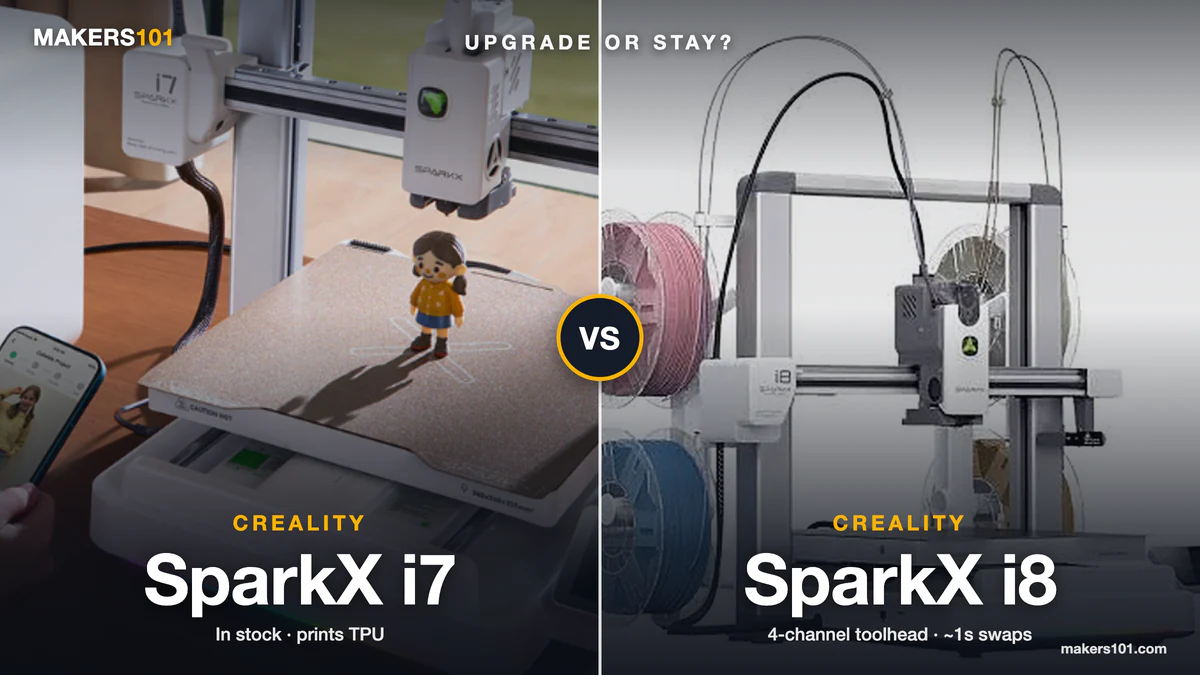
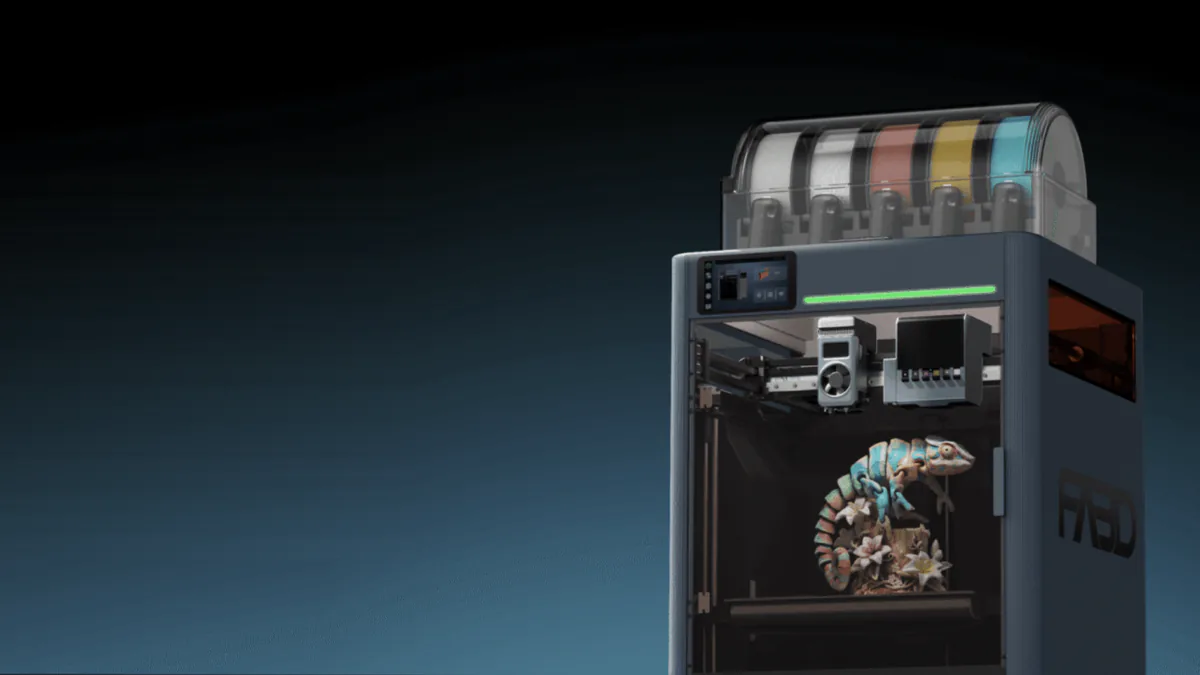
- Multicolor vs multi-material. In the Creality SparkX i8 vs K3 matchup, the SparkX i8 is a four-color bedslinger for PLA and PETG that you can back on Indiegogo today. The K3 is a four-nozzle CoreXY built for TPU, mixed nozzle sizes and mixed materials, and as of September 25, 2026 it still has no price or ship date.
- Different fixes for the same problem. The i8 merges four heated filament lanes into one nozzle. The K3 parks four separate nozzles and swaps them in a claimed 4.8 seconds.
- Only one is orderable. The i8 Indiegogo campaign runs until October 31. The K3 has no price, and its Q3 2026 window closes September 30.
- The i8 doesn’t support TPU for now. It also can’t mix materials that need very different temperatures. That gap is the K3’s whole reason to exist.
- Evidence is lopsided. Three outside reviewers have run beta i8 units supplied by Creality. Nobody outside Creality has printed on a K3.
Last updated: September 25, 2026.
If you’ve been flipping between two Creality tabs since IFA, you’re in good company. The top question under Creality’s own i8 demo on r/Creality (September 14) was blunt: “If this works as advertised, then why the K3?”
Both machines are sold on the same promise of less purge waste. They get there in opposite ways, though, and they suit different people. This Creality SparkX i8 vs K3 comparison walks through mechanism, speed, waste, materials, reliability and price, and flags which numbers come from Creality and which come from people who actually ran the printer.
Table of Contents
- SparkX i8 vs K3 at a Glance: Specs, Price and Status
- QuarTeks vs KliTek: How the SparkX i8 and K3 Each Cut Purge Waste
- Color-Change Speed on the SparkX i8 and K3: Why Every Number Differs
- Filament Waste on the SparkX i8 and K3: Checking Creality’s Own Numbers
- TPU, PETG and Mixed Nozzles: What the SparkX i8 and K3 Can Print
- SparkX i8 and K3 Reliability Evidence: Three Beta Tests vs None
- SparkX i8 vs K3 Price and Release Date (September 2026)
- SparkX i8 or K3: Which Creality Multicolor Printer Fits You
- FAQ: Creality SparkX i8 vs K3
SparkX i8 vs K3 at a Glance: Specs, Price and Status
The i8 and K3 share a build plate size and a 500 mm/s top speed. Almost everything else splits.
| Spec | SparkX i8 | K3 | Source note |
|---|---|---|---|
| Frame | Open-frame bedslinger | CoreXY | Creality spec pages |
| Build volume | 260 × 260 × 255 mm | 260 × 260 × 260 mm | Creality spec pages |
| Multicolor system | QuarTeks: 4 lanes into 1 nozzle | KliTek: up to 4 swappable nozzles | Creality |
| Color change | “<1 s" claimed; ~8 s total measured | 4.8 s nozzle swap, 15 s full change | Creality; JJ Shankles (i8) |
| Nozzle sizes | 0.4 mm (0.2/0.6/0.8 planned) | 0.2/0.4/0.6/0.8 mm, mixable | Creality via reviewers; K3 page |
| TPU | Not supported | Down to 80A (claimed) | Reviewers relaying Creality; Creality |
| Chamber heating | None (open frame) | No active heating confirmed | K3 page; YGK3D interview |
| Speed / acceleration | 500 mm/s / 10,000 mm/s² | 500 mm/s / 20,000 mm/s² | Creality spec pages |
| Hotend / bed max | 300 °C / 100 °C | 300 °C / 100 °C | Creality spec pages |
| Weight | 9.72 kg | 22 kg | Creality spec pages |
| Wi-Fi | 2.4 GHz only | 2.4 GHz only | Creality spec pages |
| Price (Sept 25, 2026) | $309 Early Bird, $399 MSRP | Not announced | Indiegogo tiers; K3 page |
| Status | Indiegogo until Oct 31 | “Coming Q3 2026” | Indiegogo; K3 page |
Two rows matter more than the rest: TPU and status. Everything else is a trade you can live with either way. If you need TPU in a printer that ships now, the Kobra X is the in-stock alternative to the i8.
QuarTeks vs KliTek: How the SparkX i8 and K3 Each Cut Purge Waste
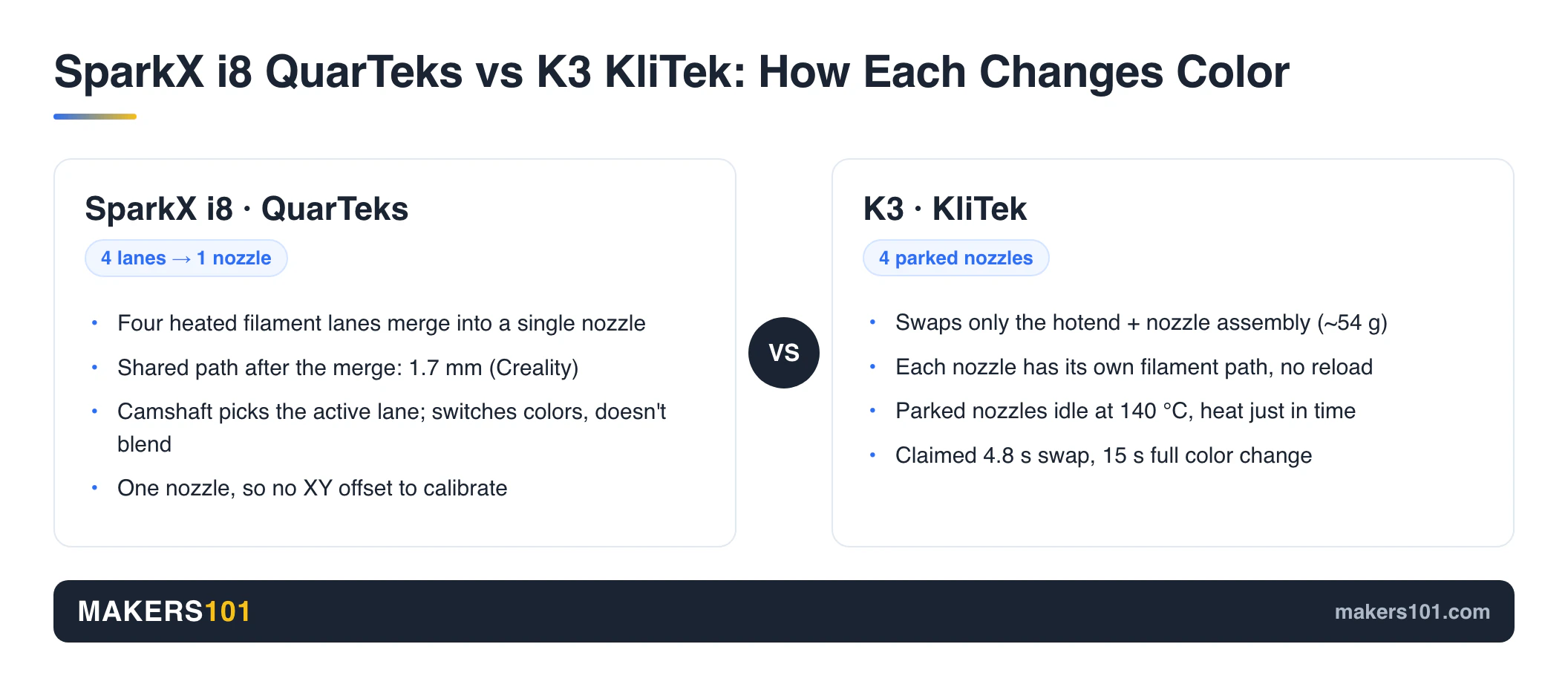
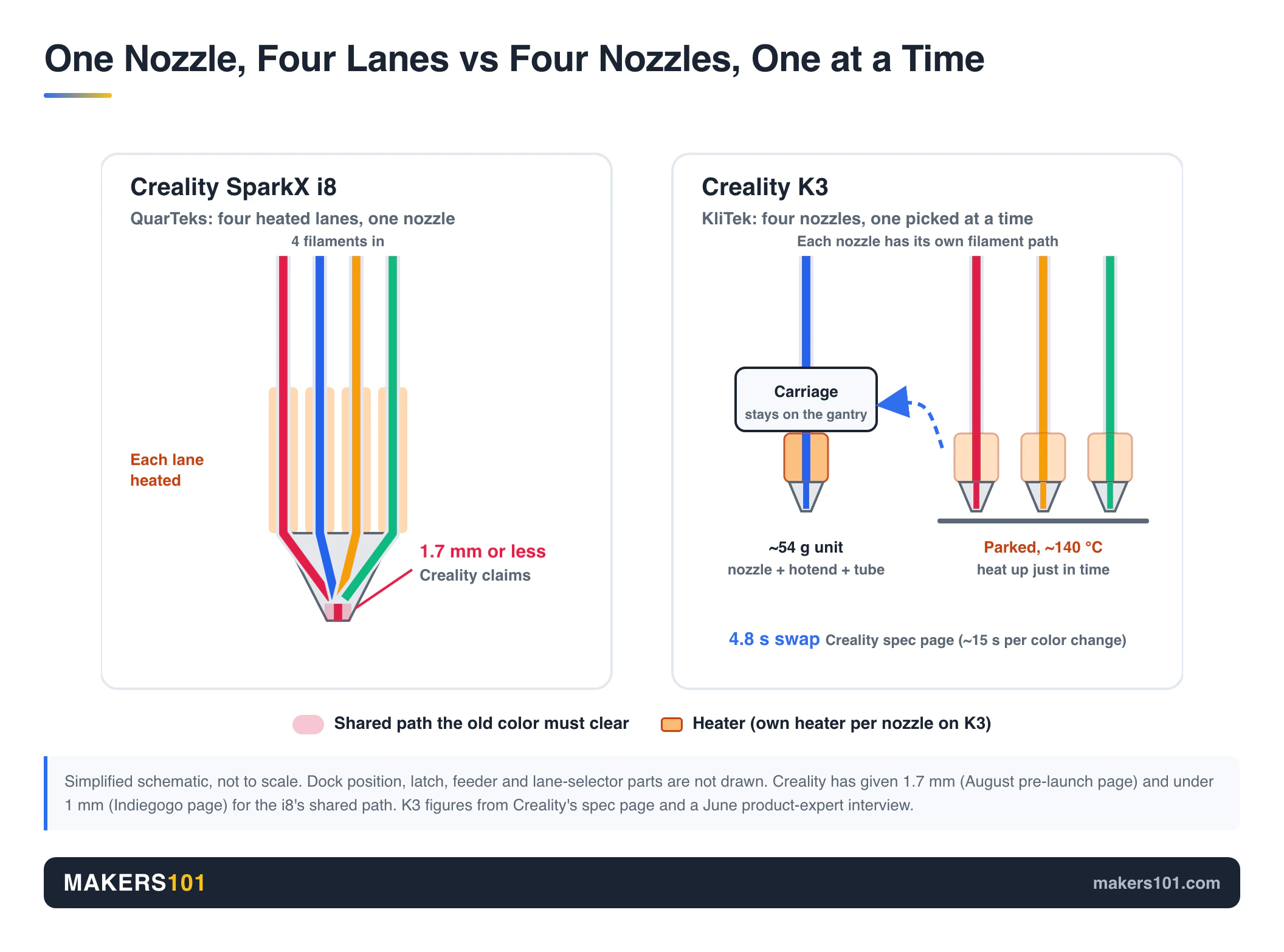
Both systems attack the same waste source. On a classic single-nozzle AMS-style printer, every color change means unloading one filament, loading the next and flushing the old color out of the hotend. The i8 shortens that path to almost nothing. The K3 skips the flush by giving each color its own nozzle.
A simple way to picture it: the i8 is a four-color ballpoint pen with one tip. The K3 is four separate pens in a holder, and the printer picks one up each time.
SparkX i8 QuarTeks: Four Heated Lanes Merging Into One Nozzle
JJ Shankles took a beta i8 apart. Each of the four filament channels has its own heated zone, and all four merge into a single nozzle, so every color stays warm and ready. Creality’s August pre-launch page put the shared path after the merge at 1.7 mm, and its Indiegogo page now says under 1 mm. That short shared section is why there’s so little old color to push out.
The extruder picks a lane with a camshaft and spring mechanism. It’s a busy piece of engineering, but JJ noted that every screw he removed was the same size and parts can be replaced individually.
Reddit worked out quickly what this design can’t do. It switches colors, it doesn’t blend them. One extruder drives whichever lane is active (r/Creality thread, September 10-11). The upside of one nozzle is that there’s no XY offset between toolheads to calibrate.
K3 KliTek: Four Parked Nozzles, Swapped in 4.8 Seconds
KliTek swaps only the hotend and nozzle assembly, about 54 g according to the Embrace Making preview. It doesn’t move a whole toolhead. Each nozzle has its own filament path, so nothing gets retracted or reloaded.
In an interview with YGK3D, Creality’s product specialist said each parked nozzle is powered over USB-C, idles at 140 °C and heats to printing temperature just in time. An eddy-current sensor handles offset calibration. The new K3 product page now lists the swap at 4.8 seconds, down from the “under 5 seconds” Creality used earlier. For the full KliTek background, see our Creality K3 and KliTek specs page.
Color-Change Speed on the SparkX i8 and K3: Why Every Number Differs
The i8 switches colors faster than the K3 on every source available. On whole prints, beta i8 units have also kept pace with toolchangers. The catch is that “switch time” means something different in every quote.
| Who measured | SparkX i8 | K3 |
|---|---|---|
| Creality claim | Under 1 s | 4.8 s nozzle swap, 15 s full change |
| JJ Shankles (hands-on) | ~1 s switch, ~8 s with wipe tower, ~6 s without | n/a |
| Silver Cos Lab (relaying Creality) | ~2.5 s without tower | n/a |
| Bondtech INDX (YGK3D, for context) | n/a | 4-5 s heat-up, 12 s total (reported) |
The “<1 s" figure covers only the lane switch. JJ's 8 seconds covers what you actually wait for: toolhead travel, the switch and the wipe. Compare that 8 seconds with the K3's claimed 15-second full change and the i8 still comes out ahead, just by less than the ads suggest.
Whole-print times back that up. TheLayeredWorkshop printed a Spider-Man bust in 5 h 10 min on the i8. His slicer estimate for the same bust on a FlashForge Creator 5 toolchanger was 6 h 21 min.
BuildDanielBuild ran Snapmaker U1 G-code on the i8 and finished a spider about 30 minutes faster than the U1. He also reported a chameleon finishing 3 hours faster (15 h vs 18 h), but didn’t say whether that run used U1 G-code too. He said it was the first time he’d seen a bedslinger beat a CoreXY on speed.
I own a Snapmaker U1, so that result caught my eye. Every toolchanger swap means parking one head and picking up another. The i8 only makes a short trip to a small prime tower. The U1 comparison is covered in our Creality K3 vs Snapmaker U1 breakdown.

- 【4-Toolhead System with 5-Second Tool Changer】 Powered by the SnapSwap system, Snapmaker U1 multi-color 3D printer features four independent…
- 【5X Faster Printing, 5X Less Waste】 Unlike traditional filament-changing systems, Snapmaker U1 3D printer swaps toolheads instead of repeatedly…
- 【True Multi-Material & Mixed-Material Printing】 Snapmaker U1 3D printer combines rigid and flexible materials, water-soluble supports, and…
- 【Smart Calibration】 Automatic toolhead offset calibration, vibration compensation, fine-tuned extrusion, and perfect first-layer work together to…
- 【Easy to Use for Beginners & Professionals】 With a built-in model library, Snapmaker Orca — custom open-source slicing software, makes it easy…
Creality has published two different i8 timing tables. TheLayeredWorkshop showed one where the i8 finishes in 18 h 10 min. The crowdfunding page’s version puts it at 14 h 41 min. Don’t mix numbers from the two.
Filament Waste on the SparkX i8 and K3: Checking Creality’s Own Numbers
Both printers waste far less than a flush-based single-nozzle machine. Both marketing pages also pick test models that make the gap look as large as possible.
SparkX i8 Waste Claims vs Measured Results
Creality headlines the i8 with “0 g” waste. The footnote says it was “tested on a model printed with zero purge waste during printing.” Tower-free printing, where purge material is dumped into infill, only works “for select models.” Keep those conditions in mind when you see the headline.
The annual savings math is shakier. Creality’s page claims 438 kg of filament saved per year.
Its own Crystal Dragon test saves 435.98 g per print, so hitting that total means about 1,005 prints. At 14 h 41 min each, that’s roughly 14,751 hours, or 1.68 years of nonstop printing.
The current page also labels the savings “$15,000.” At its own $30/kg, that figure works out to $13,140.
A r/3Dprinting thread titled “Interesting math used by Creality on their SparkX i8 page” (September 9, 86 points) made the same point. Its top reply (125 points) mocked the idea of printing one tiny multicolor toy per plate to maximize the waste ratio.
The hands-on numbers are more useful:
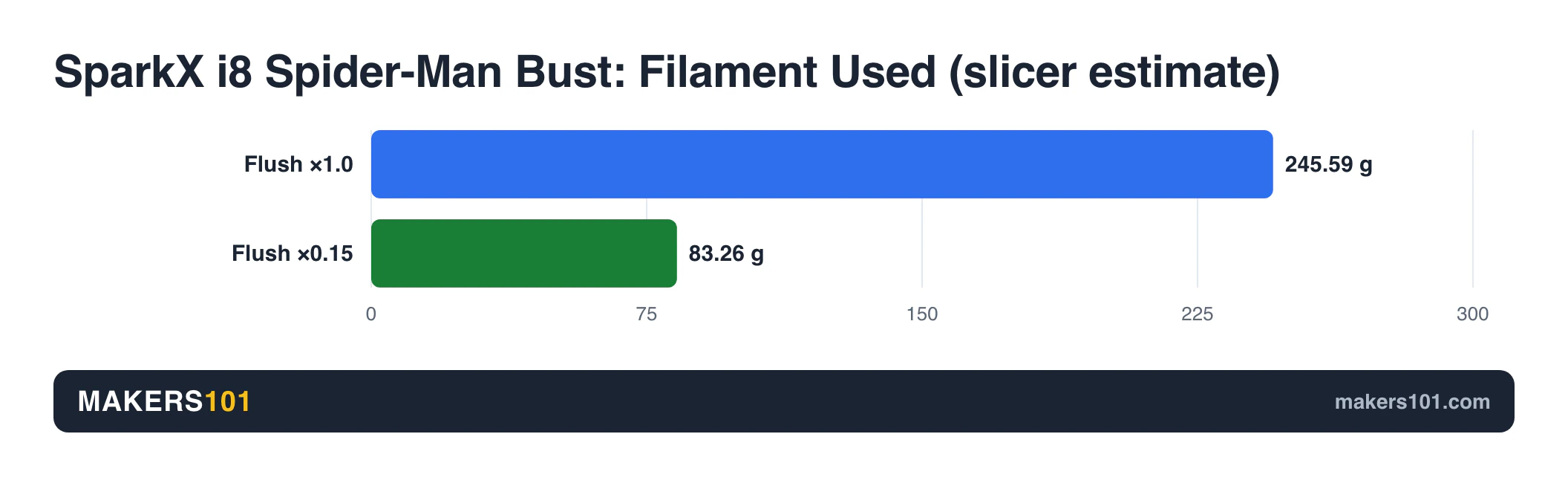
- TheLayeredWorkshop: the slicer put the Spider-Man bust at 83.26 g with Creality’s suggested 0.15 flush multiplier, down from 245.59 g at 1.0. Print time fell from 9 h 44 min to 5 h 10 min, and he saw no visual trade-off.
- JJ Shankles: a Mini Cooper with 273 color changes produced a 16.46 g wipe tower for a 63.66 g model.
There’s a fairness catch. TheLayeredWorkshop pointed out that you can’t just set a Bambu A1 or SparkX i7 to 0.15 for comparison. Those machines carry more residue in the path, so colors would bleed.
K3 Official Waste Figures
The K3 product page went live with four comparisons against unnamed “Others” (single-nozzle machines using prime towers and purges). Here’s what Creality lists, with the reduction worked out:
| Model example | K3 waste | “Others” waste | Reduction |
|---|---|---|---|
| Smallest model | 53 g | 167 g | 68% |
| Second model | 92 g | 502 g | 82% |
| Third model | 125 g | 1,608 g | 92% |
| Largest model | 240 g | 2,417 g | 90% |
These are vendor benchmarks against a machine Creality won’t name, so treat them as a ceiling. Even so, every one of Creality’s own K3 examples still includes a prime tower. Neither machine prints multicolor for free.
To see what those grams mean in dollars for your own prints, run them through the Print Cost Calculator. If you already own a purge-heavy printer, our guide to what to do with AMS filament poop covers what to do with the leftovers.
TPU, PETG and Mixed Nozzles: What the SparkX i8 and K3 Can Print
Materials are where these two machines stop competing. The i8 is a multicolor machine. The K3 is built to be a multi-material machine.
SparkX i8 material limits. According to Silver Cos Lab, Creality supports PLA, Silk PLA, PLA-CF, PETG, PETG-CF and Support PLA. TPU isn’t supported, and the open frame rules out engineering filaments.
Because all four lanes share one hotend, you can only combine materials that print at similar temperatures. PLA with Support PLA works. Creality doesn’t recommend PLA with a PETG support interface.
TheLayeredWorkshop’s verdict: “for now, I would look at [QuarTeks] primarily as a multicolor system rather than a multi-material system.” The i8 ships with a 0.4 mm nozzle, and 0.2, 0.6 and 0.8 mm sizes are only planned.

K3 material claims. Creality says the K3’s S-Drive feeder handles TPU down to 80A. Two flow figures are in circulation: 15 mm³/s for 95A and 3 mm³/s for 85A (Embrace Making preview). They cover different hardnesses, so don’t treat either as the headline number.
The product page lists 0.2, 0.4, 0.6 and 0.8 mm nozzles that can be mixed in one print. One r/Creality commenter (September 14) put the appeal simply: “.2 mm for detail and .8 for infill.”
One thing to check before you assume the K3 does ABS well: the page recommends a “stable chamber temperature” but never mentions active chamber heating. YGK3D was told the base K3 has no chamber heater and a Pro or Plus version may add one. If nozzle sizes are new to you, start with our explainer on 3D printer nozzle sizes explained.
SparkX i8 and K3 Reliability Evidence: Three Beta Tests vs None
The i8 has three outside pre-production test reports, all on units Creality supplied. The K3 has none. That’s the most useful reliability fact available right now.
What the i8 testers found:
- TheLayeredWorkshop ran thousands of color changes on a pre-production unit with zero clogs and zero system-caused failures, and stressed that early units are usually the fragile ones.
- The beta slicer locked layer height at 0.20 mm.
- BuildDanielBuild saw slight stringing with white filament.
- JJ Shankles found the hotend slow to heat and the toolhead motion a bit heavy.
The open risk is the single nozzle. Every filament passes through the same hot tip. “Isn’t that gonna cook the filament in the nozzle?” was the top reply (11 points) when r/3Dprinting first saw the i8 in August.
There’s also history: the i8 uses the SparkX i7 chassis, and a recurring complaint in the i7 long-term owner reports we’ve tracked is clogging in the 0.4 mm nozzle. Our SparkX i8 full specs and claims page tracks that thread.
The K3’s numbers all come from Creality: 80,000 nozzle swaps per nozzle in lab testing, ≤25 µm repositioning accuracy and 37 sensors, 12 of them for nozzle changing. In June, YGK3D was told root access might be removed. The September product page now promises “native Root access,” so that worry looks settled, at least on paper. Until a K3 reaches someone outside Creality, treat all of this as a spec sheet.
SparkX i8 vs K3 Price and Release Date (September 2026)
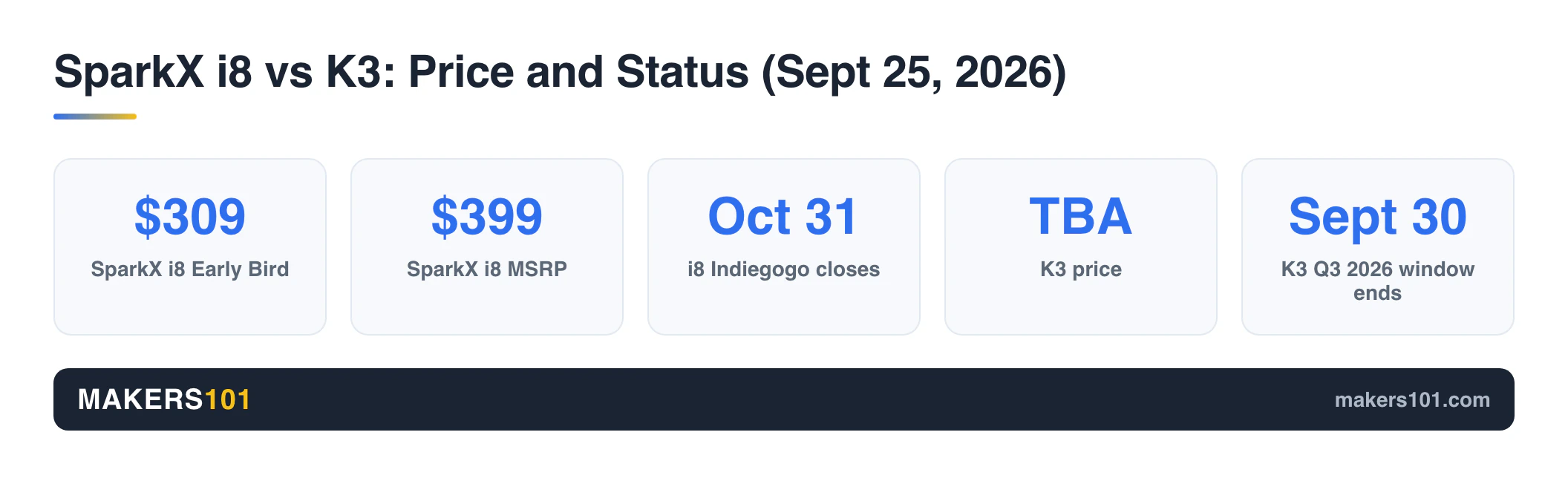
Right now you can order the i8 on Indiegogo. The K3 has neither a price nor a ship date.
SparkX i8 Indiegogo Price Tiers and Crowdfunding Risk
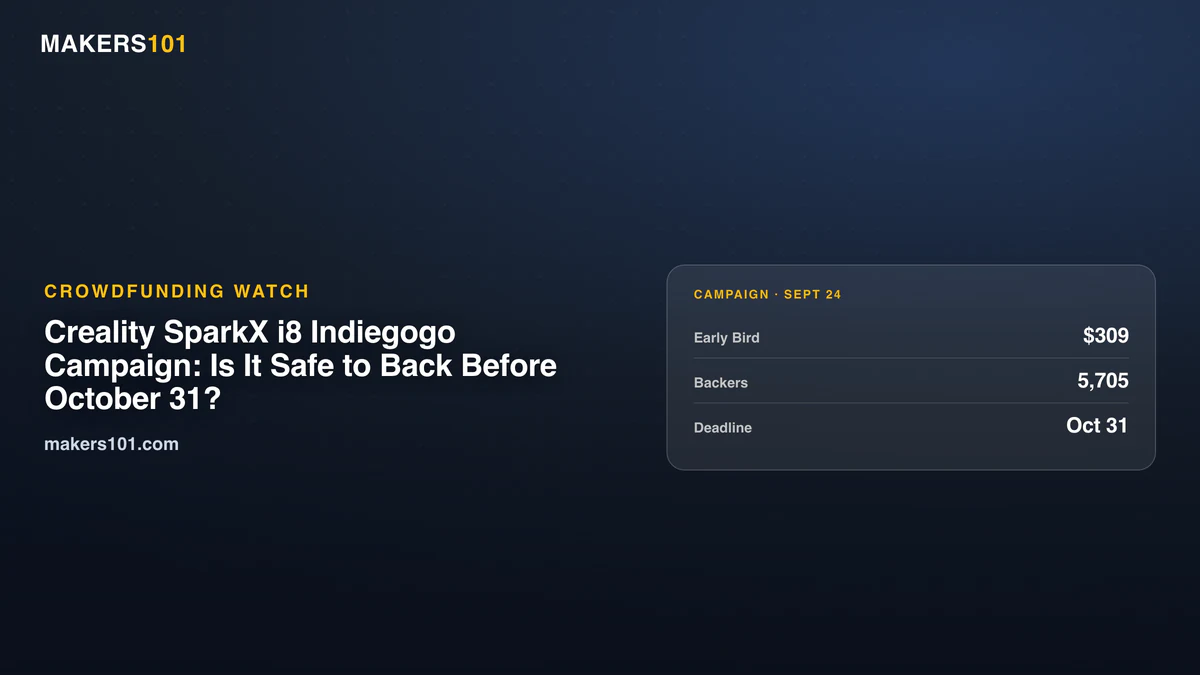
The $289 Super Early Bird tier (announced by Creality with a $399 MSRP) sold out on September 22. The $309 Early Bird was still open on September 24. Backing closes October 31.
Creality plans factory shipping in October and deliveries in November. Both dates are Creality’s plans.
Crowdfunding adds risks you should know before you back it:
- Some backers hit failed payments at launch. Creality replied on r/Creality (September 22) that it was working with Indiegogo on a fix.
- When checked on September 24, the campaign carried no Indiegogo Shipping Guarantee badge.
- Refunds go through Creality support and end once your unit ships.
One r/Creality commenter nearly backed the i8, then said they’d “wait and get the K3 the legit way.” That’s a fair instinct if payment glitches make you nervous.
Creality K3 Price Rumors and the Q3 2026 Deadline
Creality’s K3 product page returned a 404 on August 31. By September 25 it was live with a full spec sheet.
It still says “Coming Q3 2026,” has no price, and the store listing returns a 404. Two price rumors are circulating: about $595, from a Reddit post relaying a YouTube video, and $750 to $800, from a user quoting Creality support. Neither has official backing.
Q3 ends September 30. If the K3 misses that window, you’ll be waiting on a date Creality hasn’t given yet. As one r/Creality commenter asked in early September, it’s “kinda random that this one is being crowdfunded when the K3 is not.”
SparkX i8 or K3: Which Creality Multicolor Printer Fits You
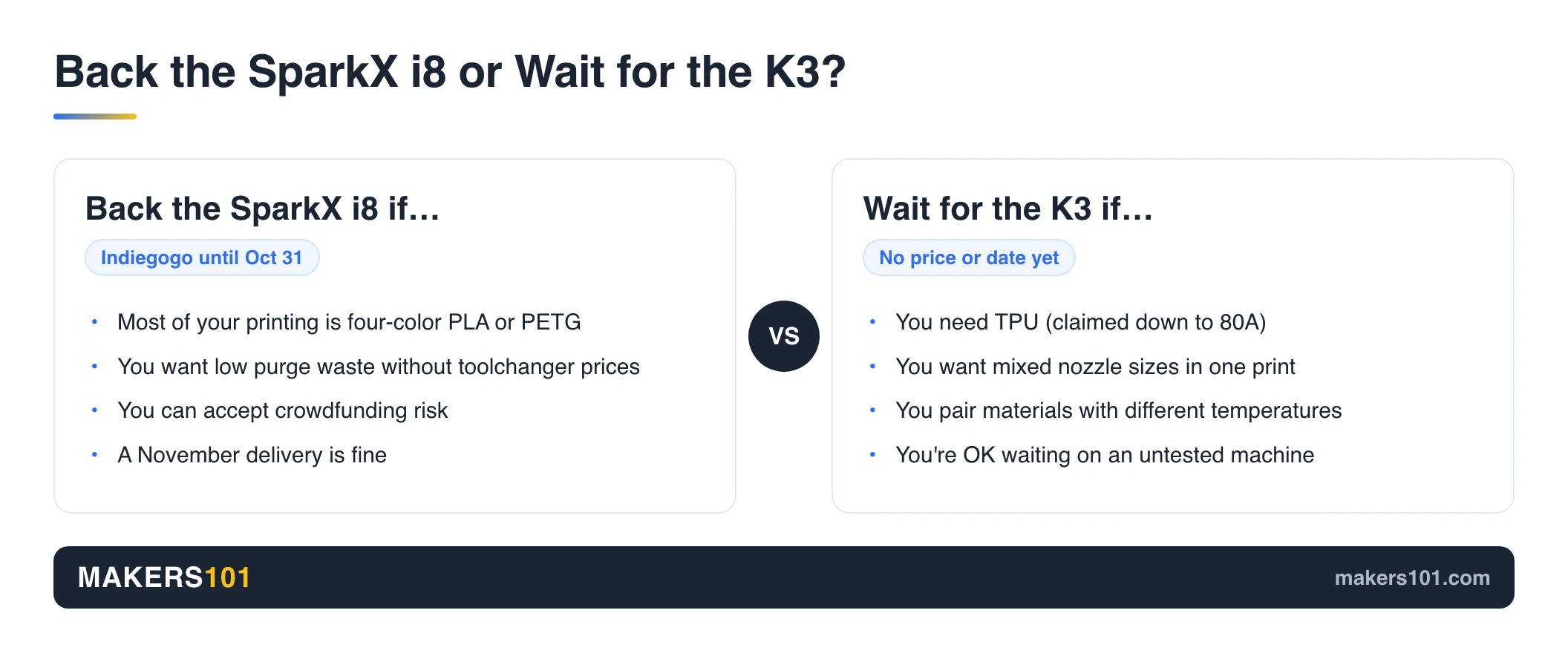
The i8 suits everyday four-color work, the K3 suits flexible and mixed-material jobs, and a machine that ships today beats both if you can’t wait.
Back the SparkX i8 if you print four-color PLA or PETG, want low purge waste without paying toolchanger prices, and can accept crowdfunding risk plus a November delivery. Beta tests put its whole-print times ahead of a Snapmaker U1 and a Creator 5 slicer estimate.
Wait for the K3 if you need TPU, mixed nozzle sizes in one print, or material pairs with different temperature needs. At 22 kg, the CoreXY K3 is rated for 20,000 mm/s² acceleration, double the i8’s. Just know that no one has tested one yet.
Buy neither if you need a printer this month. Multicolor machines you can buy today include the SparkX i7 Combo, a Bambu Lab A1 with AMS Lite, and the Snapmaker U1. JJ Shankles also pointed out that for single-color printing, the i8 costs more than cheaper printers that do the same job. If you rarely print in color, its new printhead is money spent on something you won’t use.
My take: I’d back the i8 only if four-color PLA is most of what I print. Anyone who has wanted flexible TPU parts, or a coarse infill nozzle next to a fine detail nozzle, should wait. The K3 is the only machine here designed around those jobs.

- AI Turns Portraits into 3D Models: Say goodbye to complex modeling software. With Creality’s CubeMe AI, sparkx i7 combo 3d printer simply upload a…
- Unbox & Start Printing in 5 Mins: From unboxing to your first print in just five minutes. The SPARKX i7 arrives fully pre-assembled — no tools, no…
- Multicolor Printing with 50% Less Waste: Upgrade your printing with four-color capability— smoother transitions, faster printing, and 50% less waste…
- Smart AI Detects Spaghetti & Failures: This creality built-in AI camera watches over every print in real time, detecting common failures like…
- Large 260mm Build & Quiet Night Mode: Creality sparkx i7 3d printer with a generous 260 × 260 × 255 mm build volume, create everything from…

- A1 Combo + LED Lamp Kit for Functional Light Projects: Bambu Lab A1 Combo + LED Lamp Kit lets you create illuminated models. Simply print compatible…
- High-Speed Precision: Experience unparalleled speed and precision with the Bambu Lab A1 3D Printer. With an impressive acceleration of 10,000 mm/s…
- Multi-Color Printing with AMS lite: Unlock your creativity with vibrant and multi-colored 3D prints. The Bambu Lab A1 3D printers make multi-color…
- Full-Auto Calibration: Say goodbye to manual calibration hassles. The A1 3D printer takes care of all the calibration processes automatically…
- Active Flow Rate Compensation: Achieve consistently smooth prints with active flow rate compensation. The algorithm actively compensates the flow rate…
FAQ: Creality SparkX i8 vs K3
Is the Creality K3 better than the SparkX i8?
In the Creality SparkX i8 vs K3 matchup, the K3 does more: TPU down to a claimed 80A, nozzles of different sizes on the same job, and material pairs the i8 can’t combine. The i8 switches colors faster, and every K3 price rumor ($595 to $800) sits well above the i8’s. For four-color PLA and PETG, the i8 is the better value. For multi-material work, the K3 is the only one of the two that fits.
How much will the Creality K3 cost?
Creality hasn’t announced a K3 price yet. Rumors range from about $595 to $750-800, and neither has official backing. Both rumors sit well above the i8’s MSRP.
When will the Creality K3 be released?
Creality’s K3 page still says “Coming Q3 2026,” which ends September 30. The product page with full specs is live, but the store listing isn’t, and there’s no ship date.
Can the SparkX i8 print TPU?
Not for now. Creality told TheLayeredWorkshop that TPU is “not currently supported” on the i8, whose list covers PLA and PETG variants plus Support PLA. The four lanes also feed a single hotend, so materials with very different print temperatures can’t be combined.
Why is Creality making both the i8 and the K3?
They’re aimed at different buyers. The i8 is a low-cost multicolor bedslinger. Reddit users compare it with the Bambu Lab A1, while Creality pitches it against toolchangers on speed. The K3 is a multi-material CoreXY aimed at toolchangers like the Snapmaker U1 and Creator 5. Both use a different route to reduce purge waste.
Is the SparkX i8 worth backing on Indiegogo?
It’s worth backing if most of your printing is PLA or PETG in up to four colors and you can wait until November. Three outside beta tests on Creality-supplied units look promising, but every unit so far is pre-production and runs beta software. Crowdfunding also carries payment, shipping and refund risk.
Is the SparkX i8 an upgrade over the SparkX i7?
It’s a new printhead on the same chassis. Build volume, speed, acceleration, camera, screen and PEI plate match the i7, and the i8 weighs 0.6 kg more. The upgrade is the QuarTeks four-lane head. If you don’t print multicolor often, a SparkX i7 is the cheaper choice.
Do the SparkX i8 and K3 work with the Creality CFS?
The i8 will get a CFS Lite for automatic refills and RFID, targeted for October. Creality told TheLayeredWorkshop it currently has no plans to make the i8 a 16-color machine. YGK3D reported in June that the K3 would use CFS Nano units. The September K3 product page lists CFS Flex and CFS Hub accessories instead.