
I earn a commission if you buy through links on this page, at no extra cost to you. As an Amazon Associate, I earn from qualifying purchases.
You had the Snapmaker U1 in your cart. Then a KliTek teaser landed in your feed, and your finger stopped moving.
That hesitation is reasonable, but it rests on a false premise. This isn’t a comparison of two printers you get to choose between. One of them ships today. The other one you cannot buy at any price, from anyone, including Creality.
So here is everything Creality has actually said about the K3, clearly marked as the company’s own numbers, next to a U1 that a reviewer has run for hundreds of hours. Then the honest answer on whether waiting is worth it.
Table of Contents
- Creality K3 vs Snapmaker U1 at a Glance
- The Real Difference: Swapping a Nozzle vs Swapping a Whole Toolhead
- Color Change Speed and Filament Waste
- Build Volume, Temperature, and What You Can Actually Print
- What Only the Creality K3 Can Do: Mixed Nozzle Sizes and Softer TPU
- Spare Parts and What Repairs Cost
- Software, Root Access, and How Locked Down Each One Is
- What’s Actually Been Tested, and What Hasn’t
- Creality K3 Price vs Snapmaker U1 Price: What’s Confirmed and What’s Rumor
- What the Community Actually Thinks About KliTek
- If You Own a K2 or K2 Plus, Can You Upgrade?
- Which One Should You Buy?
- Frequently Asked Questions
- The Bottom Line
Creality K3 vs Snapmaker U1 at a Glance
If you need a printer this quarter, the decision is already made for you. The U1 is a shipping product with independent reviews behind it. The K3 is a list of promises with a vague launch date, and the quarter Creality named is nearly over.
That doesn’t make the U1 the better machine. It makes it the only machine.
| Spec | Creality K3 | Snapmaker U1 | How solid is this? |
|---|---|---|---|
| Status | “Coming Q3 2026,” not on sale anywhere | Shipping, in stock | Both checked Aug 31, 2026 |
| Price | Not announced | $849, list $999 | Checked on the official store, Aug 31 |
| Build volume | 260mm cubed | 270mm cubed | K3 figure came from an interview, not from Creality |
| Change mechanism | Nozzle assembly, ~54g | Entire toolhead | Creality’s claim / Snapmaker’s spec |
| Change time | Under 5s nozzle, under 15s full swap | 5s direct swap | Both companies’ own numbers |
| Waste cut | Up to 80% | Up to 85% | Both companies’ own numbers |
| Nozzle temp | 300°C | 300°C stainless | Creality’s claim / Snapmaker’s spec |
| Bed temp | Not published | 100°C | Snapmaker’s spec |
| Heated chamber | None on the base model | None (optional top cover) | K3 figure came from an interview |
| Top speed | Not published | 500 mm/s, 20,000 mm/s² | Snapmaker’s spec |
| Mixed nozzle sizes | 0.2 / 0.4 / 0.8mm in one print | No, four 0.4mm heads | Creality’s claim / Snapmaker’s spec |
| Software | May be locked down | Open, community can modify | K3 from an interview / U1 confirmed by reviewers |
| Independent testing | None yet | Two reviews, 300+ hours on one bought at retail | — |
Read that last row twice. It’s the biggest difference here.
For the full specification history and how the KliTek reveal unfolded, see our Creality K3 and KliTek spec rundown.
The Real Difference: Swapping a Nozzle vs Swapping a Whole Toolhead
Both printers attack the same problem, so it helps to know what that problem is. On an ordinary multi-color printer, every color change shoves the old color out through one shared nozzle, and that flushed-out plastic goes straight in the bin. It is called purging, and on a busy multi-color print it can waste more filament than the model itself uses.
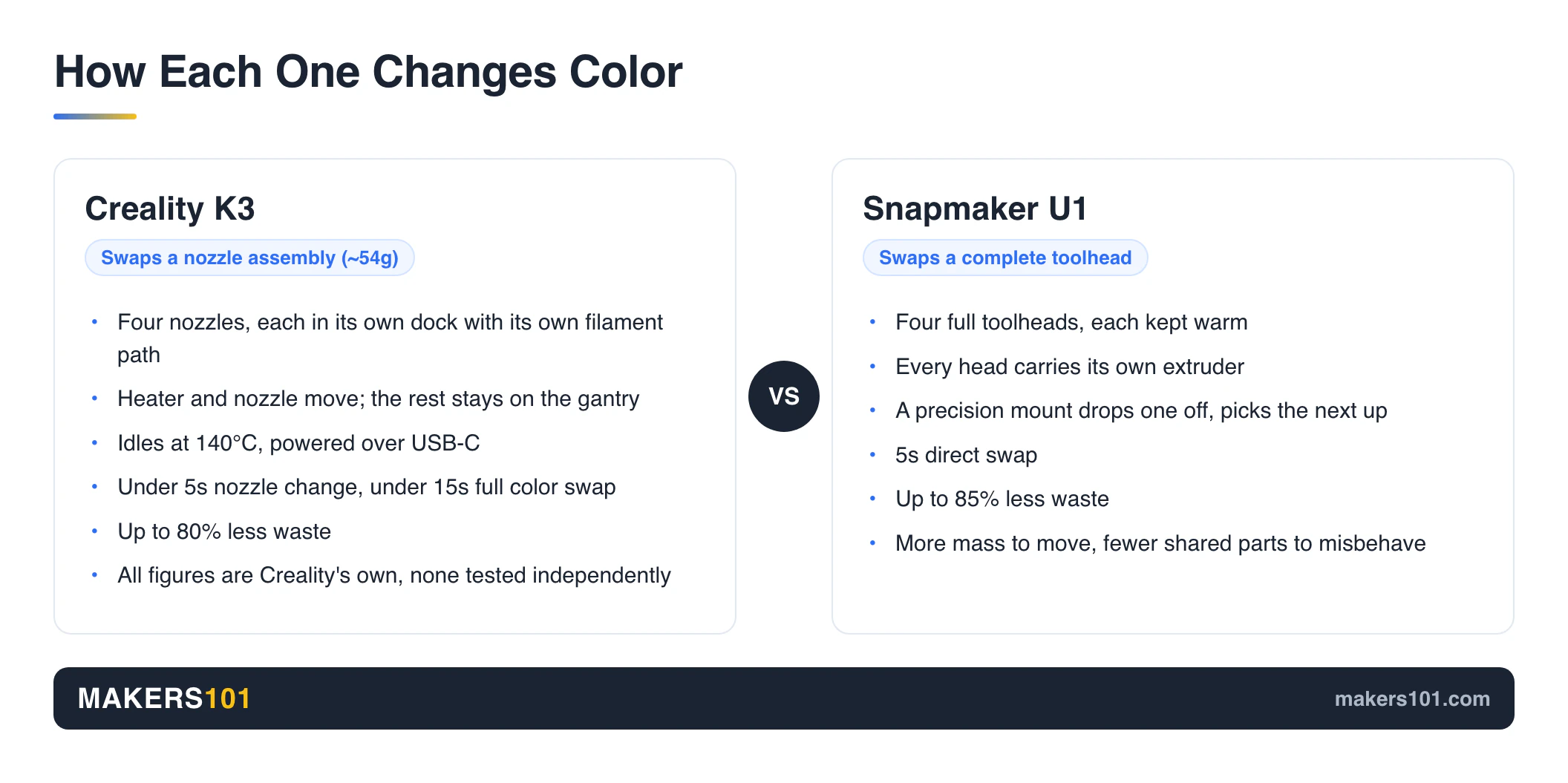
These two machines both give every color its own heated nozzle, so there is nothing to flush. What differs is how much hardware moves when the color changes. The K3 moves a nozzle assembly of about 54g. The U1 moves a complete toolhead.
Creality’s approach keeps the heater and nozzle together and leaves everything else on the gantry. Each of the four nozzles parks in its own dock with its own filament path, draws power over USB-C, and idles at 140°C so it is ready the moment it is picked up. Less moving mass. Less momentum to control.
Snapmaker went the other way. Four complete toolheads, each kept warm, each carrying its own extruder (the motor that grips the filament and pushes it down into the nozzle). A precision mount drops one off and picks the next up.
More weight to move. Fewer shared parts that can misbehave.
Both routes share the same ceiling, and it is worth naming early: four heads means four colors, full stop. An AMS-style feeder box, the kind Bambu and Creality sell alongside their printers, reaches many more than that precisely because it pushes everything through one nozzle and purges between colors.
That is the trade you are making. Fewer colors, far less waste. Four covers the large majority of models people actually print. If you have your heart set on a six-color figurine, neither of these is your machine.
Neither route is obviously correct, and the community sees the tradeoff clearly. One technically minded commenter placed KliTek between Bondtech’s induction-heated INDX and Snapmaker’s full toolhead approach, calling it a reasonable middle ground.
Bambu takes a third route on the H2C, swapping complete hotends out of a side-mounted bay, which we broke down in how Bambu’s H2C stacks up against the U1.
Color Change Speed and Filament Waste
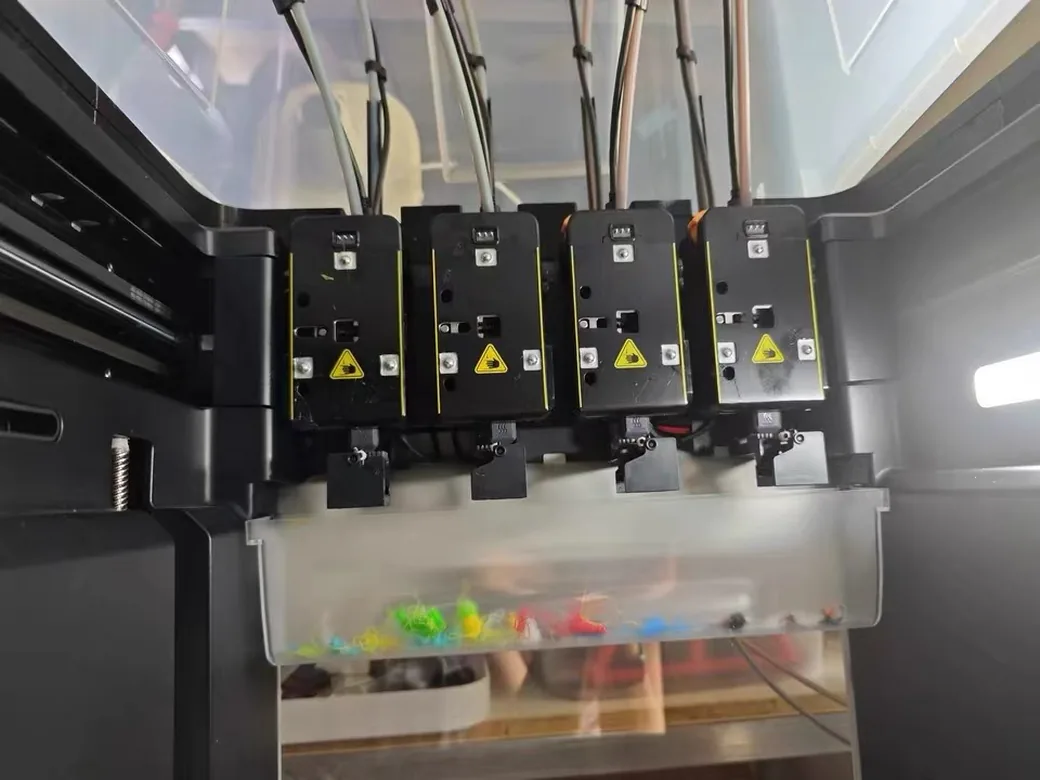
On paper these two are close enough that the difference will not decide your purchase. Creality claims under 5 seconds for a nozzle change and under 15 seconds for a complete color swap, counting the prime tower (the small throwaway block printed off to the side to get the fresh color running clean). It puts waste down by as much as 80%.
Snapmaker claims a 5 second direct swap and up to 85% less waste. Both sets of figures come from the companies selling the machines.
The closest thing to a head-to-head anyone has published is secondhand too. A reviewer Creality briefed early put the K3’s 5 and 15 second figures next to Bondtech’s INDX at 4 to 5 and 12 seconds, and called the K3 slightly slower but in the same league. Half of that comparison is Creality’s own number, so it is not an independent test.
The U1 side has something better than claims. A reviewer who bought a retail unit with his own money reported the low-waste promise holding up across more than 300 hours of printing, emptying the waste bin only three or four times in that stretch.
His speed numbers are more striking than the swap times. A 267mm dragon took 30 hours on the U1, where an Anycubic Kobra X needed 85 hours with supports. Still weighing the Kobra X? See how it stacks up against the SparkX i8.
That gap comes from skipping the purge entirely. It’s the whole argument for buying either of these machines.
Build Volume, Temperature, and What You Can Actually Print
Neither printer has a heated chamber, which puts a firm ceiling on both. The U1 gives you 270mm in each axis, a 300°C stainless nozzle, and a 100°C bed, with ABS and ASA reachable through an optional top cover. The K3 is reported at 260mm cubed with no chamber heater on the base model.
That K3 number comes with a catch. It surfaced in an interview with Creality staff. Creality’s own website still doesn’t say how big the K3 prints, with about four weeks left in the launch window it named.
The gap between 260 and 270 is not worth thinking about. What both numbers mean in practice is the same: mid-size prints, split anything larger.
Reddit has a better way to judge bed size than staring at millimeters. Cut paper squares at 260 and 270mm, put them on your desk, and see whether the things you actually print would fit. It takes two minutes.
The chamber question drew the sharper community reaction. One commenter’s response to the K3 reveal was blunt: show me the enclosure and the heated chamber. For engineering materials, that is the right instinct, and neither machine answers it.
What Only the Creality K3 Can Do: Mixed Nozzle Sizes and Softer TPU
Here is the one capability the U1 cannot match at any price. The K3 is built to run 0.2, 0.4 and 0.8mm nozzles inside a single print. A narrow 0.2mm nozzle lays down the fine visible detail, then a fat 0.8mm one fills the hidden interior in a fraction of the time. Today you pick one nozzle and accept either slow detail or fast roughness.
The U1’s four toolheads all carry the same 0.4mm nozzle.
The community noticed this before the reviewers did. On Creality’s reveal video, the single most upvoted comment out of 392 was not about color at all. It read simply: “Finally the different sized nozzles are here.” Another commenter put the reasoning plainly, arguing that varying the diameter matters more than varying the color.
The reviewer who covered the reveal reached the same conclusion independently, calling mixed diameters the more practical improvement for everyday users.
Soft filament is the second claimed advantage. TPU is the rubbery, bendy filament, and the A number tells you how soft: 95A is roughly a shoe sole, 80A closer to a rubber band. Softer is harder to print, because floppy filament buckles instead of feeding.
Creality says its S-Drive push-pull feeder handles TPU down to 80A, and runs 95A at up to 15 mm³/s. That last unit is just how fast the printer can push plastic out, and Creality puts the going rate at 2 to 3.
Treat that number carefully, because another Creality document tells a different story.
Creality’s Own TPU Numbers Don’t Agree With Each Other
A separate document Creality sent out to reviewers gives different numbers again. It puts 85A TPU at a steady 3 mm³/s, which is fine by itself, since that is a different softness. The odd part is what it claims to be beating. This document says everyone else manages under 1 mm³/s, where the video said 2 to 3.
There may be an innocent explanation. The slower figure comes attached to a note that fewer than one in ten of those prints succeed, so it may be measuring how fast you can print TPU reliably, where the video quotes a best case. Creality doesn’t say. What you are left with is one company describing its competition two different ways, and nobody independent has checked either version.
The U1 makes no such claim. It just prints TPU on the stock settings, which reviewers confirm.
Spare Parts and What Repairs Cost
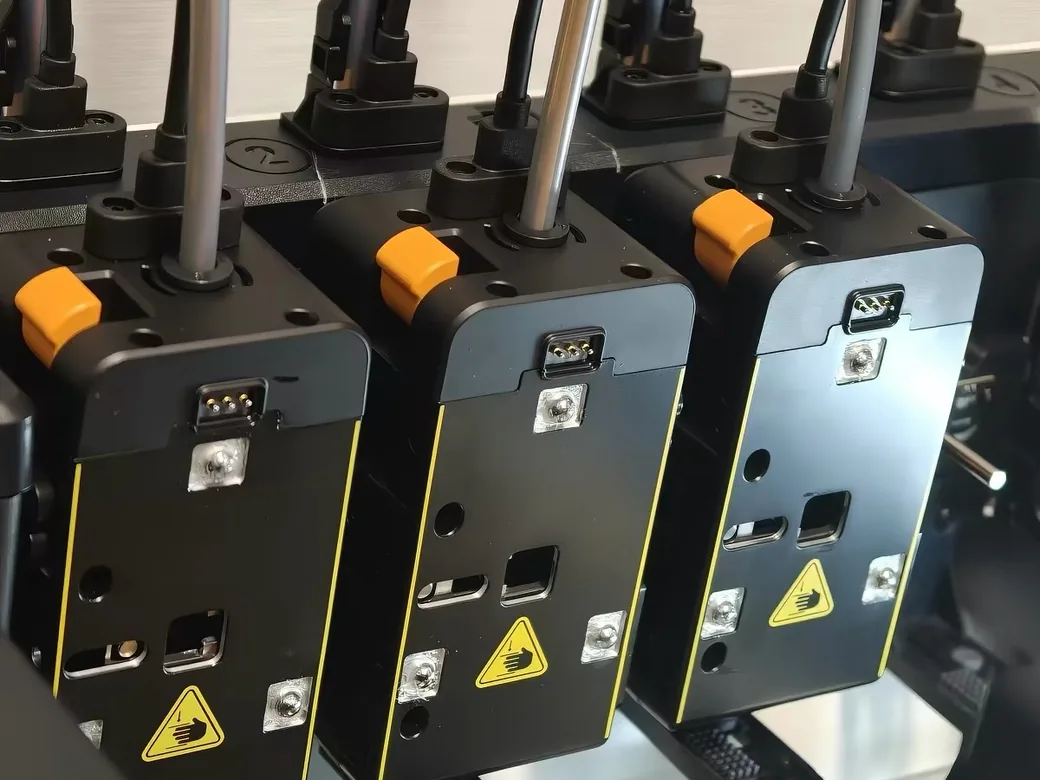
Creality puts a KliTek nozzle assembly at roughly $14 against an unnamed competitor’s toolhead at roughly $67, calling it a 4.5x reduction in replacement cost. It is the most concrete claim on its announcement page, and it is aimed squarely at the U1. The logic is sound: replacing a nozzle and heater should cost less than replacing a nozzle, heater, extruder, and mount together.
The logic being sound doesn’t make the price real. You cannot buy a KliTek nozzle anywhere yet, so $14 is a company quoting a price for a part it has never sold. It also never says which competitor the $67 belongs to.
The document Creality sent to reviewers goes further and puts it in writing, describing tool changers like the U1 as expensive to maintain, awkward to repair, and heavy enough to affect print accuracy. That is one company describing a rival. Read it as advertising.
The fair version of the same concern comes from someone who paid for a U1. One of his four heads would only push plastic half as fast as the other three, and the fix was to pull that head apart and clean it himself. His verdict: that teardown is more than a beginner should have to handle. That is a real ownership cost, from someone with nothing to sell you.
Software, Root Access, and How Locked Down Each One Is
The U1 is the more open machine today, and it isn’t close. It runs its own version of Orca Slicer on top of Klipper, and Snapmaker publishes that code openly, so the community can inspect it, modify it, and build add-ons for it.
The K3 is expected to run on Klipper too, but the same interview reported that Creality may lock out administrator access, the permission that lets you install your own software on the printer. Its slicer support is still being built. Creality has locked machines down before, which is why we wrote up Creality’s root access disclaimer when it happened to the K1.
If you like to tinker, mod, or run your own tools, that difference matters more than several rows of the table above. If you just want to press print and walk away, you will never notice it.
What’s Actually Been Tested, and What Hasn’t
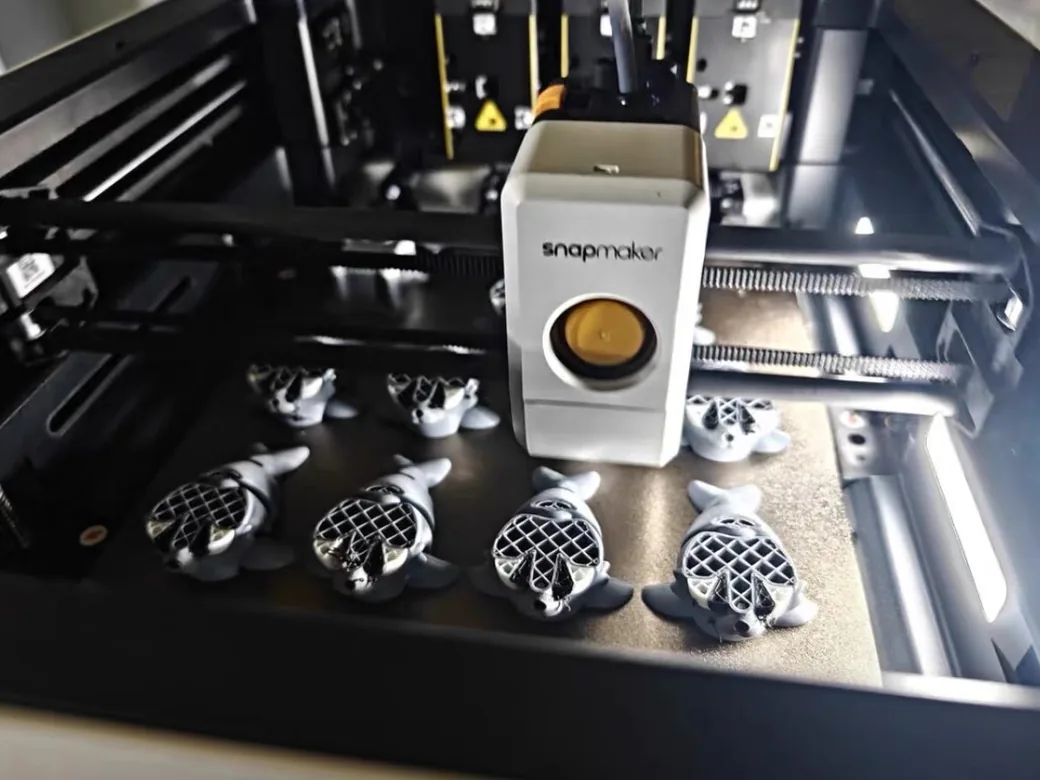
Nobody outside Creality has printed anything on a K3. The U1 has been through two independent reviews, including one that went badly for it. That gap in evidence is the real state of Creality K3 vs Snapmaker U1 right now.
The durability case for the K3 rests on Creality’s own lab: 80,000 nozzle changes on a single head, and repeat positioning accurate to 25 microns, about a third the width of a human hair. Both are believable. Both are also self-reported, and 80,000 changes on a test rig is not the same promise as 80,000 changes in your spare room.
The U1’s record is mixed and public. In a three-machine comparison against the Prusa XL and Bambu H2C, the U1 threw repeated “tool head one detach” errors that killed prints, and it failed a multi-color sphere test twice where the H2C passed on its first attempt. The reviewer rated its print quality last of the three.
He also noted his was a pre-production sample. Shipping machines may behave differently.
Machines bought at retail tell a better story. The 300-hour review found the core promise intact, with a 99-piece model printing across six days and thousands of color changes, every part fitting when it came together. Early firmware false positives on tangle and stringing detection were fixed within weeks.
So one machine has known problems and known fixes. The other has neither, because nobody independent has run it yet. An absence of bad reviews isn’t a good review.
We weighed the U1 against its closest rival you can also buy today in Snapmaker U1 against the Flashforge Creator 5.
Creality K3 Price vs Snapmaker U1 Price: What’s Confirmed and What’s Rumor
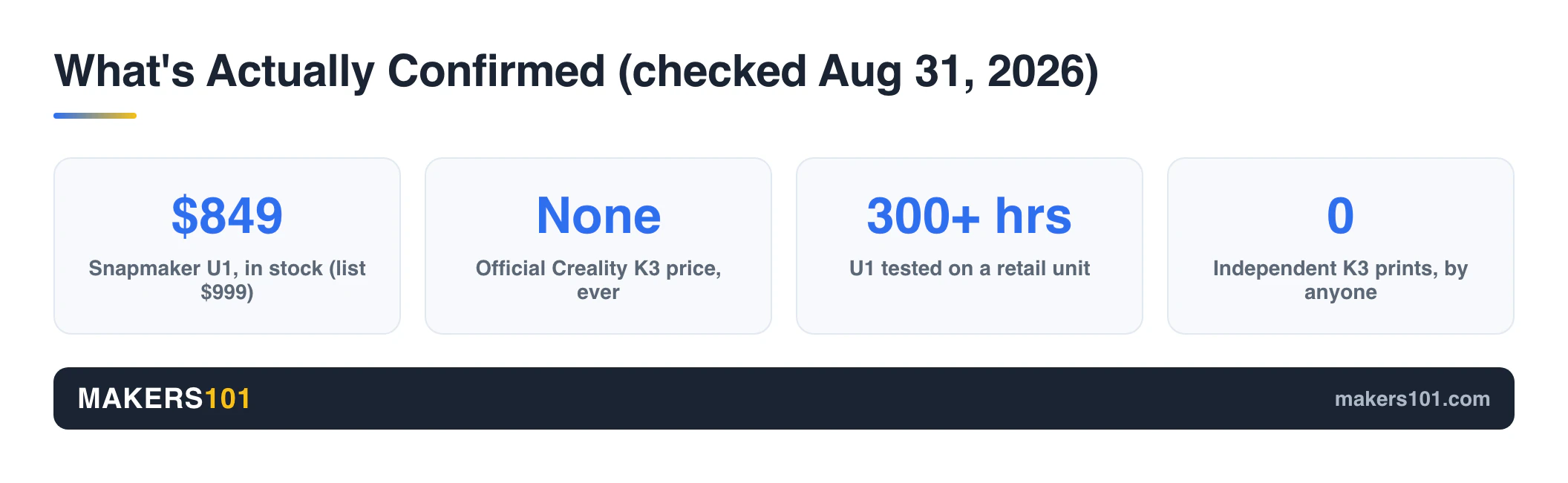
One of these numbers is real. The U1 sells for $849 in Snapmaker’s own store, in stock, marked down from $999, checked the day this went out. Amazon lists the same printer $20 lower at $829, down from $949, so check both before you order. Creality has never put a price on the K3 anywhere.
What circulates instead is two rumors that contradict each other. One traces to a YouTube video quoting a domestic Chinese price, repeated on Reddit. The other is a user relaying what Creality support supposedly told them, and it lands roughly $200 higher.
Same thread, same week. No official source behind either.
Both are worth ignoring for a practical reason. A domestic Chinese figure isn’t a US price. The top reply in that thread makes the point that shipping and import costs will move the real number well above the rumor, and that keeping prices low is easier inside one country.
The community has set its own bar, and it is specific. Across those same 392 comments, the second most upvoted one simply hoped the price stays reasonable. The recurring benchmark was blunt: the K3 has to land under the U1, or under a thousand dollars, to matter. That’s the number Creality has to hit, whatever it announces.
If you want to know what either machine costs you per print, run your filament numbers through the print cost calculator.
What the Community Actually Thinks About KliTek
Sentiment on the KliTek reveal is genuinely split, and the split is not about the technology. Across all 392 comments on the announcement video, roughly 35% were positive, 25% were waiting for reviews and pricing, and 30% were negative. The technology drew respect. The brand didn’t.
The single most discussed topic was whether KliTek copies Bondtech’s INDX, complete with questions about patents. Clone accusations ran through the thread, though one commenter pointed out the irony that INDX had not reached buyers yet, leaving the alleged copy on track to arrive first.
The rest of the negativity had nothing to do with hardware. Fear of discontinuation came up repeatedly, alongside complaints about support and quality control. For a printer whose entire pitch is a mechanism that swaps thousands of times, “will this brand still be supporting it in two years” is a fair question to ask out loud.
You are buying a support relationship along with a machine. Snapmaker’s answer is a machine on desks today, with firmware fixes people can point to. Creality’s answer is still pending.
If You Own a K2 or K2 Plus, Can You Upgrade?
No. Creality staff ruled it out when a reviewer asked them directly: no upgrade kit for older printers, though the nozzle assemblies will be sold on their own.
That answer collides with what its own customers were asking for. K2 Plus owners were one of the loudest groups in the comments, several of them offering to buy an upgrade path on the spot, and others worrying that a machine they had just bought was about to be leapfrogged.
If you own a K2 Plus, judge the K3 as a fresh purchase on its own merits. Our Creality K2 Plus and K2 Pro comparison still describes what you have.
Which One Should You Buy?
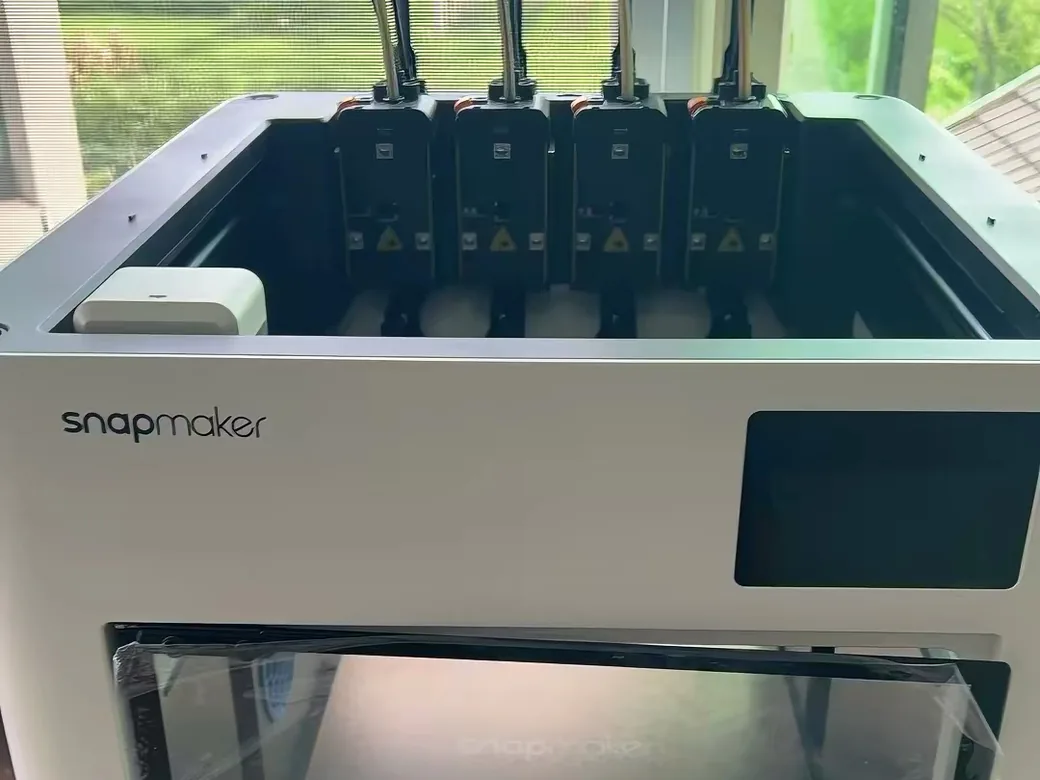
Buy the Snapmaker U1 if you want multi-color prints in the next few months. It ships, it’s reviewed, and its failure modes are documented.

Wait for the Creality K3 only if mixed nozzle diameters are the feature you actually want. That’s its one genuine exclusive. No amount of waiting adds it to the U1. Also eyeing the SparkX i8? Here’s how it stacks up against the K3.
Skip both if you print ABS, ASA, or anything else that needs a heated chamber. Neither machine has one, and the U1’s optional top cover only goes part way. Bambu’s H2C is the obvious alternative at a much higher price, with a fully enclosed heated chamber and its own low-waste hotend swapping.
Wait, with clear eyes, if your budget caps below the U1. The K3 might land there. Nothing official supports that yet, and US pricing will sit above any Chinese figure you’ve seen.
Decide on the merits if you own a K2 or K2 Plus. There’s no upgrade path, so the K3 has to beat every other printer at its price.
Frequently Asked Questions
How much will the Creality K3 cost?
Creality has not announced a price. Two figures circulate in community threads, roughly $200 apart, and neither comes from Creality. One repeats a Chinese domestic price quoted in a video; the other relays what a user says support told them. US pricing will also carry shipping and import costs that a domestic figure does not include.
When is the Creality K3 coming out?
Creality’s own announcement page says “Coming Q3 2026” and has said so for months. There is still no way to buy one, no preorder, and no firm date. Creality’s own store has no listing for the K3 at all.
Should I buy the Snapmaker U1 now or wait for the K3?
For most people weighing Creality K3 vs Snapmaker U1 today, the U1 wins on availability alone. Get it and print. Hold out only for the multi-diameter nozzle feature, which is the single thing the U1 can never do. Waiting on price is a gamble, because no official price exists.
Is the Creality K3 better than the Snapmaker U1?
Nobody can answer that yet, and anyone who does is guessing. Not one reviewer outside Creality has run a print on this machine. Every published K3 figure traces back to Creality or to someone relaying a Creality briefing, while the U1 has hundreds of documented hours behind it.
Can I upgrade my Creality K2 Plus to the KliTek system?
No. In an interview, Creality staff said no upgrade kit is planned for older printers, and Creality has said nothing about it publicly since. You should be able to buy the nozzle assemblies on their own, but they won’t turn a K2 Plus into a K3.
Is the Snapmaker U1 reliable?
One comparison review hit repeated toolhead detach errors on a beta unit that killed prints. A separate reviewer running a retail unit for over 300 hours reported a 99-piece model completing across six days with every part fitting. Buy it expecting a machine that works well and sometimes needs your attention.
Is Snapmaker a Chinese company?
Yes. Snapmaker is based in Shenzhen, China, and sells worldwide through its own regional stores, including one for the US. Creality is also based in Shenzhen, so this is not a point of difference between the two.
The Bottom Line
The U1 is a printer. The K3 is a promise with good engineering behind it.
That promise includes one thing worth wanting: nozzles of different sizes working in the same print, which nothing else at this price does. If that’s your reason for waiting, it’s a good one. If you’re waiting because the K3 might be cheaper, you’re betting on a number nobody has published.
Buy the U1 and start printing, or wait for mixed diameters with your eyes open. Both are defensible. Waiting for a price that doesn’t exist isn’t.
Prices and availability were checked on August 31, 2026. We will revisit this the moment Creality publishes real K3 specs or a price, since everything known about it today comes from Creality itself.
CERTAIN CONTENT THAT APPEARS ON THIS SITE COMES FROM AMAZON. THIS CONTENT IS PROVIDED ‘AS IS’ AND IS SUBJECT TO CHANGE OR REMOVAL AT ANY TIME.
Price details
Product prices and availability are accurate as of the date/time indicated and are subject to change. Any price and availability information displayed on Amazon.com at the time of purchase will apply to the purchase of this product.