
I earn a commission if you buy through links on this page, at no extra cost to you. As an Amazon Associate, I earn from qualifying purchases.
So the short version of heat resistant 3D printing filament goes like this. Buy ASA or ABS unless your part genuinely lives above 100°C. Past that line the spool stops being the expensive part, because the machine has to change too. Most people never need to cross it. If you were hoping a coating would solve heat instead, our XTC-3D alternative guide explains why that usually falls short.
Table of Contents
- Start With Your Temperature, Not the Material
- Why “Heat Resistant” Filament Still Fails
- Heat Resistant 3D Printing Filament Comparison Chart
- The Everyday Tier: PLA, HT-PLA, and PETG
- The Practical Tier: ABS and ASA
- The Engineering Tier: PC, Nylon, and the Ceiling
- Annealing: The Free Heat Upgrade (And When It Backfires)
- Design Beats Material
- Heat Isn’t the Only Axis
- Can Your Printer Actually Handle It?
- What I’d Choose for Seven Common Situations
- FAQ
Start With Your Temperature, Not the Material
The right heat resistant filament is decided by your part, not by a rankings table. Pin down four things first: peak temperature, whether the part is loaded while hot, whether it sees sun, and what your printer can physically run. Everything after this section is just matching those four answers to a material. If the real goal is load-bearing composite strength, that is a different rabbit hole; I covered FibreSeeker 3 and continuous fiber separately.
Go read the questions people actually ask on r/3Dprinting and you notice something. Nobody asks what PEEK’s deflection temperature is. They say things like “my DC motor sits at 100°C and it warped my PETG,” or “these boat drain plugs see 160-170°F,” or “this bushing gets direct sun plus a metal axle that might hit 75°C.”
They arrive with a part and a number. The material comes last.
The four questions that decide it
Answer these before you look at a single spool:
1. How hot does the part actually get, and for how long? Two minutes near a heat source is a different problem than eight hours in a parked car. 2. Is it carrying load while it’s hot? Heat plus weight is where most parts die. A shelf bracket and a decorative cover fail at completely different temperatures. 3. Is it outside? Sun means UV, and UV is a separate problem from heat. 4. What can your printer and your room handle? Some of these materials need an enclosure, a hardened nozzle, and ventilation you may not have.
Miss any one of these and the chart will point you somewhere wrong. If you want to work through them interactively, our filament picker walks the same four questions.
A rough map of real-world temperatures
| Where the part lives | Temperature you should design for |
|---|---|
| Warm room, near electronics | 40-50°C |
| Direct sun, dark colored part | 60-75°C |
| Car dashboard on a hot day | 80-85°C |
| Boiling water, steam, dishwasher | 95-100°C |
| Small motor or driver housing | ~100°C |
| Engine bay, away from exhaust | 100-150°C |
| Exhaust manifold | 600°C+ |
That dashboard number deserves attention. On a 100°F (38°C) day, one tester measured the dashboard surface of his truck at 80-85°C. The air outside was warm. The dashboard was almost boiling.
If you print car parts, that gap is the whole story. We went deeper on which filament survives a hot car in a separate guide.
Where the ceiling is
Some jobs are not filament jobs. One r/3Dprinting user asked for something that could sit near an exhaust manifold at roughly 850°C. There’s no answer: PEEK, the toughest thermoplastic you can realistically buy on a spool, tops out around 250-300°C. Past that you’re looking at metal, ceramic, or a machined part, and knowing that saves you a $100 spool that was never going to work.
Why “Heat Resistant” Filament Still Fails
A filament can meet its published number and still fail your part. The numbers describe a test bar in a lab, not your bracket in July.
Tg, HDT, Vicat and Tm measure four different things
Four numbers get quoted, and they’re not interchangeable.
Glass transition temperature (Tg) is where the polymer starts going soft and rubbery. It is the earliest warning sign, and the most conservative number to design against.
Heat deflection temperature (HDT) is where a standard test bar bends a set amount under a specific load. That load matters enormously. HDT at 0.45 MPa and HDT at 1.8 MPa can differ by 30°C or more for the same material, so a number without its load is close to meaningless.
Vicat softening point is where a needle pushes into the surface under light load. Of the three numbers that describe survival, it runs highest, which makes it the one marketing departments like best.
Melting temperature (Tm) is the fourth number you’ll see, and it’s the least useful one for choosing a material. It’s where the polymer flows, which is a printer setting, not a survival limit. A part loses its shape long before anything melts.
So when a spool promises “152°C,” check which of the four you’re being quoted. Polymaker’s HT-PLA does list a Vicat point of 152°C. Its heat deflection temperature, unannealed, is 69.9°C at 0.45 MPa.
Same spool. An 82 degree spread, depending on which number you quote.
Print temperature is not heat resistance
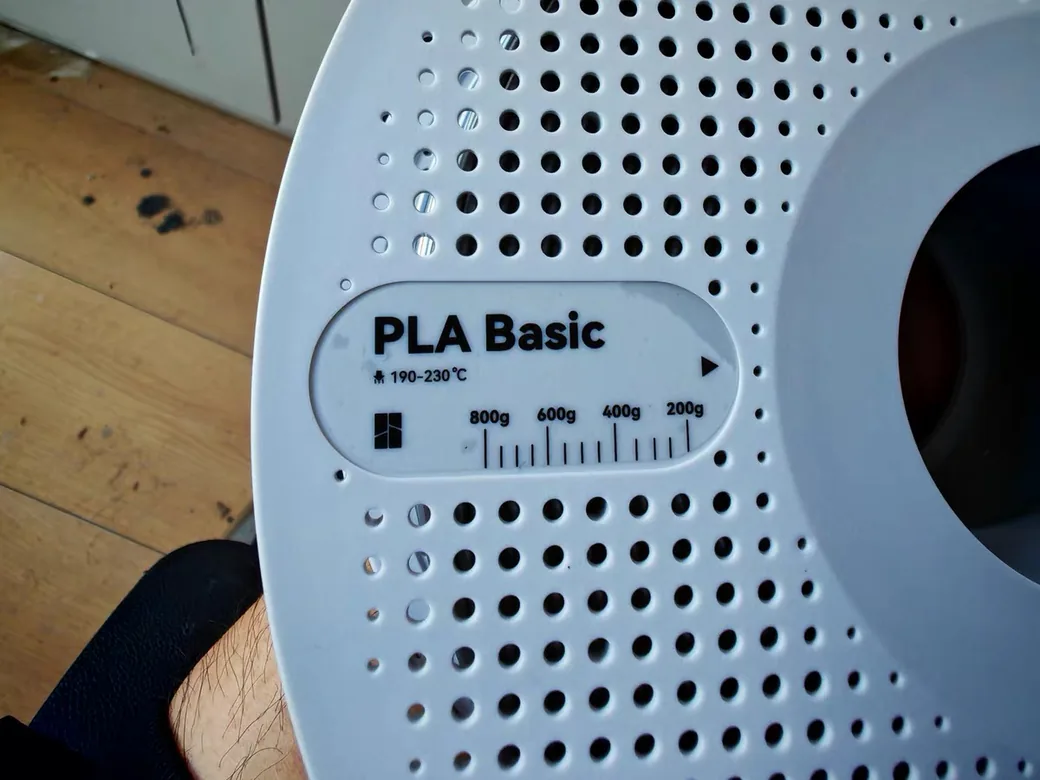
Material charts make this worse. Prusa’s filament guide lists PC at “270-275°C,” which is the nozzle temperature needed to melt it, not what the finished part survives. Printed polycarbonate softens around 110-150°C, less than half that number.
The dashboard test that broke the spec sheet
The most useful test on this isn’t a lab result at all.
SoarKraft printed identical wing tips in three materials: regular PLA Pro, Polymaker’s high-temp PLA, and ASA. He put all three on that 80-85°C truck dashboard and left them for two hours.
The PLA Pro part deformed in 45 seconds.
The high-temp PLA looked fine at first. At 30 minutes it started to droop. By the two hour mark it showed oil canning and buckling along the trailing edges. The ASA part came off unchanged.
The marketing on that high-temp PLA claims stability up to 150°C. It failed at 80-85°C, because the datasheet number was never measured with a thin unsupported wall sitting under its own weight for two hours. That gap between a spec sheet and a part is the whole reason this article exists.
But “in a hot car” is too vague, and here’s why
There’s a 3D printed phone stand living in the center console of my car. Thin walls, unsupported overhangs, the same kind of geometry that folded on that dashboard. Plain PLA, nothing special about it.
It has been in there about a year now, through a subtropical summer, and it still holds a phone.
This isn’t a controlled comparison and I won’t dress it up as one. Different cars, different summers, and SoarKraft’s part was PLA Pro in a wing tip while mine is plain PLA in a phone stand. One data point proves nothing on its own.
But it does show that “inside a hot car” isn’t one number. A dashboard in direct sun behaves like a solar oven, and the figure everyone quotes for a hot car is really the figure for that one surface. A shaded compartment is a different environment, and I haven’t measured how much cooler mine runs.
So before you pay for a heat resistant upgrade, check where your part actually lives. If it goes on the dash, take the warnings seriously. If it doesn’t, test a cheap PLA version first and see what happens.
Why every heat resistance chart disagrees
Look up PLA’s heat resistance across four sources and you get four answers. Formlabs publishes 50°C as HDT at 0.45 MPa. JLC3DP says 55°C. Snapmaker lists ~60°C as Tg. An independent bench test from 2023 measured first deflection at about 54°C.
None of them is lying. They are measuring different properties, under different loads, on different formulations.
So treat any single number as a rough band, not a threshold. When two materials are within 10°C of each other on a chart, that chart can’t tell them apart.
Heat Resistant 3D Printing Filament Comparison Chart
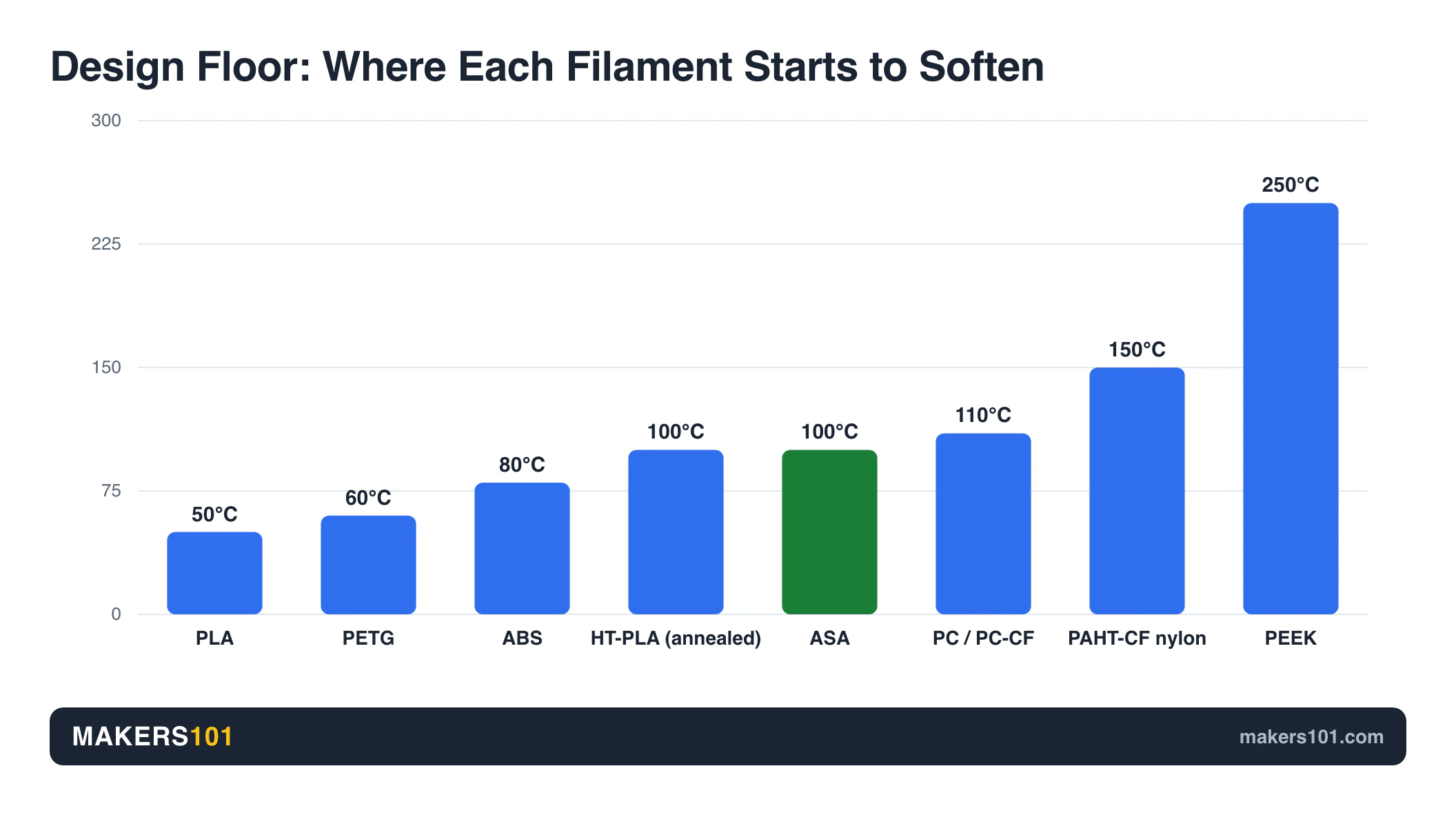
Every row below is a working range, not a guarantee. Design 15-20°C below these numbers if your part carries load.
| Material | Softens around | Holds up in | Needs | Cost per kg |
|---|---|---|---|---|
| PLA | 50-60°C | Indoor, no sun | Any printer | $10-25 |
| HT-PLA (annealed) | 100-107°C | Warm indoor, garage | Any printer, plus an oven step | ~$23 |
| PETG | 60-85°C | Outdoors, mild heat | Any printer | $15-37 |
| ABS / ABS+ | 80-105°C | Car interiors, enclosures | Enclosure, ventilation | ~$17 |
| ASA | 100-105°C | Outdoors, direct sun | Enclosure, ventilation | $27-52 |
| PC / PC-CF | 110-150°C | Engine bay adjacent | Heated chamber, hardened nozzle | PC-CF $80-150 |
| PAHT-CF (nylon) | 150-210°C | Sustained high heat | Heated chamber, hardened nozzle, drying | ~$40 |
| PEEK / ULTEM | 250-300°C / 150°C | Industrial only | 400°C hotend, 160°C bed | Specialty order |
Prices come from spools we track, verified between mid-June and August 2026, mostly on Amazon with one manufacturer-direct listing. The PC-CF figure is the exception: it comes from The Next Layer’s specialty filament roundup and dates to early 2024, making it the oldest number on this page. Plain PC has no figure of its own, and PEEK gets none because it isn’t a shelf product for consumers.
The PETG and ABS spans are wide on purpose. My sources genuinely disagree about both, and averaging that away would be the exact mistake this article is about. For PETG, one tester puts softening at 60°C and three others put it at 80-85°C. For ABS, the figures run 80°C, 90°C, 100°C and 105°C depending on whether you’re reading a Tg or an HDT and at what load. Design against the bottom of each span, not the middle.
The Everyday Tier: PLA, HT-PLA, and PETG
This tier covers warm, not hot. If your part never passes about 60°C, you can stay here and save money. This section only weighs these three on heat: for how they compare on strength, finish and printability, see our full 3D printing filament guide.
PLA
PLA starts going soft somewhere around 49-60°C. That sounds like a lot until you remember that a parked car and a sunny windowsill both clear it easily.
PLA+ doesn’t change this. Those formulations add toughness and layer adhesion, not heat resistance. Published figures put PLA+ anywhere from about 50°C for continuous use up to a 60-65°C glass transition, which is the same band as plain PLA and the same disagreement you’ll see everywhere else on this page.
It isn’t a heat resistant material and no amount of brand marketing changes that. What PLA does have is an escape hatch, which is annealing, covered further down.
HT-PLA: read the fine print
High-temp PLA is the most oversold product in this category, so it’s worth separating the claims from the numbers.
Polymaker’s own promotional video says HT-PLA softens above 130°C with no annealing required. Polymaker’s retail spec page lists “Annealing Settings (for higher temp stability): 80-100°C, 30 mins.” Their datasheet, read out on camera by reviewer ModBot, puts unannealed HDT at 69.9°C and annealed HDT at 106.5°C, both at 0.45 MPa.
Those are three different stories from one manufacturer.
The honest summary: unannealed HT-PLA buys you roughly 10°C over regular PLA. Annealed, it reaches about 106°C. You also pay for it in strength, with Z tensile strength and elongation at break both down around 50% versus standard PLA. Polymaker also states its UV resistance matches regular PLA, which rules it out for anything living in the sun. No independent test of that claim turned up in the research for this piece, so treat it as the manufacturer’s own word.
It prints exactly like PLA, which is its real selling point. ModBot only had to drop from 220°C to 210°C to clear up some stringing.

PETG and CPE
PETG lands somewhere between 60°C and 85°C, and prints on anything. That span is the widest disagreement in this guide: perspektive3D and Snapmaker both put it around 80°C, JLC3DP says 80-85°C, and 3D Print Daily puts continuous-use softening at 60°C. Treat 60-70°C as your safe design limit and the higher numbers as best case.
Two things worth knowing. Opaque PETG handles UV better than semi-translucent, so it yellows less and keeps its strength longer outside. And PETG absorbs moisture faster than PLA, including some budget spools that arrive damp from the factory despite vacuum packing.
CPE deserves more attention than it gets. It’s a co-polyester that behaves like PETG with better impact resistance, lower moisture pickup and less warping than ABS, and it prints at 240-260°C. It’s absent from the chart above for one reason: no softening figure for it survived the sourcing standard the rest of this page is held to.
When the number still isn’t enough
A cautionary case, because it explains a failure mode people rarely anticipate.
Taboretum printed a pour-over coffee dripper in colorFabb PLA HP, a high-temp PLA rated at 134°C HDT. At 1mm wall thickness, it softened and collapsed during brewing. Hot coffee beat a material rated at 134°C, and coffee never reaches boiling.
Then he printed a vase-mode container in the same filament. It held boiling water without leaking or deforming.
Same spool, same temperature, opposite outcomes, decided entirely by geometry.
The Practical Tier: ABS and ASA
This is where most people who genuinely need heat resistance should land. ASA is the more heat-tolerant of the two on paper (100-105°C against ABS’s 80-105°C) and the clear winner outdoors. ABS is the cheap one. Both are widely available.
ABS and ABS+
Published figures for ABS run from 80°C to 105°C, and that spread is real: the low end is a maker reporting continuous-use experience, the high end is a published Tg. Design against 80-90°C and you’ll be safe. At roughly $17/kg it sits in the middle of the PLA price band while surviving 20-30°C more heat, which is the best heat-per-dollar trade on this page.
The catch is fumes and warping. ABS wants an enclosure, and it wants ventilation you actually have.
If you lack an enclosure, there’s a workable path. 3D Print Daily tested this recipe: nozzle at 260°C, bed at 105°C, volumetric speed dropped to 5 mm³/s, part cooling fan off completely, an 8-layer brim with manually added mouse ears, and a draft shield acting as a miniature enclosure.
ABS+ is the modified version, and it warps and cracks less than plain ABS. Worth the small premium.

ASA
ASA edges ABS on heat and beats it outdoors. Its published range starts where ABS’s design margin ends, but the real advantage is UV stability, which is why it wins for anything living in direct sun. PLA sits at the other end of that scale. Here’s how long PLA lasts in water and sun.
It still wants an enclosure to avoid warping. If you’re choosing between brands, we ranked them in our guide to the best ASA filament brands.

Same name, different material
Here is something the charts can’t show you. “ASA” isn’t a specification.
My Tech Fun ran industrial Stratasys ASA against consumer Prusament ASA in an oven test. The Stratasys material started deforming about 10°C later. It also had better layer adhesion, despite printing at a lower nozzle temperature (235°C versus 260°C) with a much hotter chamber (85.5°C versus 55°C).
But it was also brittle, with impact resistance closer to PETG. Prusament was noticeably tougher.
Two lessons. Brand and formulation move the real number by about 10°C, which is the same margin that separates whole rows on a comparison chart. And heat resistance and toughness tend to trade against each other, so buying the most heat resistant option in a category can quietly cost you impact strength.
If you can’t use fumes
One r/3Dprinting user needed a 100°C motor housing but had an institutional EHS rule banning ABS and PC outright. Dorm rooms and shared workshops create the same constraint.
If fumes are off the table, your realistic options are annealed PLA for light-duty parts and PETG or CPE where the temperature allows. Nylon is possible but brings its own ventilation and drying requirements. If you’re falling back to PLA for that reason, check how much PLA actually emits before assuming it’s a free pass.
The Engineering Tier: PC, Nylon, and the Ceiling
Cross this line and the limiting factor stops being filament. It becomes your printer.
Polycarbonate and PC-CF
PC softens in the 110-150°C range, with sources disagreeing as usual. It needs a nozzle around 270-300°C, a bed at 100-115°C, and realistically a heated chamber.
PC-CF adds carbon fiber for stiffness and dimensional stability, and requires a hardened steel nozzle. The trade is impact resistance: the stiffer composite is less forgiving of a drop.
Nylon and PAHT-CF
Nylon composites are the practical top of desktop 3D printing. You’ll see them sold as PA-CF, PAHT-CF, or just “carbon fiber nylon,” and the naming is inconsistent between brands.
My Tech Fun oven-tested ELEGOO’s PAHT-CF and recorded first deformation at 212°C, at which point it failed suddenly rather than gradually softening. Tensile strength beat PETG-CF comfortably, and it survived a half-kilogram hammer strike.
Two real weaknesses. Layer adhesion is poor, so vertically printed parts were significantly weaker in both shear and layer tests. And it creeps under sustained load, more than PETG-CF does, which the tester was blunt about: he doesn’t recommend nylon under higher constant loads.
Nylon also drinks moisture. Dry it before every print, and keep it dry during. Our guide on how to dry and store filament covers the practical setup.

The most heat resistant filament you can buy, and why your printer can’t run it
PEEK reaches 250-300°C and ULTEM about 150°C HDT. ULTEM is sold under its polymer name PEI as well, so “PEI filament” and ULTEM mean the same thing on a spool. Both are mostly theoretical for home users.
PEEK needs a nozzle at 360-400°C and a bed at 120-160°C, plus an actively heated chamber. That is a different class of machine. If you’re working toward this tier, the machine comes first. Start with an enclosed high-temperature 3D printer and pick the filament afterwards.
Annealing: The Free Heat Upgrade (And When It Backfires)
Annealing is the cheapest heat resistance you can buy: it costs dimensional accuracy rather than money, and the gain is large enough that it should be your first move before shopping for a hotter filament. Be clear about what it doesn’t buy, though. Strength barely moves.
The heated-bed method
You don’t need an oven. My Tech Fun’s 2023 bench test used the printer itself: heat the bed to 100°C, cover the parts to trap heat, hold for one hour, then switch off and let everything cool slowly.
What you gain
In that test, deflection temperature moved from about 54°C untreated to about 150°C annealed.
That is plain PLA reaching territory that a $40 spool of nylon occupies. For a part that just needs to survive a hot car, this is often the entire answer.
What it costs
The cost is dimensional. A 30mm test cube came out measurably distorted: X went from 30.3mm to 29.15mm, Y from 30.0mm to 29.25mm, and Z grew from 29.87mm to 31.49mm. That’s 3.8% shrink in X, 2.5% in Y, and about 5% growth in Z. Compensate against the worst axis, not the average.
Tensile strength improved only about 10%, and layer adhesion got slightly worse. Solid parts warped noticeably, while low-infill parts held their shape better.
So anneal parts where fit is forgiving. Don’t anneal something that has to mate with a bearing.
When not to anneal
SoarKraft annealed his high-temp PLA wing parts at 80°C and measured stiffness before and after. It dropped from 98 N to 81 N. The control surfaces sagged during the process.
Thin walls and long unsupported spans are exactly where annealing hurts. Chunky low-infill brackets are where it helps.
So which: buy HT-PLA or anneal cheap PLA?
If you need heat resistance on a part with loose tolerances, anneal the PLA you already own. If you need dimensional accuracy out of the printer with a modest heat bump and no extra step, unannealed HT-PLA gives you about 10°C for roughly $5 more per kilogram. If you need both accuracy and real heat resistance, skip this tier and buy ASA.
Design Beats Material
Geometry can decide the outcome more than the material name does. Two people printing the same spool at the same temperature get opposite results, and the difference is almost always wall thickness, print orientation, or whether the part carries load while hot.
Wall thickness. The coffee dripper case above says it best. One millimeter of wall failed at 95°C; a single-wall vase-mode part in the same filament held boiling water. Thin flat spans under their own weight are the first thing to go.
Print orientation. Layer lines are the weak axis, and heat makes that worse. In the PAHT-CF testing, vertically printed specimens were dramatically weaker in shear and layer adhesion than horizontal ones. Orient so that heat-softened layers are in compression, not tension.
Load while hot. This is the one people forget. Even Polymaker acknowledges that under stress and heat, mechanical properties drop significantly, and notes this is normal for all plastics. A part that holds nothing survives temperatures that would fold the same part under load.
Heat Isn’t the Only Axis
“Heat resistant” gets used as shorthand for “tough outdoors,” but surviving outdoors takes three separate properties on top of heat tolerance. A material can pass one and fail the others:
- UV is why ASA beats PETG outside, and why HT-PLA doesn’t belong there at any temperature rating.
- Creep is why nylon deforms under a constant load well below its deflection point.
- Moisture is why nylon and PETG need dry storage to print at their rated numbers at all.
Can Your Printer Actually Handle It?
Above ABS, your printer becomes the limit rather than your filament budget. The table below is what each material needs to print at all. These are print requirements, not heat resistance figures, and confusing the two is the mistake from earlier in this guide.
| Material | Nozzle | Bed | Enclosure | Nozzle type |
|---|---|---|---|---|
| PLA / HT-PLA | 190-230°C | 25-60°C | No | Brass |
| PETG | 215-270°C | 70-90°C | No | Brass |
| ABS / ASA | 230-275°C | 90-110°C | Recommended | Brass |
| PC / PC-CF | 270-300°C | 100-115°C | Required | Hardened |
| PA / PAHT-CF | 260-290°C | 90-110°C | Required | Hardened |
| PEEK | 360-400°C | 120-160°C | Heated chamber | Hardened |
If you’re on a Bambu
The most common version of this question is which heat resistant filament suits a Bambu machine, and the answer splits into three tiers rather than two. An A1 or A1 mini is open-frame, so PETG is the practical ceiling and ABS or ASA will warp without a shroud. A P1S or X1C is passively enclosed, which handles ABS and ASA out of the box but leaves chamber temperature to whatever the print itself generates. The X2D goes further with an actively heated chamber rated to 65°C, which is what PC-CF and nylon composites actually want. Check which tier yours is in before buying anything above ASA.
Chamber temperature matters more than you think
The Stratasys versus Prusament comparison showed this clearly. The industrial machine ran a cooler nozzle but an 85.5°C chamber against Prusa’s 55°C, and produced better layer adhesion.
For high-temp materials, ambient heat around the part does more for part quality than nozzle temperature does.
No enclosure? Start here
You can push ABS without one using the settings above. Beyond ABS, an enclosure stops being optional, and a passively enclosed machine is not the same thing as a heated chamber.
What I’d Choose for Seven Common Situations
Here are the situations people actually bring to this question, with a verdict for each. All of them assume the part is doing real work, not sitting on a shelf.
On the dashboard. ASA. It was the only material in the dashboard test that came out unchanged. If you already own PLA and the part is non-structural, annealing is a legitimate free alternative.
Elsewhere in the car. Probably just PLA. Console, glovebox, door pocket and under-seat parts sit out of direct sun, and my own PLA phone stand has held up in the console for a year. Spend the money on a dashboard part instead.
Outdoors in direct sun. ASA first, for UV as much as heat. Opaque PETG is the cheaper second choice for milder climates.
Motor or driver housing at a steady 100°C, no fumes allowed. This is genuinely constrained, and I won’t pretend there’s a clean answer. Annealed PLA survives the temperature but not sustained load. Nothing else in the low-odour range clears a sustained 100°C with a safety margin. If the part carries load, you’ll eventually need a ventilated space and a nylon composite.
Kitchen, boiling water, or steam. Wall thickness and geometry matter more than the spool. Print thick or use vase mode, and remember that food safety is a separate question from heat resistance.
Engine bay, away from the exhaust. PAHT-CF or PC-CF, with an enclosed printer, a hardened nozzle, and a drying setup. Budget for the hardware, not just the filament.
You just want PLA to stop slumping in the car. Anneal it. Bed at 100°C, covered, one hour. Expect about 3% shrink and design around it.
FAQ
What 3D printer filament can withstand the most heat?
PEEK, at roughly 250-300°C, is the most heat resistant filament in normal production. It needs a 360-400°C hotend and a heated chamber, so few desktop machines can print it. Among realistically printable options, carbon-fiber nylon like PAHT-CF showed first deformation at 212°C in independent oven testing.
Is ABS or PETG more heat resistant?
ABS, by roughly 20°C. Published figures put PETG at 60-85°C and ABS at 80-105°C, so the two ranges overlap at the edges and the gap between their midpoints is what you’re really buying. PETG is easier to print and needs no enclosure, so the right answer depends on whether you actually need that margin.
Is PLA or PETG more heat resistant?
PETG, and the gap is worth roughly 20°C. PLA softens at 50-60°C while PETG runs 60-85°C depending on whose figure you take. In practice that difference decides whether a part survives a sunny windowsill. Neither one survives a dashboard.
Can PLA withstand 100 degrees?
Not as printed. Standard PLA begins softening around 50-60°C, so 100°C will deform it. Annealed PLA is a different story: one bench test moved the deflection point to about 150°C, at the cost of roughly 3% shrinkage.
Can PETG withstand 100C?
No, not reliably. Published softening figures for PETG top out around 85°C and start as low as 60°C, so a part held at 100°C will deform, especially under load. For sustained 100°C you want ABS, ASA, or higher.
What filament can withstand 400 degrees?
None that you can print at home. PEEK tops out near 300°C. At 400°C and above you need metal or ceramic, not FDM plastic.
Is 220 too hot for PLA?
No, 220°C is a normal nozzle temperature for PLA. Keep in mind that this is the temperature needed to melt the filament, not the temperature the printed part can survive. Those two numbers are unrelated, and confusing them is the single most common mistake in this topic.
Is PETG heat-resistant enough for a car interior?
Usually not for a dashboard. Measured dashboard surface temperatures reach 80-85°C on a hot day, which is at or past PETG’s limit. Under the seats or in a door pocket, PETG is generally fine. ASA is the safer choice for anything on the dash.
Can I print polycarbonate or PEEK on a stock printer?
Polycarbonate is borderline. Check the hardware table above against your machine: most stock printers can’t sustain those numbers, and an all-metal hotend is the minimum. PEEK is out of reach for consumer machines entirely.
What about HT-PLA or annealed PLA?
Both are legitimate but oversold. Unannealed HT-PLA gains only about 10°C over standard PLA by its own datasheet. Annealed, it reaches roughly 106°C. Annealing standard PLA can achieve similar or better results for free, provided your part tolerates a few percent of dimensional change.
CERTAIN CONTENT THAT APPEARS ON THIS SITE COMES FROM AMAZON. THIS CONTENT IS PROVIDED ‘AS IS’ AND IS SUBJECT TO CHANGE OR REMOVAL AT ANY TIME.
Price details
Product prices and availability are accurate as of the date/time indicated and are subject to change. Any price and availability information displayed on Amazon.com at the time of purchase will apply to the purchase of this product.