
Heads up — some of the links below are affiliate links. If you buy through them, I earn a small commission (at no extra cost to you), which helps cover the gear I test. Thanks!
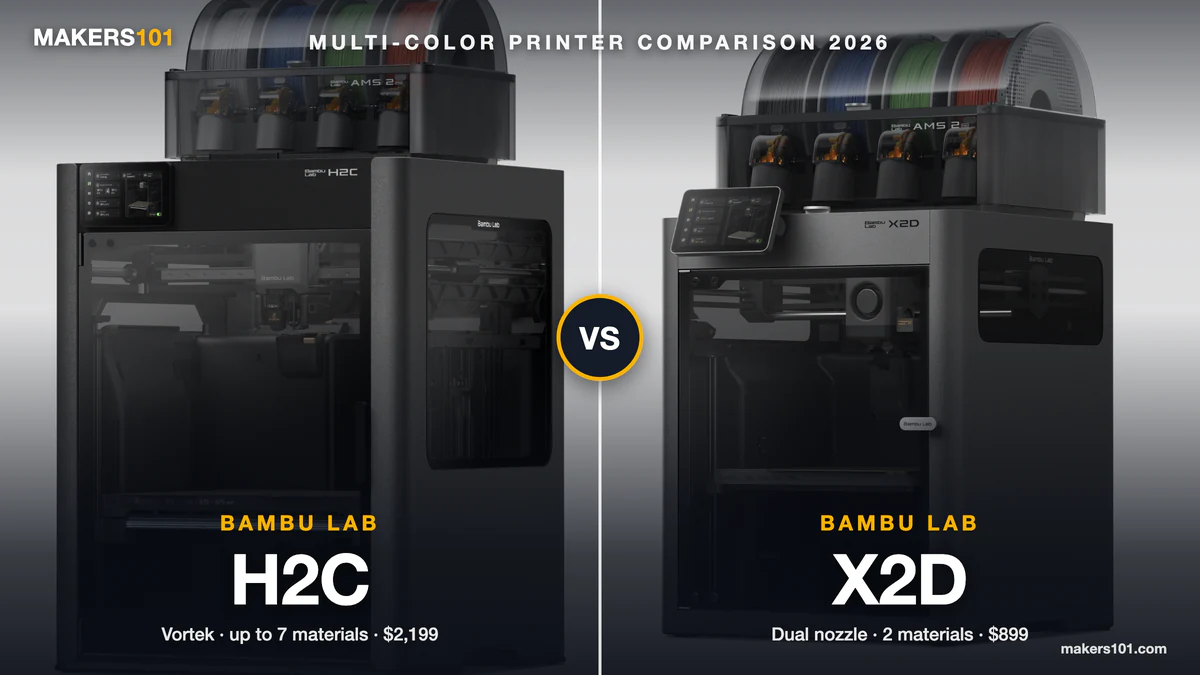
- For most people weighing the Bambu Lab H2C vs X2D, the X2D is the better buy. At $899 with an AMS 2 Pro (US store, October 2026), it prints two colors or a model-plus-support pair without purging, reaches 300°C, and has a 65°C heated chamber.
- The H2C ($2,199 AMS Combo) earns its higher price in three cases: three or more colors are your normal workload, your parts are wider than 256 mm, or you print PPS-class filament that needs 350°C.
- The real dividing line is the third color. Two materials print without purging on either machine. On the X2D, a third color brings purge waste back. The H2C keeps going up to seven materials.
- Build volume: X2D 256 × 256 × 260 mm on its main nozzle. H2C 300 × 320 × 325 mm when both nozzles share a print.
- Wait or buy? A Bambu H3C and an X2D Pro passed FCC on September 11, 2026. Neither has been announced.
If you’ve spent weeks on the Bambu Lab H2C vs X2D question, you’re in good company. r/BambuLab keeps getting new “X2D or H2C” threads, and the replies split hard. One camp says the H2C is “orders of magnitude more expensive.” The other says “all roads will lead to the H2C” once you get serious about multicolor.
Both camps are right. The spec sheet just won’t tell you which one you belong to, because “multicolor” means something different on each machine. On the X2D it means two materials almost for free. On the H2C it means up to seven.
This guide breaks the price gap into three questions: how many colors you really print, how big your parts are, and how hot your filament runs.
A note on sources: we haven’t had hands-on time with either printer. This comparison draws on 12 video reviews and tests from 11 independent creators, owner reports on Reddit, and Bambu’s own spec sheets for the H2C and X2D.
Last updated: October 1, 2026, with prices checked the same day.
Table of Contents
- Bambu Lab H2C vs X2D Specs at a Glance (2026)
- H2C vs X2D Price: What the $1,300 Gap Actually Buys
- How the X2D’s Dual Nozzle and the H2C’s Vortek System Handle Color Changes
- H2C vs X2D Purge Waste and Print Time: The Third-Color Cliff
- H2C vs X2D Build Volume: 256mm vs 300mm of Usable Width
- H2C vs X2D for Engineering Filaments: 300°C vs 350°C
- H2C vs X2D Print Quality and Speed
- Bambu Lab H2C and X2D Reliability: Known Issues Owners Report
- Who Should Buy the Bambu Lab X2D, and Who Should Buy the H2C
- FAQ: Bambu Lab H2C vs X2D
Bambu Lab H2C vs X2D Specs at a Glance (2026)
The H2C is the Vortek hotend-changing model in Bambu’s H2 series. The X2D is the X1 Carbon’s successor, launched April 14, 2026. The H2C costs about 2.4 times as much and weighs exactly twice as much.
| Spec | Bambu Lab H2C | Bambu Lab X2D |
|---|---|---|
| Position | H2 series, Vortek hotend changer | X1 Carbon successor (April 2026) |
| US price (Oct 1, 2026) | $2,199 AMS Combo | $649 printer / $899 AMS Combo |
| Combo includes | 8 hotends + AMS 2 Pro | AMS 2 Pro |
| Materials per print without nozzle purge | Up to 7 (6-hotend rack + left nozzle) | 2 (main + auxiliary nozzle) |
| Second extruder | Induction hotends, swapped from a rack | Bowden-fed auxiliary nozzle |
| Build volume, one nozzle | 305 × 320 × 325 mm | 256 × 256 × 260 mm (main) |
| Build volume, both nozzles | 300 × 320 × 325 mm | 235.5 × 256 × 256 mm |
| Max nozzle temperature | 350°C | 300°C |
| Heated chamber | 65°C, active | 65°C, active |
| Max acceleration | 20,000 mm/s² | 20,000 mm/s² |
| Laser and cutting module | Optional (10W or 40W laser) | Not offered |
| Build plates | H2C-specific size | Standard 256 mm Bambu plates |
| Size and weight | 492 × 514 × 626 mm, 32.5 kg | 392 × 406 × 478 mm, 16.25 kg |
Three rows decide most purchases: how many materials print without purging, how big the bed is, and how hot the nozzle gets.
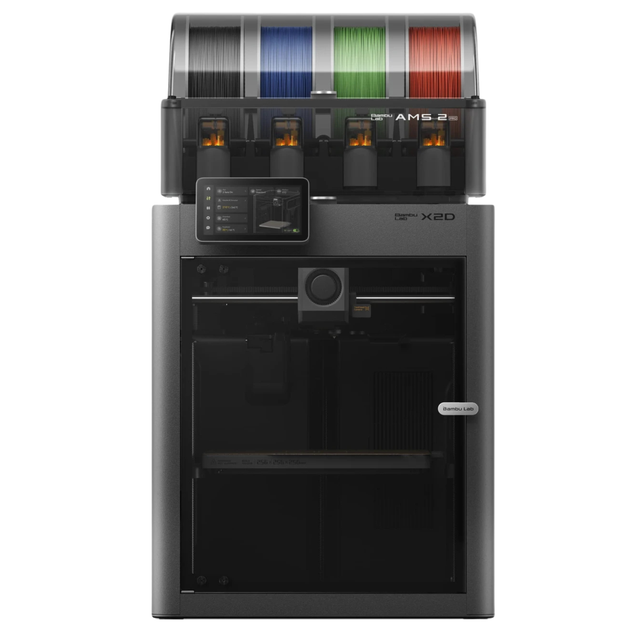
- Dual-nozzle system with a dedicated support material nozzle for clean, peelable supports
- Multi-material and multi-color printing with the AMS 2 Pro
- 300°C nozzle temperature with 65°C active chamber heating for advanced materials
- Full filament path AI detection with built-in monitoring
H2C vs X2D Price: What the $1,300 Gap Actually Buys
Combo against combo, the H2C costs $2,199 and the X2D costs $899 at Bambu’s US store. The bare X2D drops to $649.
Part of that premium is hardware you would otherwise buy later. The H2C AMS Combo ships with eight hotends. Six are induction hotends for the right side (four 0.4 mm, one 0.2 mm, one 0.6 mm), and two are standard 0.4 mm hotends for the left.
Spare induction hotends sell for about $40 each at retailers like West3D. So the five spare induction hotends in the box are worth roughly $200 at retail.
If you’re reading older reviews, check the date. Uncle Jessy, Frankly Built and 3D Print Rancher all quoted the H2C at $2,399 to $2,400 this spring. The US store price has since dropped by $200.
Will the H2C pay for itself in saved filament? One r/BambuLab commenter ran the numbers in May 2026, comparing the H2C with the H2D and H2S. At $15/kg, you’d need 30-plus prints the size of Bambu’s Firebird demo before purge savings covered the price difference. Another owner put it more bluntly: “$1500 is a lot of filament.”
So buy the H2C for time and capability. Filament savings alone rarely close that gap unless you run large multi-color jobs every week. You can plug your own filament price and print volume into the 3DPKit Print Cost Calculator to see where your break-even lands.
If you’re already leaning H2C, our guide on which H2C bundle makes sense compares the AMS Combo with the Ultimate and Laser bundles.
How the X2D’s Dual Nozzle and the H2C’s Vortek System Handle Color Changes
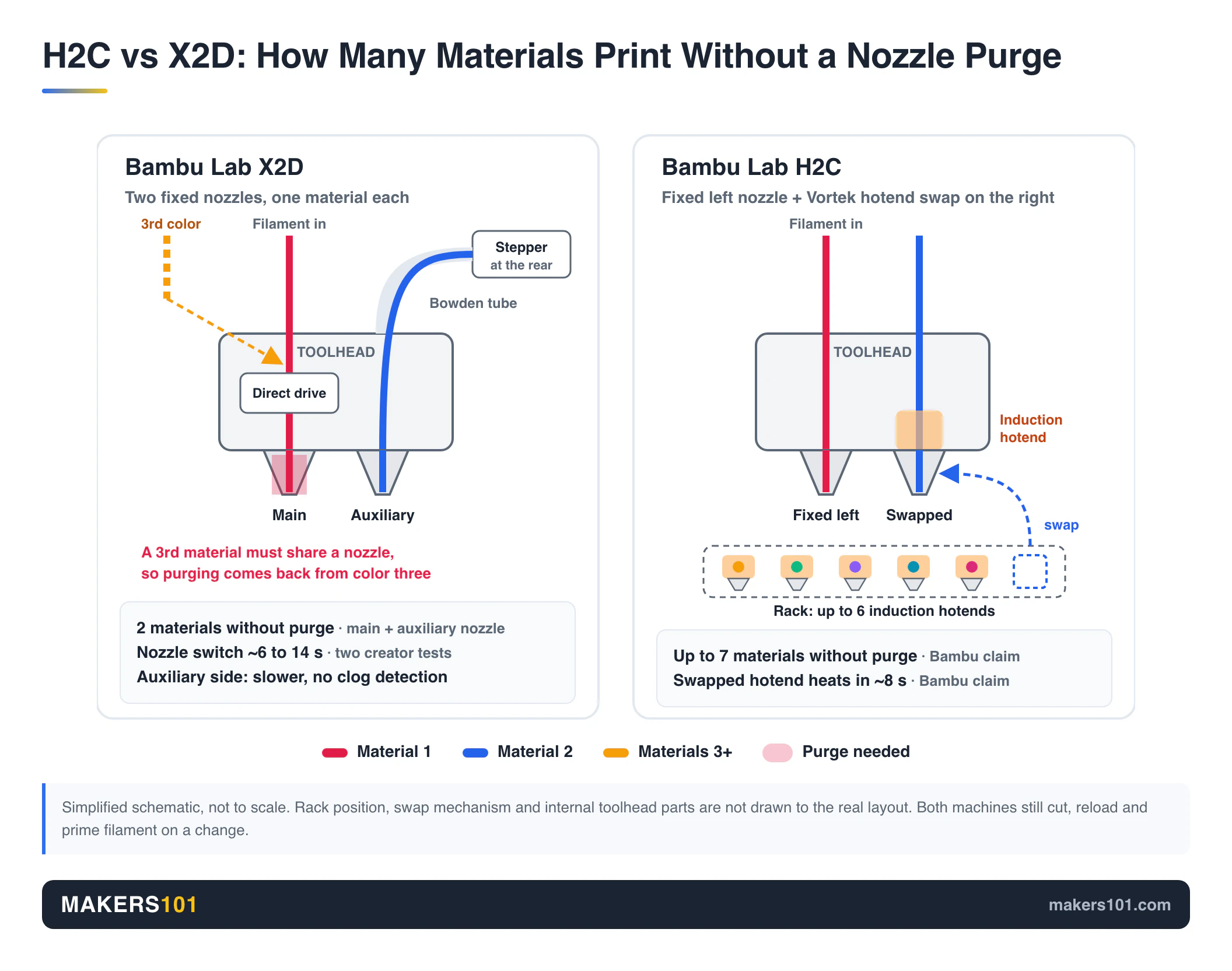
Past two colors, the H2C handles color changes far better. Both printers avoid purging by switching nozzles, but the X2D has exactly two, and the right one is a slower Bowden-fed auxiliary. The H2C keeps a rack of up to six induction-heated hotends and swaps them onto the right side of its toolhead.
Bambu Lab X2D: Two Nozzles, and the Right One Runs on a Bowden Tube
The X2D’s left nozzle is direct drive, driven by Bambu’s permanent-magnet synchronous motor. The right auxiliary nozzle is fed through a Bowden tube by a stepper motor at the back. Switching between them is fast: about 6 seconds in mpoxDE’s test and about 14 seconds per swap in The 3D Printing Zone’s. A single-nozzle P2S took 1 min 21 s to 2 min 13 s per color change in the same test.
The auxiliary nozzle has real costs. CNC Kitchen found prints on it can take almost twice as long, with longer retractions and lower accelerations. It also has no clog detection, and Bambu marks PLA Silk, PETG-CF, ASA-CF and PA6-CF as “print with caution” on that side. Soft TPU only works on the left nozzle.
The AMS also feeds only one nozzle at a time, so the second material often comes from an external spool. If both materials need to stay dry, you’ll want a second AMS or a dryer.

In practice, that makes the right nozzle a great support and second-color nozzle and a weak main nozzle. One X2D owner on Reddit put it the same way: the auxiliary nozzle is “not up to par with the main,” but it has handled plenty of multi-color prints.
Bambu Lab H2C: Up to Seven Materials, Induction-Heated in 8 Seconds
The H2C’s Vortek system parks up to six interchangeable hotends in a rack and adds a fixed left nozzle. Bambu’s own claim is “up to seven different materials in a single run,” with no nozzle purging between them. Each induction hotend reaches temperature in about 8 seconds.
Mick of The 3D Printing Zone, who runs a print farm, found the hotend swap finishes faster than the AMS can pull filament out. In those tests the swap added no time to a normal filament change.
It still isn’t instant. The printer has to cut the filament, reload, prime and wipe.
FauxHammer’s verdict is that the H2C solves only half of the color-change problem. Waste goes down, but the time cost stays. Uncle Jessy found swaps slower than the dedicated toolheads on a Snapmaker U1 or Prusa XL.
Two limits to know: you can’t mix nozzle diameters in one print yet (Bambu says a firmware update may add it), and multi-color soft TPU is limited because the AMS can’t feed it. An H2C owner on Reddit called nozzle-size swapping “a godsend,” because you just pick the size in the slicer. For the full mechanism, see how Vortek hotend switching works.
H2C vs X2D Purge Waste and Print Time: The Third-Color Cliff
For two-color prints, the X2D and H2C both waste almost nothing. The gap opens at the third color. mpoxDE’s X2D review spells it out: two colors are waste-free, and a third color brings purging back. The H2C keeps swapping hotends up to its seventh material.
The most useful numbers come from The 3D Printing Zone, a print-farm channel that measured both machines in separate videos. The two tests used different models, so treat them as two experiments from one source, not a head-to-head.
| Test (The 3D Printing Zone) | Printer | Time | Waste |
|---|---|---|---|
| Multi-color panda | Bambu X2D | 1 h 37 min | ~8 g |
| Multi-color panda | Bambu P2S (one nozzle) | ~4 h | 62 g |
| 4-color snowman head | Bambu H2C | 12 h 13 min | 11 g |
| 4-color snowman head | Bambu H2D (two nozzles) | 12 h 51 min | 32 g |
| 4-color snowman head | Bambu H2S (one nozzle) | 13 h 27 min | 50 g |
On a job that suits two nozzles, the X2D cut waste from 62 g to about 8 g. On a four-color job, the two-nozzle H2D wasted nearly three times what the H2C did. The H2D is the closest stand-in for the X2D here, since both have two nozzles.
The gap widens on bigger jobs. Mick’s multi-color bath bomb cup needed 38 hours and 689 g of filament on the H2D. The H2C finished it in 22 hours with 309 g. An 8-color Majora’s Mask dropped from 54 hours and 1,000 g to 33 hours and 400 g.
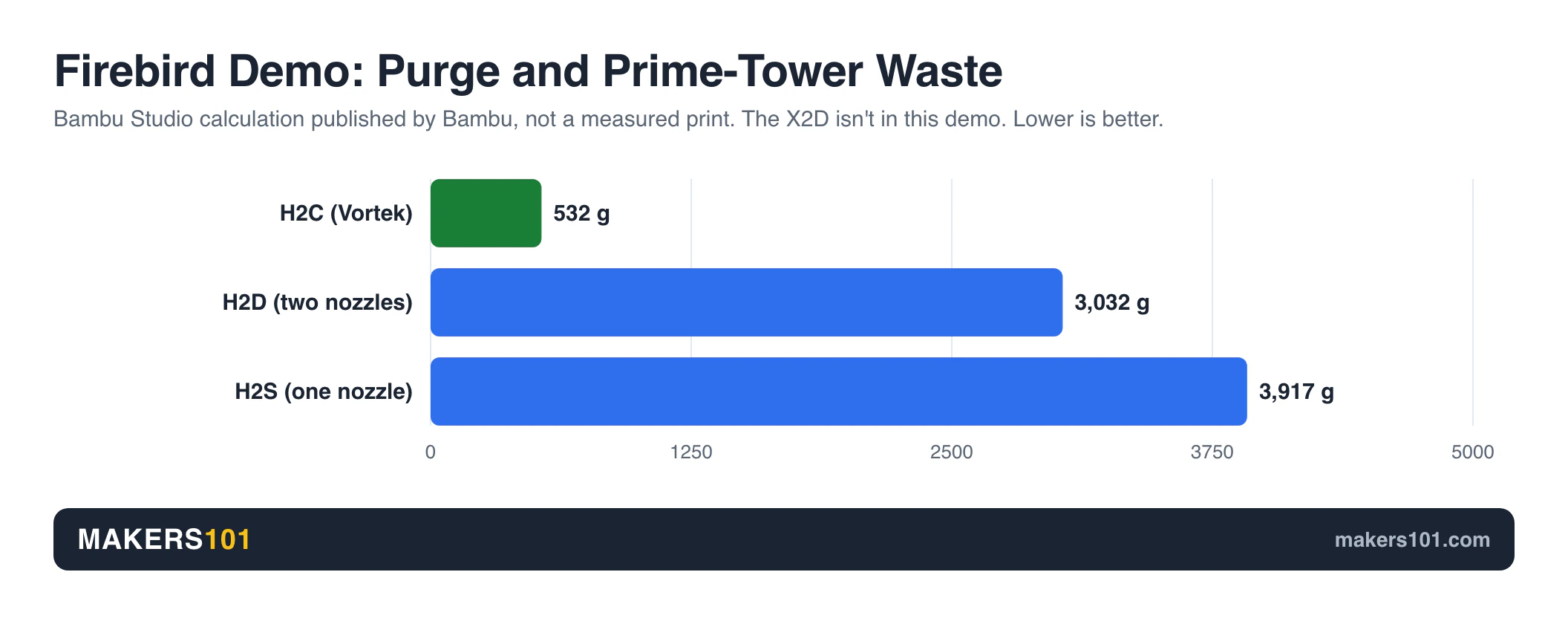
Bambu’s own Firebird demo shows the same direction, though these are Bambu Studio calculations. Purge and prime-tower waste comes to 532 g on the H2C, 3,032 g on the H2D and 3,917 g on the H2S. Print time lands at 58%, 88% and 100%.
The H2C isn’t waste-free. Uncle Jessy noticed that on some multi-color prints, the wipe tower used more filament than the model itself.
- One or two colors, or a model plus support: the X2D is the efficient pick.
- Three or four colors now and then: the X2D still works. Expect purge waste from the third color on.
- Three or more colors as your normal job: the H2C pays back in hours and grams.
H2C vs X2D Build Volume: 256mm vs 300mm of Usable Width
The X2D’s main nozzle covers 256 × 256 × 260 mm. The H2C prints 305 mm wide on one nozzle and 300 × 320 × 325 mm on a dual-nozzle job, so 300 mm is the number to plan around.
The X2D gives up width too. With the auxiliary nozzle in play, its volume drops to 235.5 × 256 × 256 mm, which matches CNC Kitchen’s estimate of about 20 mm lost.
The H2C has its own squeeze. FauxHammer says day-to-day usable width often ends up around 300 mm. FauxHammer’s broader point about the H2 line: the single-nozzle H2S is 340 mm wide, so paying more within the H2 series can get you less width.
Plates matter for upgraders. Bambu says the H2C’s bed is slightly smaller than the H2D’s, so H2C and H2D build plates aren’t interchangeable. The X2D uses the same plate size as the P2S and X1C.
The H2C measures 492 × 514 × 626 mm and weighs 32.5 kg. The X2D is 392 × 406 × 478 mm at 16.25 kg. One Reddit owner warned that H-series printers are “huge and unwieldy” if you ever need to move one.
If you print helmets, cosplay armor or large single-piece parts, the X2D’s bed size is the real deciding factor. Our X2D vs H2D comparison walks through which prints hit that wall.
H2C vs X2D for Engineering Filaments: 300°C vs 350°C
Both printers have a 65°C actively heated chamber, so ABS, ASA and carbon-fiber nylons are fair game on either. The split is the nozzle ceiling, which runs 50°C higher on the H2C. That extra headroom mostly matters for PPS and PPS-CF, which Bambu lists for the H2C and leaves off the X2D’s list.
The X2D holds up well with common engineering filaments. Bob’s Tech ran 10 to 15 ABS prints, plus several ASA and ASA-CF jobs, over a month without notable problems. Bob found it performs as well as the H2D for these filaments. The Ziltech ASA-CF settings were a 270°C nozzle and 90°C bed.

Bob also flagged two defaults worth changing. At print start the X2D sets the right circulation fan to 100% with the exhaust off. Bob sets both to 10% by hand to hold chamber heat and vent fumes.
The X2D also keeps a 0.6 mm nozzle at about 21 mm³/s of volumetric flow, while the H2D auto-raises it to 30-31. Raise it by hand and you get the same speed gain.
Chamber heat-up on the X2D took about 10 minutes for mpoxDE and about 20 for CNC Kitchen. CNC Kitchen also found the included filter helps with PLA but doesn’t fully remove ABS and ASA smells.
On the H2C, Uncle Jessy reported zero problems so far with ABS and ASA. Frankly Built notes that its fully enclosed, heated chamber opens the door to materials like ASA. Bambu also lets you dedicate one Vortek hotend to a specific filament, which is handy for keeping abrasive carbon-fiber blends in a hardened hotend of their own.
TPU is limited on both. On the X2D, soft TPU only runs on the left direct-drive nozzle. The Bowden side accepts only Bambu’s stiffer “TPU for AMS.” On the H2C, Uncle Jessy couldn’t combine two soft TPU spools for multi-color TPU.
H2C vs X2D Print Quality and Speed
On single-material prints, you won’t see a meaningful quality difference between these two. Both list 20,000 mm/s² max acceleration. The differences show up on the X2D’s auxiliary nozzle and in how long each machine takes to start.
The only direct race in our research came from RC EAST, who started the same file on an X2D, H2D and H2C at once. Slicer estimates were 4 h 50 min, 4 h 58 min and 4 h 50 min. The X2D and H2D finished within about eight minutes of each other, and the H2C restarted after a first-layer defect. That’s one run of one model, so treat it as an anecdote.
On the X2D, CNC Kitchen printed a 3D Benchy in 37 minutes on the standard 0.2 mm profile. Real print times ran 1-4% over the slicer estimate on the main nozzle and 7% over on the auxiliary.
Overhangs up to 80 degrees were superb on the main nozzle, while the auxiliary showed more stringing and gaps. mpoxDE’s 50-hour, 900 g PLA engine model came out with sharp details and clean bridges.
On the H2C, NeedItMakeIt compared Benchies in nine materials against the H2D and found them nearly impossible to tell apart. The H2C came out slightly ahead on PLA Silk, ASA, ABS, TPU and bridging. HexiBase printed a three-material housing with no color bleed.
Startup takes longer than you might expect on both. The X2D’s calibration ran 9 min 2 s in The 3D Printing Zone’s test, versus 6 min 52 s on a P2S, because it also calibrates the offset between nozzles. Uncle Jessy keeps a separate printer for quick test prints because the H2C’s startup routine is long.
Bambu Lab H2C and X2D Reliability: Known Issues Owners Report
Neither printer shows a pattern of serious failures in long-term reviews. Each has a few known quirks you should know before day one.
On the H2C, Uncle Jessy’s first 7-color print clogged on almost every color change. The cause was a silicone pad inside the rear AMS adapter, and removing it fixed every feed problem.
Uncle Jessy also saw minor layer shifts after pause and resume, after opening the door, and after false spaghetti-detection alarms. Spare hotends in the common 0.4 size were out of stock for about six weeks, and the power cord is only 4 feet long.
The bigger picture on the H2C is positive. Frankly Built called it “disgustingly reliable,” with one failed print across many, caused by the creator’s own material mistake. One Reddit owner runs three H2Cs nonstop on multi-day prints with 700 to 1,000 tool changes each. That owner reports a few broken parts and “some weird issues after updates,” but calls it reliable.
Uncle Jessy points out that a clogged Vortek hotend can be swapped on its own, while a clog on a Snapmaker U1 stopped the whole machine.
On the X2D, CNC Kitchen hit first-layer inconsistencies on the textured sheet and fixed them by switching to the smooth sheet. The AMS 2 Pro’s first feeder in that review occasionally failed at the initial load and ground filament. The auxiliary nozzle’s missing clog detection is the other weak spot to watch.

Both machines live in Bambu’s closed ecosystem. If the licensing debate around Bambu’s software bothers you, neither printer changes that.
Who Should Buy the Bambu Lab X2D, and Who Should Buy the H2C
Buy the Bambu Lab X2D if:
- Most of your prints use a single color, a second color, or a support interface. PLA supports under PETG snapped off cleanly in mpoxDE’s test.
- Your parts fit on the X2D’s bed.
- You print ABS, ASA or carbon-fiber nylon, all within the X2D’s nozzle ceiling.
- You want to stay near $900. CNC Kitchen’s view is that the X2D makes the P2S hard to justify for most people.
Pick the Bambu Lab H2C if:
- Three or more colors per print is your normal week, especially if you sell multi-color work. Mick called it “the best printer we own.”
- You need parts larger than the X2D’s bed in one piece.
- You print PPS or other filaments above the X2D’s temperature ceiling.
- You switch nozzle sizes often and want the printer to handle it.
Consider the H2D if you want two full direct-drive nozzles and a big bed but rarely go past two colors. mpoxDE’s advice for anyone who wants both nozzles at full performance is to buy the H2D.
Consider waiting if you aren’t in a hurry. The H3C and an X2D Pro both cleared FCC on September 11, 2026, and Bambu’s recent H3C patents show a 10-nozzle design. There’s no announcement, price or ship date yet.
Skip both if you only print PLA and PETG in one color. 3D Print Rancher argues that paying extra for chamber heating you don’t need is “like setting money on fire.” Our P2S vs X2D breakdown covers that choice.

- High-Speed Precision: The Bambu Lab P2S 3D printer prints up to 600 mm/s while maintaining exceptional accuracy. With the PMSM Servo Extruder and…
- Ready to Print in 15 Minutes: Set up your P2S FDM 3D printer and start printing in just 15 minutes. With AI failure detection, quick-swap nozzles, and…
- Effortless Multi-Color Printing: The AMS 2 Pro enables seamless multi-color/multi-material 3D printing. It features built-in filament drying at up to…
- Smart Airflow for Any Filament: The Adaptive Airflow System automatically balances cooling and heat retention—keeping overhangs crisp with cool air…
- Limitless Creativity, Seamless Workflow: Explore over one million 3D models on MakerWorld and bring them to life with a smooth, unified workflow using…
If I were buying one today for a home workshop, I’d get the X2D and keep the difference. I’d only change my mind if three-color prints were already my weekly routine.
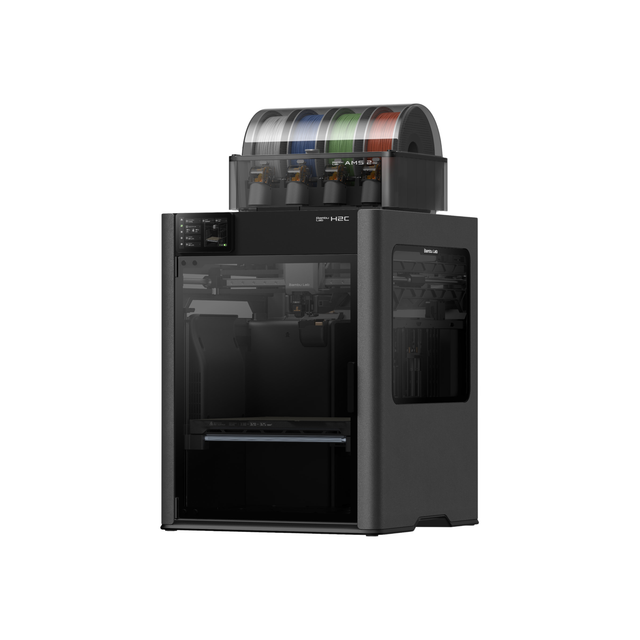
- Vortek system: 6 swappable induction hotends plus a fixed left nozzle
- Prints up to 7 materials in one job with minimal purge waste
- Combo includes the AMS 2 Pro
FAQ: Bambu Lab H2C vs X2D
Is the H2C better than the X2D?
The H2C is the more capable machine. It handles up to seven materials without nozzle purging, prints wider with both nozzles, and runs a hotter nozzle. The X2D is the better value for one- and two-color printing, at well under half the price.
Is the Bambu H2C printer worth the extra cost?
It’s worth it when three-plus colors are the norm for you. In The 3D Printing Zone’s print-farm production, an 8-color Majora’s Mask took about 40% less time on the H2C than on an H2D, with 60% less filament. For occasional multi-color work, filament savings rarely cover the price gap with the X2D.
Is Bambu Labs X2D worth it?
For most buyers, yes. At $649 for the printer alone, it adds an actively heated chamber and a second nozzle that handles two materials without purging. Its weak spot is the Bowden-fed auxiliary nozzle, which is slower and lacks clog detection.
Is the Bambu Lab P2S or X2D better?
The X2D is the better printer for multi-material and engineering filaments. CNC Kitchen notes it adds a heated chamber, dual nozzles, finer belts and an exhaust filter for about $100 more than the P2S. If you only print single-color PLA and PETG, the P2S is enough.
Are H2D and X2D nozzles the same?
Yes, for the standard hotends. Retailers list Bambu’s standard quick-swap hotend as compatible with the H2D, P2S and X2D. The H2C’s left nozzle uses that standard hotend too, but its right-side Vortek induction hotends only fit the H2C.
Is the X2D printer reliable?
Long-term reviewers report few problems. Bob’s Tech ran a month of ABS, ASA and ASA-CF without notable failures. CNC Kitchen’s main issues were an uneven first layer on the textured plate and occasional AMS feed failures at initial load.