
I earn a commission if you buy through links on this page, at no extra cost to you. As an Amazon Associate, I earn from qualifying purchases.
Disclosure: ugee sent us a Funbox free of charge and supplied a PR brief suggesting angles for coverage, including a line of attack on Toybox’s filament. We were not paid, ugee did not review this article before publication, and you can judge for yourself how much of that brief survived contact with the evidence. We don’t own a Toybox, so every Toybox claim here is sourced from Toybox’s own documentation, independent reviews, or owner reports. It’s not our testing.
Table of Contents
- At a Glance
- The Short Answer
- Funbox vs Toybox: How Big Can They Actually Print?
- Price: What You Actually Pay in Year One
- The Filament Lock-In Myth
- Bolts, Explained Fairly
- Safety and the Enclosure Question
- Setup and Your First Print
- What Your Kid Can Actually Do Alone
- Print Quality and Known Flaws
- Why I Am Less Confident About the Funbox Verdict
- Which One Should You Buy
- What About Just Buying a Bambu A1 Mini?
- FAQ
At a Glance
| Spec | ugee Funbox | Toybox Alpha Three |
|---|---|---|
| Price (as of July 20, 2026) | $269 early-bird, $329 regular | $249 Pro Saver / $299 Pro Mega / $309 Starter / $359 Deluxe |
| Build volume | 120 x 120 x 120 mm (1,728 cm³) | 70 x 80 x 90 mm (504 cm³) |
| Filament | Standard 1.75mm PLA, fits stock holder | Printer Food (same spec); third-party allowed, but full-size spools need a printed holder |
| Filament cost | From about $13/kg for generic PLA | $30/kg (500g roll) or $44/kg (250g roll) for Printer Food |
| In-app purchases | None found as of this writing | Bolts for licensed characters; 5,000 included in Pro bundles |
| Enclosure | Fully enclosed, H12 HEPA and carbon filter | Open frame |
| Bed leveling | None required | Not documented by Toybox |
| Certifications | UL GREENGUARD (on the HEPA filter), ASTM F963-23, EN71, per ugee | CE-RED and UKCA EN71-3 conformity certificates published; no GREENGUARD claim |
The Short Answer
The Funbox gives you a much bigger print area and a closed box you can put in a kid’s room. The Toybox gives you licensed characters and years of public track record.
That’s it. That’s the real split.
These two are closer than the marketing on either side suggests, and most of the differences people argue about online turn out to be wrong. We’ll walk through which ones.
Funbox vs Toybox: How Big Can They Actually Print?
This is the one gap that’s big and nobody disputes it. The Funbox has a 120mm cube of print space. The Toybox has 70 x 80 x 90 mm. That works out to 1,728 cm³ against 504 cm³, so the Funbox gives you about 3.4 times the usable volume.
Toybox’s own help center states the maximum print volume as “7x8x9 cm.” PCMag’s Alpha Three review measures it as 2.75 by 3.2 by 3.5 inches and calls it “a very small build volume.” Spec listings from Tom’s Hardware and SimplyPrint match, though both describe earlier Toybox models, which tells you the build area has not grown across generations.
What 504 cm³ actually limits
A 70mm wide print is roughly a deck of cards lying flat. Small figurines and keychains fit comfortably. Bookmarks and rings are fine. Anything bigger has to be split into pieces and assembled afterward.
That matters more than it sounds, because assembly is where kids struggle. One parent reviewer noted that the snap-fit connectors on multi-part Toybox models were hard for young children to put together, and that one-piece prints held up better. Their review doesn’t name a model, so read it as a Toybox-line observation. We’ll lean on the same review a few more times below, with the same caveat.
Why bigger is not automatically better
A larger build area also means longer prints, and children’s patience is finite. The same reviewer timed a multi-part character at 19 minutes for the head, 5 minutes for the face, and 27 minutes for the body, finishing the whole set in under an hour. That’s a reasonable attention span. A full-height print that ties the machine up for four hours is a different experience.
So read the volume gap as “the Funbox can do things the Toybox physically cannot,” not as “bigger is better in every case.”
Price: What You Actually Pay in Year One
The sticker prices are close, and the bundles matter more than the headline number.
The Funbox launched at an early-bird price with a regular price about $60 higher. ugee’s launch blog says the package includes “7 complimentary rolls of standard PLA filament.” One caveat: our review unit shipped with a single test spool, and an independent reviewer also described receiving one test spool. The seven-roll promotion may be a pre-order offer that our pre-production unit did not reflect, so treat it as a claim to verify at checkout rather than a guarantee.
Toybox sells four Alpha Three bundles, and the lineup rewards reading the fine print. All four include the EZ-Peel bed and the 7,000+ model catalog. The two Pro bundles ($249 with one roll of Printer Food, $299 with eight) add a month of Toybox Pro, the AI tools, and 5,000 bolts. The Starter and Deluxe bundles cost $60 more than their Pro equivalents and include none of those extras.
Read that again, because it’s easy to miss: the more expensive bundles give you less. If you’re buying a Toybox, the Pro versions are the ones worth your money.
Compare like for like and the picture changes. Toybox’s eight-roll Pro bundle sits about thirty dollars above the Funbox’s early-bird price. If ugee’s seven-roll promotion holds at checkout, the two are close to a wash. If it doesn’t, and your Funbox arrives with the single test spool ours did, Toybox is the better-stocked box. Either way, neither is meaningfully cheaper on the machine itself. If you want to model the ongoing cost yourself, our print cost calculator handles filament math.
The Filament Lock-In Myth
Here is the thing almost every comparison gets wrong: Toybox doesn’t require you to buy its filament. It does, however, make using anyone else’s slightly awkward. Both halves matter.
Toybox’s help center answers this directly. Asked “Can I use 3rd party filament?”, the company’s answer is that “you can absolutely purchase filament from 3rd party sources as long as it’s 1.75mm PLA filament.” Toybox’s own blog adds that using other brands “won’t void your warranty,” with the caveat that they can’t guarantee every brand will work.
Printer Food is not an exotic material either. Toybox describes it on its own product pages as “corn-based bio plastic (1.75 mm PLA).” It’s standard-diameter PLA in a Toybox-branded spool.
The real numbers
The premium is real if you choose to pay it. Priced from Toybox’s store, a 500g Jumbo roll works out to about $30/kg and a 250g Original roll to about $44/kg. Specialty colors like glow and sparkle run higher.
Budget full-size spools of generic PLA start around $13 per kilogram. So staying on Printer Food costs roughly two to three times what feeding the same machine generic filament would. If you want to understand what PLA actually costs across brands and types, we break that down separately.
The catch nobody mentions either
Here’s where the “just buy generic” advice runs into hardware. Tom’s Hardware found that the Toybox spool holder is sized to hold only Toybox’s half-pound rolls, which are roughly a quarter the size of a standard 1kg spool. To run ordinary filament you need a bigger holder, and we couldn’t find one sold by Toybox. Worth adding: Toybox’s own guidance tells you to avoid filament with specks, flecks, or glitter, so “any PLA” has always come with an asterisk.
Owners solve this by printing one. Toybox’s own model library carries a large-spool holder, and Printables hosts one listing the Alpha 2 and 3 specifically, so this applies to current machines and not just older ones. Search “Toybox 1kg spool holder” on Printables and you’ll find it in a few seconds. It works. It’s also a step nobody tells you about before you buy.
So the honest version is neither “you’re trapped” nor “just use any PLA.” The material is standard and officially blessed. The spool format is the lock, and you can pick that lock with a print.
That still cuts against the Funbox’s most-repeated selling point, just less cleanly than we first thought. “Uses standard filament” is true of both machines. The Funbox simply accepts a standard spool without asking you to make a part first.
Bolts, Explained Fairly
Bolts are Toybox’s in-app currency for licensed characters. Priced on Toybox’s store, 850 bolts cost $6.49, 1,400 cost $9.99, 3,000 cost $19.99, and 5,000 cost $31.99. A parent reviewer confirmed the practical side: a SpongeBob model ran 1,400 bolts, roughly ten dollars.
Before you file this under hidden costs, three things need saying.
So bolts aren’t a gate on the machine. They are a gate on Marvel and Minions. Whether that bothers you depends entirely on whether your kid wants generic dinosaurs or specific ones.
On the Funbox side, we found no paid content tier as of this writing. ugee’s product pages mention no subscription, and its launch materials describe free serialized STEM tutorials. We want to be careful here: the printer ships in August and the library is still filling in, so absence of a paywall today is not a promise about next year.
Safety and the Enclosure Question
The Funbox is fully enclosed with an H12 HEPA and activated carbon filter. ugee lists UL GREENGUARD certification for that filter, plus ASTM F963-23 and EN71 for the machine. We haven’t independently verified those listings.
Toybox publishes conformity certificates too, in a help center article covering the Alpha 2, the Alpha 3, and Printer Food, including a UKCA EN71-3 certificate for the filament. So the honest comparison isn’t “certified versus uncertified.” Both companies publish paperwork. What ugee has that Toybox doesn’t is the GREENGUARD emissions certification, which is the one that speaks to air quality. The Toybox is an open-frame machine. If your main worry is a child touching a hot nozzle, that’s a genuine structural difference.
The filter is a consumable nobody is discussing
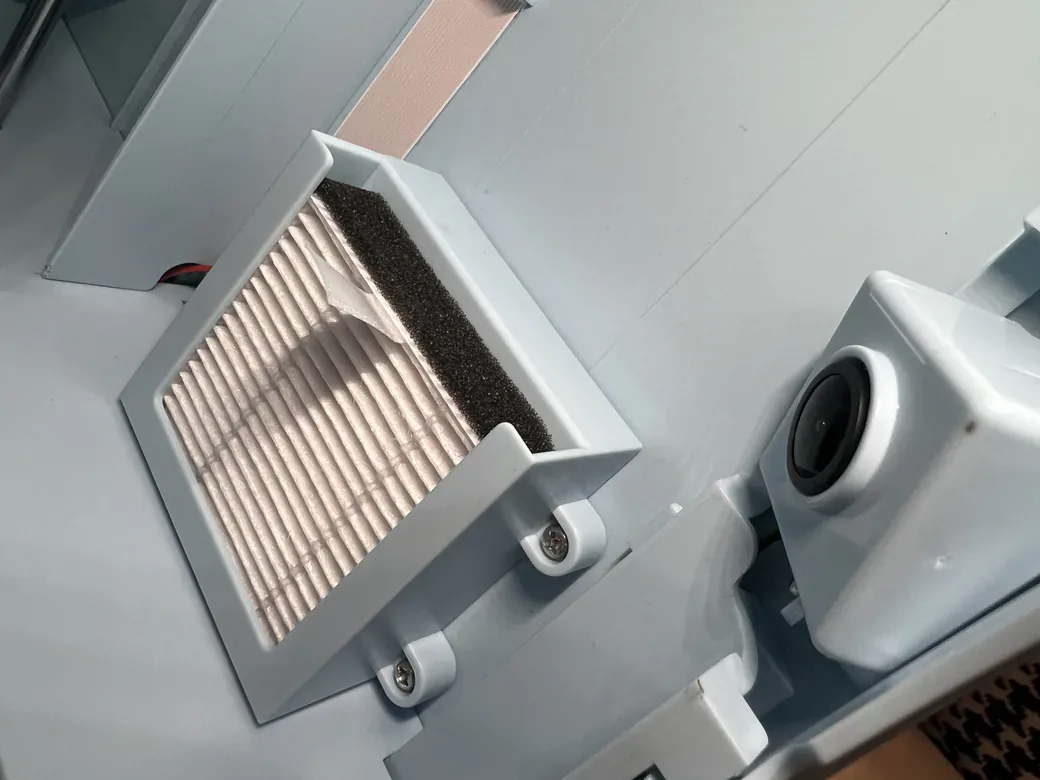
Open the Funbox door and you can see the filter cartridge on the right side, white pleated media with a dark carbon layer, sitting in a housing you can pull out. We photographed it during unboxing.
That visibility raises a question none of the marketing answers: how often does it need replacing, and what does a replacement cost? ugee hasn’t published a service interval or a spare part price. For a machine sold on air quality, that’s a gap worth asking about before you buy.
Enclosed doesn’t mean unsupervised
The Funbox’s hotend carries a yellow high-temperature warning triangle. ugee put it there because once the door is open, the hot end is within reach. The enclosure changes the odds, not the physics.
The same applies to the Toybox. A toy-review channel testing an earlier Toybox noted the nozzle gets very hot and that adult supervision is needed even for children over five. The open frame has not changed, so the point still stands.
Treat both machines as supervised appliances for young kids, not appliances you walk away from.
Setup and Your First Print
Setup is genuinely faster on the Funbox, but not by as much as the numbers floating around suggest. Three different figures get quoted, and they measure different things:
- ugee claims six minutes from box to finished print. We haven’t verified this.
- An independent reviewer reported under ten minutes from opening the box to printing.
- In our own unboxing, unpacking and setup took about five minutes. We did not time a completed print.
For the Toybox, an independent review described about twenty minutes of initial calibration and roughly forty-five minutes from unboxing to a usable toy. One caveat we have to flag: that review dates from 2023 and predates the Alpha Three. Toybox advertises the newer machine as faster at printing, but says nothing about setup time, so we don’t know whether that forty-five minutes still holds. Treat the gap between five minutes and forty-five as illustrative rather than a head-to-head result.
The step ugee’s marketing skips
Partway through Funbox setup you have to stop and register a ugee Fun App account before you can continue. It’s not a hardship, but it’s a real interruption in a story built around opening the box and going.
Leveling: one clear answer and one open question
The Funbox requires no leveling. That much is straightforward.
The Toybox is murkier than most articles admit, including an earlier version of this one. Older Toybox models needed manual bed adjustment with a screwdriver, and reviews from that era describe turning a rear screw to fix adhesion. A 2025 walkthrough of a Toybox Alpha shows the machine raising the bed by itself before printing, which is not the same claim as automatic leveling, and Toybox doesn’t document auto-leveling as a feature anywhere we could find.
We won’t pretend the two machines are equivalent here. If hands-off leveling matters to you, the Funbox is the one with a clear answer.
What Your Kid Can Actually Do Alone
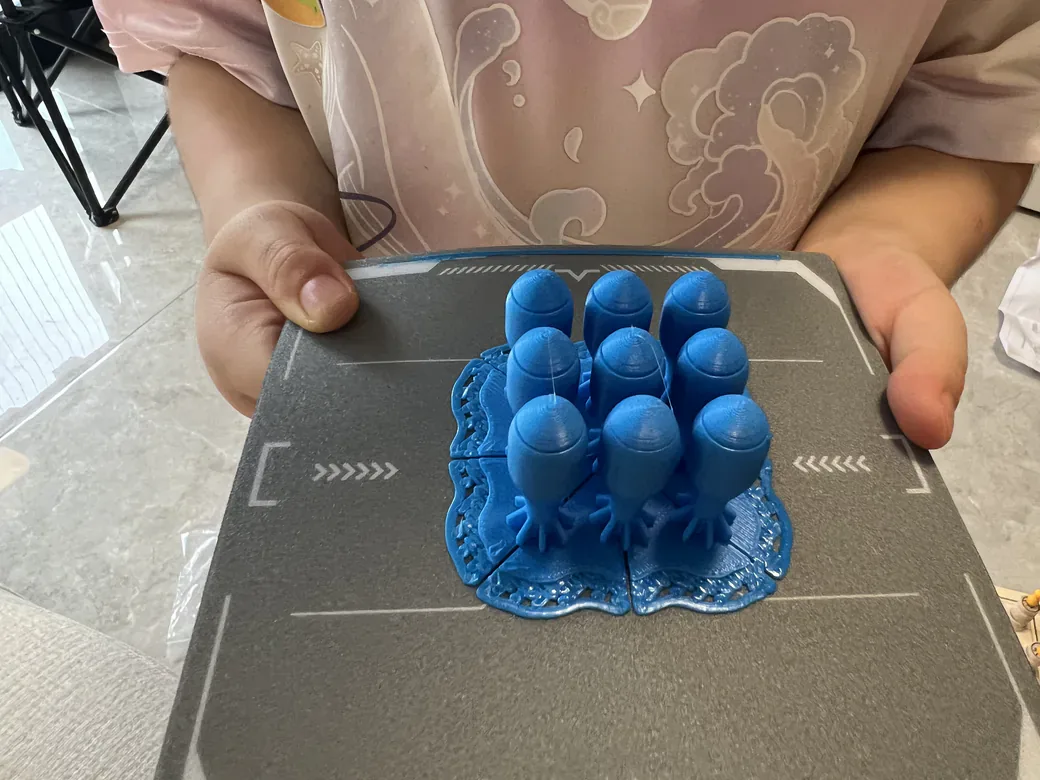
Both companies market to a wide age range. Independent testing suggests a narrower reality.
A reviewer whose eleven-year-old daughter used the Funbox found she could pick models and start prints independently, but needed help loading filament. Younger children needed more. The same review concluded that four and five year olds still require full adult supervision, which sits awkwardly next to marketing aimed at ages four and up.
On the Toybox side, the recurring friction is assembly rather than operation. One-touch printing works as advertised. Snapping multi-part models together is where small hands need help.
A practical read: from about age eight, a child can run either machine with occasional help. Below that, you’re operating it together, whichever one you buy.
Print Quality and Known Flaws
Neither machine is flawless, and the flaws are documented on both sides.
Funbox
Three limits matter more than anything on this list, and none of them show up in ugee’s marketing.
It prints one color at a time. Swapping spools between jobs works fine, but there’s no multi-material capability. The Toybox is also single-material, though its app lets you assign different colors to different parts of a multi-piece model, so a finished toy can end up multicolored even though each piece prints in one color.
It depends on ugee’s cloud. Everything routes through the app. You can’t print offline and you can’t load your own STL file through it. No internet means no printing. That’s the price of making a machine this simple, and it’s worth thinking about before you buy.
Its manual quietly discourages brand-switching. Third-party Creality PLA ran fine in our week of testing, but the printed manual nudges you toward ugee’s own filament. So the “uses standard filament” advantage is real and slightly softer than it first appears. Both machines have a filament asterisk. They’re just different asterisks.
On the reliability question we can only report a small sample: six prints over a week, six successes, longest job 4 hours 22 minutes. Real throughput landed between 9.9 and 16.5 grams per hour, which is a more useful number than any mm/s figure. We measured 47.5 dB beside the machine, close to ugee’s 46 dB claim, quiet enough for a living room.
One reviewer, testing with his eleven-year-old daughter, flagged three smaller frictions: prints default to a raft that needs cleaning up afterward, the AI model generator often picks a poor default orientation (which left one figure’s head rough where the raft attached), and filament has to be cut perfectly straight or it won’t feed through the PTFE tube.
We noticed something else during setup. The model library shows a rendered thumbnail for each item but no description text and no photos of real finished prints. You’re guessing what a model will look like. Given that the machine ships in August, this reads like content that hasn’t caught up yet rather than a design decision.
Toybox
The Toybox has been in the wild long enough for patterns to show. A widely discussed owner thread describes stringing and webbing on simple models, calibration succeeding only about half the time, articulated prints fusing or breaking, and print beds wearing out fast enough to need repeated replacement. Toybox support offered that owner a full refund. Worth noting: the poster never states which model they own, and their mention of leveling suggests an older one. Read it as a report on the Toybox line, not a verdict on the Alpha Three.
Independent reviews are gentler but consistent: an early tester hit bed adhesion failures on the first two attempts, fixing them by raising the bed and wiping it with hand sanitizer. That fix involved turning a leveling screw, which dates it to a pre-Alpha-Three machine. A parent reviewer reported articulated prints breaking during removal and recommended tape to ease them off.
Weigh those differently. The Toybox complaints come from years of real owners. The Funbox complaints come from a handful of launch reviews, which is a much thinner record.
On speed and resolution
You’ll find 60mm/s and 200 micron resolution quoted for the Toybox platform. Those figures probably describe an earlier generation. Toybox advertises the Alpha Three as substantially faster and finer, but hasn’t published its own numbers to replace them.
ugee claims up to 500mm/s and a 0.05mm minimum layer height. We haven’t verified either.
So we’re not going to line these up in a table and declare a winner. One set is unverified vendor marketing. The other is probably obsolete. Putting them side by side would look authoritative and mean nothing.
Why I Am Less Confident About the Funbox Verdict
Our confidence in the two halves of this article is not equal, and you should know which half to trust less. It’s the Funbox half.
Our Funbox arrived free from ugee. One of the two independent Funbox reviews we drew on states outright that its reviewer also received the printer free of charge. Every published Funbox assessment right now, ours included, comes from a seeded unit in the first weeks after launch.
The Toybox record is different in kind. It spans 2021 through 2025 and includes owners complaining months into ownership about beds wearing out and calibration drifting. That’s the type of evidence only time produces. It also spans three hardware generations, which is why we’ve flagged the age of individual Toybox sources throughout this article rather than treating them as one continuous record.
So when this article says something positive about the Funbox, that claim rests on a handful of fresh, mostly gifted reviews. When it says something negative about the Toybox, that claim usually rests on years of accumulated owner experience. Those aren’t equally strong, and you should discount accordingly. We spent a week with the Funbox and still consider its long-term reliability an open question.
Ask us again in a year.
Which One Should You Buy
Buy the Funbox if:
- You want meaningfully more print space, which is its clearest advantage
- You want an enclosed machine with filtration for a shared room
- GREENGUARD emissions certification specifically matters to you (Toybox publishes conformity paperwork but not this one)

Buy the Toybox if:
- Your child specifically wants licensed characters
- You want a machine with a public track record you can research
- You would rather buy into an ecosystem that has already been through several revisions

Consider neither if:
- You want a printer that will still be useful when your child outgrows toys
For families weighing more than these two, we keep a broader list of 3D printers for kids and classrooms updated with what we have tested.
What About Just Buying a Bambu A1 Mini?
For most families who are willing to be hands-on, yes, the A1 Mini is the better buy. This question comes up constantly, including from parents on Reddit choosing between an A1 Mini and a Toybox for their son.
Fair question, honest answer: the A1 Mini is a better printer and a worse toy. You get a larger build area, faster and more reliable printing, and a machine that stays useful for years. What you give up is the curated kid-safe model library plus the one-touch simplicity that makes these machines work for children at all. There’s no enclosure either.
If your goal is teaching a child to make things and you’re willing to be involved, a general-purpose printer is usually the better buy. If your goal is handing a seven-year-old something they can drive themselves, the kid-focused machines earn their premium. We looked at whether the A1 Mini makes sense for a beginner in more detail.

FAQ
Is Toybox filament proprietary?
The material isn’t. Toybox’s help center says third-party filament is fine at the standard diameter, and using it won’t void your warranty. Printer Food is corn-based PLA by Toybox’s own description.
The spool is a different story. The stock holder fits Toybox’s half-pound rolls, not full-size ones, so most owners print a larger holder before switching brands.
Do you have to pay extra to print models on the Toybox?
Not for most of the catalog. Toybox advertises 7,000+ free models, and you can upload your own designs at no cost. Licensed characters need bolts, the in-app currency. Buy a Pro bundle and 5,000 of them come with it.
How big can the Funbox and Toybox print?
Funbox: a 120mm cube, or 1,728 cm³. Toybox Alpha Three: 70 x 80 x 90 mm, or 504 cm³. In practical terms the Funbox holds about 3.4 times as much.
Can a five-year-old use these printers alone?
No. Independent reviewers testing both machines concluded that children of four and five need full adult supervision, largely because the hot end is reachable when the door or frame is open. From roughly age eight, most kids manage on their own with a nudge here and there.
What changed between Toybox Alpha 2 and Alpha 3?
The company advertises a hardware upgrade over the previous generation, claiming roughly double the print speed and 1.5 times finer detail. It hasn’t published standalone numbers for the newer model, though. That’s why older platform figures still circulate on spec sites, and why you should treat any speed comparison you read with suspicion.
Which is cheaper to run long term?
Closer than it looks, with an asterisk on each side. Both machines run generic PLA that starts around $13/kg, so raw filament costs the same for either one. Getting there is easier on the Funbox, since the Toybox needs a printed holder before it accepts a full-size roll. Stay on Printer Food and the Toybox runs two to three times higher per kilogram. Licensed characters add bolts on top.
The Funbox carries its own unknown: ugee hasn’t published filter replacement intervals or prices, and that filter is a consumable.
CERTAIN CONTENT THAT APPEARS ON THIS SITE COMES FROM AMAZON. THIS CONTENT IS PROVIDED ‘AS IS’ AND IS SUBJECT TO CHANGE OR REMOVAL AT ANY TIME.
Price details
Product prices and availability are accurate as of the date/time indicated and are subject to change. Any price and availability information displayed on Amazon.com at the time of purchase will apply to the purchase of this product.