
I earn a commission if you buy through links on this page, at no extra cost to you. As an Amazon Associate, I earn from qualifying purchases.
If you’re weighing the Anycubic Kobra S1 Max vs Creality K2 Plus, you’ve probably had both spec sheets open in adjacent tabs, looking for the number that decides it. Good luck.
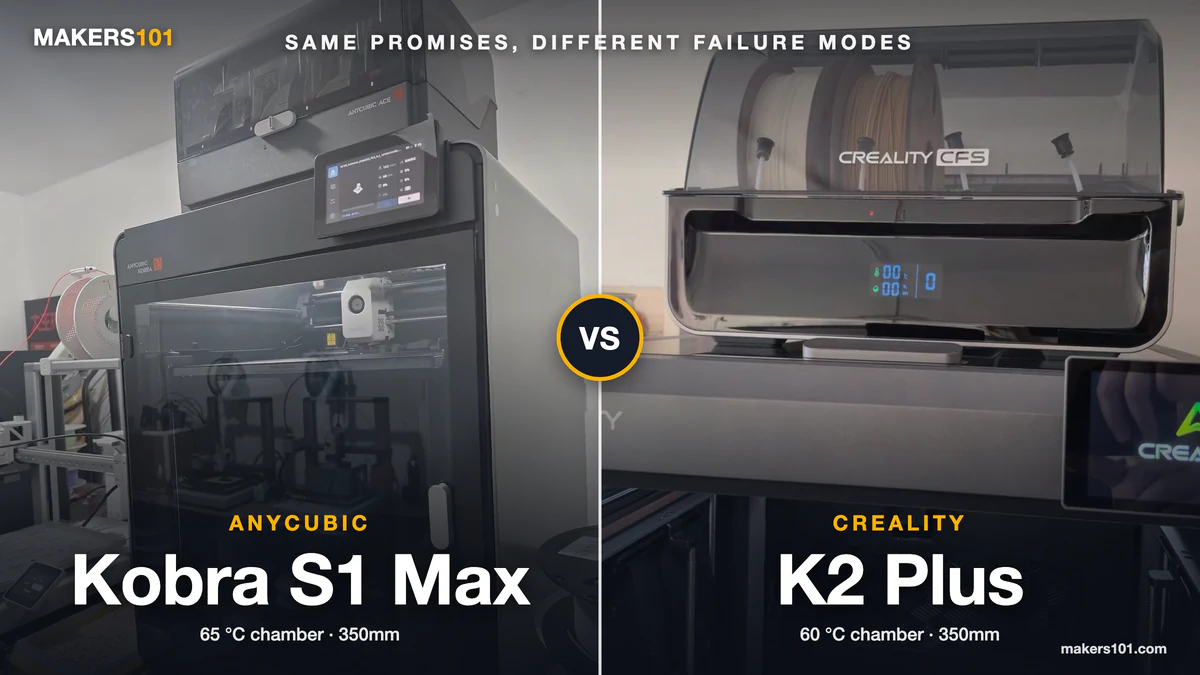
Both are 350 mm enclosed CoreXY machines. Both run a 350 °C hotend, a 120 °C bed, and a hardened steel nozzle. Both top out at 600 mm/s. Both scale to 16 colors.
The search results don’t help either. The top-ranked answer for this comparison is a Reddit reply claiming the K2 Plus is a single-color printer. Another user corrects it further down the thread, and the original commenter admits the mistake.
Google still shows the wrong half. The next several results are spec-aggregator pages, and most of them cover the smaller Kobra S1.
This comparison uses specifications pulled from both manufacturers’ own pages on September 3, 2026, paired with what owners have reported publicly. Every claim says where it came from.
Table of Contents
- Which One Should You Buy?
- Anycubic Kobra S1 Max vs Creality K2 Plus: Why the Spec Sheets Look Identical
- “Supported” Isn’t the Same as “Dialed In”
- The Heated Chamber, and What Owners Report Going Wrong
- Kobra S1 Max Combo vs K2 Plus Combo: What the Price Gap Buys
- Multicolor, Speed, and Software
- Delivery and Support: The Part Spec Sheets Never Cover
- Which One to Buy If…
- Specs at a Glance
- FAQ
- The Bottom Line
Which One Should You Buy?
If you’re cross-shopping the Kobra S1 Max vs the K2 Plus, the decision comes down to what you plan to melt.
| Anycubic Kobra S1 Max | Creality K2 Plus | |
|---|---|---|
| Build volume | 350 × 350 × 350 mm | 350 × 350 × 350 mm |
| Active chamber | 65 °C | 60 °C |
| Max acceleration | 20,000 mm/s² | 30,000 mm/s² |
| Max colors | 16 (four ACE 2 Pro units) | 16 (four CFS units) |
| Combo price | $999.99 on Amazon, $899 direct | $1,199 on Amazon |
Buy the K2 Plus if large ABS and ASA parts are the reason you’re upgrading, with one caveat covered below: the chamber is slow, and at least one owner reports it starting prints before reaching temperature. Buy the Kobra S1 Max if your work is mostly PLA and PETG with the occasional carbon-fiber blend, and you’d rather keep $200 to $300 for filament. Neither one is an appliance you can ignore.


If you’re still deciding whether you need an enclosure at all, our guide to enclosed high-temperature 3D printers covers what the chamber actually buys you.
Anycubic Kobra S1 Max vs Creality K2 Plus: Why the Spec Sheets Look Identical
Search Creality K2 Plus vs Anycubic Kobra S1 Max and you’ll find a dozen spec tables that all end in a shrug. There’s a reason for that. On the numbers that usually separate printers, these two are nearly the same machine.
Both give you a 350 mm cube. Both cap the nozzle at 350 °C and the bed at 120 °C. Both are fully enclosed CoreXY frames with an actively heated chamber, and both claim 600 mm/s.
Both also ship a hardened steel nozzle from the factory. That matters more than most buyers realize, because it’s the part that decides whether abrasive carbon-fiber filament is a normal Tuesday or a $40 mistake.
A few numbers do separate them. Creality lists an acceleration ceiling of 30,000 mm/s² against Anycubic’s 20,000. The Anycubic chamber runs 5 °C hotter. The K2 Plus carries two AI cameras where the S1 Max has one. None of that is nothing.
But none of it decides a purchase. The spec sheet gets you to a coin flip. The differences that would actually change your mind live somewhere the tables don’t go.
“Supported” Isn’t the Same as “Dialed In”
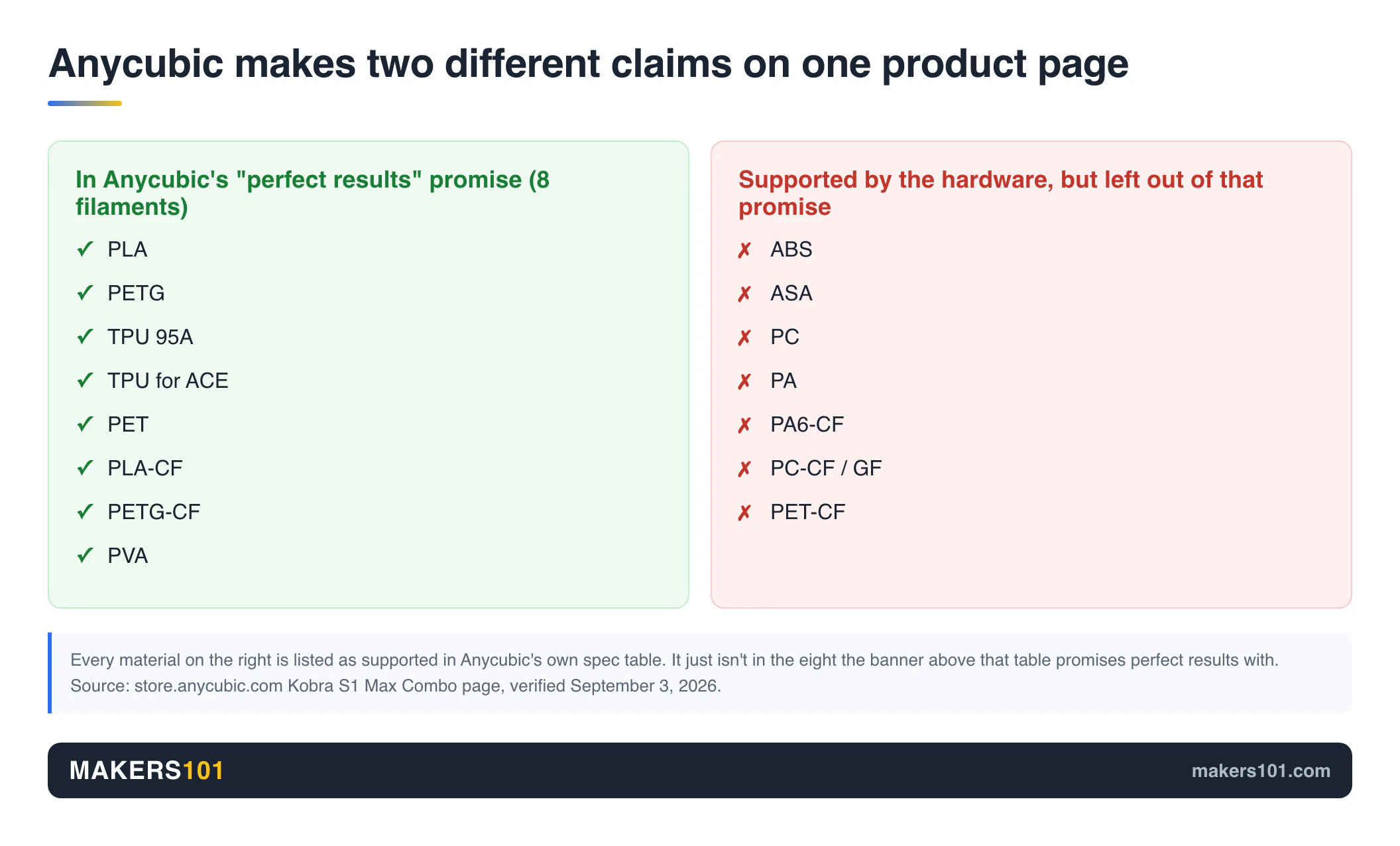
Both printers officially support ABS, ASA, PC, and PA. That surprises people who assumed the Anycubic was the more limited machine.
Anycubic’s specification table lists PLA, PETG, TPU 95A, PET, PLA-CF, PETG-CF, PVA, ABS, ASA, PC, PA, PA6-CF, PC-CF/GF, and PET-CF. Creality’s lists PLA, PETG, TPU, ABS, PC, PA, PETG-CF, PA-CF, PLA-CF, PET, ASA, and PPA-CF, with a footnote that ABS, ASA, and PPS want the chamber at 60 °C.
Compare the two lists and you’re comparing a rounding error.
Now scroll up on that same Anycubic product page. Above the specification table sits a banner: “Get Perfect Results with 8 Consumer-Grade Filaments.” The eight are PLA, PETG, TPU 95A, TPU for ACE, PET, PLA-CF, PETG-CF, and PVA.
ABS and ASA are not among them.
Anycubic is making two different claims on one page. The spec table says the hardware can run these materials. The banner tells you which materials the company is willing to promise good results with straight out of the box. Those are not the same promise, and the second one is the one that predicts your first weekend.
A public field report lands exactly in that gap. An S1 Max owner posting to r/AnycubicKobraS1Max described roughly 200 hours of trouble-free PLA, then two attempts at ABS using Anycubic’s own filament and the slicer’s default profile at 260 °C.
Both attempts clogged during the initial purge, before the first layer. Not mid-print. Before the first layer. Raising the nozzle to 280 °C changed nothing. Clearing it took a needle and a nozzle heated to maximum.
That’s one owner, one spool, one machine. It isn’t proof the S1 Max can’t run ABS. It is a concrete illustration of what “supported but not dialed in” costs you in practice: the profiles, the community threads, and the accumulated fixes have to exist before a material is genuinely usable.
So when you compare these two, don’t count entries in the filament list. Ask whether the specific material you care about has mature profiles and other people’s solved problems behind it. Our breakdown of heat resistant 3D printing filament covers which of those materials you actually need.
The Heated Chamber, and What Owners Report Going Wrong
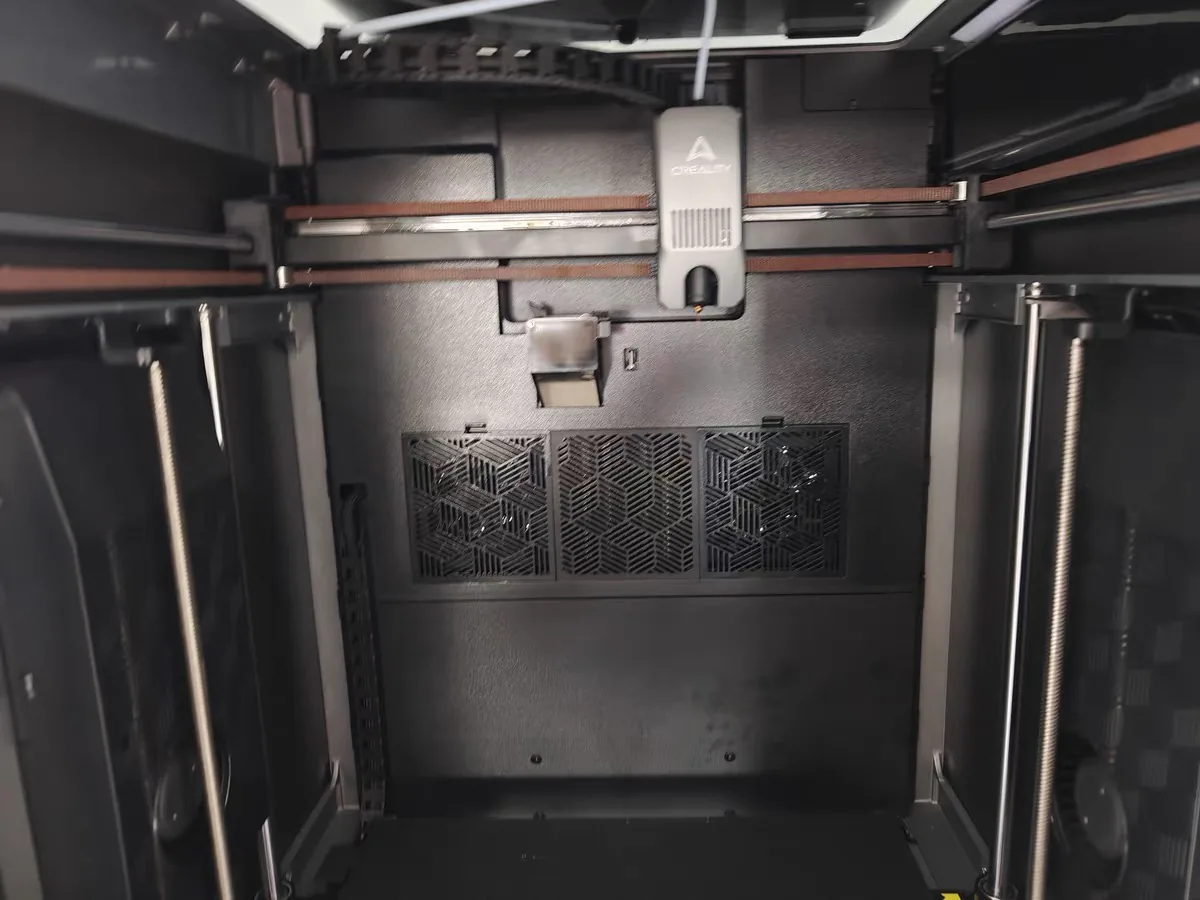
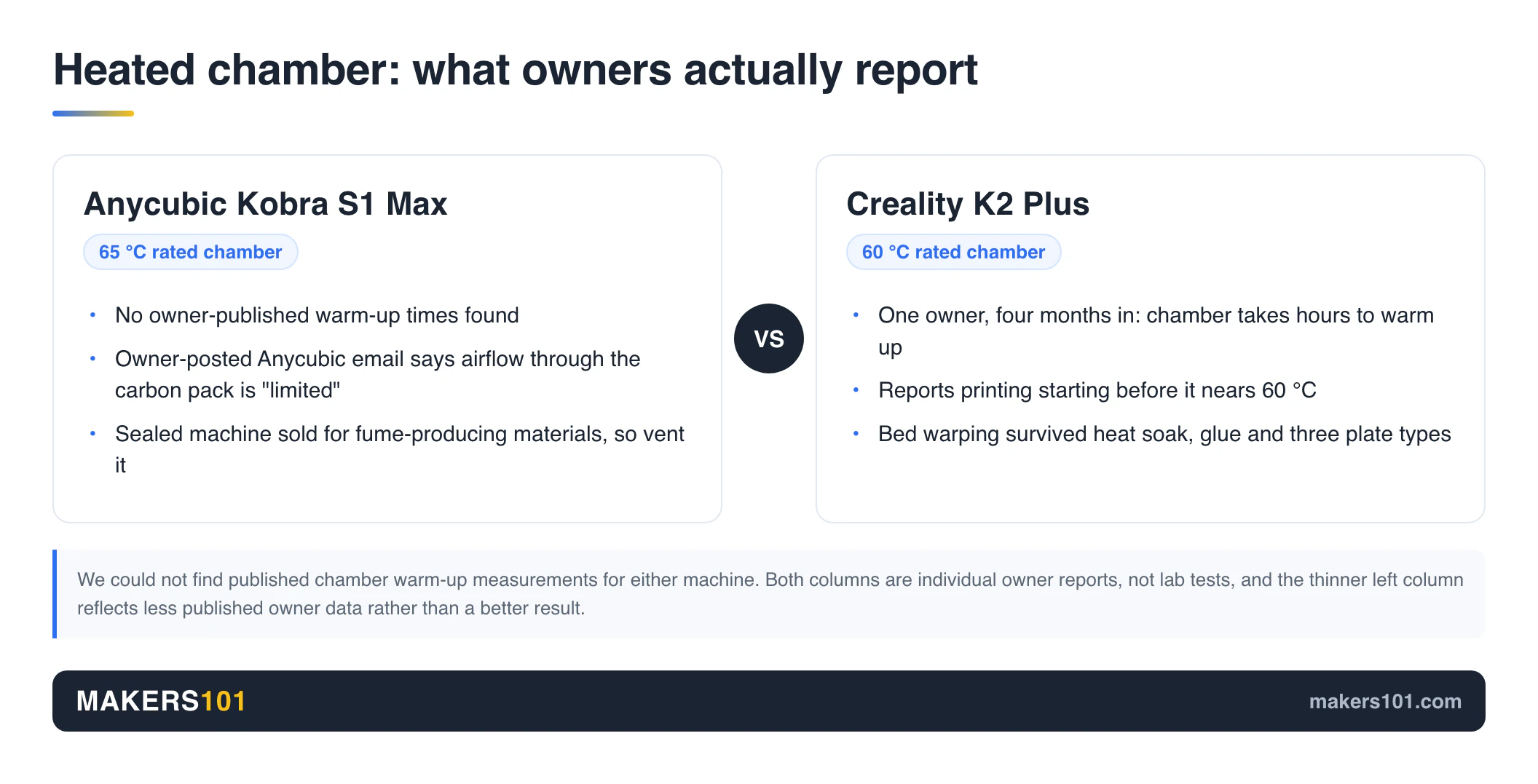
The Kobra S1 Max heats its chamber to 65 °C. The K2 Plus heats to 60 °C. Five degrees is not the story.
Chamber heat matters for ABS and ASA because those polymers shrink as they cool. Cool the bottom of a tall part while the top is still being extruded and the layers pull against each other until a corner lifts or a seam splits. A warm chamber slows that gradient down.
That’s general materials behavior. We could not find published chamber warm-up measurements for either machine, which leaves two questions worth asking: does the chamber reach temperature, and how long does it take?
What Kobra S1 Max owners report
On the chamber questions themselves, S1 Max owners have not published warm-up times, so there is nothing to compare against the Creality account below. What they have documented is the air filter. An owner suspected the carbon pack was getting almost no air, emailed Anycubic, and posted the reply.
The email, as posted by that owner in August 2026, says Anycubic retested and found that “the airflow through the activated carbon pack is limited, significantly reducing the adsorption effect of the activated carbon.” The same reply argues the pack still has some purification capacity because a small amount of air does pass through, and says the team is looking at improvements, with the general direction being to modify the air duct.
One caution on sourcing. This is a customer-posted email, and Anycubic has not said any of it publicly. Taken at face value, it has a manufacturer agreeing that filtration underperforms on a sealed machine sold partly for materials that produce fumes. It doesn’t make the printer unusable. It does mean you should vent it. Our DIY 3D printer enclosure guide covers ducting options that apply here. There’s also a printable carbon-filter mod built specifically for this machine, and we cover it in our Kobra S1 Max upgrade picks.
What Creality K2 Plus owners report
The most detailed public account comes from an owner four months in, whose previous printer was an Ender 3 V3 KE. They bought the K2 Plus for large automotive parts and specifically for the heated chamber.
Their report: the chamber takes hours to warm up, and the printer begins printing before it comes close to the 60 °C that ABS wants.
Separately, bed warping lifted prints off the plate. They tried heat soaking for 40 to 60 minutes, Creality’s own glue stick and liquid glue, rotating the model, several brim settings, and smooth, semi-smooth, and textured plates. None of it held.
First layers on small multicolor parts came out unusable, and a 0.2 mm nozzle reported a clog at the first color change across multiple nozzles and temperatures.
Support opened a ticket, sent a maintenance guide, and then stopped replying for over a month and a half.
Again, that’s one owner. But it maps onto a pattern worth knowing: on the K2 Plus, the reported failures cluster around the bed and the filament path. Our walkthrough on how to fix a jammed filament on Creality K2 series printers covers the ones that have known fixes.
Kobra S1 Max Combo vs K2 Plus Combo: What the Price Gap Buys
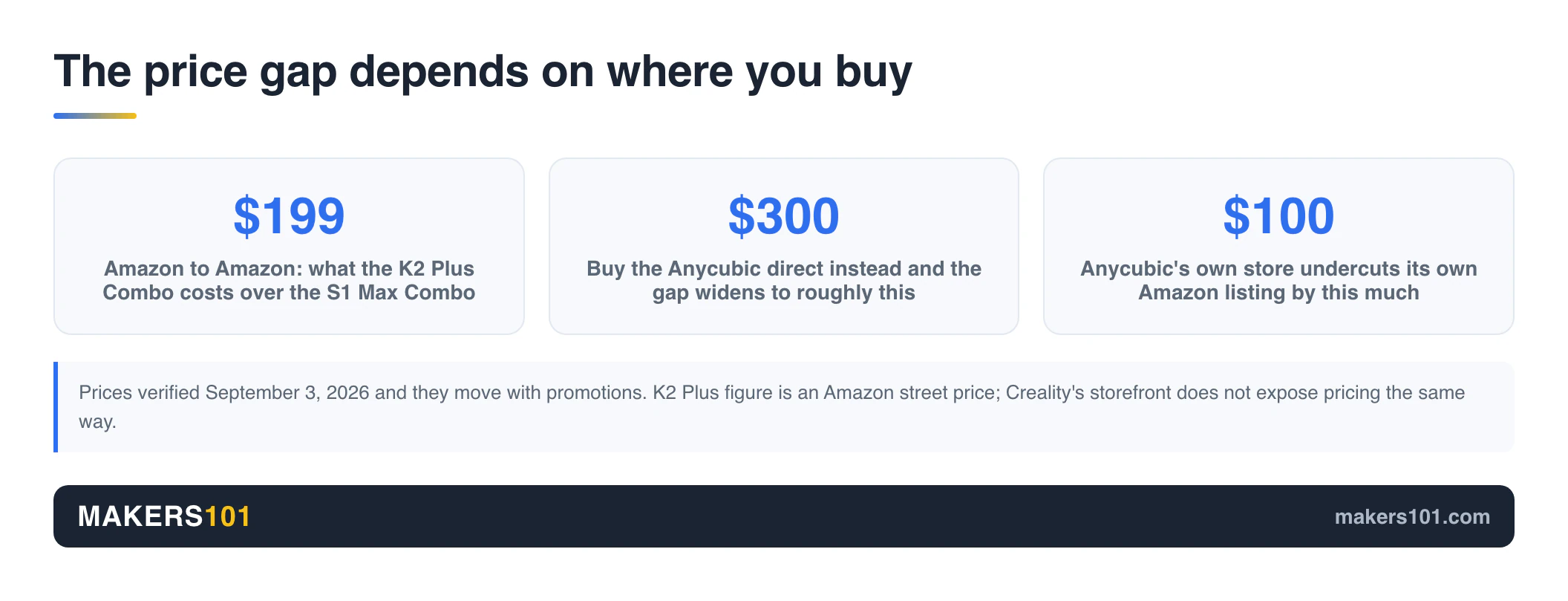
Most people shopping this comparison want the combos, and the gap between them shifts depending on where you buy.
| Configuration | Where | Price |
|---|---|---|
| Kobra S1 Max, printer only | Anycubic direct | $699 |
| Kobra S1 Max Combo, 4 colors | Anycubic direct | $899 |
| Kobra S1 Max Combo, 4 colors | Amazon | $999.99 |
| K2 Plus Combo | Amazon | $1,199 |
Prices verified September 3, 2026, and they move with promotions.
Buy both on Amazon and the Kobra S1 Max Combo saves you about $199. Then it gets stranger. Buy the Anycubic directly from Anycubic and the gap widens to roughly $300, because Anycubic’s own store undercuts its Amazon listing by $100. Creality’s storefront doesn’t expose pricing the same way, so the K2 Plus figure here comes from Amazon. Read it as a street price.
What’s inside the two combos is structurally the same deal. The S1 Max Combo includes one ACE 2 Pro, which handles four spools and chains up to four units for 16 colors. The K2 Plus Combo includes one CFS with the same arrangement. Anycubic sells an eight-color configuration with a second ACE 2 Pro for more.
Before you talk yourself into 16 colors, work out what the filament will cost you. Every color change on a single-nozzle machine throws material away, and our own tool site 3DPKit has a print cost calculator for that.
Multicolor, Speed, and Software
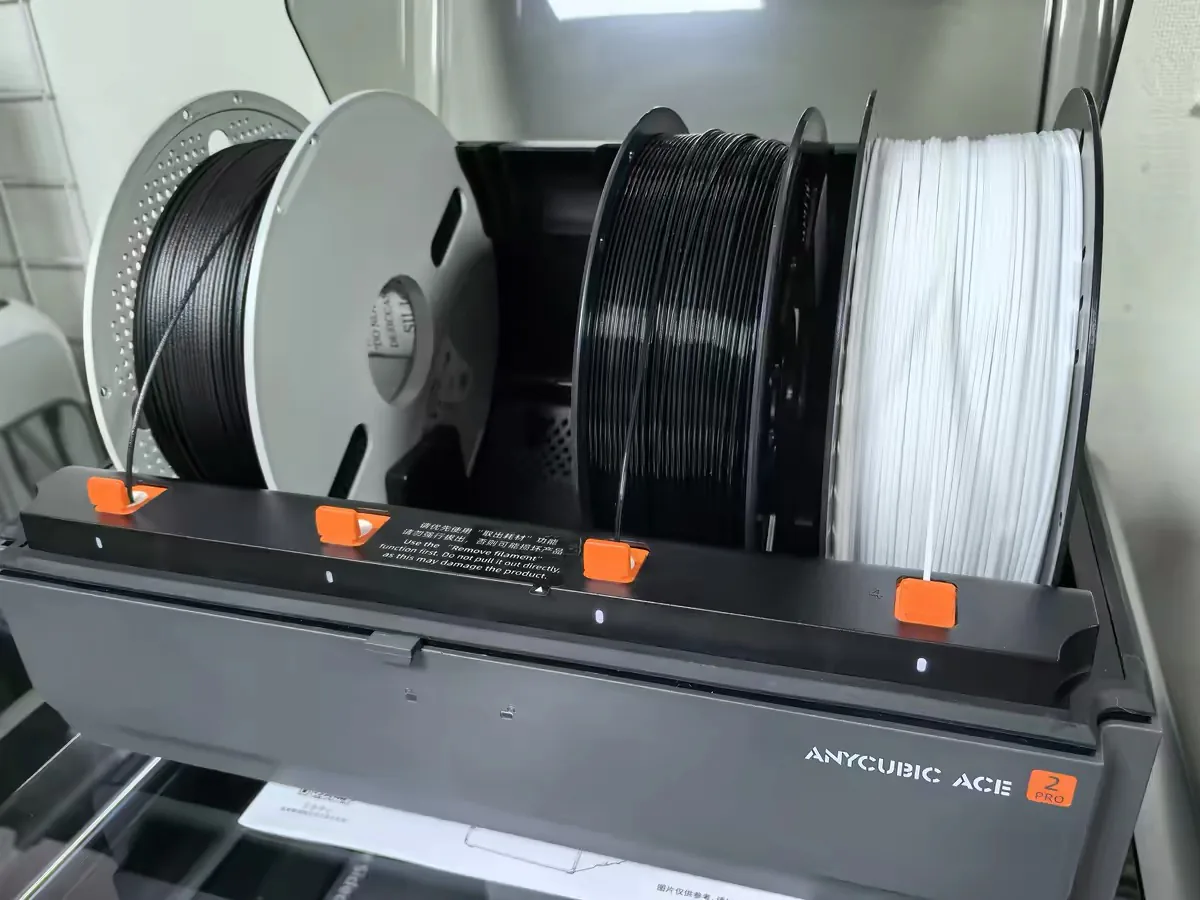
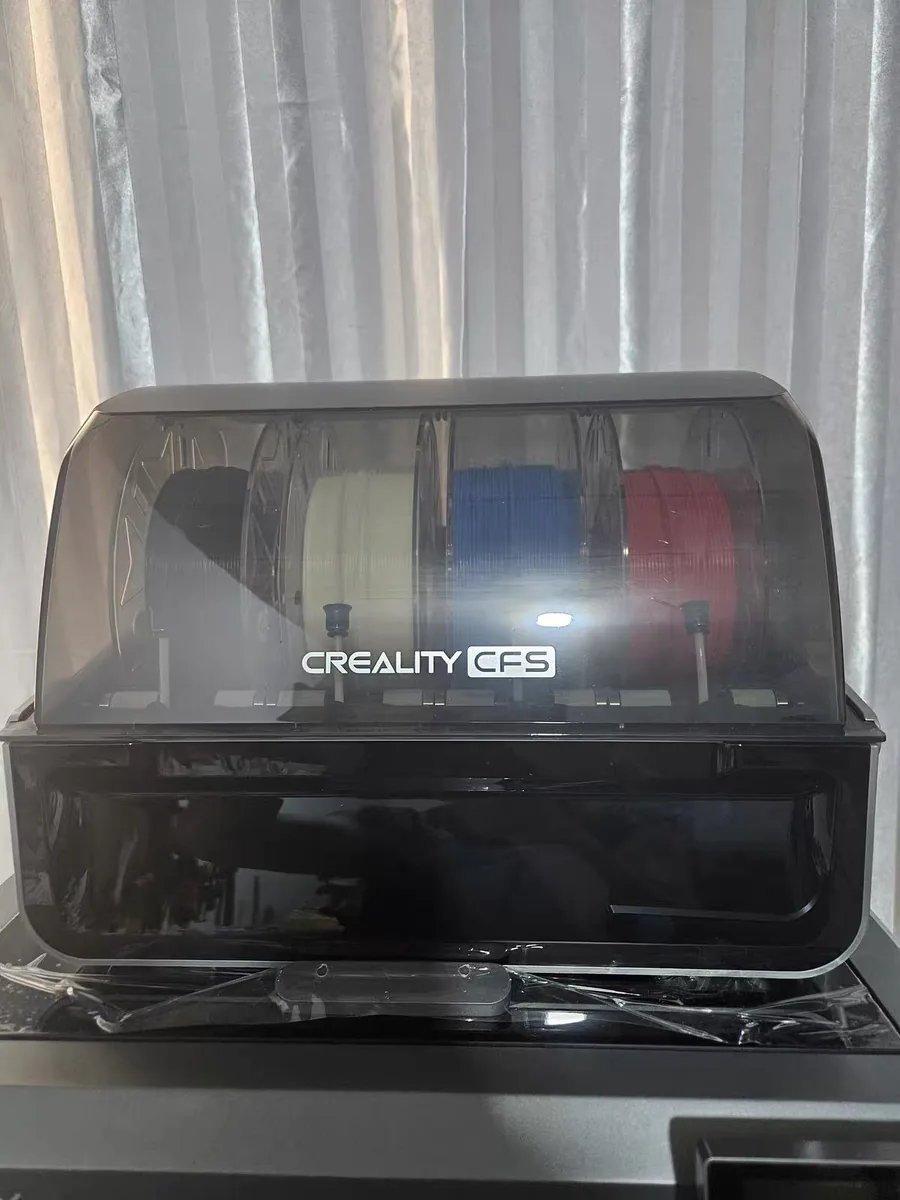
The ACE 2 Pro and the CFS solve the same problem the same way: four spools, one nozzle, chain more boxes for more colors. Anycubic’s unit doubles as a dryer and can run active drying up to 65 °C. Note one compatibility catch on the Anycubic side, listed in its own spec table: TPU 95A works on the printer but is not compatible with the ACE 2 Pro.
Speed is where published numbers deserve a second look. Both machines claim 600 mm/s. But Anycubic publishes a recommended speed of 300 mm/s alongside that ceiling, and a recommended acceleration of 10,000 mm/s² against its 20,000 mm/s² maximum.
Creality publishes only the ceilings. When one manufacturer tells you the number it expects you to use and the other doesn’t, 600 versus 600 flatters the machine that stayed quiet.
Software is the weaker flank on the Anycubic side. Both companies ship slicers derived from the same open-source lineage, and Tom’s Hardware reviewed the smaller Kobra S1 under the title “Good printer, bad slicer.”
One S1 Max owner asked how to drive the machine from OrcaSlicer directly, noting that Anycubic Slicer Next doesn’t even include a Generic PLA profile. A community-built Moonraker bridge reportedly works with the S1 and S1 Max, though its author labels that compatibility untested.
Creality is more open here, and this is one of the clearer wins in the comparison. Creality’s wiki lists the K2 Plus as compatible with OrcaSlicer 2.0 and above, and OrcaSlicer ships a K2 Plus profile. If you already work in Orca and want to keep your presets, that’s a real point for the Creality. Bambu’s P2S is the opposite case, closed but low-fuss. Here’s how the K2 Plus compares with the P2S.
If you go the Creality route, our roundup of Creality CFS accessories covers the add-ons that reduce jams.
Delivery and Support: The Part Spec Sheets Never Cover
Neither manufacturer’s page mentions this, and it’s the risk buyers underweight most.
The S1 Max had a rough launch. Owners on r/AnycubicKobraS1Max documented a day-one preorder still unfulfilled months later with about $1,000 outstanding, a batch-one order whose tracking sat unchanged for 40 days until the customer chased it and was offered a replacement with no compensation, and a US batch-one shipping estimate that slid from late February to late April.
The K2 Plus has been shipping longer. Delivery isn’t the issue there. Support is. The owner above submitted full documentation and got no reply for more than six weeks.
That’s three accounts on the Anycubic side and one on the Creality side, which is a long way from a survey, and the imbalance partly reflects that the S1 Max shipped more recently. Take them as a reason to buy through a channel with a return window you trust, and to assume you’ll be doing your own troubleshooting on either machine.
Which One to Buy If…
You’re printing large ABS or ASA functional parts. The K2 Plus is the better-documented choice, and it’s the one whose maker names those materials against a chamber temperature. But apply the same skepticism this guide applies to Anycubic: that’s a footnote, and the one detailed owner account we found describes exactly this use case going wrong, with the chamber slow to heat and prints starting before it reaches 60 °C. If you take the K2 Plus, plan on heat-soaking it yourself and budget time for bed adhesion on big footprints.
You mostly run PLA, PETG, and occasional carbon fiber. Take the Kobra S1 Max, and buy it directly from Anycubic where it’s $899. You get the same build volume and the same hardened steel nozzle for $200 to $300 less, and your materials sit inside the eight that Anycubic actually promises results with.
This is your first printer. Consider neither. Both are large, enclosed, multicolor machines with documented rough edges and slow support, which is a lot of failure surface for someone still learning what a good first layer looks like. Our guide to choosing a Creality 3D printer covers gentler starting points.
You already own a smaller printer and want a big second machine. Choose by your existing filament stack and slicer habits. If you’re already deep in Creality Print and CFS spools, staying put costs you less friction than the $200 saves you.
You need it soon. Check current stock and ship dates before ordering either, and weigh the S1 Max’s launch history accordingly.
Specs at a Glance
| Specification | Anycubic Kobra S1 Max | Creality K2 Plus |
|---|---|---|
| Amazon ASIN (Combo) | B0GSMWMS8R | B0F5HJMMT9 |
| Build volume | 350 × 350 × 350 mm | 350 × 350 × 350 mm |
| Max nozzle temp | 350 °C | 350 °C |
| Nozzle material | Hardened steel | Hardened steel tip |
| Max bed temp | 120 °C, PEI spring steel | 120 °C |
| Active chamber | 65 °C | 60 °C |
| Max print speed | 600 mm/s (recommended 300) | 600 mm/s |
| Max acceleration | 20,000 mm/s² (recommended 10,000) | 30,000 mm/s² |
| Motion system | CoreXY, enclosed | CoreXY, enclosed |
| Multicolor | ACE 2 Pro, up to 16 | CFS, up to 16 |
| Supported filaments | PLA, PETG, TPU 95A, PET, PLA-CF, PETG-CF, PVA, ABS, ASA, PC, PA, PA6-CF, PC-CF/GF, PET-CF | PLA, PETG, TPU, ABS, PC, PA, PETG-CF, PA-CF, PLA-CF, PET, ASA, PPA-CF |
| Machine dimensions | 502.7 × 483 × 584 mm | 495 × 515 × 640 mm (916 mm as Combo) |
| Weight | 25.7 kg (ACE 2 Pro 3.7 kg) | Not published |
| Noise | ≤48 dB standard, ≤45 dB quiet | Not published |
| Camera | 720p HD | Dual AI cameras, monitoring and calibration |
| Rated power | Not published | 1200 W |
| Price (Combo) | $999.99 Amazon / $899 direct | $1,199 Amazon |
Specifications from store.anycubic.com and creality.com, retrieved September 3, 2026.
FAQ
Is Creality or Anycubic better?
In the Anycubic Kobra S1 Max vs Creality K2 Plus matchup, neither brand wins outright, and the answer depends on the material. Creality names ABS, ASA, and PPS against a 60 °C chamber in its own documentation. Anycubic, in this matchup, ships the same core hardware for less. Both have owner-reported support problems. Neither is a safe default.
Is the Anycubic Kobra S1 Max good?
The hardware specification is strong for the money: a 350 mm enclosed CoreXY frame, a 350 °C hardened steel nozzle, a 65 °C chamber, and a filament dryer built into the multicolor unit. On the published evidence it looks like good hardware wrapped in immature software, which is a reasonable buy if you’re experienced and a frustrating one if you’re not. No major hardware outlet has published a bench-tested review of the S1 Max; the lab reviews in circulation cover the smaller Kobra S1. That leaves owner reports as the public evidence. Our own Kobra S1 Max Combo review works from the published specs.
How good is the Creality K2 Plus?
It’s a capable large-format multicolor machine that has been shipping longer than the S1 Max. Creality’s spec page lists ABS and ASA among supported materials, and a separate footnote names ABS, ASA, and PPS as wanting a 60 °C chamber. Owner reports concentrate on two areas: bed adhesion on large parts, and slow chamber warm-up that can begin a print before the chamber reaches target.
Can the Kobra S1 Max print ABS?
Anycubic’s specification table lists ABS and ASA as supported materials. Its own marketing banner, on the same page, promises “perfect results” only with eight filaments that don’t include ABS or ASA. One owner reported two clogs during the initial purge using Anycubic ABS on the stock profile.
So the answer is yes on paper, with the caveat that profiles and community knowledge for ABS on this machine are still thin. If ABS is your main reason to buy, weigh that carefully.
Which is bigger, the Anycubic S1 Max or the Creality K2 Plus?
They print the same size part: 350 × 350 × 350 mm. The K2 Plus takes more desk height, at 495 × 515 × 640 mm against the S1 Max’s 502.7 × 483 × 584 mm. As a combo with the CFS stacked on top, the K2 Plus rises to 916 mm, so measure your shelf before ordering.
Do both printers really support 16 colors?
Yes, and by the same method. Each starts with one four-spool unit, an ACE 2 Pro on the Anycubic and a CFS on the Creality, and reaches 16 by chaining four units. That means buying three more boxes on either machine, plus the purge waste that comes with single-nozzle color changes.
Can I use OrcaSlicer with either printer?
On the K2 Plus, yes. Creality documents Orca 2.0 and above as a supported slicer, and a K2 Plus profile ships with the software. The S1 Max has no official route. Owners have asked, and the answer so far is a community-built Moonraker bridge that its own author flags as untested on the Max. That gap is worth real money if you’ve spent years building Orca presets.
The Bottom Line
These two machines make the same promise. A 350 mm enclosed CoreXY printer with a hardened steel nozzle, a hot chamber, and 16 colors if you buy enough boxes. The paper gaps are small: acceleration, five degrees of chamber heat, and a second AI camera on the Creality.
Where they diverge is in how they fail. The Kobra S1 Max asks you to accept thinner software, open questions about how well its filter actually works, and a launch history worth checking before you order. The K2 Plus asks you to accept a slow chamber, more work on bed adhesion for large parts, and support that has left owners waiting.
Pick the failure mode you’d rather manage.
CERTAIN CONTENT THAT APPEARS ON THIS SITE COMES FROM AMAZON. THIS CONTENT IS PROVIDED ‘AS IS’ AND IS SUBJECT TO CHANGE OR REMOVAL AT ANY TIME.
Price details
Product prices and availability are accurate as of the date/time indicated and are subject to change. Any price and availability information displayed on Amazon.com at the time of purchase will apply to the purchase of this product.